The sale is active at all participating resellers, which includes our own store, where we have the YouLoop on sale for US$31.96, including free shipping to most countries worldwide (excluding tariffs!).
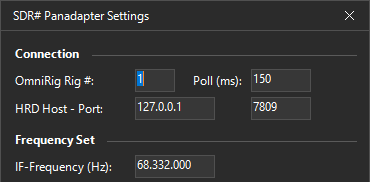
Thank you to Marco Argilli (IU4HMY) for writing in and sharing with us the release of a new SDR# Panadapter plugin that turns the popular RTL-SDR- and Airspy-compatible program SDR# into a panadapter for your transceiver. A panadapter gives you a live spectrum and waterfall view of the band around your radio's tuned frequency, which makes it much easier to spot activity, find clear frequencies, and visually navigate a busy band. Synchronization between the radio and SDR# is handled by OmniRig, so as you tune your transceiver, the panadapter display follows along.
To use the plugin, you connect your SDR to your transceiver's IF or antenna output, then set the receiver IF frequency and a per-mode offset in the plugin settings, with changes saved to a JSON config file. The plugin also has band presets, where a right-click on a preset button stores a snapshot of frequency, demodulation mode, and zoom level, so you can recall a favorite spot instantly. SDR# version 1921 or newer and the .NET 9 framework are required, and it runs on Windows 8, 10, and 11.
There are a couple of limitations worth noting. Marco recommends using Center Frequency mode for the best performance, and because OmniRig exposes the frequency as a 32 bit COM value, frequencies above around 2.1 GHz are not supported. The plugin does not appear to be open-source, but it is free for personal and non-commercial use.
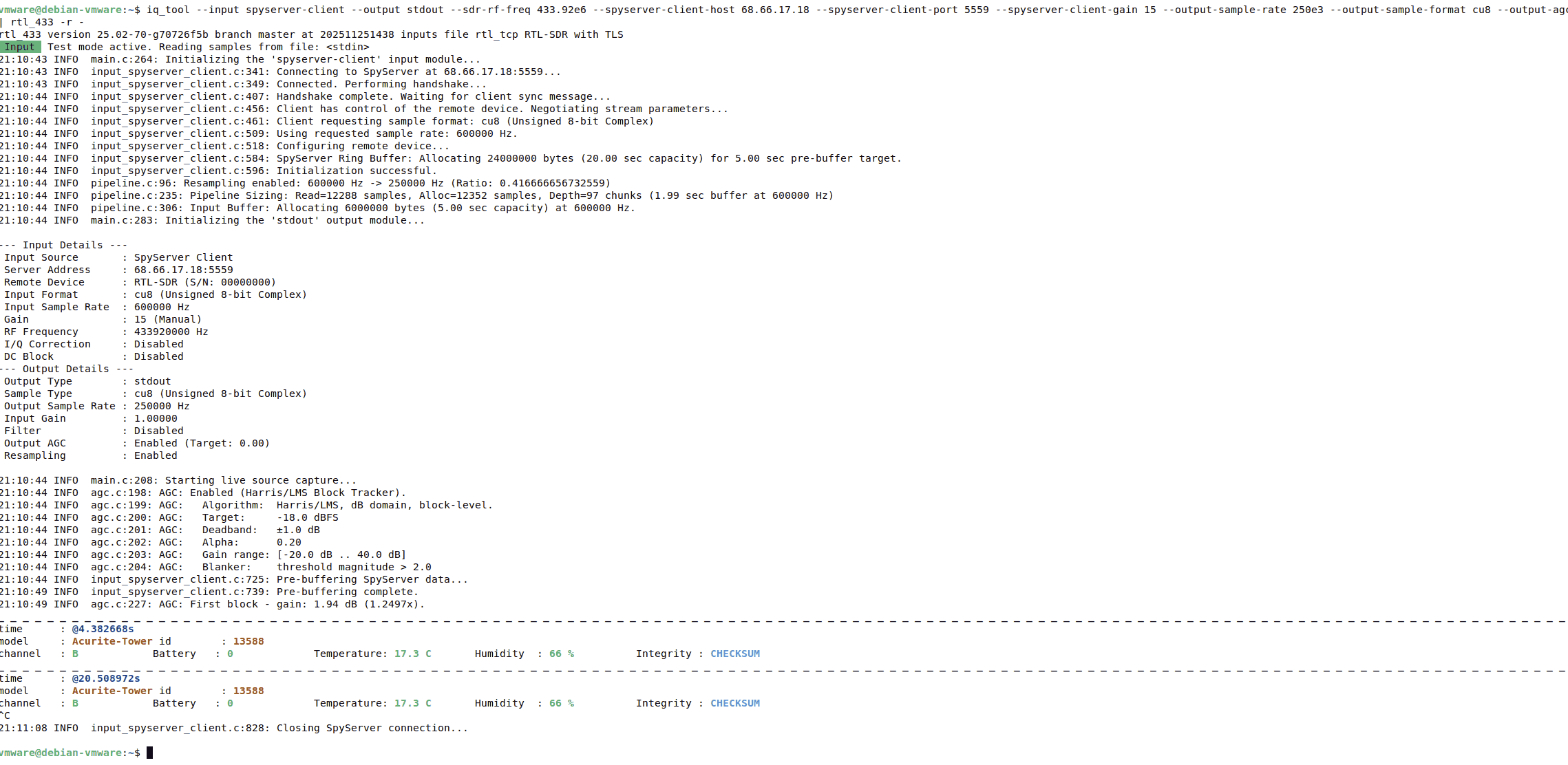
Thank you to Eric Inloes for submitting to the blog his new tool called "iq_tool". This is a tool designed to "provide an easy, fast, and lightweight command-line utility for converting I/Q data from files or SDRs to a specific sample rate and format, and then either piping it to other programs or writing it to a file". Or in other words have a "neutral ffmpeg like converter tool but for IQ data".
Many SDR software tools are written for specific SDR hardware, such as RTL-SDRs, and may only accept a specific sample rate, type, or bit depth, meaning other SDRs cannot use these tools. The goal of iq_tool is to easily allow the IQ data stream from any SDR to be converted into a compatible format.
Eric gives some examples. For example, if you wanted to use rtl_433 with an Airspy you could run the command:
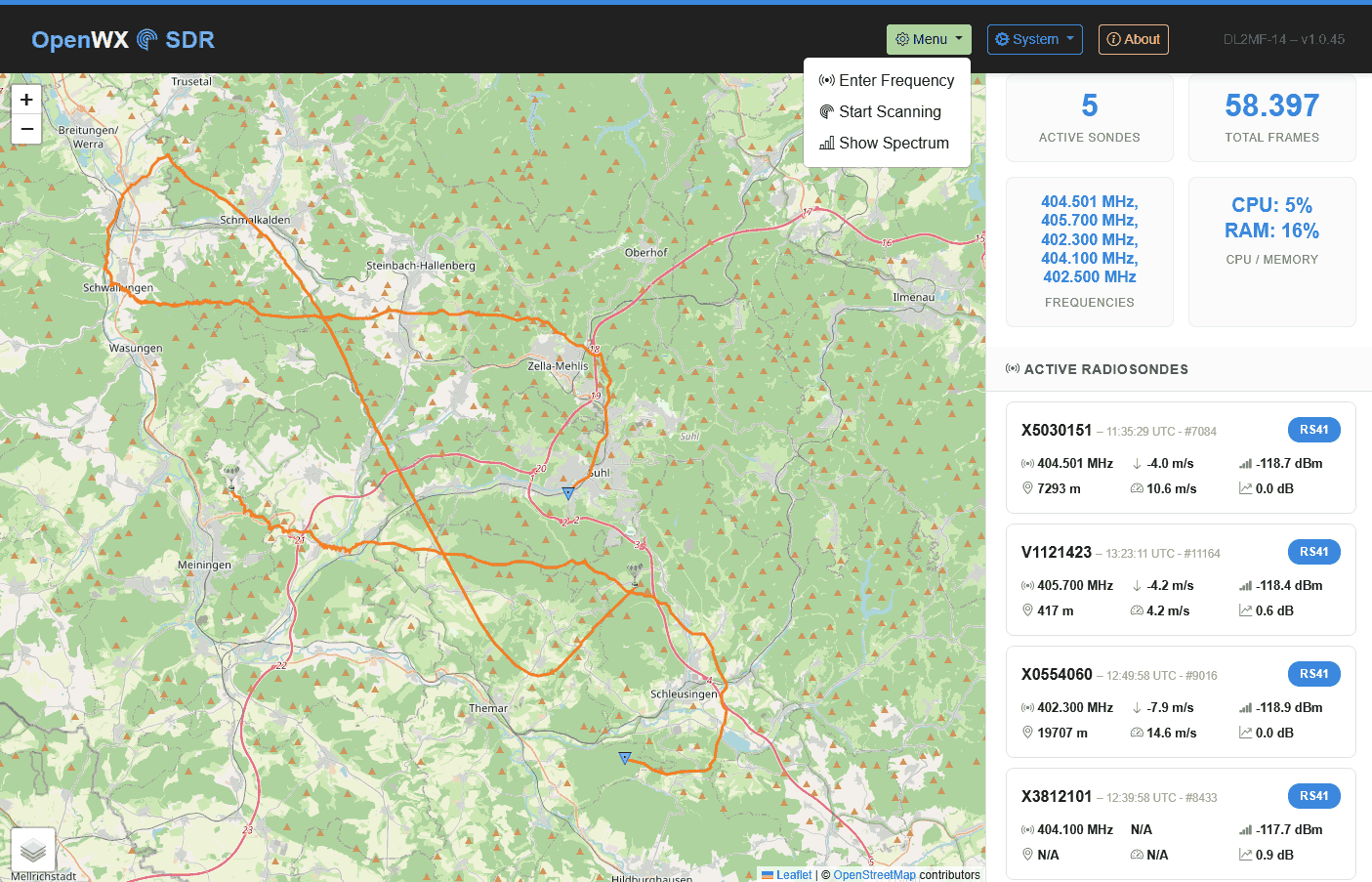
Thank you to Mike (DL2MF) for writing in about the release of OpenWXSDR, a new open-source Python framework that turns one or more RTL-SDR dongles or Airspy SDRs into a fully automated radiosonde ground station running on a Raspberry Pi 4/5 or Linux x86 machine.
If you are unaware, a radiosonde is a lightweight instrument package typically carried by a weather balloon to collect atmospheric data, including temperature, humidity, pressure, and GPS position. It transmits this data back to the ground via radio signals. Using an RTL-SDR or another software-defined radio (SDR) along with appropriate decoding software, hobbyists or researchers can receive, decode, and visualize these signals. Radiosondes are typically launched by local meteorological agencies in many cities worldwide at least twice per day.
OpenWXSDR continuously scans the 400-406 MHz meteorological band, automatically identifies balloon transmissions using DFT correlation analysis, and spawns dedicated rs1729 decoder subprocesses. Supported sonde types include RS41, RS92, DFM06/09/17, M10, M20, iMet-54, LMS6, and MRZ.
The software also supports multi-sonde and multi-SDR. While one dongle scans for new signals, others simultaneously handle active decoding sessions. Decoded telemetry can be submitted in parallel to SondeHub v2 and to OpenWX.de via MQTT (with optional TLS), and as Horus-compatible UDP JSON datagrams for local tools like SondeMonitor. A built-in Flask and Leaflet web interface shows live positions, flight tracks up to 20,000 points, PTU sensor readings, and signal metrics, with most settings editable from the WebUI during operation.
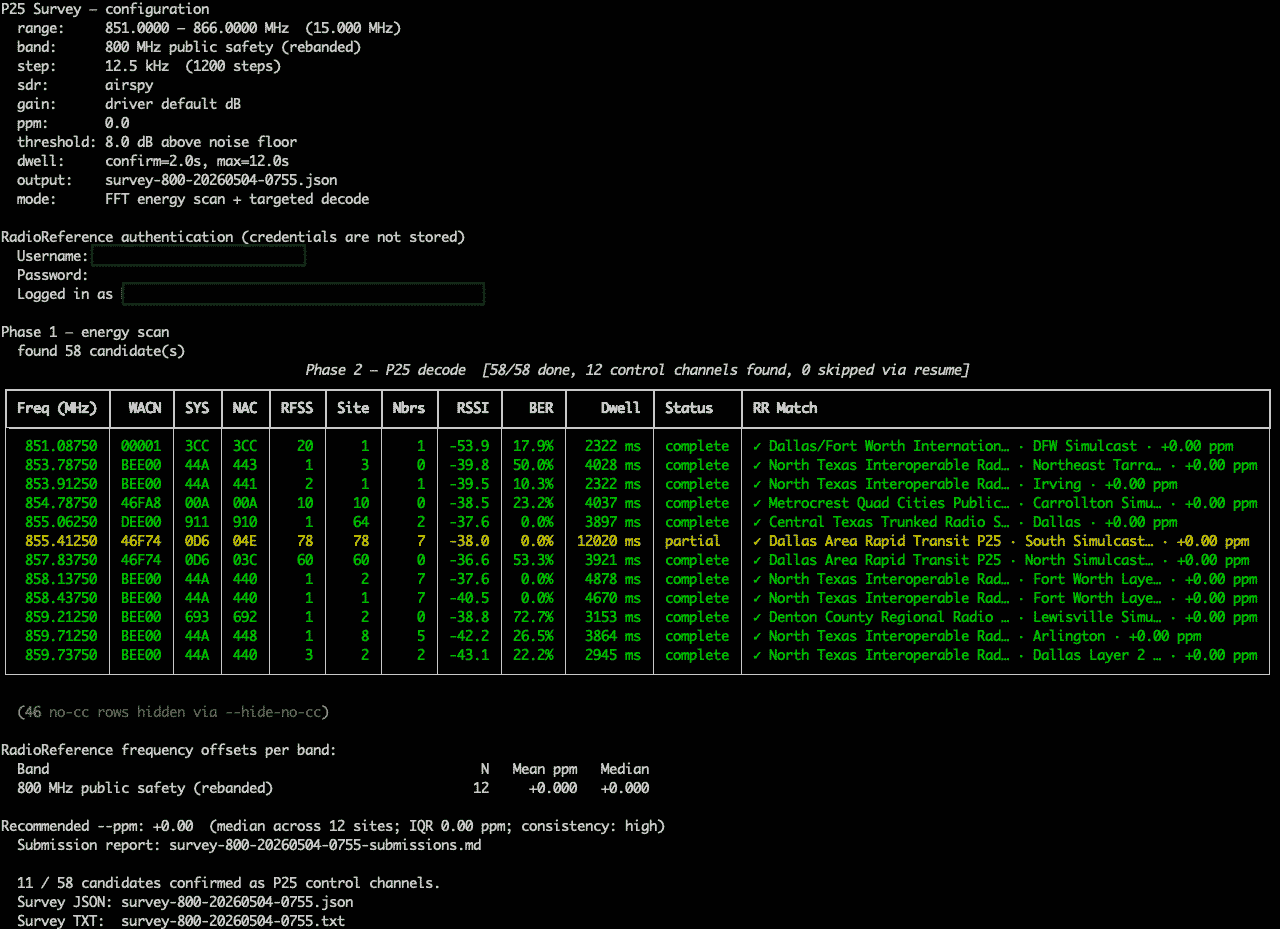
Over on GitHub, programmer blantonl has released p25-survey, a Python tool that scans a frequency range with an RTL-SDR, Airspy or HackRF and identifies any P25 control channels present. For each one found, it logs the WACN, System ID, NAC, RFSS ID and Site ID, the full IDEN_UP band plan, neighbor sites with resolved frequencies, and signal quality metrics including RSSI, BER and decode rate.
The tool also has an optional RadioReference cross-reference mode that annotates results with the RR system name and site description, flags frequency offsets versus the database, and generates a Markdown submission report for data not yet in RadioReference. An auto-gain feature sweeps gain values on each confirmed control channel and recommends the optimal setting for your SDR and location based on BER.
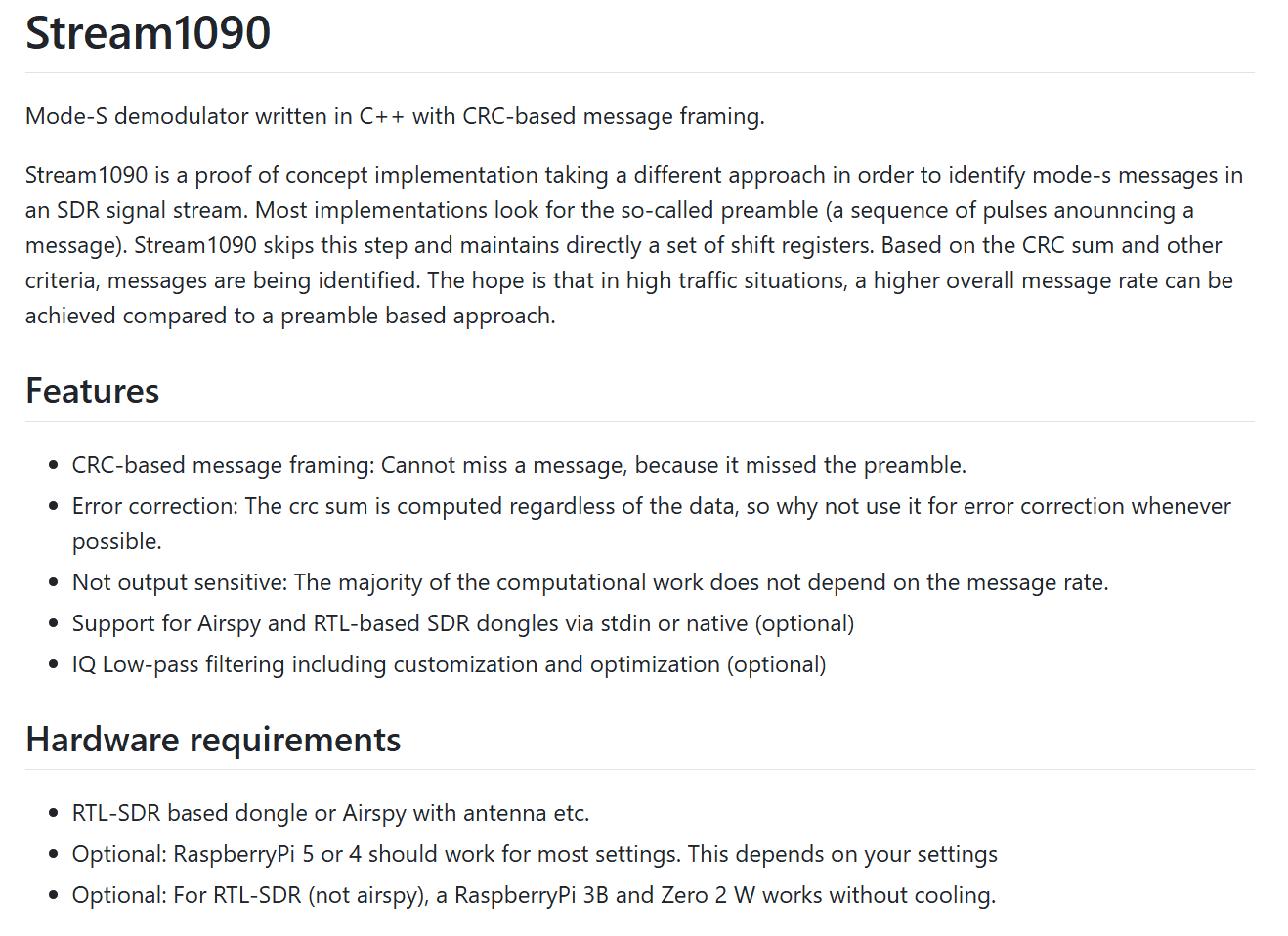
Over on GitHub, Martin (mgrone) recently released stream1090, a new open source C++ Mode-S demodulator that takes a fundamentally different approach to finding aircraft messages. Rather than searching for the traditional preamble pulse sequence as dump1090 and readsb do, stream1090 continuously maintains shift registers and identifies valid messages based on their CRC checksum. In busy airspace where preambles can be corrupted by overlapping signals, this approach theoretically cannot miss a message as long as the data itself is intact. Since the CRC is always being computed, it can also be used for single-bit error correction.
The software supports both RTL-SDR and Airspy dongles. It's lightweight enough to run on a Raspberry Pi Zero 2W. Stream1090 is a demodulator only, designed to pipe output into readsb or dump1090-fa via socat, slotting into your existing ADS-B stack as a drop-in replacement for the demodulation stage.
If you have an ADS-B station in a high-traffic area, let us know if Stream1090 increases your message rate! There is also a discussion about it on FlightAware, where many people have indicated that they are getting great results.
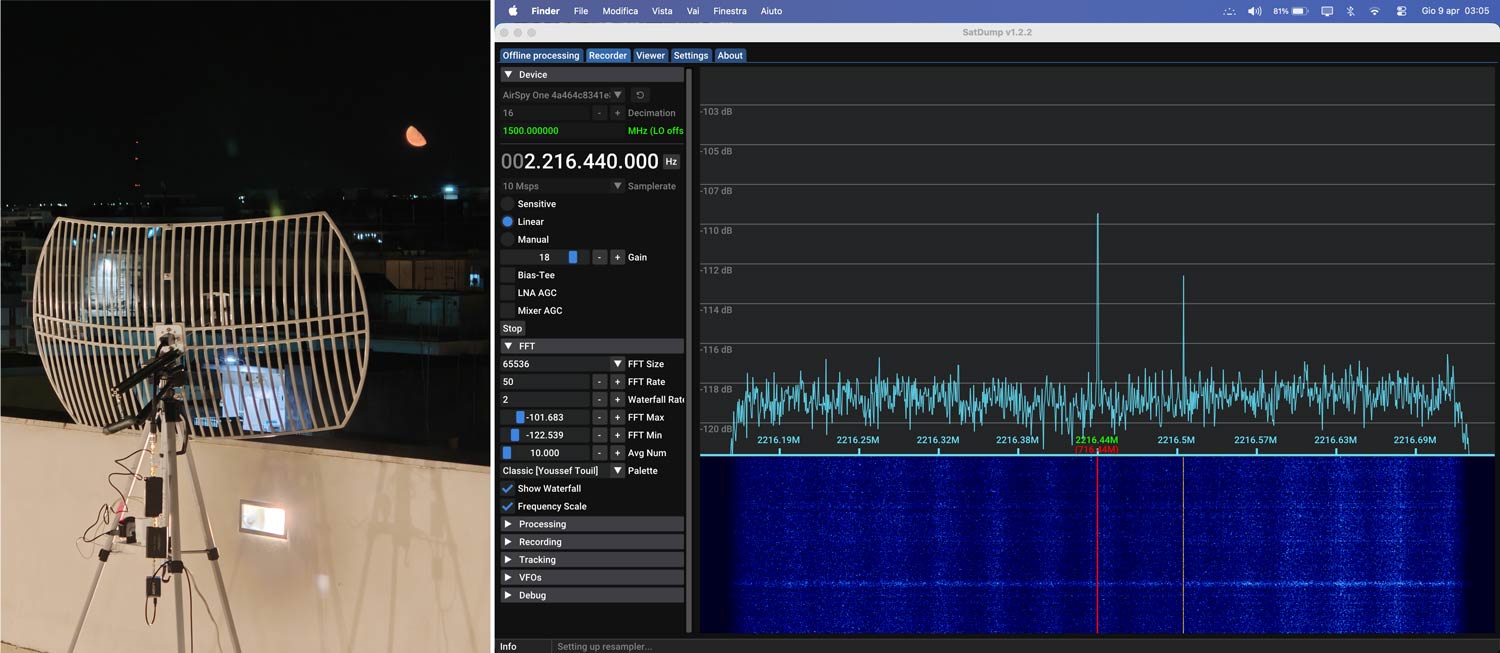
Thank you to Simone Spadino for writing in and sharing how he received the S-band carrier signal from the Artemis 2 Orion capsule from his home in Italy, using a simple one-meter Wi-Fi grid dish, an Airspy R2, an LNA, a filter, and a downconverter. Simone notes that his results show it is possible to receive the Artemis carrier signal with a small dish.
Artemis 2 may have already returned to Earth safely, but there are future missions planned for 2027 and beyond, so Simone's write-up serves as a great place to get yourself ready to receive those future missions.
Simone's write-up notes that perfect tracking with a rotator wasn't required because the Wi-Fi dish had a beamwidth of about 11°, so he was able to manually orient the dish every 10 minutes using an Android smartphone. On the first night, he achieved a carrier SNR of 5.5dB, and on the second night, 6.5 dB.
Artemis S-Band Carrier Received with Wi-Fi Grid Dish
Recently, M. Khanfar released a new free program, "Analog Radio Hunter," described as a "professional RF analysis and monitoring application built around GNU Radio and Fosphor." The software currently supports RTL-SDR, Airspy, and HackRF. Khanfar writes:
Analog Radio Hunter is a professional RF analysis and monitoring application built around GNU Radio and Fosphor.
It is designed to scan large RF spans, quickly lock onto active signals, and monitor analog transmissions with NFM, AM, or WFM audio demodulation.
Real-time FFT + waterfall spectrum display
Fast scan with dwell, pause-on-squelch, and skip-ignored channels
Detection list with hits, timestamps, and smart deactivation
Favorites profiles with monitor and favorites-only scan modes
Built-in recorder with auto-record and event log
Dedicated WFM broadcast receiver with presets
Multi-SDR device support (RTL-SDR, Airspy, HackRF) with auto-detect and device switching
NFM and AM audio demodulation (in addition to WFM)
Peak-follow in span (auto-tune to strongest signal inside the current MS/s window)
Frequency list filtering to skip/mute ignored channels
Scan and detection profiles (save/load named presets)
Favorites cooldown auto-reactivation for busy channels
Favorite TX tones (Tone 1-9), edge selection, and tone test buttons
Learning Mode hover guidance for faster onboarding
Status bar live metrics for Last, Active, Favorite, Peak SNR, and Level
Unique scanning and detection approach: Traditional sweep scanners only see the center frequency they step to. Analog Radio Hunter monitors an entire chunk of spectrum at once and reacts to peaks inside it. That is a major differentiator.
High-Impact Capabilities
Wide-span reactive scan engine that hunts activity across a full chunk, not one center point at a time.
One-click IQ capture and histogram visualization with follow and idle flow controls.
Carrier-resilient channel management using Smart Deactivate + favorites cooldown logic.
Field-ready setup speed using Auto Cal squelch and persistent live status metrics.
Operator-selectable audio routing to speakers, VB-Cable, or USB audio output devices.
Operational clarity from GUI color heatmaps, scan debug reasons, and learning-mode tips.
Signal Stability Filter: Logic and Tuning
Purpose: reject short squelch flicker and noisy open/close chatter before actions trigger.
Min Open (ms): raw squelch must stay open this long before stable-open is accepted.
Grace (ms): stable-open is held briefly after raw close to avoid tiny dropouts.
Apply targets: Detection, Rec+Alerts, Scan Hold, and optional Audio Out gating.
Start values: Min Open 150-250 ms, Grace 40-80 ms, then tune by channel behavior.
Like his other software, which we previously covered, it is free but not open source. Anti-virus programs may flag the software as suspicious due to heuristics. We believe this to be a false positive, but as with all software that isn't open source, we recommend being highly suspicious and only run it in a sandboxed environment like a VM to be sure.