Demod Analyzer: Analyze Digital Modulation (BPSK, QPSK, 16-QAM) in IQ Files
Thank you to Attila Zsellér, who has submitted his latest Python program called "Demod Analyzer". This program is designed for analyzing BPSK/QPSK/QAM16 signals in recorded IQ samples. Atilla writes:
I'm developing OpenStint, an SDR-based lap timing solution for rc racing and motorsport, which [RTL-SDR.COM] presented during the summer. Active transponders emit short bursts of data containing a unique id. By the time of reception, it's often full of various impairments. People are sometimes sending me IQ recordings for debugging purposes, and I was in need of a tool that can do a basic initial analysis on them, just to see if there is a chance of decoding anything.
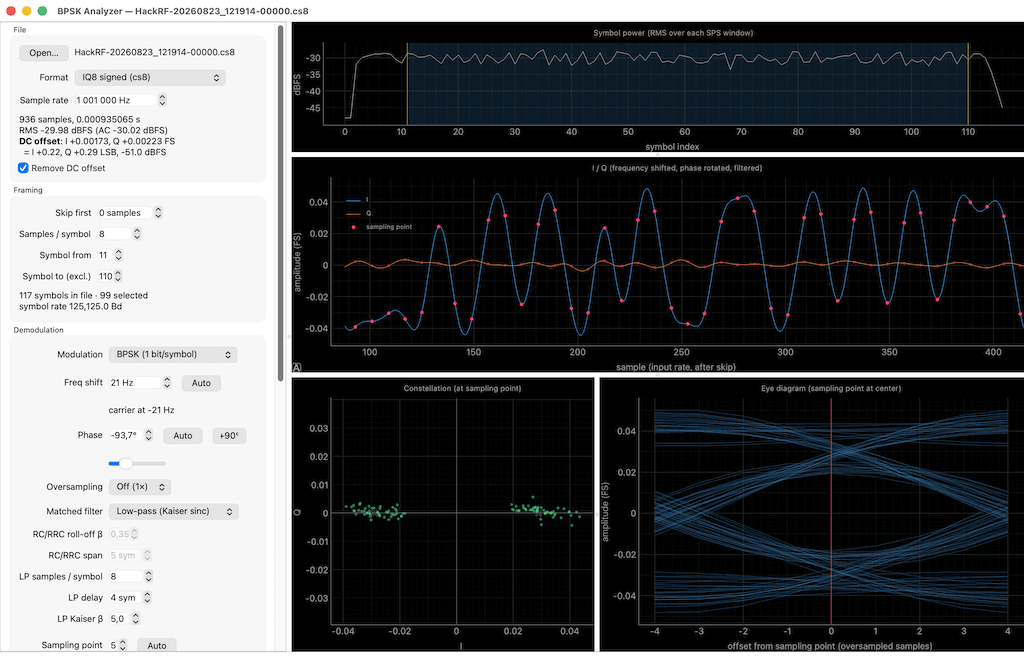
It's a set of tools, doing a typical RX chain, with instant visual feedback:
- Segment the bursts of transmissions based on RSSI
- Apply phase/frequency offset (with an "auto" button that just works)
- Optional upsample + (matched) filtering
- Symbol synchronization
- Optional blind-EQ
It supports BPSK/QPSK/QAM-16. By the end of the process, you see the demodulated bits and MER & EVM figures.
There are sample recordings of actual transponders in the repository. It's Python, and the CI builds a Windows-variant. Images are in the github repository.
AI Disclaimer: The submitted notes that this program was created via vibe coding.