Comment to Admin: Re-posting for better viewing; Please DELETE 1st entry !!!
THANK YOU !!!!
What a JOY the extra “Plug-Ins” make to SDR# !!!
—————————————————————–
REQUEST: Often, whilst Decoding P25 or DMR I use The Right-Channel for DSD+ Input; Left-Channel for the Decoded Audio. Setup is using “Stereo-Mix” as the default Audio device. This way I can Record (Using Adobe Audition OR WavePad) in Stereo; and the received Audio is on the Right, while the DECODED Audio is on the Left…. This Shows DSD+ IS Decoding; However even though you can set up a DSD+ “Bat-File” to do this; is has to be done off a GOOD Recording of the received Audio; then played back; using only the Left Channel and the DSD+. Batch-File below:
IE: ” dsd.exe -u10 -dr2 -dd20 -ds65 -v3 -i1L -o2R -OS DSD-ALL-Listen.wav -I300 ”
I Play the Right Channel; and Hear/Record the Decode on the Left – I300 sets the Recording for 5-Hours. The above file is for Listening & Recording a Playback of a VOX-Audio-Recording of DSD# from the day…. Surprisingly, a recording at 11025 Kbs / 48Kbps 16-Bit; WILL capture and DECODE P25-Clear (NOT Dual-Encrypted), DMR; where the Output is often in STEREO, as well as Turbo, PSK and D-STAR and more.
It would be nice to have a “Audio output Balance-Control”; so as to be able to do this “On The Fly” !!! As well as save Time and duplication of files… Please consider this option for either one of your current Plug-Ins; like the “DSD Interface” or simply a “Device and Balance/Level Control” to be used with the “Virtual-Cable”.
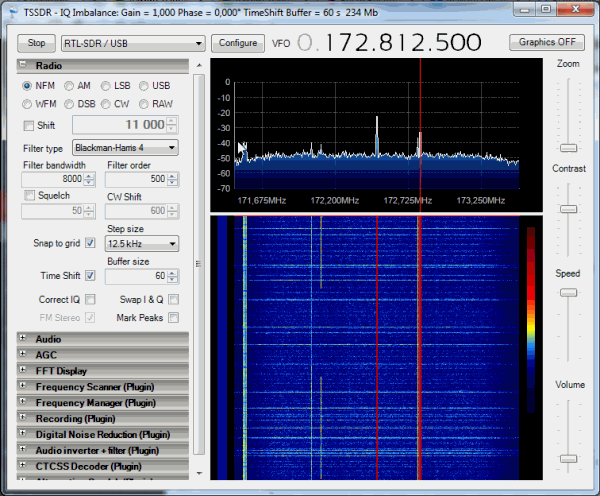






























Comment to Admin: Re-posting for better viewing; Please DELETE 1st entry !!!
THANK YOU !!!!
What a JOY the extra “Plug-Ins” make to SDR# !!!
—————————————————————–
REQUEST: Often, whilst Decoding P25 or DMR I use The Right-Channel for DSD+ Input; Left-Channel for the Decoded Audio. Setup is using “Stereo-Mix” as the default Audio device. This way I can Record (Using Adobe Audition OR WavePad) in Stereo; and the received Audio is on the Right, while the DECODED Audio is on the Left…. This Shows DSD+ IS Decoding; However even though you can set up a DSD+ “Bat-File” to do this; is has to be done off a GOOD Recording of the received Audio; then played back; using only the Left Channel and the DSD+. Batch-File below:
IE: ” dsd.exe -u10 -dr2 -dd20 -ds65 -v3 -i1L -o2R -OS DSD-ALL-Listen.wav -I300 ”
I Play the Right Channel; and Hear/Record the Decode on the Left – I300 sets the Recording for 5-Hours. The above file is for Listening & Recording a Playback of a VOX-Audio-Recording of DSD# from the day…. Surprisingly, a recording at 11025 Kbs / 48Kbps 16-Bit; WILL capture and DECODE P25-Clear (NOT Dual-Encrypted), DMR; where the Output is often in STEREO, as well as Turbo, PSK and D-STAR and more.
It would be nice to have a “Audio output Balance-Control”; so as to be able to do this “On The Fly” !!! As well as save Time and duplication of files… Please consider this option for either one of your current Plug-Ins; like the “DSD Interface” or simply a “Device and Balance/Level Control” to be used with the “Virtual-Cable”.
Many Thanks in advance; Respectfully,
DrDave-USA