Exploring the Art and Science of Spectral Painting with SDR
Thank you to Paul Maine, who wrote in and wanted to share some experiments he and Gary Schafer have been doing with spectral painting. Spectral painting is the art of drawing pictures directly on the spectrum waterfall, which a software-defined radio makes visible. Paul has written the post below:
What happens when radio technology meets digital artwork? The result is something fascinating called Spectral Painting—the ability to create images that appear inside the radio frequency spectrum.
Gary Schafer (@signalgalaxiesunlimited) and Paul “The SDR Guy” Maine (@paulmaine6433) have teamed up to explore this unique combination of software-defined radio, signal processing, and creativity. Together, they have created companion videos on Spectral Painting and released them at the same time, each approaching the topic from a different perspective. For the best experience, it is recommended to watch Gary’s video first, followed by Paul’s practical demonstration.
Gary begins the journey by diving into the theory behind Spectral Painting. Using GNU Radio flowgraphs and GNU Octave scripts, he explains how images can be transformed into signals and displayed within the frequency spectrum.
Paul then takes Gary’s GNU Radio flowgraph and GNU Octave scripts from theory into practice. Using multiple SDR platforms, he demonstrates how to transmit spectral images using both the HackRF and TRX-DUO SDRs. He then completes the process by receiving and displaying the images using several different SDR receivers, including the RTL-SDR V3, RTL-SDR V4, and Airspy HF+.
Together, these videos provide a complete journey—from understanding the science behind Spectral Painting to seeing it come alive on real SDR hardware.
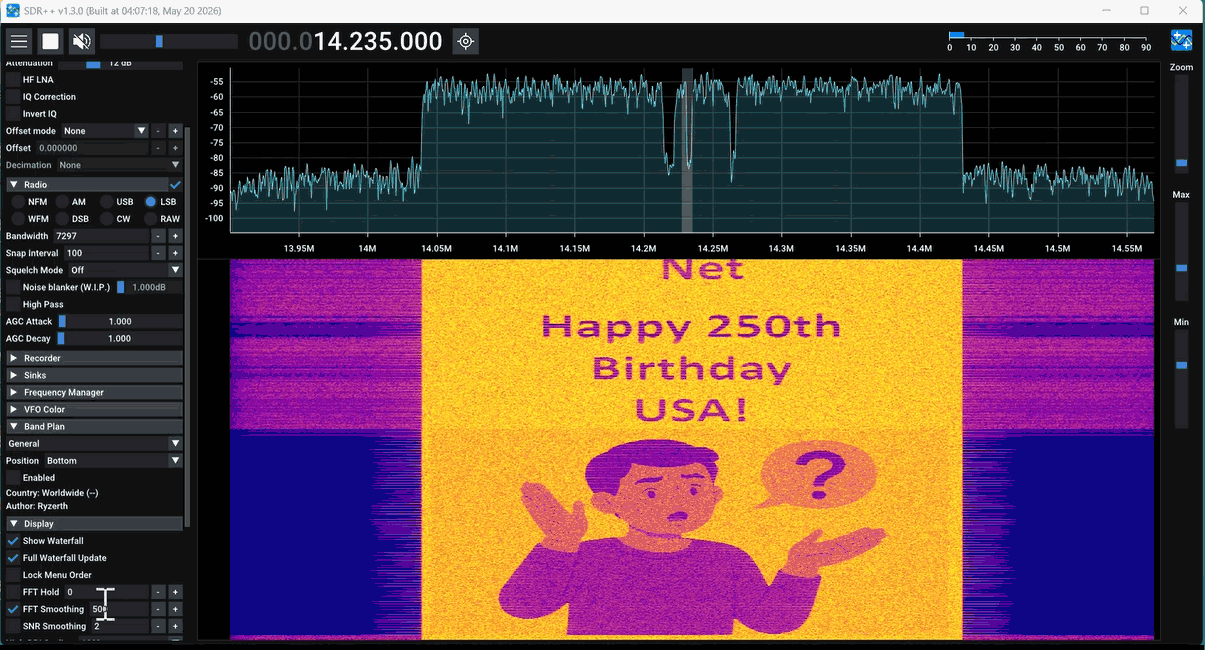
Below is an example screen capture of Spectral Painting in action.
Start with Gary’s video to learn the concepts and signal processing techniques:

Then watch Paul’s video to see Spectral Painting transmitted and received using real SDR equipment: