Tagged: WSJT-X

HamRadioWeb FT8 WSJTx JTDX Remote Control Android App

Thank you to Patricio (LU5AKF) for sharing with us the release of HamRadioWeb.com's new FT8 WSJTx JTDX remote control Android app. Previously, we posted about HamRadioWeb's browser-based remote FT8 and FT4 receiver, and this Android app seems like a natural continuation of their software.

Patricio writes:

The app allows amateur radio operators to remotely control their JTDX or WSJT-X station from any Android phone or PC — no VPN, no port forwarding required.

What operators can do with it:

  • Monitor real-time FT8/FT4 decodes and band activity, just like sitting in front of JTDX or WSJT-X
  • Respond to CQ calls and transmit CQ remotely
  • Check where your signal is being heard via PSKReporter
  • Explore a worldwide activity map and a public DX spot page
  • Keep a contact log — auto-detected or manually added/imported
  • Follow community rankings and chat with other operators

The station connection is handled by a free Windows companion app (HamRadioWeb Companion) that links JTDX or WSJT-X to the user's account.

No radio at hand? The app opens in demo mode with simulated data so anyone can explore before creating an account.
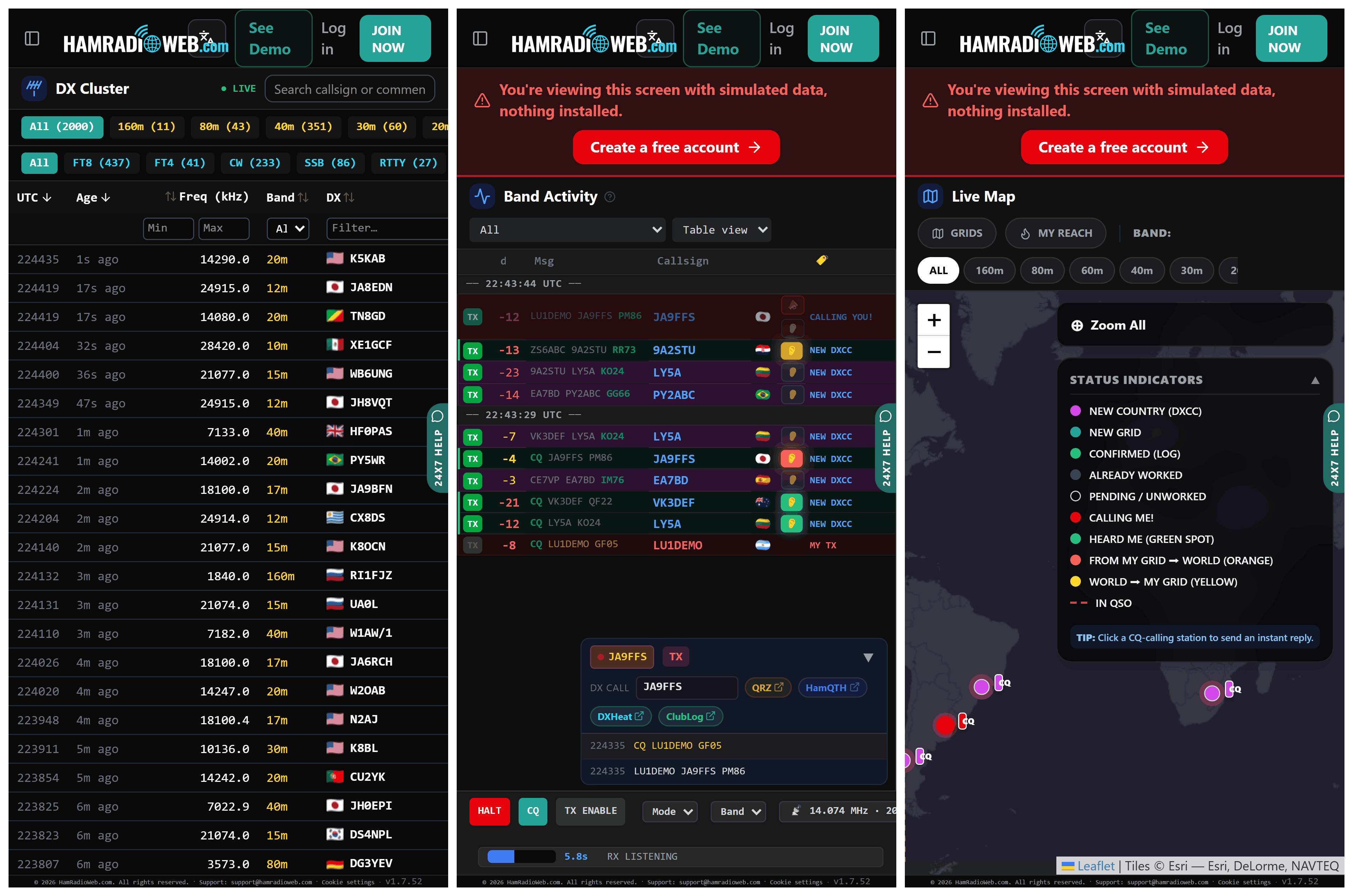
Screenshots from the HamRadioWeb.com FT8 Remote Control App.

HamRadioWeb: A Browser-Based Remote FT8/FT4 Receiver with Live Heatmaps, Performance Metrics and DX Cluster

Thank you to Patricio for writing in and sharing with us his release of HamRadioWeb, a browser-based remote receiver with a focus on FT8 and FT4 reception. If you're not aware, FT8 and FT4 are amateur radio digital fixed-format modes that can be decoded even with very weak signals. 

The software works by running a small server bridge app alongside JTDX/WSJT-X on the shack PC. Users can then log in from anywhere in the world on any device via the browser-based system. Once logged in, you can transmit and monitor, just as if you were sitting in a ham shack.

HamRadioWeb is designed to streamline remote FT8/FT4 operating directly from any mobile browser or PC without requiring complex setups like VPNs or port forwarding. In addition to remote TX/RX control, it features:

  • Live FT8 geospatial heatmaps and signal footprint visualization.
  • Grid-level SNR benchmarking against nearby stations.
  • Azimuthal radar & path telemetry relative to the shack.
  • Automated DXCC and award hunting synchronized with logbook data.

It’s built to make remote digital mode operating visual, data-driven, and easily accessible on the go.

HamRadioWeb is free for unlimited decodes, but limited to 10 TX's per day. Premium is a paid service costing $4.99 per month, which provides unlimited access.

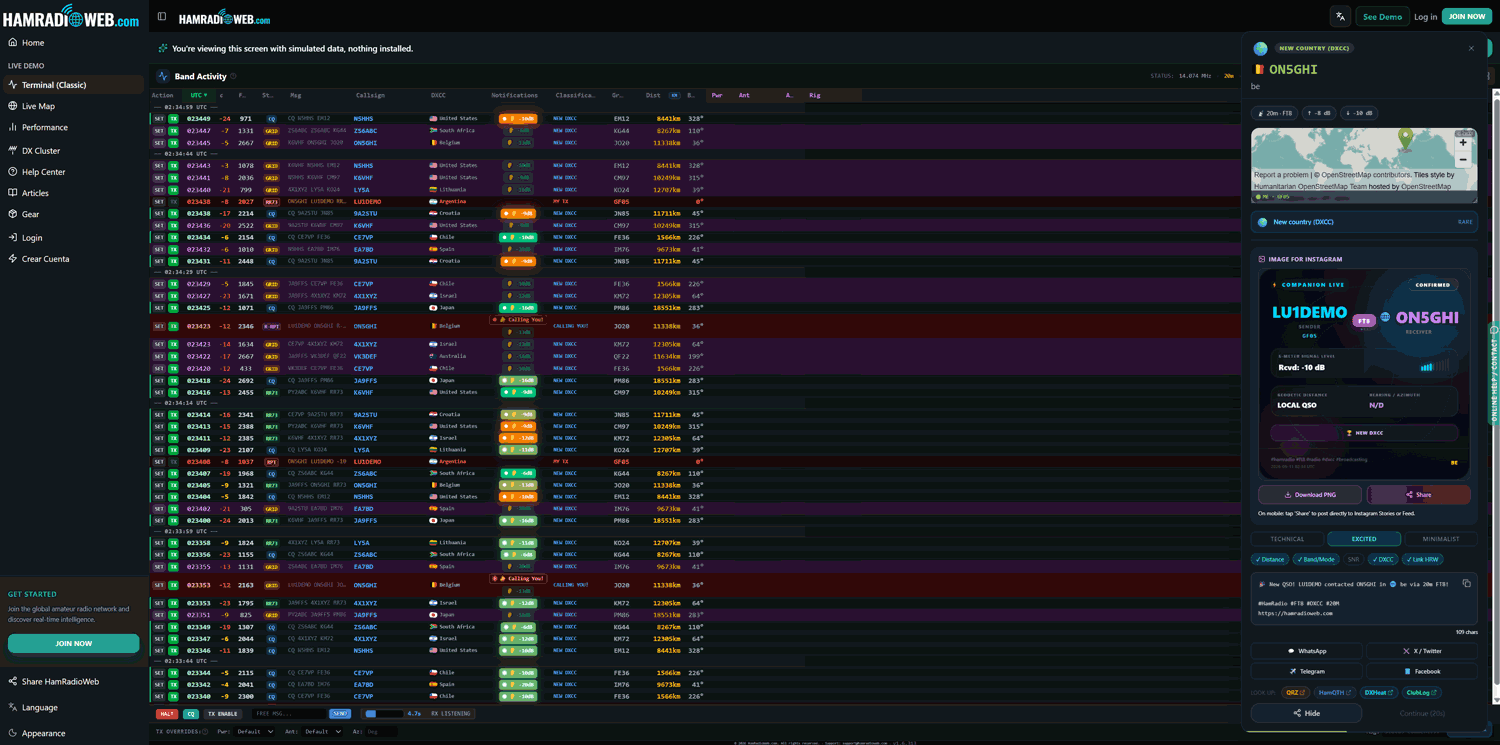
HamRadioWeb: A Demo of the FT8/FT4 Terminal Display

GridTracker Now Available on Windows, Mac and Ubuntu (Debian)

In early February we posted news about the release of a program called GridTracker. GridTracker is a live mapping program for WSJT-X which is a software decoder for low power weak signal ham communications modes such as FT8, JT4, JT9, JT65, QRA64, ISCAT, MSK144 and WSPR. Although these are low power modes, the protocols are designed such that even weak signals can potentially be received from across the world. Mapping the received signals can be interesting as it may give you an idea of current HF propagation conditions.

Previously GridTracker was Windows only software. However recently GridTracker was updated to now include support for Mac and Ubuntu (Debian) operating systems as well. This is great news as it makes it much easier to set up a portable GridTracker screen on a portable computer like a Raspberry Pi.

GridTracker Mapping out Weak Signal Communications.

GridTracker: A WSJT-X Mapping Program

Thanks to RTL-SDR.com reader Henry for letting us know about the release of a new piece of Windows software by Tag Loomis (N0TTL) called GridTracker. GridTracker is a live mapping program for WSJT-X which is a software decoder for low power weak signal ham communications modes such as FT8, JT4, JT9, JT65, QRA64, ISCAT, MSK144 and WSPR. Although these are low power modes, the protocols are designed such that even weak signals can potentially be received from across the world. Mapping the received signals can be interesting as it may give you an idea of current HF propagation conditions.

GridTracker is a Windows (XP or above) companion program for WSJT-X. It listens to WSJT-X or JTDX decodes and displays them on a map.

A great way to visualize communicating amateurs around the world!

Display on a large second monitor in your amateur radio club, hamfest or as a demonstration in a classroom. Everyone gets excited when they can see what you’re doing!

You can also load your ADIF log files from WSJT-X, Qrz.com, LoTW, PSKReporter and others to get a visual view of ‘stations worked’, stations that can hear you and more!

It might be an interesting project to set up a permanent GridTracker display using an RTL-SDR V3 in direct sampling mode, or RTL-SDR with upconverter. Low cost x86 single board PCs that can run Windows 10 such as the LattePanda, UP board or Udoo might be possible candidates for host hardware.

Henry warns us that the software is still new, so it may be a little buggy.

GridTracker Mapping out Weak Signal Communications.