Category: HF

VKVSkimmer: A Free CW and RTTY Skimmer for RTL-SDR, SDRplay and Icom IC-7610 / IC-7760

Fabio (F5VKV) has written in to share VKVSkimmer, a newly released free CW and RTTY skimmer for Windows. A skimmer decodes every CW or RTTY signal in the received bandwidth at once and publishes the callsigns it hears as spots, which contesters and DXers then use to find stations.

VKVSkimmer works with an RTL-SDR through rtl_tcp, an SDRplay RSP, or the I/Q output of the Icom IC-7610 and IC-7760. CW decoding uses the neural-network-based DeepCW decoder from VE3NEA, with a Viterbi decoder as a second opinion. To keep busted calls from being published, callsigns are checked against cty.dat, Super Check Partial and, optionally, live Reverse Beacon Network (RBN) spots. The software has a browser-based GUI with a spectrum, waterfall and spot list. It also includes a built-in telnet cluster for N1MM+, DXLog or any telnet client, spectrum output to N1MM+, and output to the RBN Aggregator.

VKVSkimmer is free, with no licence or registration required. Note that receiving HF with an RTL-SDR needs a dongle with HF support, such as our RTL-SDR Blog V4L, or the V3 in direct sampling mode. Screenshots and the download are available on the VKVSkimmer website.
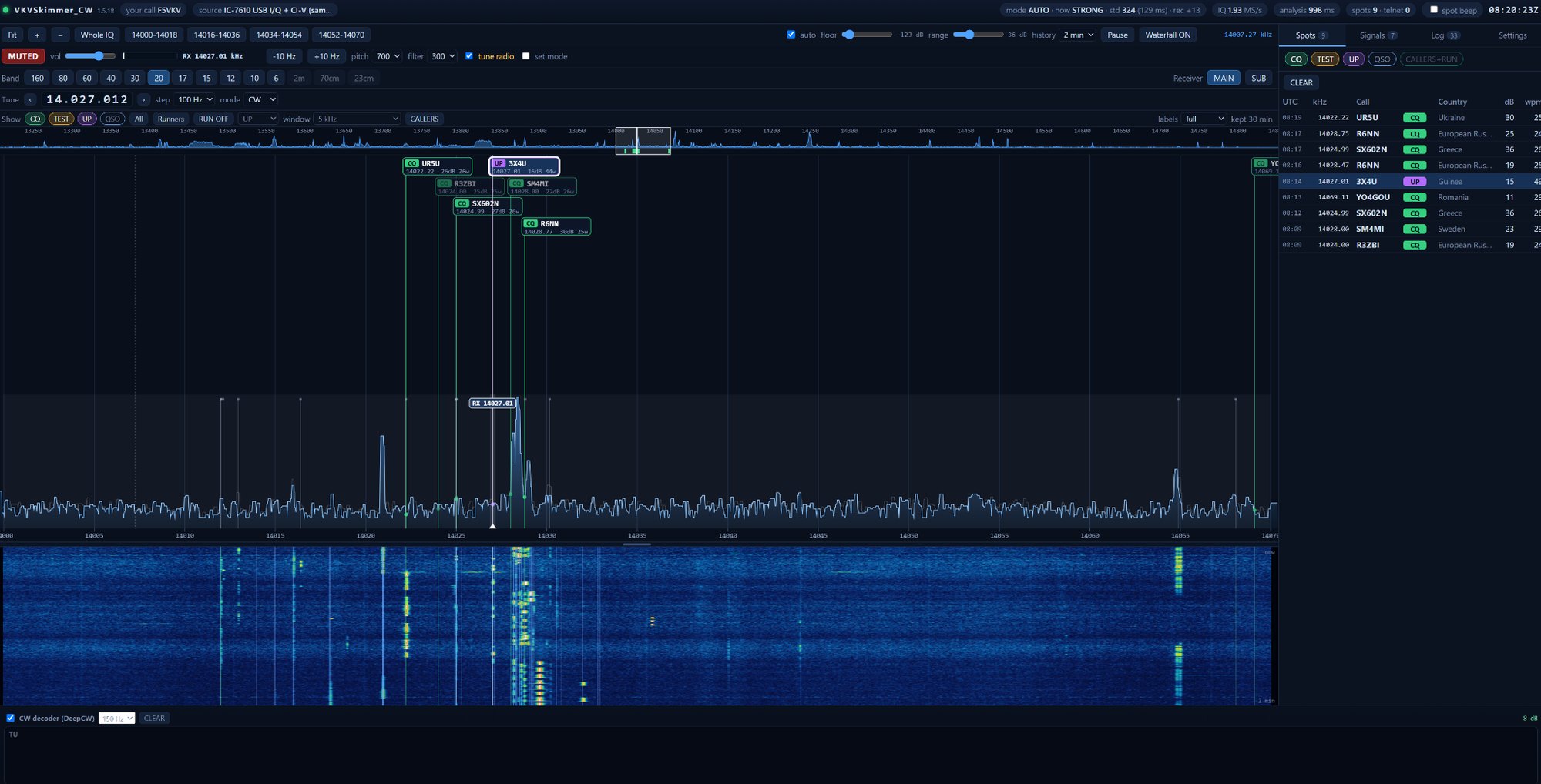
VKVSkimmer GUI
VKVSkimmer GUI

ATS Mini Controller: A Web App for the ATS Mini Receiver with an Experimental Browser-Based RTL-SDR Mode

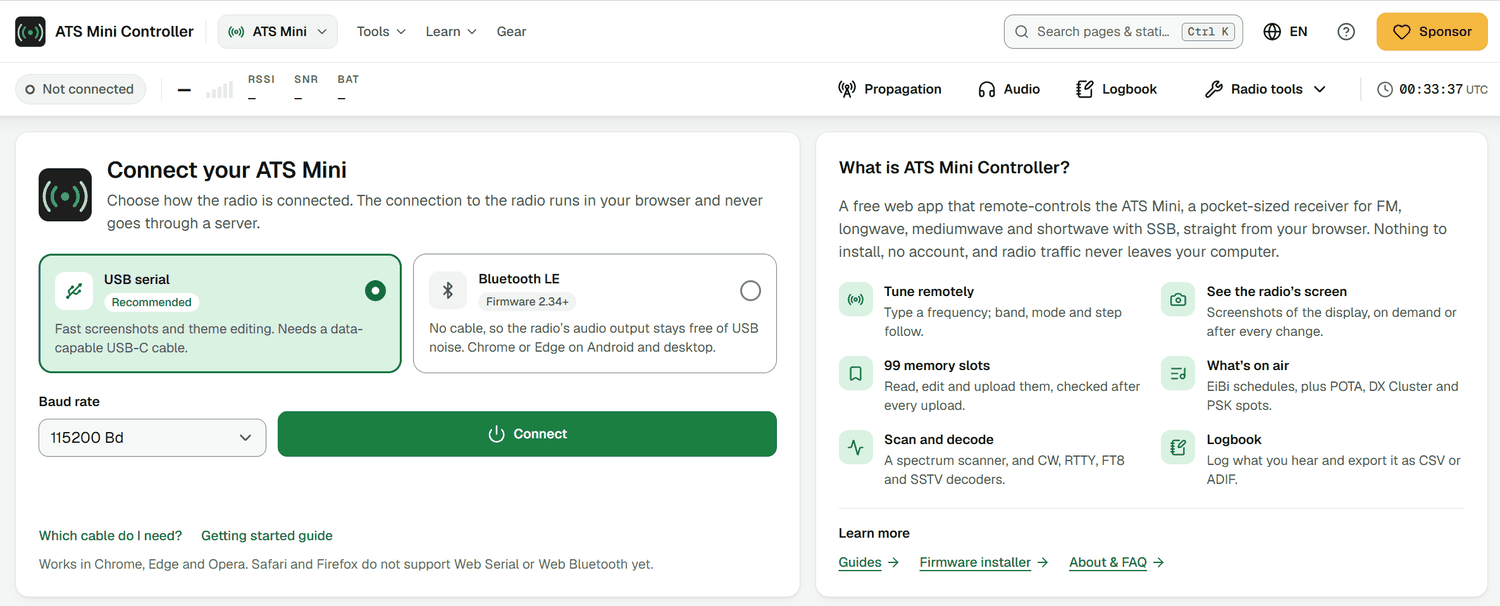
Thank you to Grzegorz Zajac for writing in and sharing ATS Mini Controller, a free web app for the ATS Mini. The ATS Mini is a low-cost pocket shortwave receiver based on an ESP32-S3 and the SI4732 broadcast radio receiver IC. The app connects to the radio over USB or Bluetooth LE from Chrome, Edge or Opera, with nothing to install. From the browser, you can tune the radio, manage its memory slots, tune straight from an offline copy of the EiBi shortwave schedule, run spectrum scans, and update the firmware.

Readers may also be interested in the experimental RTL-SDR mode. It connects to an RTL-SDR directly over WebUSB and demodulates inside the browser, without rtl_tcp or a server. It supports dongles with R820T, R820T2 and R828D tuners, including our RTL-SDR Blog V3 and V4. It has a spectrum and waterfall, up to six VFOs, IQ recording, and a long list of decoders such as ADS-B, AIS, ACARS, APRS, FT8, and POCSAG.

Grzegorz notes that "experimental" is meant seriously, because several of the decoders have so far only been tested on generated signals. Windows users will need to install the WinUSB driver with Zadig first, and Linux users will need to blacklist the DVB driver. We note that the app is free, but it does not appear to be open source.

ATS Mini Controller Start Screen Screenshot

AI Disclaimer: The author has confirmed that AI was used in the development of this software, but it was not a replacement for his own experience and engineering decisions.

Clever Quest Lab: Free Browser-Based Decoders for RTTY, Weather Fax, SSTV, NAVTEX, APRS and More

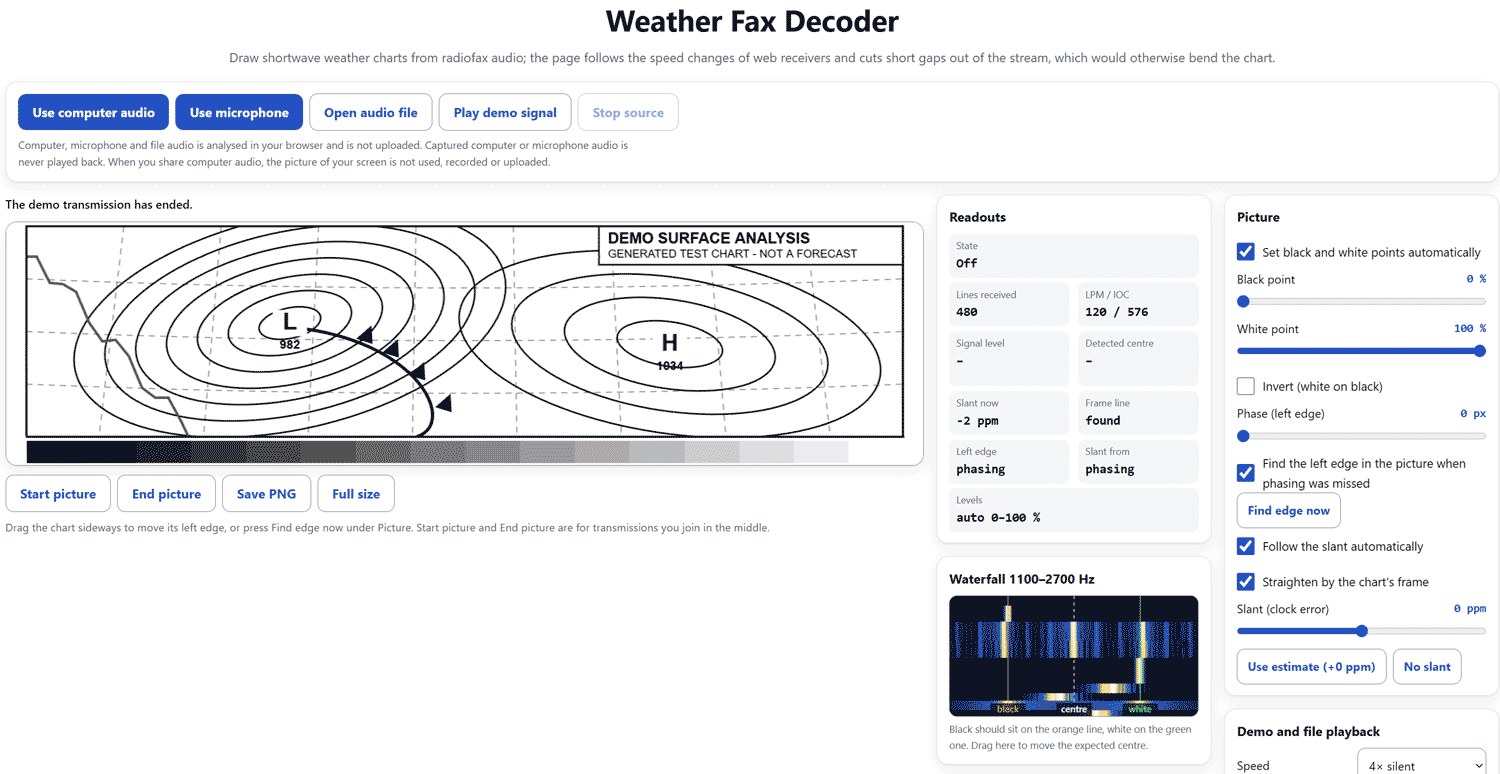
Thank you to Simpli for writing in and sharing a set of free radio decoders that run entirely in the browser. There are pages for Morse, RTTY, PSK31, SSTV, weather fax, NAVTEX, APRS and the DCF77/MSF time signals, plus a signal identifier that tries to name an unknown mode and links to the matching decoder.

Audio can come from your SDR program via a virtual audio cable, a microphone, a WAV or MP3 recording, or a WebSDR playing in another browser tab (this needs a desktop browser with screen sharing), so no hardware is needed to try them. Simpli tested them on DWD RTTY on 4583 kHz and DWD weather fax on 3855 kHz via the Twente WebSDR, as well as on live PSK31 and an ISS SSTV recording in PD120 mode.

Simpli writes:

A detail you might find interesting: the WebSDR player inserts 128 zero samples about once a second, and its playback speed wanders by up to half a percent. That's enough to tear a fax picture apart. The fax decoder cuts those gaps out and tracks the speed from the white tone, so the chart comes out straight. The RTTY page also switches to reversed polarity by itself when it sees too many framing errors.

All decoding happens locally with nothing uploaded, and the tools are free with no sign-up. This is similar in spirit to OFFgrid-SDR, which we just posted about, as both run in the browser and can automatically identify a mode. However, OFFgrid-SDR connects directly to an RTL-SDR via WebUSB and is open source under the GPLv3, while Clever Quest Lab's decoders work on audio from any receiver and do not appear to be open source.

Clever Quest Web Browser Weather Fax Decoder

ESPica32: A Standalone ESP32 Radio for Tuning Any KiwiSDR with No PC or Phone

Thank you to Ivan (LU8MIL) from the ‘Radio Bunker’ YouTube channel for writing in and sharing ESPica32, a standalone ESP32-based radio that tunes into any public KiwiSDR in the world with no PC or phone needed. The name is a tribute to the Spica, a pocket transistor radio that was hugely popular in Argentina.

The build uses just four parts: an ESP32-WROOM-32, an SH1106 OLED display, a rotary encoder, and a MAX98357A I2S amplifier with a small speaker. A single encoder controls frequency, volume and mode (LSB, USB, AM, CW and FM). A web page served by the ESP32 handles Wi-Fi setup, KiwiSDR server selection and full remote control, and also includes a diagnostic for tracking down audio dropouts.

Ivan notes that distant KiwiSDRs initially cut out because the ESP32 couldn’t keep up with uncompressed audio. Switching to the KiwiSDR’s ADPCM compression fixed this, and a Kiwi in Argentina now plays cleanly from Germany at about 260 ms ping. The Arduino IDE sketch and wiring diagram are available on Ivan’s Todo-SDR blog, and the Spanish-language video below shows the build and a demo (English subtitles are available).

🎯 EL PROYECTO DIY QUE TODO RADIOESCUCHA DEBERÍA CONOCER: ESPica32

NightDX: Automated Overnight Shortwave DX Listening with an Airspy HF+

Thank you to Marco Zennaro for writing in and sharing NightDX, a free terminal app for macOS, Windows and Linux that lets an Airspy HF+ do your overnight shortwave listening for you. The menu interface is deliberately styled like early-90s DOS software.

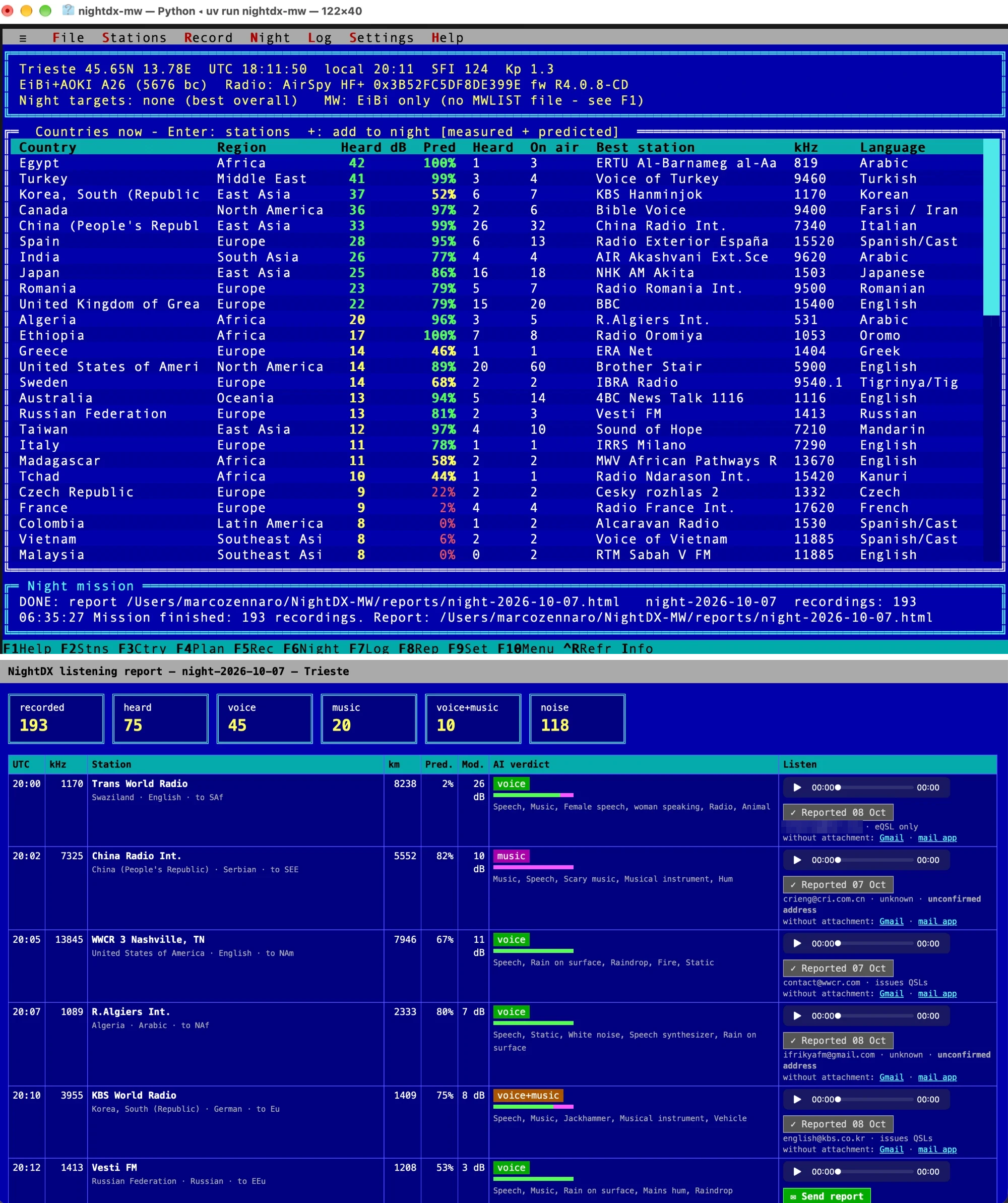
NightDX pulls the EiBi, AOKI and HFCC broadcast schedules, plus live solar flux and Kp from NOAA. A propagation model then predicts what should reach your location and calibrates itself against what your own radio hears. The HF+ sweeps all the bands in about 10 seconds to see which carriers are really there, and overnight NightDX records the best stations, putting ones you've never logged first.

Optional AI features can then label each recording as speech, music, or noise using an AudioSet classifier, and transcribe and translate it with OpenAI's Whisper, which helps when writing reception reports. In the morning, a browser report shows the recordings with audio players, one-click reception reports drafted in Gmail, and a QSL card log.

We note that NightDX doesn't claim to identify stations. It shows schedule names as candidates and flags recordings where the evidence doesn't fit, such as the wrong language or a signal far too strong for the predicted path. Only the Airspy HF+ (Discovery or Dual Port) is supported for now, so there is no RTL-SDR support. Marco notes that other SDRs such as the Perseus and Elad are being looked into. The code is open-source under the MIT license and available on GitHub.

NightDX Screenshots
NightDX Screenshots

AI Disclaimer: Marco notes that NightDX was built with the help of Claude.

SimTX: A Multiplayer Shortwave Radio Simulator with Realistic Propagation and rtl_tcp Support

Recently, we came across SimTX, an open-beta multiplayer shortwave radio simulator. Everyone shares the same simulated band, so whatever one user transmits from their virtual station can be picked up by anyone else, simulated propagation permitting. The website suggests running a pirate station, making your own numbers station, or just tuning around and listening.

For realism, the ionosphere is based on IRI-2020 climatology with live ionosonde data assimilated on top, groundwave and noise follow ITU-R models, and every link passes through a Watterson fading channel with Doppler, multipath and storms. Users can transmit from a mic, an audio file or raw IQ from GNU Radio in modes including AM, SSB, CW, NFM, WFM, WSPR and FT8, and can even launch and track their own satellites.

To receive, the SimTX app runs a local rtl_tcp bridge, so SDR++ or any other rtl_tcp-capable SDR program can tune the simulated band as if it were an RTL-SDR, without any real radio hardware. The app runs on Windows, macOS, and Linux, and accounts are created via Discord. The software does not appear to be open source. The demo video below shows a song broadcast from a simulated Amsterdam and received 1145 km away in Budapest.

This may be useful for playing around with and seeing what different TX/RX variables and propagation effects do to signal reception.

We broadcast a song through a simulated ionosphere

Claude VOACAP Skill: Ask Claude About Live Ionospheric Propagation Predictions to Optimize DX

Thank you to Reid Crowe for submitting his project, "voacap-skill." This skill for Claude Code AI (a frontier LLM) lets Claude access and use the latest VOACAP ionospheric propagation data in conversations.

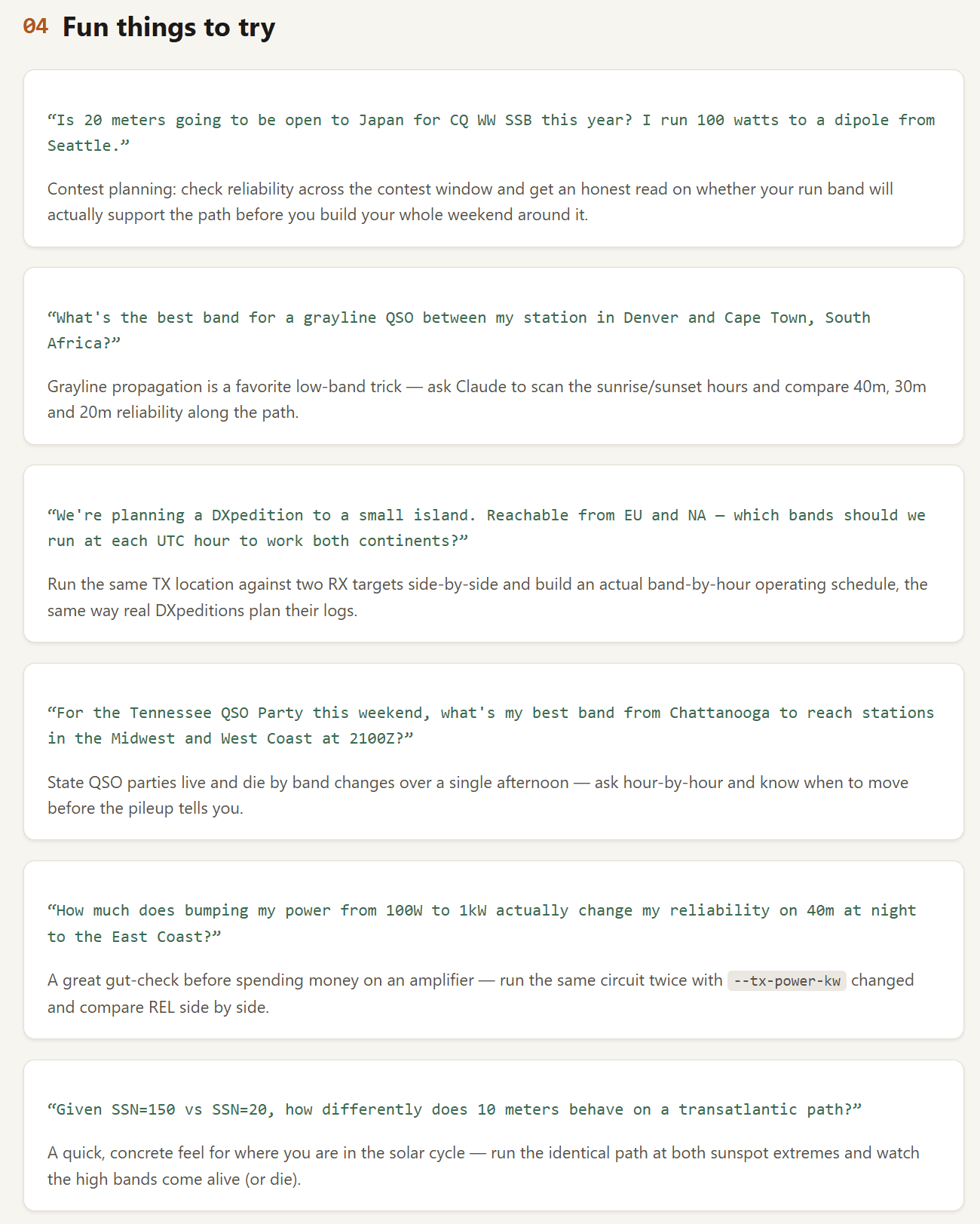
Instead of manually filling out a form for each prediction and analyzing the results yourself, with the voacap-skill, users can ask Claude questions like, "What's the best band to reach Tokyo from Columbus, Ohio around 0300Z in October?" and Claude will run a VOACAP prediction in the background and return an answer. Reid explains:

If you've ever used VOACAP, VOACAP Online, or watched a contest DXpedition plan its band schedule, you already know the engine underneath this: it's the same NTIA/ITS point-to-point HF prediction model that's been the industry standard for propagation forecasting since the 1980s. It takes a transmitter location, a receiver location, a month, and a sunspot number, and tells you — for every hour of the day and every frequency you care about — how reliable that circuit is likely to be.

voacap-skill takes that engine (via voacapl, the modern Linux/GFortran port, on macOS/Linux, or the native NTIA/ITS Windows engine on Windows) and wires it into Claude Code as a "skill" — a capability Claude can reach for on its own.

The skill is free and open-source, with the code available on GitHub. Below, Reid provides some more examples of what you can ask Claude once it has access to VOACAP data.

DXLens: An iOS App Combining Shortwave Schedules, Propagation Data and Public SDRs

Thank you to Muayyad for sharing news about the release of his iPad/iPhone-compatible application, 'DXLens', designed for listening to remote shortwave SDR receivers. DXLens also comes with features like aggregated shortwave schedules from multiple sources, and propagation data and reception forecasting to help users choose the right global receiver for the conditions. He writes:

DXLens is a newly released iPhone/iPad application built around connecting the shortwave schedule and SDR listening workflows.

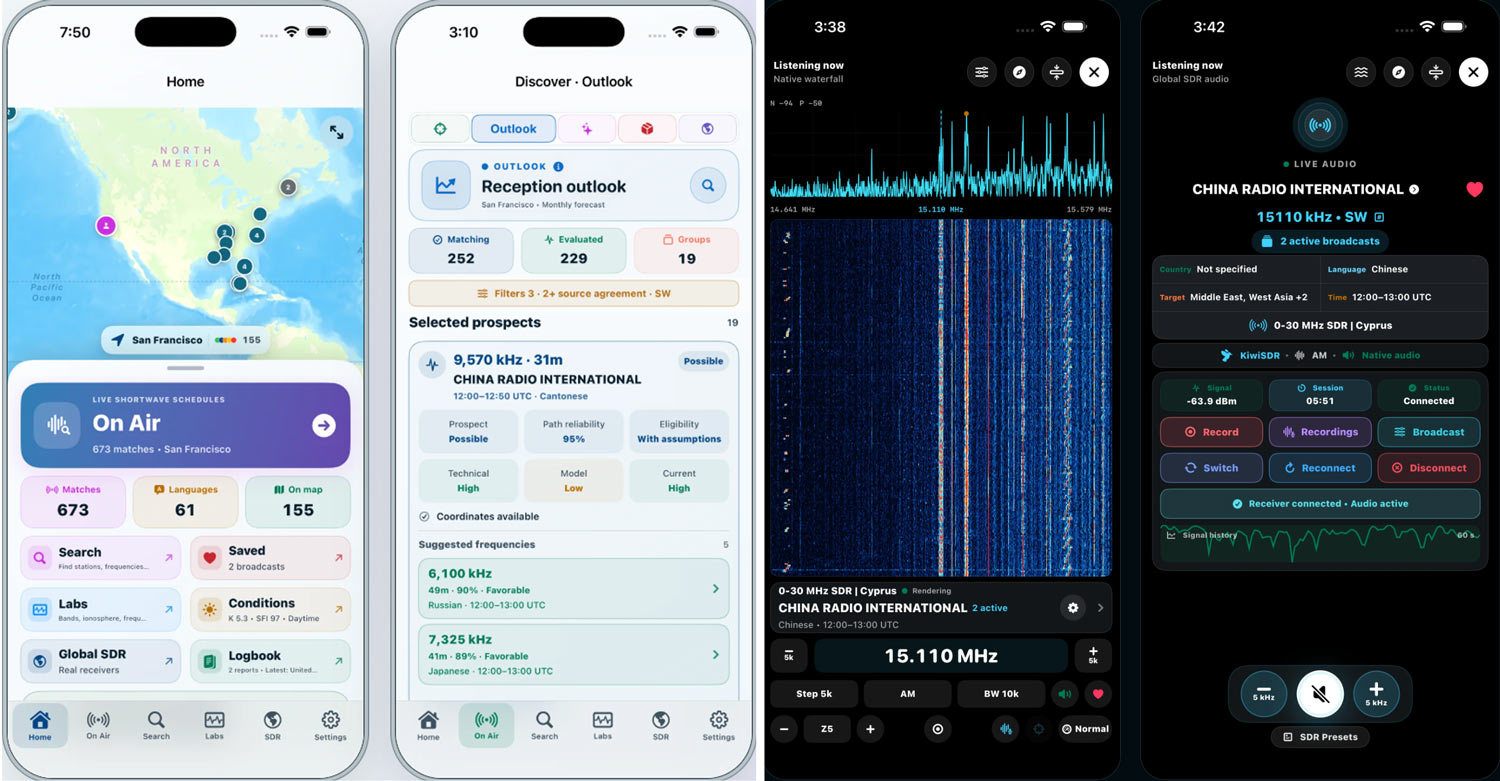
A listener can begin with a broadcast from EiBi, Aoki/NDXC, or HFCC, inspect the schedule-source evidence and transmission path, review modeled propagation context and assumptions, and then request compatible public SDR receivers for the frequency.

From there, DXLens provides a native listening workspace with live spectrum and waterfall, frequency/mode/bandwidth controls, receiver switching and reconnection, SDR presets, signal/session information, and local recording.

The app also includes Path Atlas, ionospheric and space-weather context, RF Environment tools, Model Audit, alerts, Custom listening views, and a structured reception logbook.

An important design boundary is that scheduled activity, propagation modeling, public receiver availability, and actual reception are kept separate rather than being presented as equivalent evidence.

The app appears to connect to the KiwiSDR network, and also has support for personal rtl_tcp based receivers.

At the moment, the app appears to be free, with no in-app purchases. DXLens is available on the Apple App Store.

DXLens Screenshots
DXLens Screenshots