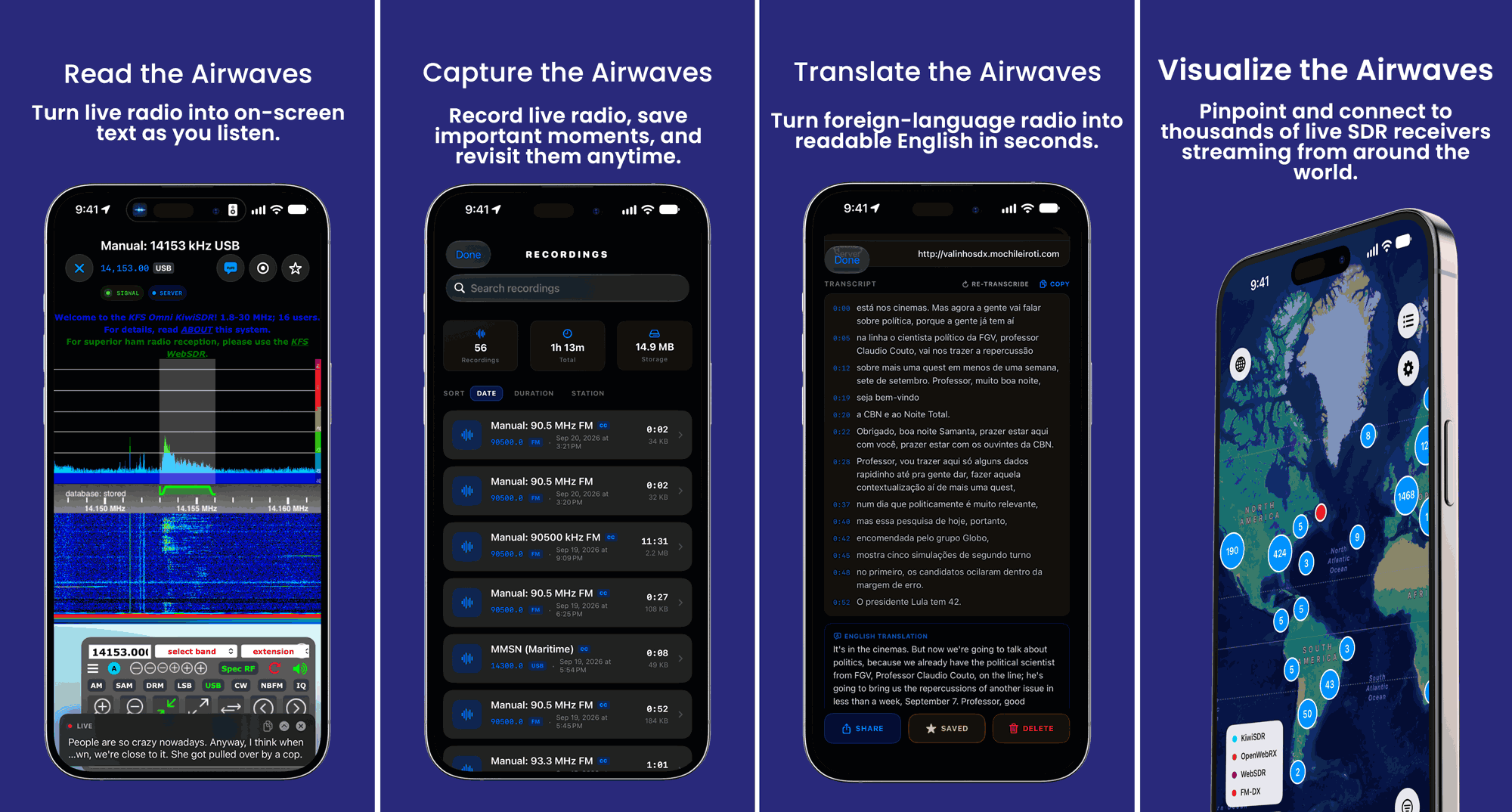
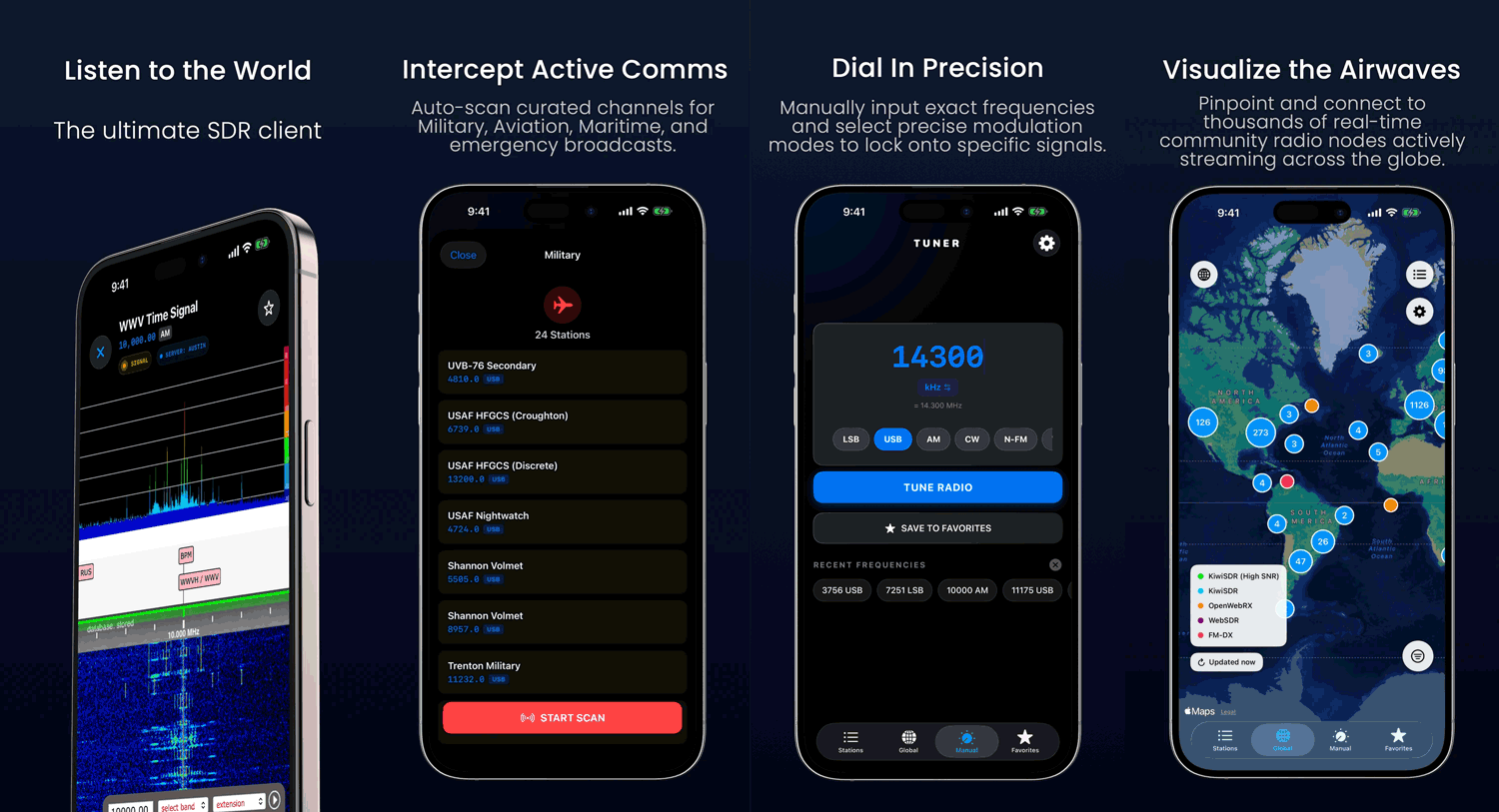
Back in April we posted about the release of Echo, a free iOS app designed for browsing global web-based KiwiSDR, OpenWebRX, WebSDR, and FM-DX software-defined radios. Mark, the developer of Echo, has written in to us again and wanted to share news about the release of the Pro (paid) version of Echo.
Echo Pro adds several features such as recording, on-device transcription and translation, iCloud sync, and the ability to access recordings across Apple devices. The transcription and translation service may be quite interesting, as it allows you to record an entire foreign radio program to text, and translate it to your language for later reading.
Echo Pro costs either US$4.99/month or US$39.99/year. More information about the app is available at echosdr.com.
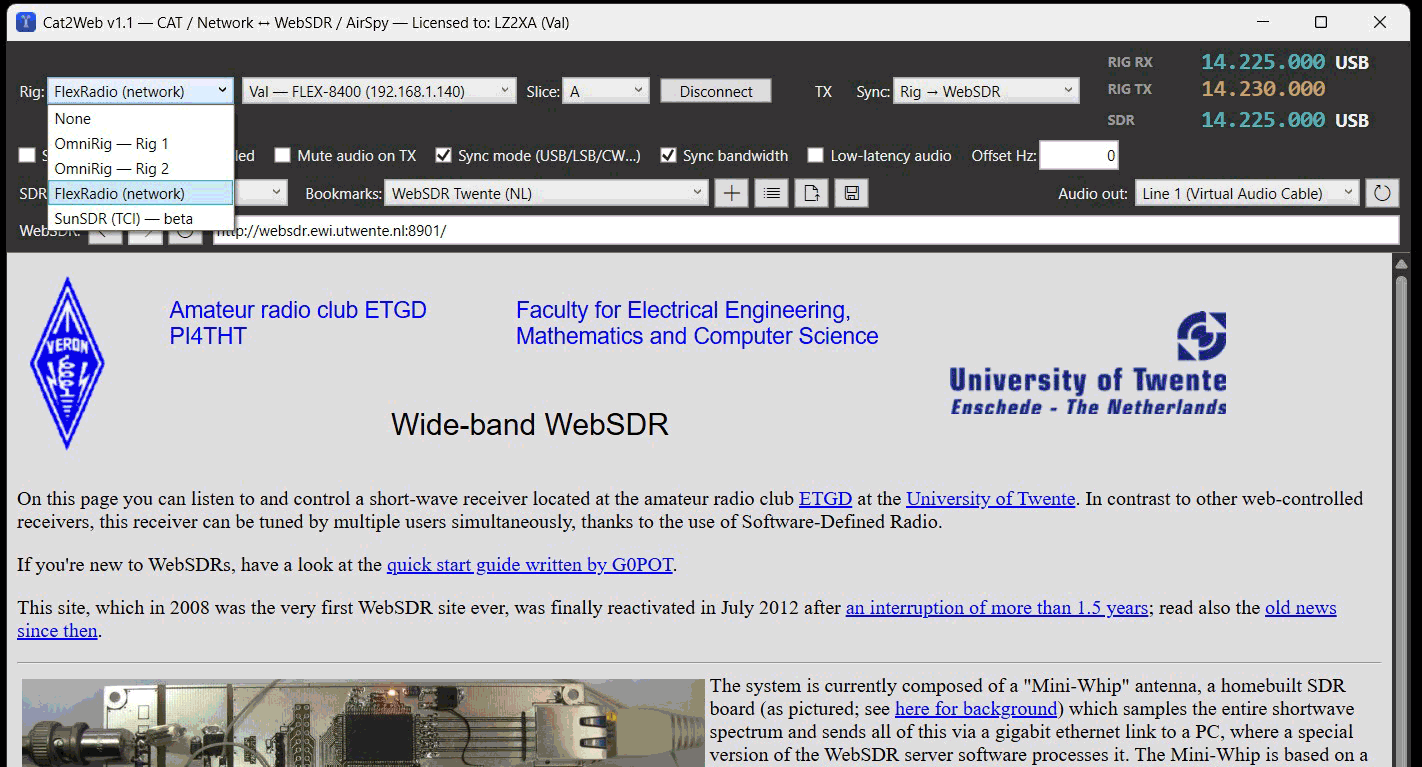
Thank you to Val (LZ2XA) for writing in and sharing with us a program he's created called "Cat2Web," which is designed to keep a ham transceiver and a public browser SDR, such as a KiwiSDR tuned to the same frequency and mode, in both directions. This is useful for amateur radio operators, as they could easily determine if their signal is being heard by a distant public remote SDR station.
Cat2Web (C2W) is a small Windows app that keeps a ham transceiver and a public browser SDR — WebSDR, KiwiSDR, OpenWebRX/OWRX+ — tuned to the same frequency and mode, in both directions.
Besides standard CAT (via OmniRig), it controls FlexRadio 6000/8000 directly over the network (SmartSDR TCP, no CAT cable) and SunSDR via TCI, and it can pull a SpyServer/Airspy stream and demodulate it itself. It also lets you pick the audio output device for the SDR sound, and stores a frequency offset per bookmark.
We note that the program is not open source and has a €20 lifetime license price tag attached to it. However, a demo is available with full sync, but limited bookmarks.
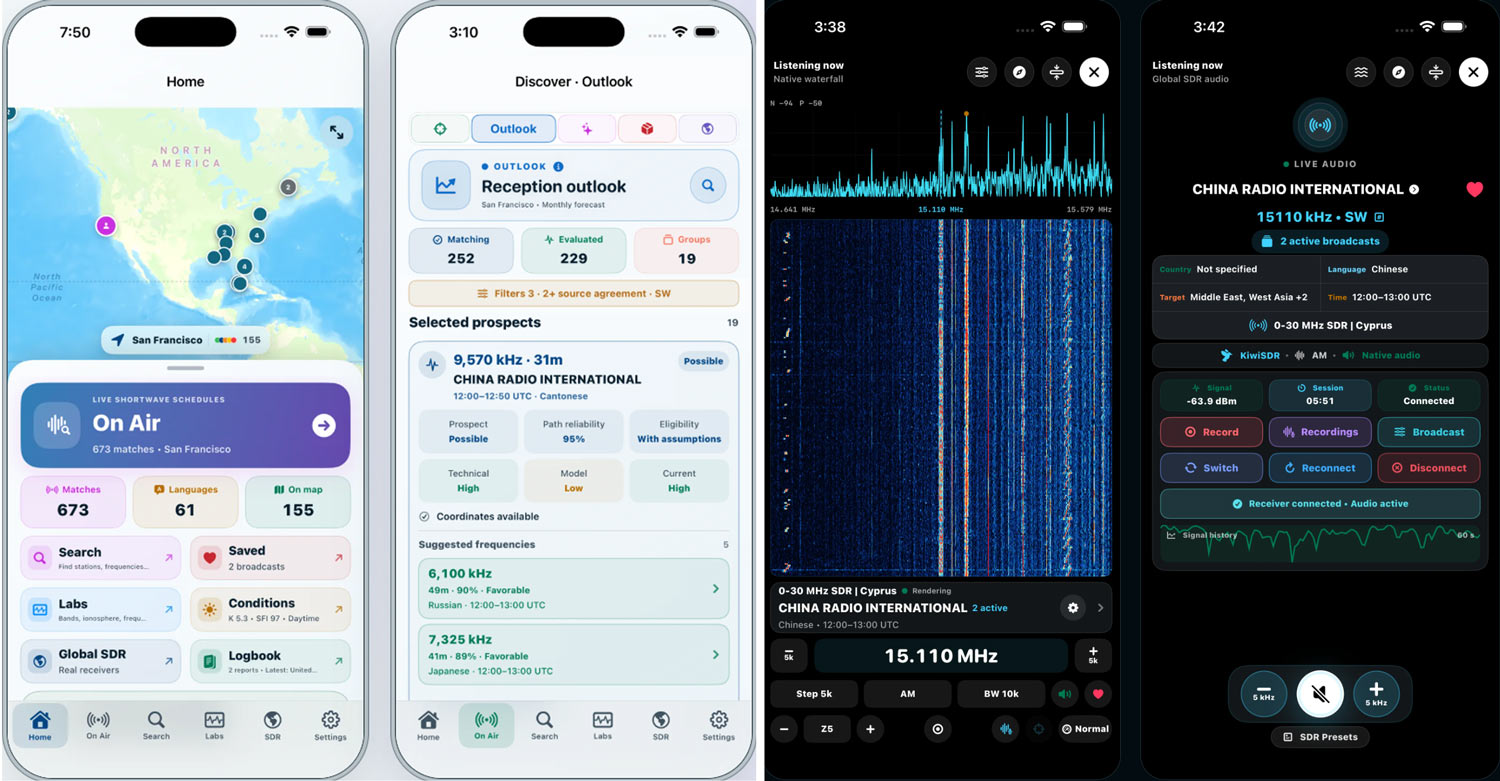
Thank you to Muayyad for sharing news about the release of his iPad/iPhone-compatible application, 'DXLens', designed for listening to remote shortwave SDR receivers. DXLens also comes with features like aggregated shortwave schedules from multiple sources, and propagation data and reception forecasting to help users choose the right global receiver for the conditions. He writes:
DXLens is a newly released iPhone/iPad application built around connecting the shortwave schedule and SDR listening workflows.
A listener can begin with a broadcast from EiBi, Aoki/NDXC, or HFCC, inspect the schedule-source evidence and transmission path, review modeled propagation context and assumptions, and then request compatible public SDR receivers for the frequency.
From there, DXLens provides a native listening workspace with live spectrum and waterfall, frequency/mode/bandwidth controls, receiver switching and reconnection, SDR presets, signal/session information, and local recording.
The app also includes Path Atlas, ionospheric and space-weather context, RF Environment tools, Model Audit, alerts, Custom listening views, and a structured reception logbook.
An important design boundary is that scheduled activity, propagation modeling, public receiver availability, and actual reception are kept separate rather than being presented as equivalent evidence.
The app appears to connect to the KiwiSDR network, and also has support for personal rtl_tcp based receivers.
At the moment, the app appears to be free, with no in-app purchases. DXLens is available on the Apple App Store.
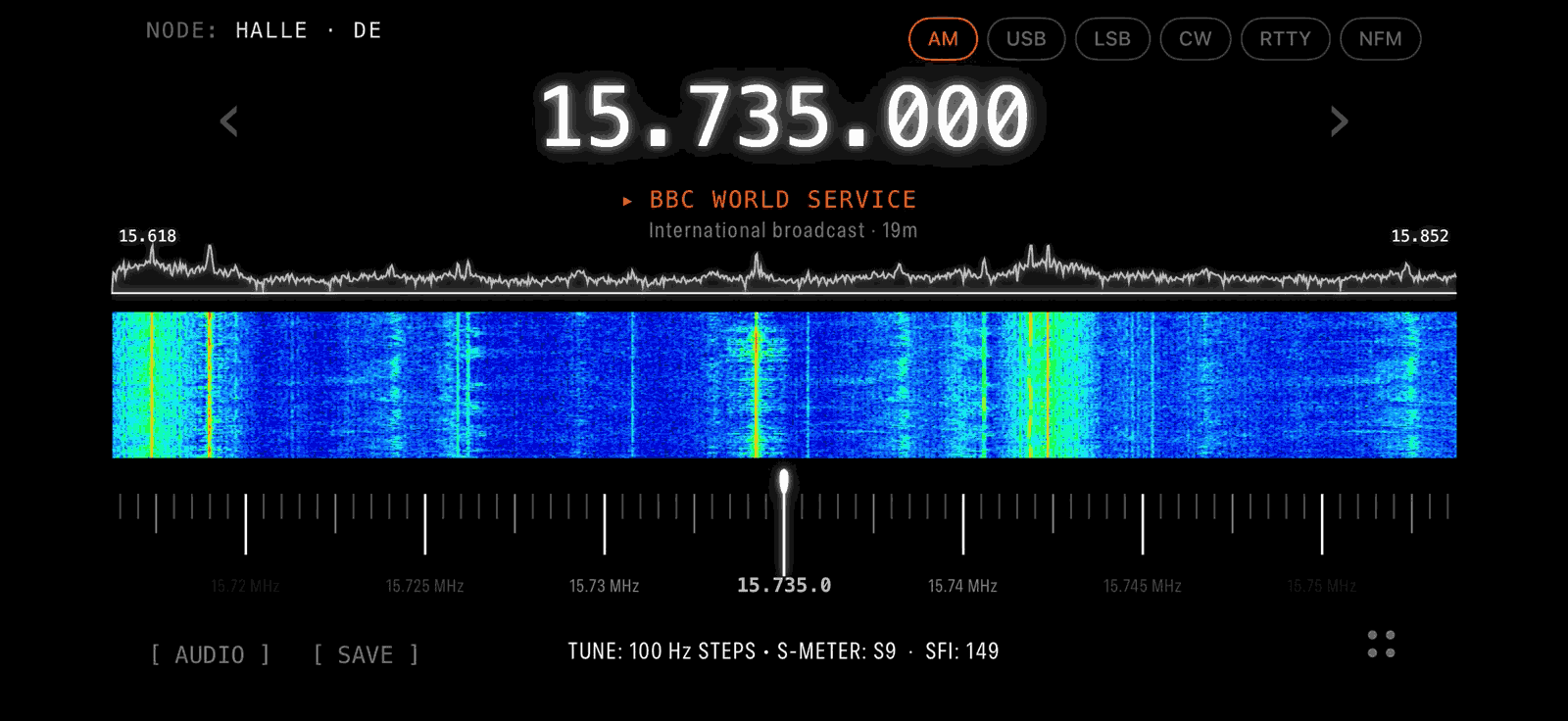
Thank you to 'Radio Silence Dev' for writing in and sharing the beta release of his iOS native app, Radio Silence, designed for listening to public KiwiSDR receivers around the world on an iPhone or iPad.
The app streams live audio from the KiwiSDR network, with a live directory showing each node's signal quality, load, and online status. If a receiver drops out mid-session, the app will automatically fail over to another one. There is also a tap-to-tune live spectrum waterfall.
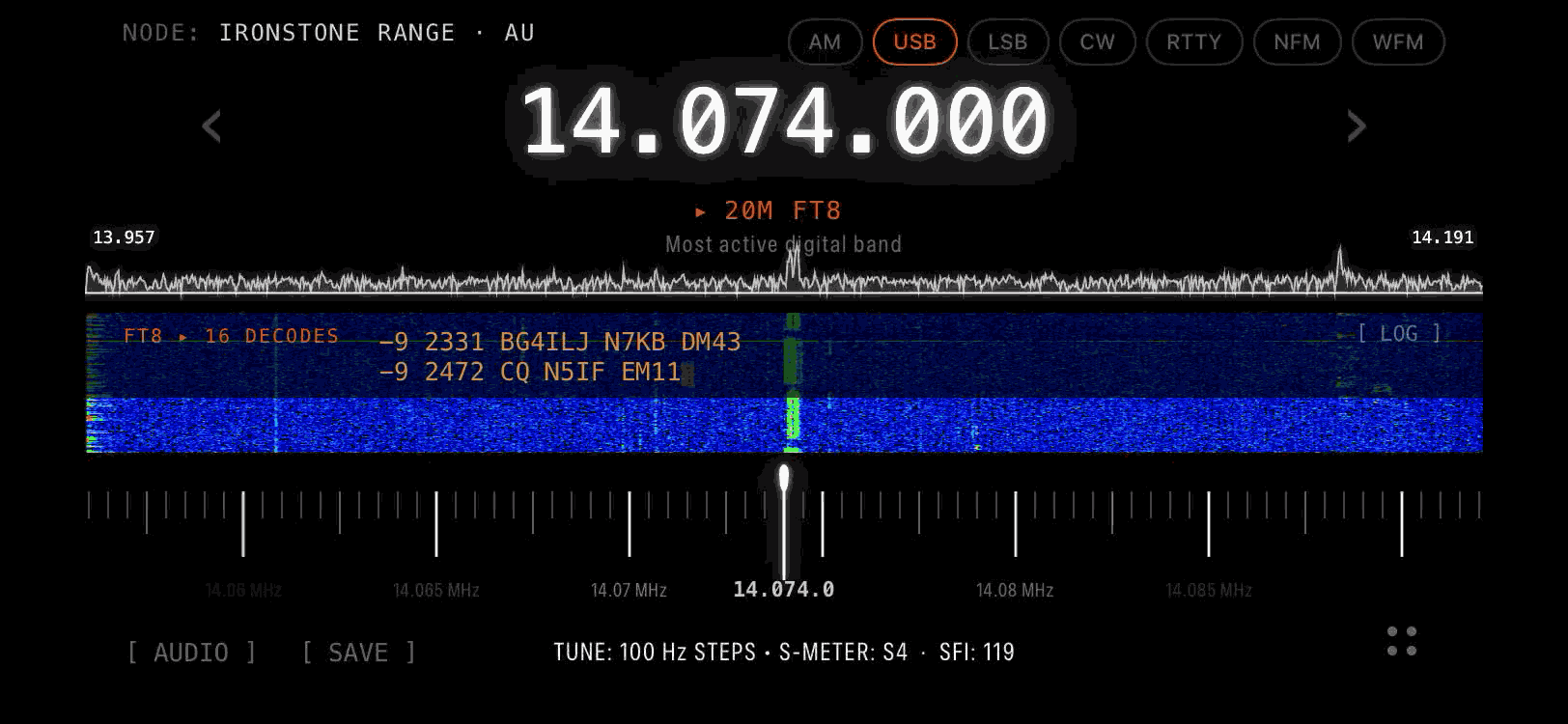
Radio Silence also includes CW, RTTY and FT8 decoders, which all run on-device rather than on the receiver, printing text under the dial as it comes in. Audio keeps playing with the screen locked, and captures are saved to a logbook tagged with frequency, mode, node, S-meter reading and UTC timestamp, with export to ADIF, CSV and WAV. Captures can also be shared as QSL-style reception report cards stamped with the solar flux and Kp index at the time of the catch. NAVTEX and SSTV decoders are in development.
The developer notes that the app is written to be a good citizen on the KiwiSDR network, releasing its channel slot when listening stops and handing it back automatically if playback is left running unattended. Streaming uses about 22 MB per hour.
Radio Silence is free during the beta, and listening is set to remain free at launch, with any future subscription covering software features only. Beta invites can be requested via radiosilencesdr.com.
Radio Silence: Waterfall ViewRadio Silence: Decoding FT8
Back in June, we posted about VibeSDR, an AI vibecoded free and open-source mobile SDR client for rtl_tcp and UberSDR/KiwiSDR/OpenWebRX servers developed for iOS and Android. Recently, Stuart Carr (Stuey3D) wrote in again to let us know that VibeSDR is now available on the Apple App Store for £2.99 and is soon to be available on the Android Play Store too.
In terms of updates, Stuart also notes that he's now developed VibeServer, which provides a more network-efficient way to share RTL-SDRs remotely via an Android phone. VibeServer compresses the data and transfers it at 120KB/s instead of the full 4.8MB/s required by rtl_tcp.
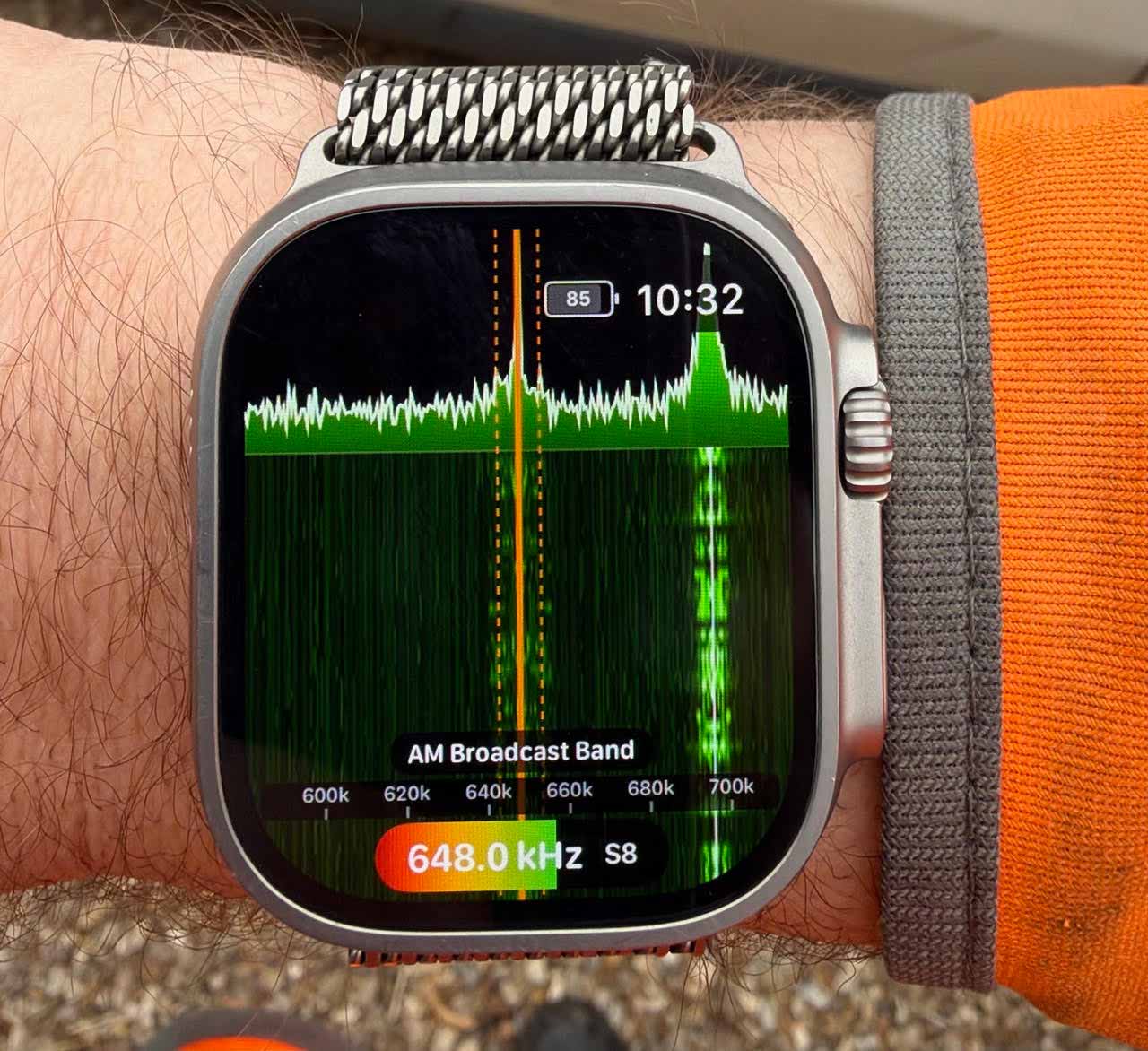
Stuart has also developed an Apple Watch Buddy app version of VibeSDR which runs directly on an Apple Watch, allowing you to view and listen to the spectrum on your wrist. The watch version is still in beta, but Stuart notes that you can join the free beta on TestFlight.
Finally, Stuart has provided us with 20 free promo codes to give away for the Apple App Store version of VibeSDR. To win a promo code, simply comment on this post (making sure to enter an email in the email field), reply to the X post, or comment on the Facebook Post (note that for Facebook you must montior your comment for a reply as Facebook does not allow private messages).
Update: All promo codes have now been allocated, thanks!
AI-Disclaimer: This software was vibecoded with Claude.
VibeSDR Running on an Apple Watch
Introducing VibeSDR Jr: A full SDR Client on your wrist.
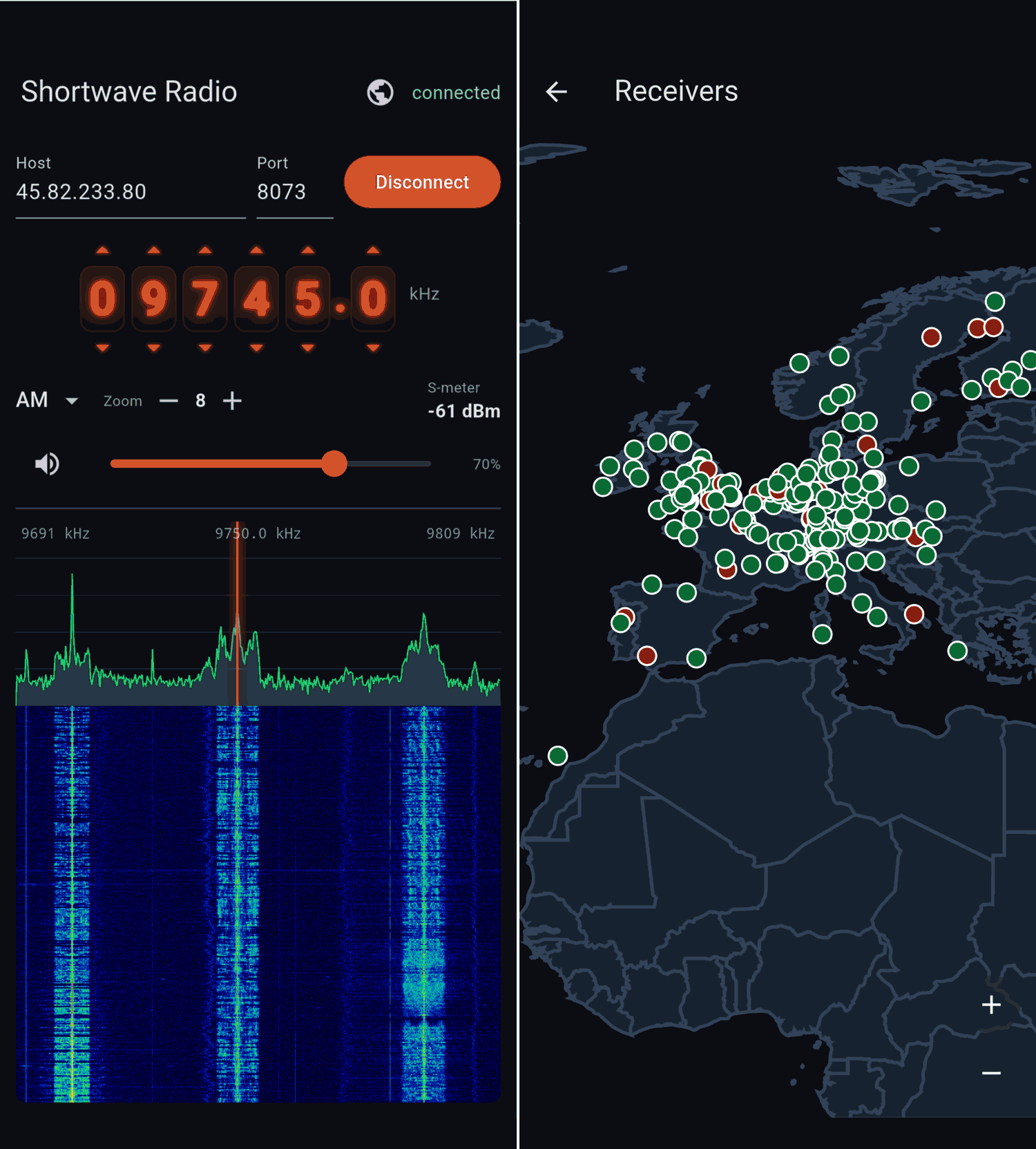
Thank you to RTL-SDR.COM reader Ladislav for submitting information about the release of a new Android app by Alexsxxx called "SwR - Shortwave Radio". This is an Android-only app that lets users easily listen to KiwiSDR and Web-888 receivers. The app appears to be free, with no in-app purchases.
SwR is a client for the worldwide network of public shortwave receivers. Tune in to live shortwave radio from hundreds of volunteer-run receivers around the globe — right from your phone.
Features: • Connect to any public receiver • Live spectrum and scrolling waterfall display • Drag the spectrum to tune; drag the waterfall to pan the band • Nixie-tube style frequency display with per-digit tuning • AM, LSB, USB, CW and FM demodulation • Zoom from the full band down to a narrow window • World map of receivers — tap one to start listening • Volume and mute controls
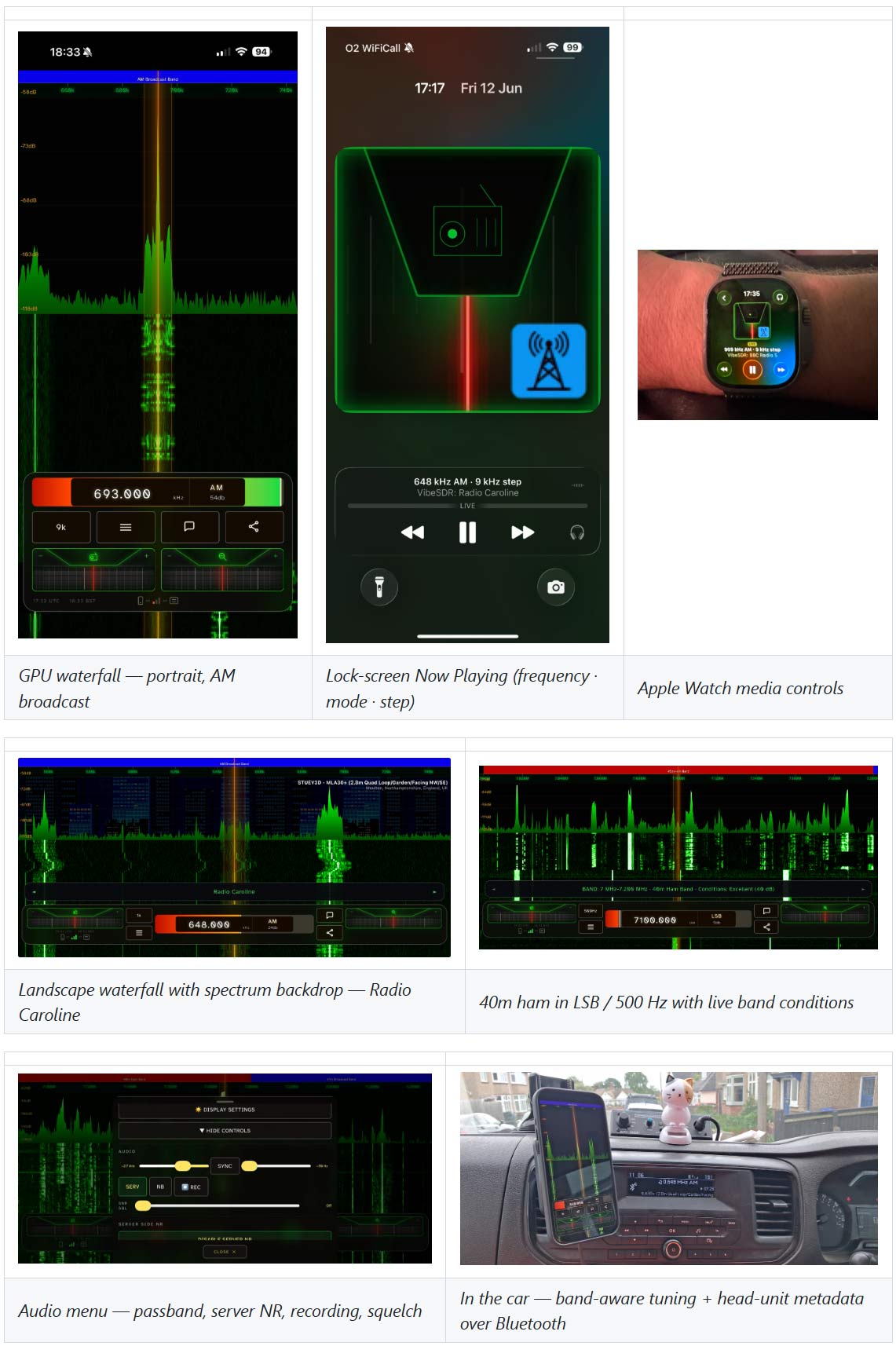
Thank you to Stuart Carr (Stuey3D) for submitting news about his new software release, VibeSDR, a free and open-source mobile SDR client he has developed for iOS and Android. VibeSDR is designed to be touch-first rather than a desktop interface shrunk down to phone size. It is a fully native client for UberSDR, OpenWebRX/OpenWebRX+, and KiwiSDR with its own GPU-rendered waterfall and spectrum. It also supports local RTL-SDR dongles via RTL-TCP on both platforms and over USB on Android with no extra driver install required.
VibeSDR comes with a long list of features. The app has on-device decoders for RTTY, WEFAX, NAVTEX, SSTV, Morse, and FT8/FT4, plus access to server-supplied decoders, Leaflet-based HFDL and digital spot maps, FM stereo with RDS, a local bookmarks engine with daily EiBi schedule downloads, and full background audio. It also has band-aware blind tuning, where using lockscreen, headphone, or in-car media controls to tune across a band boundary automatically switches to the correct demodulator and step rate for that band and ITU region. The app also has Android Auto support with browsable bookmark and band plan lists and steering wheel tuning, and on iOS, it offers Siri voice commands to work around the current lack of full CarPlay approval.
Stuart is upfront and mentions that VibeSDR was AI vibecoded with Claude, hence the "vibe" part of the name. He notes that while he did not write code himself, he designed, extensively tested, and reported bugs over weeks of late nights. The app is not available on any app store at the moment, but he notes that the app will always be free and open source, with full source, APKs and IPAs available on the VibeSDR GitHub Releases page. He also plans to eventually list it on the App Store and Play Store for a fee of around £3 to cover store and development costs.
AI-Disclaimer: This software was vibecoded with Claude.
Back in February, we posted about the beta release of Echo, an iOS app designed for browsing global web-based KiwiSDR, OpenWebRX, WebSDR, and FM-DX software-defined radios. Mark, the developer of Echo, has now officially released the app on the Apple App Store for free.
Echo turns your iPhone and iPad into a global radio receiver. Browse 2,000+ KiwiSDR, OpenWebRX, WebSDR, and FM-DX servers to hear shortwave, aviation, numbers stations, and distant FM in real time.
More information can also be found on the new echosdr.com website.
Echo iOS KiwiSDR, OpenWebRX, WebSDR and FM-DX Browser App