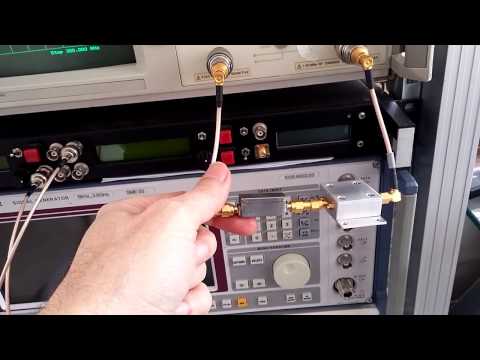
Over on YouTube Adam 9A4QV has uploaded a video showing how to build a DIY bandpass filter for 137 MHz. This can help improve the reception of NOAA and Meteor M weather satellites, by blocking strong out of band signals. Adams design is a 132 MHz – 142 MHz Butterworth bandpass filter which gives about 35 dB attenuation outside of the pass band. He’s also posted a write up documenting the filter design on his website.
Lucas Teske recently went ahead and built the 137 MHz filter suggested by Adam. Lucas didn’t have the correct capacitor values so he ended up cascading several in series. His results showed that the filter did improve his reception significantly.
Akos from the RTLSDR4Everyone blog has recently uploaded four new articles. The first article reviews the new FlightAware Prostick Plus. The Prostick Plus is an RTL-SDR dongle optimized for ADS-B reception. It contains a LNA and 1090 MHz filter on board the dongle. In his review Akos tests the FlightAware Prostick Plus and compares it against the regular Prostick with external filtering. His results show that the Prostick Plus gets 18.45% more position reports and 5.4% extra max range in his location. His second post continues with the Prostick topic and warns customers to look out for sellers reselling, or relisting the Prostick for much higher ripoff prices.
FlightAware Prostick vs Prostick Plus
In his third post Akos reviews our RTL-SDR.com broadcast FM filter and compares it against another similar filter from another seller. His test results show that both filters can improve performace.
Two BCFM band stop filters tested by Akos.
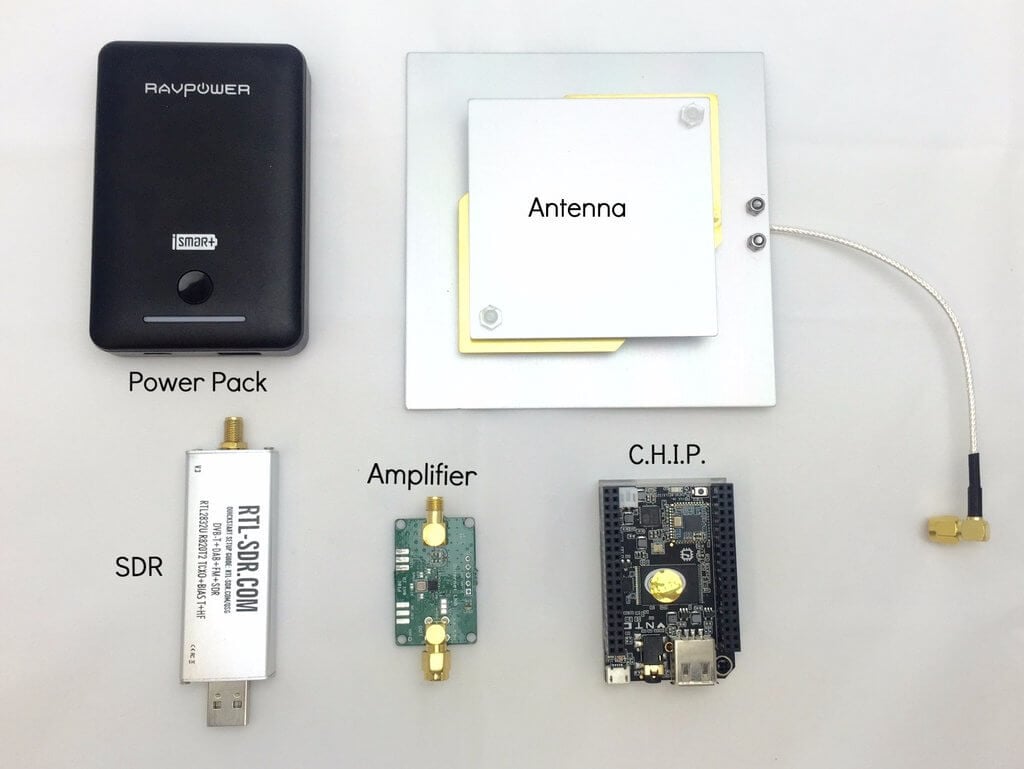
Finally in his fourth post Akos writes a tutorial on getting started with Outernet reception. He bought the full Outernet bundle which comes with a battery bank, CHIP single board computer, E4000 with bias tee RTL-SDR, LNA with filter and patch antenna. His post describes what each component is, then shows how to use them to receive Outernet. His results also seemed to show that our V3 dongle significantly outperformed the E4000 dongle at Outernet reception. The V3 received the Outernet signal with a SNR of 6.39 dB vs only 2.58 dB with the E4000.
In his latest two posts Lucas Teske continues with his series about receiving and downloading weather satellite images from the GOES satellites. In past posts he’s show us how to receive the signal with a satellite dish and Airspy or RTL-SDR (part 1), how to demodulate the signal (part 2), and how to extract frames from the demodulated signal (part 3). Lucas has recently completed his series with parts 4 and 5 having just been uploaded.
In part 4 Lucas shows how to parse the frames and get the packets which will ultimately be used to generate the weather image files. His post explains how to de-randomize the frame data which is initially randomized to improve performance, how to add Reed Solomon error correction, how to demux the virtual channels and the packets and finally how to save the raw packet.
The packet structure
In part 5 Lucas shows us how to finally generate weather satellite images from the GOES satellites. He notes that there is a problem with the LritRice compression method used by NOAA, because the library is currently broken on Linux. So he made a workaround which involved making a Windows application that runs through Wine for decompressing the data. Once the files are decompressed he uses the xrit2pic program which can open the generated .lrit files and convert them into images.
In the future Lucas mentions that he will write a user guide to his LRIT decoder, and make the whole decoding process more user friendly for people who do not care so much about the actual decoding process. Below are some images that Lucas was able to receive with his system.
GOES Full Disk Image of the EarthWeatherfax (WEFAX) Image
Yesterday we posted about Lucas Teskes (@lucasteske) success in building a demodulator for the GOES weather satellite. Before that he also showed us how to build an antenna system to receive GOES with an Airspy or RTL-SDR dongle.
Today Lucas continues with part three of his series on GOES decoding. This time he shows how he has built a frame decoder to process the output of the demodulator, and also gives us a link to his code. The decoder is written in C code. Lucas’ post explains how to sync the frame by detecting the preamble, perform convolution encoding to generate a parity and help correct any errors, and decode the frame data.
In part four Lucas will show us how to parse the frame data and extract the packets which will eventually form an image file of the earth.
A decode frame viewed as an image. This shows the syncword pattern and frame counter.
Last week we posted about Lucas Teske’s (@lucasteske) experience with setting up an antenna system that can receive the geostationary GOES weather satellites. He set up a dish antenna, feed, LNA and filter and was able to successfully receive the GOES signal with an RTL-SDR and Airspy.
Now Lucas has uploaded his second post where he discusses how to demodulate the GOES signal. The GOES satellites transmit a Low-Rate Information Transmission (LRIT) signal which contains full disk images of the earth as well as other weather data from the secondary Emergency Managers Weather Information Network (EMWIN) signal.
In order to demodulate the signal Lucas wrote a BPSK demodulator in GNU Radio. His post goes into good technical detail and shows exactly how the demodulator is constructed. Basically the the BPSK signal is first decimated down to 2.5e6, normalized with an AGC, then cleaned up with a Root Raised Cosine Filter. From there the signal goes through a Costas Loop PLL to receover the carrier wave, then a Clock Recovery MM block to recover the symbol clock. The data is then output to a TCP pipe for the decoder.
In the upcoming third part of his article Lucas will show us how to actually turn the demodulated data into an image of the earth.
Many people with an RTL-SDR have had fun receiving NOAA and METEOR low earth orbit (LEO) weather satellite images. However, a step up in difficulty is to try and receive the geostationary orbit (GEO) weather satellites like GOES. These satellites are locked to a fixed position in the sky meaning there is no need to do tracking, however since they are much further away than LEO satellites, they require a 1m+ satellite dish or high gain directional antenna to have a chance at receiving the weak signal. The GOES satellites transmit very nice high resolution full disk images of the earth, as well as lots of other weather data. For more information see this previous post where we showed devnulling’s GOES reception results, and this post where we showed @usa_satcom’s presentation on GOES and other satellites.
The nice thing about Lucas’ post is that he documents his entire journey, including the failures. For example after discovering that he couldn’t find a 1.2m offset satellite dish which was recommended by the experts on #hearsat (starchat), he went with an alternative 1.5m prime focus dish. Then after several failed attempts at using a helix antenna feed, he discovered that his problem was related to poor illumination of the dish, which meant that in effect only a small portion of the dish was actually being utilized by the helix. He then tried a “cantenna”, with a linear feed inside and that worked much better. Lucas also discovered that he was seeing huge amounts of noise from the GSM band at 1800 MHz. Adding a filter solved this problem. For the LNA he uses an LNA4ALL.
To position the antenna Lucas used the Satellite AR app on his phone. This app overlays the position of the satellite on the phone camera making it easy to point the satellite dish correctly. He also notes that to improve performance you should experiment with the linear feeds rotation, and the distance from the dish. His post of full of tips like this which is very useful for those trying to receive GOES for the first time.
In future posts Lucas hopes to show the demodulation and decoding process.
GOES signals received with the dish, LNA4ALL, filter and an Airspy.
Outernet is a satellite based file delivery service. Currently they’re beta testing their service and they are using RTL-SDR’s as the receiver. In previous posts we’ve seen that they’re now regularly transmitting weather updates, wikipedia files and more files like images and books. Over time the service is becoming more and more useful. If you’re interested in receiving their service we have a tutorial available here.
While most of the Outernet software is open sourced, the signal protocol itself is closed source, which ties you into needing to use the official Outernet software. Over on his blog, Daniel Estévez has been working on reverse engineering the Outernet signal with the goal of publishing the results and building a fully open source receiver.
So far he’s managed to fully reverse engineer the modulation, coding and framing. He’s also been able to build a GNU Radio program that receives the Outernet frames and a Python program called free-outernet which does the decoding. His post goes into greater details on how he reverse engineered the signal and what his finding are.
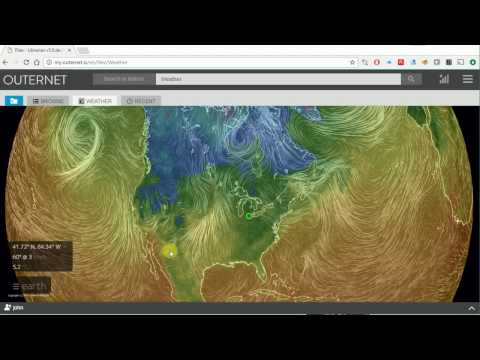
A few days ago we reported that the Outernet L-band satellite service had just upgraded their software to make it available for receiving APRS and weather updates. Back then it wasn’t clear what the weather updates would entail. Today weather updates starting being transmitted. They are using NOAA data and displaying it on a live weather app (which can also be viewed online here).
The app can be used to view weather data such as wind vectors, temperatures, relative humidity, total precipitable water, total cloud water, mean sea level pressure and ocean currents. Outernet writes that the global weather data will be updated via their satellite system once per day, and that each update also provides 24h, 48h and 72h predictions.
We also see that grib files for mariners are now coming in as well as several Wikipedia articles and regular APRS broadcasts from the ISS.
It looks like the Outernet service is becoming more and more useful over time. If you are interested in receiving Outernet with an RTL-SDR see our tutorial post here.