HamDash: A Free Real-Time Ham Radio Dashboard with a Browser-Based RTL-SDR Receiver
Thank you to several readers who have pointed us to HamDash. HamDash is a new free real-time ham radio dashboard that aims to be the always-on monitor for your radio shack. Built by Peter (G0LIW), the web-based app combines HF propagation, space weather, DX cluster spots, POTA and SOTA activations, a contest calendar, and a greyline map into a single customizable view. There's no account or subscription, and it runs in any browser, making it a good fit for a dedicated second monitor, a tablet, or a Raspberry Pi sitting in the shack. We note that despite being free, the project doesn't appear to be open source, as we could not find any public source code repo.
The dashboard includes live solar flux, K-index, X-ray flare, and aurora data so you can tell when the bands are open, plus VOACAP-based propagation predictions and Met Office/MeteoAlarm weather alerts useful for portable operating. A Visual Layout Builder lets you arrange modules into rows and slots exactly how you want, and a touchscreen-friendly on-screen keyboard makes it usable on a mouse-only or kiosk-style setup.
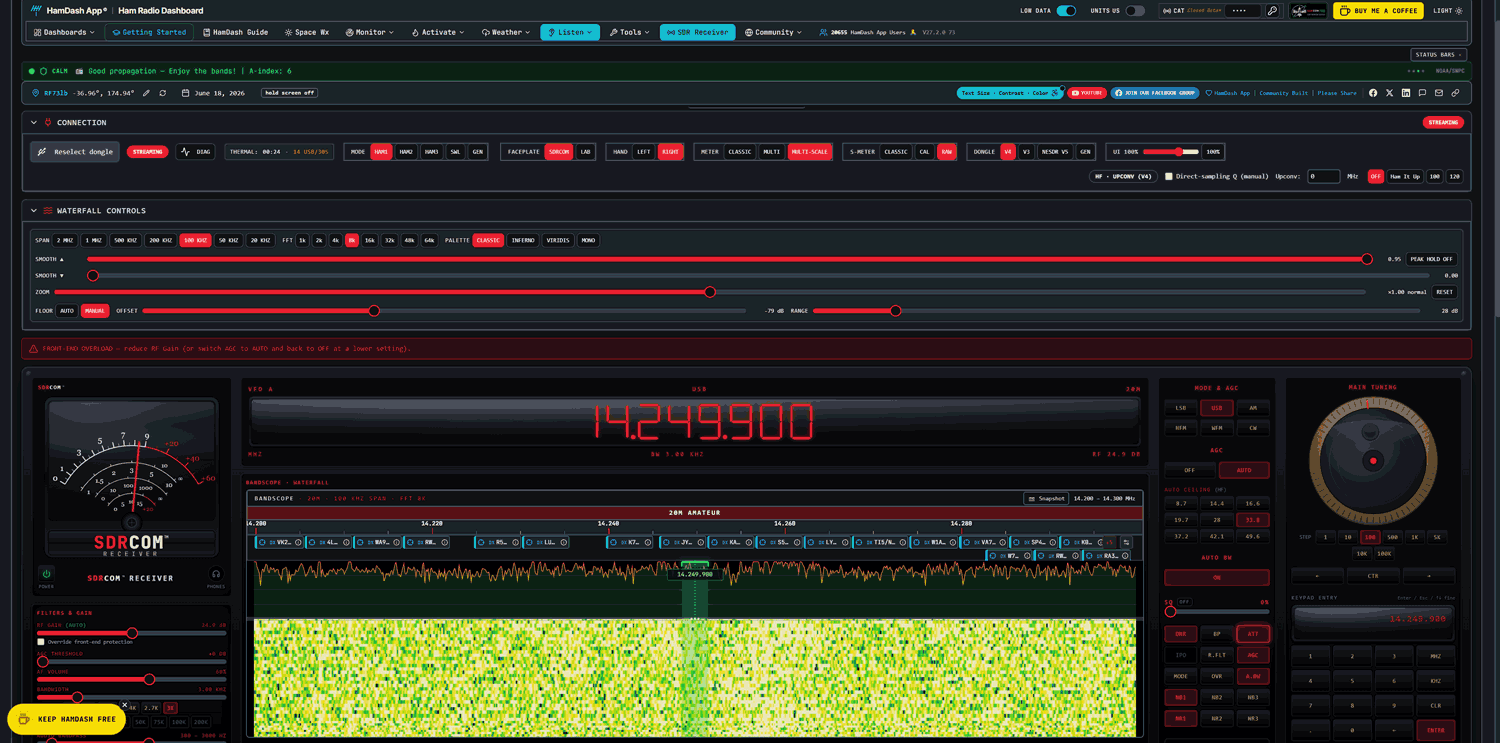
Of interest to RTL-SDR users, HamDash includes a browser-based SDR receiver called SDRCOM that works with an RTL-SDR V3 or V4 dongle over WebUSB, so you can run it in Chrome or another Chromium browser like Edge or Opera directly. The free SDRCOM Lite edition is included with HamDash and covers AM/FM/SSB/CW tuning, a waterfall display, an FT8 decoder, a basic 3-band EQ, and a 100-slot memory bank. There's also a paid SDRCOM Pro edition for a one-year license with no auto-renewal $9.99 fee that adds enhanced waterfalls, FT8 and FT4 decoders, an ADS-B engine with 3D aircraft tracking, 4-band noise-reduction DSP, an auto-lock band scanner, a WAV recorder with scheduler, and a 1000-slot memory bank.
AI-Disclaimer: While not advertised as AI-coded, the author's company, Nemeta AI Software Services LLC, and the UI-style hints at AI development tools having being used.





























Nice try and thanx for playing!
Hi UnDoMe, Peter here — I wrote the software, so let me help you out.
It comes down to getting your settings right *before* you hit Connect. In the top panel there’s a dropdown where you pick your device and connect — set these first:
– Pick your device: V3 or V4.
– V3 (R820T2): turn Q (Direct Sampling) ON. The V3 needs the Direct Sampling Q-branch to hear HF — without it the stick won’t sample HF correctly and you’ll get silence. (It auto-enables below 24 MHz, but set it on and you’re covered.)
– V4 (R828D): leave Q (Direct Sampling) OFF, and leave Ham It Up OFF. The V4 has a built-in hardware upconverter, so HF rides the normal tuner path — Direct Sampling should stay off at all frequencies.
– Only switch the Ham It Up button on if you’re actually running a Ham It Up upconverter (and you wouldn’t need that with a V4).
Then click Connect.
Windows 11 and Chrome are exactly what it’s built for — you shouldn’t have any trouble once those settings are right.
If you still hit difficulties, I’m glad to help — this is an entirely free product, no charge for HamDash and no charge for the SDR receiver. Email me at [email protected] and I’ll get you sorted. Best of luck — I think you’ll enjoy it once it’s running.
73, Peter G0LIW / W4PAH
you could not even write this reply without using AI lmao😂
Lol Whispr actually, still Ai though 🕳in 1
Win 11 and updated Chrome… no audio
Win 10 x64 and updated Chrome… could not find a V3 or 2 diff V4s.