Tagged: ipad

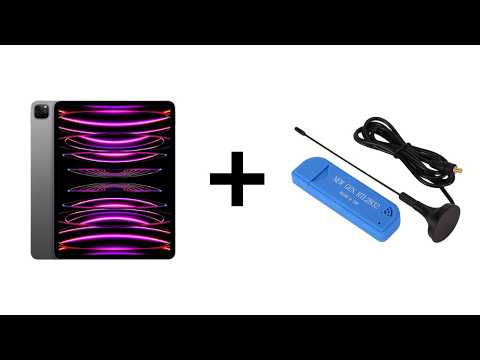
RTL-SDR Now Runs on iPad M-Series Devices Directly via USB Without Jailbreak

Thank you to Arved (DK5AV/M0KDS) for writing in and sharing with us some exciting news. Arved has just announced his USBDriverKit extension for RTL-SDRs over on X and released it as open-source code on GitHub.

This is an unofficial port of librtlsdr, created using USBDriverKit instead of libusb, which is not available on iOS. This now allows RTL-SDRs to run directly on iPad iOS devices via USB without any jailbreak requirements. Previously, RTL-SDRs were unable to run on iOS devices directly. The only way around this was to run an RTL-SDR remotely and connect to it over a network via rtl_tcp.

The one caveat at this stage is that this currently only supports iPads with an M-Series SoC. At this time, only iPads use M-series chips, whereas iPhones currently use A-series chips. It also appears that the Blog V4 is not yet compatible with this driver due to the required EEPROM strings not being read by the drivers yet. 

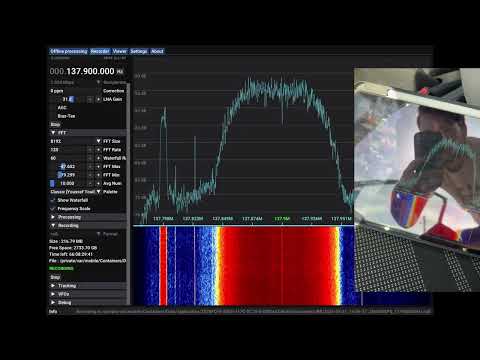
In the video embedded below Arved shows an RTL-SDR running on his M1 iPad, and demonstrates CoronaSDR, welle.io, SatDump and rtl_tcp running.

RTL-SDR Running Directly on iPad via USB — Demo with CoronaSDR, welle.io, SatDump & rtl_tcp (no JB)

Arved has also released a video (embedded below), demonstrating SatDump connecting to an RTL-SDR and receiving a signal from a Meteor M2 LRPT weather satellite. He first records the IQ data with SatDump, then uses SatDump to decode the recorded data into an image.

Meteor-M2 4 LRPT Reception on iPad with RTL-SDR via USB — SatDump Demo

New Apple iOS (iPhone/iPad) RTL-SDR rtl_tcp Client App in Beta Testing

Over on our forums poster hotpaw2 has released news about his new RTL-SDR app for iOS (iPhones/iPads). If we're not mistaken, this will be the first app that enables RTL-SDR usage on iOS. However, as iOS devices don't allow RTL-SDRs (or any arbitrary USB device) to connect directly to devices, you still need to use a Raspberry Pi or other network connected computing device as an rtl_tcp server. So the RTL-SDR does not plug directly into the iOS device. Currently he is looking for beta testers to help test a pre-release of the software. Hotpaw2 writes:

Hi. A first version of my iOS SDR app is nearing completion. So I'm interested finding a few users who would like to beta test a pre-release of the app, and provide some feedback. The beta test requirements are having a 64-bit iOS device (iPhone or iPad) running iOS 11.2.x or newer, having Apple's TestFlight app installed, having a Mac, PC, Raspberry Pi (or other Linux box) that already has rtl_tcp installed and ready to run. (And an RTL-SDR obviously.) The rtl_tcp server must be on a fast WiFi network reachable by your iOS device. Note that iOS TestFlight app distributions do have an expiration date.

iOS does not recognize arbitrary USB devices such as an RTL-SDR. This is even true when using Apple's Lightning Camera Connection kit to provide an iPhone with a wired USB port. So an adapter must be used. I use a headless Raspberry Pi 3 running rtl_tcp as the USB adapter to provide raw IQ samples from the RTL-SDR to the iOS app. A Raspberry Pi Zero W would also work. I then connect to the server either over WiFi, or via wired ethernet. 

This iOS SDR app is fairly simple. I've been experimenting with developing low-level DSP code in Swift. So this SDR app was written from scratch in the Swift programming language. Because the app is targeted for the iOS App store, it uses none of the existing SDR C++ code base. 

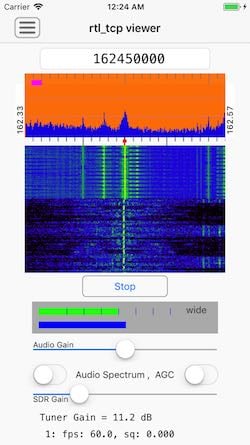
The app currently demodulates AM, N-FM, and mono W-FM. It also displays a spectrum and rudimentary waterfall, and allows one to swipe-to-tune. There are not a lot of controls, as screen real-estate on an iPhone is quite limited. But I can walk around the house and, from my iPhone, monitor if my RTL-SDR or AirSpy HF+ are picking up any interesting signals.

Contact info for beta testing can be found here: http://www.hotpaw.com/rhn/hotpaw/ 

Source code to librtlsdr and rtl_tcp can be found in many repositories on github, but zero support for finding or installing such, and/or setting up your Raspberry Pi, will be provided by me.

Screenshot of the RTL-SDR iOS app