Tagged: AIS

AISRec for Android: New AIS Decoder

Back in December last year we posted about Jane feverlay’s work on his software called AISRec, which was a Windows AIS decoder for the RTL-SDR that he had developed.

AIS is an acronym for Automatic Identification System and is a system used by ships to broadcast position and vessel information. By monitoring AIS transmissions with the RTL-SDR we can build a boat radar system. We have a tutorial on this here.

Now from YouTube it looks as though Jane has developed a new Android version of AISRec which he describes as a high performance dual-channel AIS receiver for use with a single RTL-SDR dongle. The features of AISRec include:

1. Functions include AIS and GPS NMEA I/O, from/to USB devices and serial ports (special android devices with serial ports).
2. It supports TCP server and UDP forwarding jointly or independently for AIS and GPS.
3. It supports steaming in WIFI in AP or station modes and Ethernet.
4. It supports auto run on boot for especially rooted devices.

He also writes that AISRec also has companion implementations for Windows desktop and metro, Linux on Raspberry Pi 2 and the Radxa pro.

Unfortunately, at the moment there does not seem to be a link available to download the software and the video may only be a preview. The video does link to his Taobao shop at http://shop114459024.taobao.com/ (in Chinese use Google Translate), which is where he might release the software when it is ready.

New Windows AIS Decoder For the RTL-SDR: AISRec

Over on YouTube user Jane feverlay has uploaded a video showing a new AIS decoder called AISRec for Windows that he has developed.

AIS is an acronym for Automatic Identification System and is a system used by ships to broadcast position and vessel information. By monitoring AIS transmissions with the RTL-SDR we can build a boat radar system. We have a tutorial on this here.

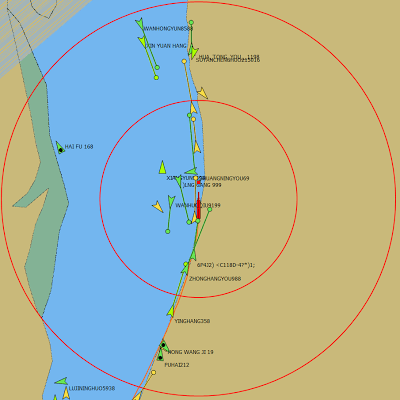
The new software is not free, but he offers a trial version that limits the run time to 20 minutes and 5000 max messages. The paid version removes these limits and also decodes both AIS channels simultaneously. The program monitors data from the RTL-SDR and sends decoded data out via UDP. Software such as OpenCPN can then be used to display the AIS data on a map.

We tested the trial version on our machine and found that it worked well at decoding AIS messages. To download the trial go to http://pan.baidu.com/s/1pJiEzEV and enter the code kn44. The download site is in Chinese, but it is obvious where to enter the code. We found the software to be virus free, but remember to always scan unknown software like this yourself. The full price of the software is unknown, but purchasing instructions are given in the trial download readme. The author also writes that his software now supports the Airspy, but not in the trial version.

Note that we discovered that the software doesn’t use a PPM correction setting as expected. Instead it uses a frequency shift setting. To set the shift in the AISRec.ini file, we had to calculate freqshift = 162.025 MHz – frequency of the second AIS channel as shown in SDR# with no PPM correction set.

Another similar software program that was released earlier is PNAis.

New AIS Decoder for the RTL-SDR: PNAIS

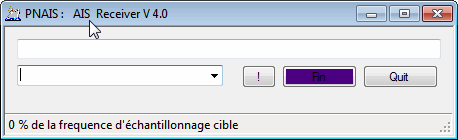
Over on our Forums  has told us about his recently released an AIS decoder called PNAIS which appears to directly connect to the RTL-SDR and decode AIS data. After decoding it then outputs the decoded NMEA data via UDP, which could then be received and used in map plotting software such as OpenCPN.

AIS is and acronym for Automatic Identification System and is a system used by ships to broadcast position and vessel information.

PNAIS
PNAIS Decoder

Hak5: Identify and Locate Ships Via AIS Transmissions

Hak5, a popular YouTube technology show has recently been dedicating a bunch of episodes to RTL-SDR projects. Recently we posted about their efforts with ADS-B, and some GNU Radio tutorials. Their most recent video discusses AIS (Automatic Identification System) which is a system similar to ADS-B which ships use to transmit their location to create a modern GPS based radar system.

The Hak5 video discusses how AIS works and also shows how to use an RTL-SDR to receive it. In their tutorial they use SDR#, VBCable and ShipPlotter to receive and view AIS data on map. Note that we also have an AIS tutorial here.

Identify And Locate Ships Via AIS Transmissions!, Hak5 1610

K2NCC’s Guide to AIS Reporting for the RTL-SDR

AIS enthusiast K2NCC has posted in our forum a link to a PDF document he has created showing how to use SDR#, AISMon and AIS Dispatcher to report AIS data to marinetraffic.com and aishub.net. Marinetraffic.com and Aishub.net are websites which aggregate AIS data from various contributors around the world.

AIS is an acronym for Automatic Identification System and is a type of modern GPS based radar system similar to ADS-B used by mariners to help avoid collisions at sea.

Map from Aishub.net
Map from Aishub.net

Decoding 2x AIS Channels with SDR Console, AISMon and OpenCPN

YouTube user k2nccvids has posted a video showing him decoding and plotting both AIS channels simultaneously on a Windows PC with free software. To do this he uses SDR Console and two AISMon instances. SDR Console is a general purpose SDR GUI that supports the RTL-SDR. One of it’s major advantages over other SDR software is that it can tune to multiple signals in the same swath of tuned bandwidth simultaneously and output their audio to different virtual audio cables.

k2nccvids used two AISMon instances, each one connected to a separate virtual audio cable outputting AIS audio from SDR Console. He set AISMon to output decoded UDP packets on two different ports. Then he created two UDP listeners in OpenCPN for plotting, one for each port.

The BIG List of RTL-SDR Supported Software

There are now dozens of software defined radio packages that support the ultra cheap RTL-SDR. On this page we will attempt to list, categorize and provide a brief overview of each software program. We categorize the programs into general purpose software, single purpose software, research software and software compatible with audio piping.

If you know of a program that is missing please leave a comment in the comments section at the bottom of the page.

13/02/2014 - Added Sodira, gr-wmbus, rtlsdr-waterfall, QTRadio, multimon, sdrangelove, lte-scanner, rtl_tcp, rtl_sdr_FS20_decoder.
17/02/2014 - Updated the Linrad description.
28/04/2014 - Added Modesdeco and Trunk88.
30/05/2014 - Added RTL Panorama, RTL SDR Panoramic Spectrum Analyzer, Chrome Radio Receiver, SeeDeR, DAB Player, RTL SDR Installer, PD/Max Wrapper, SDRWeather, LTR Analyzer, softEOT/softDPU and ScanEyes.
26/07/2014 - Added PiAware, OOK-Decoder, rtl_fm_python, rtl_power heatmap viewer, RTL Bridge, threejs-spectrum, CANFI Software, PNAIS, FLARM Decoder, Xastir, RTLSDR-Airband, SDRTrunk.
13/11/2014 - Added Touchstone, RFAnalyzer, RTL1090 XHSI Interface, Parus Decoder, PlotRTL1090, LRPT Decoder.
05/02/2015 - Added rtl_tool_kit, CubicSDR, OregonWeather, FreqWatch.
15/04/2015 - Added ADSBox, YouSDR, FlightAware Flight Feeder, Frequensea, Track your flight EUROPE, QSpectrumAnalyzer, Doppler & Demod, Redsea, rtl_heatmap, gr-gsm, driveby, SDRecord.
23/12/2015 - Added Remote rtl_udp, AISRec, dump978, AISDeco2, SDRrecorder, OpenWebRX, dsame, RTL-Widespectrum, rtl_ais, rtl_gopow, ham2mon, rtl_ais_android, inmarsatdecoder, spektrum, qtcsdr, rtl_power_fftw, JAERO, GNSS-SDRLIB, SVxLink.
8/09/2017 - Added inspectrum, gr-isdbt, telive, tetra-listener, gr-iridium, SDRuno, luaradio, rx_tools, kukuruku, chronolapse, cloud-sdr, natpos, d3-waterfall, SDRDue, gqrx-ghostbox, ships, rtlmic, tsl-sdr, universal radio hacker, dumpvdl2, re-dected, aerial-tv, questasdr, welle.io, spyserver, dspectrumgui, atcsmonitor, NRSC5 HD Radio Decoder, leandvb, imsi-catcher, block stream receiver, salamandra, deinvert, RS.
6/11/2017 - qradiolink
15/06/18 - Zeus Radio
11/01/19 - SCEPTRE
13/01/20 - VDLM2DEC, Blockstream Satellite, TempestSDR, rtlsdr-wsprd, rtl_map, Radwave, radiosonde_auto_rx, XRIT Decoder, SATNOGS, SigintOS, RadioCapture, EMI_Mapper, xrit-rx (KOMSAT 2A), RTLion, WSJT-X, noaa-apt, rtlSpectrum, fingerprinting_radios_w_ML, mySdrPlayback, QO-100_SSB-WebSDR_DATV-WebSpectrum, goestools, SigDigger, Tekmanoid EGC, Scytale-C, PEPYSCOPE, iridium-toolkit, Electrosense, ORBCOMM-receiver, r2cloud, coole-radar, vor-python-decoder, IridiumLive, radio_analyser, DSDPlusUI, retrogram-rtlsdr, vortrack, rtl_power-fm-multipath, glrpt, Spektrum SV Mod, gammaRF, SegDSP, rtl-ultrasound, radiosondy.info, OP25, RS41 Tool, TETRA Trunk Tracker, meteor_demod, FreqShow, rtl_tcp SDR, PLSDR, SDR Receiver, Echoes, rtlmm, FM2TXT, cnn-rtlsdr, Meteor Logger.
04/03/21 - SDR++

General Purpose RTL-SDR Software

We define general purpose SDR software as programs that allow the RTL-SDR to work like a normal wideband radio receiver.

SDR# (Windows) (Free)

SDR#
SDR#

SDR# (pronounced "SDR Sharp") is the most popular free RTL-SDR compatible software in use at the moment.  It is relatively simple to use compared to other SDR software and has a simple set up procedure. We have a full overview of the installation procedure on our Quick Start Page. SDR# is designed to be use with the $199 Airspy SDR, but works just fine with the RTL-SDR.

SDR# is a simple to use program that also has some advanced features. It has a useful modular plugin type architecture, and many plugins have already been developed by third party developers. The basic SDR# download without any third party plugins includes a standard FFT display and waterfall, a frequency manager, recording plugin and a digital noise reduction plugin. SDR# also decodes RDS signals from broadcast FM.

HDSDR (Windows) (Free)

HDSDR
HDSDR

HDSDR is based on the old WinRAD SDR program. HDSDR supports the RTL-SDR through use of an ExtIO.dll module. To install HDSDR, download the program from the link on the main HDSDR page, then to use the RTL-SDR you will need to download the ExtIO_RTL2832.dll file an place it into the HDSDR folder. When opening HDSDR, select the newly copied ExtIO_RTL2832.dll. The other dlls that come with HDSDR will not work with the RTL-SDR, even though they have RTL-SDR in their filename. The official installation instructions can be found here.

Along with a FFT display and waterfall, HDSDR has some extra advanced features. Users will also find an Audio FFT and waterfall display on the bottom of the screen. The output audio can also be bandpass filtered by dragging the filter borders on the display. Bandpass filtering the audio can really help clean up a noisy signal. The audio processing also supports placing of notch filters either manually or automatically. There are also noise reduction and noise blanker features and an automatic frequency centering algorithm which will automatically center the signal, so you don't need to click exactly in the center of a signal. Traditional ham radio users will also enjoy the S-units signal strength meter and the built in frequency manager.

SDR-RADIO.COM V2/V3 (Windows) (Free)

SDR-RADIO.COM V2
SDR-RADIO.COM V2

SDR-RADIO.COM V2 and the newer V3 is a popular SDR program with many advanced features. As such is it a fair amount more difficult to learn and use compared to SDR# and HDSDR. Be sure you install version 2 and not V1.5 as only V2 has RTL-SDR support.

Once sdr-radio is installed, to get it working with the RTL-SDR you will need to compile or download three .dll files (SDRSourceRTL2832U.dll, rtlsdr.dll and libusb-1.0.dll) and place them into the sdr-radio folder. To compile your own dlls see the instructions here, otherwise download the dlls directly from the bottom of this link. If the dlls were placed in the correct folder you will be able to add your RTL-SDR as a receiver by clicking on the +Definitions button, and then finding and adding the RTL SDR (USB) option under the search drop down menu.

Like HDSDR, not only does sdr-radio have a RF FFT signal and waterfall display, but also an optional audio spectrum FFT and waterfall display. Built in are also several DSP features like a noise blanker, noise reduction filter, notch filter and squelch options. The EMNS noise reduction filter is particularly good at automatically cleaning up and clarifying voice signals.

To add to the feature list, sdr-radio also has built in PSK, RTTY and RDS decoders, and also comes with a satellite tracker. Furthermore, sdr-radio V2 (not V3 yet) has an excellent remote server which will allow you to easily set up and connect to a remote RTL-SDR server over a network or the internet. Finally, sdr-radio is capable of listening to up to 6 signals in the same chunk of visible spectrum at a time.

Continue reading

2-Channel AIS Receiver with RTL-SDR and GNUAIS

Blogger OZ9AEC has written a post on his blog showing how he made a 2-channel AIS receiver using the RTL-SDR, GNU Radio and GNUAis. AIS is a radio protocol used by boats to broadcast their position and speed which is then used to create a type of radar system to help avoid collisions. AIS signals are transmitted periodically on one of two channels. Two channels are used to improve capacity and help avoid interference if two signals from different boats are broadcast at the same time.

Before this, most AIS receiver implementations we’d seen that used the RTL-SDR received only on a single channel. OZ9AEC’s GNU Radio program receives on both channels simultaneously like a commercial AIS receiver does and is thus a better receiver. He eventually plans to get this receiver to run on a Beaglebone.

See his post for instructions and to download the GRC files.

Update: Another AIS decoder known as gr-ais is also capable of 2 channel AIS, and bristromat from Reddit has written a tutorial on setting it up and running it with OpenCPN.

Two channel AIS Block Diagram