Category: RTL-SDR

Version 2.6 of GQRX Released

Version 2.6 of the popular SDR program GQRX has just been released (changelog). GQRX is a general signal browsing program similar to programs like SDR#, HDSDR and SDR-Console. However GQRX is designed to run on Linux, MacOS and Raspberry Pi 2 & 3. Note that v2.6 is still a work in progress for MacOS. Apart from the new features and bug fixes, one of the major improvements appears to be reduced CPU usage, meaning that it should run better on older PCs. The changelog is pasted below:

New features

  • 1-2-5 scaling on FFT axis.
  • Audio waterfall.
  • Remember AGC settings between sessions.
  • Right-click on FFT resets frequency zoom.
  • Separate dB ranges for pandapter and waterfall.
  • Raw I/Q mode.
  • Portaudio support.
  • Command line option to set Qt style (fusion, windows, …)
  • Binary packages for Raspberry Pi 2 and 3 (see below)

Bugs fixed

  • Stuttering audio with Pulseaudio backend.
  • Use system font on FFT plot (too small font on high res displays).
  • Broken FUNcube Dongle Pro+ support on Mac OS X 10.11.4.
  • Correct display of negative offsets between -1 and 0 kHz.
  • Reset frequency digits below the one that is being changed.
  • LNB LO could not be set from I/O configuration dialog.
  • Update squelch level when switching between demodulators.
  • Set correct filter range when loading bookmark.
  • White area on waterfall.
  • RFSpace Cloud-IQ support on Mac OS X, RPI binaries and in PPA.

Miscellaneous improvements

  • Input decimator performance.
  • SDRPlay integration through SoapySDR.
  • Only probe for devices when the program is started.
  • Allow user to enter ALSA device name.
  • Set default audio FFT range to -70…0 dB.
  • Restore audio FFT dB scaling between sessions.

GQRX

RTL-SDR.COM Broadcast FM Band-Stop Filter (88-108 MHz Reject) Now for Sale + RTL-SDR V3 Dongle Availability

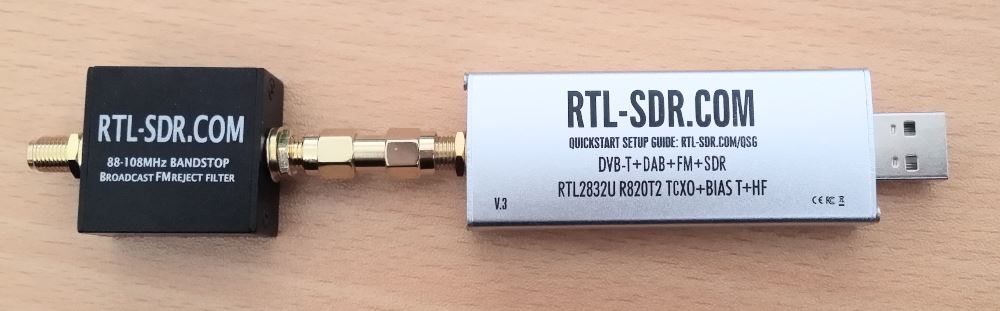
In our store we have just released our new broadcast FM band-stop filter. The cost is $14.95 USD with free international air mail worldwide shipping. (Of course you may choose to upgrade to faster shipping if desired). This product is currently only shipping from our warehouse in China and is not available on Amazon for the time being.

The filter comes in a 2.8 cm x 2.8 cm x 1.3 cm aluminum enclosure and uses female SMA connectors on each end. Included in the package is also a SMA male to SMA male straight barrel adapter.

Click here to visit our store

Important Shipping Note: Please note that right now it is the long “Golden week” holidays in China (1 – 7 Oct), so this product will probably ship out next week and there may be some delays relating to heavy “catch-up” mail volumes around this time.

The filter attached to our RTL-SDR.COM V3 dongle.

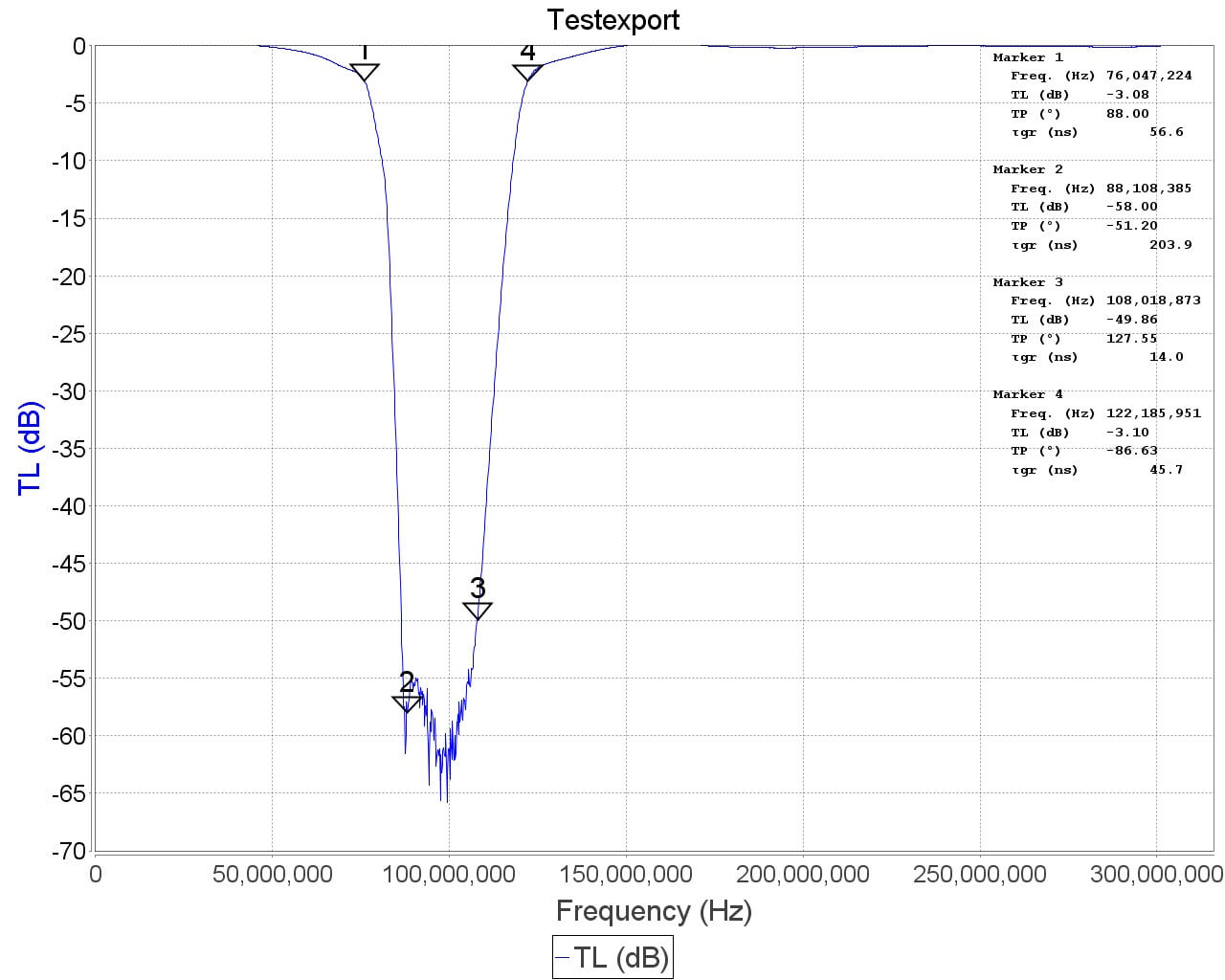
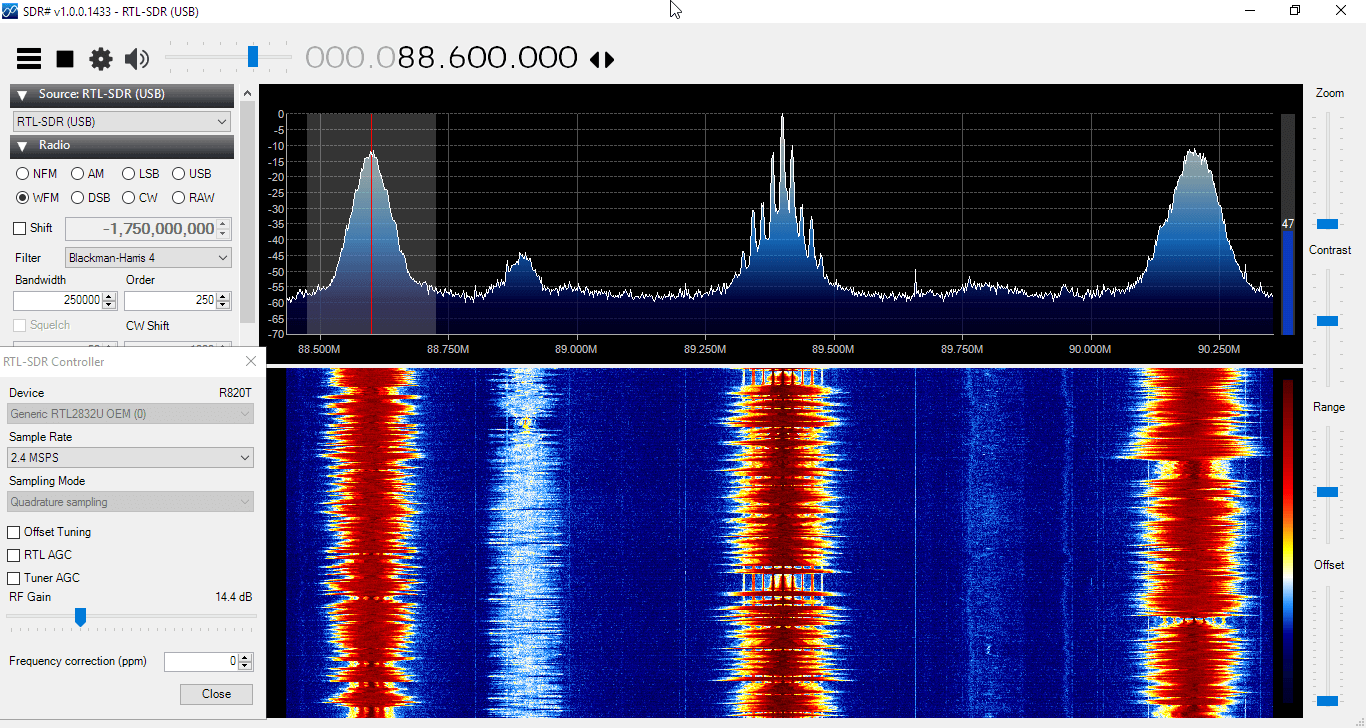
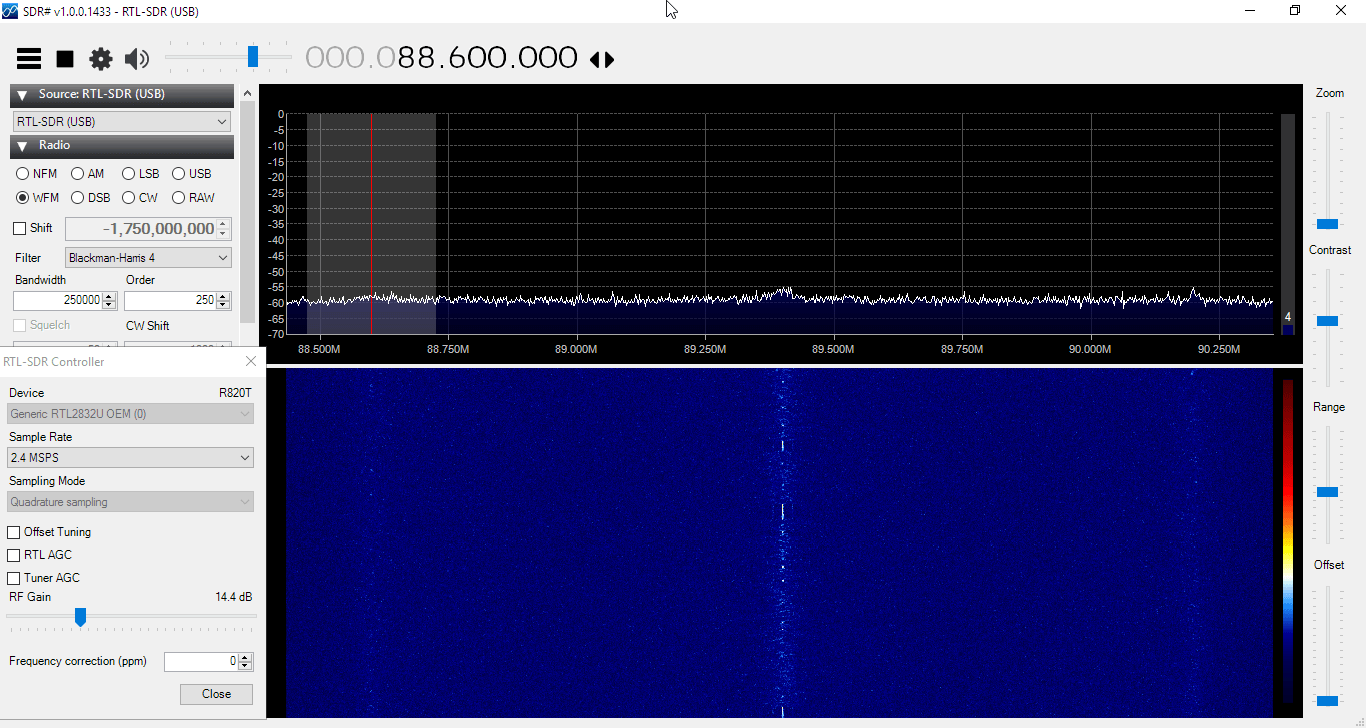
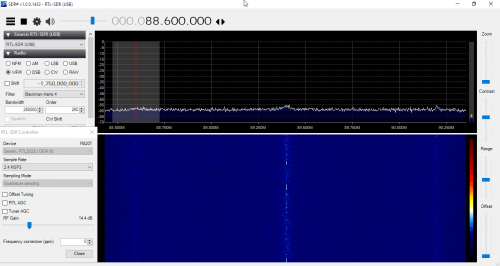
This filter rejects signals between 88 – 108 MHz with around 50 dB or more attenuation. A broadcast FM band-stop filter is very useful for use with SDRs as in some areas broadcast FM signals can be so strong that they overload the SDR, causing very poor performance in other bands. You can tell if this is the case for you if you see images of BCFM stations or interference that looks like a WFM signal at other frequencies when you turn up the gain.

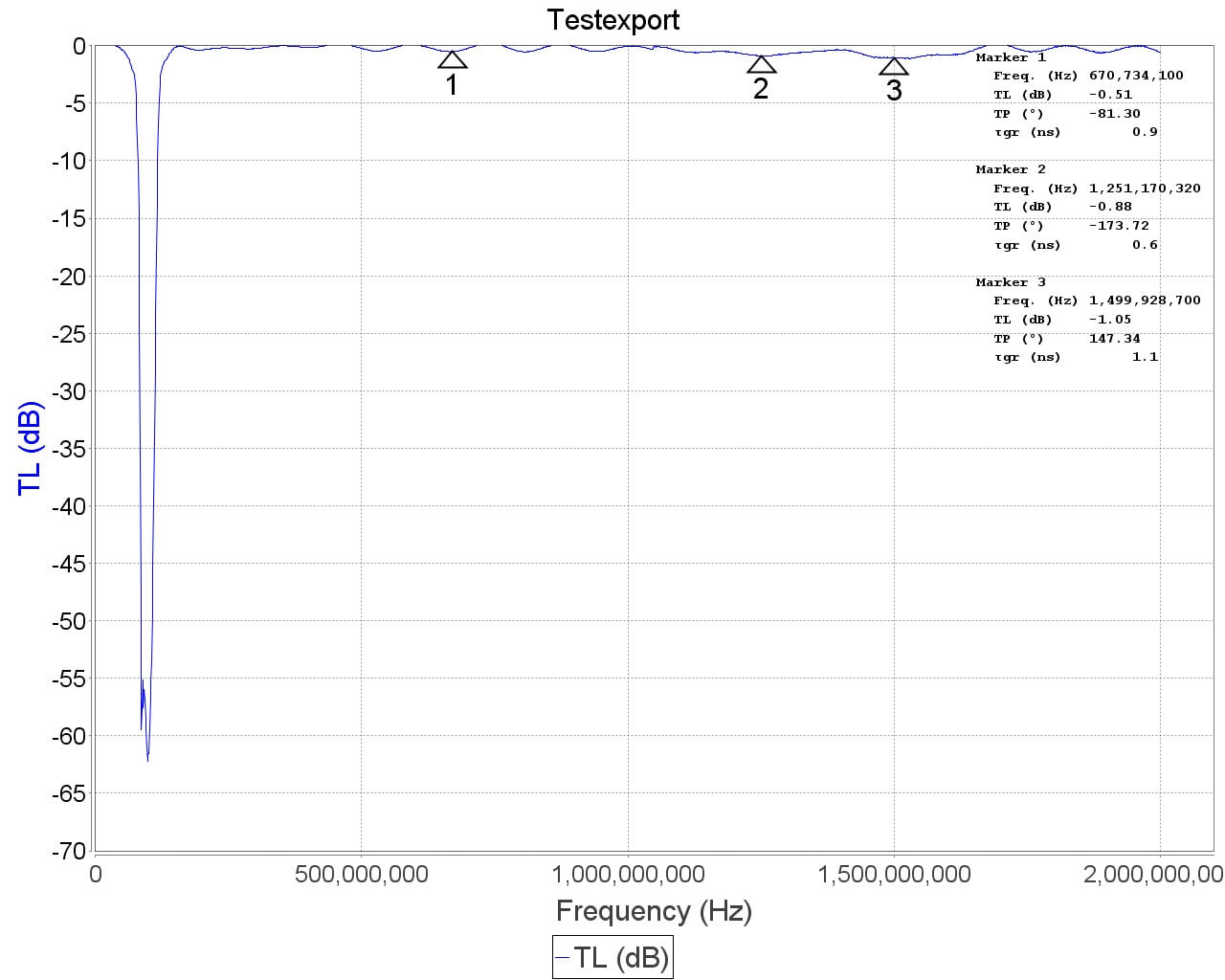
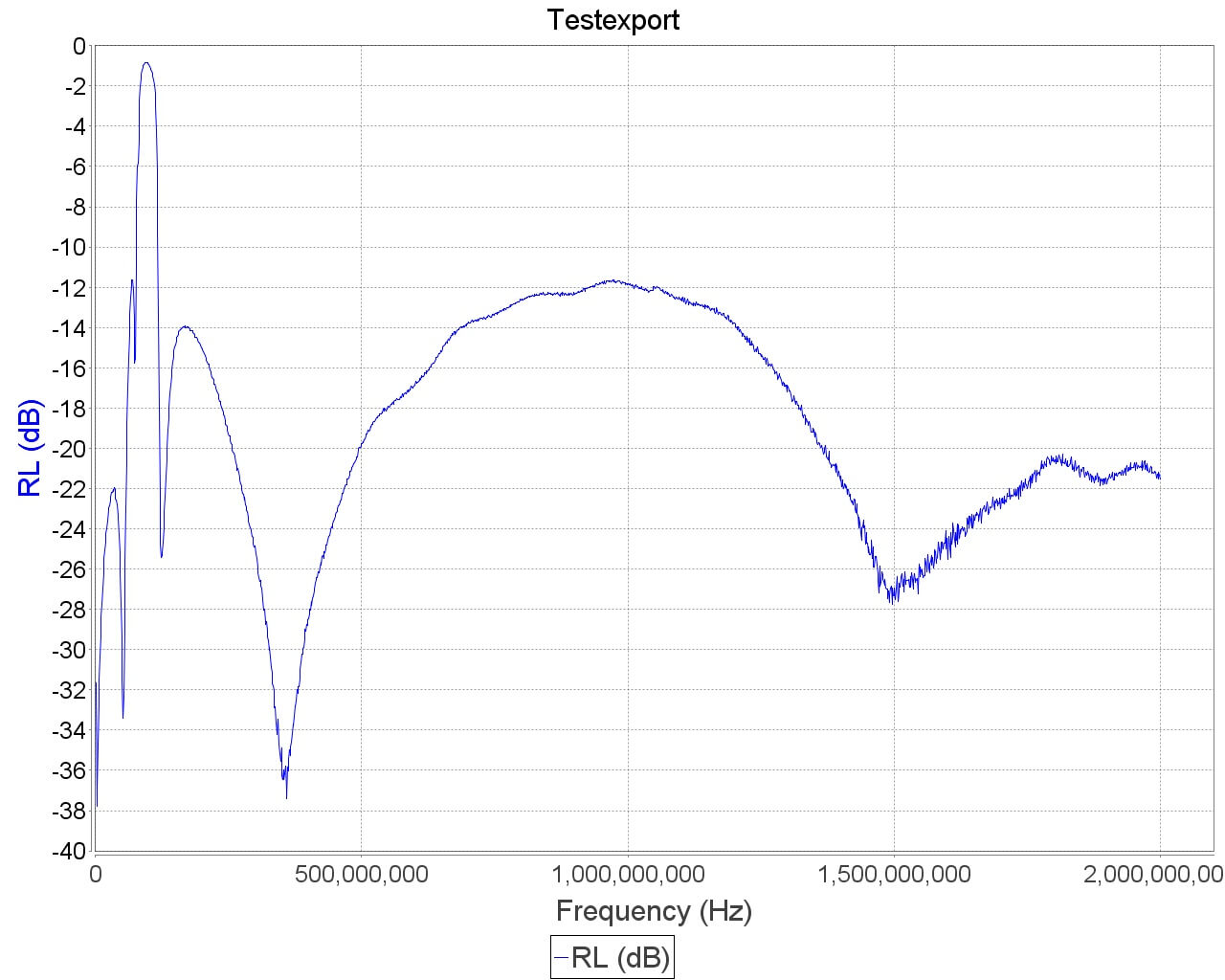
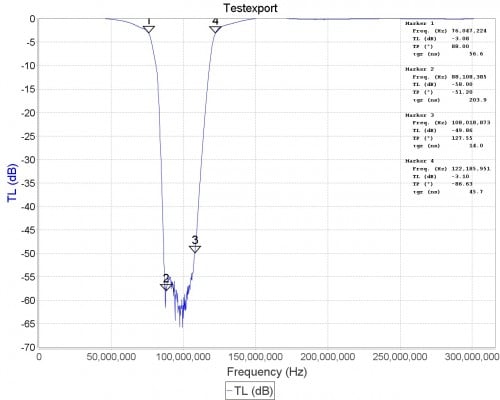
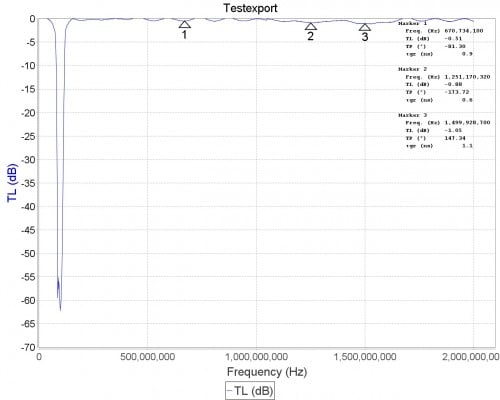
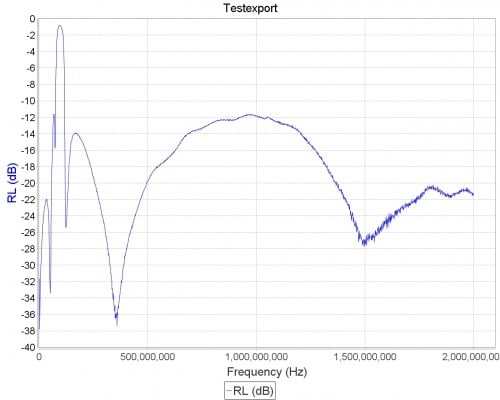
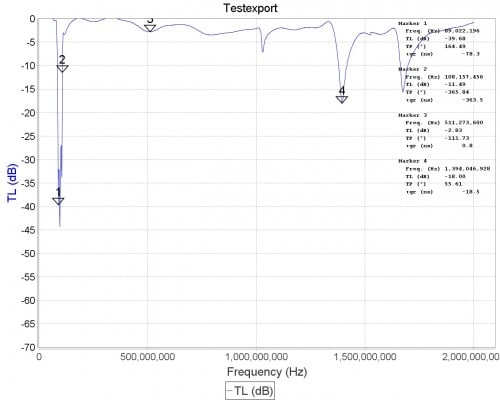
The filter is based on a simple 7th order Chebyshev design. The 3 dB roll off is at 76 MHz and 122 MHz. 88 MHz is attenuated by almost 60 dB, and 108 MHz is attenuated by 45-50 dB. Outside of the pass band the insertion loss is practically zero below 500 MHz, less than 0.5 dB from 500 MHz – 1 GHz, and below 1.5 dB between 1 GHz – 2 GHz. Between 2 – 3 GHz performance degrades slightly, but insertion loss remains below 1.5 dB for most frequencies. The filter can also pass up to 80 mA of DC current (probably can do more) and has negligible DC resistance.

Active Area
RTL-SDR.COM BCFM Band-Stop Filter
BCFM Filter Disconnected
BCFM Filter Connected
Active Area RTL-SDR.COM BCFM Band-Stop Filter BCFM Filter Disconnected BCFM Filter Connected

Below we show a comparison of what a cheap $5 TV FM band-stop filter looks like on the network analyzer. You can see that the stop band is attenuated by significantly less, and the insertion losses on other frequencies are much much larger.

Cheap $5 TV BCFM Filter
RTL-SDR.COM BCFM Band-Stop Filter
Cheap $5 TV BCFM Filter RTL-SDR.COM BCFM Band-Stop Filter
The Cheap $5 TV BCFM Band-Stop Filter

RTL-SDR v3 Availability Note: Our next batch of RTL-SDR v3 dongle stock should be available in 1-2 weeks (there is a delay with restocking due to the Golden week holidays). Production has completed, and we are only waiting for delivery of this stock. Batch 2 includes minor enhancements including slightly tweaked capacitor values, an additional decoupling cap and a fuse on the bias tee.

New SDR# Audio Waterfall Plugin

The old audio waterfall plugin for SDR# seems to be no longer available for download anywhere (it may have gone out of date and is no longer compatible with the latest versions of SDR#). Alan Duffy decided to write his own version of the audio waterfall plugin and make it available for download. An audio waterfall shows the demodulated audio in waterfall form, essentially creating an audio spectrum analyzer. This can be useful for understanding the demodulated frequency structure of a signal.

To install the plugin simply download the dll from his website and place it in the SDR# folder. Then open plugins.xml file with a text editor, and add the magicline specified on his page. Note that for us Chrome detected this file as malicious, but this is a false alarm as Chrome does this often with unknown .dll files. To recover the file we had to go to the Chrome menu -> Downloads, then select "Recover File" to download the file. (If you still have problems with the download then check out the comments as some users have kindly mirrored it). (File was moved to a trusted site so this problem shouldn't occur anymore)

Audio waterfall with the built in audio spectrum analyzer.
Alan's Audio waterfall shown together with the built in audio spectrum analyzer in SDR#.

A Good Quickstart Guide for RTL-SDR Linux Users

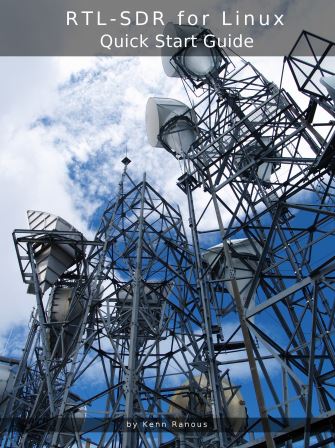
Recently we found this excellent quick start guide by Kenn Ranous which shows how to set up various RTL-SDR related software programs on (Debian) Linux. The guide shows how to install the drivers, how to install and set up GQRX, CubicSDR, dump1090, Virtual Radar Server, QSpectrum Analyzer and SDR Trunk.

If you are struggling with getting an RTL-SDR to work on a Linux system then this should be a very good starting point.

The guide can be found on Kenn’s blog at https://ranous.wordpress.com/rtl-sdr4linux.

rtlsdr_linux_qsg

RTLSDR4Everyone: Preliminary Review of the ThumbNet N3 Prototype

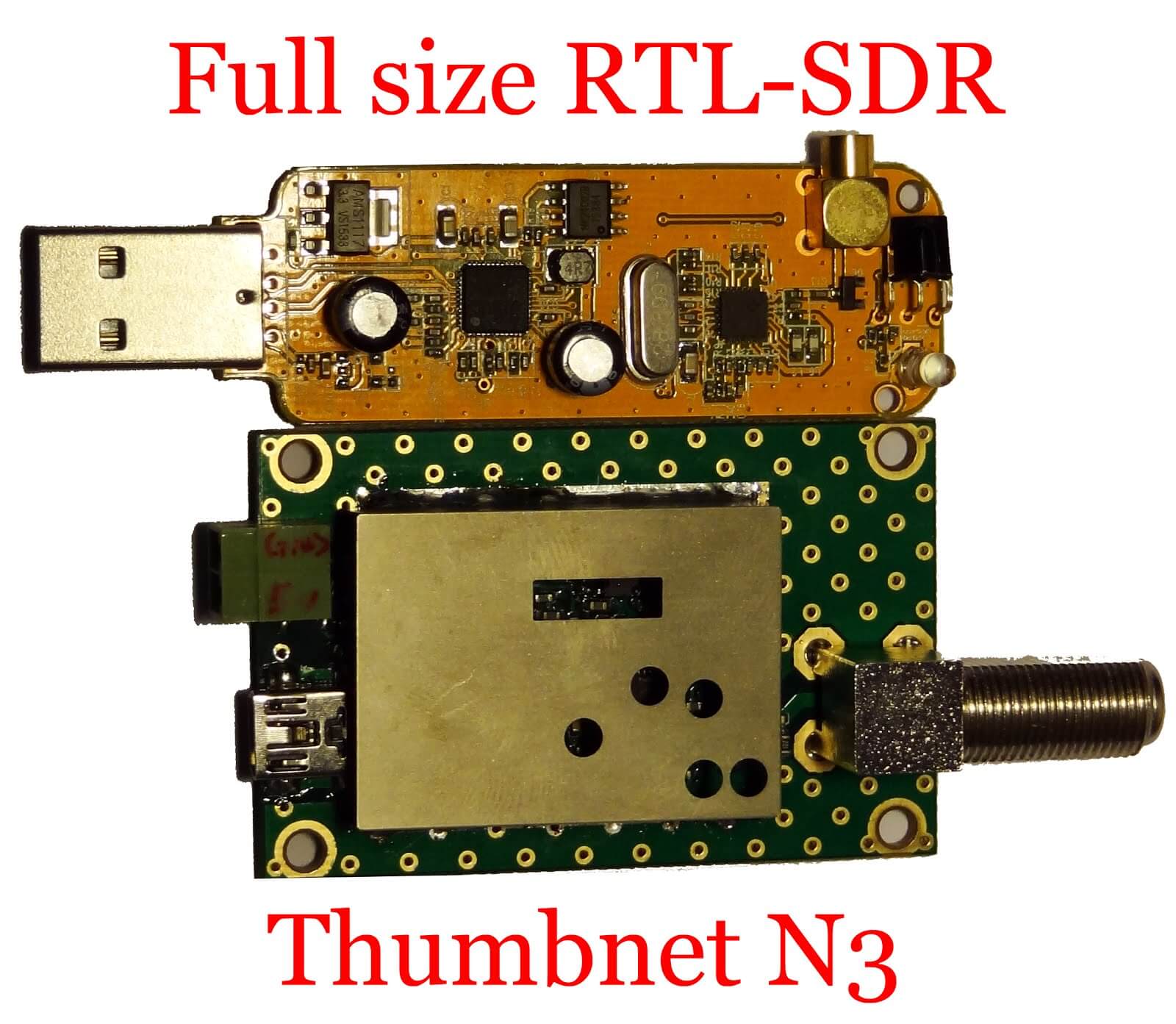
A few weeks ago we posted about ThumbNets announcement of their new N3 RTL-SDR dongles. The main theme of their new dongles is lower noise as can be seen by their decision to disable the on board switch mode power supply and add an external power port for powering the dongle from a clean power supply.

Akos from the RTLSDR4Everyone blog received a prototype sample of the N3 for an initial review. In his review he shows some close up shots of the N3 PCB, and does a quick test on receiving some signals. His screenshots show that the noise floor is indeed very low, and that many noisy spurs are eliminated or at least significantly reduced.

Once ThumbNet release their actual commercial units we intend to produce our own review as well.

ThumbSat is a company hoping to enable experimenters to get low cost mini satellites into orbit for about $20k. To support the need for global RX of these satellites they have the ThumbNet project which utilizes RTL-SDR dongles as the receiver. They aim to provide schools and eligible volunteers around the world with free RX hardware to receive and record the data coming from these satellites.

generic_vs_thumbnet
Generic RTL-SDR and the ThumbNet N3


FPGAs for DSP and Software-Defined Radio: Short Course at UCLA

The University of California, Los Angeles is hosting a 3-day hands on short course on using SDR’s like the RTL-SDR with FPGA hardware and MATLAB Simulink. This is a course with a high knowledge pre-requisite, so you will likely need qualifications and/or knowledge equivalent to a bachelors in Electrical/Computer Engineering to be able to understand the material. It is mainly intended for DSP and Communications Engineers, HDL designers, FPGAs engineers, RF engineers, and systems engineers. The course runs for 3 days between 10 – 12 October. The main blurb of the course is described below:

One of the main aims of this course is to demonstrate the workflow required to take floating point Simulink receivers (such as the ones presented in the book) and target them onto SDR hardware. This means converting to fixed point, generating HDL code, and then packaging it into something that can be deployed to ZynqSDR hardware.

In this short course we will present, review, simulate then implement real-time DSP enabled software defined radios (SDR) on laptops, Raspberry Pis, Xilinx (Zynq) SoC FPGAs with RF transceivers. The design, simulation and implementation will take the form of a complete model based design work-flow from within MathWork’s MATLAB and Simulink software tools. The course will ensure attendees are educated in key relevant multi-rate DSP algorithms and techniques, in communications modulation methods, quadrature/QAM transceiver designs, and timing and synchronisation. The first part of the course will educate on DSP and communications, followed by a second part on FPGA systems implementation (focussing on Xilinx Zynq SoC) and introduce MathWorks Embedded and HDL Coder methods for hardware targeting. In the third and final part of the course we will develop real-time ‘desktop’ implementations of SDR transceivers using a model based design flow. We will start with floating point designs, which will evolve to fixed point, and then undergo final code generation stages with the Embedded and HDL Coder packages prior to FPGA deployment..

All attendees on the course will use (and take home!) an RTL-SDR device (which tunes from 25MHz to 1.75GHz) and have access to a Raspberry Pi and Zynq SDR kits in class hosting the RTL-SDR device and a wideband FMComms RF card respectively. The class format will be 40% lecture, 20% live SDR demonstration and 40% hands-on ‘desptop SDR’ using software and SDR hardware. 

This course is related to the desktopsdr.com text book which was released September 2015. The physical copy of the book can be purchased on Amazon, or downloaded for free in pdf form on their desktopsdr.com website.

Download the book at desktopsdr.com

Introduction to Signal Analysis Baltimore-DC Course Live Stream and Recorded Videos

Earlier in the month we posted about the “Unallocated Space” free four week class on signal analysis taking place in the Baltimore-DC area. The course has now started and they are live streaming the lectures and saving them on YouTube. The first two classes have already passed, and two videos are uploaded.

The first class went over installing the RTL-SDR as well as showing a few examples of decoding some signals. The second class covers various modulation types and digital encoding schemes. They show how to learn how to identify various digital signals by listening to them and viewing them on the waterfall. The class slides are also available on links placed in the video description.

The third and fourth classes have not yet streamed. The third class will be live streamed on October 4, 7PM local time. Visit their YouTube channel for the videos. 

Introduction to Signal Analysis Week 1

Introduction to Signal Analysis Week 2

More Reports and Tests on the RTL-SDR V3

Recently we sent document author “D. B. Gain” a sample RTL-SDR V3, so that he could write a review and guide on it. The guide is now available at http://www.udxf.nl/ute-info.html, and the link to the guide is labelled “The RTL-SDR V3” and is under the “HOW TO …” section. The guide reviews the V3 and tests it out on reception of HF signals. He uses an off center fed dipole up around 30ft, RG6 cable TV coax feedlink and a Barker and Williamson 30 MHz low pass filter. He write this valuable piece of advice:

The larger the antenna system, the greater the gain – usually. It doesn’t take too much RF to overload the V3 dongle, so a 20ft piece of wire will do better than say a 430ft wire loop atop some phone poles. Use an attenuator if you have one. Remember the issue with AMBC swamping where AM stations pop up in various parts of the HF spectrum and use a preselector and/or attenuator if you can. Shortwave broadcast stations can also create spurs in the V3. Some radio parts houses carry a variable attenuator meant for cable TV or VCR player use that can be employed at HF with the use of some F to UHF or whatever connector your antenna system employs adaptor, this can be installed in the antenna system and adjusted to result in least usable signal getting to the V3, which assures best dynamic range. Then one would adjust the FFT Spectrum gain in your SDR control app of choice to best level on a quiet band, say 14MHz. This will ensure you don’t have to mess with adjusting the gain on lower frequency bands just to keep the band noise baseline above the bottom of the FFT window.

Mr. “Gain” has also uploaded several other screenshots of the V3 in action on HF in this gallery.

The RTL-SDR V3 receiving ham radio signals on 40m.

Mikael Dagman (SA6BSS) also wrote in to let us know about how he’s been using the V3 to receive WSPR. He writes:

For an experiment I have set up a SDR play and a RTL blog v3 dongle fed from the same antenna (butternut hf9) through an antenna splitter, grabbing Qrss signals on 40m, on the v3 I added a bpf. The v3 is run from SDR sharp q-branch RTL AGC on and both radios feeding separete instances of spectrum labs, doing wspr as the same time on both radios, there I hardly any difference, maby one spot out of ten the rsp get 1 db more in sn . Without the filter on the v3 its completely falling apart but with the filter inline I am more then impressed!!

I will stay on 40m for a couple of days trying to catch a ZL station tx:ing with 1.1W Qrss with the v3, (that’s 16000 km away) I will then qsy to 30m with the v3 where there is more signals to look at.

Spectrum available here http://www.qsl.net/sa6bss/
You see that bottom spectrum have the name RTL upper left corner.

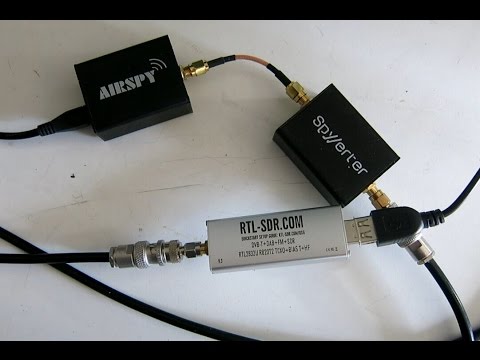
Over on YouTube Leif (SM5BSZ) has also uploaded a video where he compares the performance of the RTL-SDR V3 with the Airspy+SpyVerter. Of course the V3 cannot compete with the higher end Airspy, but still performs decently enough for a beginner. If you are strapped for time, the results are concluded at about 28 minutes.