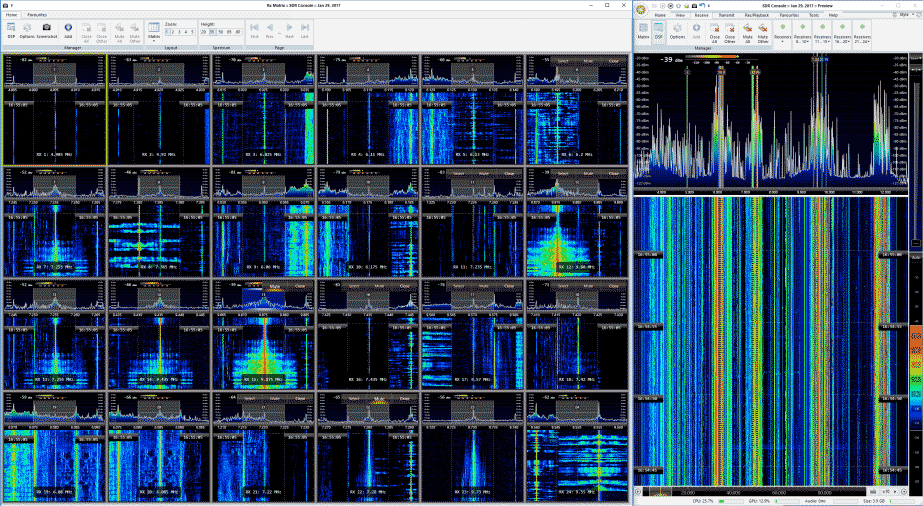
Recently DK8OK wrote in to us and wanted to share his latest review of the Airspy and SpyVerter combo (pdf). His review focuses on HF usage and he shows various examples of HF signals that he has received with the Airspy+SV such as the CHU time station, STANAG, DRM, ALE, HFFAX, VOLMET and HFDL. He also shows some tricks for optimizing HF reception, a tutorial on performing multi-channel audio recording and decoding in SDR-Console, a tutorial on playing and analyzing recorded files as well as some examples of weak signal reception.
Overall DK8OK praises the Airspy+SV combo citing it’s excellent dynamic range as one of the reasons it performs so well.
We should note that for prospective buyers, the Airspy team is currently working on a new complimentary solution for HF monitoring called the Airspy HF+. This will have extremely high dynamic range (even higher than the Airspy+SV combo), but it will have a smaller bandwidth. So the Airspy+SV combo will still be the best for monitoring a wide 9 MHz chunk of the HF band, whilst the HF+ will be the best for getting into those very hard to receive signals.
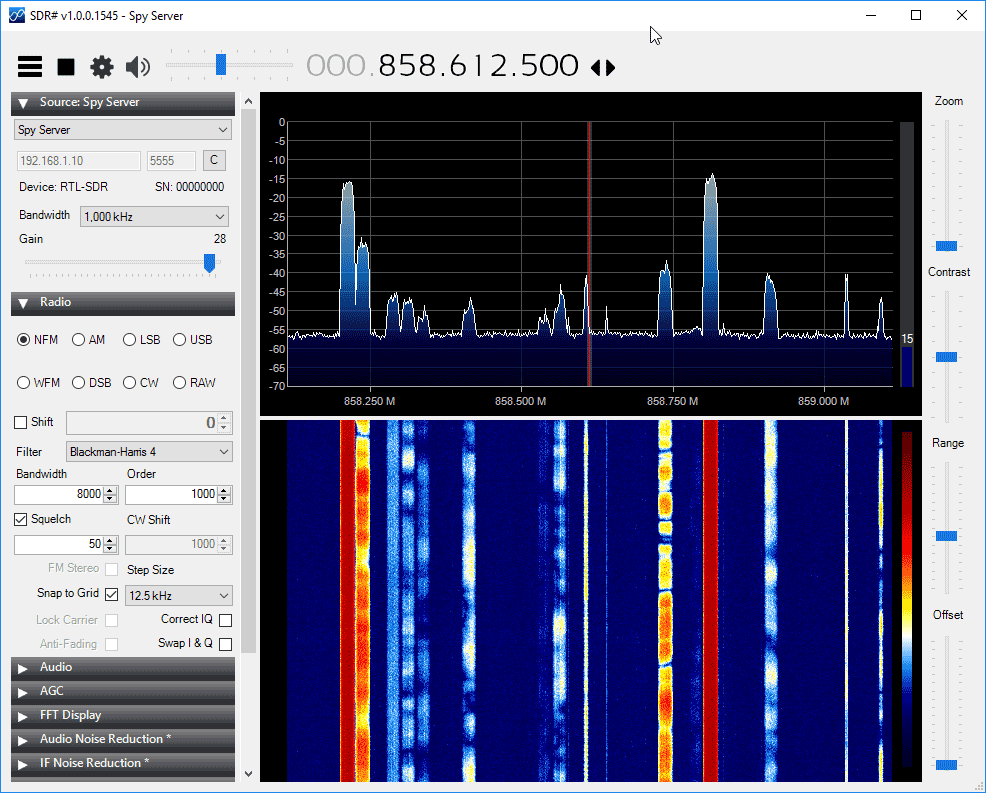
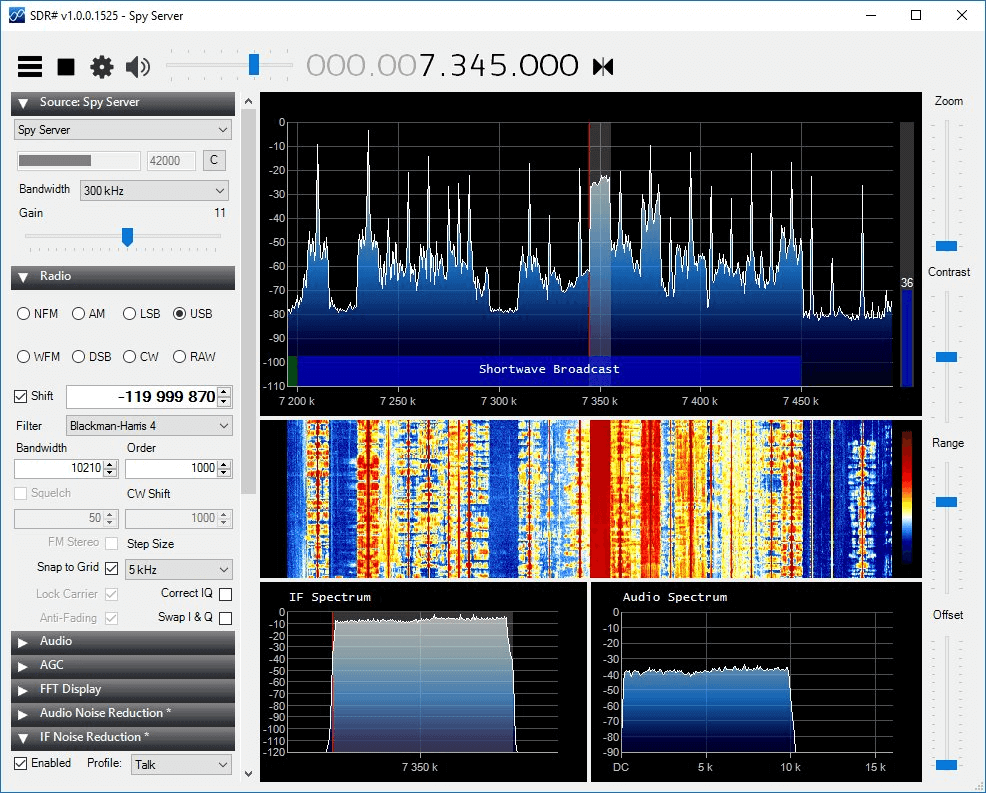
About a month ago the Airspy and SDRSharp development team released their new ‘SpyServer’ software. SpyServer is a streaming server for Airspy devices, which allows them to be used over a network connection. It is somewhat similar to rtl_tcp which is familiar to RTL-SDR users, although unlike rtl_tcp, SpyServer uses a multiclient architecture which allows several clients to connect to the server at the same time with each being able to choose individual bandwidth settings.
Today SpyServer was updated (changelog), and it now also supports the RTL-SDR dongle. The software can be found in the latest version of SDR# from www.airspy.com. The Airspy download contains the SpyServer for Windows and Linux, and the Raspberry Pi and Odroid server is available here.
To use SpyServer with the RTL-SDR you’ll first need to edit the “spyserver.config” file which is in the SDR# folder. Open this file with a text editor like Notepad, and set the “device_type” to “RTL-SDR”. Now you can run spyserver.exe on your server and it will use your RTL-SDR. Multiple dongles can be used by editing the “device_serial” string in the config file. Next on the client PC run the latest version of SDR#, and choose the Source as “Spy Server”. Here you can enter your networked PC’s IP address to connect to it.
We tested the updated SpyServer with an RTL-SDR dongle and it worked perfectly. On an 802.11n WiFi connection we were able to stream up to 1 MSPS without problems. 2 MSPS was a bit jittery, but on an Ethernet or 802.11ac WiFi connection it should work with no problems. We also tested connecting two PC’s to a single SpyServer and both were able to run at the same time without trouble. The client which connects first gets to keep control of the center frequency and gain, whilst the second client has those options locked.
Last month we saw news of the Airspy HF+, which is a yet to be released software defined radio with a focus on high performance reception in the HF bands. Some preliminary specs were unofficially released back then on the Airspy Yahoo forums.
Now over on the Airspy website, the official specifications have been released and they are pasted below. The specs suggest that the Airspy HF+ will have extremely high performance when it comes to strong signal handling. This means that there should be little to no chance of overloading, and thus no intermodulation or spurs.
The goal pricing is to be below $200 USD. If this is true, then it will compete heavily with the $249.95 USD ColibriNANO which is another new HF specialty radio with similar specs.
The Airspy team write:
Airspy HF+ is a paradigm shift in high performance HF radio design. It is a joint effort between Airspy, Itead Studio and some famous chip maker to build a state of the art SDR for HF and VHF bands.
Like most high-end HF receivers, the HF+ uses very high dynamic range ADC’s and front-ends. But unlike the current offerings in the market, it also brings more frequency agility by using high performance passive mixers with an excellent overtone rejection structure. Both the architecture and level of integration achieved in this design allow us to bring top performance reception at a very affordable price.
HF Tuner
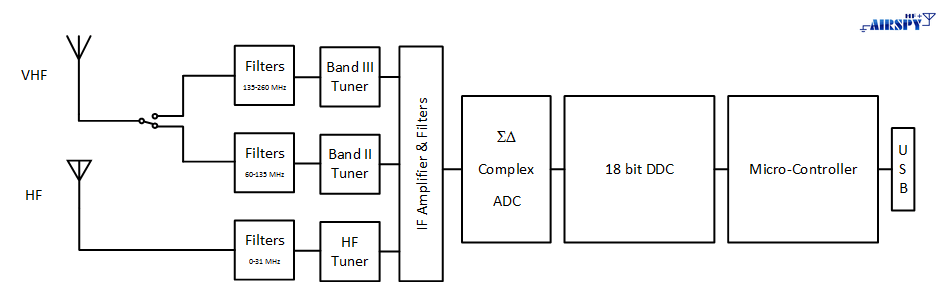
Airspy HF+ achieves excellent HF performance by mean of a low-loss band filter, a high linearity LNA, a high linearity tunable RF filter, an over-tone-rejection (OTR) mixer that rejects up to the 21st harmonic and an IF filter. The 6 dB-stepped AGC gain is fully controlled by the software running onto the DSP which optimizes the gain distribution in real time for optimal sensitivity and linearity. OTR is a key issue in wide band HF receivers because of the large input signal bandwidth. The output of the IF-filter is then digitalized by the IF ADC for further signal processing.
VHF Tuners
Excellent VHF performance is also achieved by using optimized signal paths composed by band filters, high linearity LNAs with a stepped AGC and an over-tone-rejection mixer and IF filters optimized for their respective bands. The amplifier gain is switchable in 3 dB-steps and is fully controlled by the AGC processing running onto the DSP. The RF signal is converted to baseband by a high linearity passive mixer with overtone-rejection structure. The low-IF signal is then converted into the digital domain by the IF ADC for further digital signal processing.
IF Digitalization
The IF digital to analog converter has a 4th order multi-bit topology; it features very high dynamic range and linearity. The IF-ADC sampling frequency is determined by a control algorithm running on the DSP. This advanced technique changes the sampling frequency depending on the tuning frequency with the goal of avoiding the disturbances generated by the switching discrete-time sections of the IF-ADC.
Digital Down Converter
Once the IF signal is digitalized, the high sample rate I/Q stream is then frequency translated and processed with cascaded CIC and FIR decimation stages. After every stage, the sample rate is reduced and more the resolution is increased. The final signal at the output has 18bit resolution and the alias rejection performance is 108 dBc. The data is then scaled to 16bit and sent to the Micro-Controller for streaming over USB.
Use it over the network!
Connect as many SDR applications as needed to the HF+, over the Internet or in your own local network with near zero latency thanks to the new SPY Server software. This setup basically brings all the flexibility of Web based SDRs while still benefiting from the full power of desktop applications. The IQ data is processed in the server with state of the art DSP and only the required chunk of spectrum is sent over the network. What is sent is the actual IQ signal, not compressed audio. This means you can use all your favorite plugins to process the IF, eliminate noise and perform heavy lifting of the signals as you are used to do with locally connected SDR’s. We have a tradition of building multi-tools, so we made sure the SPY Server runs on 32/64bit Windows and Linux on Intel and ARM processors without any compromises. Low cost Raspberry Pi 3 and Odroid boards are in the party.
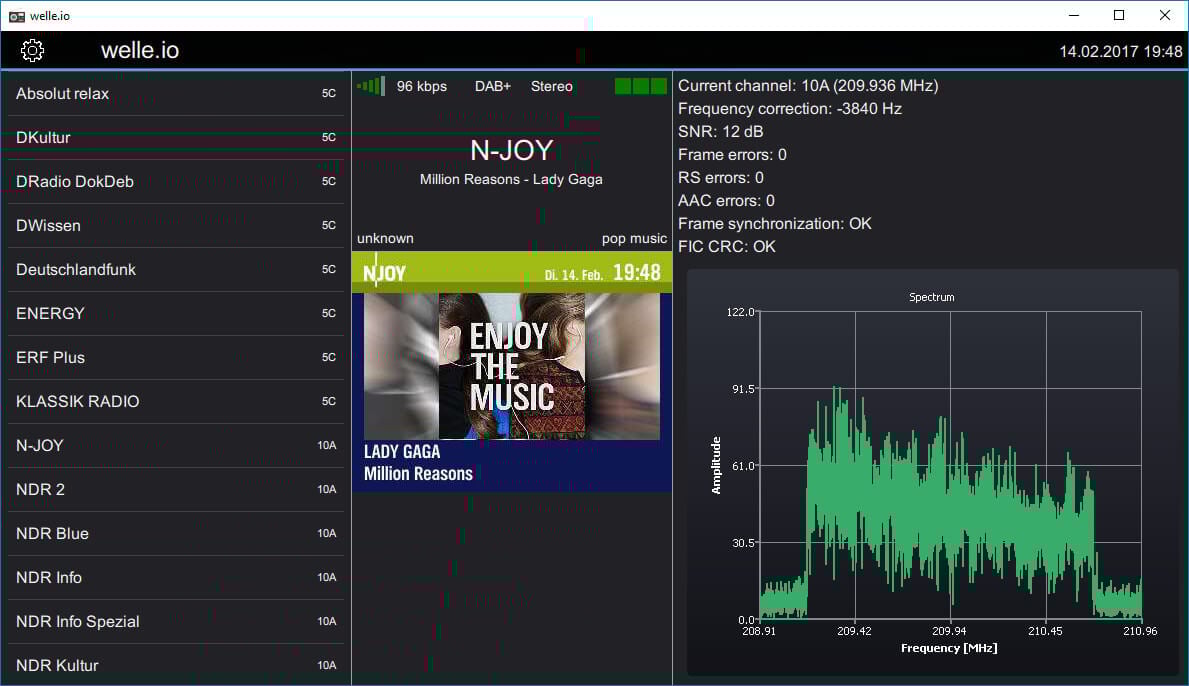
Thanks to Albrecht Lohofener for submitting to us his new software package called ‘welle.io’ which is a free DAB and DAB+ decoder and player that supports the RTL-SDR (directly or also via rtl_tcp) and Airspy software defined radios. The software can be run on both Windows and Linux, and also supports Raspberry Pi 2/3 and cheap Chinese Windows 10 tablets.
Albrecht writes that his software is a fork of the qt-dab codebase, with the development goal being to create an easy to use DAB/DAB+ software receiver. The software is still under heavy development, and Albrecht mentions that he is looking for fellow developers and testers to help improve the software and report any bugs. Albrecht writes:
I’m proud to introduce a new open source DAB/DAB+ reception application welle.io https://www.welle.io. welle.io is a fork of qt-dab http://github.com/JvanKatwijk/qt-dab (old dab-rpi and sdr-j-dab) with the goal to develop an easy to use DAB/DAB+ reception application. It supports high DPI and touch displays and it runs even on cheap computers like Raspberry Pi 2/3 and 100€ China Windows 10 tablets. As input devices welle.io supports rtlsdr and airspy.
Currently daily Windows binary builds are available over on the projects GitHub. For Linux and Raspberry Pi users you’ll need to compile the code from source, but in the future he plans to provide Ubuntu snaps.
We gave the welle.io software a brief test and it ran as expected. There is an automatic channel scan feature which scans through all the possible DAB channels and an advanced mode for seeing technical information such as the frequency, SNR and error rates. The software also has a nice touchscreen friendly GUI which automatically downloads and displays the DAB/DAB+ program guide information.
Welle.io DAB/DAB+ decoder for the RTL-SDR and Airspy.
SDR# has just been updated to version 1525 (changelog) and it now includes a new program called ‘SpyServer’. SpyServer is a Windows based streaming server for Airspy devices, and is somewhat similar to what rtl_tcp is for RTL-SDR devices. To run the server, all that you need to do is plug in the Airspy on the server PC and open the server software. Then on the remote PC select the ‘SpyServer’ radio source in SDR# and enter the server IP and default port.
We tested SpyServer with our Airspy R2 and found that it worked perfectly, however due to the very high data rates the maximum bandwidth cannot be used over a slow network. On a standard WiFi connection we were able to use a bandwidth of up to 250 kHz, and on a remote test server over the internet only 37.5 kHz. The author of SDR#, Youssef Touil however has mentioned that a gigabit network can support the maximum 10 MSPS bandwidth option with no problems. We assume that SpyServer will eventually be updated to include low bandwidth options which only stream compressed demodulated audio and waterfall data.
The SpyServer is also implemented with a special multi client DDC architecture. This allows for many clients to connect to a single server, and they can each have a different frequency and bandwidth (within the current active bandwidth around the center frequency).
We think that the SpyServer should also work well with the upcoming Airspy HF+, an HF optimized SDR.
Over on the Airspy Yahoo forums and Twitter we’ve seen news of an upcoming new product from the developers of the Airspy SDR. The new product is called the Airspy HF+ and will be a low cost, yet extremely high performance HF specialty radio.
Smart AGC with real time optimization of the gain distribution
All RF inputs are matched to 50 ohms
2 x High Dynamic Range Sigma Delta ADCs @ 36 MSPS
600 kHz alias and image free output
18 bit DDC
0.5 ppm high precision, low phase noise clock
4 x Programmable GPIO’s
No drivers required! 100% Plug-and-play on Windows Vista, Seven, 8, 8.1 and 10
Industrial Operating Temperature: -45°C to 85°C
Basically, this addresses the lack of affordable and good performing receivers for HF and VHF. Target price < $200
As with all Airspy products the SDR focuses on achieving extremely high dynamic range. From the specs is seems that the dynamic range and image rejection will be high enough so that even extremely strong broadcast AM or FM stations will not require any filtering or attenuation. They are also confident enough to say that no gain sliders will need to ever be adjusted to avoid overload.
For SWLers and MW DXers this seems like the ideal SDR as it should perform as well as high end SDRs like the Perseus, RFSpace and Elad SDRs, but at a fraction of the price.
Back in October/November of last year Lucas Teske showed us how to receive weather satellite images from the GOES line of geostationary satellites with an Airspy SDR (and possibly an RTL-SDR too), dish antenna and the decoding software that he created.
On November 19, 2016 the next generation GOES 16 (aka GOES-R) satellite was launched by NASA. GOES 16 is a little different to the older GOES satellites as it has better sensors and is capable of capturing and transmitting a new image every 15 minutes which is quite fast. Thus a different and higher bandwidth RF transmission protocol called HRIT (High Rate Information Transfer) is used, compared to the LRIT (Low Rate Information Transfer) signal used on the older satellites.
Once the satellite started transmitting in January 2017, Lucas got to work on trying to create a decoder for the new satellite. After noticing some discrepancies between the published HRIT specs and the actual signal, Lucas sent off an email to NOAA and actually received an email back with the full specifications. With this information he was able to update his Open Satellite Project code and start decoding images from GOES 16.
The images being sent right now seem to just be relays of other similar satellites like Himawari-8 and Meteosat, as it seems that they are still testing the satellite. The relayed images received via GOES 16 received by Lucas can be seen on the Open Satellite Project twitter feed and on Lucas’ personal twitter feed.
Full disk image received via GOES 16, relayed from the Himawari-8 satellite.Weather data received via GOES 16.
Over on our YouTube channel we’ve uploaded a new video that shows how bad the interference from Ethernet over Power devices can be. Ethernet over Power, Powerline Networking, Powerline Communications or ‘HomePlug’ is a technology that allows you to use any of your household power outlets as an internet Ethernet port, completely eliminating the need for runs of Ethernet cabling. They are capable of high speeds and can be used anywhere in the house assuming the two plugs are on the same power circuit.
Unfortunately these devices tend to wipe out almost the entire HF spectrum for anyone listening nearby. As household powerline cables are not shielded for RF emissions they radiate in the HF spectrum quite heavily. In the video we demonstrate what the HF spectrum looks like with one of these devices used in the house. The particular device used was a TP-Link brand adapter, and a WellBrook Magnetic Loop antenna was used outdoors, with the null facing the house. An Airspy R2 with SpyVerter was used to view the spectrum.
The video shows that even when the network is idling there are several brief bursts of noise all over the spectrum. Then when a file is downloaded almost the entire spectrum is completely wiped out.
Interestingly from the video it appears that the amateur radio frequencies are actually carefully notched out and those frequencies remain relatively clean. Most manufacturers of these devices appear to have worked with the ARRL to please ham radio enthusiasts, but SWLers will likely be in trouble if any of these devices are used in your house or neighbors house.
How Ethernet/Internet over Powerline Can Wipe out the HF Band