Category: Amateur Radio

Building a Homemade FM Repeater with a Raspberry Pi, Rpitx and RTL-SDR Dongle

A radio repeater is usually a radio tower that receives weak signals from handheld, desktop or other radio, and rebroadcasts the same signal at a higher power over a wide area at a different frequency. This allows communications to be extended over a much greater area.

Repeaters are generally made from expensive professional grade radio equipment, however ZR6AIC has been experimenting with creating an ultra low cost repeater out of a RTL-SDR and Raspberry Pi. In his system the RTL-SDR dongle is set up to receive a signal on the 70 cm (420 – 450 MHz) amateur radio band, and then retransmit it using Rpitx on the 2M (144 – 148 MHz) amateur radio band.  He also adds a 2M low pass filter to the output of the Raspberry Pi to keep the signal clean.

RTL-SDR + Rpitx Block Diagram

Rpitx is software for the Raspberry Pi which we have featured on this blog several times in the past. We’ve also seen the qtcsdr software which also uses Rpitx and an RTL-SDR to create a transceiver. Rpitx allows the Raspberry Pi to transmit radio signals without the need for any transmitting radio hardware at all. It works by modulating signals onto a General Purpose I/O (GPIO) pin on the Raspberry Pi. If the GPIO pin is modulated in just the right way, FM/AM/SSB or other signal modulation approximations can be created at a specified frequency. The signal is however not clean, as this type of modulation generates many harmonics which could be dangerous if amplified. If you use Rpitx, always use appropriate filtering hardware.

ZR6AIC’s post goes into detail about how to install and set up the required software onto the Raspberry Pi and how to set up the script to piece all the programs together into a repeater. He’s also uploaded a video demonstrating the system in action on YouTube.

Raspberry Pi Fm Repeater

Solving APRS Interference Issues with a Bandpass Filter and Coax Notches

John, DK9JC N1JJC wanted to set up an RTL-SDR APRS packet iGate. APRS stands for “Amateur Packet Reporting System”, and is a type of packet radio communications system used by Amateur Radio operators. They often use them to transmit short messages, weather sensor updates, and for vehicle tracking. An iGate allows APRS messages to be transmitted over the all world via the internet like so RF->iGate RX->Internet->iGate TX->RF.

When trying to receive the APRS packets John discovered a problem. He discovered that there was a very strong 100kW broadcast FM and 50kW DAB transmitter on a transmission tower in line of sight of his antenna. The strong signals were overloading the dongle and completely wiping out the APRS packets that he was trying to receive at 144.8 MHz.

First John tried a simple bandpass filter with 0.8 dB insertion loss and 20dB attenuation. The filter still wasn’t enough, so he went and made a several coax notch filters to take out each of the interfering signals. A coax notch filter is simply a length of coax connected via a “T” junction to the main coax cable. This creates a notch of attenuation at a frequency depending on the length of the notching coax. With these notches combined with the bandpass filter he was finally able to receive APRS packets.

A coax notch filter
A coax notch filter

Using the RTL-SDR as a Panadapter for the IC-751A

A panadapter is a device that connects to a standard hardware radio and allows you to visually see the RF signals on a waterfall. Since SDR’s run on the PC, they naturally have the ability to display a panadapter screen, and most software like SDR#, HDSDR and SDR-Console already provide this. The RTL-SDR can also be used to add panadapter capabilities to a regular hardware radio. 

Gary Rondeau has been using the RTL-SDR as a panadapter for his IC-751A, which is a high quality ham radio transceiver. In his first post, Gary shows how he connected the RTL-SDR in a block diagram, and then shows how he interfaces the RTL-SDR and IC-751A together using HDSDR and the Omnirig software.

Block diagram showing the RTL-SDR as a Panadapter with the IC-751A and HDSDR.

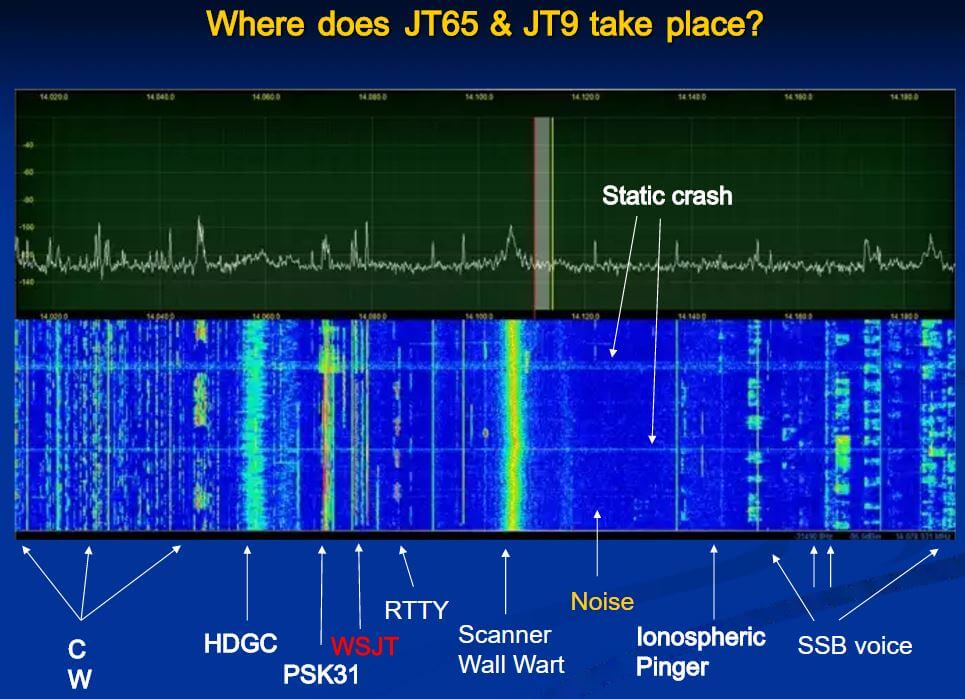
In his second post he shows a comparison between decoding JT65 and JT9 signals directly from the IC-751A audio output, vs via the RTL-SDR & HDSDR panadapter connection. His results show that as long as there is sufficient signal level, the RTL-SDR as a panadapter can match the performance of the raw IC-751A audio output, even producing less signal splatter on strong signals due to the pure numerical vs analogue mixing strategies of SDRs vs analogue radios.

RTL-SDR (top) vs raw audio from IC-751A below. RTL-SDR has a wider bandwidth, and less splatter at 2200 kHz when the strong signal came in.

Finally, in his third post he shows some more benefits of using the RTL-SDR as a panadapter, including rapid SSB tuning, RFI identification and signatures, helping work a pile up, monitor SSB net while working PSK on the parent radio, monitor the JT65 & JT9 band while working PSK – or vise versa and finally leave the radios on and monitor PSK, RTTY, JT65 & JT9 traffic for PSK Reporter.

Two Videos Showing the LimeSDR on HF in SDR-Console V3

The LimeSDR is a RX/TX capable SDR with a 100 kHz – 3.8 GHz frequency range, 12-bit ADC and 61.44 MHz bandwidth. It costs $299 USD and we think it is going to be an excellent next generation upgrade to SDR’s with similar price and functionality like the HackRF and bladeRF. Back in August we posted how they had added HF functionality to their drivers, and posted some videos from LimeSDR beta tester Marty Wittrock who had gotten HF working well  in GQRX.

Now that SDR-Console has added support for the LimeSDR and HF reception, Marty has uploaded two new videos showing it in action. The first video shows some SSB reception on 40M and the second shows some CW reception on 20M. Marty runs SDR-Console on a MSI Core i5 Cube PC. Marty also writes:

Even with the ‘older’ LimeSDRs that I have that don’t have the proposed modified matching networks on them the performance at 20m and 40m was actually REALLY good for voice and CW. Obviously if the band conditions for 15m and 10m were better the days that I tested the LimeSDR it would have been even better since ‘as-designed’ matching networks seem to do better at 30 MHz and up. Checking the performance at 162.475 MHz (my local Cedar Rapids, Iowa NOAA Weather Station) the performance is excellent on a VHF antenna.

The LimeSDR on 40m Phone using SDRConsole V3.0

LimeSDR Operating on the HF 20m Band with SDRConsole V3.0


Videos showing the LimeSDR in Action on HF with GQRX

Over on YouTube LimeSDR beta tester Marty Wittrock has uploaded several videos showing the LimeSDR receiving HF frequencies. In the first video Marty shows it receiving the USB voice on the 20m band during the 2016 ARRL field day. The second video shows reception of PSK31 signals. More videos are available on his channel if you are interested.

In the videos he uses GQRX and his own KN0CK HF upconverter. The LimeSDR should be able to receive HF on its own without an upconverter, but at the moment the HF capabilities have not been programmed into the drivers yet, so during this beta testing period an upconverter is required.

Marty also wrote in to us to make some comments on his experiences with the LimeSDR. He believes that the LimeSDR is amazing and writes:

The quality of the receive and audio [of the LimeSDR] is incredible against other SDRs I have in the house (Flex 5000A, RTL-SDR, HackRF, Red Pitaya – and soon SDRPlay).

Marty also writes that he will soon have more videos of the LimeSDR operating in Windows with SDRConsole in the near future, and we will post those videos too when they are ready.

LimeSDR Receiving 20m Voice on USB

LimeSDR Receiving PSK31 on the 20m Band

Testing out the SDRplay with SDRuno and Characterizing RF HF Filters

Over on YouTube user Mile Kokotov has uploaded a video showing him using the SDRplay on the recently released official software SDRuno. In the video he first shows reception of some HF signals, then goes on to show how he can characterize some HF filters using a noise source.

Mile also wrote in to use to expand on his video. We quote:

“SDRuno” is new specialized software for SDRplay – RSP1 receiver. Besides many others excellent features, the new one is 10 MHz spectrum span on the window screen. The 10 MHz frequency span you can use it for characterize the HF Band-pass, Low-pass, High-pass or Notch filters. All you need is one noise source (noise generator) which you can find on eBay for about 20 USD.

With addition of directional coupler (for another 20$ USD), you can using SDRplay and SDRuno for HF antenna analyzer, measuring SWR like poore-man`s HF Vector Network Analyzer!

An RF filter is an electrical circuit designed to have specific characteristics with respect to the transmission or attenuation of various frequencies that may be applied to it.

There are three general types of RF filters:

1. A high-pass filter (HPF) similarly has a cut-off frequency, above which there is little or no loss in transmission, but below which there is considerable attenuation. Its behavior is the opposite of that of the low-pass filter.

2. A low-pass filter (LPF) is one that will permit all frequencies below a specified one called the cut-off frequency to be transmitted with little or no loss, but that will attenuate all frequencies above the cut-off frequency.

3. A band-pass filter (BPF) is one that will transmit a selected band of frequencies with substantially no loss, but that will attenuate all frequencies either higher or lower than the desired band.

The Filter connected in the front end of the receiver can be very much useful and it can improve the reception of the weak signals rejecting all others unwanted signals that can produces interference, intermodulation and as a results, the weak signals can not be copied !

With bandpass filter for particular frequency band, Receiving weak signals on that band is much easier, without problems from out of band strong sugnals.

73,
Mile Kokotov

SDRplay with SDRuno Using to characterize RF HF filters

Using the SDRplay and SDRTouch on an Android Mobile Phone

A few months ago the popular SDRTouch software for Android added support for the SDRplay RSP. The RSP is a $149 USD software defined radio with a tuning range of 100 kHz to 2 GHz and a 12 bit ADC.

Over on YouTube user Mile Kokotov has uploaded a video showing the SDRplay RSP running in SDRTouch. He uses it to listen to the 14 MHz ham band in SSB mode and finds that reception is clear and that it is fairly easy to tune around.

In order to use the RSP with an Android device you will need a fairly modern phone and a USB OTG cable. Ideally try to get a USB OTG cable with an external power port as the battery can drain quite fast when using the SDR. SDRTouch also supports the RTL-SDR.

SDRplay running with Android mobile phone

Receiving WSPR with a Direct Sampling Modified RTL-SDR

Over on YouTube user Veryokay has uploaded a video showing how he was able to receive WSPR (Weak Signal Propagation Report) signals at 14 MHz with his direct sampling modified RTL-SDR. WSPR is a HF mode designed to be received even if the signal is very weak. It is used to help determine radio propagation conditions. Direct sampling mode allows you to receive HF signals on an RTL-SDR without the need for an upconverter, but it is more difficult to implement and get good results with. To get the best results Veryokay built an add on PCB that fits onto the RTL-SDR which contains and LNA and single ended to differential operational amplifier to amplify and get correct impedance matching on the input.

His video mainly shows how to calibrate the receiver correctly to receive WSPR as incorrect calibration is the most common error when trying to receive WSPR for the first time. In the video he also explains that he is transmitting WSPR himself using his Raspberry Pi and a QRPi WSPR filter shield for use with Rpitx.

Receiving WSPR with the RTL-SDR in direct sampling mode and WSPR-X.

Receiving WSPR mode at 20m with RTL-SDR dongle in direct sampling