NRSC5 Studio: A New Feature-Rich Windows GUI for the nrsc5 HD Radio Decoder
We've recently had several submissions about the release of a new program called NRSC5 Studio, a new native open source Windows and Linux supported GUI for the nrsc5 HD Radio decoder. We note that in the past, we've posted about nrsc5 and the NRSC5-DUI interface.
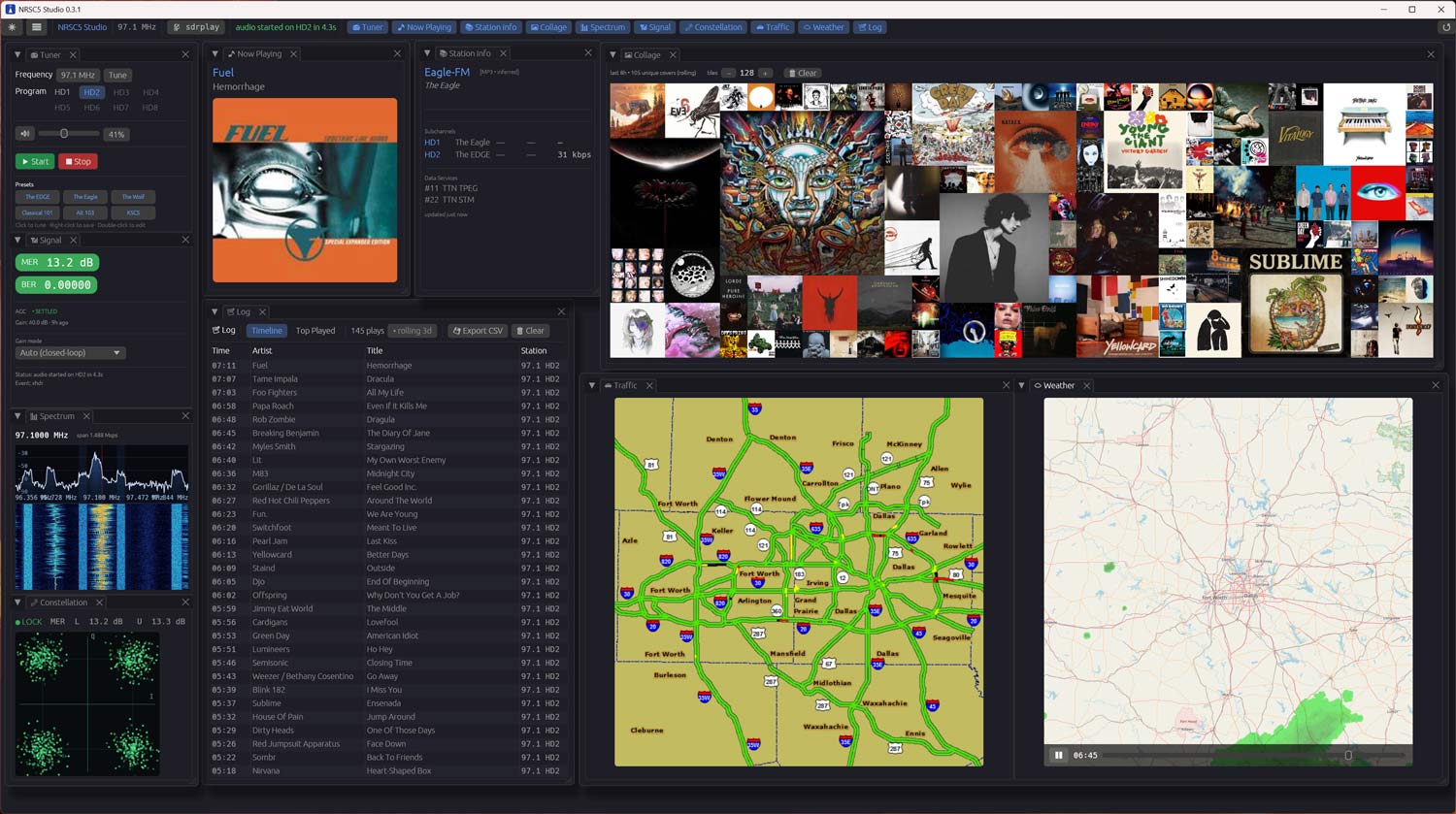
nrsc5 is an open source decoder for the proprietary HD Radio digital audio standard used by FM broadcasters in North America, and it works with low-cost RTL-SDR dongles. NRSC5 Studio is written in Rust with an egui-based dockable interface, and it wraps nrsc5 to provide tuning, HD1 to HD4 subchannel selection, station presets, and now-playing metadata with album art and station logos.
NRSC5 Studio appears to be quite feature-rich. There's a live FFT spectrum and waterfall display tapped from the same I/Q stream feeding the decoder, a QPSK constellation viewer driven by live MER readings per sideband, and a closed loop AGC that automatically tunes the R820T2 gain table to maximize MER. Other extras include a rolling 8-hour album art collage heat map, a 24-hour song log with CSV export, and TPEG traffic map and animated weather radar decoding on stations that broadcast it (currently iHeartMedia stations only).
A portable zip release is available on the GitHub releases page, requiring no installer or admin rights.
AI-Disclaimer: The software Readme credits GitHub Copilot, an AI tool.





























Hi Tim
Vielleicht hilft das hier weiter.
Quelltext NRSC5 – Master, defines.h (GitHub)
….// indexes of AM subcarriers
#define REF_INDEX_AM 1
#define PIDS_INNER_INDEX_AM 27
#define PIDS_OUTER_INDEX_AM 53
#define INNER_PARTITION_START_AM 2
#define MIDDLE_PARTITION_START_AM 28
#define OUTER_PARTITION_START_AM 57
#define MAX_INDEX_AM 81
// AM service modes
#define SERVICE_MODE_MA1 1
#define SERVICE_MODE_MA3 2
// bits per P1 frame
#define P1_FRAME_LEN_FM 146176
#define P1_FRAME_LEN_AM 3750
// bits per encoded P1 frame
#define P1_FRAME_LEN_ENCODED_FM (P1_FRAME_LEN_FM * 5 / 2)
#define P1_FRAME_LEN_ENCODED_AM (P1_FRAME_LEN_AM * 12 / 5)
// bits per PIDS frame
#define PIDS_FRAME_LEN 80
// bits per encoded PIDS frame
#define PIDS_FRAME_LEN_ENCODED_FM (PIDS_FRAME_LEN * 5 / 2)
#define PIDS_FRAME_LEN_ENCODED_AM (PIDS_FRAME_LEN * 3)
// bits per P3 frame
#define P3_FRAME_LEN_FM 4608
#define P3_FRAME_LEN_MA1 24000
#define P3_FRAME_LEN_MA3 30000
// bits per encoded P3 frame
#define P3_FRAME_LEN_ENCODED_FM (P3_FRAME_LEN_FM * 2)
#define P3_FRAME_LEN_ENCODED_MA1 (P3_FRAME_LEN_MA1 * 3 / 2)
#define P3_FRAME_LEN_ENCODED_MA3 (P3_FRAME_LEN_MA3 * 12 / 5)
// bits per L2 PCI
#define PCI_LEN 24
// bytes per L2 PDU (max)…
Gruß Micha
Does it have HD and HD MA3 modes for AM “MW” broadcast band?
Tnx, 73’s from Tim
libnrsc5.dll has the capability. But I have not put it into NRSC5 Studio.. YET!
I have actually looked at doing it and built a little stand alone app so I could explore the AM side of HD Radio.. Unfortunately, I have exactly ONE AM station near me that’s putting out HD. And it’s a bit too weak to pick up the digital signal except at night. But it’s on the roadmap.
For use with Windows be sure to download the correct NRSC5 Studio v0.6.1 build for Windows..
https://github.com/LTCAshraven/nrsc5-studio/releases/tag/v0.6.1
Click link above, and scroll down to the bottom and use the Windows Portable .zip file, extract it and run the .exe. Your in business.. What an amazing HD Radio decoder.👍
Hey! Thanks for the shoutout. I appreciate it. One correction though, Linux is supported.😊
Thanks, updated.
Last paragraph needs update too. “Linux and macOS are not supported at this time”
I use Win11. I have the sdrplay api installed/service running from D:\Program Files\SDRplay
When I try to use my rsp1a, it does not show in your program. If I copy the contents for D:\Program Files\SDRplay to C:\Program Files\SDRplay my rsp1a shows and works with your program.
Thanks
Hey Jim, would you mind raising an issue on the Github repo for that? I’ll put that in the queue for fixes..