Tagged: raspberry pi

FlightAware Introduces PiAware for use with RTL-SDR and dump1090 on a Raspberry Pi

FlightAware is an online service providing real time flight tracking. The flights are primarily tracked by volunteers who run ADS-B decoding hardware which is networked through the internet to the FlightAware servers.

Now FlightAware have written in to RTL-SDR.com to let us know about their new PiAware software which enables a Raspberry Pi running dump1090 to contribute data to the FlightAware network. Dump1090 is a popular RTL-SDR compatible ADS-B decoder program for Linux systems.

A major perk for running their software and contributing data is that FlightAware will buy you a licensed copy of PlanePlotter.

The press release provided is quoted below.

If you are running an inexpensive Raspberry Pi ADS-B receiver with dump1090 then you can install the PiAware Package from FlightAware to freely view nearby flight traffic and transmit this data to FlightAware’s tracking network.  Most aircraft within Europe by 2017 and USA by 2020 will be required to have ADS-B transmitters onboard.
FlightAware’s user-hosted worldwide ADS-B receiver network tracks about 90,000 unique aircraft per day and feeds this live data into the FlightAware website in combination with other public/private flight tracking data sources.  FlightAware has over 500 user-hosted ADS-B sites online across 60 countries, with top contributors tracking over 10,000 aircraft per day.  To see how ADS-B data is put to use, check out the FlightAware Live Map.
The PiAware installation process takes only a few minutes.  If you don’t have PlanePlotter, you can download it and then send FlightAware your installation’s serial number and we’ll buy you a license.  FlightAware will also give users a free Enterprise Account ($90/month value) in return for installing PiAware.
flightaware
FlightAware Real Time Map Example

RTL_POWER Heatmap Viewer

Back in June we posted about DE8MSH’s rtl_power based heatmap viewer which was automatically generated every day from a Raspberry Pi. The browser based heatmap display provides a way to view the frequency and time of where the mouse pointer is allowing you to easily identify signals.

Back then the code was unavailable but now DE8MSH has released his code on GitHub. An example heatmap generated by the code can be found here.

RTL_POWER Heatmap Viewer

Automatic Heatmap Logging on a Raspberry Pi using an RTL-SDR and RTL_POWER

Amateur radio hobbyist DE8MSH recently wrote in to let us know about a project he has been working on. His project involves using a Raspberry Pi B and RTL-SDR to automatically log a wide band heatmap using rtl_power. Rtl_power is a command line tool that will log signal strengths to a csv file using the RTL-SDR over a very large definable bandwidth.

To do the automatic logging the Raspberry Pi runs rtl_power for 23 hours constantly writing data to a mounted hard drive. After 23 hours the heatmap image is calculated and then uploaded to a webpage at http://qth.at/de8msh/listheatmaps.php. The scheduling is performed by a cron job.

DE8MSH has also been working on a second related project over at http://www.qth.at/de8msh/hm/pic.html. The heatmap on this page shows various transmissions from weather balloons. As you mouse over those transmissions, the QTH (location) of those weather balloon transmissions is shown as well as the frequency and time of where the mouse pointer currently is.

Raspberry Pi Automatic Heatmap Logging with rtl_power

Transmitting DVBT HDTV from a Raspberry Pi to an RTL2832U

Over on his blog, OZ9AEC has uploaded a post showing how he was able to create a live HDTV transmitter out of a Raspberry Pi, a Raspi Cam module and a UTC DVB-T Modulator adaptor. As he does not want to interfere with commercial DVB-T broadcasts, he sets the module to transmit at 1.28 GHz, aka the 23 cm licenced ham radio band.

On the RTL2832U dongle side, he modified the RTL2832U Linux DVB-T drivers (not the SDR drivers) to work on the 1.3 GHz band. The intention of this camera is for it to fly on a rocket mission. In the YouTube video below he has uploaded some sample footage with the RTL2832U dongle receiving the stream from 300 meters away.

Rocketcam 1 test 3 (20140531_142625)

Controlling a Remote Controlled Car with an RTL-SDR Attached to a Raspberry Pi

Over on YouTube user SilverXiaify has uploaded a video of a project he completed for a class in his electrical engineering school. His project involves controlling a remote controlled car using a ham radio. The remote control car carries on board an RTL-SDR for signal reception and an Raspberry Pi for data processing and control. The communications protocol they used is a naive version of AFSK700.

EE123 Final Project Demo

Raspberry PiRate Radio FM Transmitter

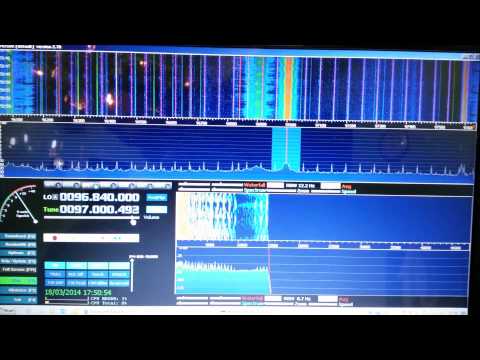
In November last year we posted a story showing how a Raspberry Pi could be used to transmit a digital AFSK signal to an RTL-SDR or other radio simply by connecting a wire to a GPIO pin.

Now an rtl-sdr.com reader has written in to let us know that this concept has also been used before to create a 1 – 250 MHz FM transmitter using the Raspberry Pi and a program called PiFM. It uses the same concept of connecting a wire antenna to one of the GPIO pins but modulates the frequency using hardware on the Rpi meant to generate spread spectrum clock signals. It is claimed that it can transmit up to 50m away.

Below we show an example YouTube video of the Raspberry Pi FM radio transmitting to an RTL-SDR running HDSDR.

PiFm & R820T & HDSDR

Icecream Box Raspberry Pi RTL-SDR Receiver

Over on our Facebook page Micheal Kent has posted about his raspberry pi based RTL-SDR receiver which runs rtl_udp. There’s not much more information on this project, but the video he posted shows what appears to be a Raspberry Pi and RTL-SDR dongle mounted inside an icecream box. There are two knobs mounted on the outside that control the brightness of an LCD screen which shows the tuned frequency, and another knob which controls the frequency itself.

Transmitting Data with a Raspberry Pi and RTL-SDR

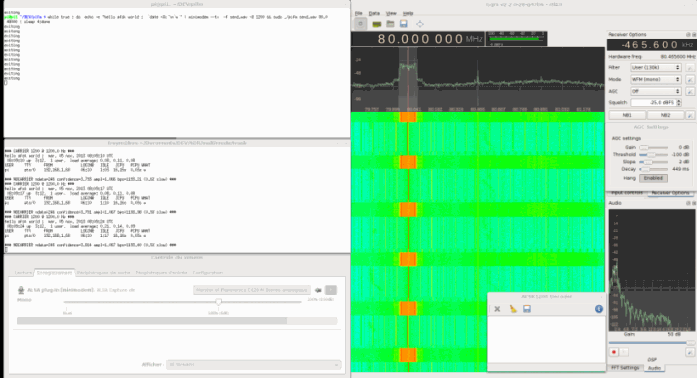
Hackaday brings to attention a simple hack where hacker Marc uses an antenna connected to a general purpose I/O (GPIO) pin on his Raspberry Pi to wirelessly transmit a wav file via AFSK modulation to his RTL-SDR. He uses a program called minimodem to encode the wav on the Raspberry Pi and then on the PC to decode the data received by the RTL-SDR.

Using this method, it is claimed that a signal can be transmitted up to 50m away, even through walls.

Raspberry Pi Transmitter
Raspberry Pi Transmitter Received with RTL-SDR