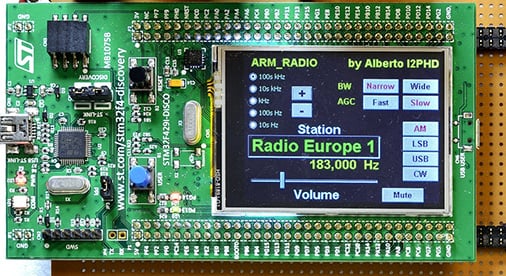
To make it actually work as an SDR he also wrote some code to utilize the development board’s ARM processor which processes the ADC input into a radio signal, demodulates it and then turns it into audio via the boards DAC and speaker. The radio can tune from 8 kHz up to about 900 kHz.
The only real extra hardware in Alberto’s system is a low pass filter for anti-aliasing and impedance transformation, and a reconstruction filter to get sound to the speakers from the DAC. He also used the boards LCD screen to implement a full GUI tuning system.
The Free and Open Source Developers Meeting (FOSDEM) is looking for SDR presentations to give at this years conference in Brussels, Belgium which will be held on January the 80th & 31st of January.
Software Radio has become an important tool to allow anyone access the EM spectrum. Using free software radio libraries and applications and cheap hardware, anyone can now start hacking on wireless communications, remote sensing, radar or other applications. At FOSDEM, we hope to network all these projects and improve collaboration, bring new ideas forward and get more people involved.
The track’s web site resides at: http://gnuradio.org/redmine/projects/gnuradio/wiki/FOSDEM
Here, we will publish updates and announcements. The final schedule will be available through Pentabarf and the official FOSDEM website.
To suggest a talk, go to https://penta.fosdem.org/submission/FOSDEM16 and follow the instructions (you need an account, but can use your account from last year if you have one). You need to create an ‘Event’; make sure it’s in the Software Defined Radio track! Lengths aren’t fixed, but give a realistic estimate and please don’t exceed 30 minutes unless you have something special planned (in that case, contact one of us). Also, don’t forget to include time for Q&A. Typical slot lengths would be 30 Minutes including QA.
You aren’t limited to slide presentations, of course. Be creative. However, FOSDEM is an open source conference, therefore we ask you to stay clear of marketing presentations. Of course, we like nitty-gritty technical stuff.
We will reserve time for interactiveness, it won’t all be talks.
If you are qualified and interested in giving a talk the submission deadline is December 4th 2015.
Last week a reader of RTL-SDR.com wrote into us to let us know about some experiments that he had been performing with the telescopic stock antennas provided in our RTL-SDR dongle packages. The reader had built a corner antenna reflector in order to improve reception in one direction. We are posting his write up and results below:
This tutorial will discuss the use of a Corner Reflector with a monopole antenna, i.e. the stock RTL-SDR antenna. To keep this tutorial concise, the reader is encouraged to study the Wikipedia pages for details about Corner Reflector Antennas, Dipoles and Monopoles.
Corner Reflector Antennas are very easily constructed from 2 A4-sized cardboard panels, covered with tinfoil. This allows for a foldable and transportable external reflector to the built-in wifi antennas of a laptop, which are located on the upper corners of the display.
The reader is pointed to the fact that corner antennas are based on a Dipole, where the stock RTL-SDR antenna is a Monopole, so some adjustments will have to be made, which is discussed and explained later in this text. If there are real antenna specialists reading this, they are encouraged to do a more thorough writeup on the exact mechanism of a monopole-based corner reflector antenna, as there was little information to be found on the internet.
The experiment started as an attempt to receive a DVB-T signal centered around 506 MHz, from a mast about 10 miles away. Indoors. This should have given a clear and strong signal, but alas, the signal was very weak.
Initial reception of the DVB-T signal with the stock antenna and no modifications.
Reading up on Monopoles and their need for a ground plane, the magnetic base of the 14 cm long antenna was placed on a metal cooking pot. The signal was a lot stronger. (The middle part of the waterfall plot above.) Clearly a wooden table is not much of a ground plane.
Next a Corner Reflector was made from tinfoil and a cardboard box, much to the dismay of the resident Feline Overlord that had seized it. 🙂 A triangular piece was added for rigidity and as a ground plane. The Monopole antenna was placed on the ground plane triangle in the middle of the 90° corner and at the correct distance from the fold in the reflector. i.e. the Focal Axis, but the gain was less than the theoretical 10dB so this setup was unsuccessful. (Upper part of waterfall plot above.)
The breakthrough came when I wanted to study the effect of a larger ground plane. For this I put the corner reflector sideways and put the monopole on the outer edge to reduce possible reflections from the standing panel. There was only a slight effect compared to the cooking pot, so I decided to progressively move the monopole towards the back panel in order to see if the additional reflection would get some more gain. When I reached about 10 cm distance from the panel, the waterfall plot exploded with a very powerful signal! See the picture below for the transition from wooden table to the sideways configuration. (On top of the waterfall plot there is some residual from the ground plane cooking pot test.)
DVB-T signal with corner reflector.
The setup looks like this:
For a few days I was baffled as to why the corner reflector behaved this way. It had already dawned on me that the diagonal distance from the fold till the antenna tip was 14 cm in this configuration, so 1/4 WL. It was only after I visualized how a monopole works, that I understood: a 1/4 WL monopole is physically a quarter wavelength open ended resonator. i.e. at the base/feed point the electric current is maximum and the voltage minimum. At the tip it is reversed, with maximum voltage and zero current. See this page for details: http://www.radio-electronics.com/info/antennas/vertical-antennas/quarter-wavelength.php
Alternatively, the polar plot of a Corner Reflector Antenna also shows that the signal is weakest/zero in the direction of the panels, where the monopole base is located, while the maximum signal is along the center line between the 2 panels, which is where the tip of the monopole is located. Hence the signal *difference* over the monopole is thus maximized and this way it works best. As stated in the beginning, if an antenna expert can write up a better explanation, please contact the maintainer of the RTL-SDR Blog.
In retrospect, the original setup I tested could not work optimal since the entire monopole is irradiated equally if it is aimed along the Focal Axis. Moreover it was suspected that the mirror image antenna that makes a monopole work, was distorted because of the electrical contact between the triangular ground plane and the reflector panels. A test with an isolated triangular ground plane was planned but has now been permanently shelved.
For those who want to re-create the experiment, these are the reflector dimensions:
2 panels of 42*25cm, joined along the longest side.
36*25*25cm triangle at the bottom. This should give a 90° angle between the 2 largest panels.
The tinfoil can be wiped smooth and attached with some glue.
So to summarize;
Make sure you have a good ground plane!
A Corner Reflector Antenna can be constructed at frugal cost with a cardboard box and tinfoil. Larger reflectors are better, especially in the plane perpendicular to the Monopole, so it is better to have wide reflectors in stead of high reflectors.
Make sure the base of the stock monopole antenna is located in an area with low signal strength and the tip is located in an area of maximum signal, therefore maximizing the *difference* between base and tip of the Monopole. Usually this means perpendicular to the Focal Axis of the reflector panels.
Distances and Monopole lengths can easily be adjusted for various frequency ranges, making this a very versatile modification or enhancement to the stock antenna.
Speculation: Since there is a focal Axis rather than a Point (i.e. like a Parabolic Dish), the sideways configuration might be more suitable for tracking a moving satellite across the horizon, ideally at 45° azimuth.
Previously we posted about the Raspberry Pi’s ability to modulate one of its pins to produce FM transmissions with PiFM. A developer (F5OEO) has recently expanded on this idea, and now the Raspberry Pi is capable of modulating and transmitting FM, AM, SSB, SSTV and FSQ signals anywhere between 130 kHz to 750 MHz.
To transmit with the Raspberry Pi all you need to do is plug in a wire antenna to Pin 12 (GPIO 18) on the GPIO port and run the PiTx software by piping in an audio file or image for SSTV.
Important Disclaimer: While the output power is very small, you should still take great care as the carrier is a square wave, and there is no filtering on the antenna output. So any transmissions will cause harmonics all across the spectrum – possibly interfering with life critical devices. A filter *must* be used if you actually plan on transmitting with any sort of range further than your room. The predecessor PiFM has been reported to have a range of 10cm without an antenna, so it may be best to not connect an antenna to the pin if just testing. With a simple wire antenna the range is increased to 100m which could affect your neighbours. There are also strict laws and licences governing transmitting in most countries so make sure you follow them carefully. In short, get your ham licence and understand what you are doing before transmitting with any sort of amplification/range.
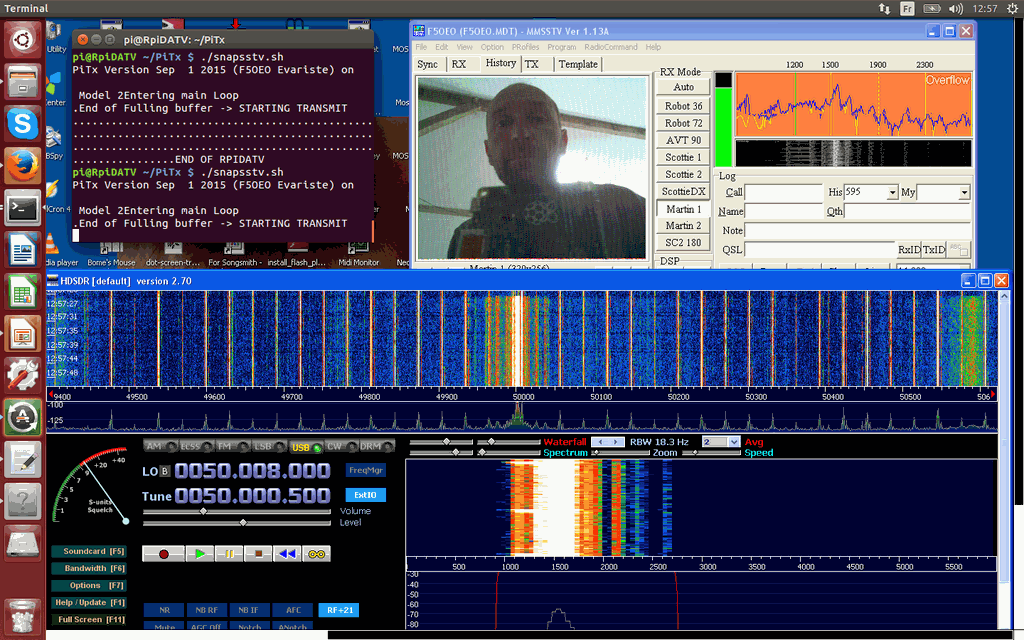
PiTX transmitting SSTV and received in HDSDR. From PiTX’s author’s Twitter @F5OEOEvariste
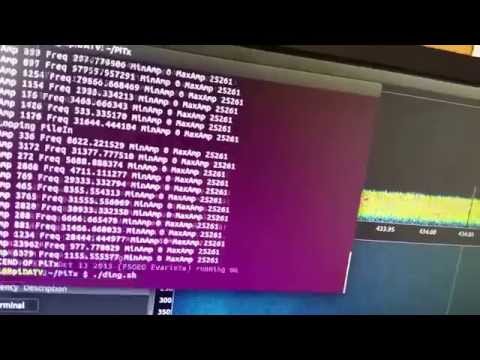
Over on YouTube the author of PiTx has also uploaded a video showing a wireless doorbell being replayed with PiTx. On the video description he writes:
PiTx is a software which permit to transmit HF directly through a pin of Raspberry Pi GPIO. Unlike PiFM which transmit only in FM, PiTx is able to perform multi modulation (FM,AM,SSB,SSTV,FSQ) : it has an I/Q input to be agnostic. The demonstration here is done in several steps : – Record an I/Q file from a doorbell transmitter on 434MHZ (first part) – Playing it with the Raspberry Pi using Pitx on HF on same frequency – Listen to the doorbell receiver which recognize the signal
Conclusion : Pitx is now a real TRANSMIT SDR at very low cost. Be aware that it generate lot of harmonics and never compete with USRP or HackRF. Goal is to popularize the transmission as rtlsdr popularize the reception.
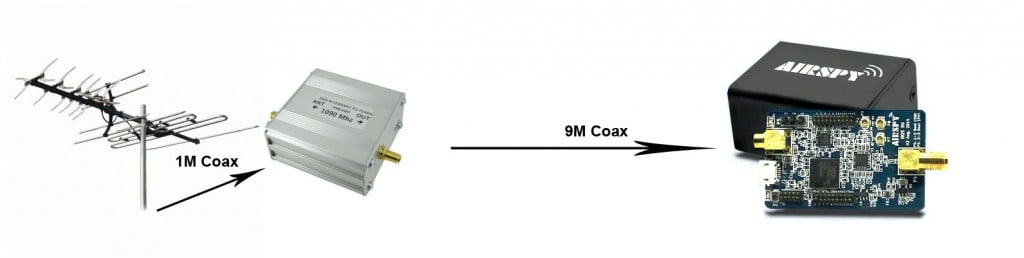
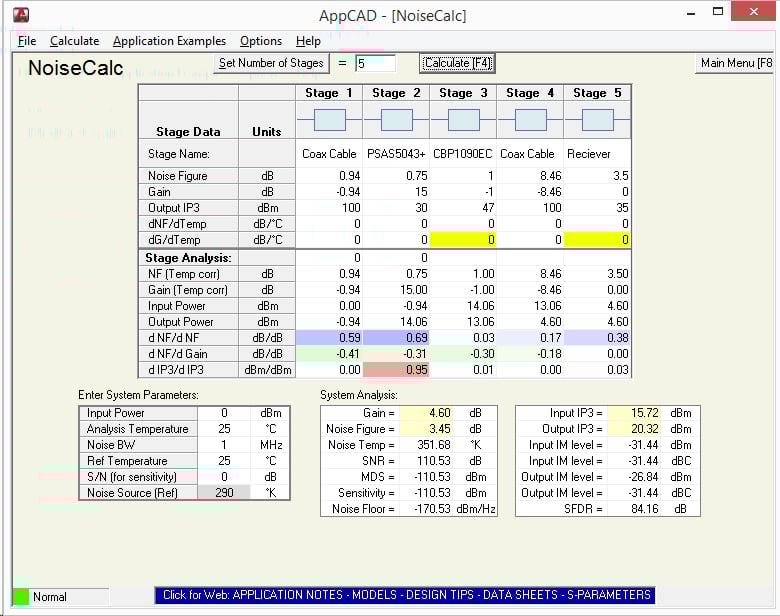
Using the free AppCAD RF design assistant software, Anthony explains how the noise figure of a system increases with longer coax cable runs, and how it can be reduced by placing an LNA right next to the antenna. He also explains why the sensitivity of the radio won’t increase if the LNA is placed close to the radio instead.
In addition to this, he also explains why adding more LNA’s to a system decreases the linearity (IP3) of the system and that if the receiver has a built in LNA that the system linearity can be severely degraded by adding extra LNA’s, causing easy overloading and intermodulation. In conclusion Anthony writes the following:
In summary, a setup with a good antenna system connected to a receiver with a built in LNA:
May not benefit from having a preamp at the antenna.
The presence of a built in LNA is detrimental to the linearity and may degrade the signals.
So in conclusion:
Put the preamp as close to the antenna as possible.
Receivers with a built in LNA may not get the most out of an antenna system or preamp.
Proper gain distribution guarantees better performance than one-size-fits-all solutions, both in terms of sensitivity and strong signals handling.
Optimal Setup: Antenna -> LNA -> Coax -> ReceiverNF and Linearity Calculations in AppCAD
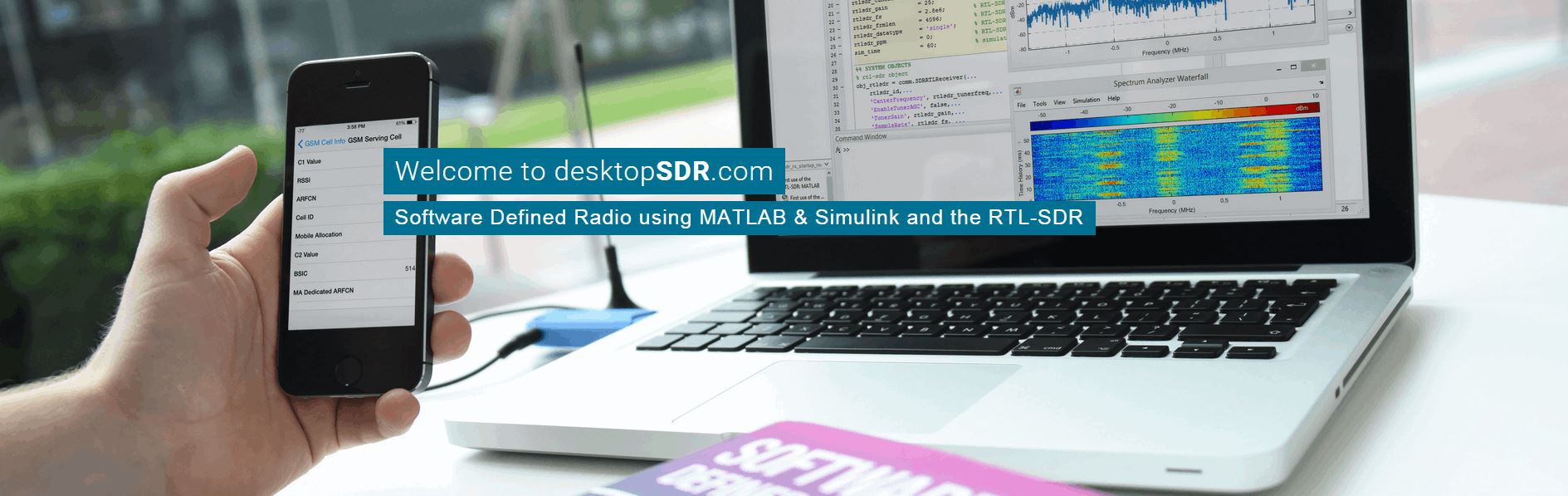
Back in August we posted about an RTL-SDR related text book called DesktopSDR that was due to be released later in the month. The text book discusses technical SDR topics, with the RTL-SDR used as the radio receiver and MATLAB used as the digital signal processing tool. It looks to be very useful to students of radio or communications engineering. There were a few delays with the release, but it is now out at www.desktopsdr.com. The eBook version is free whilst the print version is soon to be released on Amazon for about $68 USD for the paperback and $89 USD for the hard back.
To go along with the book they have also released several accompanying videos that are available at desktopsdr.com/videos.
The books blurb reads:
The availability of the RTL-SDR device for less than $20 brings software defined radio (SDR) to the home and work desktops of EE students, professional engineers and the maker community. The RTL-SDR can be used to acquire and sample RF (radio frequency) signals transmitted in the frequency range 25MHz to 1.75GHz, and the MATLAB and Simulink environment can be used to develop receivers using first principles DSP (digital signal processing) algorithms. Signals that the RTL-SDR hardware can receive include: FM radio, UHF band signals, ISM signals, GSM, 3G and LTE mobile radio, GPS and satellite signals, and any that the reader can (legally) transmit of course! In this book we introduce readers to SDR methods by viewing and analysing downconverted RF signals in the time and frequency domains, and then provide extensive DSP enabled SDR design exercises which the reader can learn from. The hands-on SDR design examples begin with simple AM and FM receivers, and move on to the more challenging aspects of PHY layer DSP, where receive filter chains, real-time channelisers, and advanced concepts such as carrier synchronisers, digital PLL designs and QPSK timing and phase synchronisers are implemented. In the book we will also show how the RTL-SDR can be used with SDR transmitters to develop complete communication systems, capable of transmitting payloads such as simple text strings, images and audio across the lab desktop.
4NEC2 is a freeware antenna simulation software program. The program can be used to model an antenna, and then determine through simulation properties such as the radiation pattern and SWR of the modelled antenna. It is very useful for those designing home made antennas for their RTL-SDR or other radio, or for those just trying to understand how antennas work.
4NEC2 can be a complicated piece of software and to get the most out of it a guide is needed. We’ve recently been informed that Mark Schoonover KA6WKE, is writing an eBook guide on this topic. His guide is currently only 20% complete, but a free sample of his book in its current state can be downloaded from leanpub. The guide already shows what the main windows of 4NEC2 do, and shows you how to model and simulate a simple dipole antenna.
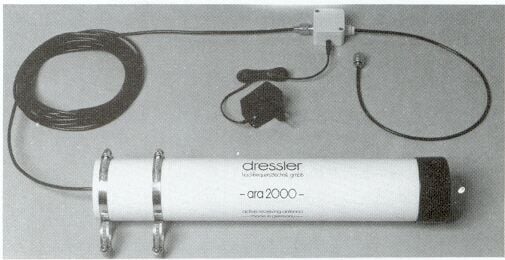
As the RTL-SDR and other SDRs are wideband, we recommend that people use a wideband antenna if they want to scan over all the frequencies. Normally a discone or a scantenna is suggested as the wideband antenna of choice, however there are alternative designs such as the Dressler ARA-2000 which is a type of log spiral antenna that can receive from 50 – 2000 MHz. This particular product is no longer for sale, but an article detailing the breakdown of its construction can be found online.
The dressler ARA-2000
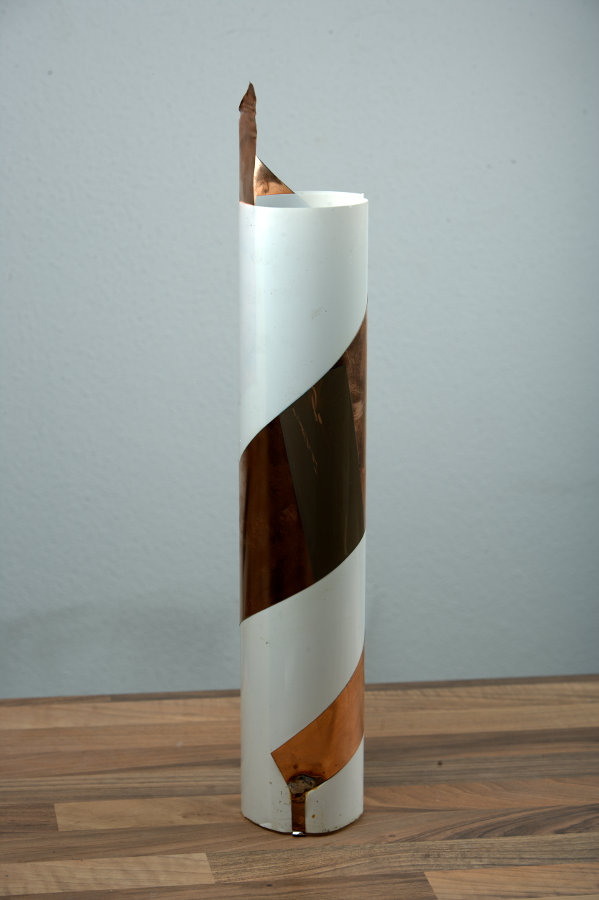
The article shows how to build the antenna from scratch. The active element consists of a thin copper sheet (or copper foil) in the shape of a wedge which is rolled into a cylinder around a plastic sheet. It is then connected to a low noise amplifier (LNA), which is powered through a bias tee. For the LNA something like the LNA4ALL could be used if building it yourself.
This antenna may be something to consider if you are thinking about building your own wideband antenna. It has the advantage of being much smaller than a discone and it can also be fully enclosed in a plastic radome to that fully protects it from weather elements. The author of the article also writes that he saw better performance from this antenna than when compared with a discone.