Category: Radio Astronomy

A Multi-Channel Coherent RTL-SDR Product: For Passive Radar, Direction Finding and More

Coherent-receiver.com is a company which is a customer of our RTL-SDR V3 dongle and they have been working on creating a multi-channel coherent receiver product based on the RTL-SDR. An RTL-SDR multi-channel coherent receiver is at its most basic, two or more RTL-SDR dongles (multi-channel) that are running from a single clock source (coherent). A multi-channel coherent receiver allows signal samples from two different antennas to be synchronized against time, allowing for all sorts of interesting applications such as passive radar and direction finding.

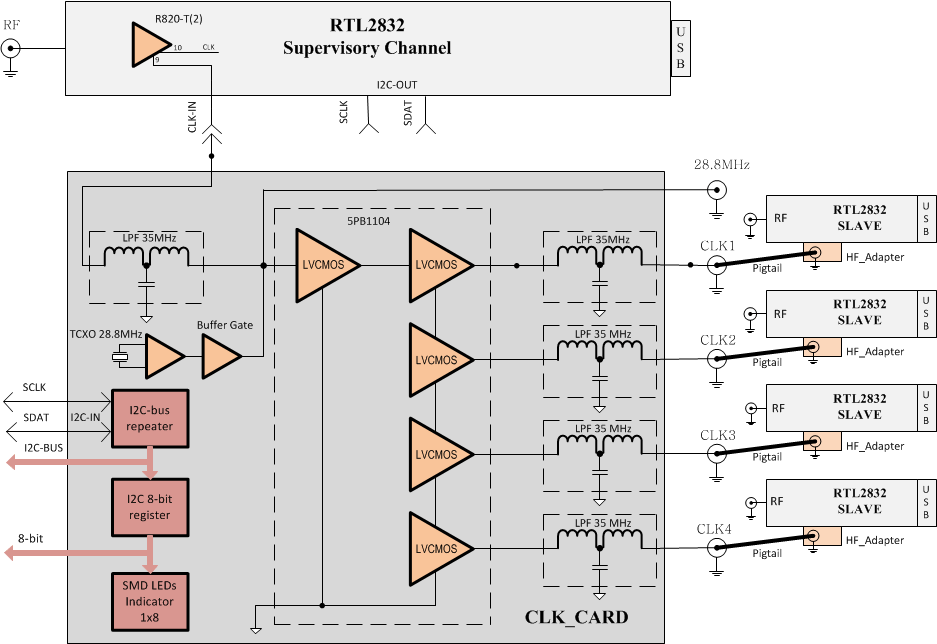
The team at coherent-receiver.com have used the new expansion headers on our V3 dongles to create their product. In their receivers they attach a control board which has a buffered 0.1 PPM TCXO (buffered so it can power multiple RTL-SDR’s). They also added an 8-bit register and I2C connection capabilities which allows for control of future add-on boards. The I2C capability is useful because it means that several RTL-SDR dongles can be controlled and tuned from the same control signal. More information on the registers and build of the receiver control board can be seen on their technical support page.

A ten channel RTL-SDR coherent receiver.
The Coherent Receiver block diagram.

One example application of a multi-channel coherent receiver is passive radar. Coincidentally, we’ve just seen the release of new GUI based Passive Radar software by Dr. Daniel Michał Kamiński in yesterdays post. Passive radar works by listening for strong signals bouncing off airborne objects such as planes and meteors, and performing calculations on the signals being received by two antennas connected to the multi-channel coherent receiver.

A second example is direction finding experiments. By setting up several antennas connected to a multichannel coherent receiver calculations can be made to determine the direction a signal is coming from. An interesting example of direction finding with three coherent RTL-SDRs can be seen in this previous post. A third example application is pulsar detection which we have seen in this previous post

Coherent-receiver.com sent us a prototype unit that they made with four of our V3 dongles. In testing we found that the unit is solidly built and works perfectly. We tested it together with Dr. Kamiński’s passive radar software and it ran well, however we do not have the correct directional antennas required to actually use it as a passive radar yet. In the future we hope to obtain these antennas and test the coherent receiver and the software further.

Currently they do not have pricing for these models as it seems that they are first trying to gauge interest in the product. If you are interested in purchasing or learning more they suggest sending an email to [email protected]. It seems that they are also working on additional RTL-SDR ecosystem products such as filters, downconverters, antennas and LNAs.

We hope that the release of this product and Dr. Kamiński’s software will give a boost to the development of coherent multi-channel receivers as we have not seen much development in this area until recently.

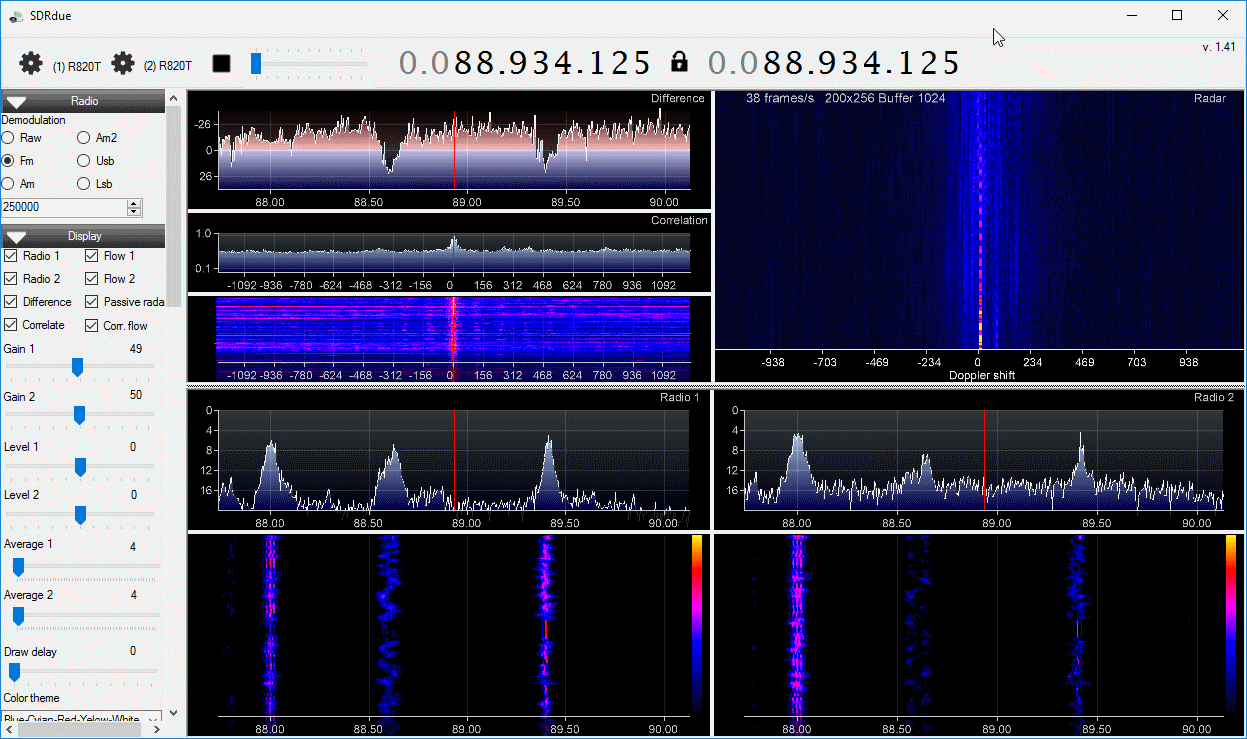
SDRDue running on the coherent-receiver.com unit.

New SDR# Plugin: Radio-Sky Spectrograph Data Stream

Edit: If you downloaded an older version of the plugin please note that it has now been updated. The update fixes some stability issues which would previously hang SDR#. The updated .dll file can be downloaded directly from https://goo.gl/0dPzOL.

Radio-Sky Spectrograph is a radio astronomy software program which is often used together with the RTL-SDR or other similar SDRs. It is best explained by the author:

Radio-Sky Spectrograph displays a waterfall spectrum. It is not so different from other programs that produce these displays except that it saves the spectra at a manageable data rate and provides channel widths that are consistent with many natural radio signal bandwidths. For terrestrial , solar flare, Jupiter decametric, or emission/absorption observations you might want to use RSS.

Usually to interface an RTL-SDR with Radio-Sky Specrtograph a program called RTL-Bridge is used. However, now SDR# plugin programmer Alan Duffy has created a new plugin that allows SDR# to interface with Radio-Sky Spectrograph via a network stream. This allows it to work with any SDR that is supported by SDR# plugins. Alan Duffy writes:

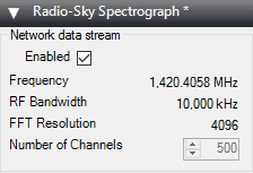
I wrote the plugin after becoming interested in amateur radio astronomy. The plugin allows you to use any of the software defined radios supported by SDR# to feed the Radio-Sky Spectrograph program with wide-band data. The plugin shows the frequency, bandwidth, and FFT resolution and has a user selected "Number of Channels" that are sent to the spectrograph program with an allowable range of 100 to 500. This number can only be edited when the data stream is not enabled. Also if certain key parameters change, such as the frequency or decimation, the network stream will stop as the spectrograph would no longer be capturing the same data. If this happens, simply click the start button on client side software (i.e. Radio-Sky Spectrograph). As long as the Enable box is checked on the server side, the plugin will listen for a connection and start transmitting data after RSS makes a new request for data.

We note that the software might also be useful for simply capturing a long term waterfall for finding active frequencies or looking for meteor scatter or aircraft scatter echoes. 

The Radio-Sky Spectrograph SDR# Plugin

Radio-Sky Spectrograph now supports the SDRPlay

Radio-Sky Spectrograph is a radio astronomy software program that integrates data over long periods of time and displays it as a waterfall. It is described by the author:

Radio-Sky Spectrograph displays a waterfall spectrum. It is not so different from other programs that produce these displays except that it saves the spectra at a manageable data rate and provides channel widths that are consistent with many natural radio signal bandwidths. For terrestrial , solar flare, Jupiter decametric, or emission/absorption observations you might want to use RSS.

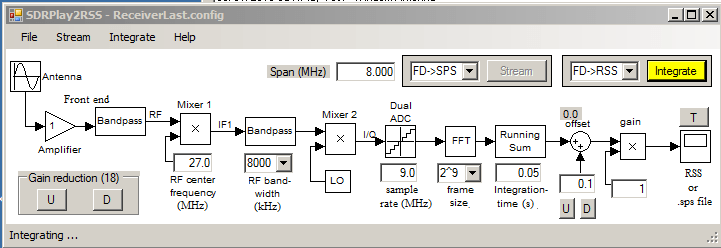
Radio Sky Spectograph is compatible with the RTL-SDR via an intermediary program called RTL Bridge, and now it is also compatible with the SDRplay via another intermediary program written by Nathan Towne called SDRplay2RSS

In previous posts we showed how some amateur radio astronomers were able to capture noise bursts from the sun and from Jupiter with an RTL-SDR. In the SDRplay software release post and documentation that comes with the software Nathan shows how he was able to capture solar emissions and Jupiter bursts with the SDRplay.

SDRPlay2RSS
SDRPlay2RSS
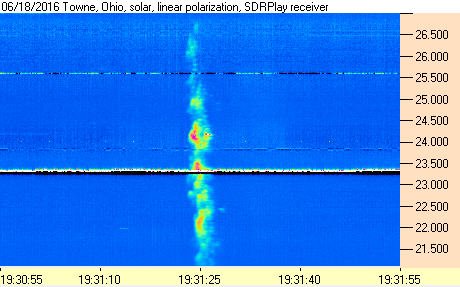
Solar emissions received with the SDRplay and Radio-Sky Spectograph.
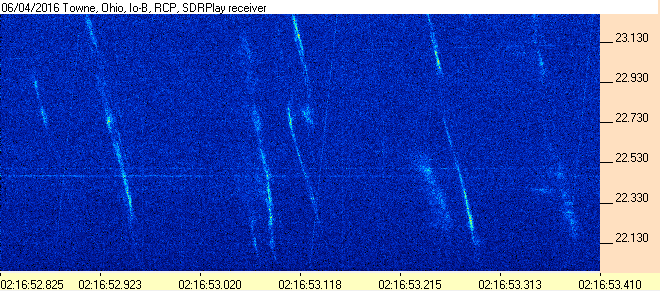
Jupiter Noise Bursts with the SDRPlay and Radio-Sky Spectrograph.

Building a Quad RTL-SDR Receiver for Radio Astronomy

Amateur radio astronomer Peter W East has recently uploaded a new document to his website. The document details how he built a quad RTL-SDR based receiver for his radio astronomy experiments in interferometry and wide-band pulsar detection (pdf – NOTE: Link Removed. Please see his website for a direct link to the pdf “Quad RTL Receiver for Pulsar Detection”. High traffic from this post and elsewhere has made the document go offline several times). Interferometry is a technique which uses multiple smaller radio dishes spaced some distance apart to essentially get the same resolution a much larger dish. Pulsars are rapidly rotating neutron stars which emit radio waves, and the strongest ones can be observed by amateur radio telescopes and a receiver like the RTL-SDR.

The Quad receiver has four RTL-SDR’s all driven by a single TCXO, mounted inside an aluminum case with fans for air cooling. He also uses a 74HC04 hex inverter to act as a buffer for the 0.5 PPM TCXO that he uses. This ensures that the TCXO signal is strong enough to drive all four RTL-SDRs.

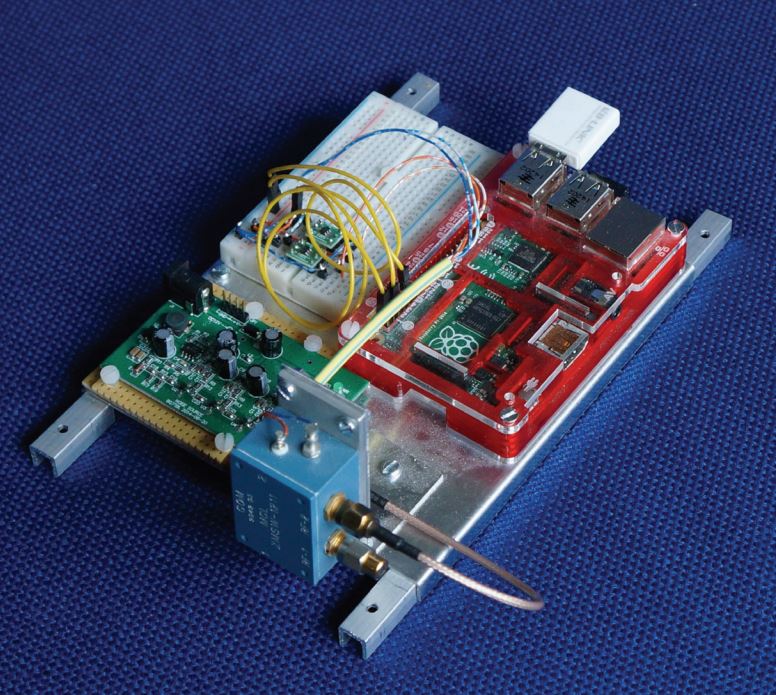
The Quad RTL-SDR with air cooling.

Whilst all the clocks are all synced to a single master clock, synchronisation between the RTL-SDR’s is still difficult to achieve because of jitter introduced by the operating system. To solve this he introduces a noise source and a switch. By switching the noise source on and off, correlation of the signal data can be achieved in post processing.

Noise Source and Switch Calibration Unit.
How correlation with the pulsed noise source works.

In the document Peter shows in detail how the system is constructed, and how it all works, as well as showing some interferometry results. The system uses custom software that he developed and this is all explained in the document as well.

IF Average SDR# Plugin Updated

The IF Average tool is a RTL-SDR compatible plugin for SDR# which allows you to plot an average of the current spectrum shown in SDR#. This is especially useful for radio astronomers who often need to average the spectrum for a long time in order to get a good plot of the Hydrogen Line. Recently the plugin was updated to support newer versions of SDR# and to upgrade some features. Daniel Kaminski, the author of the plugin writes:

I used ultrafast FFT which works on 4k to 512k bit space. With this plugin it is possible to average up to 64000000 samples in real time. XNA allows to shows the calculation results in real time.

To install the plugin you will need to install the XNA Framework 4.0 Redistributable first. Then copy the plugin files over to the SDR# folder and add the “magicline” to the SDR# Plugins.xml file.

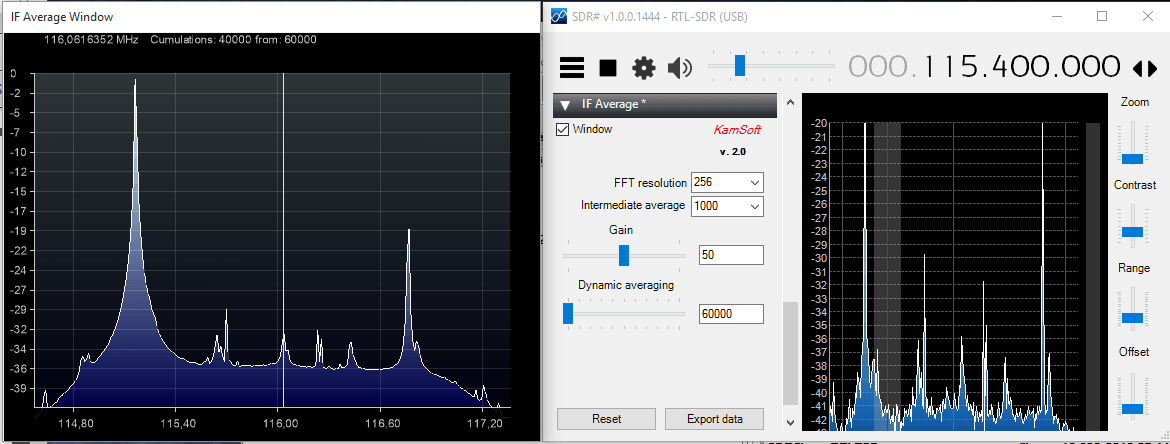
The IF Average SDR# Plugin

Notes on Amateur Radio Astronomy for Beginners

RTL-SDR.com reader Jean Marie Polard (F5VLB) recently wrote in to let us know about a useful document that he has put together which covers beginners amateur radio astronomy. The document includes various introductions to the types of antennas and electronic tools often used in radio astronomy, the software used and an introduction to all the different types of observable objects. There are also a few mentions of the RTL-SDR dongle which is known to be a useful tool for amateur radio astronomy.

The document is available in pdf form in English, as well as in French. If you are looking at getting started in amateur radio astronomy then this is a good starting guide.

jean_ra

Hydrogen Line Observation with an RTL-SDR

The RTL-SDR can be used for many interesting radio astronomy applications such as observing the Hydrogen line. Hydrogen atoms randomly emit photons at a wavelength of 21cm (1420.4058 MHz). Normally a single hydrogen atom will rarely emit a photon, but since space and the galaxy is filled with many hydrogen atoms the average effect is an observable RF power spike at 1420.4058 MHz. By pointing a radio telescope at the night sky and integrating the RF power over time, a power spike indicating the hydrogen line can be observed in a frequency spectrum plot.

On his website Steve Olney has been writing about his experiments and results with using an RTL-SDR to observe the hydrogen line. On his website he writes that he uses a 3M dish, with an LNA at the antenna to reduce the system NF, a hydrogen line tuned bandpass filter to remove out of band noise, 2 line amps to overcome coax loss, and finally a second LNA just before the RTL-SDR dongle to optimize the signal strength for the ADC. The dongle he uses has been modified to use a TCXO, and is aircooled via a PC fan. He also uses a modified version of the rtlsdr.exe IQ file recorder and his own custom GUI for controlling the RTL-SDR and antenna tracking mechanism.

His results show that he was able to detect the Hydrogen in the Large and Small Magellanic clouds. He also shows a method for converting the 8-bit IQ data down to 1-bit to save disk space, and shows that while some noise is added, the overall result is preserved.

See the related posts for other hydrogen line experiments with the RTL-SDR.

The 3M dish used for hydrogen line detection.
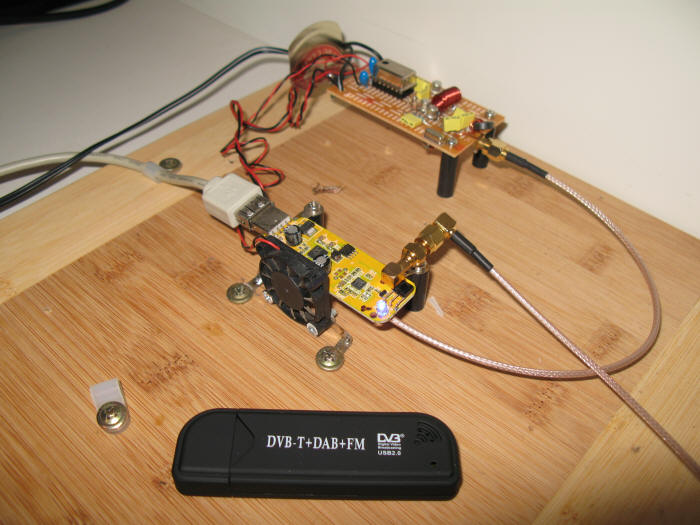
The fan cooled RTL-SDR used to detect the Hydrogen line.

Software De-Dispersion of RTL-SDR Pulsar Data

Back in September 2015 we posted about how radio astronomers Peter W East and GM Gancio were able to use an RTL-SDR dongle for the radio astronomy task of detecting pulsars. A pulsar is a rotating neutron star that emits a beam of electromagnetic radiation. If this beam points towards the earth, it can then be observed with a large dish antenna and a radio, like the RTL-SDR. 

More recently they published a new paper titled “Software De-Dispersion of RTL-SDR Pulsar Data” (pdf).  De-dispersion is a technique that allows very weak signals to be extracted from the background noise. The introduction to the paper reads:

Data files produced by RTL SDR dongles can be folded directly for pulsar detection using software such as rapulsar.exe. Using simple I/Q vector averaging software, the data can be down-sampled by factors of more than 100 prior to folding and/or period search processing to speed up useful data extraction. Ideally, wide band RF data should be de-dispersed to optimise later search and folding processing. De-dispersion is normally carried out by time adjusting data sampled from RF filter banks before combination. This note describes how data already digitised from the RTL SDR can be spectrum analysed or filtered using the FFT algorithm. Two methods are discussed, one summing power with some down-sampling; the second, a ‘coherent’ method that de-disperses the rtlsdr.exe .bin data file and outputs a .bin-compatible file. Both accurately de-disperses the data offering an improved folded data SNR.

More information about radio astronomy with the RTL-SDR, pulsars and the associated software links can be found at Peter W East’s webpage http://y1pwe.co.uk/RAProgs/index.html.

The de-dispersion principle