Category: RTL-SDR

Characterizing RF Filters with a Noise Source and RTL-SDR Dongle

Over on YouTube RTL-SDR experimenter Adam Alicajic has uploaded a video showing how it is possible to use the RTL-SDR as a tool to measure the frequency response of an RF filter. To do this he uses a noise source circuit which produces wide band white noise connected to an LNA4ALL, connected to the RF filter and finally connected to the RTL-SDR. Then using the Touchstone spectrum analyzer software he does a 300 MHz bandwidth sweep over a section of the spectrum which shows the response of the filter.

The noise source can be built from a simple diode based circuit as shown in a previous post, or if you have the Ham-it-up upconverter you can buy the parts for the noise generator part of the circuit.

In his video he shows the frequency response of a 145 MHz helix filter, a coax notch filter and a 1090 MHz home brew bandpass filter.

http://www.youtube.com/watch?v=X_gd2gWyGi4
http://www.youtube.com/watch?v=UvdaURc01Ts

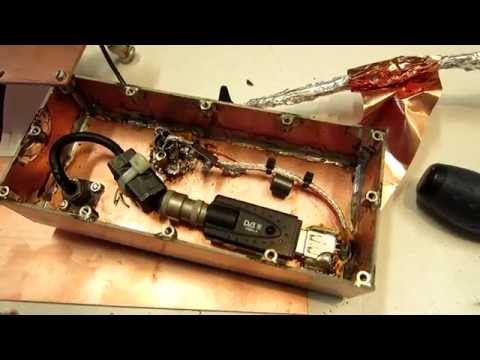
More filters and DVB-T dongle

Monitoring House Power Usage using an RTL-SDR

Home automation enthusiast Bruce Winter has recently posted on his blog about how he uses the RTL-SDR as part of his home automation system to automatically monitor his power (and solar power generation) usage. Many home power meters are now wireless which allows meter readers to gather power usage data from afar.

To gather the power usage data he used an RTL-SDR connected to a PC running rtlamr, which is software that can read data from ERT compatible power meters that transmit in the 900 MHz ISM band. He also uses some custom code he wrote that automatically plots the data over time and allows him to integrate it with his home automation system. In addition to his post he also uploaded a video shown below that shows his system in action.

Monitoring house power using a $20 RF RTLSDR USB stick

New Windows AIS Decoder For the RTL-SDR: AISRec

Over on YouTube user Jane feverlay has uploaded a video showing a new AIS decoder called AISRec for Windows that he has developed.

AIS is an acronym for Automatic Identification System and is a system used by ships to broadcast position and vessel information. By monitoring AIS transmissions with the RTL-SDR we can build a boat radar system. We have a tutorial on this here.

The new software is not free, but he offers a trial version that limits the run time to 20 minutes and 5000 max messages. The paid version removes these limits and also decodes both AIS channels simultaneously. The program monitors data from the RTL-SDR and sends decoded data out via UDP. Software such as OpenCPN can then be used to display the AIS data on a map.

We tested the trial version on our machine and found that it worked well at decoding AIS messages. To download the trial go to http://pan.baidu.com/s/1pJiEzEV and enter the code kn44. The download site is in Chinese, but it is obvious where to enter the code. We found the software to be virus free, but remember to always scan unknown software like this yourself. The full price of the software is unknown, but purchasing instructions are given in the trial download readme. The author also writes that his software now supports the Airspy, but not in the trial version.

Note that we discovered that the software doesn’t use a PPM correction setting as expected. Instead it uses a frequency shift setting. To set the shift in the AISRec.ini file, we had to calculate freqshift = 162.025 MHz – frequency of the second AIS channel as shown in SDR# with no PPM correction set.

Another similar software program that was released earlier is PNAis.

Using the RTL-SDR in the Pothos Dataflow Processing Platform

Pothos is a dataflow processing platform that can be used for signal processing through a graphical GUI that works in a similar way to GNU Radio. Over on YouTube the developers have released a tutorial video that shows how to use Pothos to interact with an RTL-SDR dongle. In the video they create a design which shows an RF spectrum and waterfall display.

Remote SDR with Pothos

Updates to a Month of RTL-SDR by Keenerd

Back in August of this year RTL-SDR code contributer Keenerd aka Kyle Keen ran an Indiegogo campaign to raise funds to pay for him to work on upgrading RTL-SDR related code for one month. As Kyle only counts the days he manages to put a good effort in towards the upgrades, the coding is still ongoing. He recently put out an update which we quote below.

Programming Report – Week 3

Hey all, sorry about dropping off the radar there.  There were several large unexpected events in recent months, but nothing bad.  I’ve still been hacking on the project.  An anonymous donor gave me a Lyons DSP textbook, which I’ve been working through for more solid foundations.  But studying doesn’t generate any new code for you to play with, so hasn’t been counted towards the project.

I’ve also been working on a very ambitious ADS-B related side project.  It is something no one has ever done before with the RTL-SDR, but mathematically it is feasible and progress is steady.  Not anywhere near for a release (and might yet be impossible in practice), and thus also hasn’t been counted towards the project.

So what has been completed since the last report?

* Automatic audio gain.  Crucial for AM/SSB listening.

* Audio padding (constant rate audio).  If you are streaming rtl_fm, this will prevent stutters when the tuner is busy hopping.

* Heatmap fixes.  The font is downloaded automatically and image slicing is completed.  Run rtl_power 24×7 but render a heatmap of only the last hour, for example.

* Rtl_power fixes.  Including one tricky corner case that caused crashes.

Also a big thank you to Kacper Michajłow who fixed and fleshed out a couple of Windows issues that were giving me trouble.

25 days remain.  As always, if you have comments or suggestions you can reach me by email or in ##rtlsdr.

The latest feature requests and links to the GitHub repositories and Windows builds can be found at http://igg.kmkeen.com/.

monthrtlsdr

Sniffing and Analyzing GSM Signals with GR-GSM

Over a year ago we wrote a tutorial on how to analyze GSM cellular phone signals using a RTL-SDR, a Linux computer with GNU Radio, Wireshark and a GSM decoder called Airprobe. With this combination it is possible to easily decode GSM system messages. Setting up Airprobe is can be difficult as it is unmaintained and incompatible with the new version of GNU Radio without patches.

Now a new software package called gr-gsm has been released on GitHub which seems to be a newer and improved version of Airprobe. The gr-gsm software is also much easier to install, uses the newer GNU Radio 3.7 and seems to decode the system data with much less trouble than Airprobe did. We will soon update our tutorial to use gr-gsm, but the instructions on the GitHub are already quite good. The author of gr-gsm also appears to be actively adding new features to the software as well. The video below shows gr-gsm in action.

Sniffing GSM data with gr-gsm and cheap RTL-SDR receivers

New R820T Driver with LNA/Mixer/VGA Gain Settings

A few weeks ago we posted about an unreleased modified RTL-SDR driver for SDR# by mm6dos which had controls for the three separate gain stages available in the R820T and some extra controls for controlling software decimation and the IF filter. While that particular driver has not yet been released, a modified driver from randaller, another driver coder has been released. His modified driver enables the LNA/Mixer/VGA gain controls, but does not enable any IF filter or decimation settings.

In the standard R820T driver one of the gain stages is locked to a pre-specified value and the the gain slider is a function of the other two gain values. Having full manual control over all three gain stages may help with optimizing signal SNR levels and reducing noise.

To install the driver simply extract the contents of the zip file from the sourceforge download into the sdrsharp folder. Then open the SDRSharp.exe.Config file in a text editor and add the line  in the section. Then in SDR# you can choose “RTL-SDR / GUSB” from the source menu to use the new driver.

Modded Driver with Extra Gain Controls

Recording Video of Passing Aircraft with A Raspberry Pi and RTL-SDR

Electronics experimenter Simon Aubury has recently made a write up on his blog about a project he has been working on. His project is the use of a Raspberry Pi with servo mounted video camera and RTL-SDR to automatically track and record video of passing aircraft.

Simon’s project works by using the RTL-SDR connected to the Raspberry Pi as an ADS-B receiver. From the ADS-B signals the current coordinates of nearby aircraft can be determined. Then by using some coordinate math, the Raspberry Pi can be told to point its camera in the direction of the aircraft. As well as videoing the passing aircraft, the Raspberry Pi also overlays text on to the video showing information such as flight number, source and destination airports, aircraft type, elevation and distance and date of observation.

In addition to all that, his software also automatically uploads the recorded videos onto his website. Here you can see the latest and closest video captures his system has performed.

[Discovered on Hackaday]

Raspberry Pi RTL-SDR Plane Tracker Video Capture