Tagged: sdr#

SDR# Now with Noise Blanker

The latest version of SDR# has now been updated to include a noise blanker plugin. A noise blanker can reduce impulsive noises like those created by spark gaps and electric motors. Other SDR programs like Linrad and HDSDR have had noise blanker functions for a while so this is a welcome addition to SDR#. Below is a comparison of the noise blanker turned on and off on a noisy CW signal.

To update SDR# to the latest version simply run install.bat again. Take note that updating will remove any plugins you have added to the SDRSharp.exe.Config file so you may wish to save it first.

Noise Blanker Off

[audio https://www.rtl-sdr.com/wp-content/uploads/2014/03/nb_off.mp3]

Noise Blanker On

[audio https://www.rtl-sdr.com/wp-content/uploads/2014/03/nb_on.mp3]

SDR# now with IF Stage Noise Reduction Algorithm

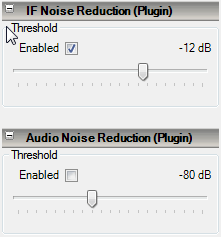
SDR# has recently been updated to include an IF stage digital noise reduction algorithm. Previously digital noise reduction could be done at the audio output stage, but now it can be done to the IF signal as well. Performing digital noise reduction on the IF stage appears to work much better than at the audio stage. Update SDR# by running the install.bat file again.

Here are some comparison audio files tested on a noisy NFM voice signal for listening.

Original Signal

[audio https://www.rtl-sdr.com/wp-content/uploads/2014/03/IF_NR_OFF.mp3]

IF Noise Reduction (set to -12 dB)

[audio https://www.rtl-sdr.com/wp-content/uploads/2014/03/IF_NR.mp3]

Audio Noise Reduction (set to -80 dB)

[audio https://www.rtl-sdr.com/wp-content/uploads/2014/03/AF_NR.mp3]
sdrsharp_if_nr
SDR# IF Digital Noise Reduction Plugin

Installing SDR# on OSX

SDR# is the most commonly used Software Defined Radio receiver GUI that is used with the RTL-SDR. Natively, it runs on Windows, but since it is written in C#, it can also run on Mac OSX and Linux with Mono. Installing SDR# on OSX using Mono is a little more complicated compared to simply running it on Windows however.

To help with this, Jan Szumiec has written a simple guide on installing SDR# using Mono on OSX. The guide includes the steps of installing Mono, the Xamarin Studio Mono IDE, the rtl-sdr libraries and then compiling the SDR Sharp sources and symlinking the Mono runtime to the native libraries.

Update: This is no longer possible as the SDR# code is not available anymore.

SDR Sharp on OSX
SDR Sharp on OSX

Fork of SDR# with Added Features

Recently an RTL-SDR.com reader wrote in to let us know about a fork of SDR# written by “Gubo682” which has some added features. Note you will need to be a member of the SDR# Yahoo group to access the download page linked above. The added features and changes to SDR# are

Frequency Manager
– Names show up in spectrum
– Scan button for simple scanning through current group
– Selected group remembered after restart
– Adding new entry: group defaults to current group
– Simple DMR support (see Tips)
– SHIFT click (or SHIFT ENTER) will select according relais input frequency for 2m/70cm

Spectrum Display
– When dragging spectrum left/right, holding SHIFT will keep frequency constant

Waterfall Display
– With the new HF [Radio Freqeuency]/AF [Audio Frequency] button waterfall can be switched to AF. Cursor will be annotated with AF frequency.
– Splitter position (hopefully) restored properly after restart

Recording
– AF recording pauses if squelch closed

DX Cluster Plugin
– Displays DX cluster stations in the spectrum
– Displays currently on-air SW radio stations in spectrum (data from http://www.eibispace.de/)

In addition there is also now a notch filter with adjustable bandwidth which can be applied by right clicking in the new AF (Audio Frequency) mode of the waterfall.

To use with the RTL-SDR, you will need to download the SDRSharp_gubo68_4d.zip file, run install.bat and then manually un-comment the line in the SDRSharp.exe.config text file and then copy over rtlsdr.dll and libusb-1.0.dll from an SDR# installation that was installed using the Quickstart guide method.

You can follow the development of this modified SDR# on the SDRSharp Yahoo group, and specifically in this Yahoo Groups thread.

Modified "Gubo682" SDR# showing DX Cluster Frequency Names, Audio Spectrum and Notch Filter.
Modified “Gubo682” SDR# showing DX Cluster Frequency Names, Audio Spectrum and Notch Filter.

New CTCSS Detector Plugin for SDR#

CTCSS is an acronym for Continuous Tone-Coded Squelch System and is a system that is used in shared two way radio systems. It is common for a single radio channel to be shared over a number of user groups for frequency use efficiency. CTCSS uses a special tone to identify each group of users, and this tone is used to prevent a group hearing radio chatter from another group sharing the channel.

Over on the SDR# Yahoo Groups forum, a CTCSS detector plugin for SDR# has been posted. The plugin can detect CTCSS tones and provide a squelch for the desired tone. The latest version of the plugin can be downloaded from this link.

CTCSS SDR# Plugin
CTCSS SDR# Plugin

The BIG List of RTL-SDR Supported Software

There are now dozens of software defined radio packages that support the ultra cheap RTL-SDR. On this page we will attempt to list, categorize and provide a brief overview of each software program. We categorize the programs into general purpose software, single purpose software, research software and software compatible with audio piping.

If you know of a program that is missing please leave a comment in the comments section at the bottom of the page.

13/02/2014 - Added Sodira, gr-wmbus, rtlsdr-waterfall, QTRadio, multimon, sdrangelove, lte-scanner, rtl_tcp, rtl_sdr_FS20_decoder.
17/02/2014 - Updated the Linrad description.
28/04/2014 - Added Modesdeco and Trunk88.
30/05/2014 - Added RTL Panorama, RTL SDR Panoramic Spectrum Analyzer, Chrome Radio Receiver, SeeDeR, DAB Player, RTL SDR Installer, PD/Max Wrapper, SDRWeather, LTR Analyzer, softEOT/softDPU and ScanEyes.
26/07/2014 - Added PiAware, OOK-Decoder, rtl_fm_python, rtl_power heatmap viewer, RTL Bridge, threejs-spectrum, CANFI Software, PNAIS, FLARM Decoder, Xastir, RTLSDR-Airband, SDRTrunk.
13/11/2014 - Added Touchstone, RFAnalyzer, RTL1090 XHSI Interface, Parus Decoder, PlotRTL1090, LRPT Decoder.
05/02/2015 - Added rtl_tool_kit, CubicSDR, OregonWeather, FreqWatch.
15/04/2015 - Added ADSBox, YouSDR, FlightAware Flight Feeder, Frequensea, Track your flight EUROPE, QSpectrumAnalyzer, Doppler & Demod, Redsea, rtl_heatmap, gr-gsm, driveby, SDRecord.
23/12/2015 - Added Remote rtl_udp, AISRec, dump978, AISDeco2, SDRrecorder, OpenWebRX, dsame, RTL-Widespectrum, rtl_ais, rtl_gopow, ham2mon, rtl_ais_android, inmarsatdecoder, spektrum, qtcsdr, rtl_power_fftw, JAERO, GNSS-SDRLIB, SVxLink.
8/09/2017 - Added inspectrum, gr-isdbt, telive, tetra-listener, gr-iridium, SDRuno, luaradio, rx_tools, kukuruku, chronolapse, cloud-sdr, natpos, d3-waterfall, SDRDue, gqrx-ghostbox, ships, rtlmic, tsl-sdr, universal radio hacker, dumpvdl2, re-dected, aerial-tv, questasdr, welle.io, spyserver, dspectrumgui, atcsmonitor, NRSC5 HD Radio Decoder, leandvb, imsi-catcher, block stream receiver, salamandra, deinvert, RS.
6/11/2017 - qradiolink
15/06/18 - Zeus Radio
11/01/19 - SCEPTRE
13/01/20 - VDLM2DEC, Blockstream Satellite, TempestSDR, rtlsdr-wsprd, rtl_map, Radwave, radiosonde_auto_rx, XRIT Decoder, SATNOGS, SigintOS, RadioCapture, EMI_Mapper, xrit-rx (KOMSAT 2A), RTLion, WSJT-X, noaa-apt, rtlSpectrum, fingerprinting_radios_w_ML, mySdrPlayback, QO-100_SSB-WebSDR_DATV-WebSpectrum, goestools, SigDigger, Tekmanoid EGC, Scytale-C, PEPYSCOPE, iridium-toolkit, Electrosense, ORBCOMM-receiver, r2cloud, coole-radar, vor-python-decoder, IridiumLive, radio_analyser, DSDPlusUI, retrogram-rtlsdr, vortrack, rtl_power-fm-multipath, glrpt, Spektrum SV Mod, gammaRF, SegDSP, rtl-ultrasound, radiosondy.info, OP25, RS41 Tool, TETRA Trunk Tracker, meteor_demod, FreqShow, rtl_tcp SDR, PLSDR, SDR Receiver, Echoes, rtlmm, FM2TXT, cnn-rtlsdr, Meteor Logger.
04/03/21 - SDR++

General Purpose RTL-SDR Software

We define general purpose SDR software as programs that allow the RTL-SDR to work like a normal wideband radio receiver.

SDR# (Windows) (Free)

SDR#
SDR#

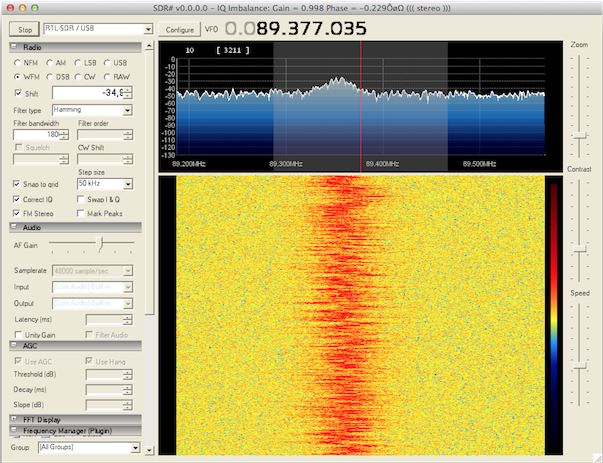
SDR# (pronounced "SDR Sharp") is the most popular free RTL-SDR compatible software in use at the moment.  It is relatively simple to use compared to other SDR software and has a simple set up procedure. We have a full overview of the installation procedure on our Quick Start Page. SDR# is designed to be use with the $199 Airspy SDR, but works just fine with the RTL-SDR.

SDR# is a simple to use program that also has some advanced features. It has a useful modular plugin type architecture, and many plugins have already been developed by third party developers. The basic SDR# download without any third party plugins includes a standard FFT display and waterfall, a frequency manager, recording plugin and a digital noise reduction plugin. SDR# also decodes RDS signals from broadcast FM.

HDSDR (Windows) (Free)

HDSDR
HDSDR

HDSDR is based on the old WinRAD SDR program. HDSDR supports the RTL-SDR through use of an ExtIO.dll module. To install HDSDR, download the program from the link on the main HDSDR page, then to use the RTL-SDR you will need to download the ExtIO_RTL2832.dll file an place it into the HDSDR folder. When opening HDSDR, select the newly copied ExtIO_RTL2832.dll. The other dlls that come with HDSDR will not work with the RTL-SDR, even though they have RTL-SDR in their filename. The official installation instructions can be found here.

Along with a FFT display and waterfall, HDSDR has some extra advanced features. Users will also find an Audio FFT and waterfall display on the bottom of the screen. The output audio can also be bandpass filtered by dragging the filter borders on the display. Bandpass filtering the audio can really help clean up a noisy signal. The audio processing also supports placing of notch filters either manually or automatically. There are also noise reduction and noise blanker features and an automatic frequency centering algorithm which will automatically center the signal, so you don't need to click exactly in the center of a signal. Traditional ham radio users will also enjoy the S-units signal strength meter and the built in frequency manager.

SDR-RADIO.COM V2/V3 (Windows) (Free)

SDR-RADIO.COM V2
SDR-RADIO.COM V2

SDR-RADIO.COM V2 and the newer V3 is a popular SDR program with many advanced features. As such is it a fair amount more difficult to learn and use compared to SDR# and HDSDR. Be sure you install version 2 and not V1.5 as only V2 has RTL-SDR support.

Once sdr-radio is installed, to get it working with the RTL-SDR you will need to compile or download three .dll files (SDRSourceRTL2832U.dll, rtlsdr.dll and libusb-1.0.dll) and place them into the sdr-radio folder. To compile your own dlls see the instructions here, otherwise download the dlls directly from the bottom of this link. If the dlls were placed in the correct folder you will be able to add your RTL-SDR as a receiver by clicking on the +Definitions button, and then finding and adding the RTL SDR (USB) option under the search drop down menu.

Like HDSDR, not only does sdr-radio have a RF FFT signal and waterfall display, but also an optional audio spectrum FFT and waterfall display. Built in are also several DSP features like a noise blanker, noise reduction filter, notch filter and squelch options. The EMNS noise reduction filter is particularly good at automatically cleaning up and clarifying voice signals.

To add to the feature list, sdr-radio also has built in PSK, RTTY and RDS decoders, and also comes with a satellite tracker. Furthermore, sdr-radio V2 (not V3 yet) has an excellent remote server which will allow you to easily set up and connect to a remote RTL-SDR server over a network or the internet. Finally, sdr-radio is capable of listening to up to 6 signals in the same chunk of visible spectrum at a time.

Continue reading

Register your interest in Airspy

You can now register your interest in purchasing an AirSpy software defined radio dongle on the new AirSpy website. AirSpy is a new software defined radio similar to the RTL-SDR currently under development by the creator of SDR#.

AirSpy promises to be an improvement on the RTL-SDR with its large 10 MHz bandwidth, 24-1750 MHz tuneable range, 12-bit ADC and a programmable Cortex M4F @ 204 MHz on board CPU. In comparison the typical RTL-SDR has ~2.4 MHz of usable bandwidth, a 24-1750 MHz tuneable range and an 8-bit ADC. A higher bit ADC can help in receiving weaker signals. AirSpy is expected to sell at around the $100-$150 mark, with it being on the cheaper end if there is greater interest.

AirSpy Dongle
AirSpy Software Defined Radio Receiver