Tagged: sdr#

XiOne – A RTL2832U based Portable Software Defined Radio: Indigogo Funding Campaign

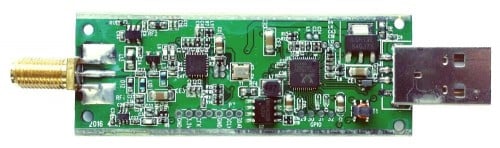
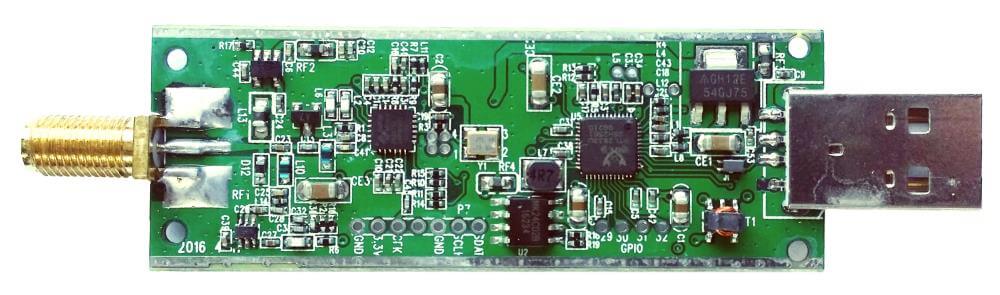
A new funding campaign for an RTL2832U based software defined radio has gone up on Indiegogo. The new SDR is called the XiOne and is intended to be the first SDR that is easy to use with smartphones and open to the maker community.

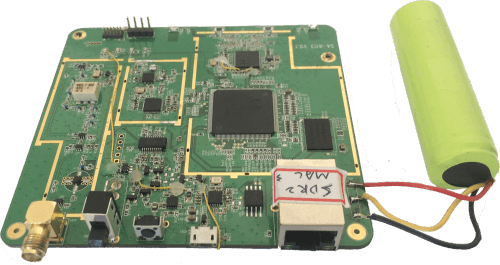
With its 100 kHz to 1.7 GHz receiving range, the XiOne has a similar tuning range to the standard RTL-SDR dongles when an upconverter or the direct sampling mod is used. What makes the XiOne different is that it will have a built in MIPS processor, an internal rechargeable battery for portability and it will connect directly through WiFi to a smart device. They are also developing SDR GUI software for mobile devices including decoders for things like ADS-B, AIS and NOAA Satellites.

The IndieGoGo backer price for a XiOne is $179 USD, but if you act fast there are 100 units available at the promotional price of $139 USD. At the moment they have a working prototype with completed firmware, portable Java based SDR GUI, iPhone demodulation software, a MacOS ADS-B receiver, an iPad AIS receiver and an iPad spectrum analyzer. The fundraiser is to help them begin serial production.

There is a Reddit thread discussing the project here.

XiOne Prototype Internals
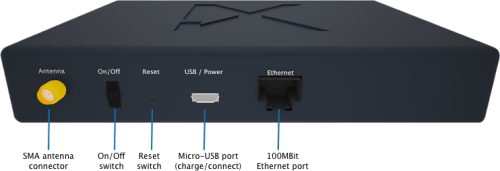
XiOne Casing
XiOne Casing

Hak5: Autonomous Boats, Hacker Printers And RTL-SDR Plugins

This week on the popular YouTube show Hak5, SDRSharp plugins are discussed once more amongst other topics. This time at around the 17 minute mark, Shannon discusses how to install plugins that do not have automated installers. For an example she shows how to install the Level Meter plugin.

Autonomous Boats, Hacker Printers And RTL-SDR Plugins, Hak5 1623

SDR# Frequency Manager + Scanner Plugin Updated to Version 1.6

The widely used Frequency Manager + Scanner Plugin for SDR# has recently been updated to version 1.6. It can be downloaded from sdrsharpplugins.com. Note that this version requires SDR# version 1248 or newer, so run install.bat if you haven’t done so in a while. The new features are as follows:

Frequency Manager

  • The Frequency Description is now displayed in the upper-right corner of the spectrum analyzer, along with the indicator for multiple database entries for that frequency.
  • As a result of moving the above information to the spectrum analyzer, the Frequency Manager panel is now 35% smaller.
  • The Clipboard Monitor now optionally watches the clipboard for frequencies you might have copied from the internet; and if that can be converted to a MHz value it tunes the radio to that frequency.
  • Function Keys F1-F10 can now be used to tune to a preset frequency.

Scanner

  • A new Minimum Signal Strength Line is displayed on the spectrum display. This, along with real-time display of the current signal’s strength when the scanner is running, let you see at a glance how that signal compares to your scanner settings. In addition you can use customize the line with one of 6 line patterns.
  • Current Signal Strength in dB is displayed in the upper right corner of the spectrum analyzer, just after the Frequency Description.
  • Timeout and Watchdog timers’ indicators are now displayed in the upper right corner of the spectrum analyzer.

SoftRock Lite II Build and Test Tutorial Video

The SoftRock Lite II is a (now fairly old) soundcard based software defined radio kitset that is capable of receiving on the HF bands. Over on YouTube user w2aew has uploaded a video showing the entire kitset build process for the SoftRock Lite II SDR radio. He also goes over the circuit blocks explaining their function and how they work.

This is an excellent video if you are interested in learning more about the components and circuits used in some SDRs.

#148: Software Defined Radio kit | Tutorial | Build | Test | Softrock Lite II

SeeDeR: New SDR GUI Software Supporting RTL-SDR

SeeDeR is a new software defined radio GUI program that supports the RTL-SDR. It also supports the Funcube Dongle and BladeRF. Currently it is in an early beta release.

SeeDeR contains features specifically developed for decoding radio data transmissions from satellites – in particular the crowdfunded SkyCube satellite – such as a built-in AX.25 decoder, and a satellite pass predictor.

SeeDeR requires a PC with Windows 7+, 1+ GB RAM, 2+ GHz dual-core CPU, 20 MB HD space. The executable is 32-bit.

We need to note that SeeDeR has been a cause of some friction with the author (Youssef) of SDR# and may be part of the reason why SDR# was temporarily removed. Youssef is claiming that SeeDer has illegally used licenced code from SDR#, however the author of SeeDer refutes that claim.

SeeDeR Software Defined Radio GUI

SDR# Website and Downloads Removed

Update: The author has updated the website with an explanation of why he took it down. He has also restored download functionality so now sdr-install.bat will work again.

The SDR# website, download links and repositories have been taken down and probably won’t be back for a number of days or weeks. This means the sdr-install.bat file will not work as well. If you already have SDR# installed it will continue to work as normal.

We aren’t exactly sure why this has happened, but it seems the author of SDR# did not like the many forks of the software that have been recently popping up. The forks may have been violating the licence that SDR# is under.

If you are new to RTL-SDR, our Quickstart guide has guides to using HDSDR and SDR-CONSOLE to try while SDR# is unavailable. HDSDR and SDR-CONSOLE are two good alternatives to SDR# but are slightly more difficult to set up and use.

See the Reddit discussion on this here.

Two new SDR# Plugins

Last month two new SDR# plugins where released on rtl-sdr.ru. The first is TimeShift SDR. This plugin creates a buffer which allows you to listen to any signal at any point in time on the waterfall within the buffer time. It is very useful for catching signals that you might have otherwise missed by being too slow to click on them. Update: Turns out Timeshift SDR isn’t exactly new. But it has recently been updated to work on the latest SDR# releases.

Timeshift SDR# Plugin

The second plugin is a Digital Audio Processor which adds in a squelch slider bar, an audio inverter, an audio band-pass filter and a de-emphasis filter.

digital_audio_processor_sdrsharp_plugin
Digital Audio Processor Plugin