Tagged: sdrplay

Recent Podcasts on Software Defined Radio from Scanner School

Scanner School is an online resource that aims to teach subscribers all about radio scanning. They also run a weekly podcast discussing various topics in the scanning hobby. Recently they've had a bit of a focus on software defined radios, with several of the last podcasts being SDR related.

Episode 170 - SDRplay with Jon Hudson

On today’s episode, host Phil Lichtenberger interviews Jon Hudson, the co-creator of the SDRplay devices. They talk about the evolution of radio scanning software, the advantages of SDRplay and SDRuno, where they think the scanner hobby is headed, and more.

What You Need To Know

Jon Hudson is a co-creator of the SDRplay device. SDRplay manufactures both hardware and software. Before about 20 years ago, processing the radio chain was done exclusively on the hardware. Now computers are powerful enough to support doing most of this work with software. SDRplay was founded in 2014. The RSPDX has multiple antennae, which allows users to switch from one antenna to another quickly and easily. Because SDRplay makes their own software for Windows, they take a lot of time to make sure it works seamlessly out of the box. SDRplay acquired a company called Studio One that manufactured software about five years ago. SDRplay is releasing a scheduler, which will function as an audio recorder for a specific channel at a specific time. An advantage of the scheduler is that it allows users to tune in to certain frequencies at a specified time and then turn it off or move on to something else. All session notes with links to the items we talked about can be found on our website at www.scannerschool.com/session170

170 - SDRplay with Jon Hudson

Episode 169 - SDR++ with Alex Rouma

A cross platform, open source, free SDR software!

In this episode, Phil talks to Alex Rouma, author and creator of SDR++. They discuss how Alex got into SDRs, where SDR++ is now and where he hopes it can go, and how you can contribute to this open source software’s development, whether you’re a programmer or not.

What You Need To Know

SDR++ is free, open-source, cross-platform software for your SDR. Alex got into SDRs after watching a video of someone receiving weather satellites, piquing his interest in radio in general. Alex is currently building SDR++ as general purpose SDR receiver software with more modern functionality like multi-VFO and multi-platform support. SDR++ supports anything Alex has or that companies have sent him, including SDR Play, HackRF, RTLTCP, and more. Alex considers the software still in beta, but thinks he’ll have stable code with the features he wants within 3-4 months. He wants to add audio filtering features and more options for the file source. SDR++ is fully modular so you can add plugins as you need them. Alex aims to make the software as automatic as possible. All session notes with links to the items we talked about can be found on our website at www.scannerschool.com/session169

169 - SDR++ with Alex Rouma

Episode 168 - Using a SDR as Your Scanner

In this episode, Phil talks to listener Greg Weamer about his SDR setup. They get into the history of SDR development, what you can do with an SDR that you can’t do with a hardware-based scanner, and where they think the future of SDRs is heading.

What You Need To Know

Today, Greg does not have a hardware scanner at all, but only a SDR. His area has simulcast problems that the SDR solves. Greg currently uses about 8 RTL-SDR dongles, including 3 on a Raspberry Pi, some on another Raspberry Pi, an old laptop, and more. Greg also uses Trunk Recorder, which is one of the most difficult things he’s ever configured, but he loves that it monitors every voice channel at the same time. RDIO Scanner is a web interface that takes the feeds from the virtual recorders Greg has going and cues up calls on every voice channel so you don’t miss anything. Because it’s a web interface, he can bring it up on his phone or tablet from anywhere. Greg thinks the next major SDR development will eliminate the need for any fully hardware based radios entirely. An SDR can do things that not a single hardware-based scanner out there is capable of. Greg has used his SDR to tune into his utilities smart meters for his water and gas to track his usage. One of Greg’s favorite things about SDR is that you can see the signals and whether they’re strong or not, whether they’re digital or analog, etc. The ability to visualize the signal lets you find a lot more new stuff to listen to. The flexibility of an SDR and ability to do so many things at once with it means you get the equivalent of several premium subscriptions to other services. All session notes with links to the items we talked about an be found on our website at www.scannerschool.com/session168

168 - Using a SDR as Your Scanner

Episode 165 - This is Why You Need an SDR

In this episode, Phil walks through the basics of what an SDR is, its history, and how you can get set up with one. The perfect introduction to his upcoming SDR webinar and course.

What you will take away from this week's podcast:

An SDR means that anything normally handled by the hardware of the radio is now handled by the computer, and the physical hardware serves as an interface. The only limitation on the SDR hardware you buy is the frequency range and the amount of RF it can digest. SDR receivers have come a long way since they were first hacked into existence. SDRs used to be difficult to set up, but that’s no longer true. You don’t need advanced computer skills to run SDR software. SDR software can run on PC, Linux, Mac, Raspberry PI, and even Android. An SDR is more flexible and less expensive than a traditional radio. You can turn a $30 USB stick into something as powerful as an SDS200 in an afternoon. All you need to get started is an SDR USB stick, a computer, and the free starter software SDR Sharp. Once you get set up with FM broadcast stations, aviation, and other analog systems, Phil’s SDR course will go into how to set up digital reception. If you download DSD+ Fast Lane or Unitrunker you can monitor trunking systems. All session notes with links to the items we talked about an be found on our website at www.scannerschool.com/session165
165 - This is Why You Need an SDR

Episode 164 - Raspberry PI and SDR w/ Fuzz the Pi Guy

In this episode, Phil talks to "Fuzz the Pi Guy".

Fuzz has a large YouTube channel and has a ton of SDR and Raspberry Pi Videos.

Fuzz and I discuss how he uses his Software Defined Radios and how he keeps costs down by using a Raspberry Pi as as his computer for many of these projects.

What you will take away from this week's podcast:

SDR stands for Software Defined Radio, where you plug your hardware into power on one end and your computer on the other end so the computer software can interpret the signal. The Raspberry Pi is essentially a low-cost computer to help teach computer science in schools, and is now used for things like hosting Minecraft servers, learning Linux, and running SDR programs. Fuzz has a YouTube channel where he primarily demonstrates Raspberry Pi projects and tips, as well as a wide variety of small electronics content. He’s using a new setup that involves a Raspberry Pi 3 with an RTL-SDR dongle, connected to a 2m 70cm homemade antenna to receive his local Phase 2 frequencies, uploaded to Broadcastify using the new free software OP25. Using this setup, Fuzz essentially created a Phase 2 scanner for under $100. The FlightAware website gives a good introduction to using the Raspberry Pi with an SDR that can get you set up in under 15 minutes. The Raspberry Pi has the best support system out there for any Pi hardware, but Fuzz has been working with the Atomic Pi lately. This setup provides an inexpensive alternative to buying a pricey scanner if you don’t mind troubleshooting and problem solving to get going. All session notes with links to the items we talked about an be found on our website at www.scannerschool.com/session164

164 - Raspberry PI and SDR w/ Fuzz the Pi Guy

TechMinds: Testing a DC-160 MHz Panadapter Switch

Over on his YouTube channel Tech Minds has uploaded a video where he tests out a cheap US$90 automatic antenna switch with DC-160 MHz range that he purchased from Chinese goods retailer Banggood. An automatic antenna switch like this is required when wanting to use an SDR such as an RTL-SDR as a panadapter with a transmit capable radio. The switch will automatically switch the SDR to ground when transmitting, so that high power does not enter the SDR via the shared antenna and destroy it.

In the video Tech Minds shows how to set the switch connections up and then demonstrates the switch in action with a Yaesu FT-991A and SDRplay SDR. He notes that this cheap Chinese version is actually built better than the MFJ-1708 antenna switch which until recently was the only commercial option available. It is also half the price.

PANADAPTER For Any Radio DC - 160 MHz SDR Antenna Switch

Playing Fair with SDRplay: Discussion on Fake SDRplay Clones

SDRplay have recently released a blog post warning potential customers to be wary of the proliferation of fake and imitation SDRplay devices on various online marketplaces. SDRplay warn that these clones may not function with the latest SDRplay software such as SDRUno, and that no technical support for the clones is provided.

Over on his blog K4FMH has also uploaded a blog post titled "Ah Geez. Play Fair with SDRPlay. And If Some Don’t, Here’s What Can Be Done….". His post also discusses the clones and includes notes on how SDRplay fans can help take down clone listings on eBay by reporting them.

Of note is that ICQ Podcast Episode 344 released on Feb 14 also discusses this issue starting at 30:50 in the episode. They note that ethically these clones are problematic as they are ripping off a small company who have sunk a lot of costs into R&D and software development.

SDRplay is a UK based company that designs and manufactures low cost software defined radios which start from $109 + shipping. In the past we've posted a few times about SDRplay clones like the MSI.SDR, and about more elaborate clones of the RSP1A as well as Airspy and RTL-SDR V3 clones. As Mirics, the company manufacturing the main silicon chips used in SDRplay products is owned by most of the same people behind SDRplay it is unclear as to how their chips made it onto the Chinese markets. However, as these Mirics chips were originally used in mass market TV tuners, it is thought that they were probably desoldered from a batch of old USB TV tuners.

Reporting a fake SDRplay device

DragonOS: Decoding FT8 on Linux with WSJT-X

DragonOS is a ready to use Ubuntu Linux image that comes preinstalled with multiple SDR program. The creator of DragonOS, Aaron, uploads various YouTube tutorials showing how to use some of the preinstalled software. This month one of his tutorials covers how to use a SDRplay RSP1A or a HackRF to receive and decode FT8 with the preinstalled software WSJT-X or JS8Call. Aaron also notes that an RTL-SDR could also be used as the SDR.

In the video he covers how to set up a virtual audio cable sink in Linux for getting audio from GQRX into WSJT-X, setting up rigctld to allow WSJT-X to control GQRX, configuring GQRX, CubicSDR and WSJT-X, and finally downloading and using GridTracker.

DragonOS Focal Receive FT8 w/ WSJT-X (RSP1A, HackRF One, GQRX, CubicSDR, GridTracker)

New SDRUno Plugin Video Demos: Frequency Annotation, WEFAX, SSTV, DXToolbox

Earlier this year SDRplay updated their SDRuno software to have plugin functionality. This allows third party programmers to implement their own decoders and software which interfaces with SDRuno directly. Recently we've seen some new plugins become public, and in one of their recent blog posts, SDRplay highlights a few new ones.

SDRplay writes the following about three demonstration videos:

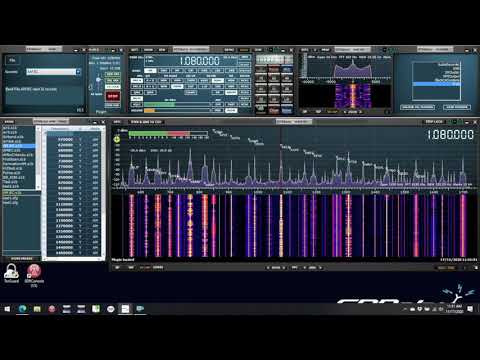
The first shows the latest version of FRAN – a FRequency ANnotation programme, developed by Eric Cottrell – it can read SWSKEDS or .s1b memory bank files and display the active stations from the files on the main spectrum window. This is an example of a Community Plugin

Quick Look at the FRAN Plugin (VID558)

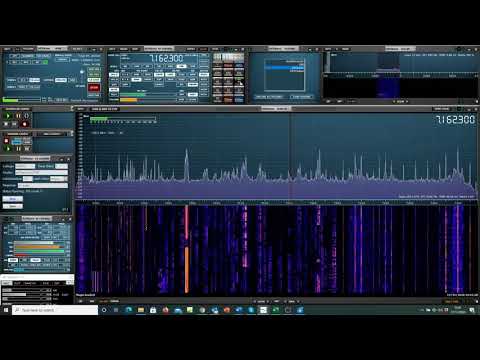
FRAN complements the DX Cluster demo plugin provided by SDRplay. This programme displays DX cluster callsigns on the SDRuno spectrum display. A DX cluster is a network of computers, each running a software package dedicated to gathering, and disseminating, information on amateur radio DX activities. With this plugin you can overlay the DX cluster callsigns as they pop up. There’s a choice of how long you let them display and you can control the way in which they appear. Here we show it successfully tuning in to a US station flagged by the cluster. (The receiver was in the UK):

Quick Look at the DXcluster Plugin (VID560)

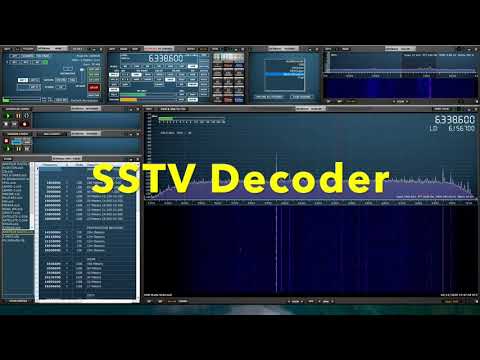
Finally there’s this new video showing the new plugin for interfacing the software suite from Black Cat Systems to SDRuno enabling DXToolbox, HF WEFAX and Slow Scan TV decodes:

Quick Look at the Black Cat Systems plugin

Black Cat Systems has a range of software available – more information can be found at: https://blackcatsystems.com/ For more about the SDRuno plugin system for both users and potential developers, go to https://www.sdrplay.com/plugins/

Tech Minds: SDRplay Interviews, Design Lab and Manufacturing Tour

In this week's Tech Minds video Matthew interviews the SDRplay team and also takes a tour of their design lab and PCB manufacturing facility. SDRplay is a manufacturer of low cost wideband software defined radios, with the cheapest starting at US$109.

The video starts with an interview with Jon Hudson from the SDRplay sales team who gives an overview of the entire SDRplay product line up, also explaining how the products have been iterated on over time. Jon also talks about the SDRuno software and team members in the company.

The next interview is with Andy Carpenter who is the head of SDRplay software development. Andy talks about SDRuno and how it came to be acquired and improved by SDRplay. They go on to discuss some recently added SDRuno features such as the plugin environment as well as the upcoming feature roadmap.

The final part of the video is a tour of the equipment used at the SDRplay design lab, and a tour of the UK based PCB manufacturing facility contracted by SDRplay. 

How It's Made - Software Defined Radio - SDRPlay

SDRplay Announce Understanding Radio Communications Course for Academic Teachers

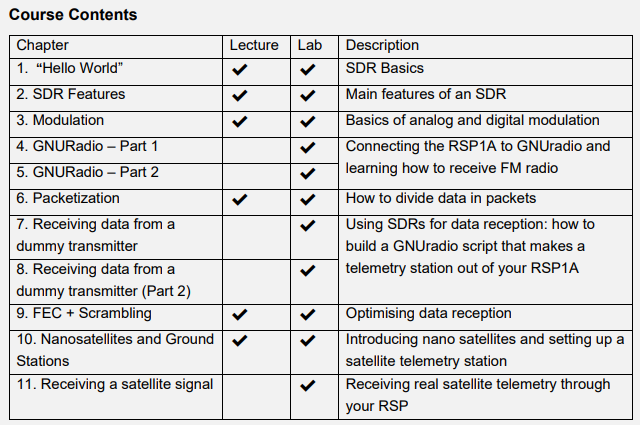
SDRplay have announced the start of their undergraduate University course titled "Understanding Radio Communications". This course is created by the Sapienza University of Rome and consists of text material plus a series of YouTube videos released on the "SDRplay Educators" channel. Currently only the introduction videos are released, and they note that all videos will be released in early December 2020. A PDF info sheet about the course can found here, and if you wish to register for the course you'll need to sign up at sdrplay.com/understandingradio.

The course appears to be intended for University teachers in order to accelerate adoption of SDR based teaching of RF courses. We're unsure if this material will be released to the general public as their signup form appears to ask for University details. They write:

Alton, England; 5th November 2020 – SDRplay Limited announces a new Radio Communications course for under-graduate teaching as part of its SDRplay Educators Programme

“Understanding Radio Communications – using SDRs” includes a rich set of teaching materials and practical exercises to help students understand the key elements of radio communications. This one semester course provides teaching materials and practical workshops that lead students from the first switch-on of a Software Defined Radio (SDR), through to signal reception, demodulation, and finally, successful communications with satellite signals.

As well as guides and set-up instructions for teachers for both the lecture and lab sessions, there are downloadable teaching materials in both PowerPoint and .pdf formats. There are video guides showing the lab activities and there’s a dedicated new forum for teachers to share experiences and to get help from the authors.

The course was created in association with academic partners Sapienza University of Rome, Department of Mechanical and Aerospace Engineering whose intention was to create a practical course that will inspire Science, Technology and Engineering students to nurture their understanding of radio communications.

The course started life as a 12-hour optional course for third-year bachelor students in Aerospace Engineering and has been broadened to make it suitable for all students that have some basic knowledge of signal theory and signal processing. It can either be run as an additional or optional “module” or adapted to be included as materials within a full year radio communications subject.

Robert Owen, University Programme specialist at Essaimage who guided the academic team, says, “I have spent 26 years in global “University Programmes” and across this time I’ve learned two fundamental principles. The first is that teaching materials must fill an essential need in the curriculum, not just be something that business thinks should be taught. And secondly, that the best teaching materials come from academics not commercial trainers. This course, Understanding Radio Communications, fulfils these principles generously, and I am proud to be associated with it!”

The details of the course structure can be found by going to https://www.sdrplay.com/understandingradio/

Key dates:19th November 2020, 1300 UTC – SDRplay and Course developers, Lorenzo Frezza and Paolo Marzioli from the Department of Mechanical and Aerospace Engineering, (DIMA), Sapienza University of Rome, will host a webinar presenting the programme and taking questions via YouTube chat.

About the SDRplay Educators Program The SDRplay Educators Program provides practical encouragement to teachers around the world so that they can use SDRplay’s SDR receivers in courses and student projects. The focus is on providing the key elements needed to teach a course: a suitable hardware platform at a reasonable price, ready access to SDRplay software, effective technical support, and excellent teaching materials that serve genuine teaching needs. The SDRplay Educators Programme is open to all members of academia, see

https://www.sdrplay.com/educators/

Intro to "Understanding Radio Communications" course for teachers | STEM Teaching Resources

SDRplay Educators Course Contents

Testing VOR Navigation in the Stratosphere with an SDRplay RSP1 and High Altitude Balloon

Over on the SDRplay blog Jon has posted about the STRATONAV experiment which makes use of the SDRplay RSP1 software defined radio. The STRATONAV experiment uses high altitude balloons to carry the RSP1 as well and a commercial portable receiver. The two receivers were configured to receive aircraft VOR navigation signals in order to test the effectiveness of VOR when used at extreme altitudes of up to 28 km. The VOR navigational data was then compared against GPS tracks, resulting in a measure of how well VOR worked at those altitudes. 

VOR (aka VHF Omnidirectional Range) is a navigational beacon that is transmitted between 108 MHz and 117.95 MHz from a site usually at an airport. In the past we have posted about VOR a few times as it can also be decoded with an RTL-SDR, or used for passive doppler aircraft radar. 

The results showed that VOR navigation does indeed continue to function at extreme altitudes, proving that it can be used as a back up navigation system for stratospheric platforms. They also note that VOR navigation could also be used as a primary navigation system on smaller stratospheric platforms due to its low cost and low complexity to implement.

The full academic paper is available on sciencedirect, or for free via Sci-Hub.

SDRplay RSP1 (seen bottom right behind the metal mount) Flying on a High Altitude Balloon