Category: Amateur Radio

Receiving D-STAR Voice with DSD 1.7 on Windows

Recently we posted about PU2VLW’s project where he was able to decode and listen to D-STAR voice using an RTL-SDR and SDR# running on Windows connected via physical audio cable to a second Linux machine running DSD 1.7.

Now a RTL-SDR.com reader by the name of “Skywatcher” has written in to tell us how he was able to compile DSD 1.7 on a Windows PC using Cygwin. This allows him to decode D-STAR audio on a single Windows PC. Skywatcher kindly sent us the steps he used to compile DSD 1.7 on Windows.

1. Download the zip archive for dsd-1.7.0 from here: https://github.com/szechyjs/dsd and then unzip the archive, so that you get the folder dsd-master, which includes all the source files.

2. Download the zip archive for mbelib-1.2.5 from here: https://github.com/szechyjs/mbelib and then unzip the archive, so that you get the folder mbelib-master, which includes all the source files.

3. Download and install the Cygwin environment. It is important to use the 32 bit version. It will not work with the 64 bit version. In the installation process, you also have to make sure that you choose gcc (the compiler) for installation.

4. Within the Cygwin command window, use gcc, to compile every .c file within the folders mbelib-master and dsd-master (subfolders can be ignored), so that you will get an .o file (object file) for each source file.

5. Copy all the resulting .o files from mbelib-master to dsd-master and use gcc again to link all the object files, so that you will get the final executable dsd.exe. This final step also has to include the sndfile library from Cygwin being mentioned in the call of gcc, otherwise it will not work.

6. In order to start dsd.exe, it is necessary to copy cygwin1.dll to the same folder, where your built dsd.exe is. It is very important that the version number of the dll is being lower than 1.7.26, otherwise dsd.exe will crash. If this is not the case for your dll, you have to find an alternative version from the internet. Additionally, it may be necessary to copy more dlls, needed by the sndfile library, next to your dsd.exe. This may depend on your environment variables of your system.

7. For decoding D-Star, you should call DSD like following: dsd -i /dev/dsp -o /dev/dsp -fd

8. For best results, make sure that all your SDR# and VAC sample rates are set to 48kHz and that you have disabled “Filter Audio” in SDR#. Also, the audio volume of SDR# should not be set to high.

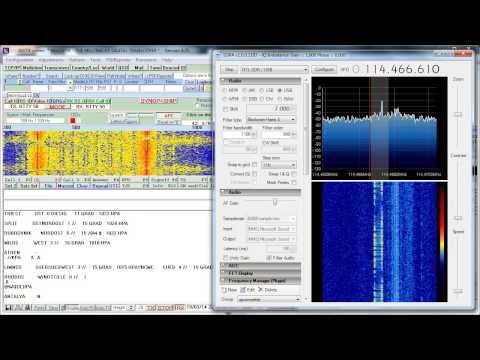
With DSD 1.7 running on Windows, Skywatcher was able to get these results shown in the video links below.

https://www.youtube.com/watch?v=5qpwnTDvI-Q

https://www.youtube.com/watch?v=30GcI4LDjdg&feature=youtu.be

EDIT: Reader Kotelnikov007 from the comments section has been kind enough to upload a pre-compiled windows version. https://mega.co.nz/#!Ft9WFbgQ!sOhsUeMC83Xi5Wxjr4eEPoc0WuM0cJOM2bq9DnE4dWE

EDIT 2 (30/12/2016): The above link seems dead. Reader Adrian wrote in to submit his compilation which is available at https://mega.nz/#!jJZRALrb!NylT4jmZIBwCyZqU05EaX8wqObxuaqeTzCD8hHP5gO8.

Adrian also writes

– The list of the required DLLs to make it work are these:
https://twitter.com/CodingFree/status/813788401610739712
– It is needed to load sndfile library (already prebuilt in Cygwin).
– It needs MBE, but also the ITPP libraries.

Using the RTL-SDR as a Panadapter

PW2VLW’s shows on his blog how to adapt an Icom IC-706 hardware radio to be able to use an RTL-SDR as a cheap panadapter (Note site is in Portuguese, so use Google Translate). A panadapter is device that allows you to visually see the RF spectrum and waterfall being received by the ham radio.

He shows instructions on how to perform the required modification to get the IF output of the ICOM, and also shows how to interface the PC with the ICOM so that it may be controlled directly via HDSDR.

Panadapter
Panadapter

Listening to D-STAR Digital Voice with DSD 1.7

D-STAR or (Digital Smart Technologies for Amateur Radio) is a Frequency Division Multiple Access (FDMA) Gaussian Minimum Shift Keying (GMSK) digital voice and data protocol used in amateur radio.

Up until recently it was possible to decode D-STAR headers using either DSD 1.6 or dstar.exe and an RTL-SDR, but it was not possible to decode voice. Now amateur radio hobbyist PU2VLW has brought to our attention that the latest DSD development version 1.7 is capable of decoding D-STAR audio (his post is in Portuguese so we suggest using Google translate). He shows a video of some example D-STAR decoding which we show at the end of this post.

DSD 1.7 can currently be downloaded as source from it’s GitHub respository. Instructions for installing DSD 1.7 on Linux can be found on the post by PU2VLW and the GitHub readme. PU2VLW built DSD 1.7 in Ubuntu 10.04, noting that newer versions of Ubuntu have removed OSS (Open Sound System) support which DSD requires. He then runs SDR# on a Windows PC, tuned to a D-STAR signal, and uses an audio out cable to connect the Windows PC’s audio out to the Ubuntu PC running DSD 1.7.

Update: See this post for installing DSD 1.7 on Windows.

Decodificando Dados e Voz da tecnologia D-STAR sem utilizar DV Dongle

EDIT: There is now a version of DSD+ that can decode D-STAR. https://www.rtl-sdr.com/dsd-version-1-5-released/

Monitoring APRS with the RTL-SDR

YouTube user Troy McQuinn has uploaded a video showing how he is able to decode amateur radio APRS signals. APRS is an acronym for Automatic Packet Reporting System and is used by ham radio users to send data like messages, announcements and also GPS coordinates. To decode APRS he uses SDR# and pipes the audio to QTMM AFSK 1200 Decoder.

RTL-SDR + Upconverter vs. Portable Shortwave Receiver

Akos from the SDR for Mariners blog has put together an article doing a comparison between the RTL-SDR + ham-it-up upconverter and a Grunding G8 Traveler II Digital conventional portable hardware shortwave radio.

His results show that the RTL-SDR and portable receiver are comparable in terms of performance, with a slight edge to the RTL-SDR. He adds that software tweaks available in SDR# can improve the voice quality for the RTL-SDR. However his final recommendation for general shortwave listening is that the portable is still the better option due to it’s ease of use.

RTL-SDR + Upconverter vs. Portable Shortwave Radio

RTL_HPSDR: RTL-SDR to HPSDR Translation Server

The High Performance Software Defined Radio (HPSDR) project is an open source SDR project that aims to create a modular SDR for ham radio use. The idea is that users only need to include the specific HPSDR hardware that they need for their particular application.

Recently, Richard Koch has written a Linux based tool called RTL_HPSDR which allows RTL-SDR based dongles to be used with HPSDR software, such as cuSDR64 which is capable of displaying and controlling up to seven receiver slices simultaneously and PowerSDR which can display and control up to four.

Using his tool Richard was able to get seven R820T RTL-SDR dongles running simultaneously on an EKB311 Quad core ARM Cortex A9 based mini-pc using a USB 2.0 hub with a modified power supply to provide 5V@2A.

Seven RTL-SDR Setup.
Seven RTL-SDR USB Setup
Five RTL-SDR Dongles used with RTL_HPSDR and csSDR64.
Five RTL-SDR Dongles used with RTL_HPSDR and csSDR64
Two RTL-SDR dongles running on PowerSDR.
Two RTL-SDR dongles running on PowerSDR


KN0CK and KF7LZE Custom HF RTL-SDR Receiver Revision 5

Update: KN0CKs products are now available at http://www.kn0ck.com/HF_SDR/.

Previously on this blog we’ve seen KN0CK release his custom modified RTL-SDR tuners which have built in upconverters for accessing the HF bands. Revision 5 of the KN0CK receiver is now almost ready for sale, and will be sold over at KF7LZE’s webstore Easy-Kits.com.

Revision 5 promises to be lower priced as it will run using the direct sampling mod instead of using an upconverter which would require more components. It will also use a Mini-Circuits MAR 8 wideband amplifier to improve weak signal performance.

Kn0CK and KF7LZE RTL-SDR HF Receiver Rev. 5