Category: Applications

Satellite Receive Station with RTL-SDR and Raspberry Pi

Unfortunately the blog referenced in this post is now gone. We have changed all links to ones archived by archive.org.

Over on the carpcomm blog, the author has posted a how to guide on building a remote satellite receive station using the Raspberry Pi and a $20 rtl-sdr dongle or funcube. He uses his own opensource CarpSD software which allows the station to be accessed directly via the web.

Space and satellites are something that only few people are fortunate enough to interact with. However, this is starting to change due to the rapid growth in capability of consumer electronics. In fact, you can receive and decode transmissions from satellites using only a Raspberry Pi, a USB software-defined radio receiver, and a few other cheap parts.

For the software, we'll use the CarpSD ground station control software. It's an open-source program with the source hosted on GitHub. It runs as a background process and connects to the Carpcomm server, so that you can control your station from the Carpcomm website. Thus, there is no need to connect a display to your Raspberry Pi and you can leave your station running continuously in the background. The instructions below can be executed entirely over SSH.

Check out the rest of his post here.

Satellite Receive Station with Rapberry Pi and RTL-SDR

RTL-SDR Tutorial: Receiving NOAA Weather Satellite Images

----------------------------------------------------------------

2025 Update:

***NOTE*** Unfortunately, the NOAA 15/18/19 satellites have now all been decommissioned as of August 2025. Therefore, it is no longer possible to receive them.

We will leave this tutorial post up for archival and historical reasons.

2024 Update:

***PLEASE NOTE THAT THIS TUTORIAL IS OUTDATED.***

Currently, we recommend using the SatDump software instead. A modern tutorial for SatDump can be found at https://www.a-centauri.com/articoli/noaa-poes-satellites-reception.

----------------------------------------------------------------

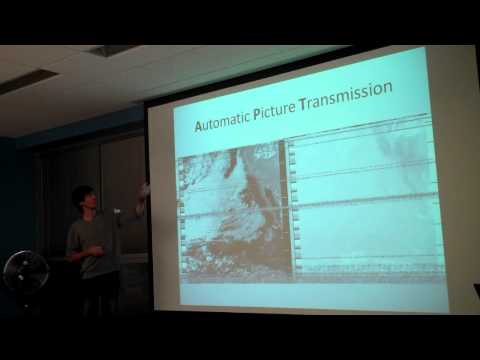
Everyday multiple NOAA weather satellites pass above you. Each NOAA weather satellite broadcasts an Automatic Picture Transmission (APT) signal, which contains a live weather image of your area. The RTL-SDR dongle combined with a good antenna, SDRSharp and a decoding program can be used to download and display these live images several times a day.

This tutorial will show you how to set up a NOAA weather satellite receiving station, which will allow you to gather several live weather satellite images each day. Most parts of this tutorial are also applicable to other software radios, such as the Funcube dongle and HackRF and Airspy, but the RTL-SDR is the cheapest option. Hardware radio scanners can also work, provided the radio has a large IF bandwidth (30 kHz +) and a discriminator tap.

Note that if you have success with this tutorial, you may also be interested in decoding Meteor M N2 weather satellites which provide much higher resolution images. Also, an alternative tutorial for decoding NOAA satellites that uses rtl_fm can be found here.

NOAA Weather Satellite Image

Examples

YouTube user GaitUutLiern shows an example of receiving NOAA satellite weather images with a RTL-SDR, SDRSharp, a decoding program called WXtoImg and a QFH antenna.

Receiving NOAA weather satellite using SDR# and WXtoImg

Continue reading

Cheap Satellite Receive Station with RTL-SDR

Blogger and Amateur Radio enthusiast N4JTC has posted a guide on setting up a satellite receiving station with the rtl-sdr. Originally the guide was intended for receiving the PhoneSat test satellites, but they have now gone offline after a week as planned. But, the guide is still useful for any current and future satellites.

The recent launch of the PhoneSats got my SDR and satellite juices flowing again. This time I decided to automate things because work seems to get in the way of my satellite listening fun. I found a combination that works great and incorporates FREE software and inexpensive hardware.

PhoneSatImg (http://www.n4jtc.com)

Meteor Reflection Observations with RTL-SDR

YouTube user ek6rsc has posted a video showing one week of meteor scatter observation at 59.25MHz using the rtl-sdr and the HROFFT software. More information about meteor scatter observations can be found at the page of The International Project For Radio Meteor Observation. The rtl-sdr is handy as a cheap monitoring tool for purposes such as this. From Wikipedia meteor scatter is described as follows.

 Meteor burst communications (MBC), also referred to as meteor scatter communications, is a radio propagation mode that exploits the ionized trails of meteors during atmospheric entry to establish brief communications paths between radio stations up to 2,250 kilometres (1,400 mi) apart.

The results of observations 1 week Meteor reflection 59.25Mhz

SDR-J Decoding DAB Radio in Software using RTL-SDR

Digital Audio Broadcasting (DAB) is a digital method for broadcasting radio stations. The rtl dongles official driver has DAB decoding capabilities. But when the rtl dongle is used as a software radio, this capability from the original drivers can not used.

SDR-J is a SDR package for Windows and Linux which is capable of receiving FM radio and decoding DAB radio completely in software. YouTube user Superphish shows a video of SDR-J decoding and playing DAB music with a rtl-sdr dongle.

DAB Radio with RTL-SDR (RTL2832) and SDR-J

Continue reading

RTL-SDR Tutorial: Cheap AIS Ship Tracking

Large ships and passenger boats are required to broadcast an identification signal containing position, course, speed, destination, and vessel dimension information to help prevent sea collisions. This system is known as the "Automatic Identification System" or AIS for short. There are dedicated AIS receivers intended to be used on boats, or by hobbyists, but they can be expensive. A radio scanner, or the cheap RTL-SDR software defined radio (or a more advanced SDR such an Airspy) can be used to receive these signals, and with the help of decoding software, ship positions can be plotted on a map.

This tutorial will show you how to set up an AIS receiver with the RTL-SDR. Most parts of this tutorial are also applicable to other software radios, such as the Funcube dongle, Airspy and HackRF, or even regular hardware scanners if a discriminator tap is used, but the RTL-SDR is the cheapest option.

Safety Warning: This probably should not be used a navigational aid on a boat as the field reliability of the RTL-SDR or other software radios is not proven. This guide is intended for land based scanner hobbyists.

Note, tracking ships with AIS is very similar to tracking aircraft with ADS-B, which is another project that may interest you.

Examples of AIS received with RTL-SDR

An AIS radar example is shown by YouTube user Vinicius Lenci who uses an RTL-SDR, SDRSharp and ShipPlotter. This video also shows what a strong AIS signal sounds like.

Recebendo sinais (AIS) com RTL-SDR

Continue reading

RTL-SDR Tutorial: Decoding DRM Radio

Digital Radio Monodial (DRM) radio is a type of digital shortwave radio signal that is used by international shortwave radio broadcasters. It provides superior audio quality compared to AM signals by using digital audio encoding. With an upconverter, good antenna, and decoding software the RTL-SDR software defined radio can receive and decode DRM signals. This tutorial is also applicable to other software defined radios that can receive HF with or without an upconverter, such as the HackRF, Airspy, Softrock and Funcube dongle.

Examples of DRM Decoding

YouTube user Superphish shows DRM reception with his Ham-it-up upconverter, and rtl-sdr.

DRM REE Noblejas Radio with RTL SDR (RTL2832), Nooelec Ham It Up Upconverter, SDR Sharp and DREAM


Continue reading