Category: Other

The Outernet Ku-Band LoRa Data Service

As mentioned in our previous post about the Outernet LoRa chat application, Outernet is currently holding a 33% off sale on their 'Dreamcatcher' satellite data receiver. To get the discount use the coupon "33%OFFJULY4SALE" on their store. The sale lasts until Midnight Central Time on Wednesday 4 July. The code is valid site wide, so applies to the moRFeus product as well.

In this post we'll highlight the Outernet data service which can be received in the Continental USA with the Dreamcatcher 3 hardware.

Outernet is a free download only satellite based information service that aims to be a sort of 'library in the sky'. Their aim to to have satellites constantly broadcasting down weather, news, books, radio, web pages, and files to everyone in the world. As it's satellite based, the service is censorship resistant, and useful for remote/marine areas without or with slow/capped internet access.

Currently the Outernet data service is considered to be beta, and is only available for those in the Continental United States.

The New Outernet Data Service

Originally a few years ago Outernet started with a 12 GHz DVB-S satellite service that gave 1GB of content a day, but that service required a large dish antenna which severely hampered user adoption. Their second attempt was with an L-band service that only needed a small patch antenna. This service used RTL-SDR dongles as the receiver, so it was very cheap to set up. Unfortunately the L-band service had a very slow data rates (less than 20MB of content a day), and leasing an L-band transmitter on a satellite proved to be far too expensive for Outernet to continue with. Both these services have now been discontinued.

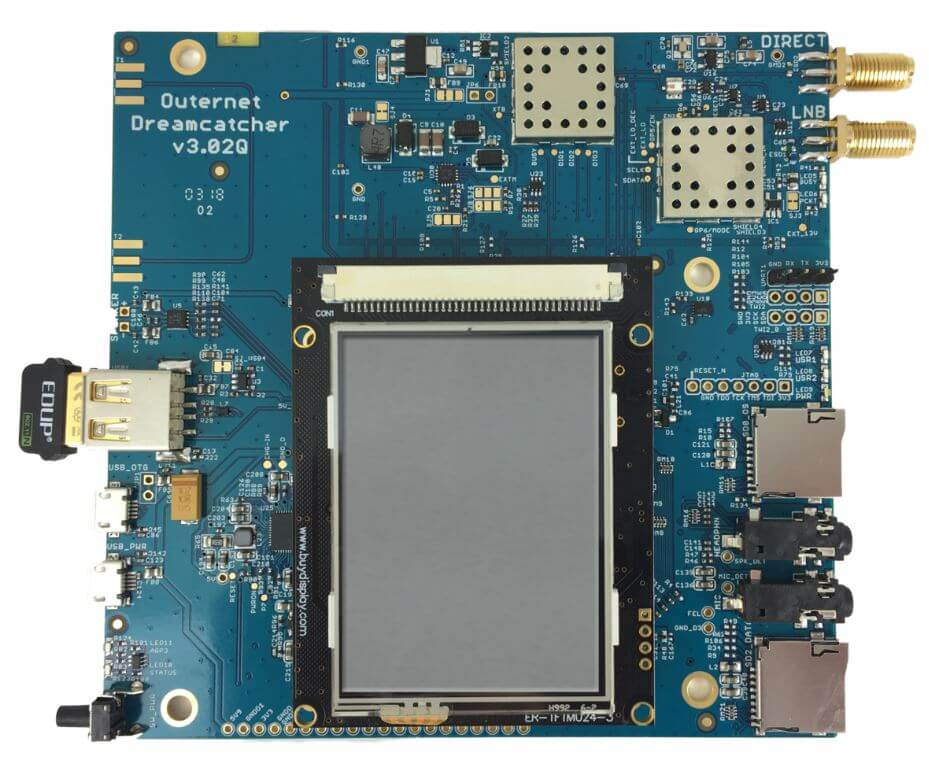
Outernet 3.0 aims to fix their previous issues by giving us a service that provides over 300MB of data a day, with a relatively cheap receiver, computer and antenna combination that is small and easy to set up. The new receiver uses a standard Ku-Band LNB as the antenna, which is very cheaply available as they are often used for satellite TV reception. The receiver is called 'Dreamcatcher 3', and is a custom PCB containing a hardware receiver (non-SDR based) with a LoRa decoder, as well as an embedded ARM computer capable of running Linux.

LoRa is an RF protocol that is most often associated with small Internet of Things (IoT) devices, but Outernet have chosen it as their satellite protocol for Outernet 3.0 because it is very tolerant to interference. In Outernet 3.0 the LNB is pointed directly at the satellite without any directive satellite dish, meaning that interference from other satellites can be a problem. But LoRa solves that problem by being tolerant to interference.

The Data Service

Currently, Dreamcatcher 3 users are receiving data such as hundreds of daily news articles, global weather information and the top 100 most searched Wikipedia articles of the day. A new satellite radio broadcast service is also being tested (kind of similar to Sirius XM, but only one channel at the moment). Compared to the older L-band Outernet service, the larger data rates allow for a lot more data and thus articles to come down.

Like previous iterations, the Dreamcatcher 3 board runs remotely on a WiFi connection. You then connect to the Dreamcatcher 'Skylark' web interface via a PC or mobile browser. On this web interface you can browse all your downloaded files. The user guide is a good read for understanding the set up procedure. 

Some screenshots of example received data are shown below.

Conclusion

Outernet have been working hard to perfect their service over the years, and the current offering is the best compromise between ease of use and data rates that we've seen so far. Unfortunately the service is only available in the Continental USA at the moment, but we're looking forward to future expansion. 

Currently we'd only recommend purchasing the Dreamcatcher 3 receiver for the Outernet data service if you understand that the service is in beta, requires a little bit of technical know-how, and like previous Outernet iterations is subject to possible change. Support is only available via their forums.

We can see the service being popular with those who live and work in remote areas without or with expensive internet. Censorship resistance is also another big plus, but satellites would need to be rented for these areas first.

There are also more creative uses. 'Unplugged' getaways are becoming popular in the modern world. Perhaps you want an internet free holiday, but don't want to miss out on important breaking news and weather updates for safety. In the future Outernet could also be used for Bitcoin or other Cryptocurrency blockchain transmission. In past Outernet iterations it was also possible to send a tweet that would be re-transmitted by Outernet. A similar messaging service could be used to control remote devices.

The Outernet Ku-Band LoRa Data Service

As mentioned in our previous post about the Outernet LoRa chat application, Outernet is currently holding a 33% off sale on their 'Dreamcatcher' satellite data receiver. To get the discount use the coupon "33%OFFJULY4SALE" on their store. The sale lasts until Midnight Central Time on Wednesday 4 July. The code is valid site wide, so applies to the moRFeus product as well.

In this post we'll highlight the Outernet data service which can be received in the Continental USA with the Dreamcatcher 3 hardware.

Outernet is a free download only satellite based information service that aims to be a sort of 'library in the sky'. Their aim to to have satellites constantly broadcasting down weather, news, books, radio, web pages, and files to everyone in the world. As it's satellite based, the service is censorship resistant, and useful for remote/marine areas without or with slow/capped internet access.

Currently the Outernet data service is considered to be beta, and is only available for those in the Continental United States.

The New Outernet Data Service

Originally a few years ago Outernet started with a 12 GHz DVB-S satellite service that gave 1GB of content a day, but that service required a large dish antenna which severely hampered user adoption. Their second attempt was with an L-band service that only needed a small patch antenna. This service used RTL-SDR dongles as the receiver, so it was very cheap to set up. Unfortunately the L-band service had a very slow data rates (less than 20MB of content a day), and leasing an L-band transmitter on a satellite proved to be far too expensive for Outernet to continue with. Both these services have now been discontinued.

Outernet 3.0 aims to fix their previous issues by giving us a service that provides over 300MB of data a day, with a relatively cheap receiver, computer and antenna combination that is small and easy to set up. The new receiver uses a standard Ku-Band LNB as the antenna, which is very cheaply available as they are often used for satellite TV reception. The receiver is called 'Dreamcatcher 3', and is a custom PCB containing a hardware receiver (non-SDR based) with a LoRa decoder, as well as an embedded ARM computer capable of running Linux.

LoRa is an RF protocol that is most often associated with small Internet of Things (IoT) devices, but Outernet have chosen it as their satellite protocol for Outernet 3.0 because it is very tolerant to interference. In Outernet 3.0 the LNB is pointed directly at the satellite without any directive satellite dish, meaning that interference from other satellites can be a problem. But LoRa solves that problem by being tolerant to interference.

The Data Service

Currently, Dreamcatcher 3 users are receiving data such as hundreds of daily news articles, global weather information and the top 100 most searched Wikipedia articles of the day. A new satellite radio broadcast service is also being tested (kind of similar to Sirius XM, but only one channel at the moment). Compared to the older L-band Outernet service, the larger data rates allow for a lot more data and thus articles to come down.

Like previous iterations, the Dreamcatcher 3 board runs remotely on a WiFi connection. You then connect to the Dreamcatcher 'Skylark' web interface via a PC or mobile browser. On this web interface you can browse all your downloaded files. The user guide is a good read for understanding the set up procedure. 

Some screenshots of example received data are shown below.

Conclusion

Outernet have been working hard to perfect their service over the years, and the current offering is the best compromise between ease of use and data rates that we've seen so far. Unfortunately the service is only available in the Continental USA at the moment, but we're looking forward to future expansion. 

Currently we'd only recommend purchasing the Dreamcatcher 3 receiver for the Outernet data service if you understand that the service is in beta, requires a little bit of technical know-how, and like previous Outernet iterations is subject to possible change. Support is only available via their forums.

We can see the service being popular with those who live and work in remote areas without or with expensive internet. Censorship resistance is also another big plus, but satellites would need to be rented for these areas first.

There are also more creative uses. 'Unplugged' getaways are becoming popular in the modern world. Perhaps you want an internet free holiday, but don't want to miss out on important breaking news and weather updates for safety. In the future Outernet could also be used for Bitcoin or other Cryptocurrency blockchain transmission. In past Outernet iterations it was also possible to send a tweet that would be re-transmitted by Outernet. A similar messaging service could be used to control remote devices.

Outernet Dreamcatcher 3 Sale $99 for the Full Kit + Testing the LoRA Chat Application

The Dreamcatcher v3.0 is Outernet's latest revision of their satellite receiver hardware. The freely available Outernet ku-band satellite service aims to keep us up to date with the latest news, provide books, videos, a daily selection of Wikipedia articles and satellite radio. Compared to the internet, Outernet is download only, and is received via their Dreamcatcher 3 hardware with an an antenna pointed to a satellite. At the moment their Ku-band service is in beta testing and so is only available in the continental United States, but they hope to eventually expand to cover more areas of the world.

Starting from today Outernet are holding a 33% off sale. This means that their Dreamcatcher 3 is only US$99 each. To get the discount use the coupon "33%OFFJULY4SALE" on their store. The sale lasts until Midnight Central Time on Wednesday 4 July. The code is valid site wide, so applies to the moRFeus product as well.

Previous Dreamcatcher implementations utilized an RTL-SDR to receive their L-Band network, however that network has now been discontinued. Dreamcatcher 3 utilizes a hardware based LoRa radio to receive their new ku-band satellite LoRa data stream. However, Dreamcatcher 3 has alternative applications, and doesn't need to be used only for the Outernet data service. Dreamcatcher 3.0 is a full LoRa radio that can transmit and receive, and in this post we'll focus on testing that out.

LoRa is a popular wireless protocol that has been designed for Internet of Things (IoT) devices. It is robust against interference and can be used in low power devices.

Dreamcatcher 3 LoRa Chat

Outernet have provided a LoRa two way open source text chat application that runs on the Dreamcatcher 3. To use it you'll need two Dreamcatcher 3 boards. With the application you'll be able to chat with short text messages in real time between the boards. Amateur radio enthusiasts may be interested in the boards as an easy way to set up LoRa experiments.

We note that Outernet are not advertising the transmit features specifically as the board is not FCC approved as an intentional radiator, so it cannot legally be used as an ISM band LoRa device for transmitting and listening to LoRa IoT sensors. But as a ham you are able to transmit with it if you can ensure that the output is clean and legal and on the ham bands. 

Dreamcatcher 3.0 Running LoRa Chat App
Dreamcatcher 3.0 Running the LoRa Chat App

A brief demo of the chat running below is shown. In the video we're using the default 'spreading factor' setting which results in robust communications, but results in a latency of about 2 seconds. Later we'll show how to change the spreading factor to reduce latency.


The Dreamcatcher v3.0

Outernet kindly provided us with two Dreamcatcher 3 boards to test the chat application with.

Like the previous versions, the Dreamcatcher is a full computing board with radio built into it. Except this time instead of an RTL-SDR, the radio is a hardware LoRa module. Another difference is that now there is a built in LCD screen.

On the board there are two SMA ports, one labelled "Direct" and the other labelled "LNB". The direct port is what we'll need to use for the chat application as this is the port that can transmit. There are also two SD Card slots, one for the OS and one for storage, a microphone and headphone jack, a USB-A slot with a supplied WiFi adapter, and two USB micro slots, one for USB OTG and one for power.

The package also comes with an LNB that is designed to be used with the Outernet satellite service. The LNB is receive only, so cannot be used with the chat application, so you'll need to use your own antenna if experimenting with the LoRa transmitter.

Chat Setup and Usage

First we burnt the latest version of Dreamcatcher Armbian OS to two SD cards and inserted one into each board. Since Dreamcatcher 3 has a built in LCD screen, you can login and access the terminal through the screen. But as there is only one USB port available, you'll need a USB hub to be able to plug in a mouse and keyboard, and the included USB WiFi adapter. Alternatively, if you connect the USB OTG port to a PC, you can connect to it via a USB serial connection. Instructions for connecting via serial, and for setting up a WiFi connection are the same as in our previous Dreamcatcher 2.0 tutorial.

The chat software is available on GitHub at https://github.com/Outernet-Project/Dreamcatcher-Packet-Tester. To install it simply run the following commands at the Dreamcatcher's terminal:

sudo apt update
sudo apt install libsoc-dev libsoc2
git clone https://github.com/Outernet-Project/Dreamcatcher-Packet-Tester
make

Then you can run the chat program with:

sudo ./chat

Upon running the program you'll be asked to enter a MIXER frequency. This frequency doesn't really seem to matter and we're not sure why we're asked for it. But you can enter any frequency such as 300000000 Hz (300 MHz).

Once you've opened the chat program on both Dreamcatchers you should be able to type in text on the console, and have it show up on the other Dreamcatcher after pressing enter. Remember to plug an antenna in to the DIRECT port of both Dreamcatchers, or run of attenuated coax between them. The provided LNB cannot be used for the chat application.

Playing with LoRa Settings

The actual RF output frequency is by default hard coded in at 2.4 GHz. If you want to change it you can edit the main.cpp file with a terminal based text editor like nano, and look for the #define RF_FREQUENCY entry. Then you will need to recompile by running 'make' again. However note that at the time of this post, according to Outernet the software only works properly at around 2.4 GHz. Apparently this is simply a software limitation and once this is fixed you should be able to transmit at any frequency between 85 MHz to 5400 MHz.

Also by default, the LoRa 'Spreading Factor' is set to the maximum of 12. This means that there is roughly a latency of about 1 second between sending a message, and receiving it on the other unit.

The spreading factor can also be adjusted in the code by editing the "modulationParams.Params.LoRa.SpreadingFactor" variable. This determines how spread out in time the packet it. Larger spreading factors result in more robust error free communications, whereas smaller factors result in lower latency.  Below are some valid spreading factor entries for the code.

Note that if you reduce the spreading factor you'll also want to reduce the RX_TIMEOUT_VALUE and TX_TIMEOUT_VALUE #defines (you'll need to search for these lines in the code. Hint: In Nano CTRL+W is search.). For a spreading factor of 7 a timeout of 100 ms works well.

LORA_SF5 
LORA_SF6 
LORA_SF7 
LORA_SF8 
LORA_SF9 
LORA_SF10 
LORA_SF11 
LORA_SF12

It is also possible to adjust the bandwidth from 200 kHz up to 1600 kHz using the following code on the "modulationParams.Params.LoRa.Bandwidth" variable.

LORA_BW_0200 
LORA_BW_0400 
LORA_BW_0800 
LORA_BW_1600

The LoRa 'coding rate' can also be changed via the "modulationParams.Params.LoRa.CodingRate" variable.

LORA_CR_4_5 
LORA_CR_4_6 
LORA_CR_4_7 
LORA_CR_4_8 
LORA_CR_LI_4_5 
LORA_CR_LI_4_6 
LORA_CR_LI_4_7

You can also adjust the TX output power by adjusting the value specified by #define TX_OUTPUT_POWER. By default it is set to the maximum output power of 13 dBm. The lowest value available is -18 dBm. 

Remember that after making a change in the main.cpp file, you'll have to recompile the chat program by running 'make'.

Below we visualized the different LoRa spreading factors with a HackRF. It's interesting to see how the spreading factor changes the packet transmit time.

Comparing LoRA Spreading Factors
Comparing LoRa Spreading Factors

Conclusion

Overall the Dreamcatcher 3 LoRa chat software works, but is still very much in early development. Regardless it is an interesting tool for experimenting with LoRa. The hardware is ready, and software now just needs to be developed to make use of the LoRa protocol. We also note that the Dreamcatcher is not a plug and play device, and that it's mostly suited to people who enjoy tinkering with new beta products.

We'd also just like to remind that in order to legally transmit you'll need a ham licence. The board is not FCC approved for regular ISM band LoRa use. While the output power of the Dreamcatcher isn't too strong at a maximum of 13 dBm, we still recommend that you make sure to reduce the output TX power, or run a direct attenuated coax connection when testing. There are also weak signal images present at some harmonics, so any ham using this with an amplifier would be of course expected to provide sufficient filtering.

Artificial Intelligence Radio – Transceiver Now Released for Crowdfunding

Last week we posted about the Artificial Intelligence Radio - Transceiver (AIR-T), which was awaiting release for crowdfunding. Today the Crowd Supply campaign for it has gone live

As expected, the AIR-T is not a cheap with it coming in at US$5,699, and this is with a 10% discount off the MSRP. However, the AIR-T is likely to be more of interest to high end industry and university researchers who have research money to spend. Also, compared to Ettus E310/N310 and LimeNET Mini SDRs which have built in non-GPU based computing platforms and similar SDR performance, the AIR-T could be seen as reasonably priced assuming that the software and drivers for it are decent. In the future we expect to see the price of similar SDR-AI development boards eventually reduce down to hobbyist level prices. 

The basic idea behind the AIR-T is to combine a 2x2 MIMO SDR transceiver with a NVIDIA Jetson TX2 GPU that can be used to run artificial intelligence (AI) software fast. They will include software that will allow GNU Radio and Python code to be easily ported to the GPU architecture. 

Why build tomorrow’s tech with yesterday’s signal processing tools? The Artificial Intelligence Radio - Transceiver (AIR-T) is a fully integrated, single-board, artificial intelligence equipped, software defined radio platform with continuous frequency coverage from 300 MHz to 6 GHz. Designed for new engineers with little wireless experience to advanced engineers and researchers who develop low-cost AI, deep learning, and high-performance wireless systems, AIR-T combines the AD9371 RFIC transceiver providing up to 2 x 2 MIMO of 100 MHz of receiving bandwidth, 100 MHz of transmitting bandwidth in an open and reprogrammable Xilinx 7 FPGA, with fast USB 3.0 connectivity.

The AIR-T has custom and open Ubuntu software and custom FPGA blocks interfacing with GNU Radio, allowing you to immediately begin developing without having to make changes to existing code. With 256 NVIDIA cores, you can develop and deploy your AI application on hardware without having to code CUDA or VHDL. Freed from the limited compute power of a single CPU, with AIR-T, you can get right to work pushing your telecom, defense, or wireless systems to the limit of what’s possible.

The Artificial Intelligence Receiver - Transceiver (AIR-T) SDR

The Artificial Intelligence Radio – Transceiver

Over on Crowd funding site Crowd Supply, a new SDR product is currently awaiting release of its crowd funding stage. The proposed product is called the AIR-T, which stands for Artificial Intelligence Radio - Transceiver. The basic idea behind the board is to combine a 2x2 MIMO SDR transceiver with a NVIDIA Jetson TX2 GPU that can be used to run artificial intelligence (AI) software fast.

The SDR transceiver chip used is a Analog Devices 9371. This is a high end chip that can be found on high end SDR hardware like USRPs. If you're interested we had a post about decapping the AD9361 recently, which is a similar chip. It provides 2x2 MIMO channels, with up to 100 MHz RX bandwidth and 250 MHz TX bandwidth. The NVDIA Jetson TX2 is a GPU 'supercomputer' module specifically designed for AI processing. Many AI/machine learning algorithms, such as neural networks and deep learning run significantly faster on GPU type processors when compared to more general CPU's.

These are not cheap chips with the AD9371 coming in at over US$250 each, and the Jetson TX2 coming in at US $467. Although we don't know what sort of bulk discounts the AIR-T manufactures could get. But it will be certain that the AIR-T will not be for the budget minded.

The board is still awaiting release of it's crowdfunding round, and you can sign up to be notified of when the project launches on their Crowd Supply page.

The melding of AI and the RF spectrum will be common in the future, and a development board like this is one of the first steps. Some of the interesting use cases that they present are pasted below:

Wireless

From Wi-Fi to OpenBTS, use deep learning to maximize these applications. By pairing a GPU directly with an RF front-end it eliminates the need of having to purchase an additional computer or server for processing. Just power the AIR-T on and plug in a keyboard, mouse, and monitor and get started. Use GNURadio blocks to quickly develop and deploy your current or new wireless system. For those who need more control, talk directly with the drivers using Python or C+. And for those superusers out there, the AIR-T is an open-platform, so you can program the FPGA and GPU directly.

Satellite Communications

Communicating past Pluto is hard. With the power of a single-board SDR with an embedded GPU, the AIR-T can certainly prove out concepts before you launch them into space. Reduce development time and costs by adding deep learning to your satellite communication system.

Ground Communications

There is an endless number of terrestrial communication systems with more being developed every day. As the spectral density becomes more congested, AI will be needed to maximize these resources. The AIR-T is well-positioned to easily and quickly help you prototype and deploy your wireless system.

Video/Image/Audio Recognition

The AIR-T allows you to demodulate a signal and apply deep learning to the image, video, or audio data in one integrated platform. For example, directly receiving a signal that contains audio and peforming speech recognition previously required multiple devices. The AIR-T integrates this into one easy to use package. Whatever your application is, from speech recognition to digital signal processing, the integrated NVIDIA GPU will jump start your applications.

Pattern Recognition

For many communications and radar applications once the signal is collected it must be sent to an off-board computer for additional processing and storage. This consumes valuable time. The AIR-T eliminates this. From its inception, it was designed to process signals in real-time and eliminate unnecessary latency.

Software Defined Radio Talks from the Friedrichshafen Ham Radio Convention

Several new software defined radio talks have been released on YouTube this week from the big European 2018 Friedrichshafen Ham Radio Convention which just finished this month. The full list of 14 new videos can be found on the Software Defined Radio Academy YouTube channel. Below are two of our favorites:

The OVI40 / UHSDR Project, Developing An Open Standalone SDR

OVI40 is an Open Source standalone homewbrew SDR TRX project (VLF to 2m), developed with the aim of being modular and future-proof. The talk describes the hardware and the UHSDR software including a discussion on the evolution from the "single-system" software used for the well-known mcHF (initially written by Chris, M0NKA and Clint KA7OEI) to the multi-SDR approach in the UHSDR software project.

DF8OE, DB4PLE, DL2FW, DD4WH: The OVI40 / UHSDR Project - Part 1 and 2

András Retzler, HA7ILM: Let's code a simple receiver in C

For using SDR in amateur radio applications, it is easier to use existing receiver software, or create GNU Radio flowgraphs with pre-build blocks. On the contrary, in the do-it-yourself spirit of amateur radio, this talk will guide you through the steps of implementing a simple AM/FM/SSB receiver from scratch, in plan old C, in order to get a deeper understanding of what happens actually under the hood in popular SDR software. The talk builds on the author's learning experience of creating the open source CSDR command line tool, which is used for DSP in the OpneWebRX web based SDR receiver.

András Retzler, HA7ILM: Let's code a simple receiver in C

Software Defined Radio for Engineers: Free University Level Text Book with PlutoSDR Examples

Analog Devices has recently released a new text book for free called "Software-Defined Radio for Engineers, 2018". This is an advanced university level text book that covers communication systems theory as well as software defined radio theory and practice. The book uses the PlutoSDR as reference hardware and for practical examples. The PlutoSDR is Analog Devices $150 RX/TX capable SDR that was released about a year ago.

The objective of this book is to provide a hands-on learning experience using Software Defined Radio for engineering students and industry practitioners who are interested in mastering the design, implementation, and experimentation of communication systems. This book provides a fresh perspective on understanding and creating new communication systems from scratch. Communication system engineers need to understand the impact of the hardware on the performance of the communication algorithms being used and how well the overall system operates in terms of successfully recovering the intercepted signal.

This book is written for both industry practitioners who are seeking to enhance their skill set by learning about the design and implementation of communication systems using SDR technology, as well as both undergraduate and graduate students who would like to learn about and master communication systems technology in order to become the next generation of industry practitioners and academic researchers. The book contains theoretical explanations about the various elements forming a communication system, practical hands-on examples and lessons that help synthesize these concepts, and a wealth of important facts and details to take into consideration when building a real-world communication system.

The companion site for the book which contains links to complimentary online lectures, slides, and example MATLAB code can be found at https://sdrforengineers.github.io. MATLAB is a very powerful programming language and toolset used by scientists and engineers. MATLAB is not a cheap tool, but there is a home user licence available for a more reasonable price. To do some of the exercises in the book you'll probably at least require the core MATLAB plus the Communications System Toolkit which is an extra add on.

The full book can be purchased as a Hardcover from Amazon, or downloaded freely online as a PDF.

If you're interested in a similar book, there is also the free DesktopSDR book which uses RTL-SDR dongles for the practical examples.

SDR For Engineers Book

CrowPi: Raspberry Pi Experimenters Kit Review (With RTL-SDR and RPiTX Tests)

CrowPi is a Raspberry Pi all-in-one experimenters kit that is currently crowd funding on Kickstarter. The idea behind CrowPi is to combine a touchscreen, various sensors, actuators and interfaces into a clutter free kit mounted on a PCB in an easy to carry hard shell case. It's mostly intended to be used in STEM learning environments, however it could also be used for rapid prototyping of Raspberry Pi based ideas, or simply as a portable computer. 

The CrowPi
The CrowPi

The kit has 4 days left on Kickstarter and has already met its minimum goal. Pledging $1,169 HKD (~USD $150) gets you the basic kit which does not include a Raspberry Pi. Higher pledge levels (up to US$250) get you models that include a Raspberry Pi as well as extras such as a 5V power supplies, earphones, heatsinks, keyboards, game controllers etc. Shipping of the units is expected to commence in July.

Elecrow, the Shenzhen based company behind CrowPi kindly sent us a free kit for an honest review. While not directly related to RTL-SDR or RF, we thought that there might be several applications that might make the CrowPi kit useful for prototyping some simple low cost RF based ideas. For example:

  • Prototyping IoT based modules that use the RTL-SDR as a receiver. For example receiving a 433 MHz ISM signal and writing received information to the LCD/LED array or activating the relay.
  • Similarly, using FL2K-SDR or RPiTX to transmit a signal when a sensor is activated, or to transmit telemetry from that sensor (e.g. distance data from the ultrasonic sensor, humidity levels from the DH11 sensor, or light levels from the light sensor)
  • Using an RTL-SDR to prototype an ADS-B plane camera tracker using the two servo module interfaces.

To get an idea of what's packed into the CrowPi, the kit includes the following modules:

  • Everything that came with our CrowPi Demo Kit (Except the Raspberry Pi)
    Everything that came with our CrowPi Demo Kit (Except the Raspberry Pi)
    1920 x 1080 Capable HDMI 7" Touch Screen
  • LCD Module
  • 8x8 Matrix LED
  • Breadboard
  • 4 character 7-seg LED
  • Vibration motor
  • Light Sensor
  • Buzzer
  • Sound Sensor
  • Motion Sensor
  • Ultrasonic Sensor
  • Servo Interface
  • Step Motor Interface
  • UART
  • Tilt Sensor
  • IR Sensor
  • Touch Sensor
  • DH11 Humidity Sensor
  • Relay
  • Matrix of buttons
  • RFID Module

With our kit we also received:

  • 2x GPIO Flex Cables
  • 1x Stepper Motor
  • 1x Servo
  • 1x Charger
  • 1x IR diode
  • 1x NFC Tag
  • 1x Mini HDMI for the Raspberry Pi Zero
  • 1x IR Remote control

Setup, Initial Testing and Thoughts

Setup: Setup was simple and consisted of downloading their customized Raspberry Pi image onto an SD card, connecting the Raspberry Pi to the HDMI, USB and GPIO pins, and then powering it up using the power jack on the CrowPi Board. A user manual is available for download.

Initial Testing: CrowPi provide a set of lessons that show how to use each of the modules on the board. All modules also have Python code examples that are ready to run as soon as you boot up. Immediately after booting up we were able to run their demo code which allowed us to test all the various sensors, print text to the LCD module, activate the 7-seg display, and actuate a servo and stepper motor. 

The tutorials are easy to understand and provide a good basic rundown of the sensors. You will need to have some basic Python skills to understand the Python code however.

Thoughts: The CrowPi is built sturdy, and is definitely easy to use. The touch screen is bright and clear. It is capable of running in 1080P mode, but is a bit too small and hard on the eyes to use at this resolution. We kept the screen in 720P mode. In order to use the Raspberry Pi, you'll need to plug in a USB keyboard and mouse which is not included in the basic kit. A wireless keyboard/mouse combo is ideal. There appear to be speaker holes next to the monitor, but it seems that our demo model is the basic model which does not include built in speakers. The kit is impressive looking and appears to be priced reasonably for what you get.

RTL-SDR and RF Testing

Unfortunately when it came to run the RTL-SDR we instantly ran into a problem. With the one 5V 3A power supply running the Pi, HDMI Screen and modules, it seems that there just isn't enough power budget left over to run the RTL-SDR which draws about 270 - 290 mA current. The RTL-SDR connects fine, but when trying to run GQRX, the Pi 3 shuts down. To get around this problem we have to connect a second power supply directly to the Raspberry Pi 3's input. After doing this the board and kit runs smoothly with the RTL-SDR. Using a powered USB hub would also work.

RPiTX is software for the Raspberry Pi that allows you to transmit RF signals directly via PIN12 or PIN7 from the GPIO ports. On CrowPi PIN12 is already connected to the buzzer, and PIN7 is connected to the humidity sensor. Using PIN12 causes the buzzer to sound, so we tried PIN7. Even though it's connected to the humidity sensor, it doesn't seem to mind the GPIO bit flipping going on. The traces within the board and cable radiate sufficiently to transmit signals strongly enough to use within a room, so no external antenna is needed. Use of PIN7 can be activated in RPiTX by using the "-c 1" flag.

Using our Replay Attacks with an RTL-SDR, Raspberry Pi and RPiTX tutorial, we copied  the signal from the remote control of a 433 MHz alarm/door bell, and used RPiTX to replay the signal. Then by modifying some of the supplied CrowPi Python code we were able to get the doorbell to sound on a touch of the touch sensor, activation of the sound sensor and via activation the RFID sensor. We could see the CrowPi being used as a general tool for learning how to prototype simple IoT or home automatic devices. The video below shows a brief demonstration. 

It would have been nice if these RPiTX GPIO pins could have been exposed, and not connected to a sensor, but the developers of the board had probably not heard of RPiTX as the goal is for a more general classroom application.

Conclusion

If you're looking to get kids or STEM students/hobbyists interested in what Raspberry Pi's can do, then this kit couldn't make it simpler. The single board and briefcase design makes the whole thing very tidy and portable and the kit looks and feels sturdy and professional. If you know a kid interested in electronics, then this kit would make a great present.

You could probably purchase all the components cheaper individually, but at the end of the day an all-in-one kit just makes sense as it is a lot tidier, and much easier to get up and running quickly.

For RF experiments, it's possible to use the RTL-SDR with the minor annoyance of having to connect two power supplies or use a powered USB hub. RPiTX also functions fine on the device and can be used to transmit an RF signal on activation of any one of the sensor modules. This could easily be used to prototype simple home automation or IoT ideas.

Osmocom now accepting Donations

Osmocom, the team behind the original RTL-SDR driver project, the Osmo-FL2K discovery, OP25, gr-osmosdr, gr-gsm and various other open source cellular phone projects is now accepting monetary donations. If you weren't already aware, it was the efforts of Antti Palosaari and Eric Fry who made the original tests on DVB-T dongles, and then Osmocom who wrote the first RTL-SDR driver and software that is still currently used in the RTL-SDR project today. If you're interested, there is a full write up on the history or RTL-SDR at the bottom of rtlsdr.org.

Recently Osmocom have begun accepting donations via Open Collective. They write

The Osmocom project (if you count its predecessor OpenBSC) have been running for close to 10 years, creating a large number of Open Source projects related to mobile communications. We have never needed nor wanted any legal entity for it. It's a pure/classic FOSS project, open to contributions from anyone.

Until today, you could only contribute in one of the following forms:

  • by writing code (bug fixes, new features, etc) and submitting it (which means you need to be a developer)
  • by writing documentation / improving the wiki
  • helping other users on the mailing lists, IRC, or in other forums
  • donating cellular equipment (which many don't have)
  • hiring a freelancer or a company to write code and contribute to Osmocom on your behalf 
  • buying products or services from companies who dedicate lots of work to Osmocom

However, we've repeatedly getting requests from some individuals who wanted to contribute to the project in an easy way, even if they are not a developer, and/or don't have time, and/or don't have the size of a budget to fund development of entire new features or sub-systems.

Today, Osmocom announces that we have joined Open Collective in order to enable you to make financial contributions, either one-off or recurring.

We'll be using the funds (if we get any!) according to our funding policy outlined at https://opencollective.com/osmocom/expenses/new# in order to pay for expenses such as hosting costs for our servers / IT infrastructure, travel funding for the annual developer conferences, etc. Any and all expenses paid from those funds will be visible on the OpenCollective website. You cannot ask for more transparency than that :)

Thanks in advance for your kind assistance!

So if you've ever enjoyed the RTL-SDR project, and how much it's improved your access to the RF spectrum, please consider donating via Open Collective or contributing back in other ways. Donations may help Osmocom to continue making new and interesting discoveries, such as Steve M's amazing FL2K-SDR discovery that was released back in April this year.