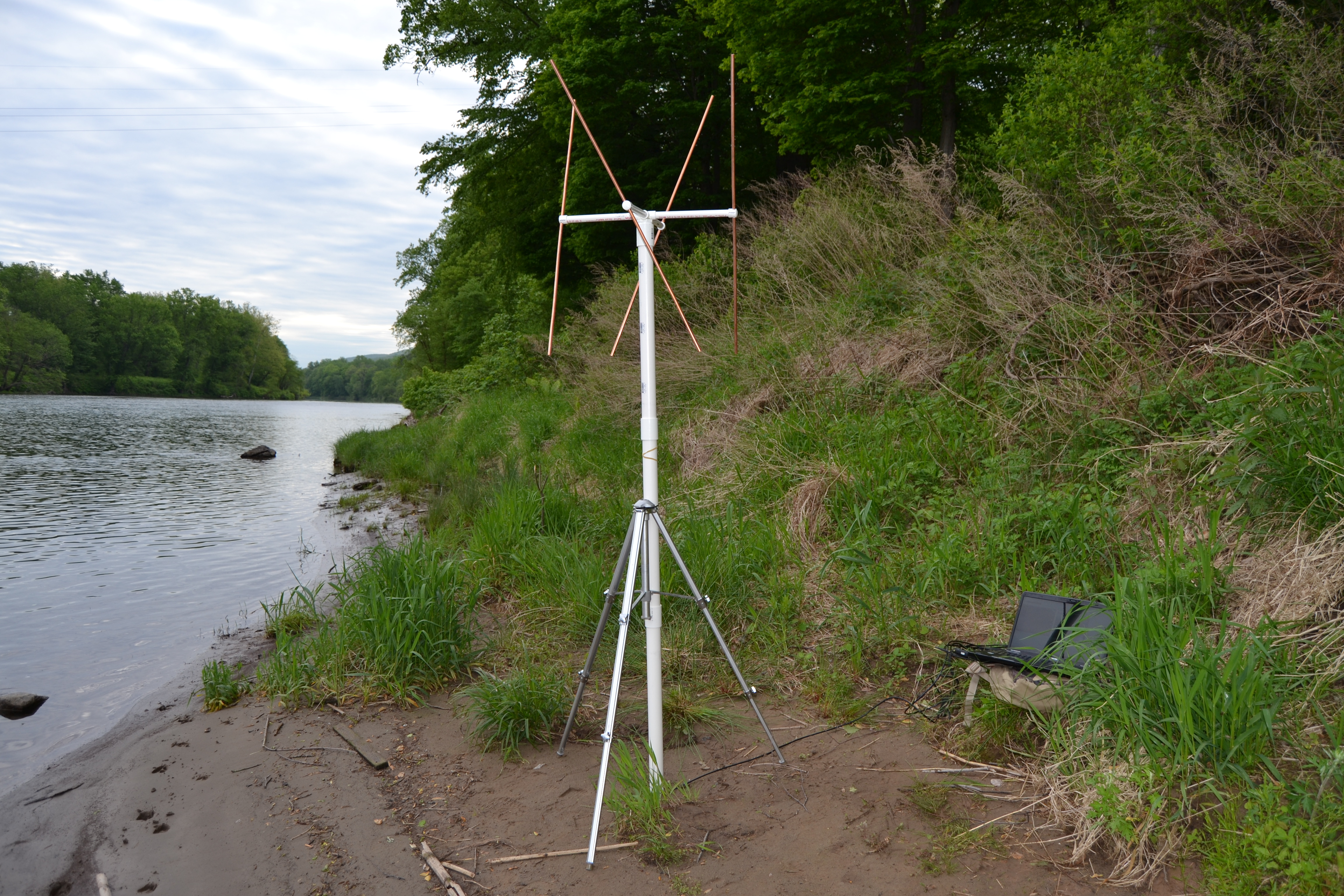
Over on Reddit user merg_flerg has uploaded an imgur post that carefully details a step by step guide for building a double cross antenna. A double cross antenna is great for reception of satellites like NOAA and Meteor since it has a sky oriented radiation pattern with very few nulls. This means that it can receive satellite signals coming from the sky well. Alternative antennas for NOAA/Meteor include turnstiles and QFH antennas, although the double cross antenna seems to have the least nulls, meaning that the signal is less likely to fade in and out as the satellite moves across the sky.
merg_flerg’s design is also modified from the standard design slightly, allowing it to become easily disassembled and carried within a backpack. At the end of his tutorial he writes that he gets much better reception with his double cross antenna than he does with his QFH.
In the post he demonstrates the final constructed antenna decoding a NOAA APT weather satellite image with an RTL-SDR and the WXtoIMG software. See our tutorial for information on decoding NOAA weather satellite images.
The finished double cross antenna connected to a PC running an RTL-SDR and WXtoIMG.
It is well known that the NOAA satellites broadcast weather satellite images which can be received and displayed with an RTL-SDR and computer. What is less known is that there is a telemetry beacon that is also transmitted by the same satellites. The telemetry not only contains data such as the current spacecraft time, day and ID, but also contains scientific data from on board instruments such as:
The HIRS/3 and HIRS/4 instruments which is a high resolution infrared sounder which can be used to create a low resolution multi-spectral scan of the earth. (more info)
The Space Environment Monitor (SEM-2) which has a Medium Energy Proton and Electron Detector (MEPED), and a Total Energy Detector (TED). This experiment is used to measure the effect of the sun on satellite communications. (more info)
The experimental DCS/2 transmitter which retransmits signals from 401.65 MHz sea buoys, arctic fox collars, sea ice monitors, weather balloons and more. (more info pdf)
The ARGOS Advanced Data Collection System (ADCS) which amongst other uses is used in research for tracking animal GPS collars around the world.
According to various reports the Russian Meteor M-N2 satellite appears to be active again once more. The Meteor M N-2 is a polar orbiting Russian weather satellite that was launched in July 2014. It transmits with the LRPT protocol which allows us to receive weather satellite images with an RTL-SDR that are of a much higher resolution than the NOAA APT satellites.
Unfortunately late last year Meteor M N-2 had some problems and LRPT transmissions were turned off for the time being. During this downtime the Russian space agency switched the LRPT transmitter on the older Meteor M N-1 satellite back on, even though the satellite was tumbling in orbit. Currently people are not reporting any signal from Meteor M N-1, so this may have been turned off, perhaps temporarily.
Now however, it seems that Meteor M N-2 has been switched back on again and various people have already successfully received its signal. If you want to receive these Meteor M N-2 weather images with an RTL-SDR dongle or other SDR then you can view the tutorial written by Happysat here.
In order to optimally receive NOAA weather satellite images a special satellite antenna tuned for 137 MHz should to be built. Generally either a QFH or turnstile antenna is recommended as these receive signals coming from the sky very well. If you are interested in receiving weather satellite images from NOAA satellites with an RTL-SDR dongle then we have a tutorial available here.
While QFH and turnstile antennas are not difficult or expensive to build, they still do require a small amount of electrical and construction skills. Over on YouTube user Wanderlinse shows us a possible alternative NOAA antenna that is simply made out of an old umbrella (the video is narrated in German, but it is easy to understand from the visuals). He uses a short BNC cable with crocodile clips, and connects one clip to the spines of the umbrella, and the other to the central metal shaft. For some reason this seems to create a good antenna that receives NOAA APT signals very well. To prevent wind issues he also cuts out some holes in the umbrella fabric.
Wanderlinse also shows that he can receive other signals with this umbrella antenna too, such as long wave, medium wave, shortwave, aircraft radio and ham radio.
Regenschirm Antenne NOAA APT Umbrella Antenna (quick n dirty)
The Meteor M N-2 is a polar orbiting Russian weather satellite that was launched in July 2014. It transmits with the LRPT protocol which allows us to receive weather satellite images that are of a much higher resolution than the NOAA APT satellites. For a while since the launch RTL-SDR users had a good time receiving beautiful images from Meteor M-N2, but unfortunately since late last year the N2 LRPT transmitter has been turned off, due to technical problems with the IR sensors as cited by Russian meteorologists.
Fortunately for Meteor N2 enthusiasts the old Meteor M N1 satellite which was thought to be dead sprung back into life around November 2015. Recently Matthew A., a reader of our blog wrote in to let us know that while N2 is still not transmitting, N1 is still transmitting, albeit with somewhat distorted images. Matthew also mentions this link: http://homepage.ntlworld.com/phqfh1/status.htm, which contains up to date info on the status of all weather satellites. He also writes:
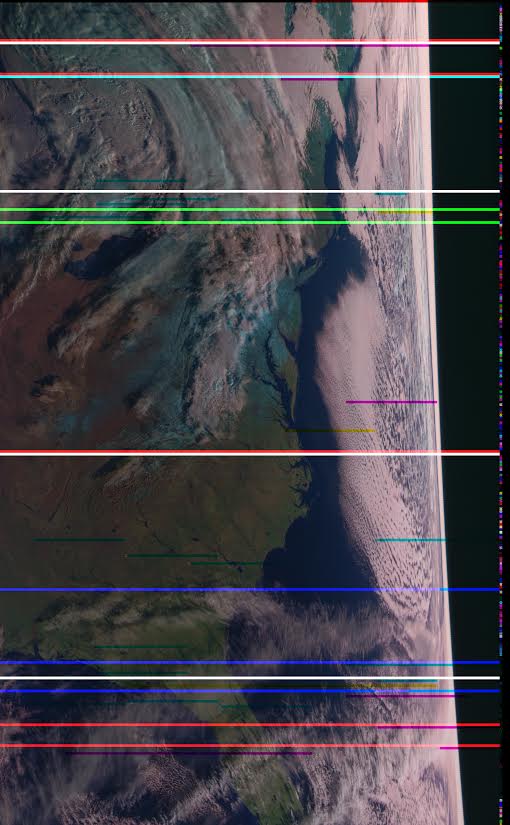
While transmissions are readily detectable and decodable at night, it seems that M N-1’s infrared sensors are not functioning. Yielding only black, with the typical noise bars of Red, Green, or Blue
As has been previously mentioned, Meteor MN-1’s stabilization system has obviously failed, and the horizon is clearly visible. Perhaps not of scientific value, but certainly beautiful.
We also note that there are several comments over on the Meteor-M N2 news and support website regarding receiving images from N1 and N2. It seems that sometimes N1 also has some problems with transmission, but they are usually quickly fixed.
Recently a reader of our blog, Initrd, wrote in to let us know about a new tutorial he created that shows how to set up a dual NOAA APT and Meteor LRPT weather satellite monitoring station with an RTL-SDR dongle. These weather satellites transmit a live image of the portion of the earth that they are currently over, providing a valuable tool for weather analysis. APT transmissions are analogue and are transmitted by the American NOAA satellites, and the newer Meteor M2 satellite transmits a higher resolution image in the LRPT format. We also have posted separate tutorials that show how to set up NOAA APT and Meteor M2 LRPT decoding with an RTL-SDR, but Initrd’s tutorial appears to be a good all in one guide.
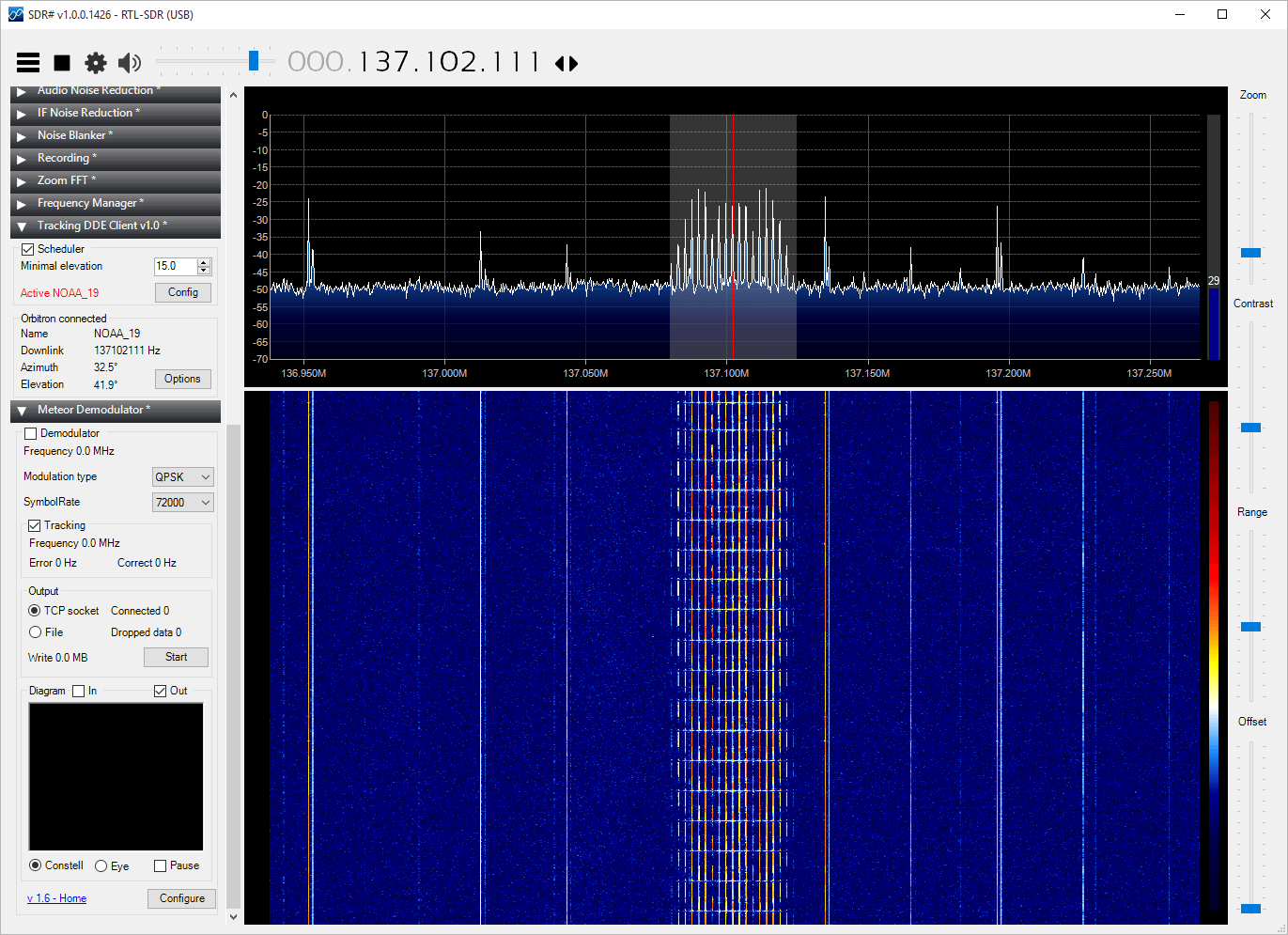
His tutorial takes you step by step through a process that involves setting up the satellite tracking software Orbitron, all the required SDR# plugins, the APT decoder WXtoIMG and the LRPT decoder. The tutorial also shows how to connect them all together and set them up so that APT and LRPT decoding can coexist.
Pete’s tutorial starts from a fresh install of Ubuntu and uses GQRX, GNU Radio Companion, WxtoIMG and the MeteorM2 decoding tools. He shows how to set up the audio piping within Linux, how to run the MeteorM2 LRPT Offline decoder Windows tool in Wine, a Linux Windows emulator and how to use WxtoIMG together with GQRX.
The NOAA and Meteor M2 weather satellites transmit images that they have taken of the earth. With an RTL-SDR and appropriate antenna you can receive these images. On this blog we have Windows tutorials on receiving NOAA and Meteor M2 satellites.
The Windows LRPTOfflineDecoder tool running in Linux with Wine.
The RTL-SDR software defined radio is often used to receive signals from NOAA APT weather satellites. Once decoded these signals produce a freshly captured image of the earth over your current location. We have a simple tutorial on setting this up here.
However, recently Marco Johansson wrote into RTL-SDR.com to explain an alternative method to the one described in our tutorial. His method uses rtl_fm as the receiver instead of the GUI based software SDR# and uses several other pieces of software to automate the whole process. Marco believes that his method may be useful for some people and his tutorial is presented below. Also, if you are interested Marco has a WxtoImg generated webpage which shows all his recently received images here wxsat.haastaja.net.
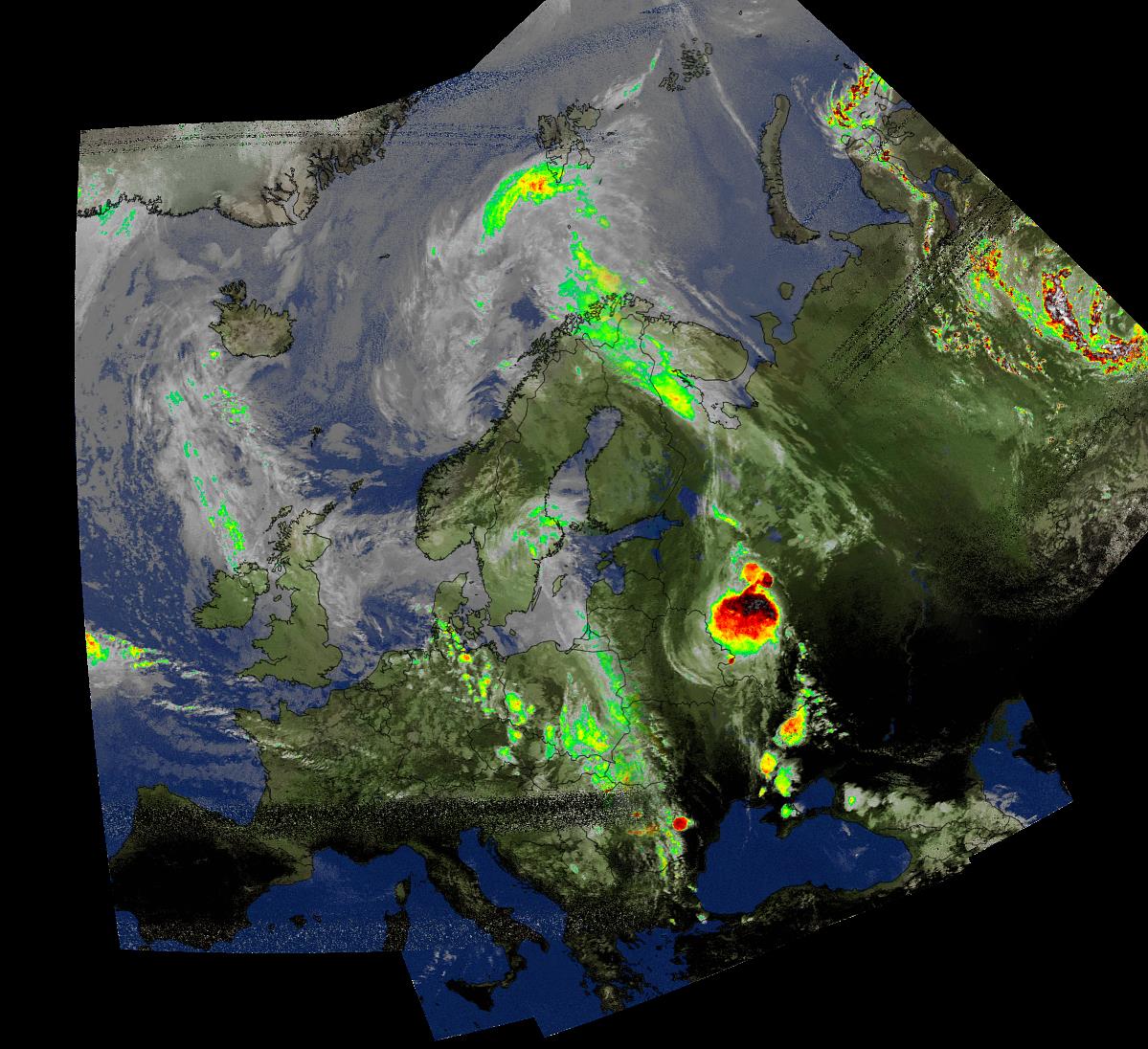
A composited weather satellite image made up of several images received from NOAA satellites by Marco Johansson
Note that the following tutorial is written by Marco Johansson.
Marco’s NOAA APT Decoding Tutorial
As a Windows user I had some serious problems using an RTL-Dongle as a receiver for WxtoImg. Signal drops, CPU load, and no receiver control. I had to use 5 different pieces of software to get automatic reception to work and every day one of the programs had some weird problems causing the whole system to stop working. I read several forum posts about similar problems. A huge bit of help came from WxtoImg’s own forum where a user told how he was able to use rtl_fm as a receiver. His system was Linux based, so I was not able to use his scripts, but it gave me enough information to find a Windows based solution.
I stumbled on to a software program that solves my problem totally. It is originally made to control Windows MCE (Media Center), but since it’s release it has been enhanced to work as a universal remote control for the Windows system.
In WxtoImg I selected “Baykal” receiver, port COM1 and 2400baud. The protocol for remote control is very easy to understand and after every command WxtoImg sends CR/LF to receiver, which is mandatory to get commands to work.
Control commands are handled with MCE controller. It listens to COM2 (bridged with COM1) and when it hears a valid command string (A Magic ‘word’) it activates a task. Tasks are .bat files, one for every satellite and a “kill” to stop receiver after the satellite pass.
When satellite is coming (one minute before it is over head) WxtoImg sends a command “MUA” that triggers “kill.bat”. Then WxtoImg sends a command “RF0xxxxxxx” where xxxxxxx is the frequency of the satellite, “1371000” for NOAA19 – this triggers “rec-noaa19.bat”. When the pass is over, Wxtoimg sends again “MUA” to kill the receiver program.
Now I can control recordings directly from WxtoImg without any other software (Orbitron, SDR#, DDE client etc).
.bat files and other configurations are provided below for others to use. I ended up to have separate .bat to start the tasks as in that way I can set the system start and stop recording in the background without a command prompt popping around my desktop every 90 mins 🙂
My system is Windows 8.1, I have not tested this in 7, 8 or 10 but I believe it should work without any modification. The HW ID of the RTL-Dongle I use for wx_rtl_fm.exe is “3” (‘-d 3’ in script). If you have only one RTL-Dongle, then this should be set to “0”. I use the bandwidth of 55 kHz that seems to be enough for good APT reception including doppler error as in this method the doppler error is not corrected in the receiver at all (no AFC).
NOTE! I have copied the original ‘rtl_fm.exe’ to ‘wx_rtl_fm.exe’ to be able to start other rtl_fm.exe instances without the risk that WxtoImg kills my other receiver accidentaly. And of course, remember that these are from my system and the correct path used in scripts will be different for you 🙂 Also, the original ‘sox.exe’ is copied to ‘play.exe’ as instructed in the SoX’s manual for Windows user. And because I’m lazy, I copied rtl_fm and SoX binaries to same directory so that I do not have to put so long path strings into my .bat scripts 🙂
Final words:
.bat’s used in this are very dirty hacks and there are lot’s of improvement available for sure – but it works! Also, the remote protocol for Baykal receiver actually sends two more commands, one is used for telling the modulation of the transmission (RM NFM) and second to do something I do not know (MUF).
The whole communication in my system goes like this:
1) “MUA” => Kill all wx_rtl_fm.exe processes currently running (if any). This happens one minute before satellite pass starts.
2) “RF0xxxxxxx” => Start wx_rtl_fm & SoX, xxxxxxx=frequency of the satellite and is used to select correct .bat for different satellites (see MCE Control XML-file for details). This happes when satellite pass starts.
3) “RM NFM” => Not used in my system. Could trigger something fun if needed :). This happens right after ‘RF0xxxxxxx’ command.
4) “MUF” => Not used in my system. Could trigger something fun if needed :). This happens right after ‘RM NFM’ command.
5) “MUA” => Kill all wx_rtl_fm.exe processes currently running. This happes right after satellite pass.
SoX is a very powerfull tool for audio manipulation. There are options that could greatly improve the audio quality of the received signal – denoice, better dynamics etc. I am not that keen to try everything SoX could do as the results are already very good in my system, but if there are someone who knows better ways to handle SoX then please do not hesitate to comment!
Used .bat Files
“Kill the receiver”:
kill.bat is triggered by MCE control and calls kill-wx_rtl_fm.bat to do the actual killing.
kill.bat
cd C:\Users\Mac Radio\ownCloud\SDR\rtl_fm_sox
start /min kill-wx_rtl_fm.bat ^& exit
This triggers;
kill-wx_rtl_fm.bat
taskkill /IM wx_rtl_fm.exe /F
“Start recording”:
Recording is started after MCE Control gets the correct ‘word’ from WxtoImg. For every satellite there are separate ‘words’ and separate .bat files.
rec-noaa15.bat
cd C:\Users\Mac Radio\ownCloud\SDR\rtl_fm_sox
start /min noaa15.bat ^& exit
This triggers;
noaa15.bat
cd C:\Users\Mac Radio\ownCloud\SDR\rtl_fm_sox
play -r 55k -t raw -e s -b 16 -c 1 "|wx_rtl_fm -d 3 -M fm -f 137.62M -s 55k -l 0" -t waveaudio
rec-noaa18.bat
cd C:\Users\Mac Radio\ownCloud\SDR\rtl_fm_sox
start /min noaa18.bat ^& exit
This triggers;
noaa18.bat
cd C:\Users\Mac Radio\ownCloud\SDR\rtl_fm_sox
play -r 55k -t raw -e s -b 16 -c 1 "|wx_rtl_fm -d 3 -M fm -f 137.9125M -s 55k -l 0" -t waveaudio
rec-noaa19.bat
cd C:\Users\Mac Radio\ownCloud\SDR\rtl_fm_sox
start /min noaa19.bat ^& exit
This triggers;
noaa19.bat
cd C:\Users\Mac Radio\ownCloud\SDR\rtl_fm_sox
play -r 55k -t raw -e s -b 16 -c 1 "|wx_rtl_fm -d 3 -M fm -f 137.1M -s 55k -l 0" -t waveaudio
And finally, the MCE Control magic ‘words’. By default, MCE Control understands over 200 separate commands originally meant to remote control Windows MCE (Media Center). Fortunately, one can create their own commands and get MCE Control to do much more – control Wx-system!
MCE Control uses an XML configuration file for these extra commands. The file is located in the same directory where the main executable is located. My system uses following XML file to be able to control ‘wx_rtl_fm.exe’:
<?xml version="1.0" encoding="utf-8"?>
<MCEController xmlns:xsd="http://www.w3.org/2001/XMLSchema" xmlns:xsi="http://www.w3.org/2001/XMLSchema-instance">
<Commands xmlns="http://www.kindel.com/products/mcecontroller">
<!-- Place command definitions here -->
<!--
==================================================================
StartProcess Commands
File: The full path to the executable you want to start.
==================================================================
-->
<StartProcess Cmd="RF01376200" File="C:\Users\Mac Radio\ownCloud\SDR\rtl_fm_sox\rec-noaa15.bat"/>
<StartProcess Cmd="RF01379125" File="C:\Users\Mac Radio\ownCloud\SDR\rtl_fm_sox\rec-noaa18.bat"/>
<StartProcess Cmd="RF01371000" File="C:\Users\Mac Radio\ownCloud\SDR\rtl_fm_sox\rec-noaa19.bat"/>
<StartProcess Cmd="MUA" File="C:\Users\Mac Radio\ownCloud\SDR\rtl_fm_sox\kill.bat"/>
</Commands>
</MCEController>