Category: Airspy

Information about Receiving the GOES-13 Weather Satellite (Europe Coverage with 1.8m Dish)

For some time now many weather satellite enthusiasts have enjoyed the ability to relatively easily receive live high resolution images directly from the GOES-16, GOES-17 and GK-2A geostationary satellites (tutorial here). However, while much of the world can see at least one of these satellites, European's have been left out.

What may be of some interest to Europeans is that the older GOES-13 (aka EWS-G1) satellite was repositioned in February 2020, and it can now be received in Europe (as well as Africa, the Middle East, Asia, Russia and West Australia) until at least 2024 when it will be replaced.

The important catch however is that GOES-13 is not broadcasting the same easy to receive LRIT/HRIT signals that the other satellites use. The signal is still in the L-Band at 1685.7 MHz, however it is called "GVAR" and it is much weaker and uses 5 MHz of bandwidth. For GOES 16/17 and GK-2A a 1m WiFi grid dish, LNA and RTL-SDR was sufficient, but for GOES-13 you'll need a much larger 1.8m dish, and a wider band SDR like an Airspy. The big dish requirement significantly increases the reception challenge.

We also note that the decoder is being developed by @aang254 and u/Xerbot and it is not yet publicly released. However, they do intend to release it soon. Update:

Over on his blog Carl Reinemann has been collecting some useful information about GOES-13 reception. Over on Reddit u/derekcz has also created a post with some useful information. We've also been talking to @ZSztanga in Poland who has been testing this satellite out, he wrote:

My hardware is: 180cm prime focus dish, with a custom cantenna (120mm diameter). I'm using the SAWBIRD GOES LNA. I will be switching to the + version, because the setup is still lacking a few db SNR. The SDR is the one I use for HRPT: the airspy mini

I found that the USB connection on the airspy generates a lot of noise, so I removed the USB cable, by moving the airspy to the laptop. I use 2m of CNT-400 coax and it works much better now. I get about 2 db SNR more. Thought you might find it interesting.

@ZSztanga's GOES-13 Reception Setup, with 1.8m dish.

We note that there is some interesting differences with GOES-13 images. Since the image is less processed, it is higher resolution (a full resolution image can be found on this Reddit post), as well as not cropped, meaning that the Earth's atmosphere is visible. Please also follow @ZSztang on Twitter for more images.

Frugal Radio: SDR Guide Ep 6 – Trunk Tracking Public Safety Systems with UniTrunker and SDRTrunk

In this episode of Frugal Radio's ongoing SDR Guide videos Rob demonstrates how he uses Unitrunker and SDR Trunk with SDRs like an RTL-SDR to monitor Public Safety networks in his area. Rob writes:

This is a video demonstrating how I use UniTrunker and SDRTrunk with Software Defined Radios to monitor multiple Public Safety networks in my area.

There is some information on how trunked systems work, and you can hear how my SDRs produce better P25 audio on a Simulcast (LSM) system than some scanners.

I use a couple of RTL-SDR v3s and an Airspy R2 in this episode.

2020 SDR Guide Ep 6 : Trunk tracking Public Safety systems with UniTrunker and SDRTrunk

Simple dPMR Decoder Plugin for SDR# Released

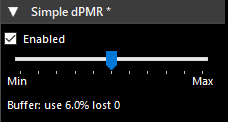
Over on rtl-sdr.ru programmer Vasili has released his latest SDR# plugin which is a dPMR decoder (note that this site is in Russian). dPMR is short for "Digital Private Mobile Radio" and is an open non-proprietary digital voice protocol. Vasili writes:

Simple dPMR decoder. No external dependencies, no settings, uses SDR # audio path. Designed for listening to unencrypted dPMR channels.

To install the plugin simply copy the dll's from the zip file into the SDR# folder, then copy the line from the magline.txt text file into the plugins.xml file which can be opened with any text editor.

We note that there is also an open source version of DSD which includes a dPMR decoder which we posted about here.

Simple dPMR Decoder Plugin for SDR#

Running SDR# On Ubuntu 20.04 Linux via WINE

SDR# is a very popular Windows SDR program often used with the RTL-SDR and Airspy SDR. One drawback is that it lacks native Linux compatibility. In the past it has been possible to run SDR# via WINE, however some newer updates were thought to have broken that ability. WINE is a Windows emulator that allows some Windows programs to run under Linux.

However, recently on Twitter we've seen a Tweet by @albinstigo indicating that SDR# can indeed run on Ubuntu 20.04 via WINE 5.0. In a Tweet he explains the steps which are quite simple:

  1. Install WINE via apt.
  2. Install dotNET 4.8 via winetricks.
  3. Install the Verdana font via winetricks.
  4. Enjoy SDR

One limitation is that the emulated SDR# cannot connect to the SDR natively via the USB. So you will need to use TCP server software such as rtl_tcp or SpyServer to get it to work. Basically, run the server on the native Linux environment, then connect to it in SDR# running on the emulated Windows environment.

SDR# Updates: RTL-SDR Enhanced Mode, AM Co-Channel Canceller for MW DX

Over the past few days SDR# has been updated again adding several new great features. The first is an "RTL-SDR Enhanced" front end driver, which is actually Vasili's front end driver that was released a few years ago. This front end enhances the capabilities of the RTL-SDR as it exposes features like decimation and individual gain control. We note that the current version appears to have a bug preventing enhanced mode from starting, but we expect that it will be fixed again soon. Vasili's File Player has also been added, and this allows for easy playback of RTL-SDR IQ files.

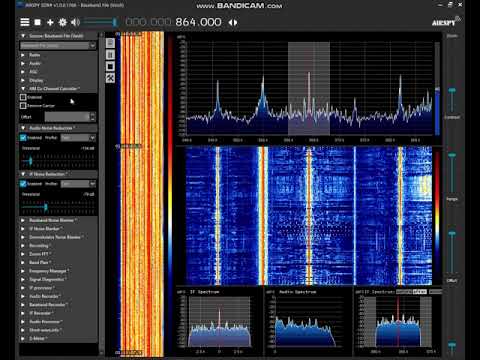
The second feature added recently is an AM Co-Channel Canceller which is could be quite a big feature for medium wave (MW)/broadcast AM DXers. When DXing MW a problem is that you'll often encounter is two stations that are on or almost on the same frequency. This is either due to neighbouring countries not agreeing on frequencies, long range DX antennas picking up further than the intended broadcast range, or from malicious jamming as with the Chinese Firedrake. With a standard radio or demodulation algorithm such a situation makes either both stations impossible to listen to, or only the strongest station will be heard. However, the new AM Co-Channel Canceller plugin in SDR# uses clever DSP algorithms to allow one of those channels to be effectively removed, allowing you to listen to the other station clearly.

Over on the SWLing blog Guy Atkins has written up a comprehensive review and tutorial of the Co-Channel canceller plugin. We've also seen a few examples up on YouTube already, and the video posted below shows user "SDR-radio" in Japan experiencing a South Korean station blocking out a weak local Japanese station. Enabling the plugin allows the weaker station to be heard.

SDR# (SDRSharp): AM Co-Channel Canceller plugin

SDR Sharp Slicer Now Supports RTL-SDR and other SDRs

Youssef, Author of the SDR# software has recently updated SDR#, now extending the Sharp Slicer functionality which we posted about earlier to RTL-SDR and other supported software defined radios. The latest version of SDR# can be obtained from the Airspy Downloads page as usual.

This feature allows SDR users to open multiple instances of SDR#, each able to tune to a seperate signal within the currently tuned frequency range of the SDR. This is somewhat similar to the old multi-VFO plugin from rtl-sdr.ru, however the advantage of Slicer is that you can have seperate spectrum and waterfall graphs for each signal.

Other recent changes include 'true dBFS' automatic scaling, where 0 dBFS now indicates that the ADC is likely saturated.

SDR# Sharp Slicer Monitoring 5 Broadcast FM Stations Simultaneously.

Testing Sharp Slicer: Multiple Spectrum Slices via SDR# with an Airspy SDR

Youssef the author of SDR# has recently released an update which adds a feature called "Sharp Slicer". This feature allows Airspy SDR users to open multiple instances of SDR#, each able to tune to a seperate signal within the currently tuned frequency range of the SDR. This is somewhat similar to the old multi-VFO plugin from rtl-sdr.ru, however the advantage of Slicer is that you can have seperate spectrum and waterfall graphs for each signal. This could be especially useful for monitoring multiple narrowband HF modes with an Airspy HF+ Discovery. 

To use Sharp Slicer you must have an Airspy SDR, be it an Airspy Mini/R2 or HF+/Discovery. Unfortunately it will not work with RTL-SDR or other SDRs. Once the SDR is running in SDR#, simply press the "+" button on the top left to open a new Slicer instance. It seems possible to open as many instances as you want, and probably the only limitation is your CPU. On our Intel i7-6700 we tested up to 8 instances running at the maximum bandwidth of an Airspy Mini, and the SDR# CPU utilization was only at 50%.

A nice touch is that you can also see the location of each VFO on the master SDR# instance, and the color can be changed on each Slicer instance.

Over on Twitter @ea3ibc has also been testing:

TechMinds: Using Public Online SDRs without SDR Hardware

This weeks video on the TechMinds channel explores the various online web SDRs that are available to access for free. Accessing these online SDRs does not require any hardware apart from a PC and internet connection, although of course you are then receiving signals from a different location to yourself. 

In the video he shows how to access the SDR# Spy Server Network which mostly consists of Airpsy and RTL-SDR units, the SDR-Console V3 Server network which consists of a wide array of different SDRs, the browser based WebSDR network which is mostly soundcard based SDRs but also RTL-SDR and other SDRs, and finally the KiwiSDR network which is made up of KiwiSDRs.

Using Software Defined Radio Without SDR Hardware - WebSDR