Every month SDR evangelist Balint Seeber hosts the Cyberspectrum Meetup in San Francisco, where many SDR fans come together to listen to various presentations. The 20th Cyberspectrum SDR meetup has now concluded, and the recorded video is available on YouTube.
Cyberspectrum 20
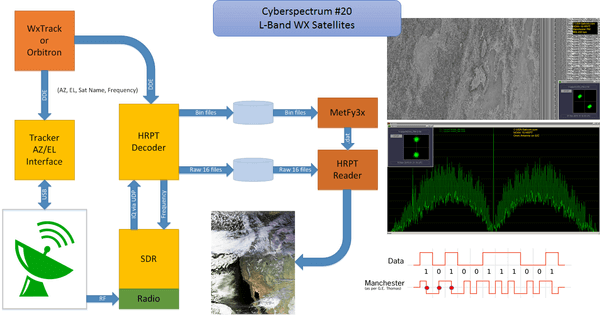
The talks this time include a very interesting talk by Joe Steinmetz (@usa_satcom) about decoding L-Band weather satellites such as NASA GOES. Previously we made a post regarding GOES where Reddit user devnulling showed his GOES reception setup. To save time, on the video Joe’s talk starts at 00:10:45.
This presentation will cover most aspects of receiving, demodulating and decoding current L-Band Weather Satellite signals (NOAA, MetOp, Meteor, FengYun, GOES). Topics will include hardware, software, de-modulation/decoding techniques, challenges, flows as well as cool sample images and data.
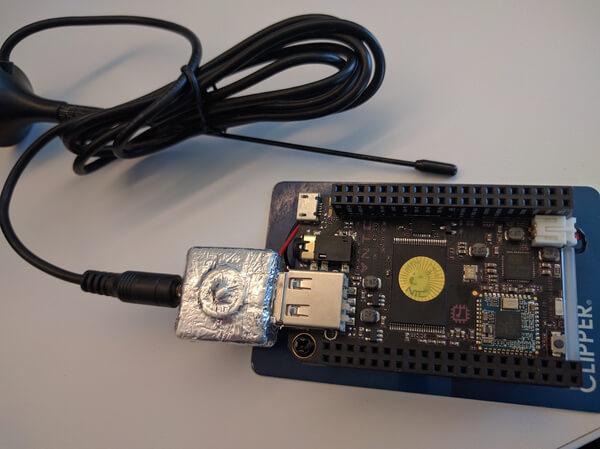
The second talk is titled “Disposable, Stealthy, Cheap SIGINT” is by Chris Kuethe, @kj6gve and delves into topics relating to low cost signal analysis. Chris’ talk starts at 1:45:00. The blurb reads:
This presentation covers some observations and considerations for using inexpensive and compact ARM boards for signals analysis. Topics may include: power budget, air interface, attributability, performance tuning, lolcats and doges.
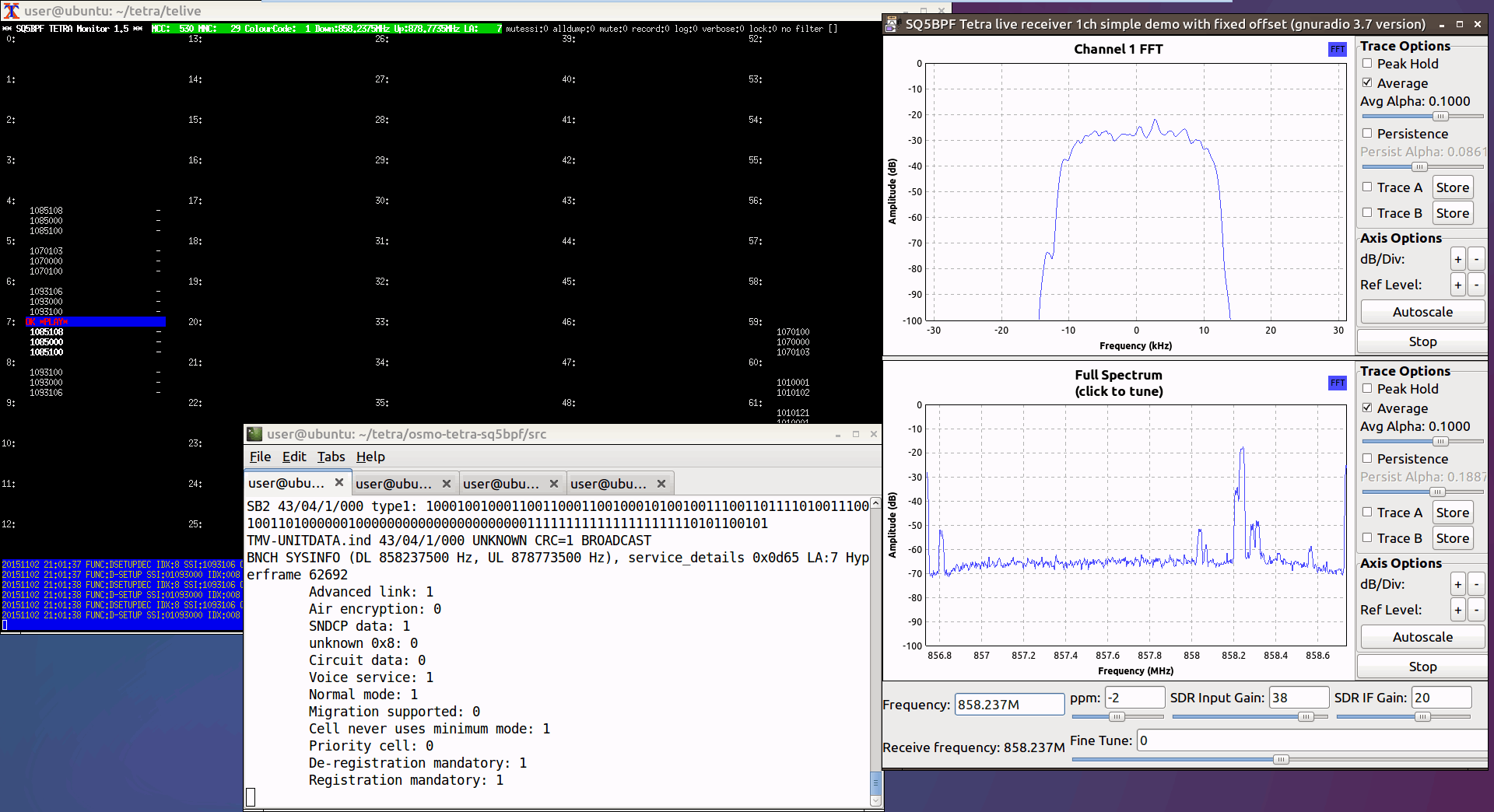
TETRA is a type of digital voice and trunked radio communications system that stands for “Terrestrial Trunked Radio”. It is used heavily in many parts of the world, except for the USA. Telive is a decoder for TETRA which is compatible with RTL-SDR dongles, and has been around and in use for almost 2 years now. If you have unencrypted TETRA signals available in your area it can be used to listen in on them.
However, now a TETRA experimenter by the handle of “cURLy bOi” has released a new prototype of a telive modification that works on Windows systems. It makes use of the GNU Radio for Windows development. The telive Windows file can be downloaded from curly’s webserver. His reademe file shows how to install and use the software and it reads:
This has been put together as lowest-effort configuration to run telive on Windows system. I have also optimized to process (for example adding the CQPSK block to GRC since the python code in the original telive package is IN FACT some unused part of GNU Radio)
Warning: ——— This package contains pre-compiled binaries that work on my 64-bit system. I have compiled them inside the M-SYS2 package. If you don’t trust me, you can follow the installation guide from telive docs, just be prepared you are going to need a lot of packages for the M-SYS2 (pacman -S gcc automake git wget, etc.)
Install: ——— 1) Download GNU Radio for Windows from http://www.gcndevelopment.com/gnuradio/downloads.htm and install 2) Copy contents of gnuradio_mod to c:\Program Files\GNURadio-3.7\ 3) Download and install M-SYS2 from https://sourceforge.net/projects/msys2/ and install 4) Copy contents of msys_root to your M-SYS2 installation directory 5) Download FFmpeg for Windows (64-bit Shared) from https://ffmpeg.zeranoe.com/builds/ and extract everything from bin to usr\bin in your M-SYS2 installation directory 6) In M-SYS2 shell execute “pacman -S socat” 7) Get GNU Radio Companion (GRC) projects from original telive package at https://github.com/sq5bpf/telive/tree/master/gnuradio-companion (only udp or xmlrpc, pipes won’t work) 8) Open whatever GRC project you want to use and edit it: – Delete the link between (all) Fractional Resampler and UDP Sink – From the modules on the right (ctrl-f to search) drag CQPSK Demod to project (If you don’t see CQPSK Demod then you have messed up #2) – Connect Fractional Resampler -> CQPSK Demod -> UDP Sink – Change UDP Sink Input Type to Float in its properties – Save
Use: —— 1) Open GRC project of your choice (already with the CQPSK Demod box) 2) Use the Project/Execute to run the project from the GRC – OR – If you had headless (without GUI) project, use Project/Generate option to generate top_block.py file in the GRC project directory. Then open GNURadio Command Prompt from Start menu, the use this command c:\Program Files\GNURadio-3.7\gr-python27\python.exe -u c:\path\to\grc\project\top_block.py This will enhance performance. 3) Open new M-SYS2 shell for every channel in that project and execute command “receiver1udp X” where X is the number of each channel in GRC project 4) Open new M-SYS2 shell, resize it to 203×60 and execute: – cd /tetra/bin – ./rxx OR ./rxx_xmlrpc (if you are using XMLRPC GRC project) You can edit these files to match your preferences 5) That’s it, should work.
Note that we have not tested this out ourselves yet and can’t guarantee the file safety or that it works, but we have no reason to believe that it wouldn’t be safe or not work.
Over on his blog author Simone Margaritelli has added a tutorial that shows how to set up a bladeRF to act as a GSM basestation (cell tower). Having your own GSM basestation allows you to create your own private and free GSM network, or for more malicious illegal users it can allow you to create a system for intercepting peoples calls and data. Simone stresses that it is well known that GSM security is broken (and is probably broken by design), and now it is about time that these flaws were fixed.
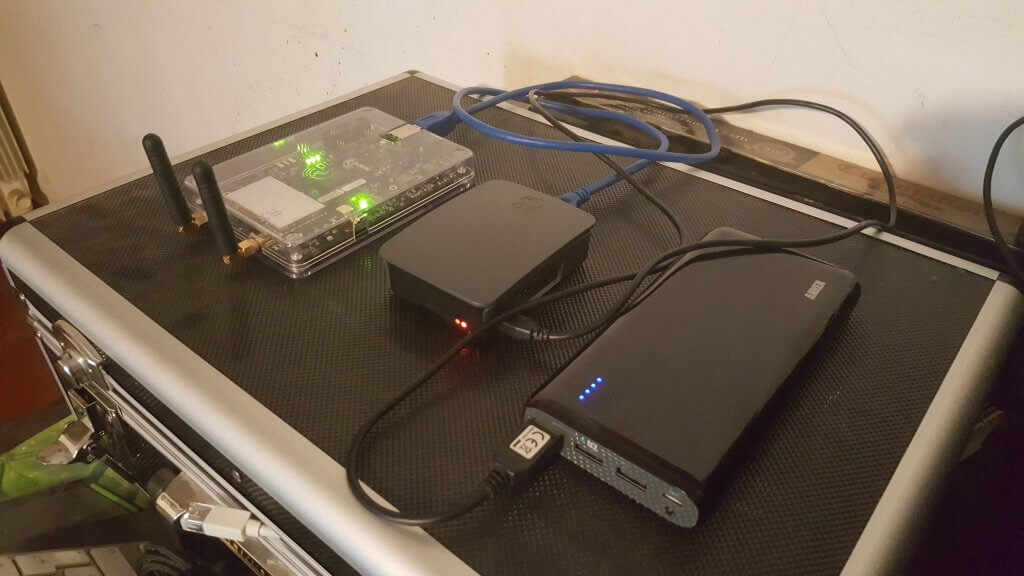
In his tutorial he uses a single bladeRF x40 and a Raspberry Pi 3 as the processing hardware. The bladeRF is a $420 transmit and receive capable software defined radio with a tuning range of 300 MHz – 3.8 GHz and 12-bit ADC. He also uses a battery pack which makes the whole thing portable. The software used is Yate and YateBTS which is open source GSM basestation software. Installation as shown in the tutorial is as simple as doing a git clone, running a few compilation lines and doing some simple text configuration. Once set up mobile phones will automatically connect to the basestation due to the design of GSM.
Once setup you can go further and create your own private GSM network, or make the whole thing act as a “man-in-the-middle” proxy to a legitimate GSM USB dongle, which would allow you to sniff the traffic on anyone who unknowingly connects to your basestation. This is similar to how a “Stingray” operates, which is a IMSI-catcher device used by law enforcement to intercept and track GSM communications. More information on using the bladeRF as an IMSI catcher with YateBTS can be found in this white paper.
bladeRF x40, Raspberry Pi 3 and a battery pack. Running a GSM basestation.
Back in September we posted a tutorial that showed how to set up an Outernet receiver with a Raspberry Pi running their rxOS software and an RTL-SDR, LNA and patch antenna. Recently, Outernet have released a new decoder for Windows and Linux which is very easy to install and run. Outernet is an L-band satellite data service which can be received almost anywhere in the world with an RTL-SDR. They aim to be a “library in the sky”, constantly broadcasting public data like news, books, images/videos and other data files.
The new decoder is a Linux machine that runs in a self contained multiplatform Virtual Box virtual machine. This means that it is a standalone package, and it comes included with the OS, decoder, and all the files needed to make it run. Using a virtual machine eliminates any installation issues due to missing dependencies or libraries. Running the VM in Windows is as easy as double clicking on a .exe file to open it up. Note that you’ll need a relatively modern machine that supports hardware virtualization support (VT-x) (Core 2 or newer). The virtual machine itself is lightweight, and uses less than 50MB of RAM, and has very low CPU usage.
At the moment, the decoder writes files downloaded from the Outernet service to a directory stored in C:\Outernet\downloads. Unlike the Raspberry Pi decoder, there is no web interface for accessing the content, though this will probably be added in future builds. The files can be directly accessed in the Windows/Linux file managers.
To set up the VM on a Windows machine:
Download the Windows .exe archive and open it. When prompted, extract the files to a convenient folder on your PC.
Plug in your RTL-SDR and LNA, and set up your L-band antenna.
In the extracted folder run the outernet.exe file once. This will open the decoder and the first time it is run it will automatically create a folder in C:\Outernet.
If you are in the Europe/Africa and use the Alphasat satellite then you can ignore this step. If you are in another region, close the opened VM, then go to C:\Outernet\Satellites.Available, and then copy the file corresponding to the satellite used in your part of the world over to C:\Outernet\Satellites.Selected. Now reopen the outernet.exe VM.
The decoder should now be showing a good SNR value >2 in the top right information, and the State: should show FRAME LK. The bottom right window should also scroll “Packed written to socket.”
After a few minutes check the C:\Outernet\cache folder for pieces of files. Later check the C:\Outernet\downloads folder for completed files.
Further instructions can be found on their Windows Readme file. Note that as there is no web browser for the files, some will be downloaded as GZipped files, and will need to be unzipped to be viewed. For more information on the Outernet service as well as the hardware requirements see our previous tutorial.
We tested out the VM on a Windows laptop for a few hours and was able to receive several GZipped Wikipedia webpages as well as a photo, as shown in the screenshot below.
Files downloaded from Outernet (left). Outernet decoder running in VM (right).
Moon Bounce or “Earth Moon Earth” (EME) is an amateur radio activity where people attempt to transmit a signal towards to the moon, and listen to the reflected signal. In some cases a separate transmitter is not needed, as an already powerful constant transmitter like the GRAVES radar in France can be used.
Over on his YouTube channel user cqpy2rn has uploaded a video showing his moon bounce reception of the GRAVES radar using an eleven element yagi antenna. He compares the reception with an RTL-SDR, FunCube PRO Plus and SDRplay. He writes:
+++ Nooelec model NESDR Smart (RTL-SDR) +++ GOODs: Price $20, frequency stability 0.5ppm tcxo, aluminum case, firm sma antenna connector, better dynamic range than regular-cheaper RTL dongles. Easy gain adjustment. BADs: No pass filters, freq coverage from 24MHz to 1.7GHz, poor dynamic range (moderate de-sense with near strong signals)
+++ FunCube PRO PLUS – FCDPP +++ GOODs: freq coverage from 150KHz to 2GHz, pass saw filters, frequency stable 0.5ppm tcxo, easy gain adjustment, acceptable dynamic range. BADs: Plastic case, fragile sma connector, just 192KHz wide spectrum view, price $160.
+++ SDRPlay +++ GOODs: Frequecy coverage from 10KHz to 2GHz, firm SMA connector, pass saw filters, up to 8MHz wide spectrum view, acceptable dynamic range. BADs: Plastic case, legacy printer USB connector, frequency drift during warm up, difficult gain adjustment
CONCLUSION: In essence all these have the same “DNA”, they were made from digital TV tuner chips, comparisons produce very similar RX practical results, the RTL suffers due the lack of internal filtering which can be a little remediated adjusting the gain carefully through your SDR software or adding external filters. FCDPP and SDRPlay are vey similar, although the freq drift for SDRPlay is a bit annoying to me.
Nooelec RTL vs. FunCube PRO Plus vs. SDRPlay (VHF 143MHz graves via EME test)
Back in August we posted how Albert Lederer had created a RTL-SDR interface for the LabVIEW visual programming language which could be run on a host PC. LabVIEW is a visual programming language which is used commonly by engineers and scientists to quickly build applications for things like product testing, system monitoring, instrument control etc.
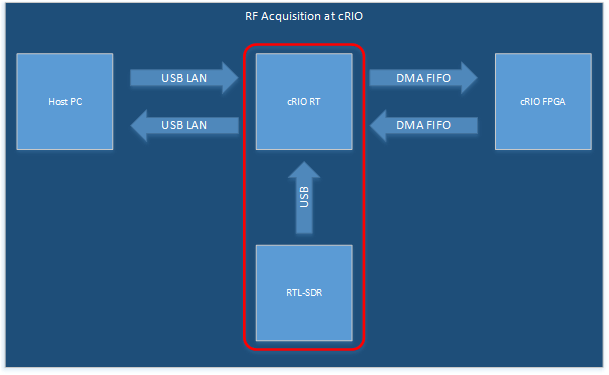
In his latest post/tutorial uploaded a few days ago he shows how to run the RTL-SDR RF acquisition on a myRIO, which is a development processing board that can run Linux and has an on board FPGA. LabVIEW can then be used to control the RTL-SDR from the host PC.
The whole point of running the RTL-SDR on the myRIO is to eventually make use of the on board FPGA. In future posts he hopes to show us how to use the on board FPGA to offload digital signal processing (DSP) tasks, which would significantly speed up applications.
Data flow for offloading RTL-SDR DSP tasks onto the FPGA
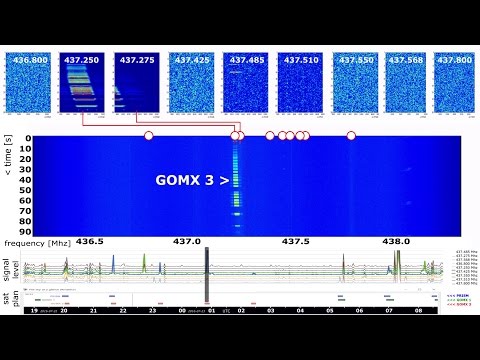
Over on hackaday.io there is a project blog for the “Distributed Ground Station Network”. This is essentially an idea to build a large network of distributed RF receivers which automatically receive signals from sources like cube satellites and other beacons. The project mainly uses RTL-SDR dongles at the moment for their RF receivers. In some ways it appears to be similar to the SatNOGs project which won the hackaday prize two years ago but the DGSN appears to be more focused on “reverse GPS” which allows the detection and tracking of the location of small satellite signals through distributed receivers.
They write:
The Distributed Ground Station Network (DGSN) is a novel network concept of small ground-stations and connected via the internet for performing automatic scans for cubesats and other beacon signals. By correlating the received signal with the precise, GNSS synchronized reception times of at least 5 ground stations, it enables the positioning of the signal’s origin. Thus a global tracking of small satellites becomes possible in this “reverse GPS” mode. It allows mission operators to position and track their small satellites faster after piggy-back commissioning, when the final orbit is yet undefined and could differ from the specified orbit. Furthermore it allows permanent communication in “data-dump” mode. In this mode, DGSN ground-stations relay the received data to the servers and thus to the operator. Let’s track everything, together!
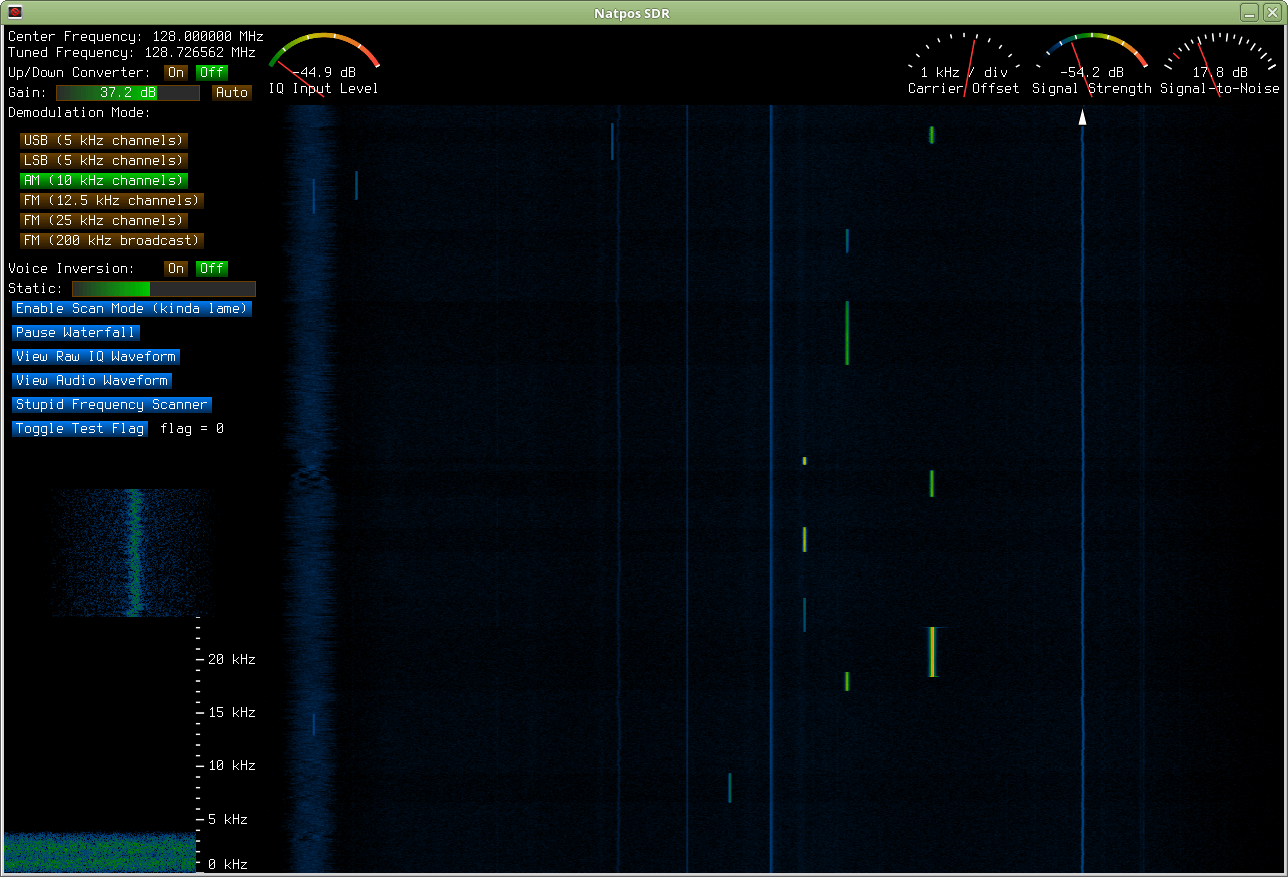
The thing I like most is that I can replay past transmissions by clicking in the waterfall history. Using other SDR software, when a new transmission pops up, I feel like I’m in a race to tune to it before it ends so that I can at least hear some of it, but in my software, I don’t even have to pay attention to what’s happening now, and so I seldom do. Usually I don’t notice transmissions on new frequencies until they’ve ended, but I still get to listen to them.
I also put some effort into trying to make sure AM and FM transmissions were equal in volume, as well as at the correct volume according to how well they were modulated, in that I aimed for 100% modulation leading to audio output that’s 6 dB below the ceiling. It seemed as if it was quite random in other software, as switching from AM to FM might cause a huge jump or drop in audio volume. I don’t like to play with my volume controls, so I did my best to make it so that I don’t have to. I’m also not at all fond of the “click the numbers” method of changing the center frequency which seems to be so common. So in mine, I just type in the MHz on the number keypad and press enter.
I’m also much more fond of my waterfall coloring scheme than any other I’ve seen. It seems much smoother and more informative, at least to me anyway. I suppose that’s rather subjective.
…but it’s rather hard to compare it to other software given that I only got to use other software for two or three days. I rather soon knew I wanted to write my own, and I wanted to use the V4L2 API (that dvb_usb_rtl28xxu module you have to blacklist to use rtl-sdr is an SDR driver, not a video driver), but I had to upgrade to Linux Mint 18 to get access to it since it’s a new API, and after doing so, I haven’t been able to get any of the existing SDR software to both compile and work after it’s compiled. So I just focused on writing my own, since I was wanting to do so anyway. (No support for that V4L2 API though, as it turns out its buggy and offers no way to control the dongle’s gain, so it’s basically unusable.)