Category: News

HDSDR Updated to Version 2.70. Now with Autocorrelation Feature for Signal Identification

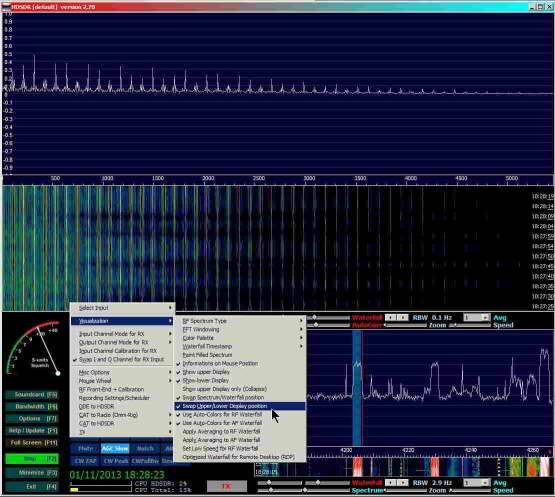
HDSDR, a popular SDR program used with the RTL-SDR dongle has been updated to version 2.70. The new features include

– better CPU utilization
– added Automatic Notch Filter
– added AFC for AM and FM. AFC can be deactivated in ECSS mode
– smoothed S-Meter display
– enhanced parameters for ‘SDR on IF output’
– new keyboard shortcuts for Lo/HiCut and WAV files
– ‘spectrum’ switchable to Autocorrelation/Cepstrum display (Click on ‘Spectrum’ label)
– TX-Button for HRD(DDE) / CAT to HDSDR
– added ‘Double Size’ option in Frequency Input Dialog
– Frequency Manager now provides 5 User Banks

The new autocorrelation feature is particularly useful for signal identification. The authors of HDSDR have created a webpage showing what the autocorrelation feature can be used for, and how to use it.

HDSDR Autocorrelation Feature

SDRSharp Frequency Manager Plugin updated to Version 1.4

The commonly used frequency manager and scanner plugin for SDRSharp has been updated to version 1.4. The new features include:

Frequency Manager

  • Frequency Presets – there are now 10 frequency presets you may use to store and recall favorite frequencies.

Scanner

  • A new Signal Strength Indicator displays a real-time measure of a frequency’s signal strength compared to the Minimum Signal Strength that you set. The indicator shows the signal strength as it bounces below and above your minimum, and also shows when the “Seconds wait for transmission” and “Watchdog” timers have been triggered.
  • The Scanner Configuration window now has two tabs which organize scanner behavior into Rules settings and Performance settings.
  • Snap to next Step Size: a new checkbox lets you force the scanner to tune a scanned frequency to the SDR# step size, or instead allow it to tune to the actual detected peak signal strength of a frequency.
  • Update a frequency’s Date when monitored: a new checkbox that causes the scanner to record the current date for a frequency that is already in your database, when the scanner lands on that frequency.
  • Adjacent Frequency Rejection: a new setting that lets you define the width of the area around a tuned frequency that is used to monitor signal strength after tuning to a frequency. This reduces the influence of adjacent strong frequencies that “splatter” into the tuned frequency’s step size or bandwidth size.
  • Faster scanning speed: Scanning speed has been improved yet again, and is now faster than the improvements in version 1.31. On my equipment I now average 1.6 GHz scanning speed as measured with the built-in benchmark tool on a range scan.
  • Improvements to the busy-frequency detection process.

The updated plugin can be downloaded from http://www.sdrsharpplugins.com.

Elusive E4000 RTL-SDR Dongles

Over on the Gough’s Tech Zone blog, Gough has posted about his experiences in trying to obtain an E4000 RTL-SDR. He found that finding a real E4000 on ebay was tough, with most vendors claiming to have “upgraded E4000s” which were in fact R820T’s.

The E4000 tuner is becoming rare as Elonics, the manufacturer has shut down. The newer, still in production R820T tuner is in many ways better than the E4000, but the E4000 is still useful for some applications that require the higher frequencies that it can tune to.

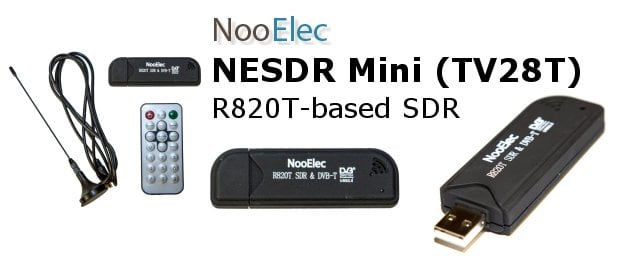
If you want an E4000, we know for sure that Nooelec sells a Terratec version that has the E4000 chip.

Wavesink Plus: Android RTL-SDR App with FM+RDS/DAB+/DRM+ Decoding

Wavesink Plus, the paid version of the trial version of Wavesink has been released on Google Play. Wavesink Plus is an Android app which has FM+RDS, DAB+ and DRM+ receiving and decoding capabilities when connected to an RTL-SDR dongle via a USB OTG cable.

We gave Wavesink Plus a test today on a HTC One X Android phone and were pleased to discover that it works perfectly. The user interface has been tidied up from previous versions, and DAB+ has been added. There is now also auto tuning functionality, which will automatically find a station.

In further testing we found that the latest version of Wavesink was fast and snappy and was able to load DAB+ stations quickly, and decode them with clear audio. FM radio also sounded clear and RDS information loaded quickly as well.

Download the trial version here and buy the full version from this link.

Wavesink Plus Decoding DAB+

SDRLab: An RTL-SDR Interface to LabVIEW for Educational Purposes

If you’re familiar with the LabVIEW software, there is now an RTL-SDR interface called SDRLab by Beküldte Andris. The software is able to capture the I/Q data from the RTL-SDR, and with that you can do educational experiments in LabVIEW, which is great for students. The author has also implemented a FM demodulator.

ha5kfu_sdrlab_release

Wavesink: New Android RTL-SDR App for FM/RDS/DAB/DRM+

Wavesink is a new SDR Android App, which allows your RTL2832U based dongle to receive FM radio with RDS, Digital Audio Broadcast Radio (DAB) and VHF band Digital Radio Monodial (DRM+). DAB+ support is also to be released by next week, and a station memory will also be added in a future release.

The app is currently in beta development, and only the trial version is released, which will allow you to use the app for 5 minutes at a time. They indicate that the commercial version will be out soon.

To use this with your Android device, you will need a USB OTG (On the Go) cable, and your device must support USB host mode, which most Android devices above 3.1 should support.

I gave the app a quick spin in FM mode, and found that the interface was a little clunky, but the app worked fine, and the FM and RDS signals were decoded correctly.

wavesink

RTL-SDR.COM Forum

I’ve had a few email requests by different people over the past few months to start up a discussion forum.

The new forum can be found at rtl-sdr.com/forum, and can also be accessed from the Discussion Forum link in the top menu. Please register and post. If you have any suggestions for the forum such as categories you think should be added, you can reply in the welcome thread.

New DSD Block Available for GNU Radio

The popular digital speech decoder (DSD) software has now been wrapped into a GNU Radio Companion block. Previously, DSD required use of virtual audio cables to get decoding to work with GNU Radio, but now the signal audio can be passed directly into this block.

Luke Berndt from the HackRF-dev forums has posted his work to make the functionality of DSD available to GNU Radio users in the form of a GRC block. “I have been playing around a bit and found an easy way to receive and playback digital LMR. More and more of the radio systems are going from narrow band FM to Digital. This makes it tough to listen to them on GQRX. DSD is a great program which can decoded the audio you get when you tune in a system in GQRX, but you either have to run it on another machine with a audio cable in between or figure out how to do a virtual audio cable on your machine.

Luckily, someone wrapped the DSD libraries so they can be accessed as GRC blocks. I have put together a GRC file and a Python program that make it a little easier to use the block.

If you have a chance, give them a try and let me know if they work. There is a good chance I have messed up the values in the filters or else where, but I have gotten clean audio out of it.”

Download the files from GitHub.

DSD is a Linux and Windows software program capable of decoding popular digital speech codecs such as APCO P25 and MOTOTRBO/DMR.

Via DangerousPrototypes