Category: RTL-SDR

Frugal Radio: Monitoring VHF Airband Aviation Frequencies at the Airport

Rob from Frugal Radio has recently uploaded the next video in his airband monitoring series. In this video Rob explains various airband communications that can be received from the airport, and explains about needing to be in the line of sight of an airport in order to receive them.

He goes on to explain signals and airport radio communications channels such as ATIS, Clearance Delivery, Tower, Arrivals (Approach), Departures, Radar and Terminal communications. The video provides various examples of these communications being received with an SDRplay software defined radio.

Monitoring VHF Airband Aviation Frequencies at the Airport

GNU Radio Amateur Radio Meeting: A Look at Project 25 (P25) Digital Radio

Over on their YouTube channel GNU Radio have uploaded a recent talk by Aaron Rossetto titled "A Look at Project 25 (P25) Digital Radio". The talk explains the North American public safety P25 system in great depth, and is a good watch for anyone looking into details on how the system works in a deeply technical way. He later shows some examples of his P25 decoding and recording setup. Slides can be found here, and the video is posted below.

Agenda: In this presentation, I will introduce Project 25 digital radio, with a strong emphasis on its use in North American public safety trunked radio systems, and to describe experiments monitoring and decoding P25 traffic using GNU Radio code.

  • What is Project 25?
  • A brief introduction to trunked radio
  • Diving into the P25 protocol
    • Modulation
    • Packet framing and encapsulation
    • Packet types
  • GNU Radio and P25 decoding experiments
Amateur Radio Meetup: P25 Trunked Radio

Receiving Shortwave Radiograms with an RTL-SDR and MultiPSK

Shortwave Radiogram's are digital broadcasts of images, text and sometimes HTML files that are regularly broadcast on two shortwave radio stations, WRMI in Florida and WINB in Pennsylvania. The transmissions are produced and presented by Dr. Kim Andrew Elliott, and a schedule can be found on the Shortwave Radiogram website.

Over on his blog Jeremy Clark has been experimenting with receiving shortwave radiograms with an RTL-SDR and upconverter. To do this he notes the transmission schedule on the shortwave radiogram website, and uses SDR# and MultiPSK in MFSK mode to receive and decode the data. Jeremy's post explains the MFSK transmission mode and shows a few examples of radiograms that he's received including a video posted below showing live reception and decoding.

RTL-SDR for Shortwave Radiogram

Controlling a Wireless Ceiling Fan with an RTL-SDR and RPiTX on a Raspberry Pi

Over on YouTube River's Educational Channel has uploaded a new video showing how he uses a Raspberry Pi to control a ceiling fan via it's wireless control signal. Back in January we posted about River's first video where he shows him using and RTL-SDR and Universal Radio Hacker (URH) to reverse engineer the control signal.

In this new video River uses the RPiTX software to generate the control signal without requiring any additional transmit hardware. He first explains how RPiTX can generate an arbitrary signal from a square wave and talks a bit about the harmonics this creates. To reduce harmonics he adds a simple low pass filter to the GPIO output.

Next to control the fan he uses the "sendook" program that is included with RPiTX to transmit the binary control string that he reverse engineered in his original video. Finally he creates a simple web server so that he can control his ceiling fans via his phone and integrate it into his smart home.

Abusing Raspberry Pi GPIO pins as a radio transmitter to control my ceiling fan

Adding an RTL-SDR Antenna Port to a Pinetab Linux Tablet

The Pinetab is a US$99.99 open source Ubuntu Linux Tablet based on a low power Pine64 singe board computer. The Pinetab can optionally support an internal RTL-SDR, which is essentially just a standard RTL-SDR PCB connected to the single board computer inside the tablet enclosure.

Over on YouTube channel Privacy & Tech Tips has uploaded a video where he takes the Pinetab apart and adds an external antenna port, allowing for external antennas to be connected. In the video we get a good look at the internals of the Pinetab, and after installing the external antenna port he shows us the Pinetab receiving a LoRa signal.

Opening Pinetab (Linux Tablet) back cover (+show tips for safer opening) on video and show how you can add an external threaded antenna port for your internal SDR. It makes for an amazingly compact SDR kit and smaller antennas like LoRa fit right inside the keyboard/tablet/laptop stand. Larger antennas such as a dipole, the antenna cord fits along the case/stand perfectly.

I show how to open the Pinetab safely, and install an external threaded antenna port. After this I take a Heltec LoRa ESP32 I have had laying around and use it to demo GQRX on the screen. I show LoRa packets coming over the radio waves at 915MHz. Series on SDR using Pinetab/Pinephone/Pine64 hardware. Linux makes for an amazing platform where the tools at hand leave the limits to what you can do to the power of your imagination.

Opening Pinetab + Add SDR Modification!

Frugal Radio: Monitoring Aviation Communications Part One

Rob from Frugal Radio has recently started a new YouTube series all about monitoring aviation communications. In his first video Rob gives an overview on what can be aviation signals can monitored and recommends a few hardware scanners as well as software defined radios for monitoring.

This is an introductory video to my new series aimed about monitoring aviation communications. Throughout the series we will talk about:

  • Civil Airband (aka VHF airband)
  • Military Airband (aka UHF airband)
  • HF Aeronautical communications
  • Decoding aircraft data on HF and VHF
  • Decoding CPDLC transmissions and much more!
  • Good frequency scanners to use, like the Uniden BC125AT and BCT-15X
  • Recommended Software Defined Radios (SDR)
Monitoring Aviation Communications - Part 1

SDRSharp Guide by IZ1MLL Updated

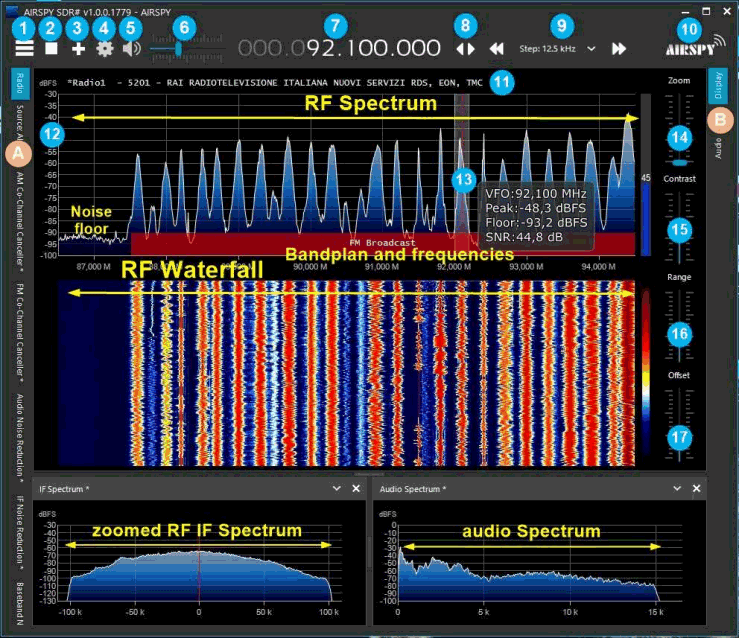
Thank you to Paolo Romani IZ1MLL for letting us know that he has updated his popular SDRSharp users guide that we posted about previously last December. The guide is available on the Airspy downloads page. SDR# (aka SDRSharp) from Airpsy.com is designed for Airspy SDRs, however it is one of the most popular SDR receiver programs that is used with RTL-SDRs as well. Paolo's guide covers all of the settings and features in SDR# as well as some third party plugins. Paolo writes:

In the last month I have completely rewritten the guide for other devices and for the latest radical changes to the software. From today, version 2.1 is available in Italian and English for all interested guys.

We note that the guide has also been translated in Spanish and Russian, although at the time of writing those translations are still only for the older guide. 

SDRSharp Guide

Engineer and Beauty Queen Xyla Foxlin sends an RTL-SDR and Miss America Crown to Space in a High Altitude Balloon

Xyla Foxlin is a Mechatronics engineer, entrepreneur, and beauty queen who amongst many other titles is also a STEM YouTuber. In her latest YouTube video Xyla sends her Miss America crown that she received as winner of Miss Greater Cleveland 2018 to space on a high altitude balloon.

In the video she explains her beauty queen journey, shows the balloon prep, launch and recovery and well as the video of the crown ascending into space via an onboard camera. Whilst not specifically mentioned in the video, in the description of her video she also notes that the scientific payload of the balloon was an RTL-SDR.

The scientific payload was an RTL SDR radio receiver recording spectrum data from FM broadcast stations as it ascended. This was a collaboration with my friend (and PhD candidate in Electrical Engineering) Kristina Collins, with the goal of submitting a paper to HamSCI eventually. (Collaboration means she did most of the payload and I did most of the get-it-to-the-stratosphere part)

We were able to track the payload in real time all the way to 112,00 feet because we flew an APRS transmitter using my Amateur Radio Callsign. This let anyone following me watch it in real time as well, it even flew over one of my fan's houses! If you plan on launching a weather balloon, I HIGHLY recommend getting your HAM license so you can fly with APRS.

Why I Sent My Miss America Crown to Space

EDIT: Please note that violent and hateful comments will be removed - they have no place on this technical blog. This post is about an interesting individual who has done something interesting that promotes the radio hobby. We look forward to more work from Xyla and anyone else promoting ham radio, and radio projects in general.