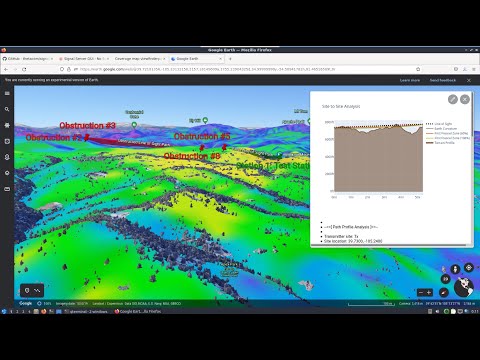
DragonOS is a ready to use Ubuntu Linux image that comes preinstalled with multiple SDR software packages. The creator Aaron also runs a YouTube channel showing how to use the various packages installed. In his latest video Aaron shows how to use the new Signal-Server GUI that has recently been added to DragonOS.
We posted about Signal Server before as it's a very powerful open source tool for creating RF Propagation simulations. With this tool you can determine how a signal from a transmitter might propagate, by taking into account factors like frequency, EIRP, and geographic elevation maps. The resulting propagation map can then be plotted on Google Earth.
Aarons recent work adds thetacoms GUI to the Signal Server install on DragonOS, and his video shows how to use it, including an introduction to RF propagation analysis in general. This version of DragonOS with the GUI is not yet available for download, but it will be in a future version. For now the video also shows how to install the GUI.
DragonOS Focal New Signal Server GUI Setup + Intro to RF Propagation Analysis (Signal-Server) Part 1
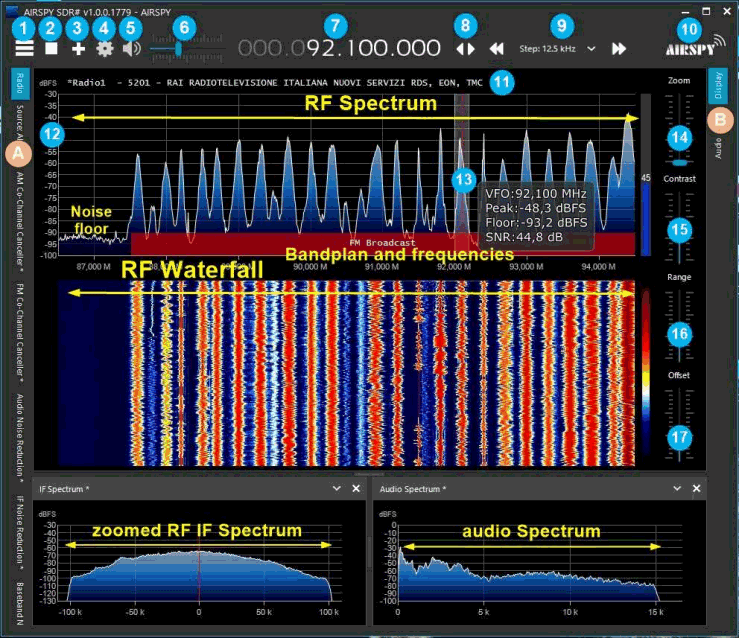
Paolo Romani (IZ1MLL) has recently released version 3.0 of his SDRSharp PDF Guide which we posted about last in March of this year. As before the document is a detailed guide about how to use SDRSharp, which is the software provided by Airspy. While intended for Airspy devices, SDRSharp also supports a number of third party SDRs, including the RTL-SDR, and it is the software we recommend starting with when using an RTL-SDR.
The guide is now 61 pages long, and covers all the settings, UI customization, included and third party plugins, and use of some external decoders.
Thank you to Adrian (YO8RZZ) for writing in and sharing with us his article explaining how to use an SDR to set up a digital voice hotspot for digital voice modes supported by MMDVM such as D-Star, DMR, System Fusion, P25 and NXDN. Adrian notes that this is possible with any full duplex SDR such as the LimeSDR or PlutoSDR, or with a combination of simplex devices, such as a HackRF for transmitting combined with an RTL-SDR for receiving.
MMDVM is firmware that normally runs on an ARM microcontroller board such as the Arduino Due, and is designed to be interfaced with hardware radios via the microcontrollers built in ADC and DAC hardware.
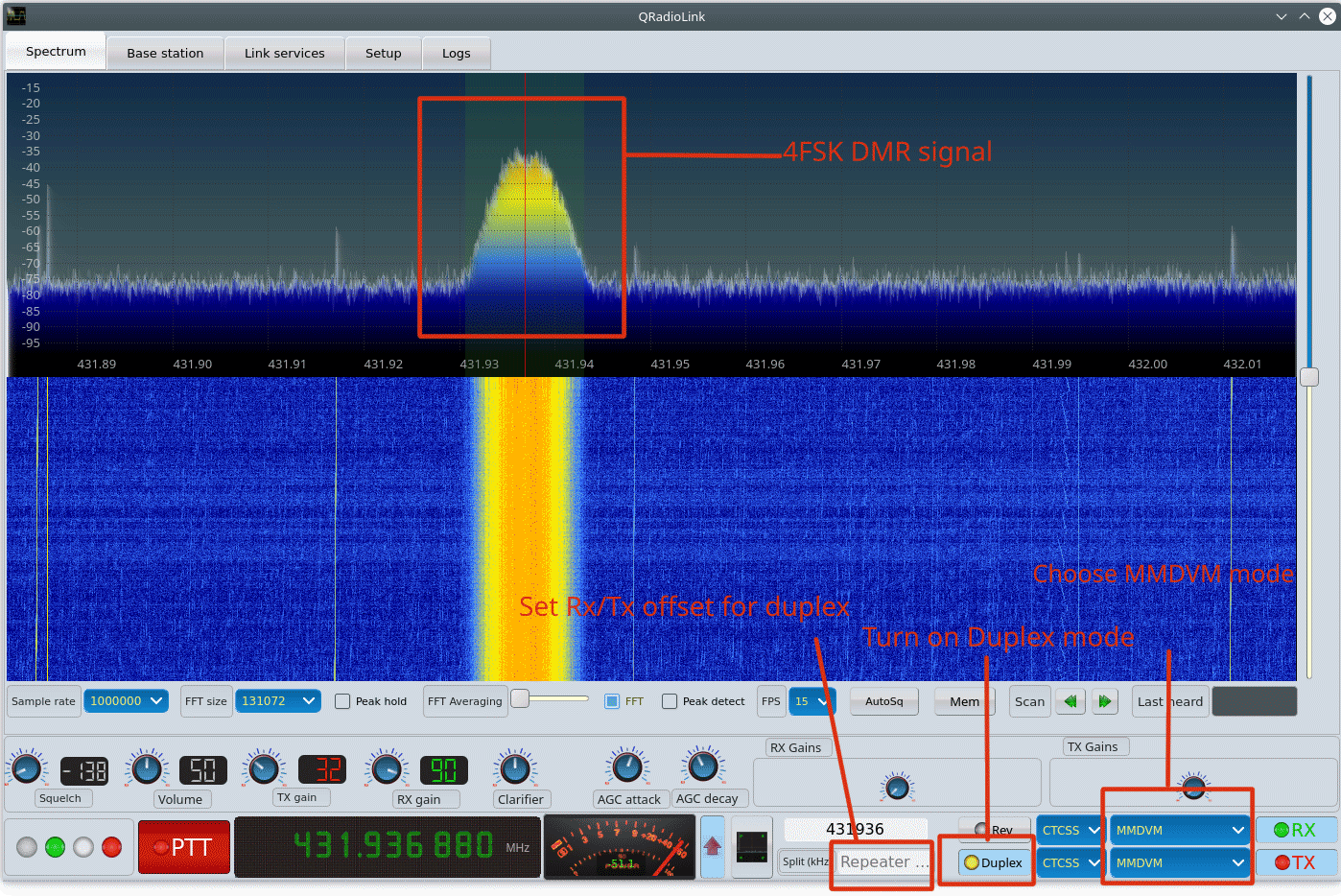
In order to use an SDR instead of physical hardware radios, Adrian's article describes how a fork of MMDVM called MMDVM-SDR is used in his system as this allows the code to run on a normal Linux computer with an SDR. GNU Radio running on Adrian's own QRadioLink software is then used to create software ADC/DAC interfaces for the SDR and MMDVM-SDR to interface with, as well as providing a user interface.
QRadioLink used as the UI for MMDVM-SDR and GNU Radio
Just a quick note to say that the second batch of our Active L-Band Patch Antenna for receiving Inmarsat, Iridium and other L-Band satellites is now in stock, available to be shipped from our warehouse in China from early next week. Amazon will be stocked within the next 1-2 months as the freighter will take time to arrive.
Apologies as we've had to temporarily suspend sales of this product as a manufacturing defect has been discovered in this batch. The defect is that on a number of units the plastic around the screws is cracking, and this was caused by a factory worker over torqueing a pneumatic screwdriver.
The antenna itself will work fine, and it probably won't even affect weather tightness, but it is certainly a defect. If your unit already shipped out and your unit has these cracks, please let us know at [email protected] and we will get the factory to ship you a replacement enclosure. For unshipped units we will be issuing a refund within the next few days.
Update: The units have been repaired and are available for shipping again.
Pricing remains the same at US$49.95 including free worldwide shipping to most countries. A reminder to EU customers: please order from our Aliexpress or eBay stores as due to the new IOSS laws we need to now use those marketplaces to collect and remit VAT upon your purchase, instead of upon import at the border.
This second batch comes in a gray color as feedback from the previous batch indicated that a lighter color is preferred to avoid excess heating from the sun.
If you are hearing about this patch antenna for the first time, please see our original release post for more information. In short this is an amplified patch antenna designed to be used with bias tee capable SDRs that can provide 3.3V - 5V power, such as our RTL-SDR Blog V3 dongle, Airspy, SDRplay or HackRF.
The antenna allows for reception of L-band satellites that transmit between 1525 - 1660 MHz, such as Inmarsat, Iridium and GPS. Please note it is *not* for receiving weaker signals like HRPT and GOES which require a dish antenna.
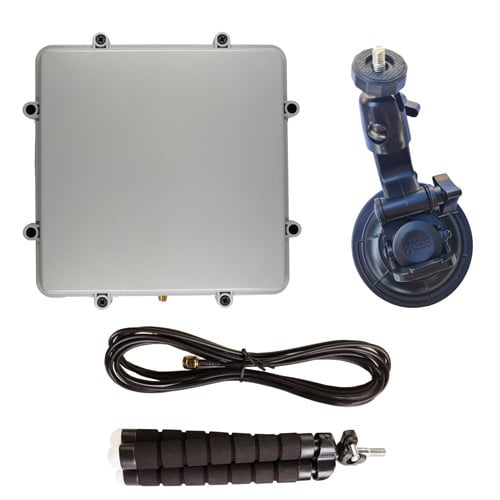
The patch comes with useful mounting accessories including a window suction cup, bendable tripod and 3M RG174 coax cable. The patch and active circuitry is enclosed in a weather proof enclosure.
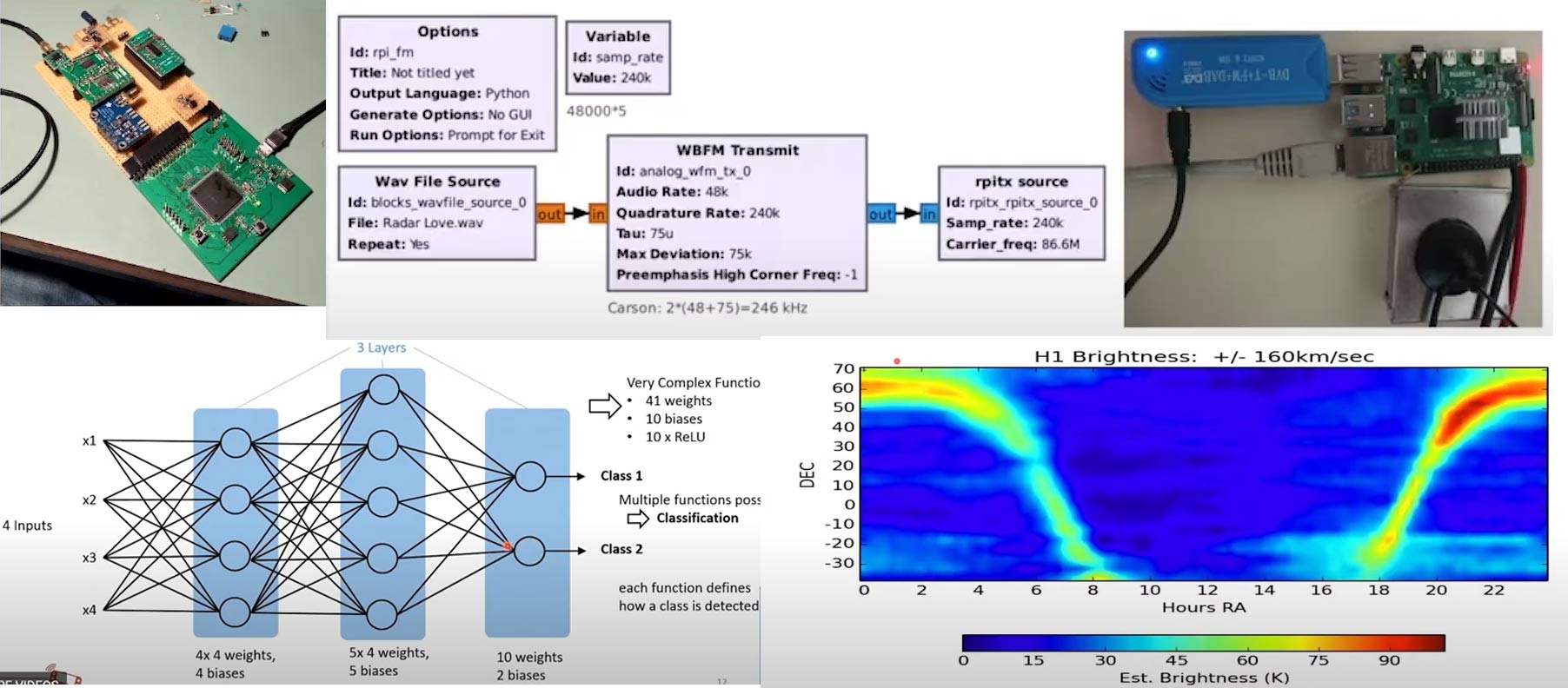
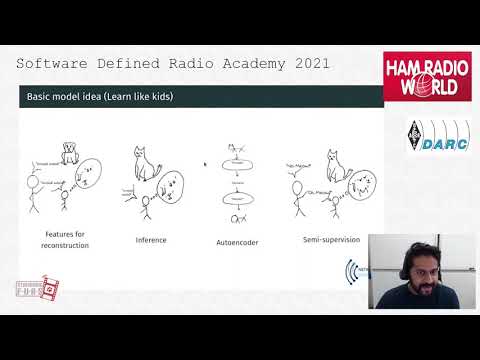
The 2021 Software Defined Radio Academy conference was held online this year on June 26/27 and the talks have been recently uploaded to YouTube. There are some interesting talks this year including a presentation on various SDR related topics including Electrosense, gr-rpitx, 21cm radio astronomy with low cost SDR hardware, and using deep learning neural networks for automatic signal identification. Our favorite talks and blurbs are collected below for easy access, and the full set of talks can be found on their YouTube channel.
Dr. Henning Paul: Building a flexible Multi-Antenna-capable SDR using open Source
The availability of Open Source software components enables the ambitious hardware hacker to design their own powerful SDR. This talk is the follow-up to the talk on Scientific SDR and recapitulates the steps towards the current design of a Homebrew SDR based on a Xilinx Zynq SoC using the Linux kernel and other Open Source components. Furthermore, one of its applications, receiving shortwave radio with antenna diversity is presented.
SDRA2021 - 04 - Dr. Henning Paul: Building a flexible Multi-Antenna-capable SDR using open Source
Jean-Michel Friedt: GNURadio compatible gen. purpose SDR emitter using RasPi4 PLL
GNU Radio, the Raspberry Pi single board computer and Digital Video Broadcast Terrestrial receivers make an awesome combination for educational purposes of Software Defined Radio. gr-rpitx aims at complementing these tools with emitting capabilities, combined with the flexibility of GNU Radio.
SDRA2021 - 08 - Jean-Michel Friedt: GNURadio compatible gen. purpose SDR emitter using RasPi4 PLL
Sreeraj Radjendran: Knowledge extraction from wireless spectrum data
In this half-hour talk, the need for large scale wireless spectrum monitoring will be discussed. A short introduction to a large scale wireless spectrum monitoring framework, Electrosense, will be given. Furthermore, how anomaly detection and signal classification can be performed using the collected data will also be discussed. Insights to the major problems with state-of-the-art machine learning models will also be discussed in this context.
SDRA2021 -11- Sreeraj Radjendran: Knowledge extraction from wireless spectrum data
Stefan Scholl, DC9ST: Classification of shortwave radio signals with deep learning
Automatic mode classification of radio signals in the HF band is a valueable tool for band monitoring, operation of rare transmission modes and future applications of cognitive radio. In recent years, machine learning has established as a general and very powerful approach to classification problems. The presentation first provides an introduction to neural networks and deep learning. Then neural nets are applied to the task of radio signal classification. The result is an experimental deep convolutional neural net (CNN), that can distinguish between 18 different transmission modes occurring in the HF band, such as AM, SSB, Morse, RTTY, Olivia, etc.
SDRA2021 -12- Stefan Scholl, DC9ST: Classification of shortwave radio signals with deep learning
Marcus Leech: Mapping the sky at 21cm: Gnuradio and Radio Astronomy
We show the results of a year-long sky survey at the 21cm hydrogen line, producing an intensity map of the sky covering a declination range from -35 to +75DEG. We discuss the software tools used, Gnu Radio signal flows, and the hardware aspects of the instrument.
SDRA2021 -14- Marcus Leech: Mapping the sky at 21cm: Gnuradio and Radio Astronomy
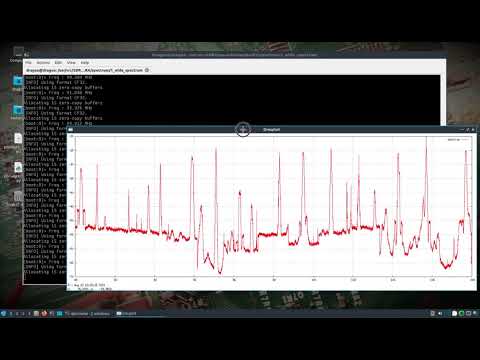
Over on YouTube Aaron has uploaded a video showing how he is using the SDR4Space.lite package in DragonOS to do some interesting experiments with automated spectrum analysis using a PlutoSDR or RTL-SDR. As a reminder, Aaron is responsible for DragonOS which is a Linux OS with many SDR software programs preinstalled (including SDR4Space.lite).
This video shows how to use the RTLSDR/PlutoSDR with some of the prebuilt SDR4space.lite javascript examples preinstalled in DragonOS Focal.
I start out showing the new IQ recording script w/both the RTLSDR or the PlutoSDR. After a recording is triggered, the saved file can be looked at with inspectrum, SigDigger, etc. The javascript itself can be modified to produce desired results, but by default it's setup to record POCSAG.
The second half of the video shows how to use the wide spectrum analysis javascript to look at 88-108Mhz. The script produces a graphical representation of the RF spectrum along with a spreadsheet containing the corresponding RF information.
Any of these scripts can be modified, new ones can be built, and cron jobs or other scripts could call upon them as needed. I hope to do more videos once I figure out how to take the data and put it into some sort of database.
DragonOS Focal Automate Spectrum Analysis + IQ recording w/ SDR4space.lite (RTLSDR, PlutoSDR) part 1
Thank you to Jean Marie (F5VLB) who has written in and wanted to share an invitation to their Facebook group where they are discussing ways for beginners to get into low cost 10 GHz (SHF) experiments. The 10 GHz band is generally considered tough to break into due to the precision required at these frequencies, however Jean notes how they are making use of readily available TV LNBs, RTL-SDRs and free software for their experiments. Jean writes:
I would like to present to you here about a Facebook group that addresses (only) radio enthusiasts, whether it is SWL or loose amateur radio and are interested in the high bands (SHF). On my life of Ham Radio I have never found a site that explains clearly, without big expenses, how to explore these bands.
The purpose of this FB group is to gently take you to this world, reserved for the experts, and yet accessible with reasonable means, with facilities found in the TV SAT store from the corner of the street. For some 50$ you will be ready with a dish, a lnb, a tx module.
The site begins. In 3 weeks 116 members came to join us. We go slowly, step by step.
The result ? It will listen to a satellite at 36000km, listening to tags everywhere around you, emit (if you have the license) on these mythical bands of 10 and 5.7 GHz.
This is aimed at young people aged 7 to 77, without special knowledge.
Want to know more ?
So come on https://www.facebook.com/groups/bzh10ghz this site is for you. And for others who are far in front of us, do not hesitate to bring your comments, simple, kind and taking into account that this site is made for newbies.
10 GHz Equipment and Group (Images provided by Jean Marie F5VLB)
Mark Jessop (@vk5qi) has recently been experimenting with a LED based hardware vehicle heads up display (HUD) that he has created to be used together with our KerberosSDR. The KerberosSDR combined with four antennas in a circular array determines the bearing towards a transmitter, and then the HUD displays this bearing visually on a circle.
The HUD is cleverly designed so that the LEDs reflect on the windshield of the car, allowing for the lights to be safely seen on the windshield while driving. More videos of the HUD being developed and used can be seen on his Twitter feed.
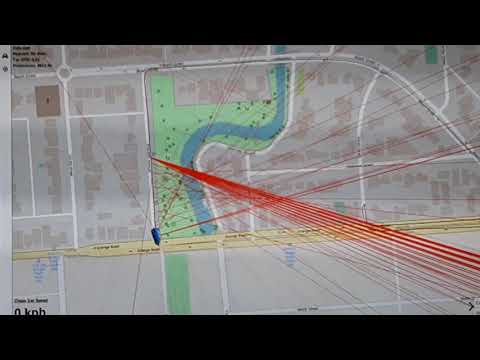
In the video below Mark also shows how he combines KerberosSDR bearing data with his Chase Mapper software, which he uses for tracking down radiosonde weather balloons.
For the last few months I've been piecing together a radio direction finding (also known as 'fox-hunting') system using a RTLSDR-Blog Kerberos-SDR, a custom-made antenna array, and my 'ChaseMapper' software. I have also recently added a 'heads up display' (HUD) box which displays the direction-of-arrival and SNR data from the Kerberos-SDR software.
I hope to put together a longer video showing how the system goes together sometime in the future, but this short clip shows how the system is used in the final approach to a radio transmitter (in this case, a 144 MHz transmitter from one of the Amateur Radio Experimenters Group organised night fox-hunts).
The antenna array consists of two 4-element nested arrays, one with 200mm antenna spacing for the 70cm band, and another with 425mm antenna spacing for the 2m band. The array is mounted to my car roof-racks, with phase-matched coax entering the car through a window-mounted bulkhead.
The red lines on the map indicate a bearing line produced by the Kerberos-SDR software. As we drive around the fox location, bearings are plotted, and we look for where they cross. There are always some inaccurate bearings due to multi-path issues, and misalignment between bearing acquisition time and the position/heading of the car, but it works well enough to be able to allow navigation to the transmitter location. The display can get fairly busy, so there are options to threshold by signal quality, and to 'age out' bearings over time.
The beeping noise you hear in the video is the signal from the radio transmitter, in this case a 144.390 MHz beacon which transmits short CW 'pips'. We were listening to the signal with an Icom IC-705 attached to an omnidirectional antenna so we knew when the transmitter started and stopped (and hence when to trust any bearings produced by the DoA system).
Towards the end of the video you can see the HUD in action, with the blue lights showing the estimated signal arrival direction, relative to the front of the car. As I slowly drive past the transmitter location (which I could see out the side of the car), the bearings swing to the right, and the SNR shows as being very strong. This is exactly what the display was intended for - it's not about getting hyper-accurate bearings, but more knowing when you need to turn left/right, or get out of the car!
Thanks to Will Anthony for capturing the video while I was driving!
Finding a Radio Fox using a Kerberos-SDR + ChaseMapper
KerberosSDR is our 4-channel phase coherent capable RTL-SDR unit that we previously crowdfunded back in 2018. With a 4-channel phase coherent RTL-SDR interesting applications like radio direction finding (RDF), passive radar and beam forming become possible. It can also be used as four separate RTL-SDRs for multichannel monitoring.
KerberosSDR is soon to be replaced with the upgraded KrakenSDR, which will begin crowd funding on Crowd Supply later this year. Be sure to sign up on the Crowd Supply page to be updated once the campaign releases as due to long supply chain crisis related lead times, only a limited amount of stock will be initially available.