New Outernet Hardware “Dreamcatcher”: An RTL-SDR with Embedded Computing Hardware

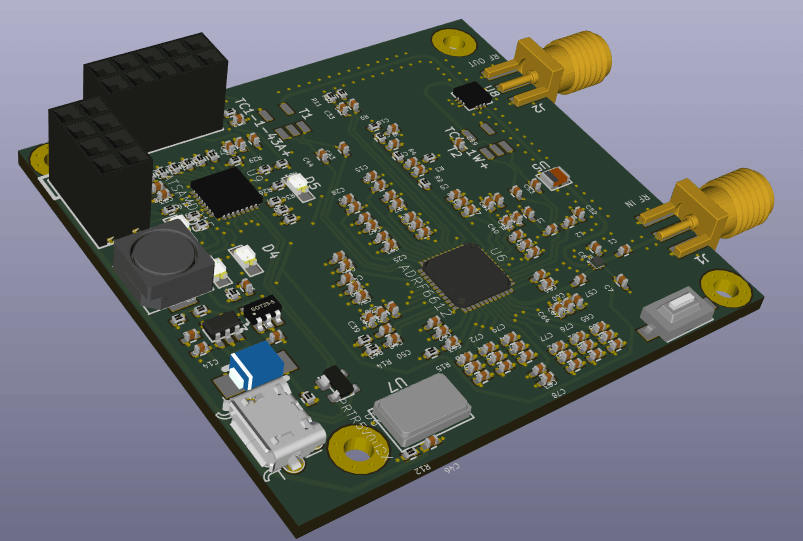
Over on the Outernet forums Outernet CEO Syed has just released pictures of the latest upcoming Outernet receiver called “Dreamcatcher”. The new receiver is an RTL-SDR, LNA, filter, and embedded Linux capable computing hardware all on board a single PCB. The full specs are pasted below:

  • L-band SAW filter (1525 – 1559 MHz)
  • Two-stage L-band LNA with 34dB gain
  • 0.5 PPM TCXO
  • RF bypass for tuning from 24 – 1600 MHz – use as a regular RTL-SDR!
  • USB ports
  • GPIO forest
  • UARTs, I2C, SPI headers (unpopulated) for driving external hardware
  • Two microSD card holders – for boot and storage!
  • 1 GHz CPU
  • 256 MB RAM Now 512 MB RAM
  • USB wifi dongle (not shown) – STA+ AP mode capable!
  • Lots of LEDs! and Switches!
  • microUSB OTG
  • microUSB power port
  • Audio In/Out
  • Speaker with 1.4 W integrated audio amplifier
  • Fully mainline (4.10) Kernel and (2017.01) Uboot support!
    *** JST battery is being removed

On the Roadmap:

  • armbian/debian support

This is a fully-integrated SDR receiver – RF frontend, SDR, Compute, Wifi – Everything!

Outernet is an L-band satellite service that aims to be a download only “library in the sky”. Currently they are broadcasting from Inmarsat and Alphasat geostationary satellites which can be received from almost anywhere in the world. We have a tutorial on receiving and decoding their signal here. Every day almost 20 MB of data is sent down, and this includes data like news, weather forecasts, APRS, wikipedia articles, books and more. In the future you will be able to pay to upload private files or messages. This could be useful for sending messages to people isolated from cell phone reception, or for operating remote hardware.

Previously Outernet sold a DIY version of their receiver which included an RTL-SDR V3 or E4000 dongle, LNA+filter, a C.H.I.P embedded computer, and a patch antenna. Recently they have changed to their custom RTL-SDR hardware which is called the “SDRx”. The SDRx includes the RTL-SDR, LNA and filter on a single PCB. Over time it seems that they are moving in the direction of integration of all components onto a single PCB and this can be seen in the Dreamcatcher which now also includes the computing hardware. This is especially good news as the $9 C.H.I.P computing hardware has been almost impossible to acquire since its release.

The Dreamcatcher looks to be also not just useful for Outernet, but also for general projects that can be done on embedded hardware as there is a port which bypasses the L-Band filter.

Back in 2014 we posted about the XiOne. This was also to be an RTL-SDR and computing hardware built onto the same PCB. It would have been controlled via a WiFi connection and apps on a smart phone/tablet. Unfortunately the XiOne Indiegogo crowdfunding campaign never reached its target so the project faded away. The Dreamcatcher is somewhat similar in that both are RTL-SDRs with onboard computing hardware and WiFi connectivity.

The Dreamcatcher is not yet for sale, but it is currently under production. From the looks of the discussion on the forums, it looks like it will sell for $149 USD. Outernet have said that they are sending us a review sample, so keep an eye out for the review in the coming weeks.

The Outernet Dreamcatcher: RTL-SDR + LNA + Filter + Computing Hardware on a single PCB.

Some Tests on the LNA4ALL

Over on the SWLing post blog Tony Roper has uploaded his review and testing of the LNA4ALL. The LNA4ALL is a PSA-5043+ LNA produced by Adam 9A4QV in Croatia. It is normally considered as one of the best wideband LNAs for RTL-SDR users as it designed well, built well, runs well and is reasonably priced at 20 Euros.

On his post Tony tests the LNA4ALL and compares his measured gain specs against the claimed gain specs on the LNA4ALL website. At 5V power supply he found that the real vs claimed gains matched quite nicely.

Although the LNA4ALL is only specified to run down to 3.3V, Tony found that he could still get usable performance out of it with only a 1.2V supply. However, the gain was reduced by a few dB’s, and we also assume that the IP3 characteristics would also be sufficiently degraded at the low voltage.

Testing the LNA4ALL with his NASA Engine AIS receiver, he found that the LNA4ALL boosted his reception range from 15nm without the LNA, to 22nm with the LNA, and also tripled his received messages.

Tony's LNA4ALL Gain Comparions
Tony’s LNA4ALL Gain Comparions

Some HackRF Portapack Demos

The PortaPack is an addon created by Jared Boone for the HackRF software defined radio. It costs $200 USD at the sharebrained store and together with a USB battery pack it allows you to go completely portable with your HackRF. The HackRF is a multi-purpose SDR which can both receive and transmit anything (as long as you program it in) from 1 MHz to 6 GHz. 

Since we last posted about the PortaPack many new features have been added, and the firmware has matured significantly. Now the official PortaPack firmware allows you to receive and demodulate SSB, AM, NFM, WFM and display up to an 18 MHz wide waterfall. You can also decode marine AIS, the automobile tyre pressure monitoring system (TPMS) and utility ITRON ERT meters.

There is also a popular fork of the official PortaPack firmware called portapack-havoc, which is created by a dev who goes by the handle ‘furrtek’. This firmware is a bit more risky in terms of the trouble it can get you into as it enables several new features including:

  • Close call – See if anyone is transmitting near to you
  • A CW generator
  • a GPS and various other jammers
  • an LCR transmitter – the wireless protocol used in France for programming traffic related signage
  • a microphone transmitter
  • a pocsag receiver and transmitter – receive and send to pagers
  • a PWM RSSI output – useful for crude automatic direction finding
  • an RDS transmitter – transmit radio station text data to compatible broadcast FM radios
  • a soundboard – play a stored bank of wav sounds on a frequency
  • an SSTV tranmitter – transmit slow scan TV signals
  • an OOK transmitter – control on-off-keying devices such as doorbells.

Below we’ve created a YouTube playlist showing several videos that show the portapack in action.

PortaPack H1 Firmware 20160222

And below we show a tweet from @furrtek showing off the recently added SSTV transmit feature, and a tweet from @giorgiofox showing off the microphone transmit feature.

[tweet id=”https://twitter.com/furrtek/status/844725030734966784″ align=”center”]

[tweet id=”https://twitter.com/giorgiofox/status/841373529463521281″ align=”center”]

Discussion and Review of our RTL-SDR Blog Broadcast AM High Pass Filter

Early last month we released a new broadcast AM high pass filter product. The goal of the filter is to block out extremely strong broadcast AM signals (and other problematic LF/MF signals) in order to prevent an SDR from overloading. This is especially needed if you live close to AM towers.

Over on the Utility DX Forum files section, reviewer D. B. Gain has written an excellent review of our broadcast AM high pass filter (pdf), also explaining why and in what situations it might be needed. In the review he explains how broadcast AM propagation works, and how it can change from day to night. He also explains how devices with diode switches (used for switching RF circuits such as filter in and out electronically) can easily overload and contribute to IMD within the switches themselves. This is why a filter without any diode switches in front of it is usually the best solution for reducing strong RF energies.

In the review he then goes on to test the filter, showing some screenshots of the reduction is AM signal strength.

New Product in Our Store: SDRplay RSP-1 Aluminum Case Upgrade

We’re happy to announce that in conjunction with Mike, one of the leaders in the SDRplay users community, we have manufactured and released a high quality aluminum enclosure upgrade for the SDRplay RSP-1 software defined radio. The SDRplay RSP-1 is a $129 USD 12 bit SDR that can tune between 10 kHz – 2 GHz. It comes by default in a simple plastic enclosure. Upgrading to a metal case enclosure not only looks sleeker, but also shields the RSP-1 from strong RF interference directly entering the PCB.

The enclosure also comes with a bonus RTL-SDR Blog broadcast FM (BCFM) filter to help reduce overloading and images from extremely strong broadcast FM stations. This filter can be installed either inside or outside the metal enclosure.

Also included is a semi-hardshell travel case which is perfect for protecting the RSP-1 while on the move. Finally, some accessories such as a thermal pad for mounting, grounding lug with nuts, 3M rubber feet and of course the enclosure screws are also included.

The cost of the enclosure including all extras is $39.95 USD with worldwide shipping included. The case is available from our Chinese warehouse for customers anywhere in the world, and in a few days it will also be able on Amazon USA for faster local US shipments. Shipping on Amazon should also be free as the free shipping threshold on Amazon was recently reduced back down to $35 USD.

Visit our store to purchase

See some images below for an overview of what you get in the package:


Creating a RTL-SDR NOAA Weather Radio Audio Streamer in Linux

On his blog leander has added a post which shows how he has set up a icecast streaming solution together with an RTL-SDR dongle which is receiving live NOAA weather radio. The idea is to give a computer with no soundcard the ability to stream compressed NOAA weather audio over a network. To do this he uses ezstream, icecast2 and lame. Streaming like this is great if you only want to listen to a single radio channel, and want a low bandwidth solution. Something like rtl_tcp streams the entire raw IQ data across the network which can use huge amounts of bandwidth. Streaming only MP3 audio is significantly more efficient.

First the RTL-SDR is set up to receive NOAA weather audio with rtl_fm. The audio is output to stdin, which is then sent to lame for encoding and MP3 compression. Next ezstream is set up to stream the encoded MP3 data via icecast. Now any PC on the network can use VLC or a similar program to connect to the stream and listen in.

Receiving the stream with VLC

YouTube Videos: NOAA Satellite Tutorial and Building a Radio Telescope

Over on the Thought Emporium YouTube channel the team have uploaded two videos that may be of interest to radio hobbyists. The first video shows a nice overview about receiving NOAA weather satellite images. They explain everything from scratch for complete novice, so the videos are great for almost anyone to watch and learn about radio and SDR concepts. The blurb of the first video reads:

Over the past 2 months, me and my friend Artem have been building antennas to receive signals from weather satellites as they pass overhead. This video chronicles our progress through this project and goes through some of the science involved in working with radio and receiving transmissions. We explore how dipoles work and how to build them, and how we built our final double cross antenna. We used an SDR (software defined radio) called a HackRF to do the work of interpreting the received signals and then decoded them with some special software. We pulled images from 4 satellites: NOAA 15, 18 and 19 as well as METEOR M2. The satellites broadcast immediately as they take the images and no images are stored, so we’re likely the only ones on earth with these images.

How to Pull Images from Satellites in Orbit (NOAA 15,18,19 and METEOR M2)

The second video is about building a radio telescope. Like the NOAA video, they explain all concepts in a simple and easy to understand way, so that anyone even without any radio knowledge can understand what the project is about. In the video they also show how they use a 3D printer to create a tracking mount which can point a satellite dish. They then use the dish to create a satellite heat map. The blurb reads:

Over the last 2 months me and my friend Artem (you met him in the last video) built our first radio telescope. It was built mostly out of off the shelf components, like a satellite dish and Ku band LNB, as well as some parts we 3d printed. When all was said and done we had a system that could not only take images of the sky in radio frequencies (in this case 10-12ghz), but could also be used to track satellites. With it, we were able to see the ring of satellites in geosynchronous orbit, over 35,000km away, This is only the first of what I suspect will be many more telescopes like this. Next time we’ll be building ones that are far larger and can see things like the hydrogen lines so we can image the milky way.

How to Build a Radio Telescope (See Satellites 35,000km Away!)

YouTube Talk: Hunting Rogue WiFi Devices using the HackRF SDR

Over on YouTube a video titled “Hunting Rogue WiFi Devices using the HackRF SDR” has been uploaded. The talk is given by Mike Davis at the OWASP (Open Web Application Security Project) Cape Town. The talk’s abstract reads:

Rogue WiFi Access Points are a serious security risk for today’s connected society. Devices such as the Hak5 Pineapple, ESP8266-based ‘throwies’, or someone with the right WiFi card and software can be used to intercept users’ traffic and grab all of their credentials. Finding these rogue devices is a very difficult thing to achieve without specialised equipment. In this talk Mike will discuss the work he has been doing over the past year, to use the HackRF SDR as a RF Direction-finding device, with the goal of hunting down various malicious RF devices, including car remote jammers.

The talk starts off with the basics, explaining what the problems with WiFi devices are, what the HackRF and SDR is, and then goes on to explain some direction finding methods that Mike has been using. 

Hunting rogue WiFi devices using the HackRF SDR - Part 1 of 2

Hunting rogue WiFi devices using the HackRF SDR - Part 2 of 2