Category: Other

ADSBee: ADS-B and UAT Reception and Decoding On an RP2040 Microcontroller

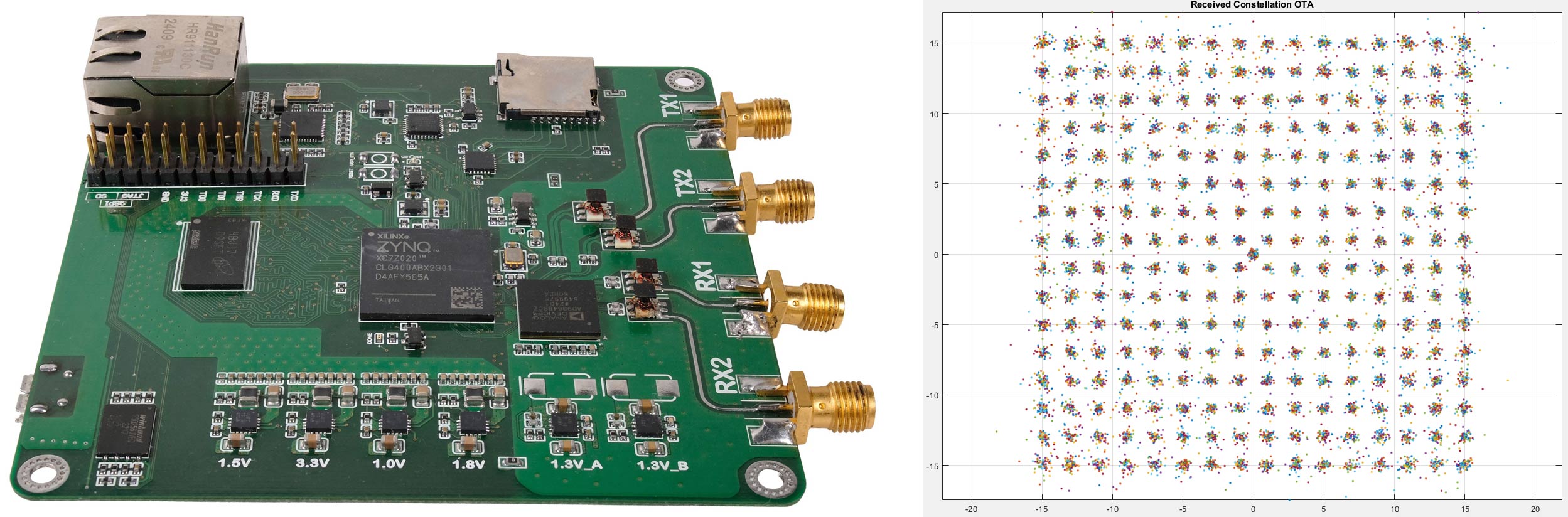
ADSBee is an open-source project that has implemented a 1090 MHz ADS-B decoder on a Raspberry Pi RP2040 microcontroller using a programmable I/O (PIO) pin. 

PIO pins cannot handle RF signals, so the ADSBee front end is a critical analog circuit that enables this to work. It consists of a 1090 MHz SAW filter to remove other signals, a low-noise amplifier, and, critically, a log-power detector, which essentially converts the pulse-position-modulated 1090 MHz ADS-B signal to baseband, which the PIO can handle.

However, this same trick does not work for 978 MHz UAT, as UAT signals are not pulse position modulation like ADS-B. Instead, for UAT support, the ADSBee design takes a more traditional approach, using a CC1312 sub-GHz transceiver chip connected to the RP2040.

Finally, an ESP32 S3 is added to the stack to enable networking via WiFi, allowing for received and decoded data to be used.

The project is entirely open source on their GitHub, including both code and KiCAD PCB files. They also have a store, where they sell pre-made kits. A kit consisting of the ADSBee, 1090 MHz Antenna, and 978 MHz costs US$202 in total. They are also selling an industrial model for $995, which includes PoE power.

ADS-Bee 1090 MHz and Sub-GHz Boards

GhostHunter (Anti-LIF): Using Spiking Neural Networks to Rescue Satellite Signals Drowned in Noise

Thank you to Edwin Temporal for writing in and showing how his proprietary neuromorphic engine, GhostHunter (Anti-LIF), is being used to recover satellite data buried in the noise floor, which typical DSP methods would fail to do.

To recover the signals, Edwin uses trained Spiking Neural Networks (SNN). SNNs are artificial neural networks that draw further inspiration from nature by incorporating the 'spiking' on/off behavior of real neurons. Edwin writes:

My engine has successfully extracted and decoded structured data from high-complexity targets by mimicking biological signal processing:

Technosat: Successful decoding of GFSK modulations under extreme frequency drift and low SNR conditions.

MIT RF-Challenge: Advanced recovery of QPSK signals where traditional digital signal processing (DSP) often fails to maintain synchronization.

These missions are fully documented in the https://temporaledwin58-creator.github.io/ghosthunter-database/, which serves as a public ledger for my signal recovery operations. Furthermore, the underlying Anti-LIF architecture is academically backed by my publication on TechRxiv, proving its efficiency in processing signals buried deep within the noise floor.

Although the engine remains proprietary, I provide comprehensive statistical reports and validation metrics for each mission. I believe your audience would be thrilled to see how Neuromorphic AI (SNN) is solving real-world SIGINT challenges.

In the database, Edwin shows how his Anti-LIF system has recovered CW Morse code telemetry and QPSK data from noisy satellite signals. 

While Edwin's Anti-LIF is proprietary, he is offering proof of concept decoding. If you have a 250MB or less IQ/SigMF/Wav recording of a signal that is buried in the noise floor, you can submit it to him via his website, and he will run Anti-LIF on it for analysis.

Advanced readers interested in AI/neural network techniques for signal recovery can also check out his white paper on TechRxiv, where he shows signal recovery from signals buried in WiFi noise, as well as results from use in ECG and Healthcare applications.

An Example Signal Recovery with the Anti-LIF Spiking Neural Network

Touchstone Networks in Terminals (TNT): Visualize Touchstone S-Parameter Files in Terminal ASCII

Thank you to Alexander Arsenovic, the original author of the OpenSource RF engineering Python library www.scikit-rf.org, for writing in and sharing with us a new program he has created called "tnt: [t]ouchstone [n]etworks in [t]erminals".

The program is written in Python, and allows a user to visualize Touchstone S-parameter graphs in a terminal, using simple ASCII character-based plotting techniques. Touchstone files are created by Vector Network Analyzers (VNAs), which are used to measure and tune antennas and RF components, or by RF simulation software.

TNT Demo
TNT Demo

NSA GENESIS: How NSA Spies Snooped on Local RF Bands using Modified Cell Phones with a Built-in SDR

Over on YouTube, the "Spy Collection" channel has recently uploaded a video detailing the US National Security Agency's (NSA) GENESIS spy gadget. GENSIS was a modified Motorola cell phone that contained a full software-defined radio system within. This system allowed NSA agents to discreetly record the local RF spectrum for later analysis. For example, an agent may have been able to record the frequencies and RF protocols used at particular facilities of interest for use in later operations. 

Details about the NSA GENESIS were revealed when the NSA's Advanced Network Technologies (ANT) catalogue was publicly leaked back in 2013. Originally, project GENESIS was due to be declassified in 2032.

Spy Collection also notes that the leaked documents indicate it is possible the phone was also used, or intended to be used, as a "finishing tool". In other words, a remotely detonated explosive phone, that could be given to persons on the US terrorist list. 

NSA's Leaked Secret GENESIS Cell Phone

A Review of the SunFounder Pironman 5 MAX Raspberry Pi 5 Enclosure

Recently, SunFounder sent us a free review unit of their latest "Pironman 5 MAX" enclosure for Raspberry Pi 5 devices. While not directly related to SDR, we thought we'd accept the unit and review this product, as RTL-SDRs are often used together with Raspberry Pi 5 single-board computers. Depending on the number of SDRs connected and the software used, SDR applications can consume a significant amount of CPU, causing heat and throttling down of CPU speeds; therefore, adequate cooling may be necessary.

The Pironman 5 costs US$94.99 if purchased directly from the SunFounder website, and they advertise that US duties and EU VAT are included in the pricing. There is also the slightly lower Pironman 5 model available for US$79.99. The main difference between the 5 and 5 MAX is that there is only one SSD expansion slot vs two on the 5 MAX, and no tap-to-wake OLED functionality.

Overview

The Pironman 5 is what we would consider a high-end enclosure for the Raspberry Pi. It includes a large CPU tower cooling heatsink with a fan, along with two case fans to keep the internal temperatures down.

It also adds a dual slot NVME M.2 expansion board to the Pi 5, so that you can install two SSDs or one SSD and a Hailo AI accelerator module. SSDs might be useful for RTL-SDR users who are recording large amounts of IQ data, or saving many weather satellite images, for example. The Hailo AI accelerator module could turn a Raspberry Pi and RTL-SDR into an RF intelligence powerhouse. One advanced AI use-case might involve running local Whisper speech recognition to log voice communications to text, followed by using a local LLM to summarize daily received data (noting that you'll need to wait for the Hailo-10H model to run local LLMs).

Finally, it also adds an OLED status display, which shows current CPU temperature and fan speeds, as well as an on off button.

Another plus is that the GPIO header remains accessible on the outside of the enclosure, thanks to an extender included in the design.

Pironman 5 Fully Assembled

Assembly

Assembly of the Pironman 5 took just over 30 minutes. It involves screwing in standoffs, seating the heatsink/fans, connecting jumpers and ribbon cables, and screwing down the panels. A nice color paper assembly manual is provided, making the installation easy to follow. Anyone who is mildly familiar with installing connectorized PC components should have no trouble.

All parts included with the Pironman 5.
Pironman 5 Assembly Manual
Pironman 5 Built (Acrylic side panels off)

Software Installation and Usage

After assembly, you can simply insert a freshly burned Raspbian image into the SD card slot and power on the unit.

At this stage, you now need to install some software to properly control the OLED, CPU fans, and case fans. This involves installing some software from their GitHub, but you can simply copy and paste the commands in the terminal one by one.

Once the software is installed a web UI is exposed at <IP_ADDR>:34001. Here you can monitor various stats including CPU temps, and make changes to the OLED, RGB and fan behaviour.

Pironman 5 Web UI
Pironman 5 Web UI

OLED QC Problems?

Unfortunately, our unit had a problem where the OLED screen wouldn't work. We attempted fresh software installs and reseated all cables and connectors, but had no luck. Upon contacting SunFounder, they immediately sent us a new OLED screen to try. But the replacement also did not work.

However, when trying the new screen, we noticed that the screen would briefly light up when we pressed on the FPC connector. Upon inspecting the FPC connector, we noticed that some pins on the PCB looked suspiciously low on solder compared to the others, so we applied flux and used a hot soldering iron to refresh them. After doing this, the OLED screen began working again.

Based on our dealings with SunFounder, we believe that they're support is good, and any customer facing similar issues would be supplied with replacement parts if required.

Pironman OLED Screen Working

Usage and Performance with RTL-SDR

As expected, with the great cooling in place, the Raspberry Pi 5 never throttled down when running an RTL-SDR with SDR++. We also tested it with our KrakenSDR system, which requires more CPU, and found great performance too.

The rear GPIO fans are quiet enough, and the CPU fan makes almost no noise inside the enclosure. We ran a stress test using the 'stress' Linux package, which can push all four CPU cores to 100%. With the fans running in a room with an ambient temperature of 22 degrees, we saw that the CPU temperature never went above 55 degrees C.

While still running 'stress', we manually disabled the two GPIO fans, and the temperature stabilized at around 66 degrees C. So the rear fans may only be required to be on when you have an SSD or AI module installed.

Conclusion

If you're looking for a high-quality enclosure and cooling solution for the Raspberry Pi 5, the Pironman 5 MAX is probably the best high-end solution available. Not only does the enclosure protect the Raspberry Pi 5 completely, but the cooling performance is excellent, and the ability to add SSDs and AI modules is great too.

Disclaimer: We were given a unit for free in exchange for an honest review. We received no other compensation.

Pironman 5 with full RGB

Eavesdropping on Sensitive Data via Unencrypted Geostationary Satellites

Recently, Wired.com released an article based on research by researchers at UC San Diego and the University of Maryland, highlighting how much sensitive unencrypted data many geostationary satellites are broadcasting in the clear.

The researchers used a simple off-the-shelf 100cm Ku-band satellite dish and a TBS-5927 DVB-S/S2 USB Tuner Card as the core hardware, noting that the total hardware cost was about $800. 

Simple COTS hardware used to snoop on unencrypted satellite communications.

After receiving data from various satellites, they found that a lot of the data being sent was unencrypted, and they were able to obtain sensitive data such as plaintext SMS and voice call contents from T-Mobile cellular backhaul and user internet traffic. The researchers notified T-Mobile about the vulnerability, and to their credit, turned on encryption quickly.

They were similarly able to observe uncrypted data from various other companies and organizations, too, including the US Military, the Mexican Government and Military, Walmart-Mexico, a Mexican financial institution, a Mexican bank, a Mexican electricity utility, other utilities, maritime vessels, and offshore oil and gas platforms. They were also able to snoop on users' in-flight WiFi data.

Cellular Backhaul
We observed unencrypted cellular backhaul data sent from the core network of multiple telecom providers and destined for specific cell towers in remote areas. This traffic included unencrypted calls, SMS, end user Internet traffic, hardware IDs (e.g. IMSI), and cellular communication encryption keys.

Military and Government
We observed unencrypted VoIP and internet traffic and encrypted internal communications from ships, unencrypted traffic for military systems with detailed tracking data for coastal vessel surveillance, and operations of a police force.

In‑flight Wi‑Fi
We observed unprotected passenger Internet traffic destined for in-flight Wi-Fi users on airplanes. Visible traffic included passenger web browsing (DNS lookups and HTTPS traffic), encrypted pilot flight‑information systems, and in‑flight entertainment.

VoIP
Multiple VoIP providers were using unencrypted satellite backhaul, exposing unencrypted call audio and metadata from end users.

Internal Commercial Networks
Retail, financial, and banking companies all used unencrypted satellite communications for their internal networks. We observed unencrypted login credentials, corporate emails, inventory records, and ATM networking information.

Critical Infrastructure
Power utility companies and oil and gas pipelines used GEO satellite links to support remotely operated SCADA infrastructure and power grid repair tickets.

The technical paper goes in depth into how they set up their hardware, what services and organizations they were able to eavesdrop on, and how they decoded the signals. The team notes that they have notified affected parties, and most have now implemented encryption. However, it seems that several services are still broadcasting in the clear.

Our Review of the Vivid Unit GPSDR: A Portable Single Board Computer with Screen and RTL-SDR Expansion Board

As mentioned in a previous post last week, UUGear have recently released their VU GPSDR expansion board for their Vivid Unit single board computer with touchscreen. Together, this combination results in a handheld Linux system, with built-in RTL-SDR and upconverter.

The VU GPSDR has some interesting features, including:

  • GPS-assisted 24 MHz clock for improved frequency accuracy and stability
  • An integrated 108 MHz up-converter for HF (under 30 MHz) reception
  • Dual programmable rotary encoders for tactile control
  • A software-controlled frequency output port for experiments
  • Software features, including OpenStreetMap integration and ADS-B aircraft tracking 
Vivid Unit with VU Extender and VU GPSDR

Assembly

We won't repeat the assembly steps as the instructions show everything clearly, but we can say that the assembly steps were clear, and the assembly itself was easy. It was simply a case of plugging in a few jumper wires between the Vivid Unit and VU Extender board, screwing down the extender board, and then slotting in the VU GPSDR into the Extender boards mini-PCIe slot, before finally screwing down the GPSDR. Assembly took less than 10 minutes.

Physical Design Review

The system is put together like a sandwich. You have the screen and Vivid Unit on the top, then the Extender board, and finally the VU GPSDR on the bottom.

The Vivid Unit and GPSDR are essentially bare PCBs that connect to one another via the PCIe slot on the Vivid Extender board. This means that there is no enclosure, and you are essentially handling PCB parts in their raw form. In the future, we would like to see an optional enclosure to protect the unit better.

The exposed design results in some flaws that we have to point out. The shielding cans on the VU GPSSDR unit sit on the rear of the system, and during operation, they get very hot to the touch. So much so that handling the unit requires a bit of care to avoid the hot spots. Most of the heat appears to be coming from the AMS1117 LDO on the rear, which gets up to 80 °C, so be careful not to touch it accidentally. From the photos you can see that the RTL2832U and R860 are heatsunk to the shield. This is a good idea to keep the chips cool, but it also means that the metal gets quite hot to the touch. So handling the unit only from the edges is recommended. 

Vivid Unit with the shielding cans removed.
VU GPSDR Thermals
VU GPSDR Thermals

Secondly, because the Vivid Unit does not have a built-in battery, you need to power it separately via its USB-C port on the side. This makes the ergonomics of handling the unit a little trickier as you also have a cable sticking out. UUGear has noted that they are working on an 18650 battery pack, so this issue may be resolved in the future.

Finally, the "GPS" in the GPSDR comes from the fact that there is a GPSDO with a built-in GPS patch antenna on board. When active, a GPSDO provides excellent frequency stability, meaning that signals will be on frequency and will not drift.

But because of how the system is designed, the GPS patch antenna faces the ground when you look at the screen, even though it should face upward to get a clear view of the sky for satellite signals. However, despite this, we were happy to see that even while upside down, the patch antenna was able to receive several GNSS satellites with sufficient strength in order to obtain a fix when used outdoors.

Indoors, of course, no GPS fix is possible. But the uBlox NEO-M8N GPS module used in the GPSDR also has a fallback TCXO, so even without any GPS fix, the frequency accuracy of the system is good. UUGear also noted that the GPSDO automatically activates once a GPS fix is achieved, so no action is needed when you take the unit outdoors.

Realistically, the design issue with the GPS patch doesn't really matter anyway. For most use cases in handheld operation, the built-in TCXO will be sufficient. Any use case requiring extreme GPSDO precision will probably involve the device being mounted upside down and used remotely. 

The screen is clear and bright, the two encoder wheels are non-indented and are in a good spot, and so is the SMA antenna port, although the VU Extender's USB-C plug can block the antenna SMA port if a really fat plug is used (normal-sized USB-C plugs fit OK). The screen is large and has a high resolution, making it possible to use the onscreen keyboard. However, it is still a little fiddly for typing and clicking, so we ended up plugging in a small wireless keyboard.

Continue reading

DSG-22.6 GHz: An Open Source 300 MHz to 22.6 GHz Signal Generator

Thank you to Süleyman Dündar for submitting news about the pre-release of their new product called "DSG-22.6 GHz". DSG-22.6 GHz is a compact, handheld, open-source RF signal generator covering a continuous range from 300 MHz to 22.6 GHz with 1 Hz tuning resolution, 40BC harmonic level, and power output ranging from 15 dBm to -50 dBm.

An RF signal generator produces a clean, stable radio frequency signal at a chosen frequency. It is a helpful tool for testing SDRs and other radio equipment, such as low-noise amplifiers (LNAs), RF filters, mixers etc.

Competition to the DSG-22.6 GHz may include the ERASynth Micro and moRFeus; however, neither covers the wide frequency range of the DSG-22.6 GHz, and it appears that the ERASynth Micro has been discontinued.

Currently, the product is in the pre-release crowdfunding stage on Crowd Supply, so pricing hasn't been revealed. Interested individuals can subscribe to receive updates on their campaign page. The open source code can also be found on GitHub.

DSG-22.6 GHz. An upcoming wide frequency range, hand held and fully open source signal generator.