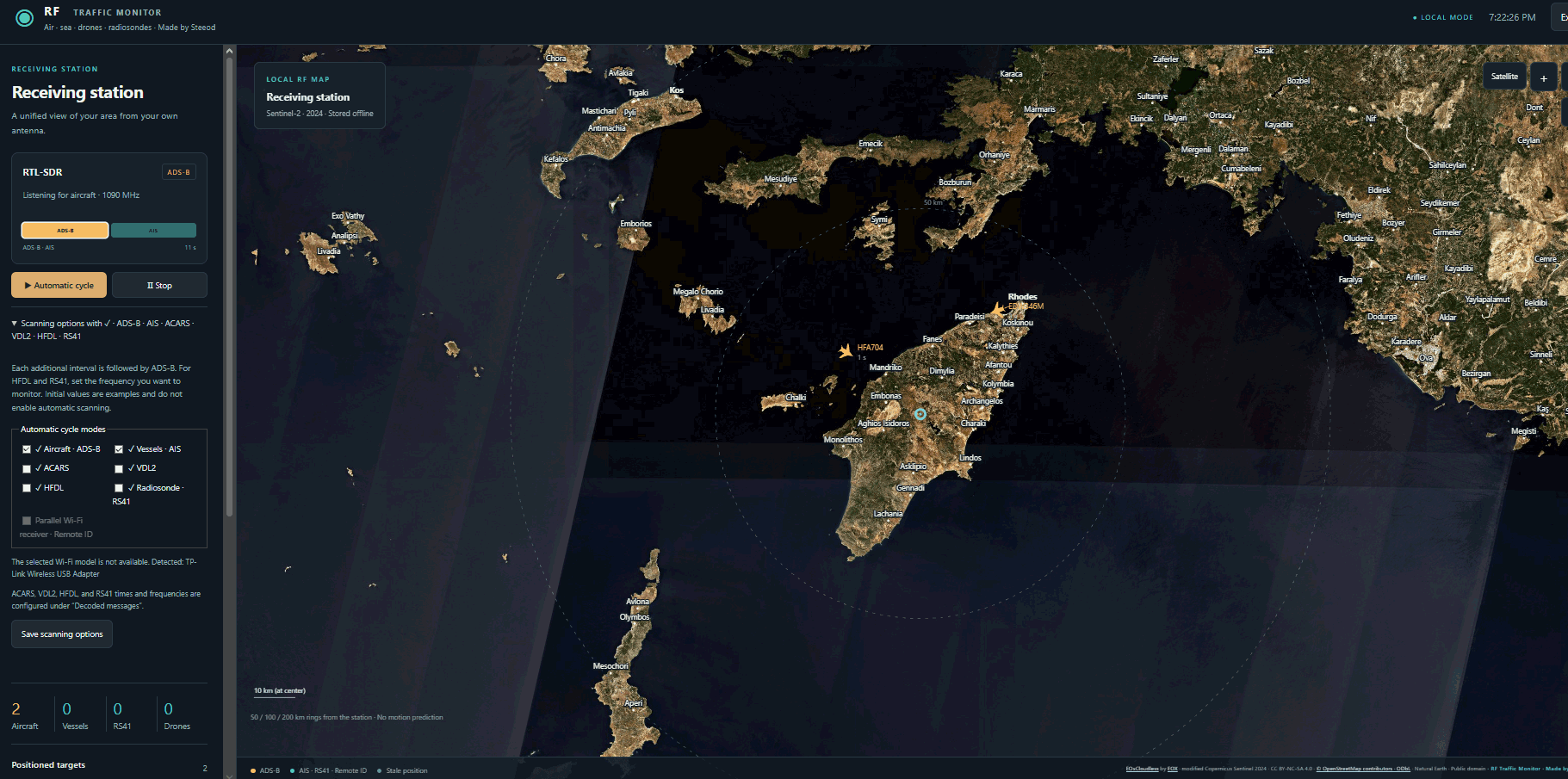
Thank you to Stefanos (Steeod) for sharing a new program he created, "RF-traffic-monitor." Stefanos created this program because he initially wanted to install adsb.im (an ADS-B feeder image that also tracks ships, radiosondes, and ACARS/VDL2/HFDL) on Windows 10, but was unsuccessful in doing so, as adsb.im is written for Linux machines.
So, to get around this, Stefanos decided to fire up ChatGPT to write his own similar Windows program. The end result was RF-traffic-monitor, which is capable of tracking aircraft, ships, and radiosondes using an RTL-SDR or HackRF. It can also use the SDR to decode ACARS, VDL2, and HFDL. With a compatible WiFi adatper the software is also capable of tracking drones via Wi-Fi Remote ID.
RF-Traffic-Monitor Screenshot
AI Disclaimer: The author notes that this program was written by ChatGPT.
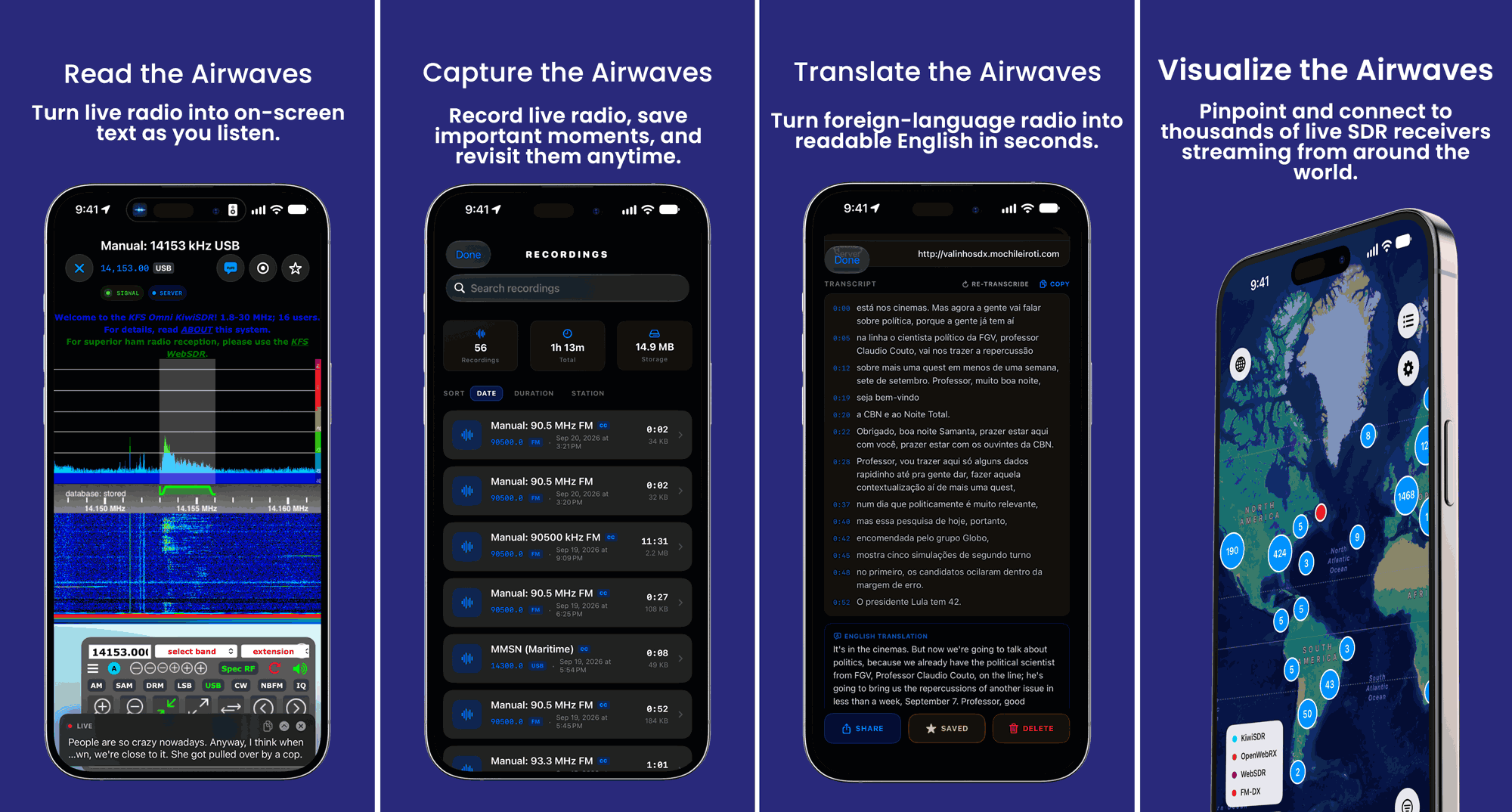
Back in April we posted about the release of Echo, a free iOS app designed for browsing global web-based KiwiSDR, OpenWebRX, WebSDR, and FM-DX software-defined radios. Mark, the developer of Echo, has written in to us again and wanted to share news about the release of the Pro (paid) version of Echo.
Echo Pro adds several features such as recording, on-device transcription and translation, iCloud sync, and the ability to access recordings across Apple devices. The transcription and translation service may be quite interesting, as it allows you to record an entire foreign radio program to text, and translate it to your language for later reading.
Echo Pro costs either US$4.99/month or US$39.99/year. More information about the app is available at echosdr.com.
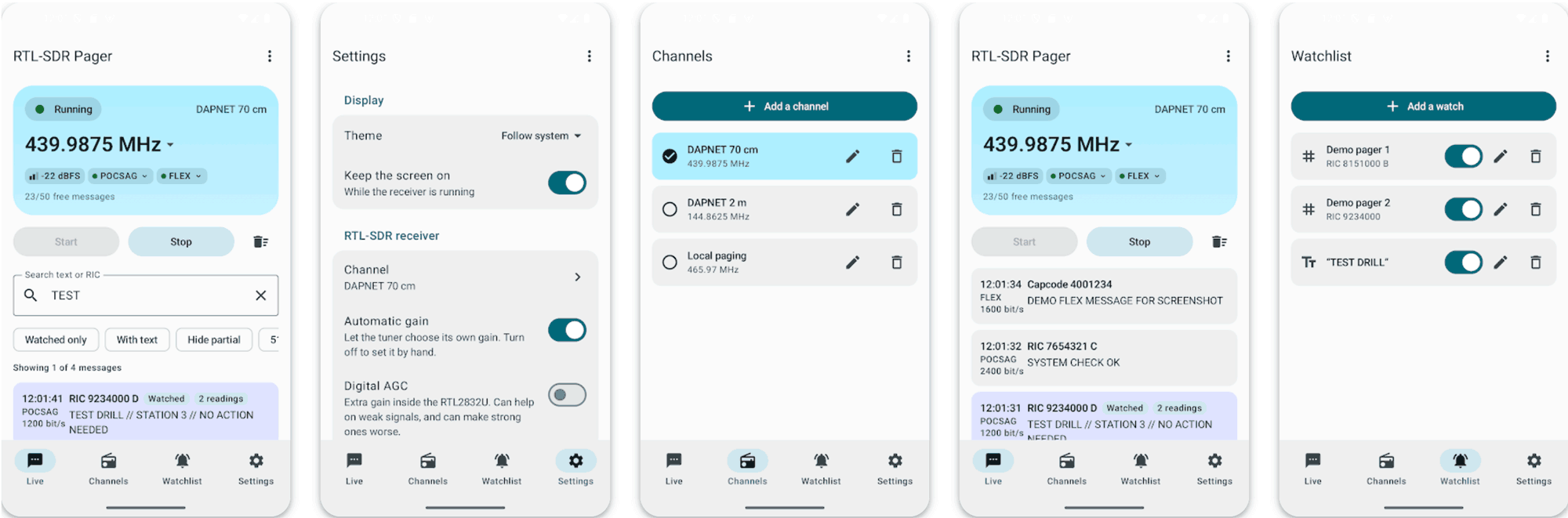
Thank you to Christian from ebcTech.eu for writing in and sharing with us the release of his new Android app called "RTL-SDR Pager" (Google Play Store link). The app is designed to work with an RTL-SDR dongle connected to the Android device. It is capable of decoding POCSAG and FLEX messages. However, Christian notes that he hasn't been able to test FLEX decoding so far because there are no FLEX channels in his area, so he would be interested in any feedback on this.
The app also provides push alerts, allowing you to monitor for a specific RIC or keyword and allows you to save channel lists.
The app offers a free demo that allows up to 50 messages. Upgrading to unlimited messages costs $3.99.
Thank you to Efe Işık (TA1EEI) for writing in and sharing with us his open-source project showing how to turn a modern Android smartphone’s internal Class-D speaker amplifier into a silent, intentional VHF Morse transmitter. Efe writes:
By pushing inaudible 21 kHz full-amplitude PCM audio via Android's AudioTrack, the amplifier's PWM switching circuit radiates near-field RF harmonics into the 144 MHz (VHF) band. The signal is strong enough to be received in AM mode on common SDRs and BK4819-based handheld transceivers (such as the Quansheng UV-K5) simply by placing the antenna near the speaker grill.
Everything is open-source, requires zero Android permissions, and includes instructions on receiver setup and frequency alignment.
With the software running on the Android device, simply use an SDR or handheld radio to look for the signal in the 144 - 146 MHz region. Increasing the volume can help increase transmission power.
This reminds us of the TrojPix project, a more sophisticated method that uses a program on a PC to imperceptibly modulate pixels on a screen, effectively turning video cable/screen EMI into an air-gapped data transfer path.
Back in May, we posted about how Russia's Elektro-L3 geostationary weather satellite was expected to move from 76°E to 14.5°W, which would finally bring an unencrypted L-band LRIT/HRIT downlink over Western Europe. Thank you to RTL-SDR reader tec_msat for writing in and letting us know that the move now appears to be underway.
tec_msat writes that Elektro-L3 went quiet around September 10. Updated TLEs on September 13 then showed the satellite drifting west at roughly 1.7 degrees per day. Around September 20, its orbit was circularized, making it drift faster at around 3.1 degrees per day. At its current speed, it should reach 14.5°W around October 12. Based on Elektro-L5's commissioning timeline, test transmissions could begin within days of arrival.
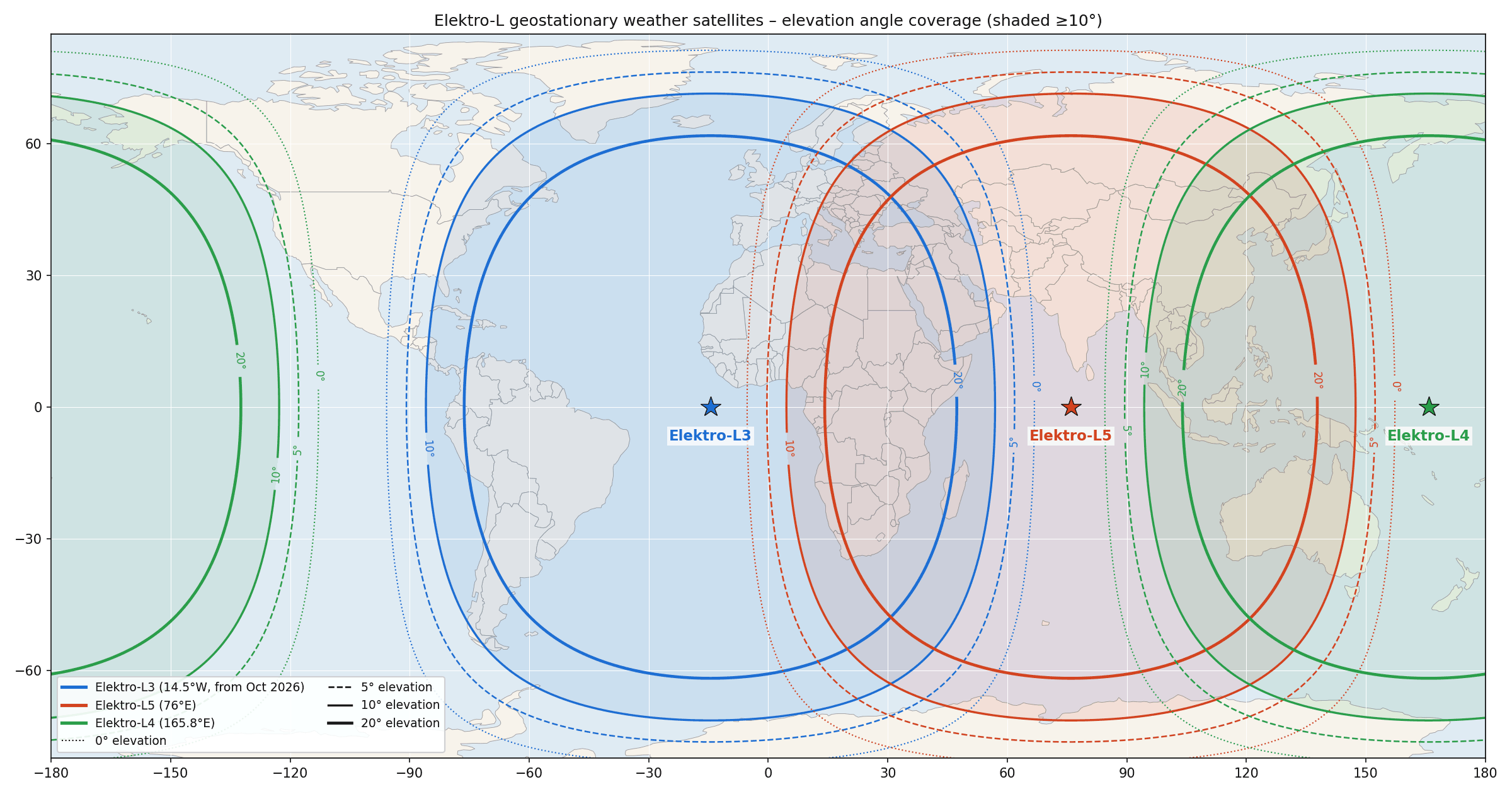
Elektro-L5, launched in February 2026, has now been successfully commissioned at L3's old 76°E slot, which covers Asia, the Middle East, and parts of Russia and Australia. It has been transmitting GGAK, LRIT and HRIT, as well as X-band RDAS. With L5 taking over the eastern slot, L3 will replace the aging Elektro-L2 at 14.5°W. L2 never provided LRIT/HRIT from that position due to power supply issues, although the original Elektro-L1 did when it was stationed there.
Roscosmos noted in August, when announcing L5's commissioning, that L3 may be moved to 14.5°W. However, there has been no official announcement from Roscosmos that the relocation has started, so the drift observations currently come from amateur TLE tracking.
Once commissioned, L3 should once again make geostationary L-band weather imagery at 1691 MHz available to users in the UK, Ireland, Iceland, Portugal, Spain and western France. tec_msat also speculates that the signal may be stronger over Europe than it was from 76°E (potentially due to better elevation angles), making xRIT reception even easier.
If you're in the coverage area, now might be a good time to get your dish, feed and LNA ready. SatDump is the best software tool to use for reception and decode and our Discovery Dish with L-Band feed and RTL-SDR Blog V3 is a great starting point for hardware.
Expected Elektro L3/L4/L5 global coverage from mid-October 2026.
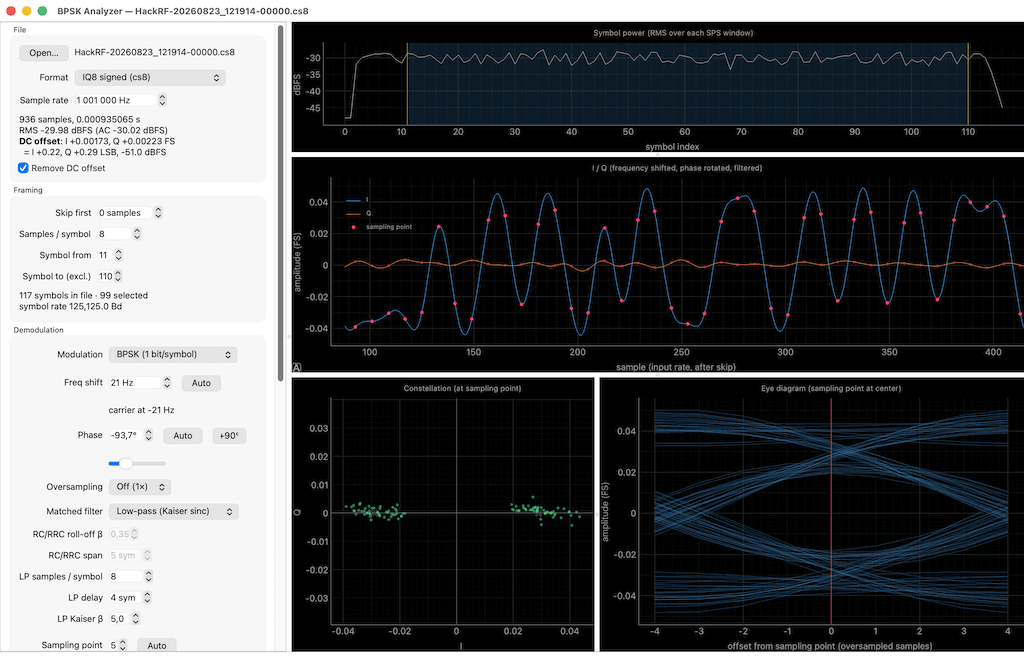
Thank you to Attila Zsellér, who has submitted his latest Python program called "Demod Analyzer". This program is designed for analyzing BPSK/QPSK/QAM16 signals in recorded IQ samples. Atilla writes:
I'm developing OpenStint, an SDR-based lap timing solution for rc racing and motorsport, which [RTL-SDR.COM] presented during the summer. Active transponders emit short bursts of data containing a unique id. By the time of reception, it's often full of various impairments. People are sometimes sending me IQ recordings for debugging purposes, and I was in need of a tool that can do a basic initial analysis on them, just to see if there is a chance of decoding anything.
It's a set of tools, doing a typical RX chain, with instant visual feedback:
Segment the bursts of transmissions based on RSSI
Apply phase/frequency offset (with an "auto" button that just works)
Optional upsample + (matched) filtering
Symbol synchronization
Optional blind-EQ
It supports BPSK/QPSK/QAM-16. By the end of the process, you see the demodulated bits and MER & EVM figures.
There are sample recordings of actual transponders in the repository. It's Python, and the CI builds a Windows-variant. Images are in the github repository.
Demod Analyzer Screenshot
AI Disclaimer: The submitted notes that this program was created via vibe coding.
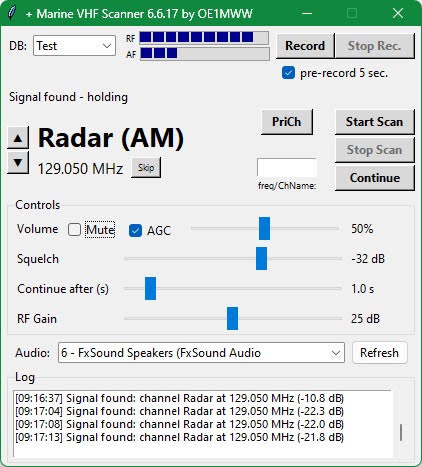
Thank you to Wolfgang (OE1MWW) for writing in and sharing with us his software called "Marine VHF Scanner". Although its title suggests it's a Marine band scanner, Wolfgang notes that he has since evolved it into a general-purpose narrowband scanning tool. Wolfgang writes:
Marine VHF Scanner began as a purpose-built receiver for VHF marine channels using an RTL-SDR USB receiver.
It has evolved into a general-purpose narrowband receiver and scanner. User-editable channel databases support marine, airband (AM), 2 m and 70 cm amateur radio (FM), and other AM/FM services within the RTL-SDR tuning range of approximately 24 MHz to 1.7 GHz.
Recent additions include manual and unattended frequency-range sweeps (Section 4.7) and two configurable keyboard hotkeys (Section 4.8) for quickly saving interesting frequencies.
A note on its development Although the project consists of around 4,000 lines of Python code, I did not write those lines myself. The code was generated - completely - by Claude.ai under my supervision. I developed it iteratively by specifying features, requesting changes, and reporting operational logic errors (views, handling etc.) until reaching Version 6.6.17.
Unique features
Pre-recording and recording to WAV files (where permitted by local laws!)
Frequency-range scan in Discovery Mode, registering and storing where signals have been heard
Frequency-range scan with automatic stop on detected signals - Continue button to go to the next signal.
Dual-channel monitoring (helpful for duplex split-frequency stations)
Remembers recent settings, the last-used database, and window position
Priority Channel button (the same frequency must be twice in the database, once marked PriCh)
Database editor for the CSV frequency database
JSON settings editor for viewing and editing configuration files
The ZIP package includes English and German manuals and additional documentation.
The program is supplied as a compiled Windows executable (.exe), together with configuration files (.json), example frequency databases (.csv), recent rtlsdr.dll files, and detailed documentation in the ZIP package.
No Python installation is required. Download, unzip – read the manuals – start it!
To protect your ears, Mute is enabled at startup. Set the volume low and click Unmute before listening.
The Python source code is available on request
Marine VHF Scanner: A general purpose narrowband VHF scanner
AI Disclaimer: This program was generated entirely by Claude.
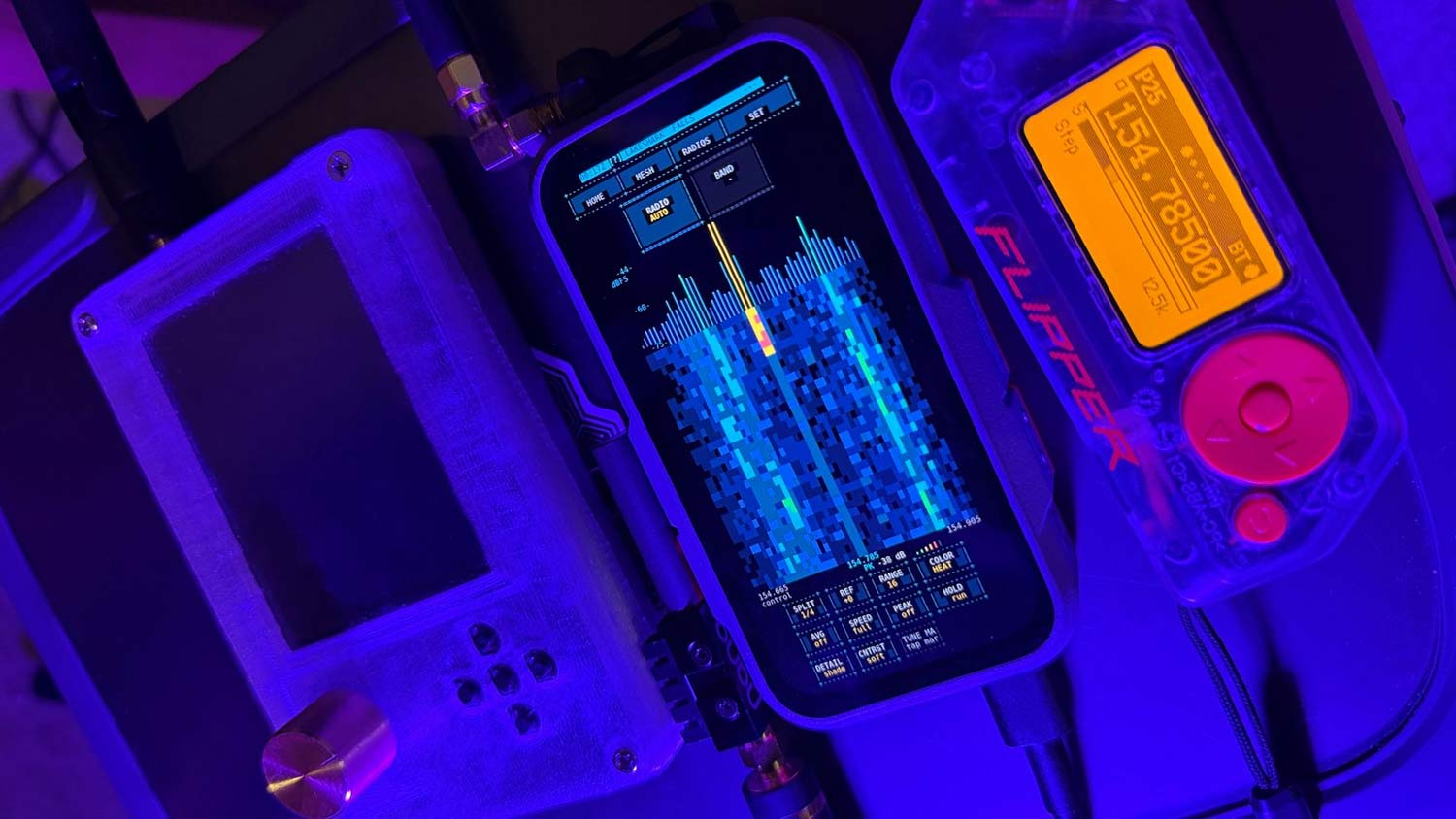
Thank you to Samuel Reynolds (aka SAMS0N1TE on GitHub), for writing in and sharing with us his project called 'LakeShark'. LakeShark is firmware for the LilyGO T-Display P4 (an ESP32-P4-based microcontroller with a 4.1 Inch touchscreen, detachable keyboard, GPS, and nine-axis motion sensor), which allows a USB-connected RTL-SDR Blog V3 or V4 to be used for P25 Phase 1 trunking, FM, POCSAG, ADS-B, and sub-GHz capture. Samuel writes:
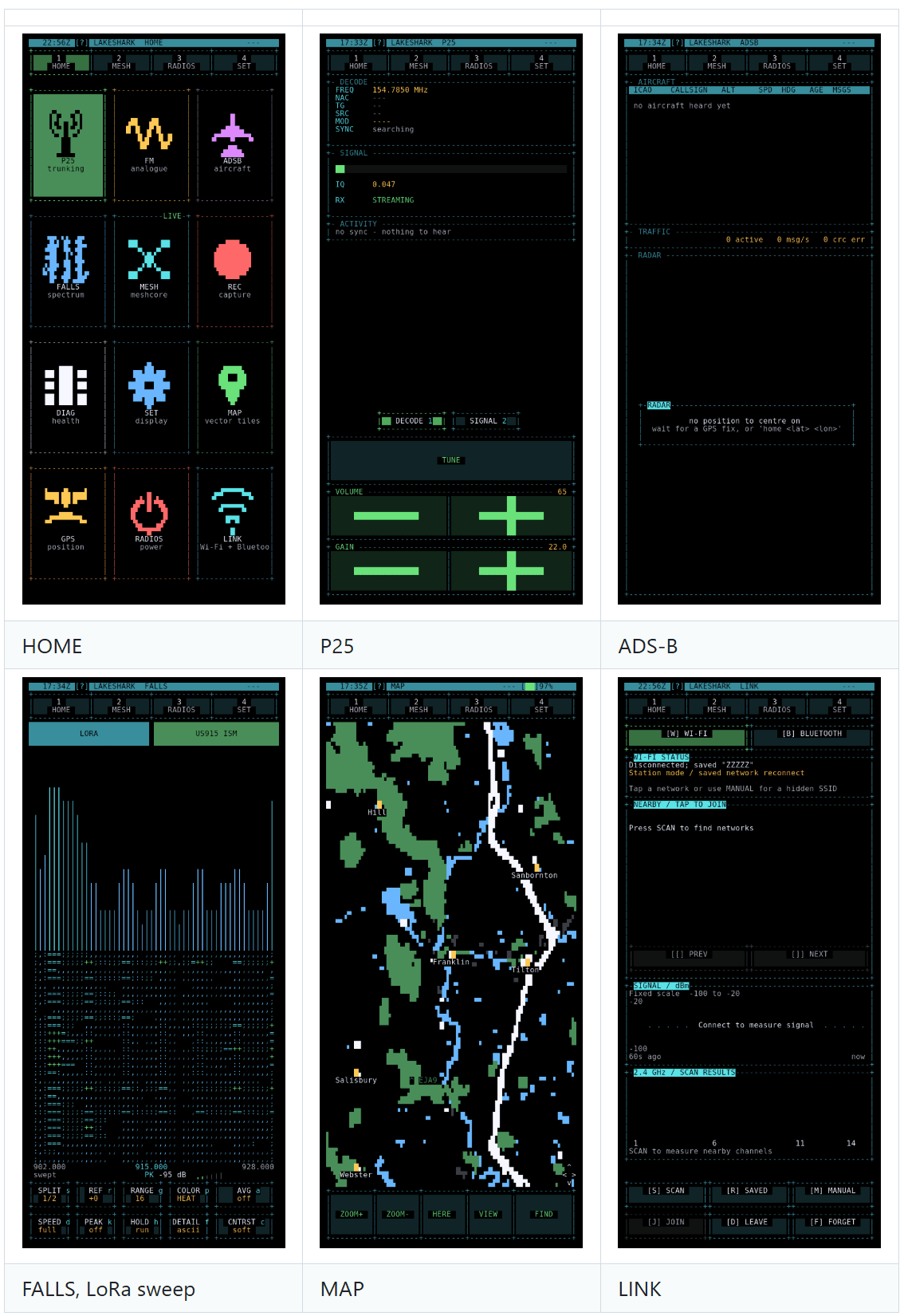
LakeShark supports P25 Phase I conventional and trunked voice, analog FM, POCSAG pager decoding and 1090 MHz ADS-B, with a spectrum display and waterfall for tuning around.
There are a few other things that might interest your readers:
Passive sub-GHz pulse recording with export to Flipper .sub files, so captures can be transferred to a Flipper and opened in its Sub-GHz app.'
Offline maps showing aircraft and MeshCore nodes, plus GPS track recording with GPX export.
Mixed P25/FM scan lists and a field journal for saving notes with radio readings, position and sensor data.
MeshCore messaging and LoRa experiments using the onboard SX1262. The optional MIX-RF keyboard adds CC1101, nRF24 and NFC tools.
The T-Display-P4 touchscreen works on its own, but you can also use the keyboard or connect a Flipper Zero over Bluetooth. LakeShark also supports a headless ESP32-P4 Nano receiver controlled from the Flipper. That lets you keep the radio and antenna in a bag while tuning from the Flipper.
Version 2.2.0 is available now. Experimental work includes manually tuned P25 Phase II decoding, HackRF support and GPS-based scan filtering. Those have separate limitations documented in the wiki. Next steps include live-RF validation, Phase II automatic call following and further work on portable power and everyday usability.
There’s also an experimental CELL WATCH app for surveying cellular-band activity and comparing it against a saved baseline. It’s meant for spotting changes worth investigating, rather than identifying a cell site as malicious or claiming to detect an IMSI catcher.
LakeShark builds on xtrsdr, OP25 and other open-source projects. ADS-B Scope also provided a reference for part of the aircraft position decoding. Full credits are in the README.
LakeShark is part of a growing repertoire of ESP32-P4 microcontroller RTL-SDR applications. Just last week we posted about OrcSDR, a standalone RTL-SDR application built around the M5Stack Tab5. Back in May, we also posted about a portable open-source 1090 MHz ADS-B firmware for the LILYGO T-Display-P4.
Previously, RTL-SDR applications have only run on full general-purpose CPUs running an OS like Windows/Linux/MacOS/Android. But the ESP32-P4 has shown that commodity microcontrollers are now powerful enough to run an RTL-SDR too, via custom bare-metal drivers and software.
LakeShark running on A LilyGO T-Display-P4 next to a HackRF (left) and a Flipper Zero (right).LarkShark Screens