Thanks to DE8MSH for writing in about his project that involves using a Raspberry Pi 3 and cheap 7€ USB sound card connected to an old Grahn GS1 VLF antenna to detect the SAQ VLF station. Standard PC or USB sound cards can be used as a narrowband VLF capable SDR simply by connecting an antenna to the sound inputs. SAQ (aka Grimeton Radio Station) is a heritage VLF transmitter in Sweden that transmits CW at 17.2 kHz, normally only on Alexanderson Day and Christmas Day, but can sometimes unofficially transmit without announcement due to maintenance, training or local events.
In terms of software running on the Pi 3 DE8MSH uses Spectrum Laboratory (speclab) to monitor the sound card waterfall, and has written a Python script that uploads the processed images from speclab to a Twitter account every 20 minutes. This way he hopes to be able to detect any unannounced SAQ transmissions from his station in Sweden.
Spectrum Laboratory is actually a Windows and x86 only program, however as shown in one of our previous posts, it is possible to use a special compatibility emulator called Exagear which allows you to run x86 programs on ARM hardware. Together with Wine you can then run x86 Windows programs on single board computers like the Raspberry Pi 3 which run Linux on ARM hardware.
Speclab Screenshot from DE8MSHs Pi3 soundcard monitoring system
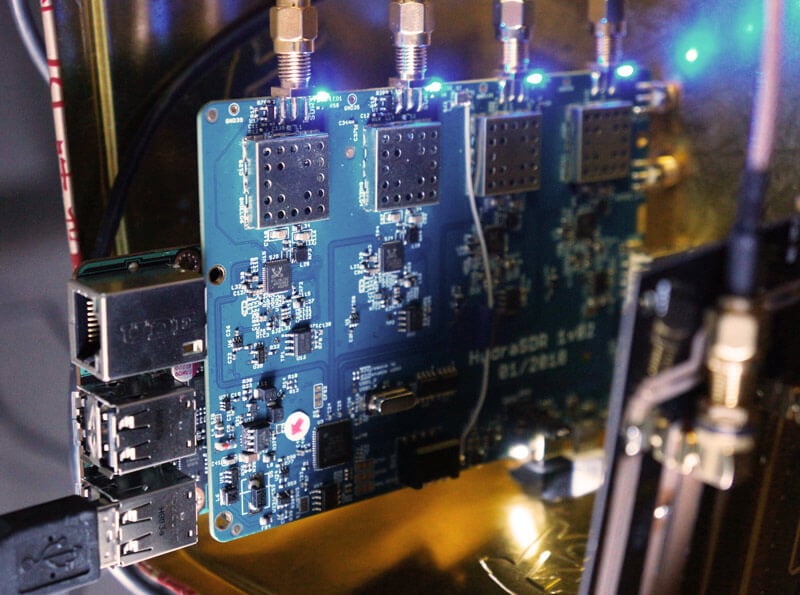
Over the last few months we've been working on a 4-input coherent RTL-SDR called 'KerberosSDR' (formerly known as HydraSDR) that is designed to be a low cost way to get into applications such as RF direction finding, passive radar, beam forming and more. It can also be used as a standard 4-channel SDR for monitoring multiple frequencies as well.
Phase coherent RTL-SDRs have been worked on and demonstrated several times over the past few years, but we've been disappointed to find that so far there hasn't been any easy way to replicate these experiments. The required hardware has been difficult to build and access, and the software has been kept as unreleased closed source or has been too complicated to install and use. With KerberosSDR we aim to change that by making phase coherent applications easier to access and run by providing ready to use hardware and software.
Thanks to our developer Tamás Peto, a PhD student at Budapest University of Technology and Economics whom we hired via the ad in our previous post, and the Othernet (formerly Outernet) engineering team who are our partners on this project, we've been able to build a working system, and demonstrate coherent direction finding and passive radar working as expected (demo videos below). We plan to eventually release Tamás' code as open source so that the entire community can benefit and build on it. Also if KerberosSDR turns a profit, we plan to reinvest some of the profits into continually improving the software and expanding the list of use cases.
KerberosSDR will be usable for coherent applications from ~80-100 MHz up to 1.7 GHz (as a standard receiver it will work down to 24 MHz like a regular RTL-SDR). The lower coherent limitation is due to the phase calibration board, and could be improved by custom creating a larger calibration PCB.
At the moment we are finalizing our prototype, and plan to begin final production within the next 2-3 months.
If you have any interest in KerberosSDR, please sign up to our Kerberos mailing list.
Direction Finding
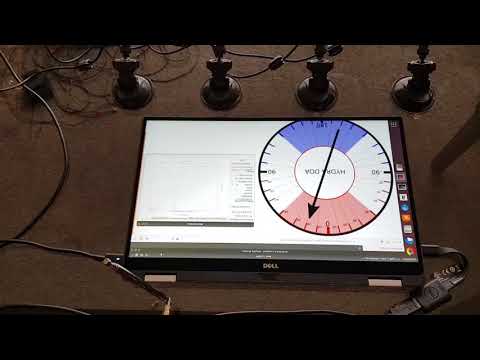
KerberosSDR can be used to find the bearing towards a signal using it's coherent direction finding capabilities. The software by Tamás currently implements several direction finding algorithms such as Bartlett, Capon, Maximum Entropy (MEM) and MUSIC. In the video below we show a quick test of the direction finding system working with a HackRF being used as a signal source, and four dipole antennas connected to KerberosSDR in a linear array. The MUSIC algorithm is used.
KerberosSDR Direction Finding Test
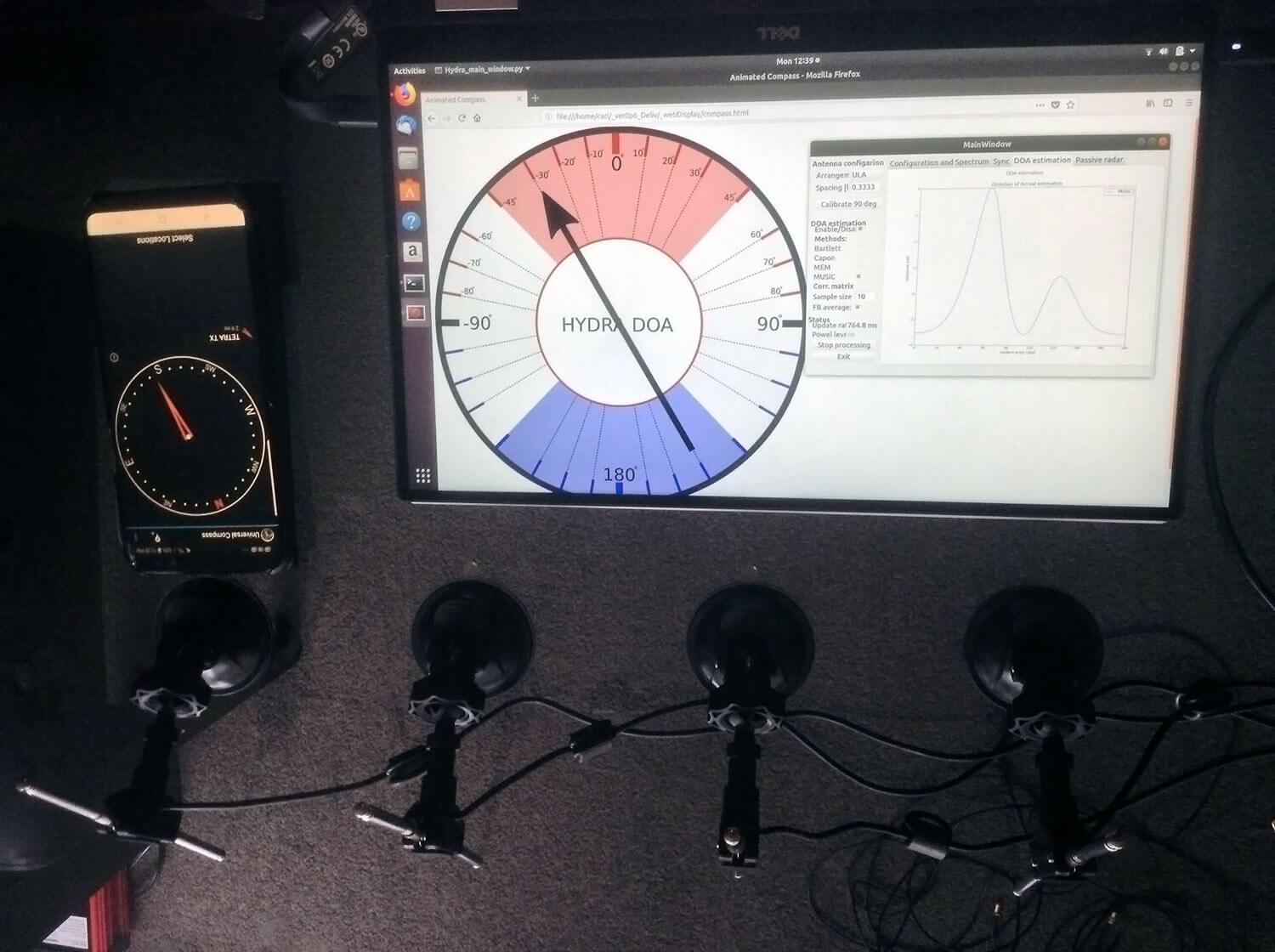
In the image below we also attempted to find the direction towards a known TETRA transmitter. We were able to confirm the direction with an Android compass app that points towards the known transmitter location. As the two angles match, we can be confident that Kerberos is finding the correct direction to the transmitter.
Finding the direction of a TETRA Transmitter
Passive Radar
KerberosSDR can also be used for passive radar. Normal radar systems work by transmitting a pulse of RF energy, and listening to the reflections from objects like planes, cars and ships. Passive radar works by using already existing transmitters such as those for FM/TV and listening for reflections that bounce of objects.
With a simple passive radar system you need two directional antennas and two coherent receivers. One antenna points at the transmitting 'reference' tower, and the other at the 'surveillance' area where you want to listen for reflections. It's important to try and keep as much of the reference signal out of the surveillance antenna as possible, which is why directional antennas like Yagi's are used.
The result is a doppler vs time delay graph, where the reflection of aircraft, cars, ships and other objects can be seen. The doppler gives you the speed of the object relative to your antenna and the transmitting tower, and the time delay gives you the distance relative to your antenna and the transmitter tower.
Below is an example time lapse video of KerberosSDR being used for passive radar. The reference antenna points towards a DVB-T transmitter at 588 MHz, and the surveillance antenna overlooks a small neighborhood, with aircraft sometimes flying over. The antennas we used were two very cheap TV Yagis.
You can constantly see the reflections from vehicles at small doppler values (low speeds), and every now and then you see an aircraft reflection which shows up at much higher doppler (speed) and further time delay (distance) points.
More information about KerberosSDR
KerberosSDR includes:
4x Coherent R820T2 based RTL-SDR dongles with standard 24 MHz - 1.7 GHz frequency range
On board GPIO switched wide band noise source for sample sync and phase calibration
Special phase calibration PCB for 4x inputs. Required to make the Kerberos phase coherent.
On board USB Hub, so only one USB port is required on the PC
Shielded metal enclosure
KerberosSDR can also be extended to 8x receivers by daisy chaining two boards together, so that their clocks and noise sources are connected. We've also taken into account undesirable effects such as heat related PLL drift which can be an issue for phase coherence.
At the moment we are also investigating whether singleboard computers like the Raspberry Pi 3 or Tinkerboard can be used, and there will be a header available for powering them via the Kerberos PCB. In the future we also plan to work on optimizing the code and potentially using CUDA/OpenCL GPU optimizations for passive radar so everything runs smoothly.
Once released we plan to have extensive tutorials and documentation that show exactly how to set up and replicate direction finding and passive radar experiments with low cost antennas.
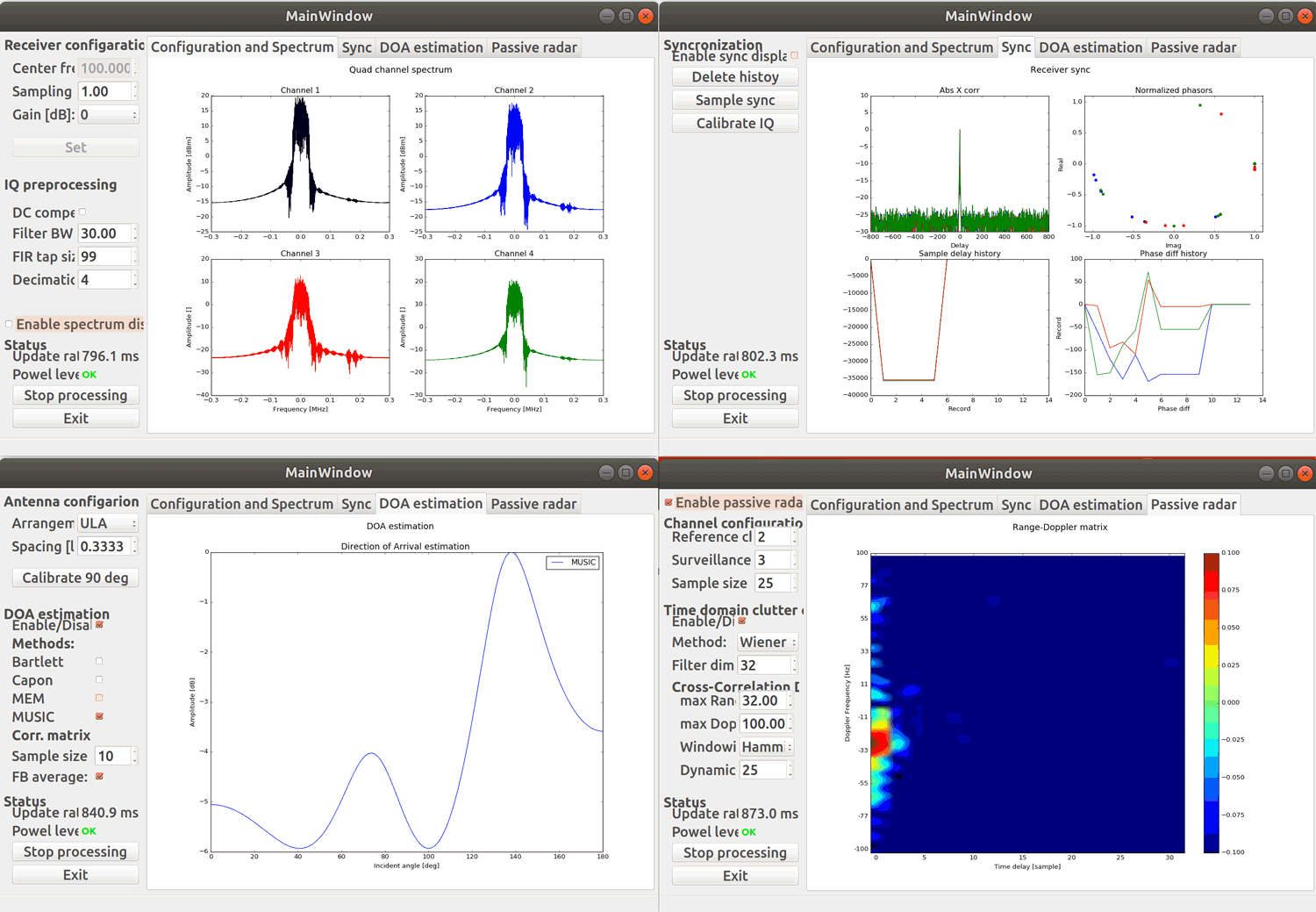
Screenshots of KerberosSDR software:
Screenshots of each KerberosSDR software screen
Remember, if you're interested please sign up to the KerberosSDR mailing list for announcements and the chance to get in early with the cheaper first 100 units.
Be on the look out for more interesting demos that will be posted in the coming weeks!
[the_ad id="14114"]
Update: Please note that due to a Trademark complaint, we have changed the name of this unit from HydraSDR to KerberosSDR.
KerberosSDR Updates: 27 August 18
This week we've managed to get the KerberosSDR demo software made by Tamás Peto functioning on a TinkerBoard. The TinkerBoard is a US$60 single board computer. It's similar to a Raspberry Pi 3, but more powerful. We've also tested the app running on the Raspberry Pi 3 and Odroid XU4. The Pi 3 is capable of running the software but it is a little slow, and the Odroid XU4 is a little faster than the TinkerBoard. In the future we hope to further optimize the code so even Raspberry Pi 3's will be smooth.
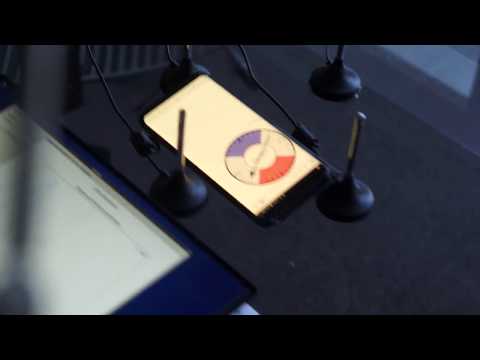
In the video below we used a circular array of four whip antennas connected to KerberosSDR. The TinkerBoard is connected to KerberosSDR and is set up to generate a WiFi hotspot, which we connect to with an Android phone and a Windows laptop. The Windows laptop connects to the TinkerBoard's desktop via VNC, and the Android phone receives an HTML/JavaScript based compass display via an Apache server running on the Tinkerboard. With this setup we can wirelessly control and view information from KerberosSDR and the TinkerBoard.
We've also tested the KerberosSDR system on a real signal, and have found it to work as expected. More demo's of that coming later.
KerberosSDR Direction Finding Test 2: Tinkerboard + Circular Array
KerberosSDR Prototype with TinkerBoard Running Computations
KerberosSDR Updates: 4 September 2018
In this post we'll show an experiment that we performed which was to pinpoint the location of a transmitter using KerberosSDR's coherent direction finding capabilities. RF direction finding is the art of using equipment to determine the location of a transmitting signal. The simplest way is by using a directional antenna like a Yagi to try and determine the bearing based on signal strength. Another method is using a pseudo-doppler or coherent array of antennas to determine a bearing based on phase information.
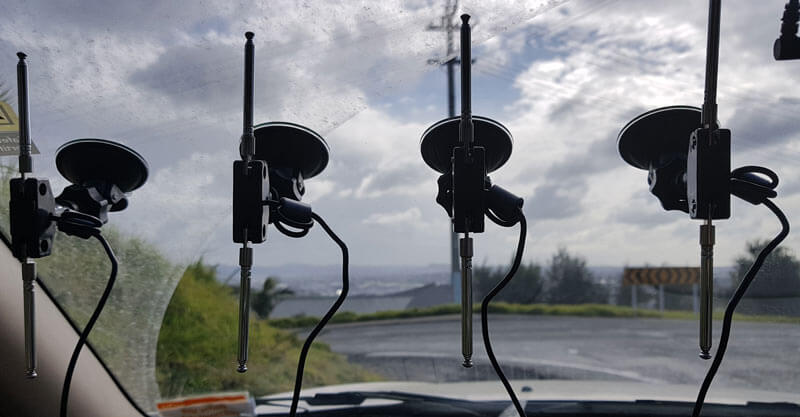
For the test we tuned the KerberosSDR RTL-SDRs to listen to a signal at 858 MHz and then drove to multiple locations to take direction readings. The antennas were set up as a linear array of four dipole antennas mounted on the windshield of a car. To save space, the dipoles were spaced at approximately a 1/3 the frequency wavelength, but we note that optimal spacing is at half a wavelength. The four dipole antennas were connected to KerberosSDR, with a laptop running the direction finding demo software.
Low cost direction finding array mounted to vehicle windshield.
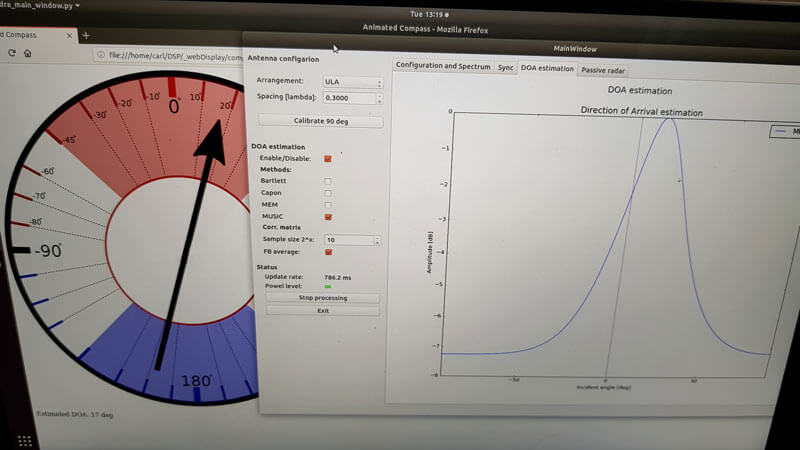
Our open source demo software (to be released later when KerberosSDR ships) developed by Tamás Peto gives us a graph and compass display that shows the measured bearing towards the transmitter location. The measured bearing is relative to the antenna array, so we simply convert it by taking the difference between the car's bearing (determined approximately via road direction and landmarks in Google Earth) and the measured bearing. This hopefully results in a line crossing near to the transmitter. Multiple readings taken at different locations will end up intersecting, and where the intersection occurs is near to where the transmitter should be.
KerberoSDR SDR Directing Finding DOA Reading
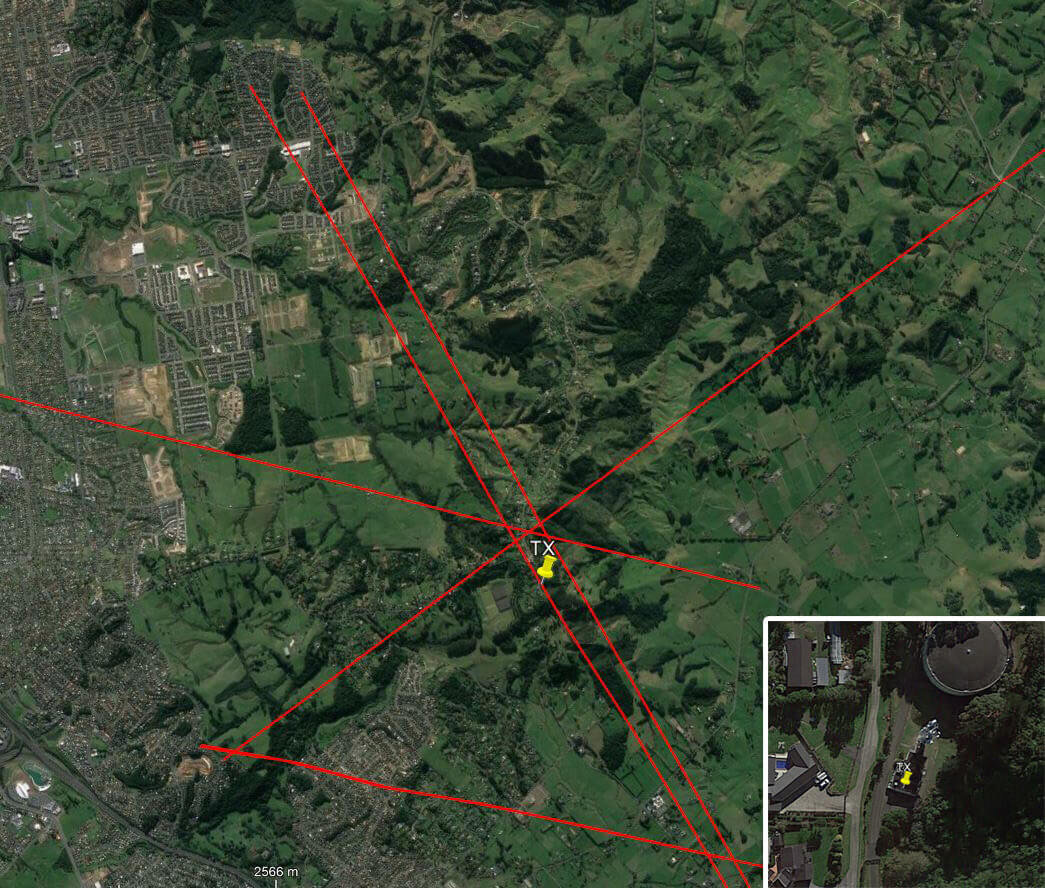
In the image below you can see the five bearing measurements that we made with KerberosSDR. Four lines converge to the vicinity of the transmitter, and one diverges. The divergent reading can be explained by multipath. In that location the direct path to the transmitter was blocked by a large house and trees, so it probably detected the signal as coming in from the direction of a reflection. But regardless with four good readings it was possible to pinpoint the transmitting tower to within 400 meters.
In the future we hope to be able to automate this process by using GPS and/or e-compass data to automatically draw bearings on a map as the car moves around. The readings could also be combined with signal strength heatmap data for improved accuracy.
This sort of capability could be useful for finding the transmit location of a mystery signal, locating a lost beacon, locating pirate or interfering transmitters, determining a source of noise and more.
KerberosSDR pinpointing a transmitters location
KerberosSDR Updates 7 September 2018
For this test we parked our car to the side of a highway and pointed a cheap DVB-T Yagi antenna towards a DVB-T transmission tower, and another cheap Yagi down the road. The video shown below displays the results captured over a 5 minute period. The blips on the top half of the display indicate vehicles closing on our location (positive doppler shift), and the blips on the bottom half indicate objects moving away (negative doppler shift).
DVB-T Antennas In Car
The resolution of each individual vehicle is not great, but it is sufficient to see the overall speed of the highway and could be used to determine if a road is experiencing traffic slowdowns or not. When larger vehicles pass by it is also obvious on the display by the brighter blip that they show. The display also shows us that the highway direction coming towards us is much busier than the direction moving away.
In the future we'll be working on optimizing the code so that the display updates much faster and smoother. It may also be possible in the future to use the third and fourth tuners to obtain even greater object resolution.
KerberosSDR Updates 27 September 2018
In this post we're showing some more passive radar demos. The first video is a time lapse of aircraft coming in to land at a nearby airport. The setup consists of two DVB-T Yagi antennas, with KerberosSDR tuned to a DVB-T signal at 584 MHz. The reference antenna points towards a TV tower to the west, and the surveillance antenna points south. Two highlighted lines indicate roughly where reflections can be seen from within the beam width (not taking into account blockages from mountains, trees etc).
The second video shows a short time lapse of a circling helicopter captured by the passive radar. The helicopter did not show up on ADS-B. On the left are reflections from cars and in the middle you can see the helicopter's reflection moving around.
We are expecting to receive the final prototype of KerberosSDR within the next few weeks. If all is well we may begin taking pre-orders shortly after confirming the prototype.
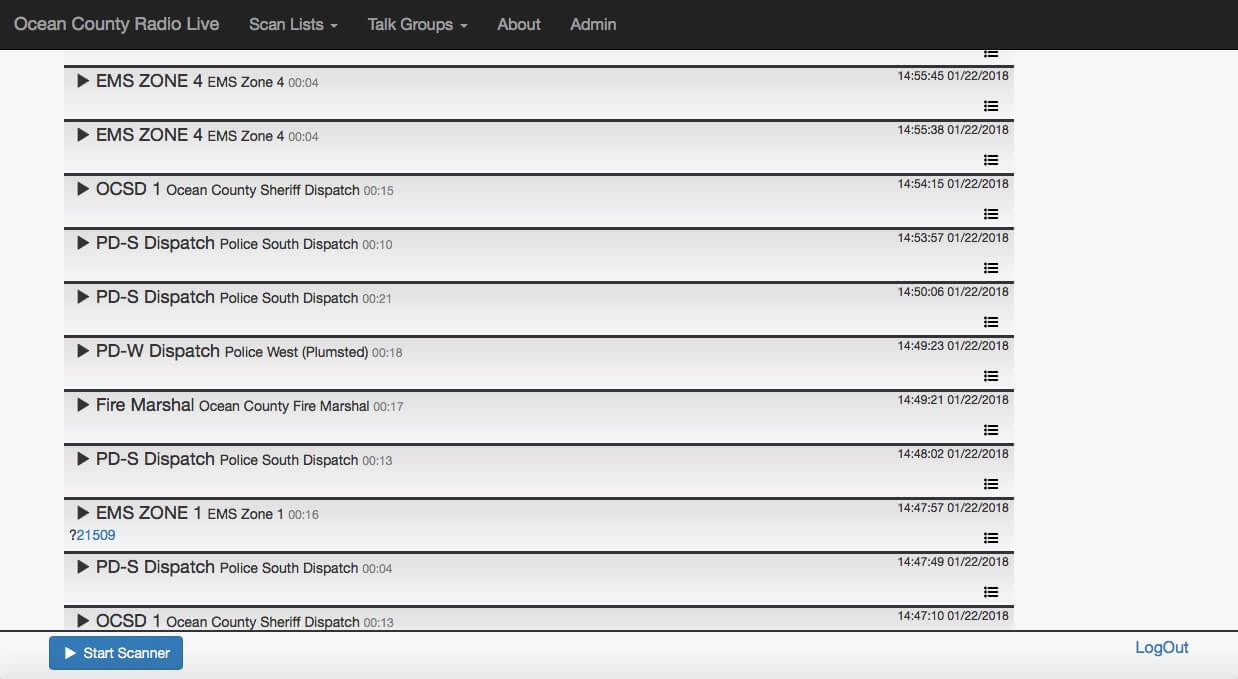
During the Cyberspectrum Wireless Village talks a few days ago Gavin Rozzi gave a talk about his online RTLSDR-based trunking scanner website at ocradio.live. Recently he wrote in and wanted to share a little more about his system. He writes:
[The talk focuses] on my experience implementing several open source software packages to create an online RTLSDR-based trunking scanner website, https://ocradio.live/ that serves the part of New Jersey that I live in. Using multiple RTLSDR receiving locations, the site is demodulating, recording, and timeshifting multiple talkgroups of local and state trunked radio systems to create a live streaming service and archive of past scanner calls. Data from the site is also accessible over a REST API and we allow the creation of custom scan lists. My presentation is going to center on the advantages the site has over traditional hardware scanners and some of the technical challenges that we had to overcome to get the project off the ground.
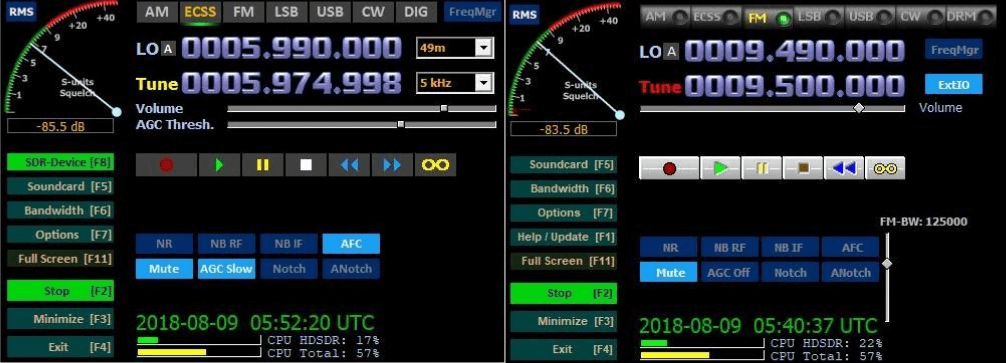
HDSDR is a popular general purpose multimode program for Windows that supports various SDRs including the RTL-SDR. Version 2.80 (beta) of HDSDR was released a few days ago and brings with it a few GUI and feature updates. An extensive description of the changes can be found in the change log, but briefly the changes are:
GUI buttons updated to a more modern and cleaner look
Improved friendliness to blind users during IQ recording playback
A better IQ file player with the ability to loop over a certain time frame
Improved snap to frequency option
Improved LO tuning with an "autochange LO if necessary" option
The ability to sort IQ recordings by date
Ham/broadcast band spectrum identifiers added
Ability to import the HFCC frequency list into the frequency manager
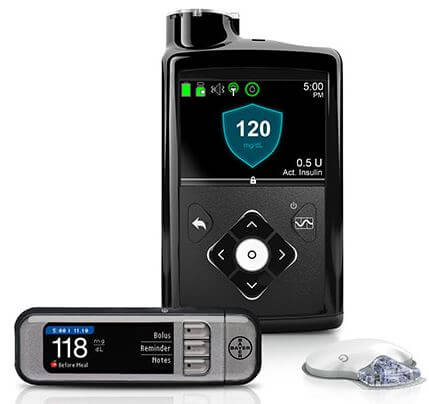
Recently Arstechnica ran a story about how during this August's Black Hat security conference, researchers Billy Rios and Jonathan Butts revealed that a HackRF software defined radio could be used to withhold a scheduled dose of insulin from a Medtronic Insulin Pump. An insulin pump is a device that attaches to the body of a diabetic person and deliveries short bursts of insulin throughout the day. The Medtronic Insulin Pump has a wireless remote control function that can be exploited with the HackRF. About the exploit MiniMed wrote in response:
In May 2018, an external security researcher notified Medtronic of a potential security vulnerability with the MiniMedTM Paradigm™ family of insulin pumps and corresponding remote controller. We assessed the vulnerability and today issued an advisory, which was reviewed and approved by the FDA, ICS-CERT and Whitescope.
This vulnerability impacts only the subset of users who use a remote controller to deliver the Easy Bolus™ to their insulin pump. In the advisory, as well as through notifications to healthcare professionals and patients, we communicate some precautions that users of the remote controller can take to minimize risk and protect the security of their pump.
As part of our commitment to customer safety and device security, Medtronic is working closely with industry regulators and researchers to anticipate and respond to potential risks. In addition to our ongoing work with the security community, Medtronic has already taken several concrete actions to enhance device security and will continue to make significant investments to improve device security protection.
In addition to this wireless hack they also revealed issues with Medtronic's pacemaker, where they found that they could hack it via compromised programming hardware, and cause it to deliver incorrect shock treatments.
Earlier in the year we also posted about how an RTL-SDR could be used to sniff RF data packets from a Minimed Insulin pump using the rtlmm software, and back in 2016 we posted how data could be sniffed from an implanted defibrillator.
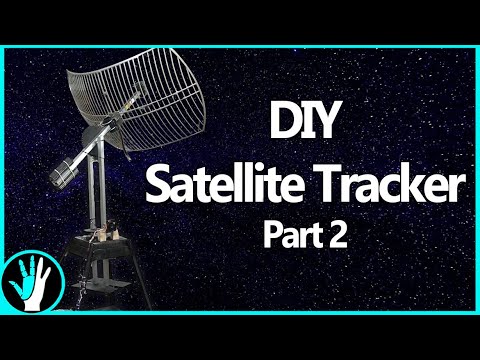
Earlier this month we posted about The Thought Emporium who uploaded a video to YouTube where they documented the first steps of their construction of a tracking mount for a 2.4 GHz grid WiFi dish which they intend to use for HRPT weather satellite reception.
If you didn't already know, receiving HRPT weather satellite signals is a little different to the more commonly received NOAA APT or Meteor M2 LRPT images which most readers may already be familiar with. HRPT is broadcast by the same NOAA satellites that provide the APT signal at 137 MHz, but is found in the L-band at around 1.7 GHz. The signal is much weaker, so a high gain dish antenna with motorized tracking mount, LNA and high bandwidth SDR like an Airspy is required. The payoff is that HRPT images are much higher in resolution compared to APT.
In this video they document the steps required to finish the physical build and add the electronics and motors required to control and move the dish. The final product is a working tracking mount that should be able to track the NOAA satellites as they pass over. In the next video which is not yet released they plan to actually test reception.
Cyberspectrum #23 is now live and can be viewed via the YouTube live stream below. It should be available for delayed viewing after the event as well. The talks include SDR and radio related topics on subjects such as:
HAARP ionosphere research
An open source implementation of DVB-S2 and DVB-S2X for both satellite and terrestrial amateur radio use
An open source SpyServer based tool for automatically demodulating/recording and parsing RF data
Reverse engineering X-Band satellites
An RTL-SDR powered web based trunking scanner with timeshifting capabilities.
Cyberspectrum Special: DEF CON Wireless Village
Since out last post previewing the event, some new talks have been added, and we've posted the line up and info below.
At this years DEFCON conference SDR evangelist Balint Seeber will be hosting Cyberspectrum #23. DEFCON is a yearly conference with a focus on hacker topics, which often include SDRs and other radio topics too. This years conference will be help on August 9 - 12 a Caesars Palace & Flamingo in Las Vegas. Cyberspectrum is an almost monthly meetup of SDR enthusiasts and researchers that is normally held in the San Francisco Bay Area, but often hosts remote speakers via teleconference. This months meetup will be held at DEFCON on August 9, hosted by the Wireless Village.
Chris Fallen, Ph.D. (@ctfallen):"Opportunities for radio enthusiasts and heaters of the ionosphere: HAARP is just another instrument, or is it?"
Preview of a future #cyberspectrum talk: Background of passive and active ways to get involved with HAARP experiments (and perhaps with other natural natural ionosphere events) based on prior and ongoing work.
Open Research Institute (ORI) is a new non-profit research and development organization which provides all of its work to the general public under the principles of Open Source and Open Access to Research.
One of our projects is called Phase 4 Ground. Our mission is to provide an open source implementation of DVB-S2 and DVB-S2X for both satellite and terrestrial amateur radio use. Phase 4 Ground radio system has a 5GHz uplink and a 10GHz downlink. We are developing SDR software that heavily leverages IP multicast and RTP protocols to set up and tear down distributed remote radio functions.
The reference designs are in GNU Radio and we will provide recipes for as many SDRs as possible.
Phase 4 Ground radios are intended to be reusable and reconfigurable, supporting payloads at GEO (AMSAT Phase 4B), HEO (AMSAT Phase 3E), and beyond (such as NASA's Cube Quest Challenge). Additionally, our radios will work as terrestrial microwave stations. These 'Groundsats' on mountaintops or towers establish a fun and flexible digital microwave experience. If you want to build up your radio from SDRs, you can. If you want to build it entirely from scratch, then you can. Our manufacturing partner for an off-the-shelf design is Flex Radio.
Lucas Teske (@lucasteske): SegDSP SpyServer Segment Digital Signal Processor
SegDSP is a WIP "Segment Digital Signal Processor" that is tuned for connecting into a SPY Server and do automatically demodulation/recording/parsing of RF data. This talk will be about what it does today, how was the development, how it works, how it will work and what are the uses for it. Tired of losing the pass of a LEO satellite? Want to hear the recording from last week? SegDSP is a Open Source tool made in Go for both learning and monitoring Satcom and Terrestrial Com.
Luigi Freitas (@luigifcruz): "Reverse Engineering X-Band Satellites Datalink And The Worst Software Defined Radio Ever"
This talk will be about the reverse engineering process of the next generation X-Band datalink signal on-board of Sun Synchronous Satellites like Suomi (NPP) and NOAA-20 (NPOESS/JPSS-1). From the RAW I/Q recording to the decompressed high-resolution Earth pictures. This is the latest addition to the Open Satellite Project, a non-profit organization that is committed to develop and publish software tools and hardware projects that enable the Open-Source Community to access spacecraft non-sensitive data.
The other half (or so) of this talk will be about the “Worst SDR Ever” that is made entirely of dirty cheap parts readily available from China. This project is intended to demonstrate how a Software Defined Radio works utilizing real hardware and comprehensive modular software.
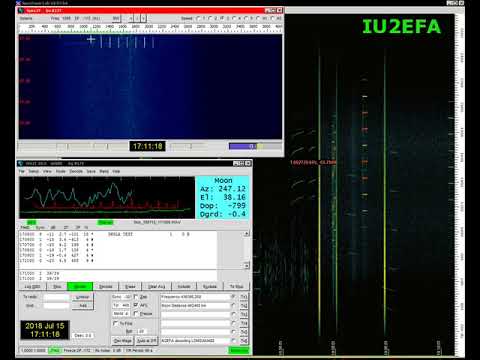
Thanks to IU2EFA (William) for writing in and letting us know about his success in decoding telemetry from the moon orbiting satellite known as DSLWP-B / LONGJIANG-2. LONJIANG-2 is a Chinese lunar microsatellite (45kg) that was launched in May 2018. It is designed to perform ultra long-wave radio astronomy observations. It also has an on board camera and took some nice photos of the Earth back in June.
While the satellite is still being tested, William notes that it is transmitting telemetry data to Earth during it's scheduled days at 435.4 MHz and 436.4 MHz, and the signal can be received with an RTL-SDR and Yagi antenna. William writes:
[LONJIAN-2] transmits with a little linear antenna and a little power of just 2 Watts.
In other sessions, I used a professional radio to have the maximum performance.
But this morning I wanted to test the reception, just using my RTLSDR V3 and my antenna yagi 15 elements pointed to the Moon. No other options (as filters, pre aplifiers, or other stuffs. Zero of these)
Well, the result was great. I received the signals and also i could decode them!
So I think people can be happy to know, that with a very little setup, they can receive incredible little signals from great distances.
When I received these signals, the Moon distance was about 378500 km.
LONGJIAN-2 transmits telemetry with GMSK and JT4G, and JT4G can be decoded with WSJT-X or WSJT 10. There is also a GNU Radio program called gr-dslwp that can be used to decode the telemetry. JT4G is a weak signal coding that can be decoded with signal levels down to -17 dB. Therefore anyone with modest hardware can decode the satellite. More information about the coding can be found on this post by Daniel Estevez.
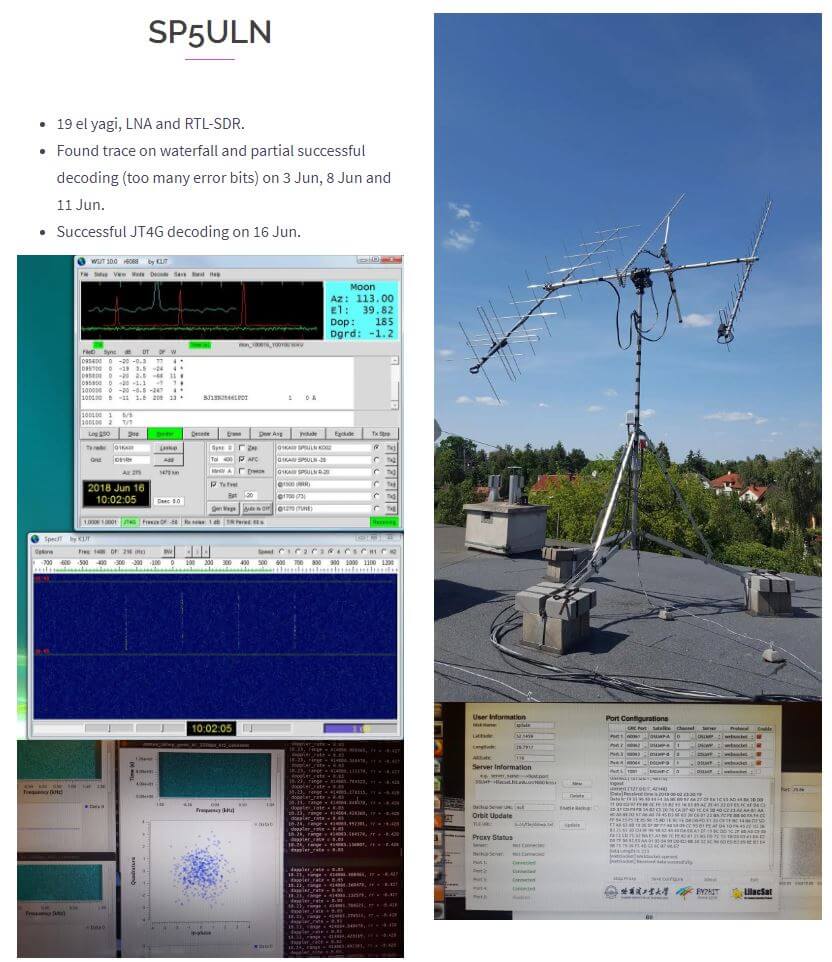
On the Lilacsat page for LONGJIANG-2 if you scroll down you can also see reports from several other amateur radio operators who have managed to receive the satellite with RTL-SDR dongles and other radios. Below is an image of an example for SP5ULN who was able to receive and decode the JT4G signal with an RTL-SDR, LNA, and 19-element Yagi.
Example of LONJIAN-2 being received with an RTL-SDR by SP5ULN as noted on the LilacSat website.
Ho Decodificato Segnali dalla LUNA! | Decoding a Satellite Orbiting the Moon (JT4G)