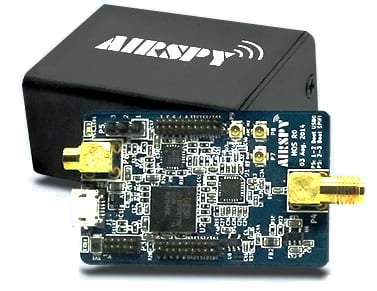
Januaries review discusses the Airspy specifications, the unboxing, ease of use and reception results. The review is generally positive and he writes that in the coming weeks he hopes to do some comparisons between the RTL-SDR and Airspy.
A few days ago we posted about Anthony Stirk’s comparison between the RTL-SDR and the Airspy on receiving ADS-B signals. In his first test Anthony used an E4000 dongle, which is known to have inferior performance at the ADS-B frequency of 1090 MHz.
Now Anthony has done his test again, but this time with an R820T2 RTL-SDR. His results show that the R820T2 RTL-SDR is better than the E4000 RTL-SDR, but that the Airspy is still better than the R820T2 RTL-SDR. The R820T2 received at maximum distances more comparable to the Airspy, though still fell short of the Airspy by some 50 kms in some directions. Anthony’s writes that his distance seems to be mainly limited by geography so it is possible that in some other location the Airspy could out perform the RTL-SDR by a more significant distance.
The most interesting part of his last experiment was that over a 28 hour period the E4000 RTL-SDR received only a total of 2.9 million messages whilst the Airspy received a total of 10.3 million messages. In the new experiment the R820T2 received a total of 22.3 million messages whilst the Airspy received a total of 31 million messages, which is a little closer. However, with the R820T2 RTL-SDR, 3 million messages were unusable, versus only 31 unusable messages with the Airspy.
From these results it’s clear that the better design and more ADC bits in the Airspy can significantly improve ADS-B reception. However, there is a cost difference at $199 for the Airspy vs <$20 for the RTL-SDR. The Airspy cost may be soon less of a problem we are aware that an Airspy Lite version is in the works and that will probably cost around $99 USD.
In the future Anthony will do another test with no error correction enabled because the current version of the Airspy ADS-B decoder has no error correction whereas the RTL-SDR ADS-B decoder does. Those results may show that the Airspy is even better that shown here.
Update: Anthony ran the test again with a modified version of ADSB# with not error correction and obtained the following results which show that the Airspy receives about double the messages compared to the RTL-SDR:
Total Messages Received: Airspy 65,150,313 RTL 32,973,049
Airborne Position: Airspy 4,615,972 RTL 2,270,810
Unusable: Airspy 533 RTL 635,549
Airspy vs R820T2 RTL-SDR on Maximum ADS-B Distance.
With the recent release of ADSBSpy, an ADS-B decoder for the Airspy software defined radio, many people have been wondering how much better the Airspy is compared to the low cost RTL-SDR dongle at ADS-B reception. Over on his blog, Anthony Stirk has performed a test comparing an E4000 RTL-SDR with the Airspy.
In his test Anthony uses an A3 ADS-B antenna from Jetvision.de, and a HABAMP which is an LNA plus 1090 MHZ SAW filter. To create a fair test he used an antenna splitter and measured the reception of both dongles at the same time. He ran one instance of ADSB# for the E4000 RTL-SDR, and one instance of ADSBSpy for the Airspy over 24 hours and recorded the results.
Airspy vs E4000 RTL-SDR
The results showed that the Airspy had approximately 50 km more range compared to the E4000 in some areas. More interestingly the stats showed that the Airspy received approximately 7 million more ADS-B messages compared to the RTL-SDR.
While there is no doubt the Airspy will perform better, one thing to note about this test is that it used an E4000 RTL-SDR which is widely considered to have inferior performance at the 1090 MHz ADS-B frequency when compared to the R820T/2 dongles.
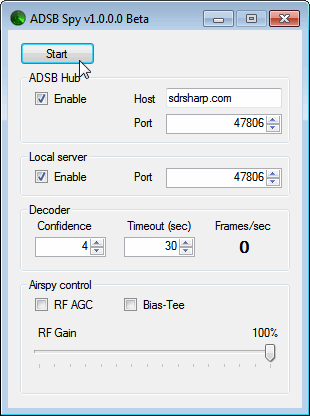
Youssef, the programmer of SDR#, has just released a beta version of an ADS-B decoder for the Airspy. The software is called "ADSB Spy" and is similar in operation to ADSB# which is used with the RTL-SDR dongle. The increased sensitivity and lower noise floor of the Airspy should help ADS-B enthusiasts get longer ranges and more aircraft on their screen.
Update: Note that we also now have our own comprehensive review available here which compares the Airspy, SDRplay RSP and HackRF.
A new review of the Airspy (store) software defined radio has been published by Mike Richards in the March 2015 edition of the Radio User magazine. Although the magazine is for sale, the publishers have allowed the Airspy team to release the review for free. The review goes over the Airspy architecture, features, use of the software and presents a favourable tone towards the Airspy.
The Airspy is an software defined radio that costs $199 USD and comes with a 24 – 1800 MHz tuning range, 10 MHz of bandwidth and 12-bit ADC.
Over on YouTube user Mile Kokotov has uploaded a video showing a comparison between the ham-it-up and SV1AFN upconverters. An upconverter allows reception of VLF to HF signals with SDR dongles such as the Airpsy and RTL-SDR.
Mile shows that both the ham-it-up and SV1AFN upconverters use the same core component, a double balanced mixer ADE-1. However, the ham-it-up comes with the option for a noise circuit to be populated. A noise circuit is useful if you want to measure the response of a filter or antenna for example. With the ham-it-up the noise source components are sold seperately and need to be carefully soldered on.
On the other hand the SV1AFN upconverter comes with a built in selectable LNA and better filtering circuitry. The SV1AFN upconverter also uses the ADE-1 in a slightly different design compared to the ham-it-up which allows for much improved performance at VLF frequencies.
In the results Mile uses his Airspy and shows that the SV1AFN upconverter is significantly better at receiving VLF frequencies, and also better at receiving a 28.205 MHz beacon. The results are summarized in the table captured from the video shown in the image below. In the second video Mile also compares the local oscillator drift of each upconverter.
Upconverter comparison results screencap.
RF Upconverters Comparison: Ham it Up vs SV1AFN - part1
Over on YouTube user Mile Kokotov has uploaded a video showing how he optimizes reception of weak signals in the presence of strong signals on the Airspy software defined radio. He writes:
Using Airspy SDR, I find the interesting way to improve SNR (Signal to Noise Ratio) of the receiving signal, especially in case when very weak signal, which is signal of interest, is close to strong unwanted signals making nonlinear distortion in the receiver front end.
There are two cases:
1. If the weak signal frequency is higher than strong unwanted signals, than you can place the weak signal to the left edge of spectrum window, just before the receiving signal levels goes down to the left. Then you can increase the IF-Gain, Mix-Gain and LNA-Gain so you can improve SNR of weak signal without getting nonlinear distortion from the strong signals with lower frequency.
2. If the weak signal frequency is lower than strong unwanted signals, than you can place the weak signal to the right edge of spectrum window, just before the receiving signal levels goes down to the right. Then you can increase the IF-Gain, Mix-Gain and LNA-Gain so you can improve SNR of weak signal without getting nonlinear distortion from the strong signals with higher frequency.
Of course, the best possible way to improve SNR in wide-band receivers sach is Airspy, Funcube, RTL-SDR and others, is by using narrow filter before Airspy front end, but you will loose wide-band possibilities in that way…
The Wide Dynamic range LNA at the antenna side is strongly recommended for VHF/UHF !
AIRSPY SDR - Tips & Tricks Receiving Weak signals with Strong ones near by
The Airspy software defined radio comes with breakout pins that connect directly to the analogue to digital converter (ADC) inputs. By connecting an antenna to these inputs together with experimental software it is possible to receive frequencies between 0 – 10 MHz. This is the same trick used in the RTL-SDR direct sampling mod. However, to get decent reception and to keep the Airspy circuitry safe, a low pass filter and isolation transformer are required.
Over on YouTube W9RAN discusses this mod in his latest YouTube video.