Tagged: GOES

GOES Weather Satellite Images on an E-Ink Display

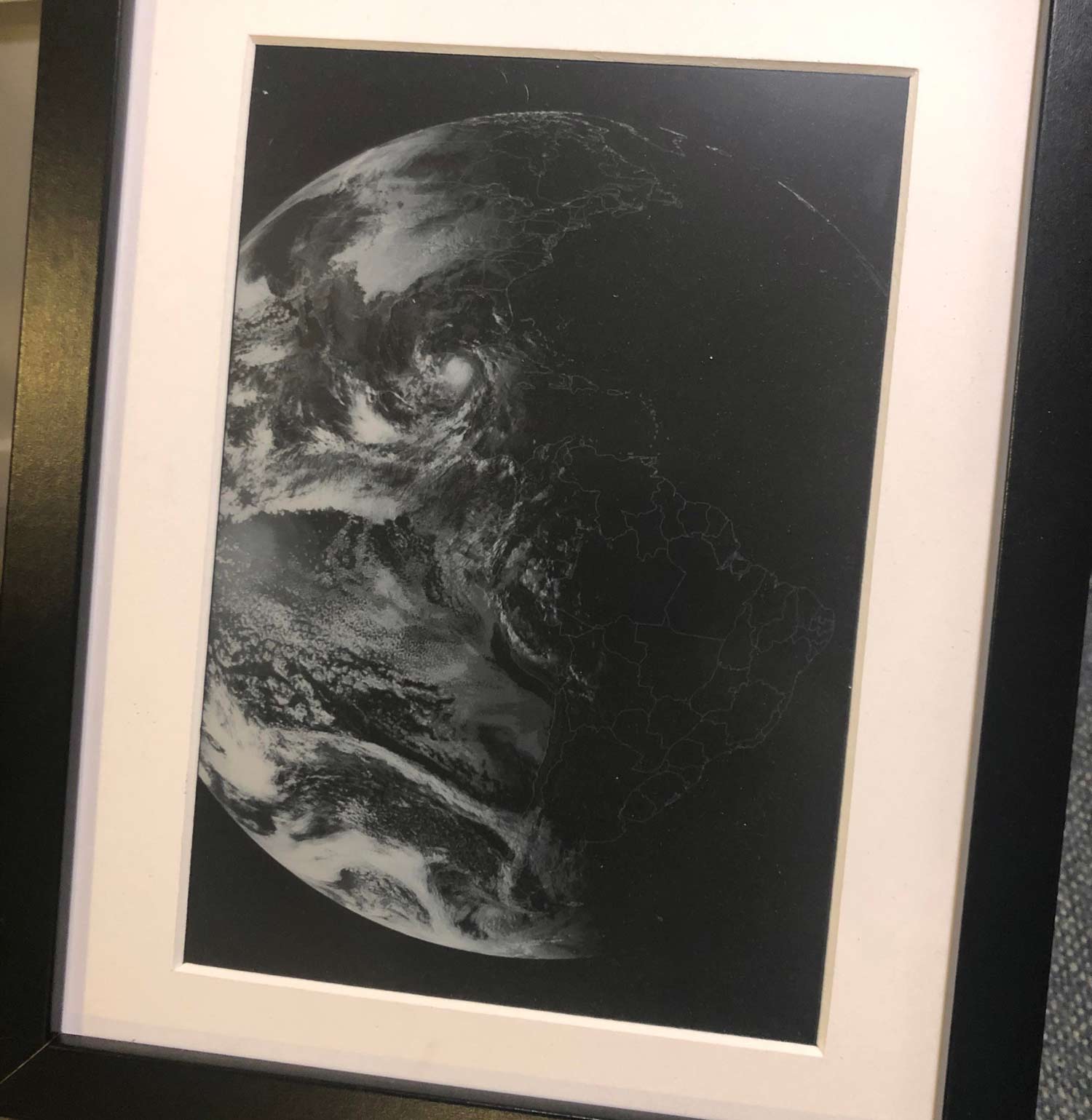
Thank you to a few users who have submitted links to u/ThePhotoChemist's Reddit post showing his e-ink display for his live GOES-16 weather satellite images. The post doesn't go into much detail about the setup, however it seems that he is using a Raspberry Pi, and displaying the images via a 9.7 inch E-Ink display which he notes does not come cheaply. He also notes that the resolution is quite low, and that it's limited to 16 shades of grey, however the images do still look good on it. The display is mounted into a picture frame which makes a very nice display piece.

If you're interested in receiving live GOES (or GK-2A) weather satellite images with an RTL-SDR we have a tutorial available here

An e-ink display with live GOES images from space

New GOES Weather Satellite Bundle from NooElec

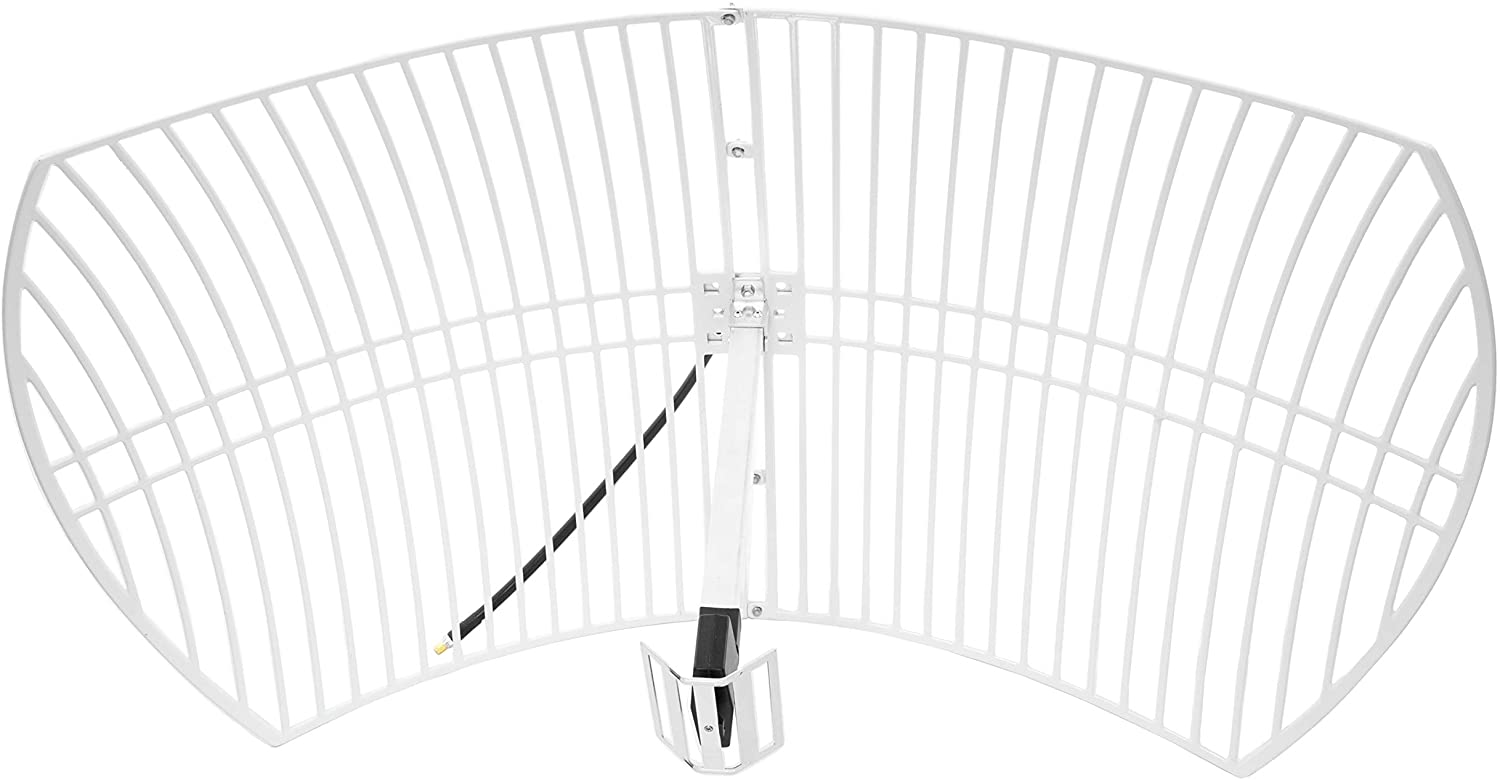
NooElec have recently released for sale a GOES geostationary weather satellite reception bundle which includes a parabolic grid dish, feed, GOES LNA and RTL-SDR dongle. The bundle should be usable for the GK-2A satellite, as well as HRIT from polar orbiting satellites, although for HRIT you'll need some way to motorize or hand track the satellites.

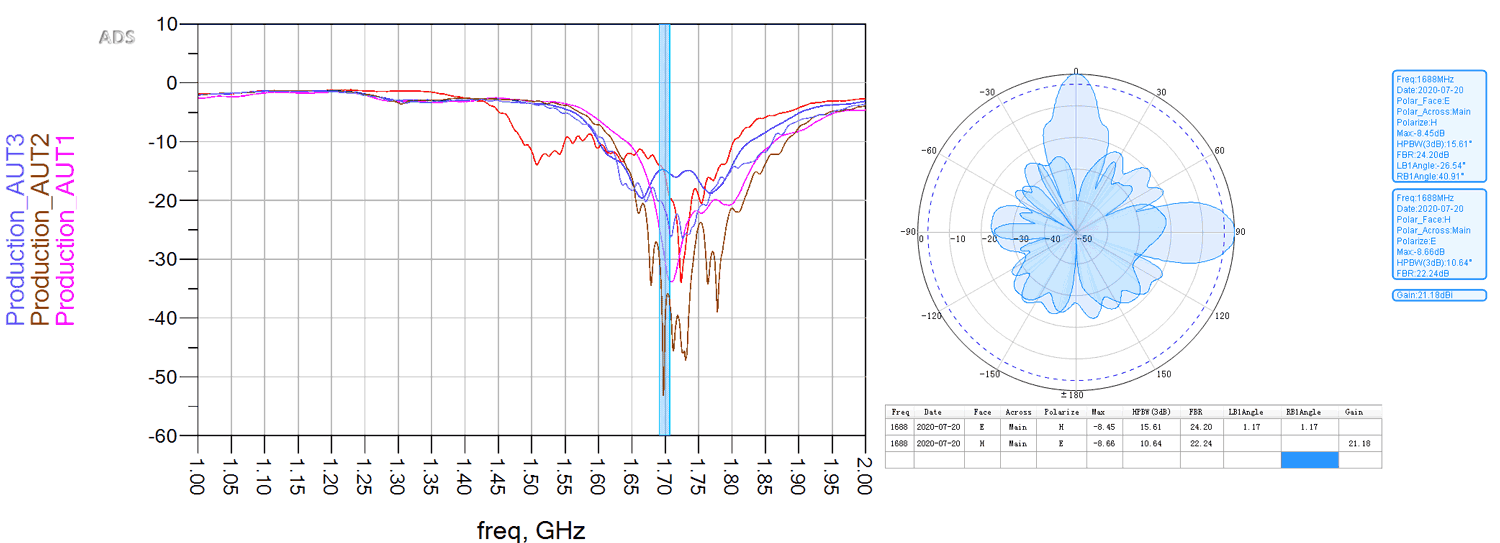
Typically to receive GOES a 2.4 GHz WiFi grid dish has been used in the past. While the mismatch between 2.4 GHz and the 1.7 GHz used by GOES doesn't cause too much trouble, the dish provided by NooElec has a feed optimized for the 1.7 GHz which should make receiving the signal easier. The bundle also comes with their SAWbird+ GOES LNA, one of their always ON bias tee E4000 tuner based RTL-SDR dongles and a roll of 10m LMR400 cable.

The bundle is currently available on Amazon USA priced at US$179.95. Canadian customers can also order from Amazon.ca for CDN$259.95. Amazon shipping is free within the USA, however shipping this overseas will cost at least US$100 extra due to the weight + additional import fees. That said, the coverage area of GOES is mostly only for the USA, Canada and South America.

If you're interested in GOES or GK-2A satellite reception we have a tutorial written here.

NooElec GOES DIsh
NooElec GOES Bundle Data

Sanchez Scripting Examples For Post-Processing GOES, GK2A, Himawari, Elektro Satellite Images

Recently we posted about new updates to the Sanchez software. The updates allow users to combine images received from multiple geostationary weather satellites such as GOES 16/17, Himawari-8, GK-2A and Electro. The images can also be reprojected into a flat equirectangular image, and then optionally reprojected back into a disk view at any location on earth. Sanchez's original function is also still there which allows users to add a false color underlay image to grayscale infrared images received from the satellites.

Sanchez is a command line tool, so scripts are required to do anything interesting. Over on his page Carl Reinemann has uploaded a page with a number of Sanchez command line examples available. The page shows examples like how to stitch together multiple images, and how to create a stitched time lapse animation. The YouTube video below shows an example of an animation Carl created with Sanchez and GOES 16 and 17 images stitched together.

GOES 16-17 Composite imagery

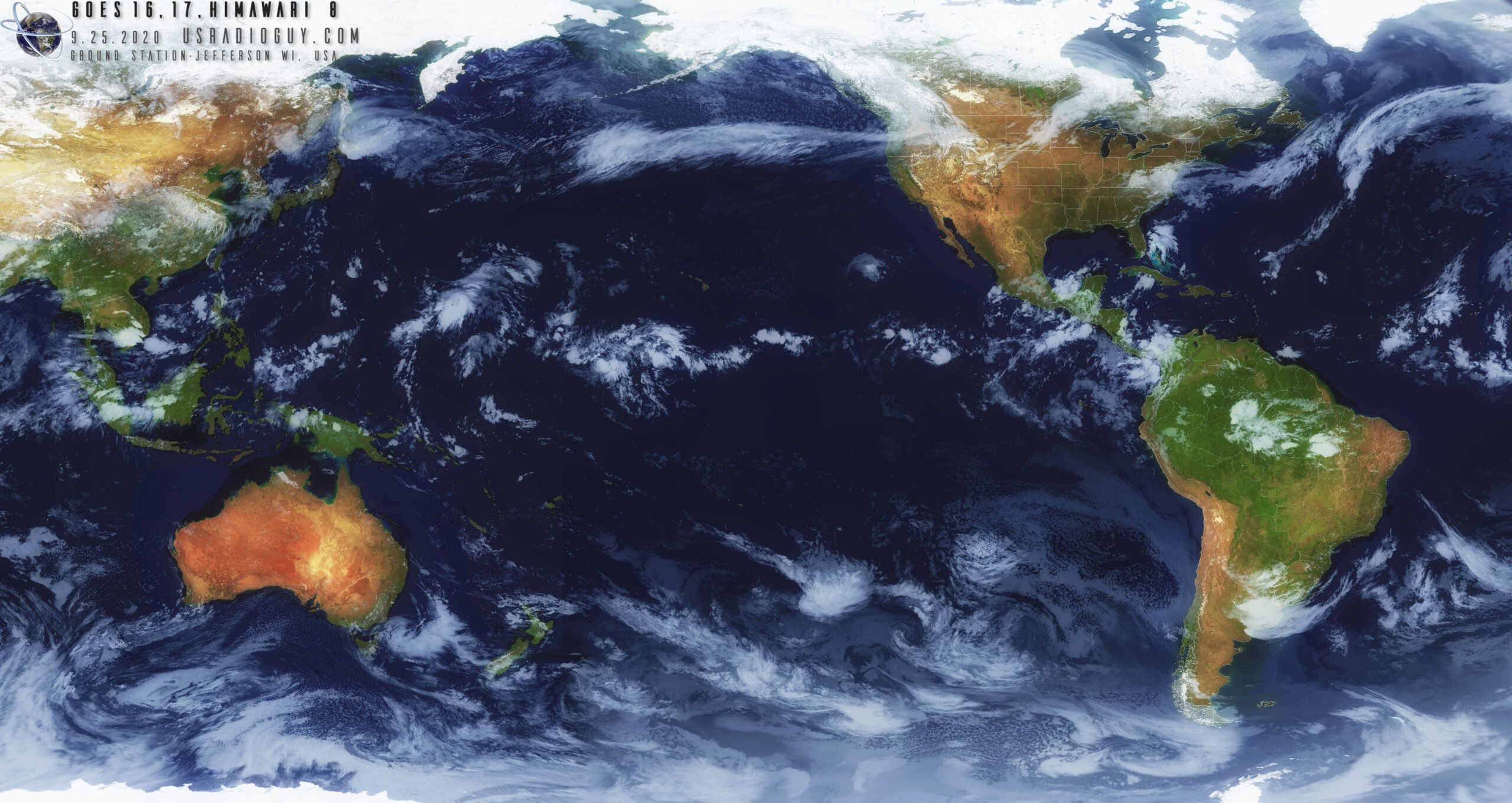
And the image below is an example of an image of Himawari 8, GOES 16 and 17 he stitched together with Sanchez.

GOES 16 and 17 composite created by Carl Reinemann via Sanchez

Sanchez Updates: Combine Weather Images from GK-2A, Himawari-8, GOES 16/17 Satellites into one Composite Image

Back in August we posted about the release of Sanchez, a tool originally designed to apply a color underlay image to grayscale infrared images received from geostationary weather satellites such as GOES 16/17, Himawari-8 and GK-2K. The tool has recently been updated with some very nice new features.

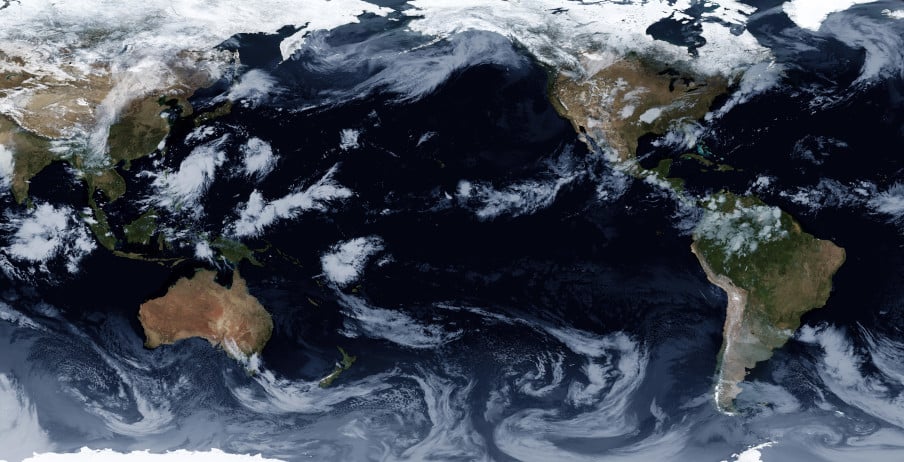
One of the new features is the ability to composite together images obtained from multiple satellites in order to form a full equirectangular image of the earth with live cloud cover. Another feature is the ability to use two or more images from different satellites to reproject back to geostationary projection at a specified longitude, essentially creating an image from a virtual satellite.

Image composed of GK-2A, Himawari-8, GOES-16 and GOES-17 satellites (full resolution images available at https://github.com/nullpainter/sanchez/wiki/Sample-images

Decoder for Geostationary Elektro-L Weather Satellites Released

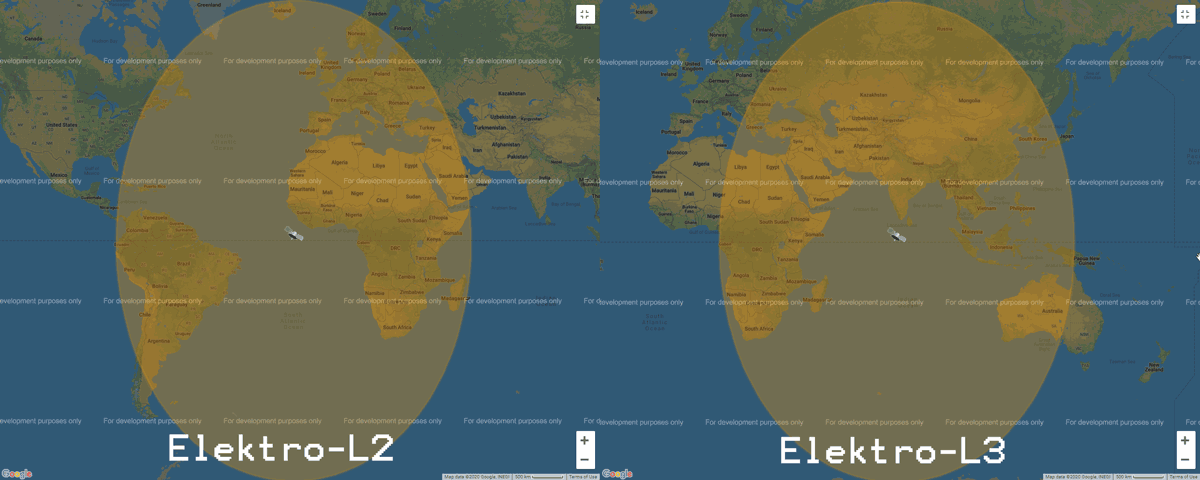
Elektro-L is a range of Russian geostationary weather satellites. Elektro-L1 and L2 were launched in 2011 and 2015 respectively, and Elektro-L3 was launched more recently in December 2019. Currently only Elektro-L2 and L3 are in operation. Like it's NOAA GOES, Himawari and GK-2A cousins, Elektro-L satellites beam back full disk images of the entire earth.  Elektro-L2 is positioned to cover South America, Africa and Europe, whilst Elektro-L3 covers the East of Africa, Eastern Europe, Russia, Middle East, Asia and the West of Australia.

Elektro L2 and L3 Coverage from https://www.wmo-sat.info/

Recently @aang254 has been Tweeting that he has managed to get an Elektro-L decoder working. The decoder is open source and available on GitHub and Windows builds are already available. He notes that he's still working on the demodulator, but that should be released tomorrow. This decoder is great news as now Europeans now have an opportunity to receive full disk images. There is no full guide yet on how to use the decoder, but we expect that one will be released soon.

We note that according to wmo-sat.info the Elektro-L satellites transmit at ~1693 MHz, and have a 2 MHz wide HRIT and 200 kHz wide LRIT mode. So the signals should be able to be received with an RTL-SDR and appropriate LNA. EDIT: Unfortunately it seems that wmo-sat.info may have incorrect information, and that Elektro-L requires X-Band hardware to receive these images. While not totally impossible, an X-Band satellite SDR setup is a bit more difficult to put together compared to the L-band SDR setup used by GOES and GK-2A.

Sanchez: Create False Colour Images from GOES/Himawari/GK-2A Infrared

With an RTL-SDR, an appropriate satellite antenna and LNA it is possible to receive visible light images from geostationary satellites such as GOES/Himawari and GK-2A. However, in a 24 hour cycle there will only be one or two images that show the Earth fully illuminated by the sun. The rest of the day parts or all of the Earth will be dark with not even clouds visible. To get around this the satellites also use an Infrared (IR) camera which can see clouds at all times. However, these images are greyscale and not very visually appealing.

To fix this aesthetic issue there is now a recently released multiplatform tool called "Sanchez" which will combine a high resolution underlay image with the greyscale IR image in order to create a more beautiful image. The software is command line based and can run on a batch of collected images.

False colour satellite images made by Sanchez

An Art Project Involving GOES-16 & NOAA Weather Satellite Reception with SDR

As part of his Masters in Design Studies studies Daniel Tompkins created an art installation called "signs of life" which was focused around his interest in weather satellite reception with an SDR.

FM radio headphones were given out at the door. Each set was tuned beforehand to receive a broadcast from my pre-programmed station.

Visitors were then invited to walk around the room, contemplating the artifacts of the exhibit. A V-dipole at one end of the room captures the broadcast and displays a real-time spectrogram of the radio waves on a small display.

Across the room, a satellite dish points back, creating an alignment across the projected GOES-16 "full-disk" image animation of the Earth. Along the back wall, a few dozen images show demodulated signals from the NOAA 15/18/19 satellites as they passed over Cambridge, Massachusetts in the months of October and November 2018.

The experience demonstrated my interest in tapping into an invisible (wireless) environment of digital information. A USB, software-defined radio (SDR) dongle helped me reach the satellites.

In listening to the transmission, the visitors are engaging in a shared experience, but are somehow still alone and unable to communicate while wearing their headphones. The performance of the exhibition is designed to be a place which simulates the real disconnection of techno-humanity. The "reflecting pool" of the earth spinning on the floor might provide a metaphorical reflection of humanity and progress.

Daniel Tompkins GOES-16/NOAA Art Installation

This installation reminds us of the "Holypager" live art piece which used a HackRF to receive and print out live pager messages with an aim to demonstrate the amount of personal data being sent publicly over pagers. Another related art piece was the "Ghosts in the Air Glow" project by Amanda Dawn Christie, which saw the HAARP Auroral research facility used to transmit various art pieces to be received from all over the world by people with HF radios. 

Tutorial on Using xrit-rx to Receive Weather Images from Geostationary Satellite GK-2A

Over on his website VKSDR has recently released a tutorial about his Linux based xirt-rx software which allows RTL-SDR and other SDR owners receive weather images from the geostationary satellite known as GEO-KOMPSAT-2A (GK-2A). GK-2A is a Korean satellite, hence it is positioned over the Asia-Pacific region, covering Asia, Eastern Russia, Australia and New Zealand. 

To receive images from GK-2A you'll need an RTL-SDR, 2.4 GHz WiFi grid antenna and an L-band LNA. We have an earlier tutorial about receiving GK-2A and GOES geostationary L-band satellites that goes into more detail about the hardware required. 

VKSDR's xrit-rx software decodes the Low Rate Information Transmission (LRIT) signal from GK-2A which provides a 64kbps data stream and full disk images of the earth every 10 minutes. His tutorial explains the various image types that are transmitted, shows a few example images, and shows that some smooth animations can be created with the 144 images received over a day. The rest of the tutorial goes into the software setup, and explains the installation and configuration procedure.

We note that the latest version of xrit-rx now also comes with a nice web based dashboard that allows you to view the latest image, as well as the upcoming image schedule.

Full Disk Images Received from GK-2A via XRIT-RX
Full Disk Images Received from GK-2A via xrit-rxThe new web based dashboard for xrit-rx

The new web based dashboard for xrit-rx