Tagged: sdr#

SDR# TETRA Plugin Updated: No longer requires MSYS2

Last week we posted about the release of a new TETRA decoder plugin for SDR#. The plugin made setting up a TETRA decoder significantly easier compared to previous methods, but it still required the installation and use of the MSYS2 environment on Windows. 

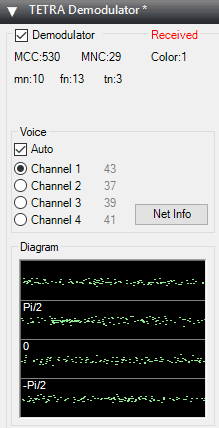
Thanks to reader Zlati for letting us know that the TETRA plugin has recently been updated once again and now no longer requires MSYS2 to be installed first. Now it is as easy to install as any other plugin, just drop the .dlls into the SDR# folder and add the magicline to the plugins.xml file. We tested it out and decoding worked fine. At the moment the "Net info" button is not working however.

x64 plugin: https://yadi.sk/d/StPod0Op3SkpKh
x86 plugin: https://yadi.sk/d/f0SS97Rb3SoyNr

New Link: http://rtl-sdr.ru/page/obnovlen-meteor-i-tetra-plagin

In the future news and download lines for newer versions will probably be available on the programmers radioscanner.ru forum thread which is available here (use Google Translate to read): http://www.radioscanner.ru/forum/topic50051-9.html

Updated TETRA Decoder Plugin

Building an IcoBoard FPGA based Software Defined Radio

The IcoBoard is an FPGA IO board that is compatible with the Raspberry Pi. An FPGA (Field Programmable Gate Array) is a silicon chip that can implement custom digital circuits (such as DSP processors) and be reconfigured with different circuits many times. Other silicon chips are ASICs (application specific integrated circuit) which have circuits that are set in stone.

Over on YouTube OpenTechLab has been trying to create a software defined radio with his IcoBoard FPGA. To do this he's combined it with an audio A2D/D2A (analog-to-digital/digital-to-analog) converter board and a Raspberry Pi. The video goes through the entire design process, including A2D/D2A selection and purchasing, PCB adapter design in KiCad, soldering the PCB, as well as 3D printing a frame.

In the last part of the video he does a simple test where a signal is input into the A2D converter, converted to digital and processed by the FPGA. The circuitry programmed into the FPGA then simply outputs the received data to the D2A which converts it back into an analog signal. In the next steps of the project OpenTechLab hopes to work on the software and turn it into a full SDR. Show notes for the video are available here.

[014] IcoBoard Software Defined Radio Project - Hardware

SDR# Tuner Knob, Night Mode and FFT Grabber Plugins have a new home

Recently we've posted about Eddie MacDonald's several releases of new plugins for the popular SDR# software. Recently he's released a tuner knob plugin which provides a visual frequency tuning knob that is useful for those running on touchscreen hardware, a 'dark mode' plugin which reduces the brightness of SDR# and compresses the UI a little, and an FFT grabber plugin which allows for easy screenshots of the FFT and waterfall spectrum's to be taken.

Eddie notes that all his plugins now have an actual home website at https://sdrplugins.com. This is where he will release updates and new plugins from now on.

If you are interested in discovering more SDR# plugins, we have a large list available here.

Tuner Knob Plugin for SDR#

SDR# Plugin: FFT Window Screen Grabber

Recently Eddie MacDonald has been pumping out simple but useful plugins for SDR# including the SDR# Dark Mode and Visual Tuner Knob plugins. Recently he released a new plugin called "FFT Window Screen Grabber". This plugin simply helps you to easily take a screenshot of the FFT and waterfall displays in SDR#. It could be a useful plugin if you are constantly finding interesting signals that you want to document, or upload to sigidwiki.com.

The plugin can be downloaded from his thread in our forums. Note: Updated plugins now available at https://sdrplugins.com.

FFT Window Screen Grabber example screenshot

SDR# Dark Mode Plugin

A few days ago Eddie MacDonald released his Tuner Knob plugin for SDR#. Today he's released a new plugin called "SDR# Dark Mode" over on our forums. This plugin is very simple in that is just makes the SDR# interface black, which should be better on the eyes those using the app at night. The plugin also adds two other options which allow you move the tuning toolbar to the bottom of the screen and remove all padding to save some screen space. The three options in the plugin are:

"Night Mode" or "Regular Mode" - allowing the app to be black or not
"Bottom Tool Bar" - allows you to place the radio control tool bar on the top or bottom of the app
"Remove Padding" - remove the 10px border around all the controls giving you a tiny amount of more workable space.

The plugin can be downloaded from the file uploaded on the third post on the announcement thread. Note: Updated plugins now available at https://sdrplugins.com.

Normal Mode
Dark Mode + Remove Padding
Dark Mode + Remove Padding + Toolbar on Bottom
Normal Mode Dark Mode + Remove Padding Dark Mode + Remove Padding + Toolbar on Bottom

SDR# TETRA Plugin Updated: No longer requires MSYS2

Last week we posted about the release of a new TETRA decoder plugin for SDR#. The plugin made setting up a TETRA decoder significantly easier compared to previous methods, but it still required the installation and use of the MSYS2 environment on Windows. 

Thanks to reader Zlati for letting us know that the TETRA plugin has recently been updated once again and now no longer requires MSYS2 to be installed first. Now it is as easy to install as any other plugin, just drop the .dlls into the SDR# folder and add the magicline to the plugins.xml file. We tested it out and decoding worked fine. At the moment the "Net info" button is not working however.

x64 plugin: https://yadi.sk/d/StPod0Op3SkpKh
x86 plugin: https://yadi.sk/d/f0SS97Rb3SoyNr

New Link: http://rtl-sdr.ru/page/obnovlen-meteor-i-tetra-plagin

In the future news and download lines for newer versions will probably be available on the programmers radioscanner.ru forum thread which is available here (use Google Translate to read): http://www.radioscanner.ru/forum/topic50051-9.html

Updated TETRA Decoder Plugin

Building an IcoBoard FPGA based Software Defined Radio

The IcoBoard is an FPGA IO board that is compatible with the Raspberry Pi. An FPGA (Field Programmable Gate Array) is a silicon chip that can implement custom digital circuits (such as DSP processors) and be reconfigured with different circuits many times. Other silicon chips are ASICs (application specific integrated circuit) which have circuits that are set in stone.

Over on YouTube OpenTechLab has been trying to create a software defined radio with his IcoBoard FPGA. To do this he's combined it with an audio A2D/D2A (analog-to-digital/digital-to-analog) converter board and a Raspberry Pi. The video goes through the entire design process, including A2D/D2A selection and purchasing, PCB adapter design in KiCad, soldering the PCB, as well as 3D printing a frame.

In the last part of the video he does a simple test where a signal is input into the A2D converter, converted to digital and processed by the FPGA. The circuitry programmed into the FPGA then simply outputs the received data to the D2A which converts it back into an analog signal. In the next steps of the project OpenTechLab hopes to work on the software and turn it into a full SDR. Show notes for the video are available here.

[014] IcoBoard Software Defined Radio Project - Hardware

SDR# Tuner Knob, Night Mode and FFT Grabber Plugins have a new home

Recently we've posted about Eddie MacDonald's several releases of new plugins for the popular SDR# software. Recently he's released a tuner knob plugin which provides a visual frequency tuning knob that is useful for those running on touchscreen hardware, a 'dark mode' plugin which reduces the brightness of SDR# and compresses the UI a little, and an FFT grabber plugin which allows for easy screenshots of the FFT and waterfall spectrum's to be taken.

Eddie notes that all his plugins now have an actual home website at https://sdrplugins.com. This is where he will release updates and new plugins from now on.

If you are interested in discovering more SDR# plugins, we have a large list available here.

Tuner Knob Plugin for SDR#

SDR# Plugin: FFT Window Screen Grabber

Recently Eddie MacDonald has been pumping out simple but useful plugins for SDR# including the SDR# Dark Mode and Visual Tuner Knob plugins. Recently he released a new plugin called "FFT Window Screen Grabber". This plugin simply helps you to easily take a screenshot of the FFT and waterfall displays in SDR#. It could be a useful plugin if you are constantly finding interesting signals that you want to document, or upload to sigidwiki.com.

The plugin can be downloaded from his thread in our forums. Note: Updated plugins now available at https://sdrplugins.com.

FFT Window Screen Grabber example screenshot

SDR# Dark Mode Plugin

A few days ago Eddie MacDonald released his Tuner Knob plugin for SDR#. Today he's released a new plugin called "SDR# Dark Mode" over on our forums. This plugin is very simple in that is just makes the SDR# interface black, which should be better on the eyes those using the app at night. The plugin also adds two other options which allow you move the tuning toolbar to the bottom of the screen and remove all padding to save some screen space. The three options in the plugin are:

"Night Mode" or "Regular Mode" - allowing the app to be black or not
"Bottom Tool Bar" - allows you to place the radio control tool bar on the top or bottom of the app
"Remove Padding" - remove the 10px border around all the controls giving you a tiny amount of more workable space.

The plugin can be downloaded from the file uploaded on the third post on the announcement thread. Note: Updated plugins now available at https://sdrplugins.com.

Normal Mode
Dark Mode + Remove Padding
Dark Mode + Remove Padding + Toolbar on Bottom
Normal Mode Dark Mode + Remove Padding Dark Mode + Remove Padding + Toolbar on Bottom

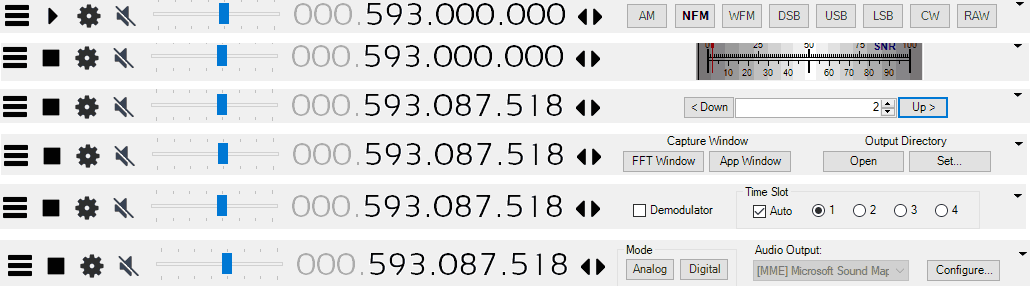
Visual Tuner Knob Plugin for SDR#

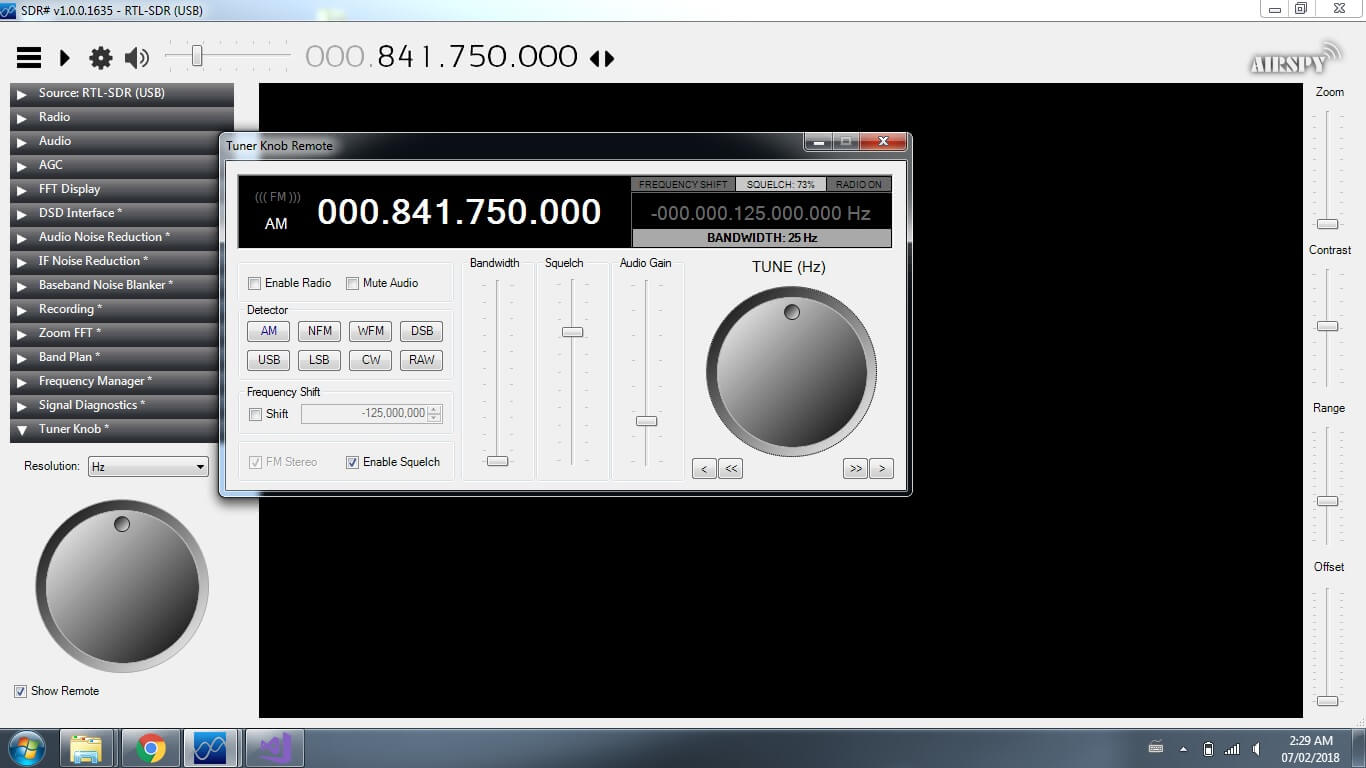
Thank you to Eddie MacDonald for submitting his new SDR# plugin to us via our forums. Eddie's plugin is called the 'Tuner Knob Plugin', and simply enables a visual tuner knob on the screen for adjusting the frequency. This plugin could be useful especially for those running SDR# on touchscreen tablets or laptops. To install the plugin copy the .dll file to the SDR# directory and copy and paste the magicline.txt into the plugins.xml file. We tested the plugin on our PC and found it to run well.

We have uploaded the plugin here for all to download. Note: Updated plugins now available at https://sdrplugins.com.

Eddie writes about the plugin:

Programming the plugins is not so easy considering their is very little documentation and few examples on the net. There may be a few bugs I have not caught (but i hope i have caught them all.)

This DLL was compiled and tested on a Windows 7 x64 machine and the DLL is compiled for both x86 and x64 platforms. I have tested it on SDR# Version v1.0.0.1635

I am not certain which previous versions it may or may not run on. However, being built on the 4.6 .Net framework it should work with Win7 on.

I built this plugin because i got tired of holding down buttons and waiting for the frequency changes. I figured this was a simpler method (even though some people hate rotary style controls on windows) It works exceptionally well with a touch screen.

As previously mentioned in the forum post I created the 'remote' to test my programming for future plugins for DSP

While some may not find a use for the remote I made it this way for my wife who like to cruise the dial and just see what she can pick up.

Tuner Knob Plugin for SDR#

TETRA Decoder Plugin for SDR# Now Available

Back in 2016 cURLy bOi released a Windows port of the Linux based "Telive" TETRA decoder. Now the latest development in TETRA decoders is that a TETRA decoder plugin for the SDR# software has been released. This makes setting up a TETRA decoder significantly simpler than before.

The plugin doesn't seem to be officially released anywhere, but we did find it thanks to @aborgnino's tweets on Twitter, and he found it on a Russian language radio scanner forum. The plugin is available as a direct download zip from here, but we suggest browsing to the last few posts in the forum thread to find the latest version.

Installing the plugin is a little more difficult that usual, as you first need to install MSYS2 which is a compatibility layer for Linux programs. The full installation instructions are included in the README.TXT in the zip file. One clarification from us: you need to copy the files in the msys_root/usr/bin folder from the zip file into the /usr/bin folder that is in your MSYS2 installation directory. 

We tested the plugin and found it to work well without any problems. With the plugin turned on you just need to simply tune to a TETRA signal in WFM mode, and you will instantly be decoding the audio.

TETRA is a type of digital voice and trunked radio communications system that stands for “Terrestrial Trunked Radio”. It is used heavily in many parts of the world, except for the USA. If you have unencrypted TETRA signals available in your area then you  can listen in on them with an appropriate SDR like an RTL-SDR and decoder software like the aforementioned plugin.

SDR# TETRA Plugin Running

New Audio Streaming TCP Server Plugin for SDR#

Over on his site rtl-sdr.ru, Vasilli has been back at work creating new plugins for SDR#. The latest plugin is a TCP server that takes the demodulated mono audio stream from SDR# and sends it over TCP (note that the site is in Russian but the Google translate button on the right can be used). This can be used to easily stream audio over the internet or a network, or even locally on the same PC to another program. If enough programs support TCP audio streams, then the plugin could potentially replace the need for software like Virtual Audio Cable or VBCable by allowing another method for piping the audio from SDR# into a decoding program.

Installing the plugin is the same as usual. Just extract the SDRSharp.TcpServer.dll file to the SDRSharp folder, open plugins.xml with a text editor and paste in the 'magic line' specified in MagicLine.txt.

To test the server you can connect to it with VLC media player. Some special commands need to be specified to VLC in order for it to understand the audio format. To enter them go to Media->Open Network Stream and make sure 'Show more options' is checked. Enter the network URL as 'TCP://127.0.0.1:20022' (without quotes), and enter the Edit Options field as ':demux=rawaud :rawaud-channels=1 :rawaud-samplerate=48000 :rawaud-fourcc=s16l' (without quotes). Ensure the first colon in the line is copied over properly. Then enable the TCP server in the SDR# plugin, and click Play in VLC. Ensure the SDR# is muted, and the volume in VLC turned up. Audio should now begin streaming through TCP.

Hopefully in the future we can see some audio compression algorithms and more decoding software supporting TCP audio connections.

Vasilli has also updated many of his other plugins too, including creating a DSD_TCP plugin which allows you to transmit the digital audio directly to DSD+ via a TCP connection.

The plugin streaming via TCP to VLC