Over on YouTube user Orlando Lima shows reception of the SO-50 Saudisat 1C satellite. Saudisat is an amateur radio satellite with an FM radio repeater. Orlando listened to the downlink frequency at 436.795 MHz using an RTL-SDR, Yagi antenna and Orbitron software to track the downlink frequency in SDR#.
Over on YouTube user k2nccvids has posted two videos showing how he was able to decode High Frequency Data Link (HFDL) packets using the RTL-SDR, Ham-it-up upconverter, MultiPSK and HFDL Display. HFDL is a service similar to ACARS but sent over HF frequencies. It is used to sent short messages to and from aircraft and ground stations.
In the first video k2nccvids uses MultiPSK with the RTL-SDR directly and also uses the add on software HFDL Display to more clearly view received HFDL packets. In the second video he uses SDR-CONSOLEv2 to monitor three HFDL frequencies simultaneously, with MultiPSK and HFDL Display still being used for decoding and display.
Over on YouTube user k2nccvids has posted a short video showing the Logic Trunked Radio (LTR) Analyzer software working with SDR# and the RTL-SDR. Logic Trunked Radio is a type of radio trunking system that uses distributed control channels modulated into the analogue voice channel instead of using just one signal control channel.
The popular trunking decoding software Unitrunker now supports the RTL2832U R820T RTL-SDR directly in its new version. This means that extra SDR receiver software like SDR# is no longer required to use Unitrunker.
In a normal radio system, one company (or talkgroup) might use a single frequency for radio communications. However, this is very inefficient as the frequency may not be in use for the majority of the time. In a trunked radio system, a small set number of frequencies are shared between a large number of talkgroups. Each radio receives a special computer controlled control channel. The control channel determines a vacant frequency that a particular talkgroup should use. This helps to make radio frequency allocations more efficient.
Because a talkgroup might switch between various frequencies often, it can make listening to a conversation difficult for radio scanners. Unitrunker can be used to decode the control channel and follow a voice conversation as it hops across various frequencies. With two RTL-SDR dongles you can set up a trunking receiver station with just Unitrunker. What follows below is a tutorial on how to set this up.
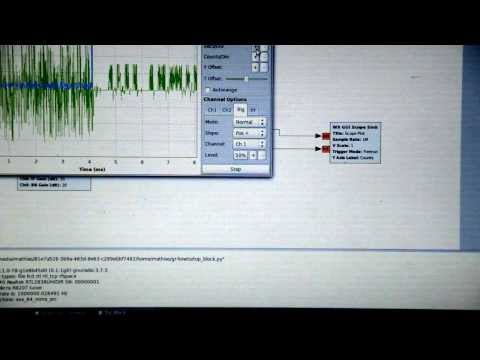
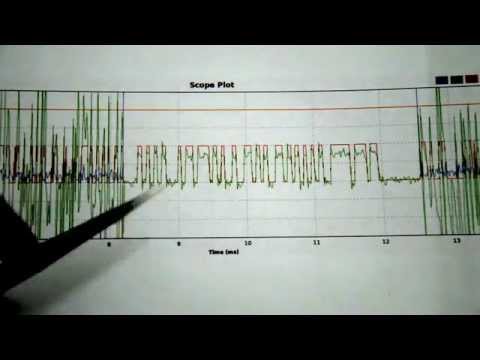
Over on YouTube user MrCircuitMatt has uploaded two videos on how he was able to decode a temperature weather sensor using an RTL-SDR and GNU Radio. His videos go through the GNU Radio technical steps as well as the signal encoding theory he used to decode the temperature.
Using RTL-SDR to read temperature from outdoor sensor, part 1
Using RTL-SDR to read temperature from outdoor sensor, part 2
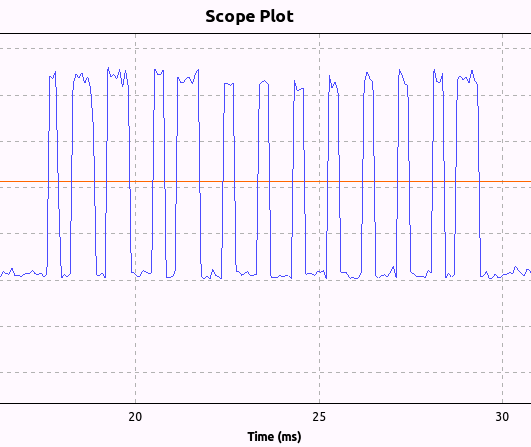
Using an RTL-SDR Clayton Smith was able to reverse engineer his remote controlled ceiling fan. To do this he first used his BladeRF to determine that the remote control was transmitting a signal at 303.747 MHz. He then used a simple GNU Radio flow graph with the RTL-SDR to plot the amplitude of the signal over time which suggested that the signal was using on-off keying. From the plot he was then able to visually determine the bit pattern sent from each button on the ceiling fan remote.
Next he used his bladeRF and another GNU Radio flowgraph to replicate and transmit the the bit pattern which was able to control the ceiling fan from the PC.
Clayton notes that all this reverse engineering was done in half an hour, demonstrating the power of software defined radio.
Ceiling Fan Bit Pattern Recovered with an RTL-SDR and GNU Radio
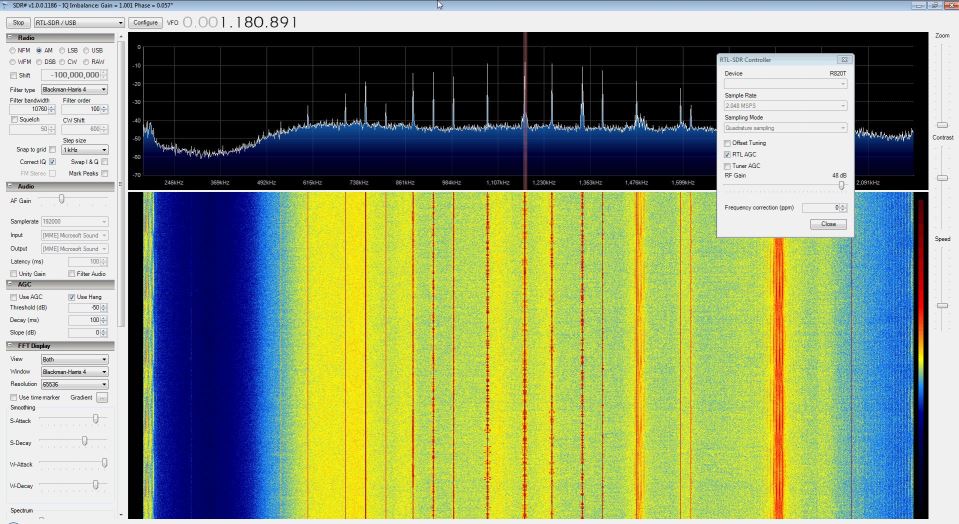
The direct sampling mod is a hardware modification to the RTL-SDR which allows it to receive HF frequencies between 0-14.4 MHz without the need for an upconverter. It works by connecting an antenna directly to the RTL2832U chip, thus bypassing the tuner. Teejez’s modification tells the RTL-SDR to bypass the tuner in software, allowing antennas to be connected to the normal antenna port. HF reception with the experimental driver is very poor in comparison to the direct sampling hardware mod or an upconverter, but even so Jengal was able to receive AM Radio, an SSB ham radio signal and an HF weather report with a simple longwire antenna.
To use the modified dll, simply download it from this link, rename it to rtlsdr.dll, and replace the original rtlsdr.dll in the SDR# folder. Then connect an HF antenna to the normal antenna port and in SDR# tune to a frequency between 0-14.4 MHz. Next turn ON the RTL AGC option in the configure menu. Jengal replaced the function of the RTL AGC option with the direct sampling mod. He found that best reception occurred when he set the gain to 48 dB.
No Hardware Mod Direct Sampling in SDR# Receiving AM Radio
YouTube user k2nccvids has posted a video showing him decoding and plotting both AIS channels simultaneously on a Windows PC with free software. To do this he uses SDR Console and two AISMon instances. SDR Console is a general purpose SDR GUI that supports the RTL-SDR. One of it’s major advantages over other SDR software is that it can tune to multiple signals in the same swath of tuned bandwidth simultaneously and output their audio to different virtual audio cables.
k2nccvids used two AISMon instances, each one connected to a separate virtual audio cable outputting AIS audio from SDR Console. He set AISMon to output decoded UDP packets on two different ports. Then he created two UDP listeners in OpenCPN for plotting, one for each port.