Category: Applications

Passive Doppler Aircraft Scatter with a VOR Beacon and an RTL-SDR

Over on YouTube Meine Videokasetten has posted a video showing how he's been using an RTL-SDR to detect aircraft landing and taking off via the scatter on a VOR beacon. VOR (aka VHF Omnidirectional Range) is a navigational beacon that is transmitted between 108 MHz and 117.95 MHz from a site usually at an airport. Although as it is an older technology it is slowly being phased out in some places. 

An interesting observation can be made that is unrelated to the actual operation and use of VOR navigation. When an aircraft passes near the VOR beacon it results in the signal reflecting and scattering off the metal aircraft body. As the aircraft is moving quickly, it also results in a frequency doppler shift that can be seen on an RF waterfall display.

In his video Meine Videokasetten uses an RTL-SDR and OpenWebRX to receive the VOR signal. He then pipes the audio output of that signal into Speclab which allows him to get significantly increased FFT resolution for the waterfall. This increased resolution allows him to clearly see the doppler scattering effects of aircraft on the VOR transmission. He notes that it's possible from the scattering to determine if an aircraft is taking off or landing.

Passive doppler radar on VOR beacon transmitter .:°:. A let's test it out

We note that back in 2015 we posted about the ability to "fingerprint" aircraft using this technique. Different types of aircraft will result in unique patterns on the waterfall. In that post they used analogue TV carriers which are not very common in most countries anymore, so it's good to see that this can be used with VOR signals too.

Comparing large and small aircraft with aircraft scatter
Comparing large and small aircraft with aircraft scatter with an analogue TV transmitter. From previous post.

Solving a Frequency Hopping CTF Challenge with Aliasing

At this years BSides Ottawa security conference, Clayton Smith was tasked with setting up a wireless "Capture the Flag" (CTF) competition. CTF competitions generally consist of a mystery signal that participants need to figure out how to decode with an SDR such as an RTL-SDR. 

One CTF that Clayton set up was a frequency hopping challenge with several levels of difficulty. The signal consisted of a narrow band FM signal that constantly hopped between multiple fixed frequencies. The idea was to use whatever means possible to piece together that signal again so that the speech audio could be copied.

The first level had the audio signal hopping very slowly, so the speech could be pieced together manually by listening by ear to each channel it transmitted on. Subsequent levels had the signal hopping much faster, so they required some DSP work to piece everything back together.

In his post Clayton writes about three possible GNU Radio based DSP solutions to the problem. The first method he describes is an interesting method that abuses the effects of aliasing. Aliasing is a problem in SDRs when a signal can be folded on top of another, creating interference. However, this approach makes use of aliasing to purposely fold the hopping channels into one frequency, resulting in speech that can be copied.

The rest of his post explains two other methods that could be used as well. The second method involves treating the entire band consisting of the hopping signals as a single FM signal, then filtering it with a DC block. The third approach uses FFT to detect which channel is active with the highest power, then shifting that channel by it's offset.

Spectrum of the frequency hopping CTF challenge.

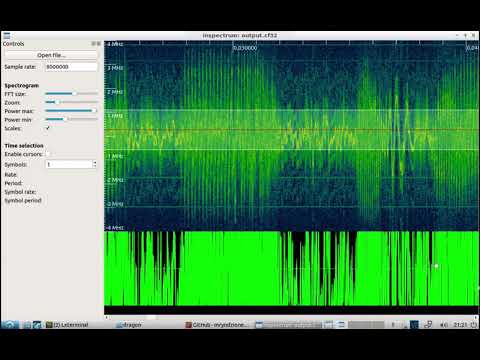
Clayton also set up another CTF with gr-paint. The idea was to read text on a "painted" waterfall with ever decreasing text spacing that would eventually be too small to read on standard SDR programs like GQRX. Instead, the solution was to open the IQ data in a tool like Inspectrum or Baudline which has much higher FFT resolution. 

Gr-Painted spectrum with decreasing text.
Gr-Painted spectrum with decreasing text spacing.

Decoding Differential GPS (DGPS) with an RSPdx and MultiPSK

Over on YouTube the TechMinds channel has uploaded a new video about decoding Differential GPS (DGPS) using an SDRplay RSPdx SDR. DGPS is a terrestrially transmitted long wave signal that is used to help correct and improve GPS position data calculations which may have timing errors due to atmospheric propagation delays. It works by broadcasting correction data calculated by the difference in received GPS location and the known location of the DGPS transmission site. DGPS is typically transmitted on longwave between 285 kHz and 315 kHz, but in Argentina there are two stations at 2570 and 2950 kHz.

In the video TechMinds explains how DGPS works, and some location around the world from where it is transmitted from. Later in the video he shows a DGPS signal being received by a SDRplay RSPdx SDR, and then show a demo of how it can be decoded with MultiPSK.

We note that there also various other DGPS decoders available including decoders for Android and iOS. A list of decoders can be found on the DGPS sigidwiki page.

DGPS Differential GPS Decoding With RSPdx And MultiPSK

Coole-Radar: A Retro Terminal Based Radar Display for ADS-B Aircraft Data

John Wiseman has been working on a cool old-school retro styled aircraft ADS-B radar that runs entirely within a terminal window. So no GUI desktop should be required. The project, called "coole-radar", is available as open source code on GitHub.

It takes decoded ADS-B data via a Virtual Radar Server webpage, so it should be fairly easy to set up together with an RTL-SDR and dump1090 that feeds Virtual Radar Server. The latest version displays a radar screen with decay-like effect, a list of currently detected aircraft, and a pixelated screen of the aircraft image downloaded from the internet.

Networked Radio Direction Finding with KerberosSDR and RDFMapper

We've just uploaded a short Python script to GitHub that allows radio direction bearings from a KerberosSDR to be used with the RDF Mapper software created by Jonathan Musther. RDF Mapper is a (~US$25) program that was initially written for the RDF42, a kit based doppler direction finding system. RDFMapper runs on Windows/MacOS and Linux.

KerberosSDR is our experimental 4-Tuner Coherent RTL-SDR product made in collaboration with Othernet. It can be used for applications such as radio direction finding and passive radar. Currently it's available for US$149 on the Othernet store.

The RDF Mapper software allows you to upload bearings from multiple devices distributed around a city to a public RDF server, and view all the bearings on any internet connected PC. This can allow you to quickly triangulate the location of a transmitter.

Normally you would use RDFMapper combined with an RDF42 to upload bearings, but we've written a simple script that can be used to upload bearings generated by a KerberosSDR onto the server. The RDFMapper software can then be used to visualize those bearings.

The script is based on Python, and can run directly on the Pi 3/4 or Tinkerboard that is running the KerberosSDR, or on another PC that can see the KerberosSDR bearing server if you prefer.

Instructions are available on the GitHub page. Simply set unique station names for each of your distributed units, entry your lat/lon and fixed direction bearing. Then on the RDF Mapper software open the 'Web upload/download' tab and add the unique station ID name. All the other tabs for connecting to a GPS and serial port can be ignored, as those are used for the RDF42.

This script will only work for stationary KerberosSDR units as the lat/lon is fixed. If you want to try radio direction finding in a vehicle, we recommend using our Android App for a better experience. If there is interest, we may also add support for the Android app to upload to an RDFMapper server for mobile bearing uploads. 

Notes: RDFMapper runs on the system's default browser and it needs to run in either Chrome or Firefox to work. IE does not work. It also appears that Jonathan processes orders manually, so we just want to note that there may be a delay between payment and receiving the software.

RDF Mapper Software. Data from networked units.
RDF Mapper Software. Plotting bearing data from networked units.

TechMinds Reviews our RTL-SDR Blog L-Band Patch Antenna + Horn & Dish Mod

Over on YouTube the TechMinds YouTube channel has uploaded a review of our RTL-SDR Blog L-Band patch antenna which we recently released. TechMinds tests the antenna on a STD-C Inmarsat channel with the Scytale-C decoder, and on various AERO ACARS transmissions with JAERO. Later in the video he also tests the patch antenna on Iridium reception using the Iridium Toolkit software. In all tests the patch is able to suitably receive the signal with either an RTL-SDR or Airspy SDR.

We also wanted to make a note about an additional tip regarding polarization that many people using the antenna seem to have missed. As Inmarsat signals are LHCP polarized, it is important to not only point the antenna towards the satellite, but also to rotate the antenna to match the polarization until maximum SNR is achieved. The rotation can make the difference between strong signals and nothing received at all.

RTL-SDR Active L-Band Patch Antenna For Inmarsat / Iridium / GPS

We've also recently seen a user 'Bert' who has needed to boost the signal strength as he was running the patch inside and at a location in northern Europe with poor reception of Inmarsat. To boost it he simply added a metal horn over the patch made from an old aluminum box, and also a back plate reflector. He notes that this improved his SNR on AERO 10500 from 8 - 9 dB, up to 12 - 14 dB. He also tested using the patch on a dish antenna, and found very good results too.

Aluminum Horn Added to L-Band Patch
L-Band Patch Antenna on Dish

cuSignal: Easy CUDA GPU Acceleration for SDR DSP and Other Applications

The RAPIDS cuSignal project is billed as an ecosystem that makes enabling CUDA GPU acceleration in Python easy. Scipy is a Python library that is filled with many useful digital signal processing (DSP) algorithms. The cuSignal documentation notes that in some cases you can directly port Scipy signal functions over to cuSignal allowing you to leverage GPU acceleration.

In computing, most operations are performed on the CPU (central processing unit). However, GPU's (graphical processing units) have been gaining popularity for general computing as they can perform many more operations in parallel compared to CPUs. This can be used to significantly accelerate DSP code that is commonly used with SDRs.

In particular the developers have already created a notebook containing some examples of how cuSignal can be used with RTL-SDRs to accelerate an FFT graph. There are various other DSP examples in the list of notebooks too. According to the benchmarks in the notebooks, the GPU computation times are indeed much faster. In the benchmarks they appear to be using a high end NVIDIA P100 GPU, but other NVIDIA graphics cards should also show a good speedup. 

The cuSignal code is based on CUDA, so for any GPU acceleration code to work you'll need to have an NVIDIA based GPU (like a graphics card) with a Maxwell or newer core.

We note that in the future we'll be investigating how this could be used to speed up the passive radar algorithms that are used in the KerberosSDR. It may also be useful for running DSP code quickly on a $99 NVIDIA Jetson Nano single board computer.

NVIDIA Tesla P100. A high end $3000+ GPU.

Creating An Automated Raspberry Pi and RTL-SDR Based NOAA Weather Satellite Station

The nootropicdesign blog has recently uploaded a comprehensive tutorial showing how to create an automated NOAA Weather Satellite ground station using an RTL-SDR V3 and an Raspberry Pi 3. The project also makes use of an Amazon S3 bucket, which is a cheap web storage platform that allows you to store and access the downloaded images.

The tutorial starts by showing you how to set up your Amazon AWS credentials and bucket on the Raspberry Pi, and how to host a simple webpage that can be accessed publicly. The second stage shows how to set up the RTL-SDR drivers and wxtoimg which is used to decode the images. Finally, the third stage shows how to create the automation scripts that automatically schedule a decode, and upload images to the AWS bucket.

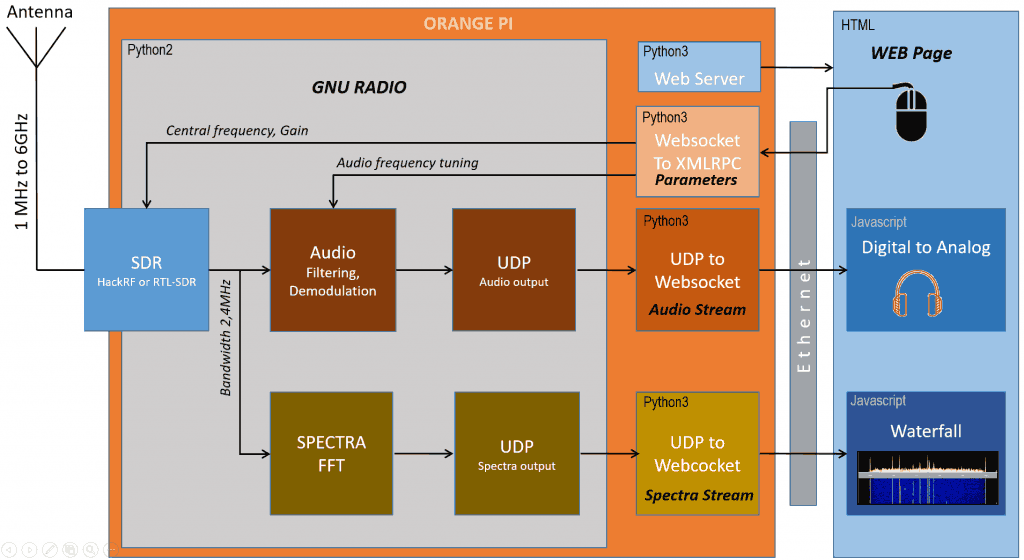
Flowgraph for an automated NOAA satellite weather image station.