Category: Satellite

Meteor M-N1 Still Working, Meteor M-N2 Still Down

The Meteor M N-2 is a polar orbiting Russian weather satellite that was launched in July 2014. It transmits with the LRPT protocol which allows us to receive weather satellite images that are of a much higher resolution than the NOAA APT satellites. For a while since the launch RTL-SDR users had a good time receiving beautiful images from Meteor M-N2, but unfortunately since late last year the N2 LRPT transmitter has been turned off, due to technical problems with the IR sensors as cited by Russian meteorologists.

Fortunately for Meteor N2 enthusiasts the old Meteor M N1 satellite which was thought to be dead sprung back into life around November 2015. Recently Matthew A., a reader of our blog wrote in to let us know that while N2 is still not transmitting, N1 is still transmitting, albeit with somewhat distorted images. Matthew also mentions this link: http://homepage.ntlworld.com/phqfh1/status.htm, which contains up to date info on the status of all weather satellites. He also writes: 

  • While transmissions are readily detectable and decodable at night, it seems that M N-1’s infrared sensors are not functioning. Yielding only black, with the typical noise bars of Red, Green, or Blue
  • As has been previously mentioned, Meteor MN-1’s stabilization system has obviously failed, and the horizon is clearly visible. Perhaps not of scientific value, but certainly beautiful. 

We also note that there are several comments over on the Meteor-M N2 news and support website regarding receiving images from N1 and N2. It seems that sometimes N1 also has some problems with transmission, but they are usually quickly fixed.
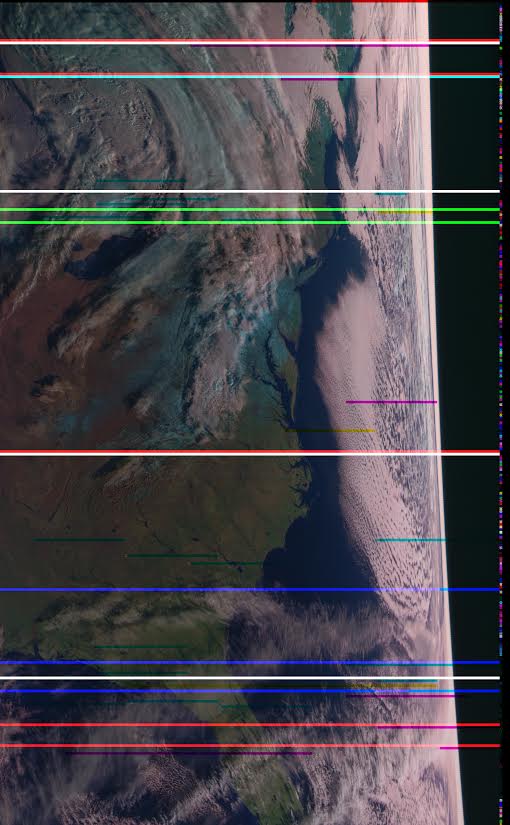
Meteor M-N1 Image Received by Matthew
 

New L-Band Filters from Adam Available

Adam (9A4QV) is well known in the RTL-SDR community for producing the LNA4ALL low noise amplifier as well as various RF filters that work well with the RTL-SDR. Adam is now selling some L-Band filters designed for improving reception with Inmarsat, Thuraya, Iridium, GPS satellites. It can be used for example when trying to received STD-C EGC or AERO data from Inmarsat satellites.

Adam writes that the filter will be most useful for those living in urban areas that are close to radio and TV towers. The filter is built on his standard filter PCB which also has the ability to add a simple bias tee circuit for powering externally positioned LNA’s such as his LNA4ALL which are necessary for good reception at L-band with an RTL-SDR.

He is currently selling it fully assembled for 20 euros, plus 5 euros for worldwide shipping.

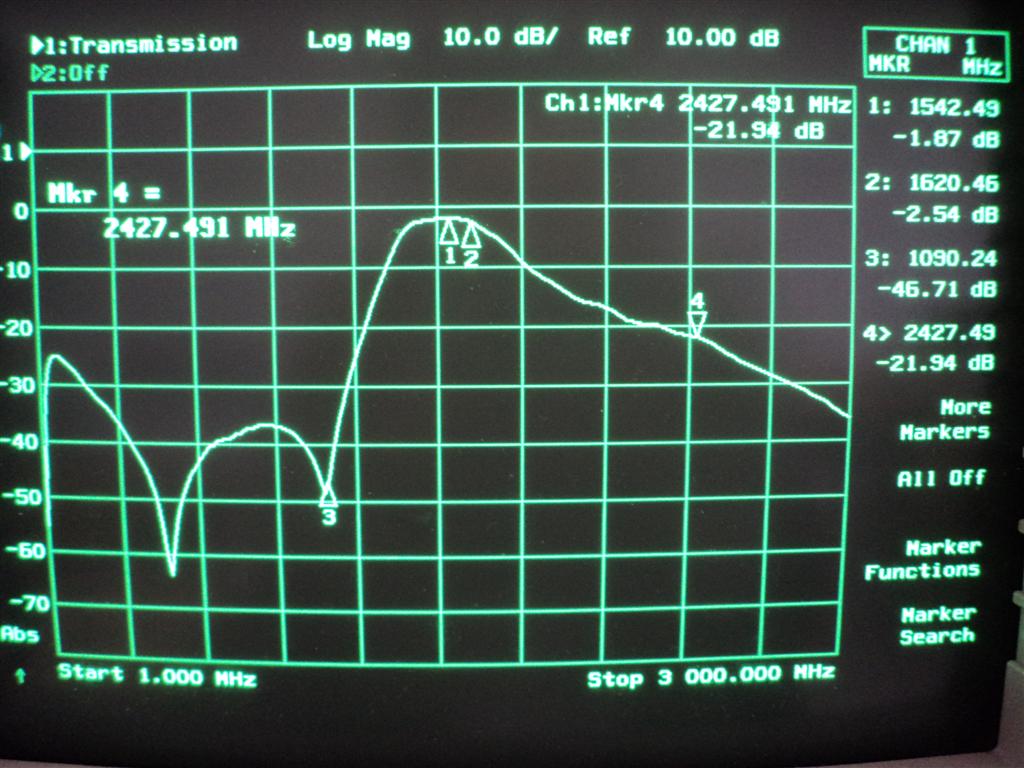
Adam's L-Band Filter Characteristics.
Adam’s L-Band Filter Characteristics.

Testing RTL-SDR and SDRPlay receivers for AERO reception

Jonti, the programmer of the JAERO decoder for L-band AERO signals recently bought and received one of our new RTL-SDR Blog dongles and also an SDRplay unit for testing L-band reception. Previously he had been using a standard RTL-SDR dongle. Now he’s done a write up comparing the performance of the three units on L-band AERO reception.

The two most important things to pay attention to when receiving AERO signals are signal SNR and frequency stability. In order to lock on to the signal, the signal’s frequency must remain relatively stable over a short period of time. For the stability test Jonti writes the following, referencing the image posted below:

You can see the old RTL dongle moves almost 3kHz within a couple minutes after being turned on, this speed is so rapid that JAERO can’t keep up with the frequency changed during this period of time. What’s odd is the old RTL dongle does some fairly crazy stuff around 20 minutes in that lasts for about 15 minutes, JAERO also can’t cope with some of that. The other thing to notice in the old RTL’s spectrograph are vertical lines, these lines I believe are caused by interference entering the dongle between the RTL dongle’s tuner and ADC (analog-to-digital converter).

The frequency stability of the new RTL dongle can only be described as amazing!!! There is not much more than 100 Hz change during the whole test.

The range of frequencies for the SDRPlay is similar to that of the old RTL dongle of about 3kHz. The difference being the transition from the lowest frequency to the highest frequency is slow. Any demodulator should not have any issue tracking this slow and steady change. The only problem you will encounter here is when you are trying to tune into a particular frequency your frequencies will be slightly different depending on the temperature of the SDRPlay.

The results of the frequency stability test on an AERO signal. Standard RTL-SDR, RTL-SDR Blog Unit, SDRplay.
The results of the frequency stability test on an AERO signal. Left: Standard RTL-SDR; Middle: RTL-SDR Blog Unit; Right: SDRplay.

Jonti also found that in terms of sensitivity the SDRplay was the best at receiving when a non active antenna (an active antenna is an antenna with a built in LNA) was used. The RTL-SDR dongles could not receive well at all when a non active antenna was used. When an active GPS antenna was used the SDRplay was only about 1dB more sensitive than the RTL-SDR dongles.

In his article Jonti expressed concern that the SDRplay did not see much improvement in SNR over the RTL-SDRs when an active antenna was used. Our thoughts on the sensitivity findings are that the SDRplay does not see much improvement with an active antenna because the noise figure of the system is not reduced any further by adding an additional front end LNA (the noise figure in a RF system is almost entirely determined by the first LNA in a RF chain). Adding an extra LNA could even potentially make reception worse by reducing the overall linearity of the system. An external LNA would only be beneficial if a long run of coax was used between the feed and SDR, and in Jonti’s connections he connected the feed and SDRplay with a very short cable. The RTL-SDR only works well with an active antenna because its raw sensitivity at 1.5 GHz isn’t great, and it needs the extra boost from the LNA.

Testing the SDRplay with a non-active antenna.


Receiving AERO-H on L-Band with an RTL-SDR

Over on YouTube Adam Alicajic (9A4QV – creator of the LNA4ALL and upcoming MIX4ALL) has uploaded a video showing his reception of AERO-H signals from an Inmarsat satellite. A few days ago we posted about how the JAERO decoder had recently been updated to be able to decode these AERO-H signals. These signals contain various messages meant for airplanes, but also sometimes contain news messages.

In the video Adam uses a satellite dish antenna together with his MIX4ALL, an RTL-SDR dongle and the JAERO software. With decent reception he is able to easily decode the AERO-H messages.

Receiving AERO-H on L-band (Inmarsat AOR-W)

JAERO Updated: Now supports 10.5k Aero-H and Aero-H+

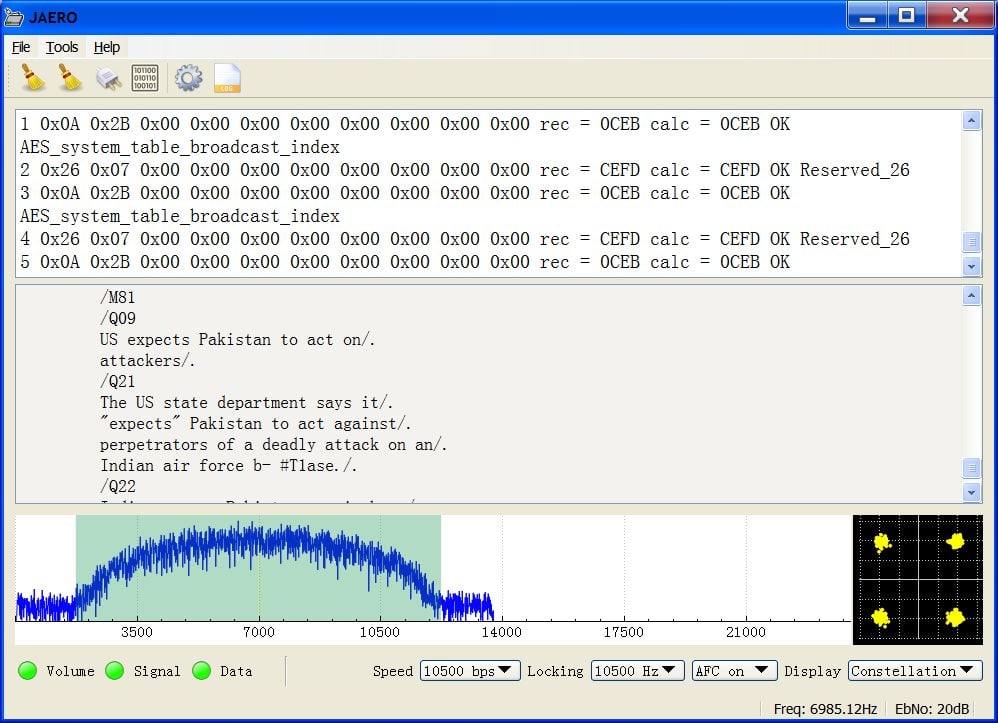
The JAERO decoder for AERO signals on Inmarsat satellites has recently been updated to version 1.03. This new version supports the decoding of 10.5k Aero-H and Aero-H+ signals. The author of JAERO Jonti writes that on these channels he’s seeing significantly more traffic than on the narrowband signals and that he was suprised to see that other non-aircraft messages such news was broadcast on this 10.5k signal. Jonti writes about his experience in developing the 10.5k decoder and his experience with receiving the messages in this post.

AERO is a system similar to VHF ACARS, but instead of running over terrestrial VHF it uses an L-band Inmarsat satellite link. Our first post about the JAERO decoder explains a bit about AERO, and this previous tutorial about decoding Inmarsat EGC messages may help you get set up with decoding Inmarsat signals in general.

Jonti discovered that news updates are also broadcast on 10.5k AERO.
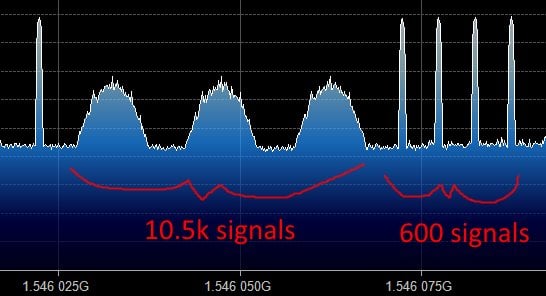
What the 10.5k signals look like compared to the 600 signals.

If you like Jonti’s apps, then please remember to donate a small amount to him so that he can continue to work on them more. His PayPal donate button can be at the bottom of his main page.

Deocoding Orbcomm with MultiPSK 4.31 and an RTL-SDR

MultiPSK is a signals decoding program with many available decoders to choose from. It is also able to directly connect to the RTL-SDR, or be used via a virtual audio cable. The latest beta version (available on the MultiPSK Yahoo mailing list) now allows for decoding of Orbcomm satellites which transmit at around 137 MHz. While it is not possible to decode the encrypted messages, it is still possible to decode pieces of telemetry data from the satellites. MultiPSK writes the following information about Orbcomm:

This system has been developed by the ORBCOMM society which disposes of a constellation of about 28 active LEO (“Low Earth Orbit”) satellites, transmitting between 137.2 and 137.8 MHz (+/- 2.5 KHz maximum of Doppler shift).

This system permits:

  • to handle messages (encrypted) from ground users
    (ships, trucks, oil wells…) until other ground users, through the ORBCOMM satellites, the cover being worldwide. These frames are decoded by Multipsk but not deciphered.
  • to broadcast identification, frequencies, position and orbital elements pieces of information, not encrypted. These frames are decoded and interpreted by Multipsk.

This mode is available for licencied copies, only (otherwise, the decoding is stopped after 5 minutes).

One user of MultiPSK has uploaded a video showing the Orbcomm decoding in action.

Multipsk 4.31 decoding Orbcomm

Receiving and acquiring GPS positions with an RTL-SDR dongle and GPS antenna

GPS experimenter and blog author e.p. has recently been posting about his experiments in which he uses an RTL-SDR dongle to receive GPS satellite signals and acquire a position lock. 

To receive GPS e.p. uses one of our RTL-SDR blog units (back in stock soon!) with the bias tee enabled which is used to power a cheap 5V active GPS antenna. For software he uses GNSS-SDRLIB and RTKLIB which runs on Windows. Using the RTL-SDR, GPS antenna and the decoding software he was able to get his current position to within about 5 meters of accuracy.

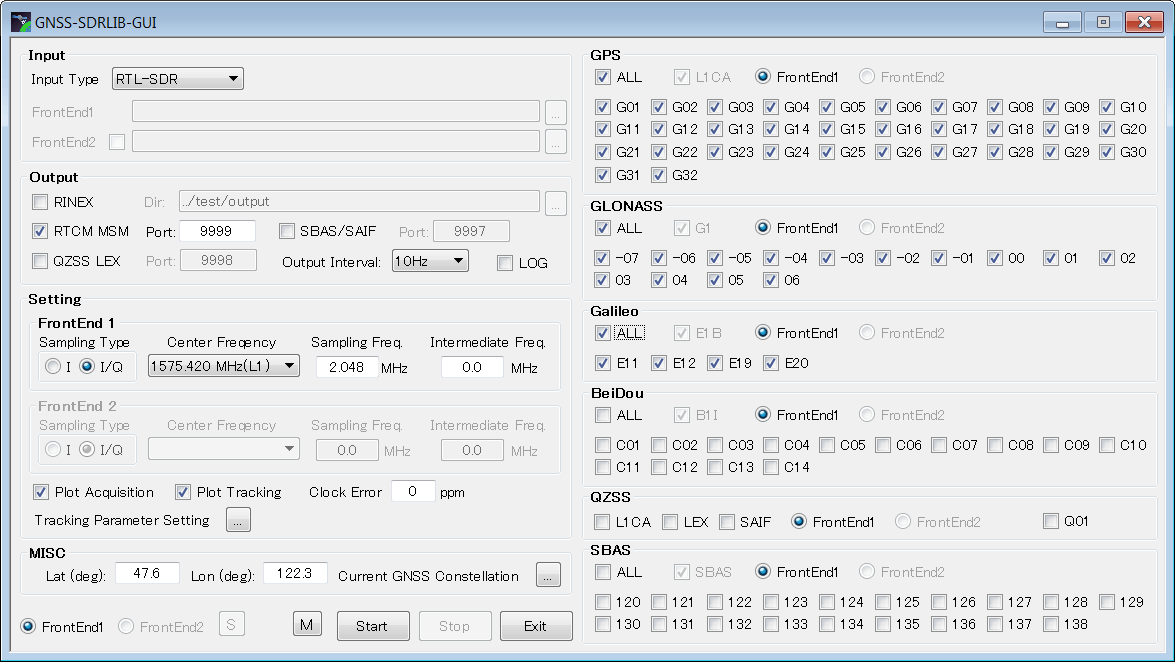
In his blog post e.p. shows a step by step guide on how to install and use the Windows software. In later posts he also shows how to install and use another program called GNSS-SDR which runs in Linux and can also be used to acquire GPS fixes with an RTL-SDR dongle.

The GNSS-SDRLIB GUI setup screen.

To illustrate the software in action e.p. has also uploaded a video to YouTube which is shown below.

Setting up an RTL-SDR based APT/Meteor Satellite Weather Station Receiver

Recently a reader of our blog, Initrd, wrote in to let us know about a new tutorial he created that shows how to set up a dual NOAA APT and Meteor LRPT weather satellite monitoring station with an RTL-SDR dongle. These weather satellites transmit a live image of the portion of the earth that they are currently over, providing a valuable tool for weather analysis. APT transmissions are analogue and are transmitted by the American NOAA satellites, and the newer Meteor M2 satellite transmits a higher resolution image in the LRPT format. We also have posted separate tutorials that show how to set up NOAA APT and Meteor M2 LRPT decoding with an RTL-SDR, but Initrd’s tutorial appears to be a good all in one guide.

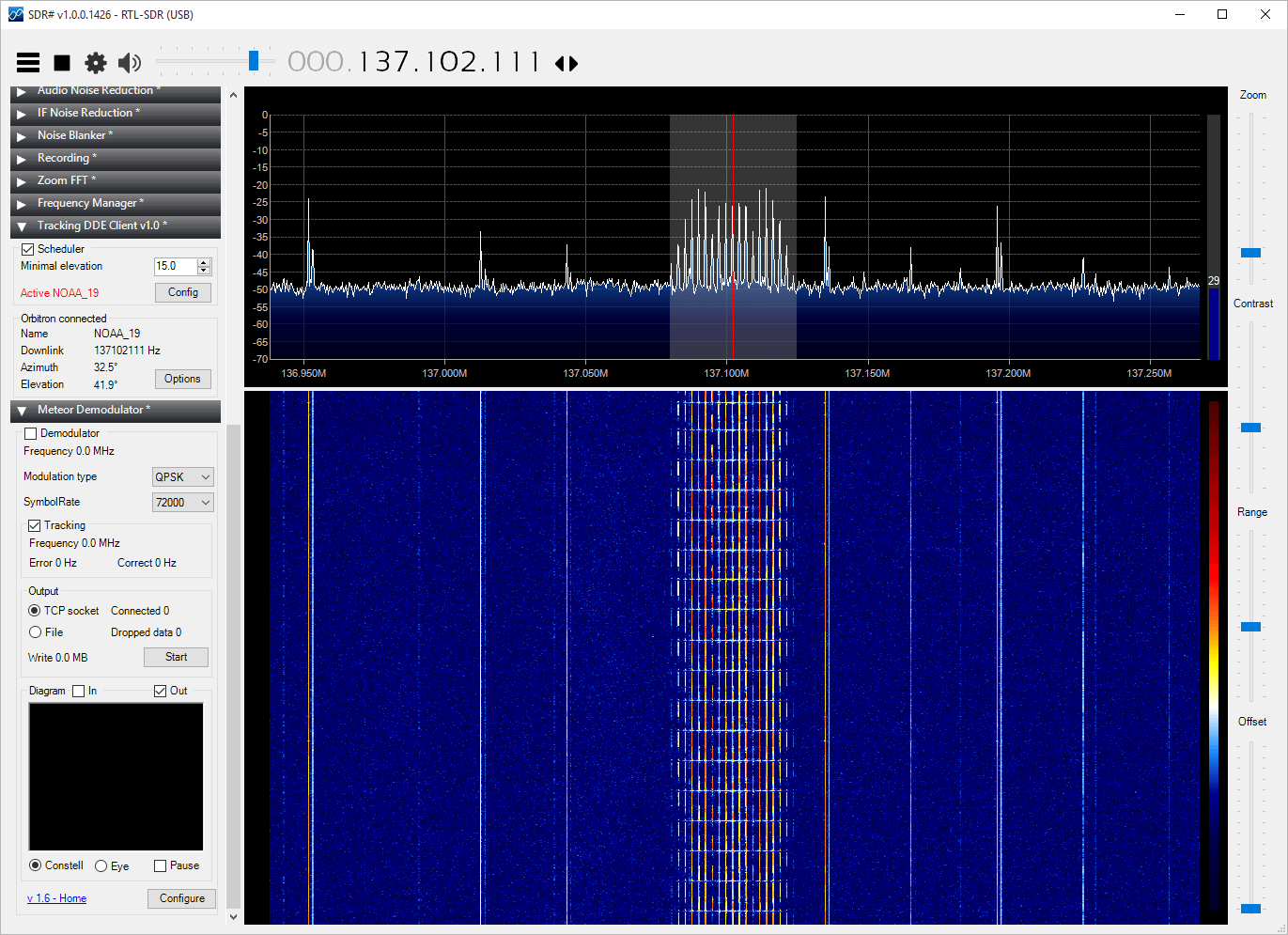
His tutorial takes you step by step through a process that involves setting up the satellite tracking software Orbitron, all the required SDR# plugins, the APT decoder WXtoIMG and the LRPT decoder. The tutorial also shows how to connect them all together and set them up so that APT and LRPT decoding can coexist.

sdrsharp_apt