Corrosive from the SignalsEverywhere YouTube channel is starting up a radio/SDR related podcast, and today has released episode one. The podcast is 22 minutes long, and in that time he discusses Es-hail-2, a geosynchronous satellite with an amateur radio transponder that was recently launched and activated, some of his favorite recent posts from our blog here at RTL-SDR.com, including posts about a 3D printed V-Dipole holder, Radwave RF Analyzer, cloning 433 MHz devices, and finally he ends the podcast by discussing the question of what SDR is right for you.
Podcasts are a great way to catch up on what's happening in the SDR and radio world so check it out below or over on the SignalsEverywhere podcast post.
The SDRplay team have released an updated version of a program called "rsp_tcp" (originally written by F4FHH Nicholas). This is a streaming IQ server for SDRplay devices, which is directly ported from the original rtl_tcp code that was designed for RTL-SDRs. The rsp_tcp code is fully compatible with the rtl_tcp protocol, so this should allow almost any software that accepts an rtl_tcp stream as an input to use an SDRplay device as the SDR hardware instead of an RTL-SDR.
The downside to using this server is that in order to be compatible with the standard rtl_tcp protocol, the software will downgrade the RSP data stream from 14-bits to 8-bits only, thus forfeiting the RSP's greater dynamic range. However, if a custom ExtIO plugin is used on the client software, then the full 14-bits can be restored.
This software is based on a fork of F4FHH’s version of RTL TCP Server. It has been updated to support the RSP features, but also contains an extended mode. The extended mode allows the client (via a compatible interface) to fully control all aspects of the RSPs, including notch filters, Bias-T enable and switching ports (where applicable)
We have provided binaries for Windows, Mac and RPi on our downloads page and the source code for all platforms can be found on our GitHub repository: https://github.com/SDRplay/RSPTCPServer
To utilise the extended mode, extra commands need to be sent from the client. We have provided an example of this in the form of an ExtIO plugin. You can find the Windows dll on our downloads page and the source code for the plugin on our GitHub repository: https://github.com/SDRplay/ExtIO_RSP_TCP
In standard mode, the server will be compatible with any RTL server client.
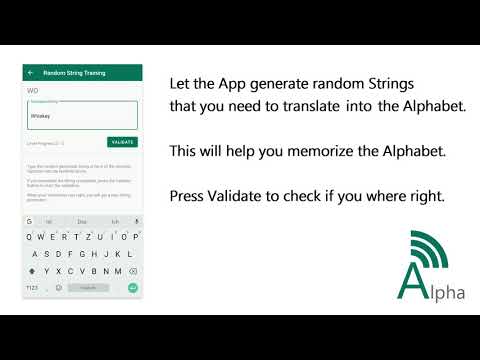
Thank you to Manuel DO5TY who wrote in and wanted to share his Android App that helps you to memorize the ham radio phonetic alphabet. The phonetic alphabet is a way to avoid confusion when speaking out similar sounding English letters such as "p" and "b". Instead of "pea" and "bee" these are spoken as "papa" and "bravo". The phonetic alphabet is commonly used in all sorts of radio communications, so it is a good skill to learn for potential hams, radio operators or even for people just listening in to radio communications.
The Phonetic Alphabet Trainer is an App you can easily learn the Alphabet that is used in the Military and on Hamradio contacts. The App has different options for you to learn and memorize the Alphabet. Your current Skill Level is displayed on the main screen and indicates how good you are at the Phonetic Alphabet.
Alphabetlist Take a look at the Phonetic Alphabet and see what words are used for each Character. You can also hear how the words are spoken out with a simple button click.
Train with random Strings Let the App generate random Strings and translate them into the Phonetic Alphabet. With that you can memorize the Alphabet and learn how to write them correctly at the same time. The String gets one Character longer each time you got Five in a row correct.
Train with Hamradio The App generates a random Callsign and speaks it out loud in the Phonetic Alphabet. Your Task is it to Write down the correct Callsign. You only have one try to get it right, your score is how many you recognize correctly in a row.
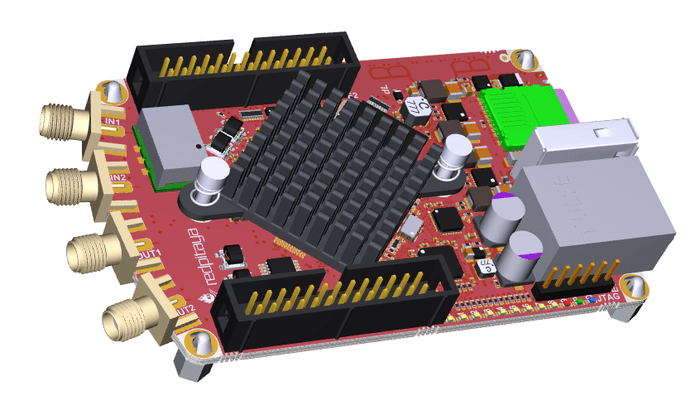
The SDR is advertised to cover HF + 6m (50MHz) and includes two 16 bit 50 ohm input ADCs and two 14 bit outputs. Based on the Xililinx Zynq 7020 FPGA running an ARM cortex A9 processor it’s plenty powerful to handle the various modes frequently seen in the amateur bands and then some while supporting an impressive 122.88 MS/s sample rate.
The RedPitaya – 3D Rendering
This hardware is also fully compatible with the HPSDR software platform which is an open source project for amateur radio SDR operation.
While this radio is built with amateur operation in mind, it is still a very capable platform that could be used for experimentation albeit with a more restricted frequency range that what you may be used to with traditional software defined radios.
The radio retails for $499 euros and will be available for pre-order from RedPitaya until March 31st of 2019.
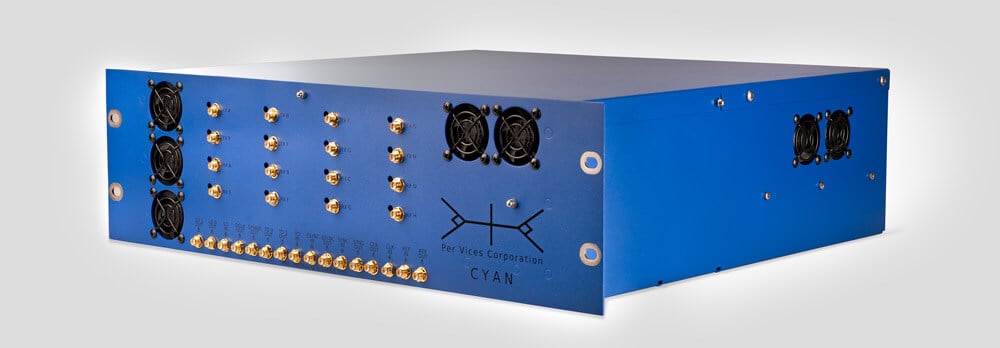
This blog is mostly concerned with software defined radios that are affordable to most hobbyists, but if you've ever wondered what the cutting edge is, take a look at the recently released Per Vices Cyan. This is a US$73,500 one channel RX/TX SDR with a tuning range from 100 kHz up to 18 GHz, ADC resolution of up to 16 bits, a maximum instantaneous bandwidth of up to 1 GHz (with 16 GHz if all channels are required), and an on board Stratix 10 FPGA. There are also higher end Cyan's, with the Cyan Mid having 8 RX/TX channels for USD$149,500, and the Cyan Pro with 16 RX/TX channels for USD$289,000.
Obviously Cyan is aimed at the research, industrial and possibly military market, but maybe this is the sort of capability we will all have in 10-20 years.
Their press release reads:
Per Vices Releases New High Bandwidth, Compact Software Defined Radio Platform
Ontario, Canada- February 20th, 2019
Per Vices, an industry leader in wireless platforms in North America, has been developing Software defined radio (SDR) solutions since 2006, offering customers high performance solutions. Continuing to grow their influence in the wireless communications, radar, signals intelligence, defence, medical imaging, and test and measurement markets. Their newest product, Cyan, is the best SDR available on the market, offering the highest bandwidth on a compact radio platform. Cyan continues to fulfill the company’s legacy by providing the market with the highest performance radio solutions.
Cyan is designed to offer users with a customizable number of independent, phase coherent radio channels, up to 16 total, each offering a standard 1GHz instantaneous RF bandwidth. Featured on a high channel count, ultra wide band, high gain direct conversion quadrature transceiver and signal processing platform. Cyan provides the highest RF and digital bandwidth with an onboard DSP in a compact form factor.
On the digital front, the platform is designed around an Intel Stratix 10 FPGA SoC enabling significant DSP resources for a variety of applications. The platform also features 4 x 40 Gbps digital backhaul enabling ultra-high data throughput while maintaining low latency for applications that require raw radio data to be transferred to another platform.
To learn more about Cyan, Per Vices, or their other product offerings, contact Brandon Malatest at +1 (647) 534-9007, or email [email protected], or visit the website at www.pervices.com
Over on his YouTube channel SignalsEverywhere, Corrosive has uploaded a tutorial video that shows how to update the LimeSDR firmware and drivers. The LimeSDR Mini is a US$159 12-bit TX/RX capable SDR that can tune between 10 MHz – 3.5 GHz, with a maximum bandwidth of up to 30.72 MHz. The specs and price of the LimeSDR mini are pretty good, but documentation for actually using it can be a bit confusing, so videos like Corrosive's tutorial are great.
LimeSDR Mini Tutorial Drivers and Firmware Update on Windows 7/10
At the beginning of this year the MIT Radio Society held a series of nine lectures all about radio. The lectures cover topics like the history of radio, radio technology, signal modulation and phasor analysis, software defined radio, ionosphere, shortwave radio, propagation, radio astronomy, low frequency radio astronomy for the observation of exoplanets, principles of radar, space weather and 5G cellular comms and the future of radio. The lectures have all been uploaded to YouTube for free viewing, and can be found on their playlist.
If you're interested in learning more about radio this series of lectures is an excellent start, and lecture three specifically focuses on software defined radio.
USA-Satcom is the programmer of XRIT Decoder, which is a popular (paid) Windows decoding application for GOES weather satellites. With a WiFi grid dish antenna, LNA and SDRplay, Airspy or even an RTL-SDR, high resolution full disk images of the earth can be downloaded from these geosynchronous satellites. Browse through our previous GOES posts for ideas and various tutorials about setting up a receiver.
USA- Satcom has just released version 1.4.6985 of the XRIT Decoder software package. New features include:
1) Improved image clarity. 2) An antenna Align Mode feature. 3) And a Viterbi and Eb/No (Energy per Bit to Noise Power Spectral Density Ratio akanormalized SNR) graph over time feature.
The improved image clarity reduces image artifacts at the Earth-space boundary of the image and improves the overall aesthetics of the colorization of the full disk images. The images are quite amazing. The resolution is far better than what can be shown here due to image size limitations for this site. Below is a full disk GOES 16 image from February 17, 2019 and a corresponding zoomed in portion to get an idea of the resolution and clarity (the actual full disk images are approximately 40MB PNG images each which are much greater resolution than the below image)
The antenna Align Mode is a great new feature that allows users to view the Signal Quality, Viterbi FEC, and Eb/No from a distance using large numeric values. This mode enables users to better view these values when fine tuning adjustments to GOES receiving antennas. The Eb/No and Viterbi graphing enables users to see how well their receiving system is doing throughout the day (e.g., over temperature and while the sun is in alignment with the receiving path).
GOES 16 Received by RSP2User
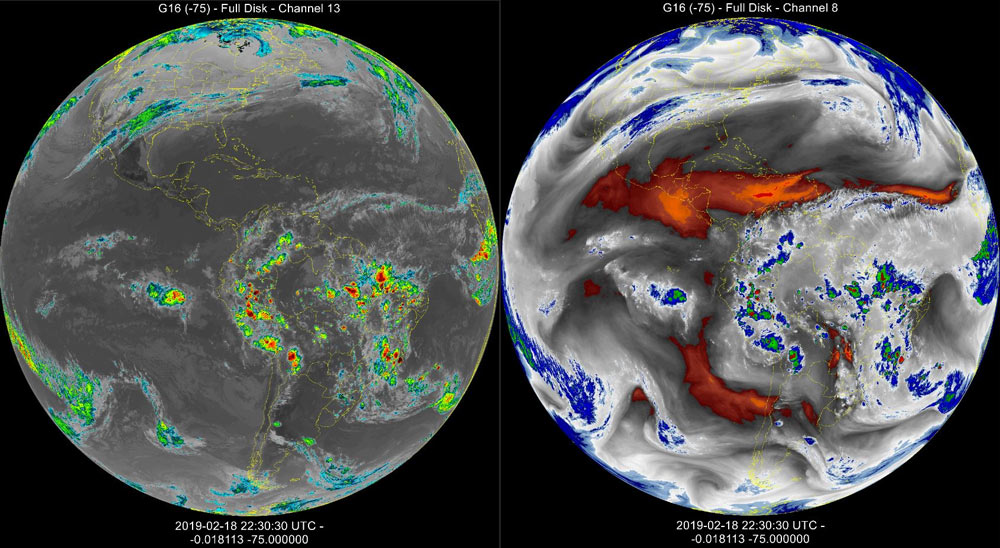
More updates from USA-Satcom to the XRIT Decoder software with a new patch from today. The XRIT file manager now provides IR image enhancements for GOES Bands 8 and 13. Here are some examples:
G16 CH13 & G16 Band8 Enhancements . Images received by RSP2user.