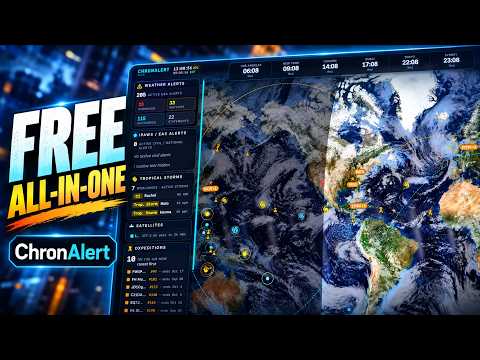
Thank you to Danny from brokensignal.tv, who wrote in and shared the release of his new project, 'ChronAlert'. Danny describes ChronAlert as "a free PC-based live dashboard for radio, weather, alerts, and other live information".
ChronAlert appears to be a situational awareness dashboard that combines multiple live feeds into one screen. It includes feeds like weather and emergency, ham radio & propagation, hazards & infrastructure, and local radio & tracking.
On the local radio side, we see that RTL-SDR is supported for receiving and tracking aircraft and ships via ADS-B and AIS, and for receiving APRS messages. The dashboard also supports Meshtastic radios, allowing users to see heard Meshtastic nodes and messages.
ChronAlert is free at the basic level, which allows 2 saved panels and 1 watch zone. A one-time fee of US$39.99 unlocks 10 panels and 10 watch zones, as well as various other features.
If you want more information, Danny has also published a detailed article with screenshots about ChronAlert on his blog.
ChronAlert: Weather, Ham Radio, Alerts & More in One Free Dashboard
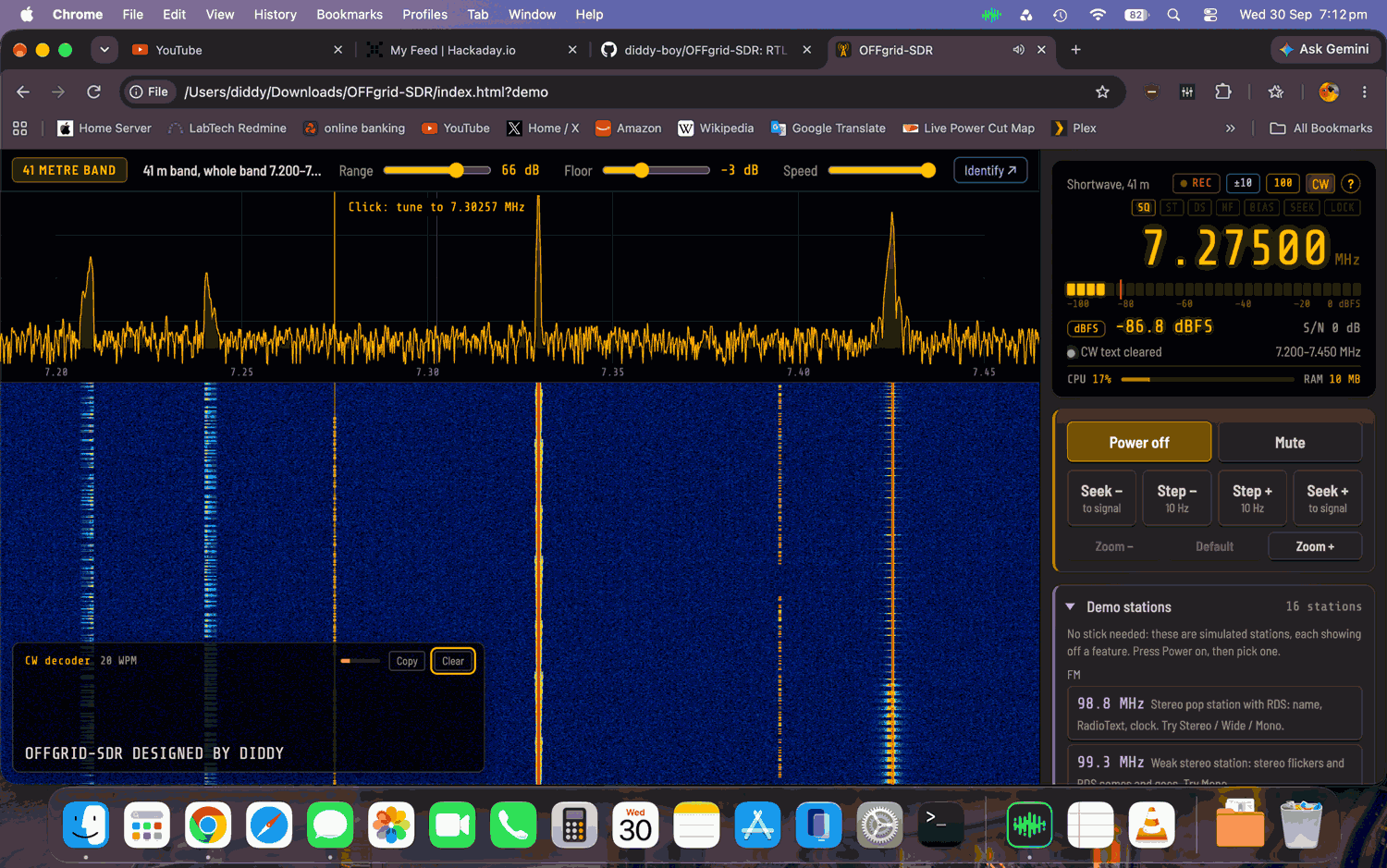
Thank you to Richard Didd for submitting his new software, 'OFFgrid-SDR', a fully offline RTL-SDR receiver program in an installer-free, single index.html file.
The OFFgrid-SDR program runs in any modern WebUSB-compatible browser, can demodulate common modulation types, and includes a spectrum and waterfall display, plus RDS, weather fax, and Morse code decoders. No internet connection is required to run it in the browser.
The program's advantage is that you can put the index.html file on a USB drive and use it portably on almost any machine with a browser. However, Windows users will still need to have installed the WinUSB drivers via Zadig first, and Linux users will need to blacklist the DVB-T drivers from taking over the dongle. macOS and Chromebook should just work without any additional steps.
The code is entirely open source and available on GitHub. More information about the project can be found on the project's GitHub.io page.
OFFgrid-SDR Screenshot
OFFgrid-SDR Demonstration with RTL card and Demo Mode
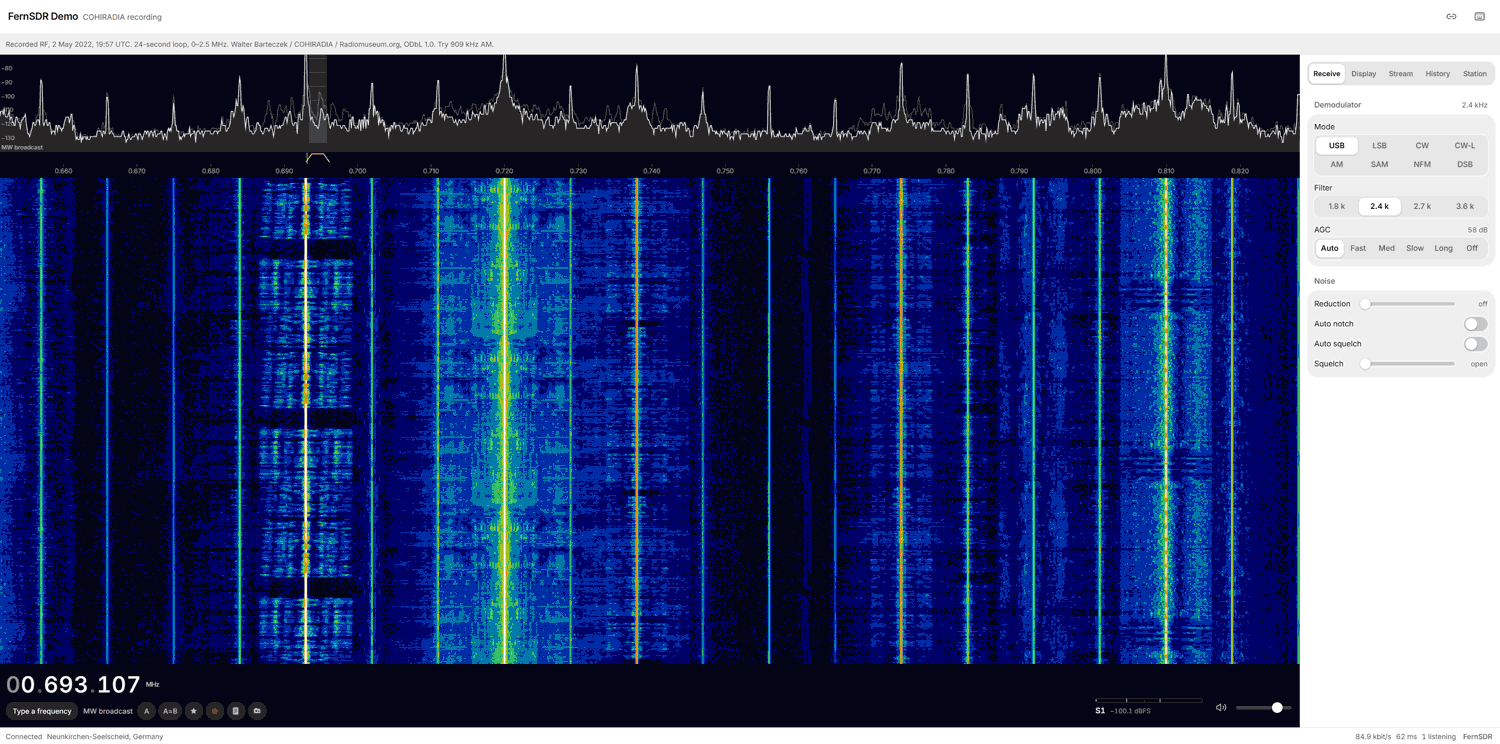
Thank you to 'magicint1337' for writing in and sharing with us a new program he's created called FernSDR. The author writes that FernSDR is an open-source WebSDR server rebuilt from scratch, based on feedback from WebSDR operators. It replaces his two previous programs, NovaSDR and PhantomSDR, the latter of which we covered in 2024.
A WebSDR program like FernSDR allows users to set up an SDR receiver on a remote device, such as a Raspberry Pi or PC, and access that SDR's data from anywhere in the world via a network connection. The author explains why FernSDR stands out:
What's different: a single binary with no dependencies and a one-line install on any Linux, an admin panel for everything (bands, updates with rollback, modules), day/night band switching by sunrise at the station, and modules for RTL-SDR (incl. Blog V4), RX-888 MkII and SDRplay, plus an FT8 decoder with PSK Reporter spots. In my lab tests against ten other WebSDR servers it had the lowest delay and memory use; the method and raw data are public.
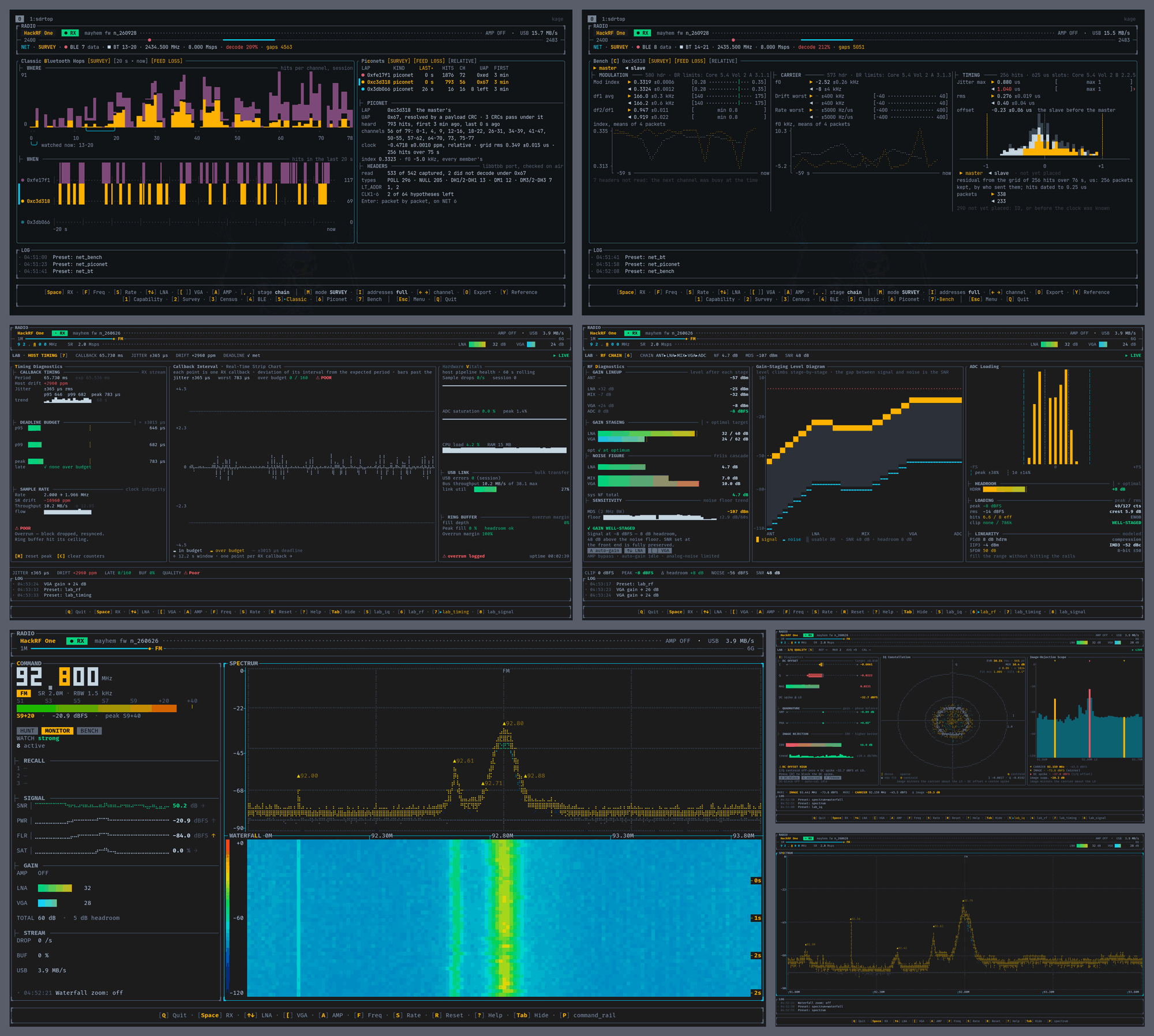
Thank you to Viktor László (MusiThang on GitHub), for writing in and sharing with us his new project called sdrtop. sdrtop is a terminal-based SDR tool that is compatible with the HackRF and RTL-SDR. Viktor writes:
I bought a HackRF because I was curious how SDR works and found the whole topic interesting.
Later I wanted to understand what was actually in the radio signals, and I ended up writing a terminal tool for that. Along the way it grew RTL-SDR support too.
sdrtop is a bench instrument in a terminal: spectrum, waterfall, gain and clipping, lab-style readouts, and digital demodulation for measurement, not for listening.
I started it to learn the signal path. What it turned into is a gap I kept hitting: cheap SDRs used for real measurements over SSH, in tmux, or on a cyberdeck, where a heavy GUI just slows you down.
No audio on purpose. If RX stops, the numbers go stale instead of looking fine forever.
I care about being able to trust the numbers, so the signal path is written in Rust from scratch rather than sitting on a DSP library. The only external piece in that chain is the FFT crate. (rustfft).
On RTL-SDR it has native full support (R820T, E4000, R828D): single tuner gain + AGC, spectrum, waterfall, and the measurement panels the dongle can actually back. HackRF and tinySA are supported as well; Soapy is available in beta for other devices.
Written in Rust, open source, one-person hobby project, and still very much in active development. Classic Bluetooth is in progress; spectrum and lab are what I use every day.
sdrtop reminds us of a few previous terminal-based SDR programs such as sdrrat, as well as terminal-based ADS-B radar displays such as radar-tui and coole-radar.
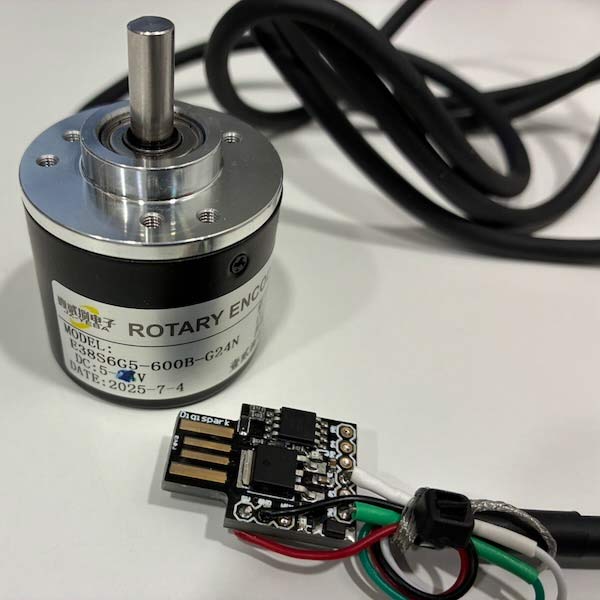
Thank you to Gerrit (PA3BYA) for writing in and sharing a hardware project he completed that combines an affordable optical encoder and a microcontroller with custom firmware to create a high-resolution USB mouse wheel for SDR tuning. Many people prefer using a knob to tune through the bands rather than a keyboard and mouse. Gerrit writes:
Although I initially developed it for use with the RTL-SDR, it is actually a general-purpose tuning solution that can be used with virtually any SDR software. Many SDR projects use a cheap mechanical rotary encoder with, for example, 24 pulses per revolution.
But why settle for a 24-pulse mechanical encoder when an affordable optical encoder can provide 600 pulses per revolution? For this quick SDR experiment, I combined a high-resolution optical encoder with a tiny Digispark ATtiny85 and turned it into a standard USB mouse wheel for tuning.
The result is a surprisingly simple and platform-independent tuning control that works with SDR software on macOS, Windows, Linux, and even a Raspberry Pi.
The encoder he used is a cheap Chinese part, costing around 17 Euros. However, one interesting issue that Gerrit encountered was that the cheap encoder would not reliably operate when powered from 5V, even though the operating voltage was specified as 5V to 24V. To fix this, he suspected that the input LDO was dropping too much voltage at the low 5V end, so he modified the encoder by shorting the input and output of the 78M05 regulator, to allow direct 5V power without any dropout.
His firmware for the ATtiny85 is open source and can be found on GitHub.
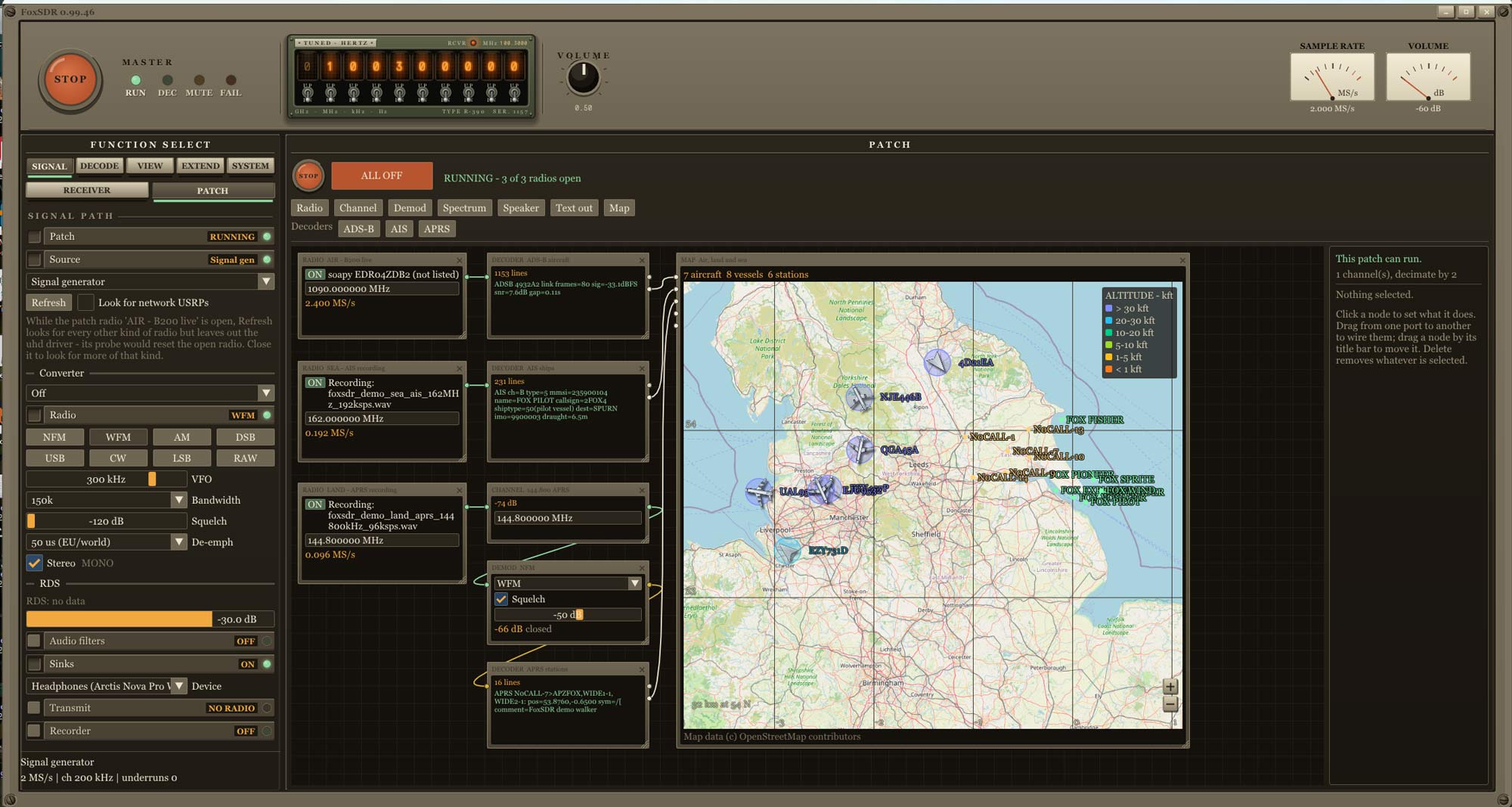
Thank you to wonderingStars for writing in and sharing updates to his FoxSDR software program. FoxSDR is a new AI-coded software that supports all common protocols and SDRs.
The first update that wonderingStars notes is the addition of a node canvas where you can wire radios, decoders, speakers, and displays together. It can run up to five SDRs at the same time, each with its own decoders. This is now FoxSDR's main screen.
The second update is a map that can accept multiple inputs from multiple decoders, allowing users to plot various data streams such as ADS-B, AIS, amateur high-altitude balloons, and more on a single map.
The third update is that Linux x64 builds are now published, although they are noted to still be in development. An Android arm64 build has also been released in alpha form. To access this, users will need to sign up to test.
The final update adds a new radar sweep feature, which locates the positions of air-traffic radars around you by listening to 1090 MHz. The author explains:
Secondary surveillance radars rotate and interrogate aircraft transponders as their beam passes. Aircraft that broadcast ADS-B also report their own position, so every reply they give reveals where a radar was pointing at that moment. Radar Sweep collects these replies over hours and works out each radar's location, rotation speed and direction on its own. It then draws bearing lines towards aircraft that answer the radar but broadcast no position, and marks a position where two radars' lines cross.
It is the same idea as PlanePlotter's Beamfinder, except that Radar Sweep finds the radar sites itself instead of being given them. It is not affiliated with PlanePlotter or its authors.
In testing on a 12.8-hour recording, it confirmed two radars, each within about 5 km of a published airfield position. Bearings to held-out aircraft had a median error of 0.3°.
You need a 1090 MHz antenna, an SDR running at 2 MS/s or more, and a few hours of traffic. Radar Sweep remembers the radars it finds and never reveals your location.
It is available free to FoxSDR users in the United States.
The author also wanted to share an upcoming feature, which is the GUI builder, which will allow you to customize your own GUI.
FoxSDR: New Node Canvas + Radar Sweep
AI Disclaimer: wonderingStars describes their company as a human-gated AI company, and FoxSDR is AI coded.
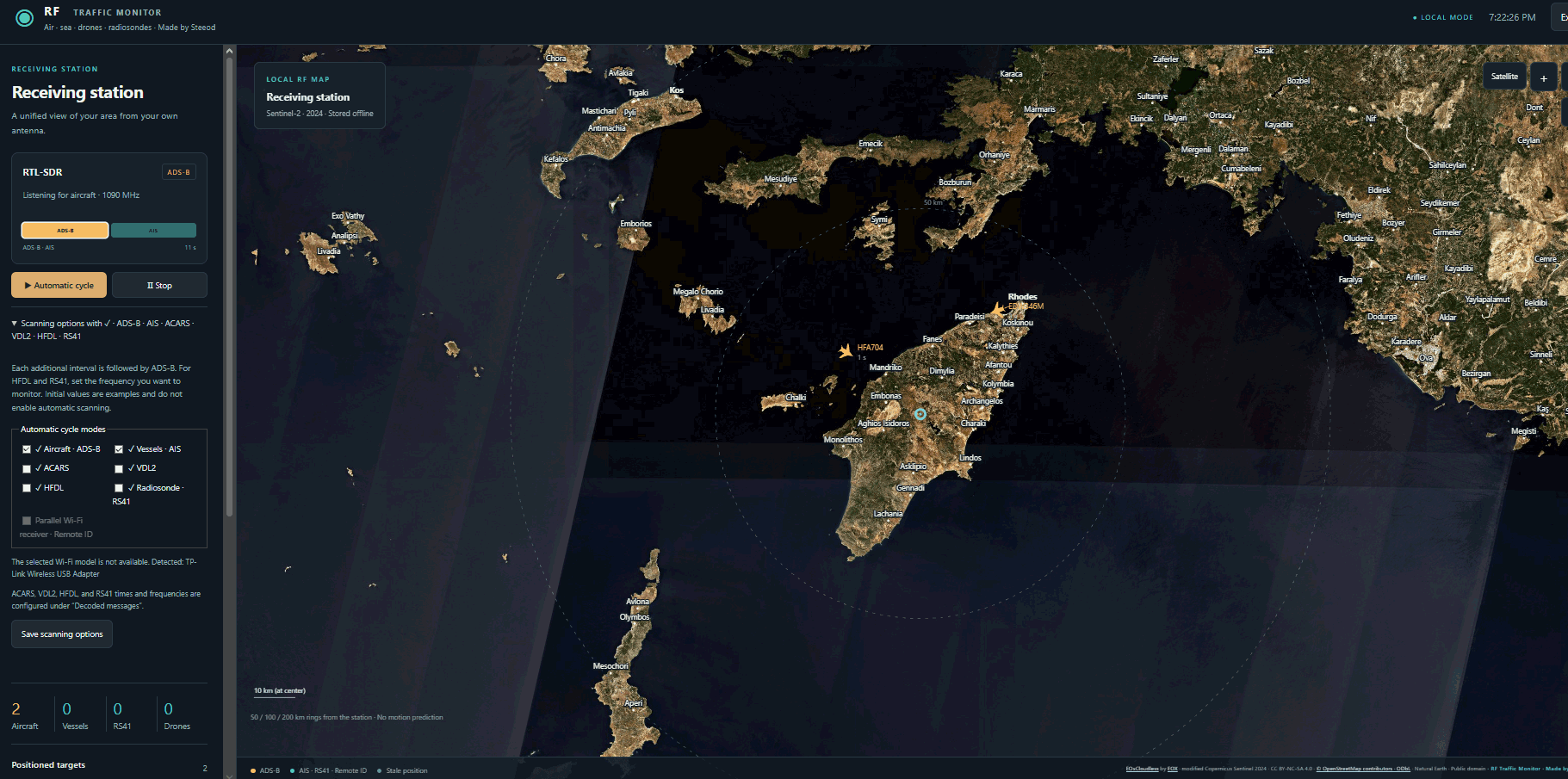
Thank you to Stefanos (Steeod) for sharing a new program he created, "RF-traffic-monitor." Stefanos created this program because he initially wanted to install adsb.im (an ADS-B feeder image that also tracks ships, radiosondes, and ACARS/VDL2/HFDL) on Windows 10, but was unsuccessful in doing so, as adsb.im is written for Linux machines.
So, to get around this, Stefanos decided to fire up ChatGPT to write his own similar Windows program. The end result was RF-traffic-monitor, which is capable of tracking aircraft, ships, and radiosondes using an RTL-SDR or HackRF. It can also use the SDR to decode ACARS, VDL2, and HFDL. With a compatible WiFi adatper the software is also capable of tracking drones via Wi-Fi Remote ID.
RF-Traffic-Monitor Screenshot
AI Disclaimer: The author notes that this program was written by ChatGPT.
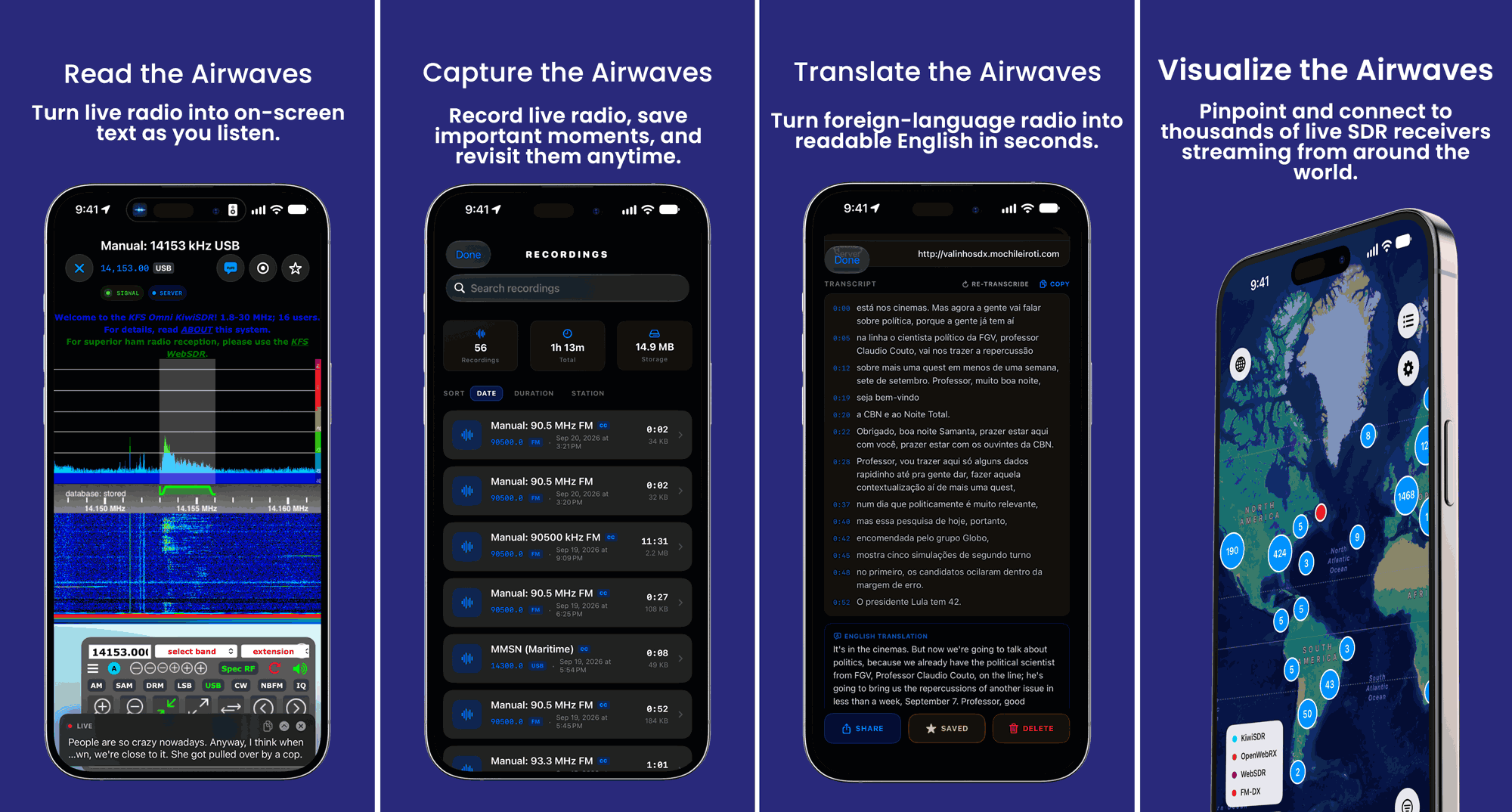
Back in April we posted about the release of Echo, a free iOS app designed for browsing global web-based KiwiSDR, OpenWebRX, WebSDR, and FM-DX software-defined radios. Mark, the developer of Echo, has written in to us again and wanted to share news about the release of the Pro (paid) version of Echo.
Echo Pro adds several features such as recording, on-device transcription and translation, iCloud sync, and the ability to access recordings across Apple devices. The transcription and translation service may be quite interesting, as it allows you to record an entire foreign radio program to text, and translate it to your language for later reading.
Echo Pro costs either US$4.99/month or US$39.99/year. More information about the app is available at echosdr.com.