Tagged: rtl2832u

Video Demonstrating C-Band AERO Aircraft Tracking

AERO is essentially the satellite based version of aircraft ACARS. AERO's L-band signals contains short ground to air messages with things like weather reports and flight plans. The C-band signals are the air to ground portion of AERO and more difficult to receive as they require an LNB and large dish. However they are much more interesting as they contain flight position data, like ADS-B.

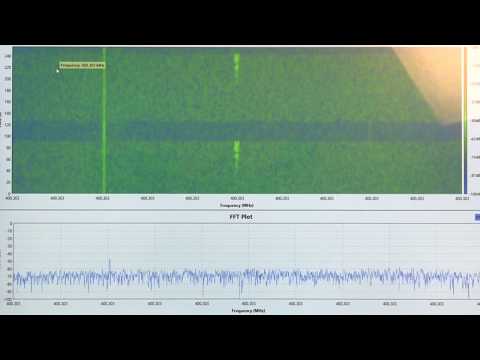
Over on YouTube Tomasz Haddad has uploaded a video of C-band AERO being received from the Inmarsat 3 F2 (Atlantic Ocean Region – East (AOR-E) 15W satellite. He uses a 1.80m motorized satellite dish with Kaonsat KS-N201G C-band LNB, a Prof 7301 PCI satellite card (to power the LNB) and an RTL-SDR V3. The C-band LNB translates the high C-band frequencies down to L-band which is receivable with an RTL-SDR. He notes that the LNB drifts quite a lot as it is not frequency stabilized.

With the signals received by his setup he's able to use the JAERO decoding software together with Virtual Radar Server to plot aircraft positional data using Virtual Radar Server. The plotted aircraft are mostly all in the middle of the ocean or in remote areas, which is where C-band AERO is normally used due to the lack of ground ADS-B stations.

Inmarsat 3 F2 15W C Band AERO Reception Using Jaero And Virtual Radar

Creating a Linear Transponder with an RTL-SDR, HackRF and Raspberry Pi

A linear transponder is essentially a repeater that works on a range of frequencies instead of a fixed frequency. For example, a normal repeater may receive at 145 MHz, and repeat the signal at 435 MHz. However, a linear transponder would receive a wider bandwidth, and add a set frequency offset to the received signal. For example a signal received by a linear transponder that receives from 145 - 145.5 MHz, may receive a signal at 145.2 MHz and it would translate that up to 435.2 MHz. Another signal received at 145.4 MHz would translate up to 435.4 MHz. Hence the received frequency linearly translates to the transmitted frequency.

Over on his blog ZR6AIC has shown that it is possible to create a linear transponder using an RTL-SDR for receiving, a Raspberry Pi for processing the signal, and a HackRF for re-transmitting the signal. 2M and 70cm band bandpass filters are also used. For software he uses a GNU Radio flowchart that simply moves the IQ data from the RTL-SDR to the HackRF.

In the video below he demonstrates the linear transponder in action with two handheld radios.

A Linear Transponder made with HackRF, Raspberry Pi and RTL-SDR.
Building a Linear Transponder with Gnu Radio, rtl dongle and hackRF module..

Forwarding Pager Messages Received with an RTL-SDR to Email

Over on YouTube Jack Riley has created a video that documents his system which uses an RTL-SDR to receive POCSAG pager messages and forward messages sent to specific pager addresses to an email address. He uses his RTL-SDR on a Raspberry Pi, together with rtl_fm and multimon-ng to receive and decode the pager messages.

Then using a custom program that is available on his website he filters messages for a particular 'capcode' which indicates the address of a particular pager. When a pager message to the specified capcode address is received, the program turns the message into an email which is instantly sent out.

This is a nice way to forward pager messages on to a more modern device such as a smart phone.

Creating a Pager using a Raspberry Pi and RTL-SDR to send alerts via Email.

Monitoring FT8, JT65, JT9 on Multiple Bands with Low Cost Single Board PCs

Thank you to Michael (dg0opk) who wrote in and wanted to share details of his full SDR monitoring system for weak signal HF modes. His setup consists of nine ARM mini PCs (such as Banana Pi's, Raspberry Pi's, and Odroid's), several SDRs including multiple RTL-SDR's, an Airspy Mini, FunCube Dongle and SDR-IQ, as well as some filters and a wideband amp. For software he uses Linrad or GQRX as the receiver, and WSJTx or JTDX as the decoding software, all running on Linux.

Michael also notes that his Bananapi FT8, JT65 and JT9 SDR monitor has been up and stably running continuously for half a year now. Bananapi's are lower cost alternatives to the well known Raspberry Pi single board computers, so it's good to note that a permanent weak signal monitoring system can be set up on a very low budget. Presumably even cheaper Orange Pi's would also work well.

With his setup he is able to continuously monitor FT8, JT65 and JT9 on multiple bands simultaneously without needing to tie up more expensive ham radios. His results can be seen on PSKReporter. A video of his RTL-SDR Raspberry Pi 3 decoding FT8, JT65 and JT9 can be found here.

Weak Signal Receiver Setup
dg0opk's weak signal receiver setup

SDR# TETRA Decoder Plugin Updated

The TETRA plugin for SDR# has been updated a few times since our last post on it back in March. The latest version can be downloaded directly here, and the original link comes from the Russian scanner forums.

In the new version the 'Net Info' button is now functioning and it is possible to see the current calls, groups, and meta information on the current cell and neighbour cell. It also appears that it has been updated to allow for multiple SDR# TETRA decoder instances to be opened simultaneously now for wider band monitoring.

SDR# TETRA Plugin Net Info Window

Outernet’s Old Antenna Stock for Sale: L-Band Active and Filtered Ceramic Patch Antennas

In the past the Outernet project operated on L-band frequencies, and for the service they manufactured a number of active L-band active ceramic patch antennas for use with RTL-SDR dongles. Outernet has since moved on to faster Ku-band delivery, and hence their old L-band antennas can no longer be used for their service.  There are a few of these patch antennas left over in Outernet's stock and they are currently selling them on eBay for US $29 + shipping (link expired).

Although no longer useful for Outernet, these antennas are still very useful for receiving other L-band services such as STD-C SafetyNET and AERO. SafetyNET is a text broadcast intended for sailors at sea, but contains many interesting and potentially useful messages for others too. Often they transmit data like military sea live firing warnings, reports of marine pirate activity, search and rescue reports, scientific vessel reports as well as weather reports. AERO is the satellite version of ACARS, and is used by aircraft to communicate with text messages to and from ground stations. L-Band AERO signals only contain information from the ground station up to the aircraft. For air to ground you'll need a C-band receiver set up. AERO is the satellite communications protocol that was so heavily centered on during the MH370 flight disappearance investigation.

In the past we've reviewed the Outernet L-band ceramic patch and found it to work very well. Certainly STD-C and AERO signals are easy to receive with the antenna if you point it at the satellite. The antenna requires bias tee power and can easily be used in combination with the bias tee on our RTL-SDR V3 dongles. The onboard filter helps reduce problems from interfering signals, but restricts reception to 1525 - 1559 MHz, so Iridium signals cannot be received with this antenna.

The L-Band Active Ceramic Patch Antenna.
The L-Band Active and Filtered Ceramic Patch Antenna.

Hacker Warehouse Demonstrates Pager Decoding with an RTL-SDR

Over on YouTube the web show Hacker Warehouse have created a video explaining wireless pagers and how RTL-SDRs can be used to sniff them. In the video host Troy Brown starts by explaining what pagers are and how they work, and then he shows how to decode them with SDR# and PDW. We have a tutorial on this project available here too.

Later in the video he shows some examples of pager messages that he's received. He shows censored messages such as hospital patient data being transmitted in plain text, sports scores, a memo from a .gov address claiming allegations of abuse from a client, office gossip about a hookup, a message about a drunk man with a knife, a message from a Windows server with IP address and URL, a message from a computer database, and messages from banks.

In the past we've also seen an art installation in New York which used SDR to highlight the blatant breach of privacy that these pager messages can contain.

Decoding Pager Data with RTLSDR - Tradecraft

Building A Low Cost GOES Weather Satellite Receiver with an RTL-SDR

Over on Twitter and his github.io page, Pieter Noordhuis (@pnoordhuis) has shared details about his low cost RTL-SDR based GOES satellite receiving setup. GOES 15/16/17 are geosynchronous weather satellites that beam back high resolution weather images and data. In particular they send beautiful high resolution 'full disk' images which show one side of the entire earth. As the satellites are in geosynchronous orbit, they are quite a bit further away from the earth. So compared to the more easily receivable low earth orbit satellites such as the NOAA APT and Meteor M2 LRPT satellites, a dish antenna, good LNA and possibly a filter is required to receive them. However fortunately, as they are in a geosynchronous orbit, the satellite is in the same position in the sky all the time, so no tracking hardware is required.

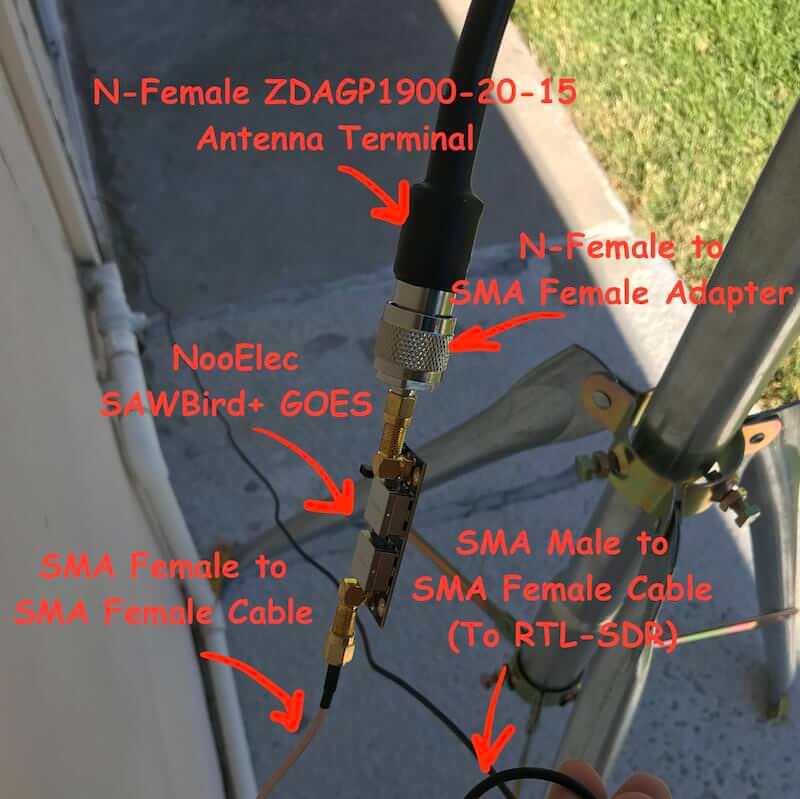
In the past we've seen people receive these images with higher end SDRs like the Airspy and SDRplay. However, Pieter has shown that it is possible to receive these images on a budget. He uses an RTL-SDR, a 1.9 GHz grid dish antenna from L-Com, a Raspberry Pi 2, the NooElec 'SAWBird' LNA, and an additional SPF5189Z based LNA. The SAWBird is a yet to be released product from NooElec. It is similar to their 1.5 GHz Inmarsat LNA, but with a different SAW filter designed for 1.7 GHz GOES satellites. The total cost of all required parts should be less than US $200 (excluding any shipping costs).

Pieter also notes that he uses the stock 1.9 GHz feed on the L-com antenna, and that it appears to work fine for the 1.7 GHz GOES satellite frequency. With this dish he is able to receive all three GOES satellites at his location with the lowest being at 25 degrees elevation. If the elevation is lower at your location he mentions that a larger dish may be required. It may be possible to extend the 1.9 GHz L-Band dish for better reception with panels from a second cheaper 2.4 GHz grid dish, and this is what @scott23192 did in his setup.

For software Pieter uses the open source goestools software that Pieter himself developed. The software is capable of running on the Raspberry Pi 2 and demodulating and decoding the signal, and then fully assembling the decoded signal into files and images.

Pieters GOES RTL-SDR Receiving Setup
Pieters Low Cost GOES RTL-SDR Receiving Setup