Over on YouTube user Tech Minds has uploaded a useful video which shows how to set up DMR decoding with SDR#, VB-Cable, DSD+ and an RTL-SDR dongle. He also uses the DSD plugin for SDR# which makes controlling the command line DSD+ software a little easier. If you are interested we also have a short tutorial on DMR/P25 decoding available here. The video starts from downloading and installing the software, and explains every step very carefully, so it is a very good starting video for beginners.
DMR (aka MotoTRBO or TRBO) is a digital voice protocol used by Motorola radios. Software like DSD+ is required to listen to it, but it can only listen in if the signal is unencrypted.
Tech Minds has also uploaded several other tutorial videos to his channel over the last few months including guides on how to set up the ham-it-up upconverter, ADS-B tracking, using a Raspberry Pi to create a FM transmitter and more.
How To Setup SDR # Sharp To Decode DMR Digitial Using DSD Plus And An RTL SDR Receiver on Windows 10
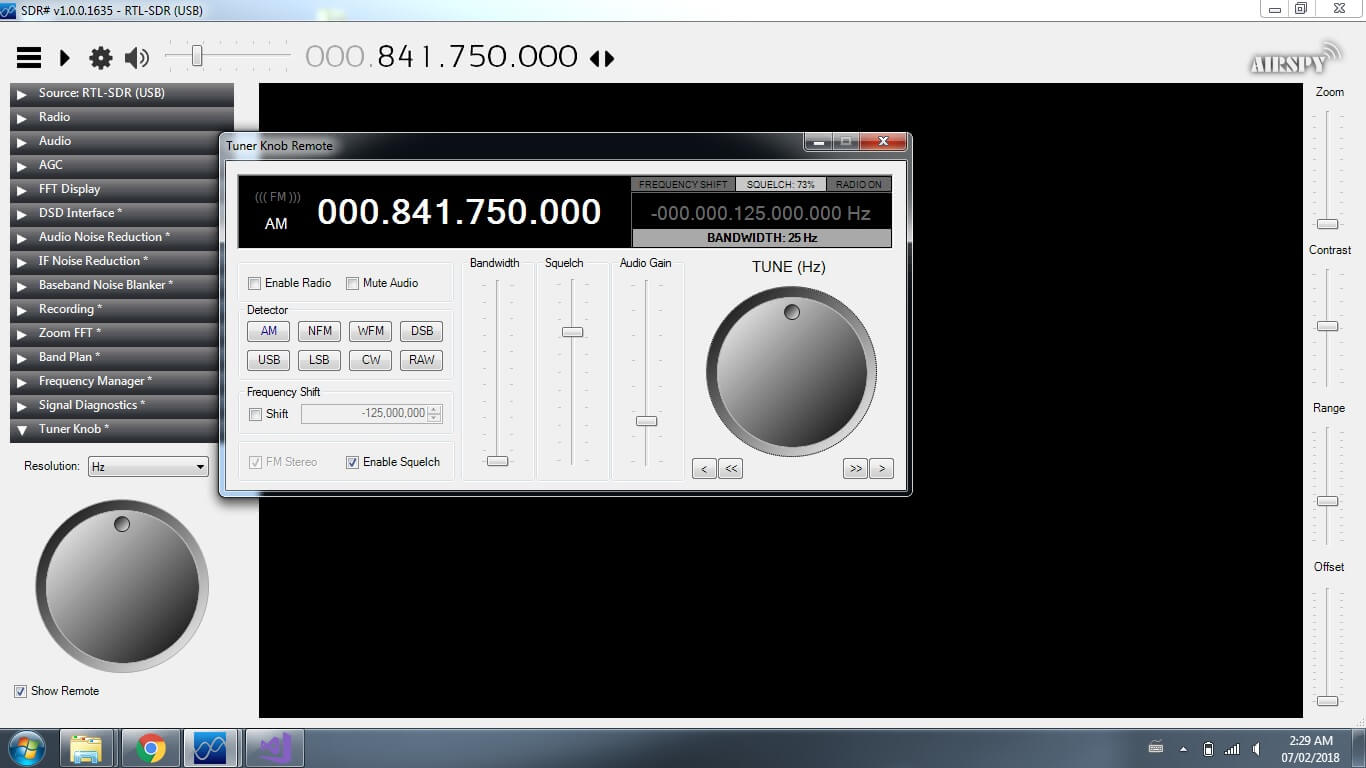
Thank you to Eddie MacDonald for submitting his new SDR# plugin to us via our forums. Eddie's plugin is called the 'Tuner Knob Plugin', and simply enables a visual tuner knob on the screen for adjusting the frequency. This plugin could be useful especially for those running SDR# on touchscreen tablets or laptops. To install the plugin copy the .dll file to the SDR# directory and copy and paste the magicline.txt into the plugins.xml file. We tested the plugin on our PC and found it to run well.
Programming the plugins is not so easy considering their is very little documentation and few examples on the net. There may be a few bugs I have not caught (but i hope i have caught them all.)
This DLL was compiled and tested on a Windows 7 x64 machine and the DLL is compiled for both x86 and x64 platforms. I have tested it on SDR# Version v1.0.0.1635
I am not certain which previous versions it may or may not run on. However, being built on the 4.6 .Net framework it should work with Win7 on.
I built this plugin because i got tired of holding down buttons and waiting for the frequency changes. I figured this was a simpler method (even though some people hate rotary style controls on windows) It works exceptionally well with a touch screen.
As previously mentioned in the forum post I created the 'remote' to test my programming for future plugins for DSP
While some may not find a use for the remote I made it this way for my wife who like to cruise the dial and just see what she can pick up.
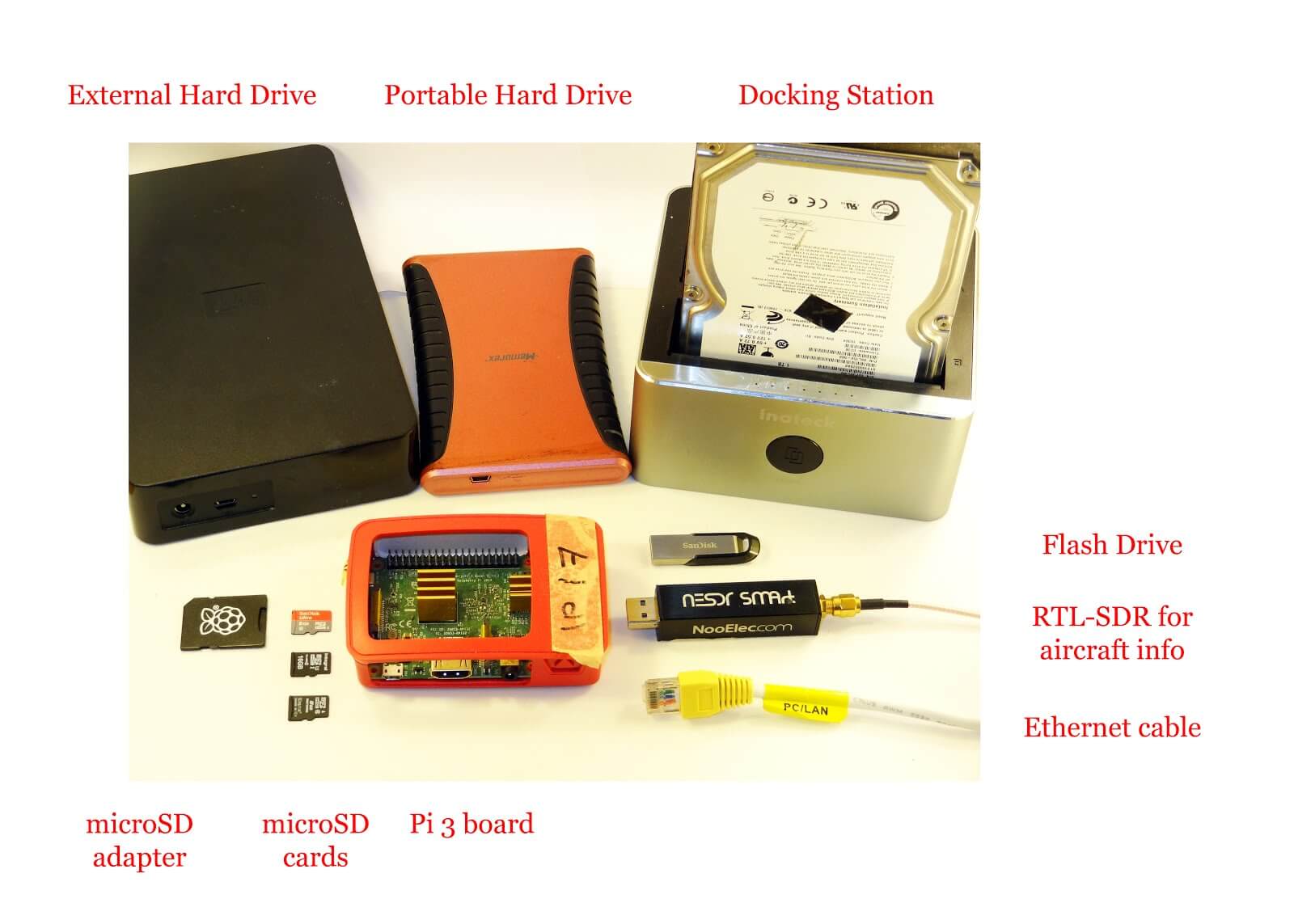
Most readers are familiar with the Raspberry Pi 3 and how it can be used with RTL-SDR applications such as ADS-B reception. However, one does not need to dedicate an entire Pi 3 to a single task as they are more than powerful enough to run multiple applications at once.
Over on his blog 'Radio for Everyone' Akos has uploaded a tutorial that shows how he set his Raspberry Pi 3 up as a simultaneous Network Attached Storage (NAS), Torrentbox and ADS-B server. A NAS is simply a hard drive or other data storage device that can be accessed easily over a network instead of having to be connected directly to a PC. A torrentbox is a device such as a Raspberry Pi 3 running torrent software so that you can download torrent files 24/7 without needing a PC on all the time.
Akos' tutorial shows how to set everything up from scratch, starting from writing the Raspbian SD Card and connecting to it via SSH. He then goes on to show how to install the torrent software, set up the NAS and finally set up ADS-B reception.
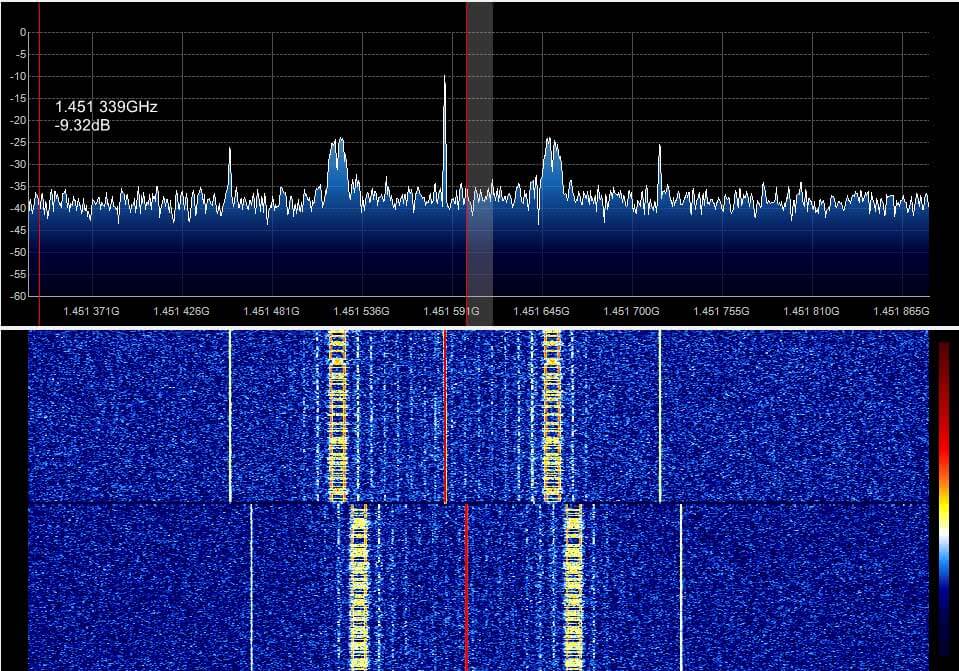
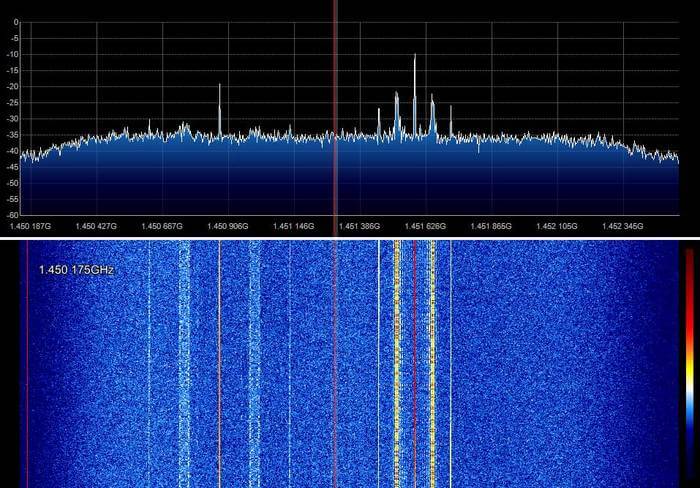
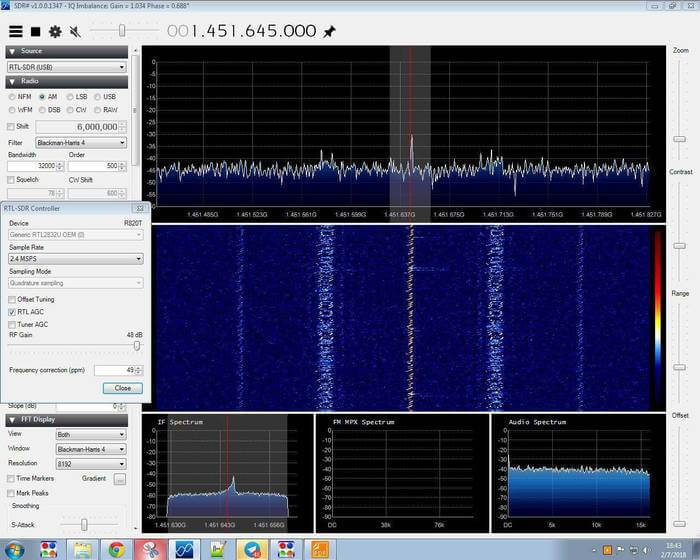
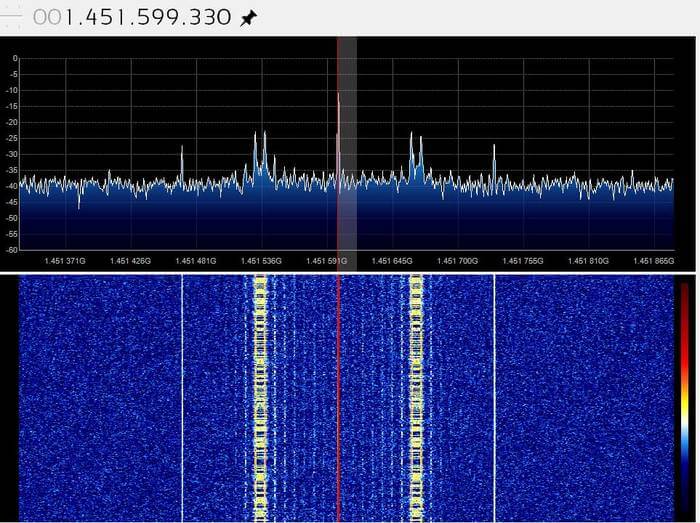
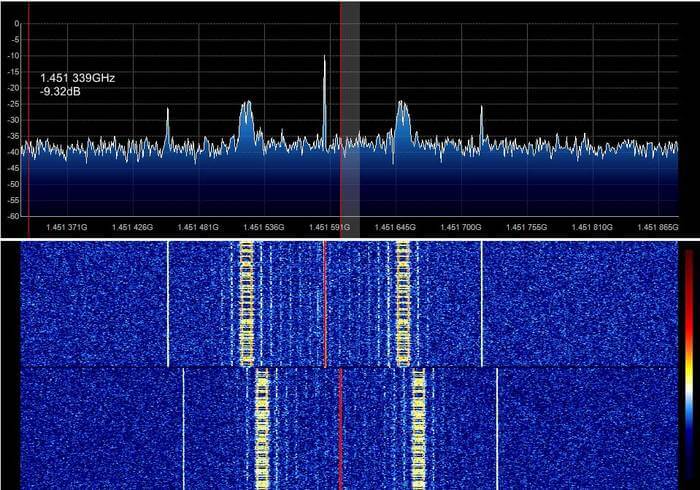
Thank you to an anonymous contributor for sharing his experiences with trying to receive satellite TV beacons with his RTL-SDR. Satellite TV is typically up at 10.7 to 11.7 GHz which is far too high for an RTL-SDR to receive. So to receive these frequencies with the RTL-SDR he uses a satellite TV LNB (an LNB is essentially a downconverter and satellite dish feed), a DIY Bias T and a 90 cm dish. He writes:
Almost all television satellites have a special frequency for transmitting a beacon signal. The beacon signal is a reference signal with fixed frequency, power and [maybe] without modulation that is sent usually by satellites. One of the most important techniques used for satellite wave propagation studies is satellite beacon signal measurement. (http://eej.aut.ac.ir/article_433.html)
I used an universal LNB, DIY bias-T and a fixed 90cm dish pointed at 26 degrees East. By connecting 18 volts DC to LNB I am able to activate the 9750 Mhz local oscillator and horizontal operating mode of LNB.
Means that anything received with LNB between 10.7-11.7 GHz can be easily seen in 950-1950 MHz range, using RTL-SDR.
It is useful for measuring attenuation caused by heavy rain in Ku band or accurate dish positioning or even measuring frequency drift in LNB local oscillator caused by wind and temp change during a timespan.
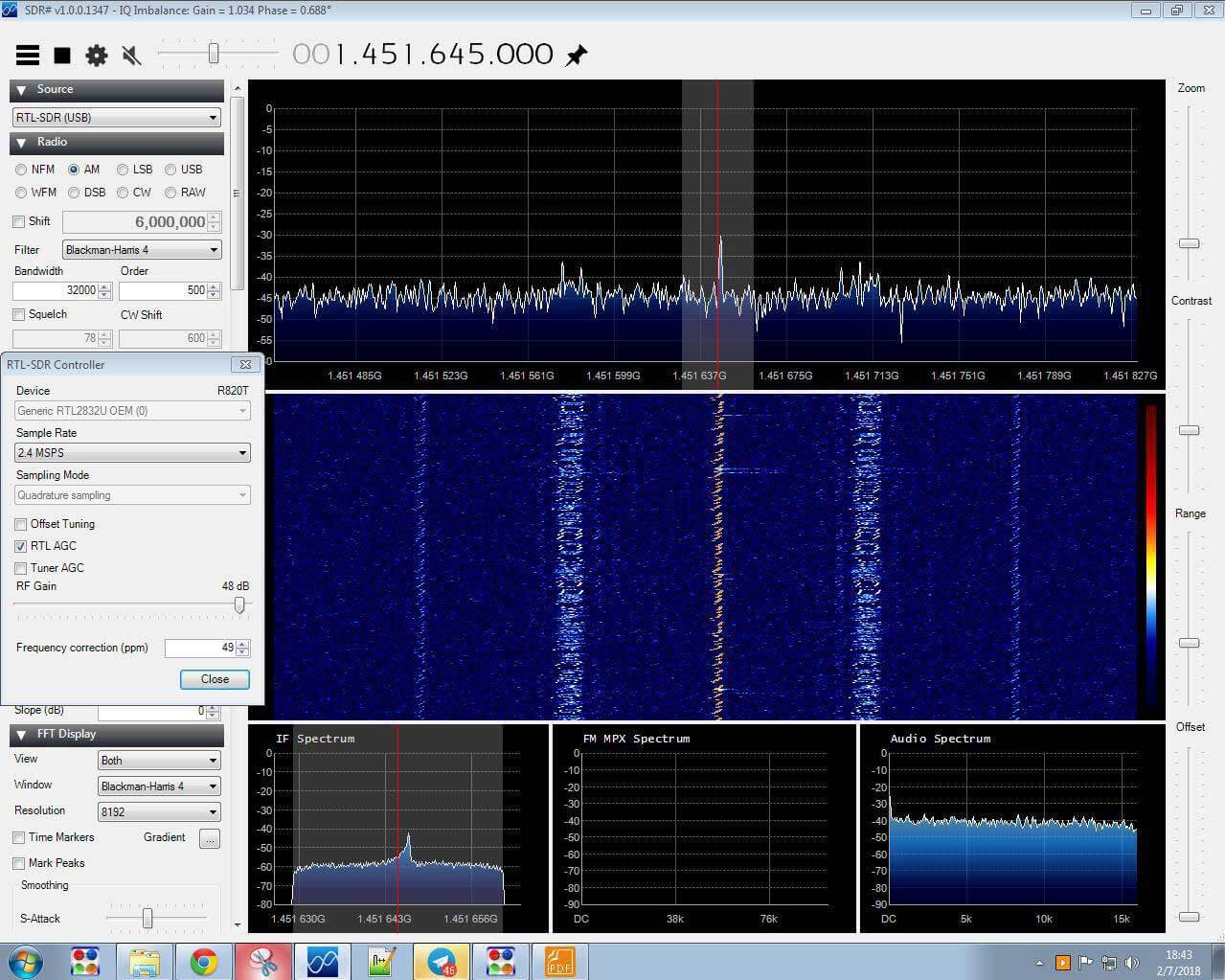
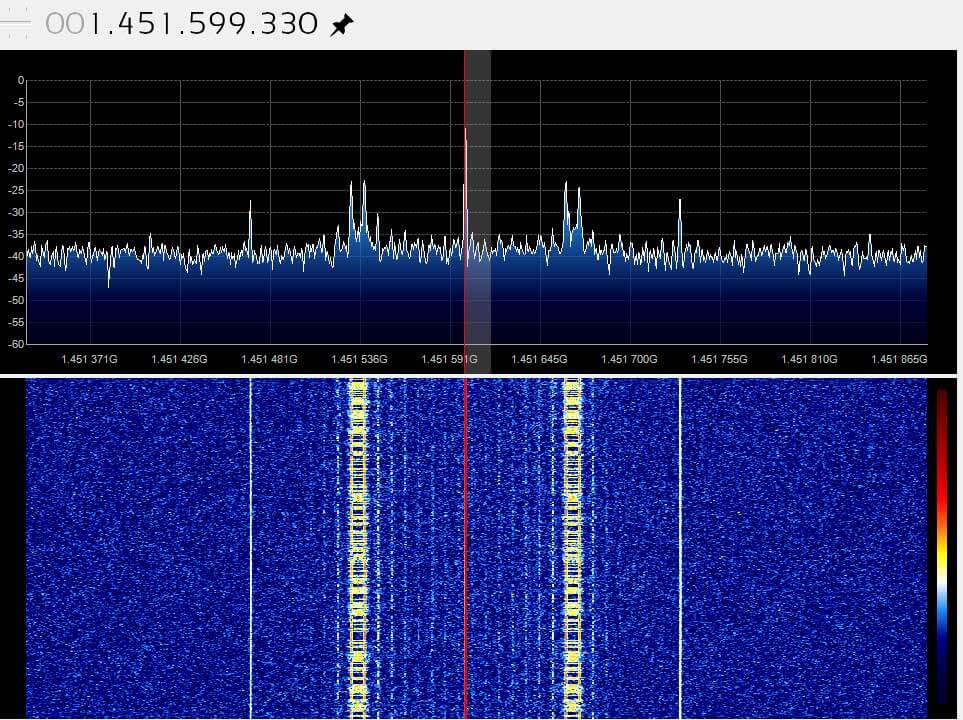
It seems that the right signal is Eutelsat 21B and left Es'hail 1.
In picture 4 signal captured immediately after turning on LNB. but all others are captured after at least 5 hours of warming up.
MAYBE oscillator needs a stabilize time or temp change may caused the drift.
If you are interested in receiving these beacons, Daniel Estevez has also performed similar experiments with his RTL-SDR and an LNB as well, and has written about it on his blog.
Below we show some images of beacons shown in SDR# that the anonymous contributor received with his setup.
Back in December Tysonpower showed us how he was able to receive HRPT weather satellite images with a 80cm and 1.2m satellite dish, LNA and Airspy Mini.
If you didn't already know, HRPT signals are a little different to the more commonly received NOAA APT or Meteor M2 LRPT images which most readers may be more familiar with. HRPT images are more difficult to receive as they are broadcast in the L-band at about 1.7 GHz and so receiving them requires a dish antenna (or high gain Yagi antenna), L-band dish feed, LNA and a high bandwidth SDR such as an Airspy Mini. The result is a high resolution and uncompressed image with several more color channels compared to APT and LRPT images.
In the last video Tysonpower was successful with receiving HRPT images with his setup. But recently over on his YouTube channel and on his blog Tysonpower has shown how he has improved his HRPT reception by first optimizing the feed and adding in a copper matching line which helps improve the impedance matching of the feed. He also added an L-Band filter tuned to the HRPT signal which he notes made the biggest improvement, and he also moved all the components into a watertight box for permanent outdoor mounting. With these changes he's now able to consistently pull in some very nice imagery. All the images are still received by hand tracking the satellite dish as the satellite passes over, but he notes that he plans to experiment with motorized trackers in the future.
Note that the video shown below is narrated in German, but English subtitles are provided if you turn on YouTube captions.
[EN subs] HRPT - optimierungen und sehr gute Bilder
A sample HRPT image received by Tysonpower.
In addition to the above Tysonpower also writes that he has created a free HRPT decoder for the HRPT signals originating from NOAA satellites. He writes regarding HRPT decoders:
I found it quite complicated to find a decoder for HRPT when i started and there is still no one that you can just Download.
The only free Decoder is the gr-noaa example in gnu radio that has a depricated wx GUI and uses a input from a specific SDR. I used that gr-noaa example and created a decoder that uses the modern QT GUI and has a clean interface. You just put in a wav IQ file from SDR# for example and it will decode the Data into the file you entered. It is not the best one out there in form of signal processing, but a good start i would say.
The decoder can be downloaded from tynet.eu/hrpt-decoder. Below is a second YouTube video where Tysonpower explains how to use the decoder.
[EN subs] Kostenloser HRPT Decoder (GNU Radio) - Und wie man ihn nutzt
Thanks to Stefan Dambeck for letting us know that there is now a fork of libairspyhf made by DL9RDZ which contains an adapted version of airspyhf_rx (the raw IQ generator). This enables the Airspy HF+ to be easily integrated into OpenWebRX.
If you weren't aware, OpenWebRX is a browser based SDR interface and server software that allows an SDR to be used by multiple people at the same time over the internet. It performs audio demodulation and compression on the server side allowing for very low and efficient network usage. In this way it is different to Airspy official server solution SpyServer which sends the IQ data over the network. So an OpenWebRX server uses significantly less network bandwidth and might be more suitable for those on slower or capped internet connections.
At the moment we're not seeing any public HF+ servers available on the OpenWebRX database at sdr.hu, but this may change in the future.
Airspy HF+ Running on the OpenWebRX Web Browser Interface
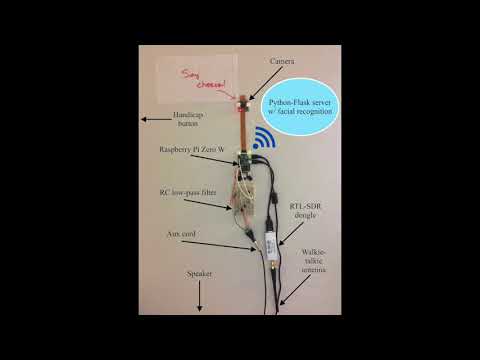
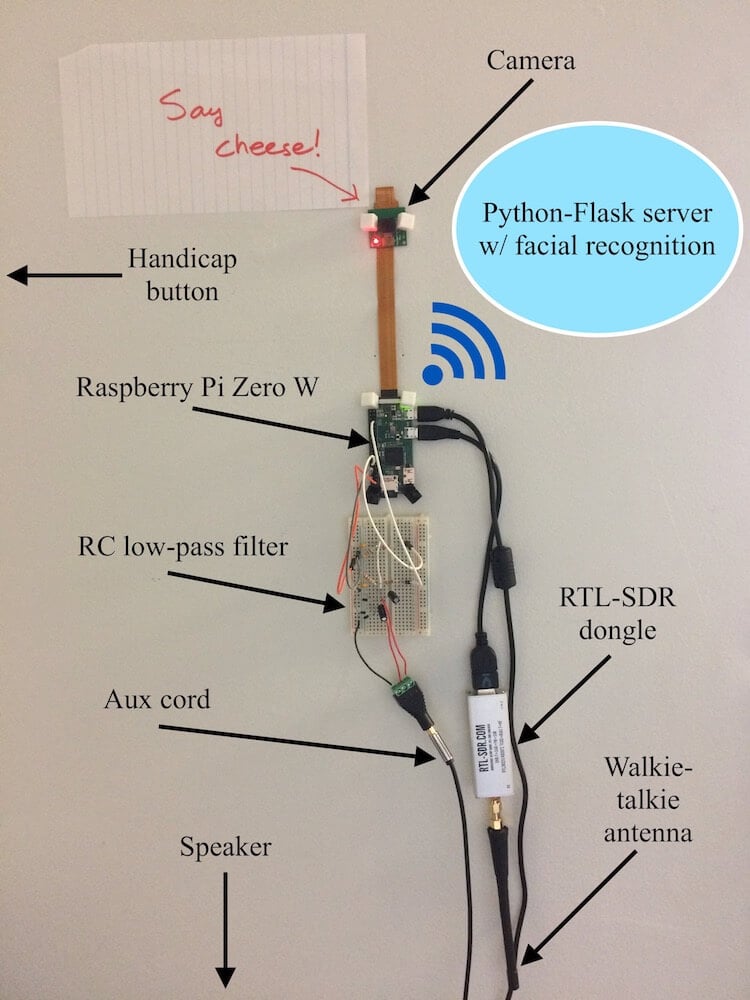
He uses a handicap door button with wireless transmitter that transmits at 300 - 390 MHz, and uses the RTL-SDR on the Raspberry Pi Zero to detect whenever the button is pressed. The button detection algorithm simply looks for an increase in RF energy via an FFT transform. Once a button press is detected by the RTL-SDR and Raspberry Pi the camera and facial recognition software on the Pi activate, and a text to speech algorithm asks the button presser to face the camera for identification. If the face is recognized in the database the speech to text welcomes the user.
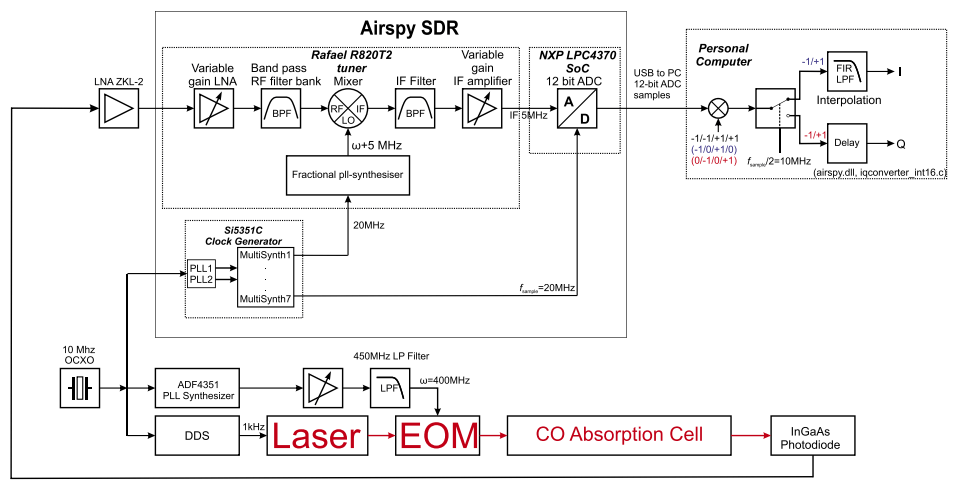
In the experiment a laser is fiber optically coupled to an eletro-optic phase modulator, which modulates a 400 MHz FM signal onto the light. The light is then passed into a Carbon monoxide absorption cell with a photodiode used to take the spectroscopic measurements. The signal from the photodiode is passed into a LNA and then into the Airspy where the signal can then be processed on the PC.
The paper is very technical, but describes the setup, and how they characterized and calibrated the Airspy for their measurements. They conclude with the following:
A successful demonstration of a commercially available software defined radio as a lock-in amplifier was performed. For this purpose, the tuner front end and back end were characterized. The sensitivity and non-linearity of the receiver circuit was measured and analyzed. Acquisition of a CO spectral line was demonstrated using FM-spectroscopy with a repetition rate of 1 kHz. This proves the usability of an off-the-shelf SDR as a cheap but powerful lock-in amplifier by adding PLL driven frequency generators. The drawback of the arbitrary initial phase of the used phase locked loops can be either solved by software or hardware measures.
This experiment is somewhat similar to one we posted about earlier in the month where an RTL-SDR was used in an optical interferometer lab experiment.
FM Spectroscopy with an Airspy Software Defined Radio.

![[EN subs] HRPT - optimierungen und sehr gute Bilder](https://www.rtl-sdr.com/wp-content/plugins/wp-youtube-lyte/lyteCache.php?origThumbUrl=https%3A%2F%2Fi.ytimg.com%2Fvi%2FHcaJgFatKQI%2F0.jpg)

![[EN subs] Kostenloser HRPT Decoder (GNU Radio) - Und wie man ihn nutzt](https://www.rtl-sdr.com/wp-content/plugins/wp-youtube-lyte/lyteCache.php?origThumbUrl=https%3A%2F%2Fi.ytimg.com%2Fvi%2FxtNu3rV1FEY%2F0.jpg)