Rtl_power is a tool that allows you to create wide band signal strength heat maps over a long length of time. It works by very quickly hopping across the spectrum, capturing the RTL-SDR bandwidth of about 2 MHz at a time, and then displaying it on a heat map. This is useful for seeing what frequencies are active and at what times.
Unitrunker is software that allows you to follow trunked voice conversations, and SDR-Console V2 is a general purpose receiver, similar to other software such as SDR#. The authors write:
This applications sole purpose is to allow Universal Trunker (aka Unitrunker) to control the tuning frequency of individual VFO’s in SDR Console v2. This is achieved by translating Unitrunker Receiver Control commands into a format accepted by SDR Console. Communication occurs over virtual com / serial ports.
Uni-SDR Link has been tested on Windows 7 & Windows 8 and requires .NET Framework version 4.0 or greater.
Just download & launch. No installation required.
The Uni-SDR-Link.chm file contains help for the application should be placed in the same directory as the Uni-SDR-Link.exe.
To commemorate the 40th Anniversary of the Apollo-Soyuz mission the International Space Station (ISS) is set to transmit 12 Slow Scan TV (SSTV) images this weekend. The images are set to transmit Saturday morning, July 18 10:30 UTC and will run through until Sunday, July 19 21:20 UTC, but they note that the dates are tentative and could be subject to change. The images will be transmitted at 145.80 MHz and will probably be sent in the PD180 SSTV mode with 3 minute breaks between each transmission.
SSTV is a type of radio protocol that is used to transmit low resolution images over radio. An RTL-SDR with appropriate antenna can be used to receive these images from the ISS. The signal is usually quite strong, so even a simple whip or long wire antenna may receive these images if placed in a good unobstructed view of the sky.
As with the last ISS SSTV event we suggest that to decode the images you use SDR# and pipe the audio into MMSSTV, a freeware SSTV decoding software program. We also suggest using the settings recommended by “happysat”, which are enabling “Auto slant” and “Auto resync” under Options->Setup MMSTV->RX.
To know when the ISS is overhead you can track it online using heavens-above.com or isstracker.com. If using heavens-above to predict pass times remember to set it to show all passes, not just the visible ones. Received SSTV images can be submitted to the ARISS Gallery.
40 years ago this week, the historic joint Apollo-Soyuz mission was conducted. Apollo-Soyuz (or Soyuz-Apollo in Russia) represented the first joint USA-Soviet mission and set the stage for follow-on Russia-USA space collaboration on the Space Shuttle, Mir Space Station and the International Space Station. The Soyuz and Apollo vehicles were docked from July 17-19, 1975, during which time joint experiments and activities were accomplished with the 3 USA astronauts and 2 Soviet cosmonauts on-board. Apollo-Soyuz was the final mission of the Apollo program and the last USA human spaceflight mission until the first space shuttle mission in 1981.
To commemorate the 40th anniversary of this historic international event, the ARISS team has developed a series of 12 Slow Scan Television (SSTV) images that will be sent down for reception by schools, educational organizations and ham radio operators, worldwide.The SSTV images are planned to start sometime Saturday morning, July 18 and run through Sunday, July 19. These dates are tentative and are subject to change. The SSTV images can be received on 145.80 MHz and displayed using several different SSTV computer programs that are available on the Internet.
Also, as a special treat, on Saturday July 18 the ISS cosmonauts will take time out to conduct an ARISS contact with students attending the Moon Day/Frontiers of Flight Museum event in Dallas Texas. This Russian cosmonaut-USA student contact is planned to start around 16:55 UTC through the W6SRJ ground station located in Santa Rosa, California. ARISS will use the 145.80 MHz voice frequency downlink (same as the SSTV downlink) for the Moon Day contact. More details about these contacts are provided at Upcoming Contacts.
The ARISS international team would like to thank our ARISS-Russia colleague, Sergey Samburov, RV3DR, for his leadership on this historic commemoration.
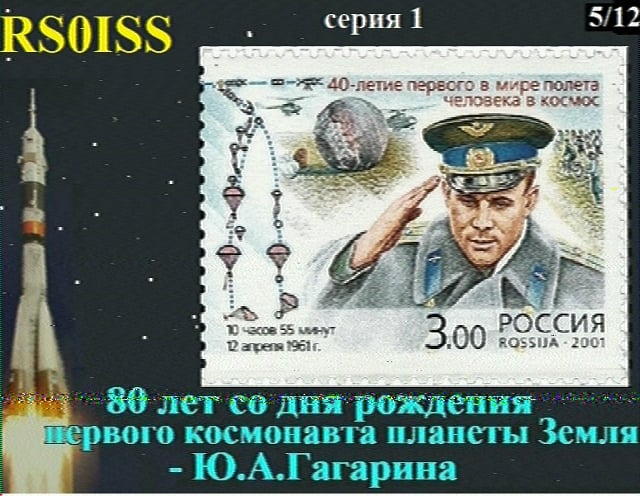
An example SSTV image from the last ISS SSTV event which was to commemorate first man to space Yuri Gagarin’s would be 80th birthday.
At the recent 2015 Society of Amateur Radio Astronomers (SARA) Conference Ciprian Sufitchi (N2YO) presented a paper titled “Detecting meteor radio echoes using the RTL/SDR USB dongle” (pdf). His paper introduces the RTL-SDR, the theory behind forward scatter meteor detection as well as the practical application of the RTL-SDR to meteor detection. Ciprian summarizes meteor scatter as the following:
When a meteor enters the Earth’s upper atmosphere it excites the air molecules, producing a streak of light and leaving a trail of ionization (an elongated paraboloid) behind it tens of kilometers long. This ionized trail may persist for less than 1 second up to several minutes, occasionally. Occurring at heights of about 85 to 105 km (50-65 miles), this trail is capable of reflecting radio waves from transmitters located on the ground, similar to light reflecting from a mirrored surface. Meteor radio wave reflections are also called meteor echoes, or pings.
In the paper he explains how analog TV transmissions are the best for meteor scatter, but unfortunately these been discontinued within the USA. Instead he has been able to use analog TV transmitters from Canada, who still transmit this type of signal. He shows that about half of the USA could use the transmitter he is using for meteor scatter, which is based in Ontario, Canada.
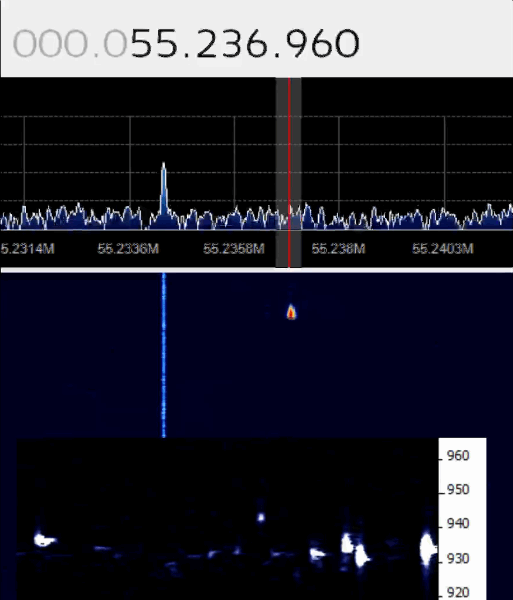
Ciprian is also running a very cool live meteor detection stream on his website at livemeteors.com. His setup is located in the DC Metropolitan area and uses a directional Yagi antenna pointed at the Canadian analog TV tower which is broadcasting at 55.237 MHz. The receiver is an RTL-SDR dongle coupled with SDR# and the ARGO software.
Tim Havens is an avid CW operator on the ham bands and primarily uses his Yaesu FTDX-5000 transceiver for this purpose. At the same time he also uses a software defined radio coupled with an upconverter as a panadapter by connecting the SDR to the 9 MHz IF output of the Yaesu.
To get around this Tim decided to use the Airspy in a special configuration. First he used the external clock input of the Airspy to connect to his Jackson Labs “Fury” GPSDO. This device uses GPS satellites to generate a very accurate 10 MHz clock, with almost zero drift. Secondly, to get around the need for an upconverter with it’s own frequency drift he used the ADC1 direct sampling input ports on the Airspy to connect to the 9MHz IF output of his FTDX-5000 through an extra band pass filter and LNA.
Tim writes that he will soon update his post with more images and a video.
Airspy with external GPS clock and ADC1 output connected.
So in order to optimize VLF reception, Martin built an external frequency equalisation network which has the following components and functions:
2MHz Low pass Filter – to minimise alias signals originating at 30MHz
20dB Variable attenuator – to set the overall signal level fed into the dongle
Switched LF roll-off – to optimise the performance at frequencies around 10KHz in the presence of strong lightning surges
-10dB notch at 198KHz – to reduce level of BBC R4 broadcast station in the LF band
-10dB notch at 800KHz – to reduce level of local broadcast stations in the MF band
His screenshot results show that his filters work well and significantly reduce the effect of lightning pulse noise at 9 kHz. With the filters in place and properly optimized with the attenuator and various switches, he is able to receive Russian Alpha navigation signals at frequencies around 12 and 14 kHz and the 300 to 500 kHz aeronautical and maritime navigation bands.
Over on cruisersforum.com we’ve seen news of a user who has worked to combine rtl_fm and aisdecoder into a single command line program called rtl_ais. AIS stands for Automatic Identification System, and is used in the marine industry to broadcast vessel GPS coordinates to one another to work as a collision avoidance radar system. With the correct software and an RTL-SDR, nearby boat AIS broadcasts can be received and the boat GPS coordinates plotted on a map.
Until recently, to decode AIS you had to pipe the AIS audio from software like rtl_fm or SDR# into a decoder. rtl_ais is a decoder which allows you to directly connect to the RTL-SDR and decode AIS without the need to pipe audio. The software is compatible on Linux and Windows and the current source code and Windows binary release is available at https://github.com/dgiardini/rtl-sdr-misc/releases/tag/v0.1.
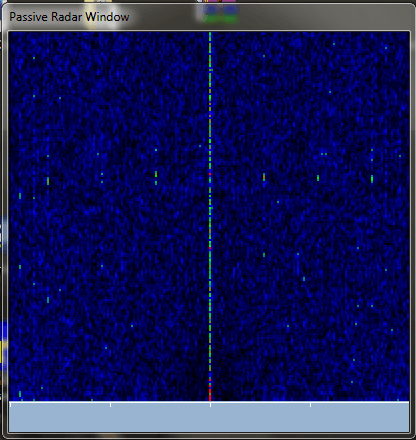
The first one is Passive Radar which bases on the signal from only one dongle. The ambiguity function is the same as in advanced projects with the difference that I implemented self-correlate function instead of cross-correlate one which is used in 2 dongles projects. Such solution theoretically should works as can be found in internet. It should be noticed that for proper work of such passive radar the direct signal should be comparable in strength to the reflected one. This plugin is still under development.
In the future he hopes to be able to support two dongle passive radar as well.
The Passive Radar plugin by Dr. Kaminski in SDR#.The Passive Radar window.
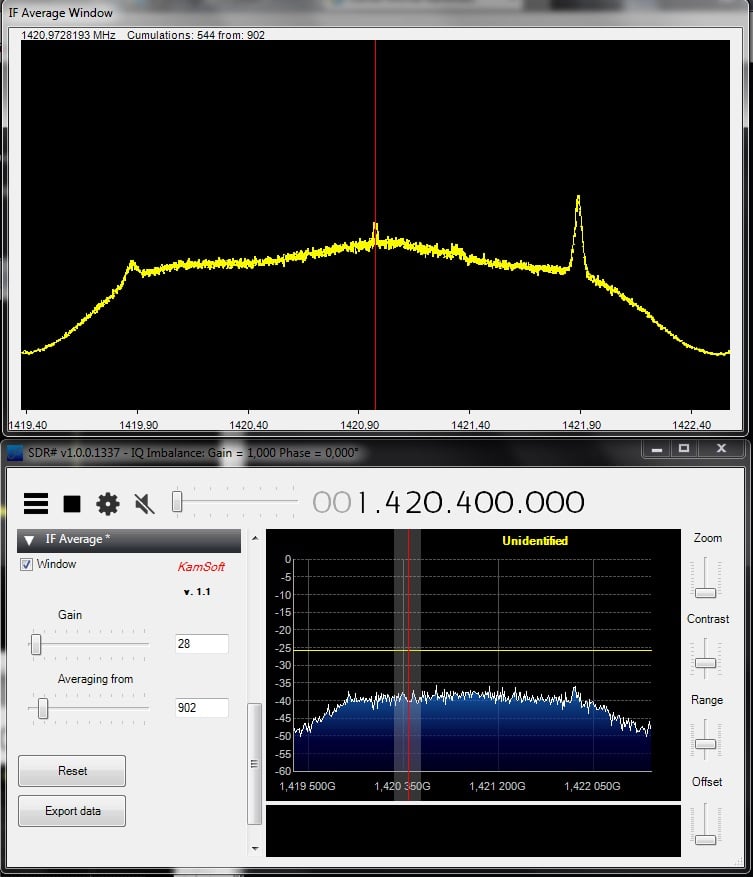
The second plugin is called "IF Average". This plugin allows the IF signal (the entire active bandwidth is what he seems to be referring to) to be averaged which is useful for many applications including radio astronomy projects such as detecting the Hydrogen line. He writes:
The second plugin which is finished is for IF signal averaging. It is important in case of radio-astronomical observations. It allows to cumulate signals (up to 10000 samples in real time), present them in friendly way and save for further work.