Category: Applications

RTL_ACARS Updated

The rtl_acars console based ACARS decoder which is based on rtl_fm has been updated by a new author, gat3way on Reddit. The new updates include decoder sensitivity improvements and the following:

  • Multiple frequencies scanning is now supported (by providing multiple -f arguments at command line and -l ). Since there is no audio output and it’s hard to determine right squelch level, a squelch debug option (-r) is implemented. Use it to experiment with squelch value, it’s simple: good squelch values flood stdout with “hopping freq!” messages yet avoid too high squelch levels. In general, values between 20-30 work good with my setup (big city, lots of radio interference, NOAA turnstile which gives -3db due to rhcp polarization).
  • Aircraft and airline databases now supported (using the acarsdec builtin ones). DBs are text files using simple format, so you may easily update them. I would very much appreciate your help to keep that up-to-date.
  • Certain improvements in frequency hopping code as compared to rtl_fm, but don’t expect wonders, it takes time to retune so data loss is not avoidable especially if you provide lots of frequencies to scan or huge ranges.
  • A simple Makefile to make it simpler šŸ™‚

In the future gat3way hopes to support the decoding of multiple ACARS channels as well. The updated rtl_acars software can be downloaded from github here.
Sniffing and Decoding NRF24L01+ and Bluetooth LE Packets with the RTL-SDR

Omri Iluz wrote in to us to let us know about his recent project which involves sniffing and decoding wireless packets at 2.4 GHz from NRF24L01+ and Bluetooth Low Energy (BTLE) transceivers. The NRF24L01+ is a popular wireless transceiver which is used in many common devices such as keyboards, mice, remote controls, toys and appliances.

Since 2.4 GHz is out of any of the RTL-SDR’s receivable range, Omri used a cheap downconverter which he was able to buy from China using Aliexpress. The downconverter converts the 2.4 GHz signal into a lower frequency at around 400 MHz which is in the receivable range of the RTL-SDR.

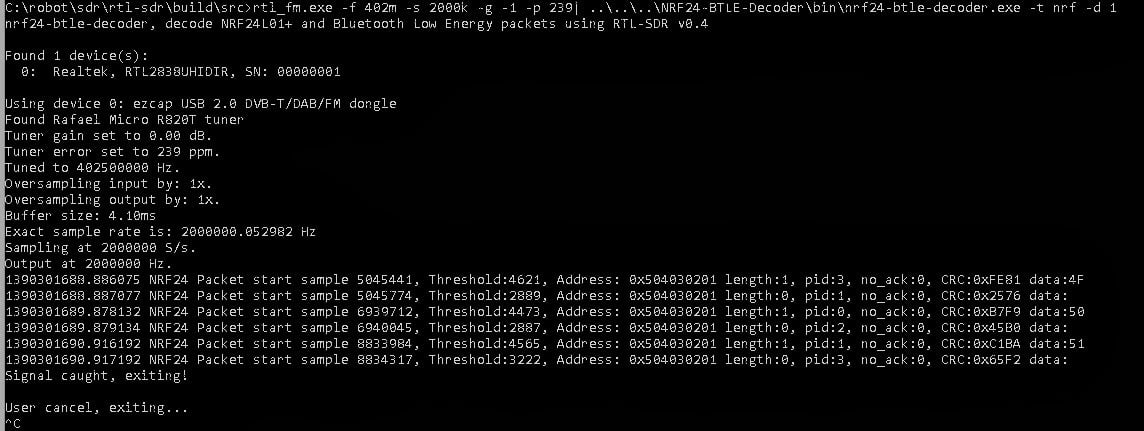
He was then able to use hisĀ NRF24-BTLE-Decoder software that he developed to convert the received data from the NRF24L01+ transceiver into a decoded packet by simply piping the output of RTL_FM into his program.

Since the NRF24L01+ uses hardware similar to the Bluetooth Low Energy (BTLE) protocol, Omri was able to modify his code to be able to also decode BTLE packets.

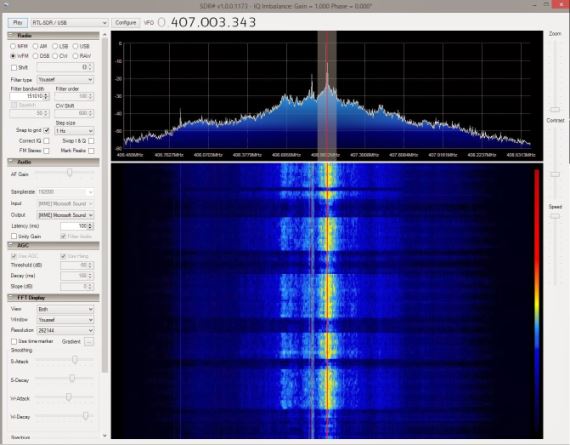
2.4GHz NRF24 packet received on the RTL-SDR from a Logitech mouse using a downconverter
2.4GHz packet received on the RTL-SDR + downconverter from a Logitech mouse
decodednrf
Decoded NRF24 Packets

Radio Astronomy with a 0.2dB Noise Figure LNA

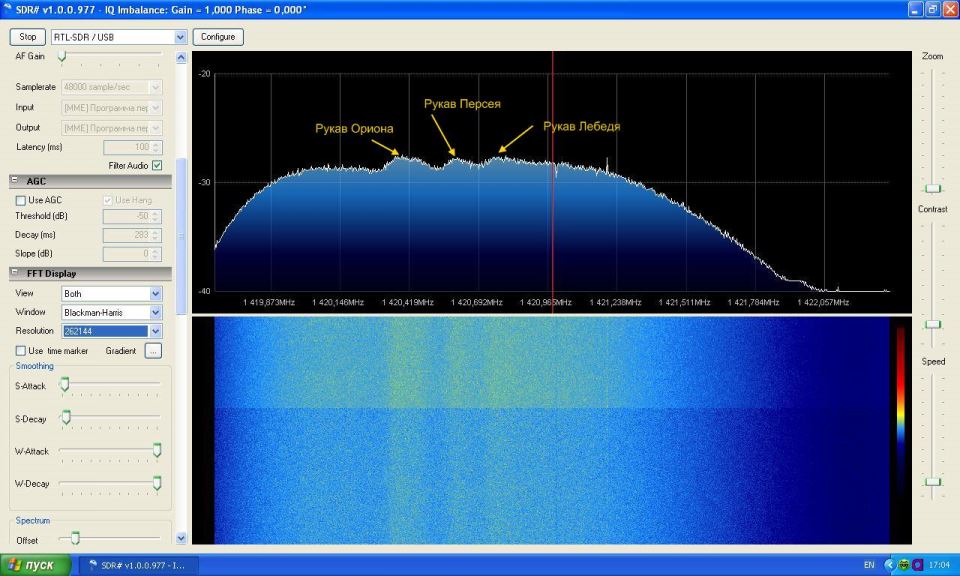
Over on our Facebook pageĀ member АлексанГр has let us know about a Russian amateur astronomer, Alex who has been using the RTL-SDRĀ for radio astronomy. Alex uses an Elonics E4000 RTL-SDR combined with a 3.7m mesh parabola dish with 1420 MHz waveguide.

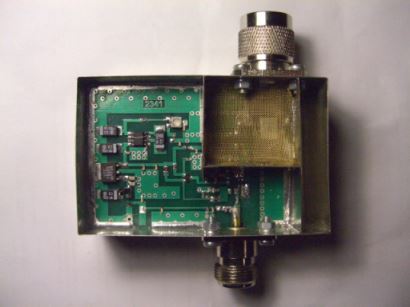
At the center of his system is an LNA with 40dB gain and a very low noise figure of 0.2dB. This LNA appears to be based on G4DDK’s VLNA, but modified to work with the 1420 MHz frequency used for radio astronomy. It seems the LNA can be ordered for 140 USD from the above link.

Note: The above Russian links are machine translated with Google to English.

0.2dB Noise Figure Low Noise Amplifier
Radio Astronomy Results

Using the RTL-SDR to help Program a TI Chronos RF Watch

Over on our Facebook page, member АлексанГр has posted about a project he found by Georg CampanaĀ which involves using an RTL-SDR to capture signals from his TI Chronos watch which has a programmable 433 MHz RF transmitter built into it.

GeorgĀ used his TI Chronos watch to transmit a signal copied from remote controls which are used to open his house gate, garage door, light switches and set his house alarm.Ā When he discovered that the watch signal was not transmitting properly, he used his RTL-SDR to compare the signal coming from the watch to the original signals from the remote controls to help him with debugging. In order to detect the bit stream from the RF signal, he used a GNURadio program for decoding wireless temperature sensors, which he modified slightly to work with his watch.

Tools used to program the TI Chronos watch

RTL_HPSDR: RTL-SDR to HPSDR Translation Server

The High Performance Software Defined Radio (HPSDR) project is an open source SDR project that aims to create a modular SDR for ham radio use. The idea is that users only need to include the specific HPSDR hardware that they need for their particular application.

Recently, Richard Koch has written a Linux based tool calledĀ RTL_HPSDR which allows RTL-SDR based dongles to be used with HPSDR software, such as cuSDR64 which is capable of displaying and controlling up to seven receiver slices simultaneously and PowerSDR which can display and control up to four.

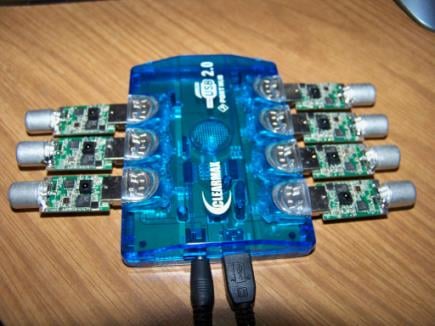
Using his tool Richard was ableĀ to get seven R820T RTL-SDR dongles running simultaneously on an EKB311Ā Quad core ARM Cortex A9 based mini-pc using a USB 2.0 hub with a modified power supply to provide 5V@2A.

Seven RTL-SDR Setup.
Seven RTL-SDR USB Setup
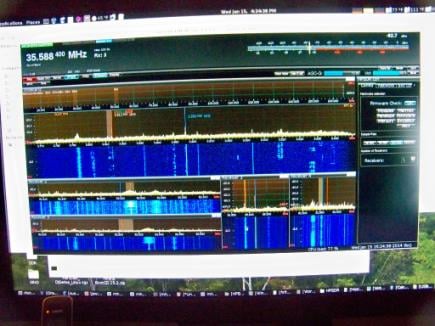
Five RTL-SDR Dongles used with RTL_HPSDR and csSDR64.
Five RTL-SDR Dongles used with RTL_HPSDR and csSDR64
Two RTL-SDR dongles running on PowerSDR.
Two RTL-SDR dongles running on PowerSDR


RTL-SDR Now Supported by MATLAB

The Communications System Toolbox in MATLAB 2013b now supports the RTL-SDR dongle.Ā MATLAB is a scientific computing software product which scientists and engineers use for complex technical computations and simulations.

The RTL-SDR radio support package enables you to design wireless receivers using real world signals. Using Communications System Toolboxā„¢ in conjunction with an RTL-SDR USB radio, you can design and prototype systems that process real-time wireless signals in MATLAB® and SimulinkĀ®.

Wireless engineers, students, and hobbyists can learn to receive and decode real-world radio signals using this low cost RTL-SDR hardware connected to your computer.

Key Features:

  • RTL-SDR radio as an I/O peripheral to receive streaming RF signals
  • Configurable center frequency and sample rate
  • NooElecā„¢ NESDR Mini USB Stick (R820T) and NooElec NESDR Nano USB Stick (R820T) SDR devices with frequency range 30MHz – 1.8GHz
  • Compatible with other RTL-SDR USB radios (eg., Terratec T-Stick E4000)
  • Several application examples for getting started:
    • FM Mono / Stereo with RTL-SDR
    • FRS Receiver with RTL-SDR
    • Spectral Analysis with RTL-SDR radio
    • Frequency offset calibration with RTL-SDR

Icecream Box Raspberry Pi RTL-SDR Receiver

Over on our Facebook page Micheal Kent has posted about his raspberry pi based RTL-SDR receiver which runs rtl_udp. There’s not much more information on this project, but the video he posted shows what appears to be a Raspberry Pi and RTL-SDR dongle mounted inside an icecream box. There are two knobs mounted on the outside that control the brightness of an LCD screen which shows the tuned frequency, and another knob which controls the frequency itself.

Video Tutorial: Setting Up Satellite Tracking with SDRSharp and Orbitron

YouTube user HamradioSatĀ has put up a video tutorial showing how to connect SDR# and Orbitron together. By interfacing the two, Orbitron can then be used to automatically tune to the doppler corrected frequency of a satellite passing overhead in SDR#. Orbitron is a free satellite tracking software program.

This can be useful for simplifying theĀ tracking of NOAA weather satellites and downloading their live images.

http://www.youtube.com/watch?v=z7Ut-HvnRb8&feature=youtube_gdata