Over on YouTube the TechMinds YouTube channel has uploaded a review of our RTL-SDR Blog L-Band patch antenna which we recently released. TechMinds tests the antenna on a STD-C Inmarsat channel with the Scytale-C decoder, and on various AERO ACARS transmissions with JAERO. Later in the video he also tests the patch antenna on Iridium reception using the Iridium Toolkit software. In all tests the patch is able to suitably receive the signal with either an RTL-SDR or Airspy SDR.
We also wanted to make a note about an additional tip regarding polarization that many people using the antenna seem to have missed. As Inmarsat signals are LHCP polarized, it is important to not only point the antenna towards the satellite, but also to rotate the antenna to match the polarization until maximum SNR is achieved. The rotation can make the difference between strong signals and nothing received at all.
RTL-SDR Active L-Band Patch Antenna For Inmarsat / Iridium / GPS
We've also recently seen a user 'Bert' who has needed to boost the signal strength as he was running the patch inside and at a location in northern Europe with poor reception of Inmarsat. To boost it he simply added a metal horn over the patch made from an old aluminum box, and also a back plate reflector. He notes that this improved his SNR on AERO 10500 from 8 - 9 dB, up to 12 - 14 dB. He also tested using the patch on a dish antenna, and found very good results too.
Aluminum Horn Added to L-Band PatchL-Band Patch Antenna on Dish
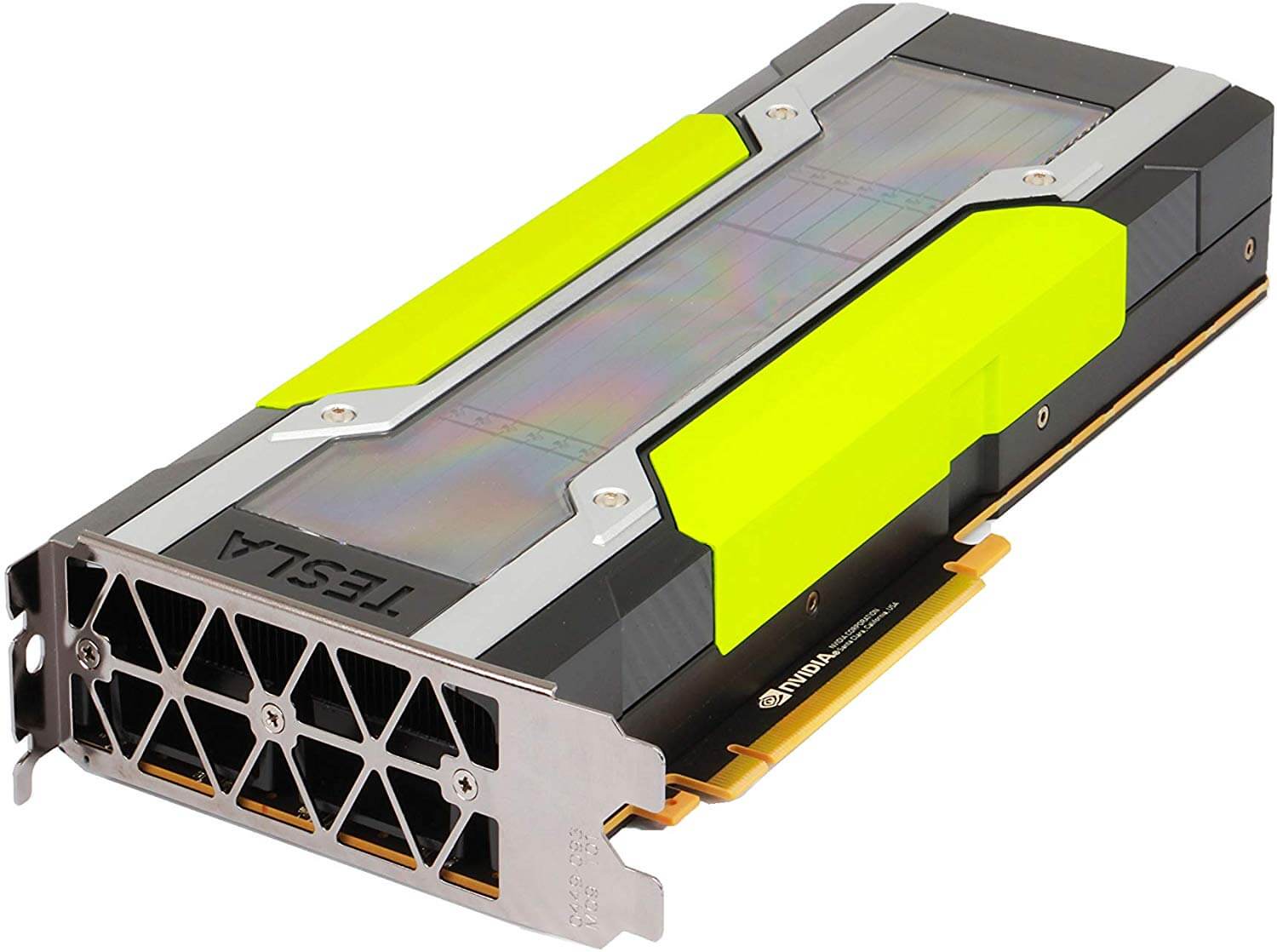
The RAPIDS cuSignal project is billed as an ecosystem that makes enabling CUDA GPU acceleration in Python easy. Scipy is a Python library that is filled with many useful digital signal processing (DSP) algorithms. The cuSignal documentation notes that in some cases you can directly port Scipy signal functions over to cuSignal allowing you to leverage GPU acceleration.
In computing, most operations are performed on the CPU (central processing unit). However, GPU's (graphical processing units) have been gaining popularity for general computing as they can perform many more operations in parallel compared to CPUs. This can be used to significantly accelerate DSP code that is commonly used with SDRs.
In particular the developers have already created a notebook containing some examples of how cuSignal can be used with RTL-SDRs to accelerate an FFT graph. There are various other DSP examples in the list of notebooks too. According to the benchmarks in the notebooks, the GPU computation times are indeed much faster. In the benchmarks they appear to be using a high end NVIDIA P100 GPU, but other NVIDIA graphics cards should also show a good speedup.
The cuSignal code is based on CUDA, so for any GPU acceleration code to work you'll need to have an NVIDIA based GPU (like a graphics card) with a Maxwell or newer core.
We note that in the future we'll be investigating how this could be used to speed up the passive radar algorithms that are used in the KerberosSDR. It may also be useful for running DSP code quickly on a $99 NVIDIA Jetson Nano single board computer.
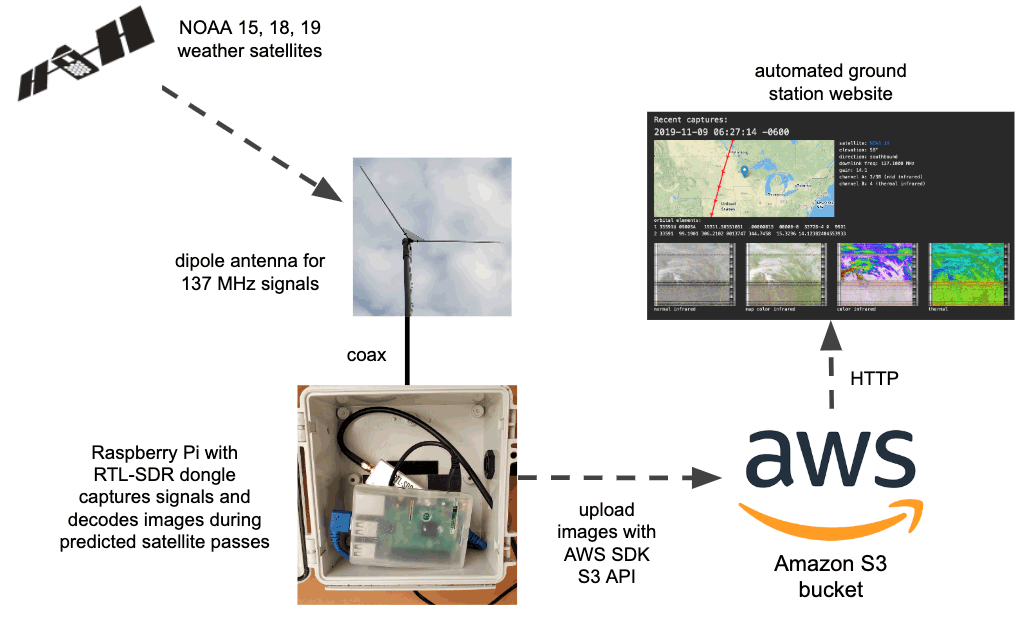
The tutorial starts by showing you how to set up your Amazon AWS credentials and bucket on the Raspberry Pi, and how to host a simple webpage that can be accessed publicly. The second stage shows how to set up the RTL-SDR drivers and wxtoimg which is used to decode the images. Finally, the third stage shows how to create the automation scripts that automatically schedule a decode, and upload images to the AWS bucket.
Flowgraph for an automated NOAA satellite weather image station.
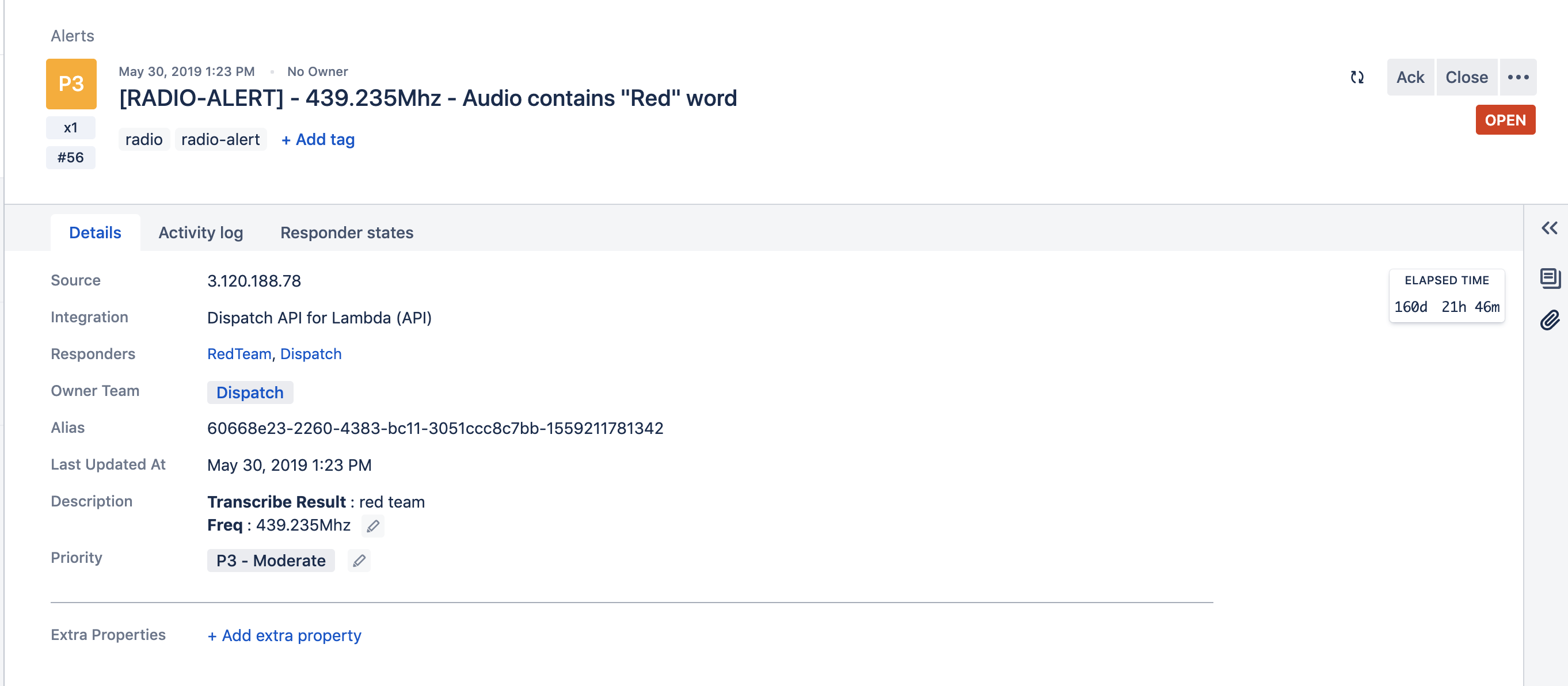
Atlassian Opsgenie Engineer Fahri Yardımcı has recently written up an interesting post that details how he's using Opsgenie and Amazon Transcribe to automatically create alerts when specific voice phrases are mentioned on a radio channel. For example, if the words "blue team" are heard on the radio, the system can automatically issue an alert with the spoken words to members of the blue team in an organization. Amazon Transcribe is a cloud based speech to text service and Opsgenie is a platform that is used for managing and delegating alerts from multiple IT or other computer systems.
The system works by using an RTL-SDR and the ham2mon software to scan, receive and record voice from multiple voice channels. Fahri notes that he modified ham2mon slightly in order to allow it to upload the .wav files to an AWS S3 server which then runs the Amazon Transcribe service to convert the voice into a text file.
To make an interesting use case, we have imagined this scenario: When we detect a phrase in predefined words, like “Help”, “Execute Order 66”, “North outpost is compromised”, “Eggs are boiled”, we want to create an alert in Opsgenie. Opsgenie can send notifications to users via various ways such as push notifications and calls.
Amazon Transcribe uses advanced machine learning methodologies, to convert an audio stream to a text. As mentioned before, ham2mon uploads to .wav files to S3 and a Lambda is triggered from S3 Events. Lambda calls Transcribe API and depending on the result, Lambda creates an Opsgenie Alert through API.
Fahri writes that his system also filters out small files that may just be noise, and files with voice less than 3 second long. He's also added a custom vocabulary to Amazon Transcribe with words commonly heard on the radio, as this improves the transcription algorithm, especially in the presence of radio noise.
The rest of the post goes into further detail about the specific cloud services used and the flow of the system.
Flow Graph of the Radio to Transcription SystemAn example alert from Opsgenie when the phrase "red team" was heard.
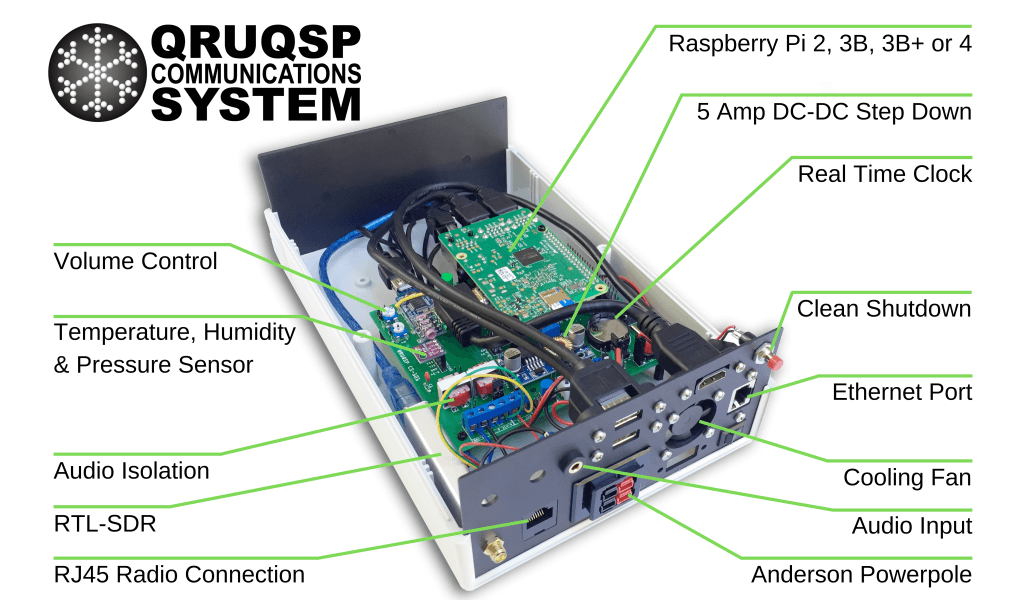
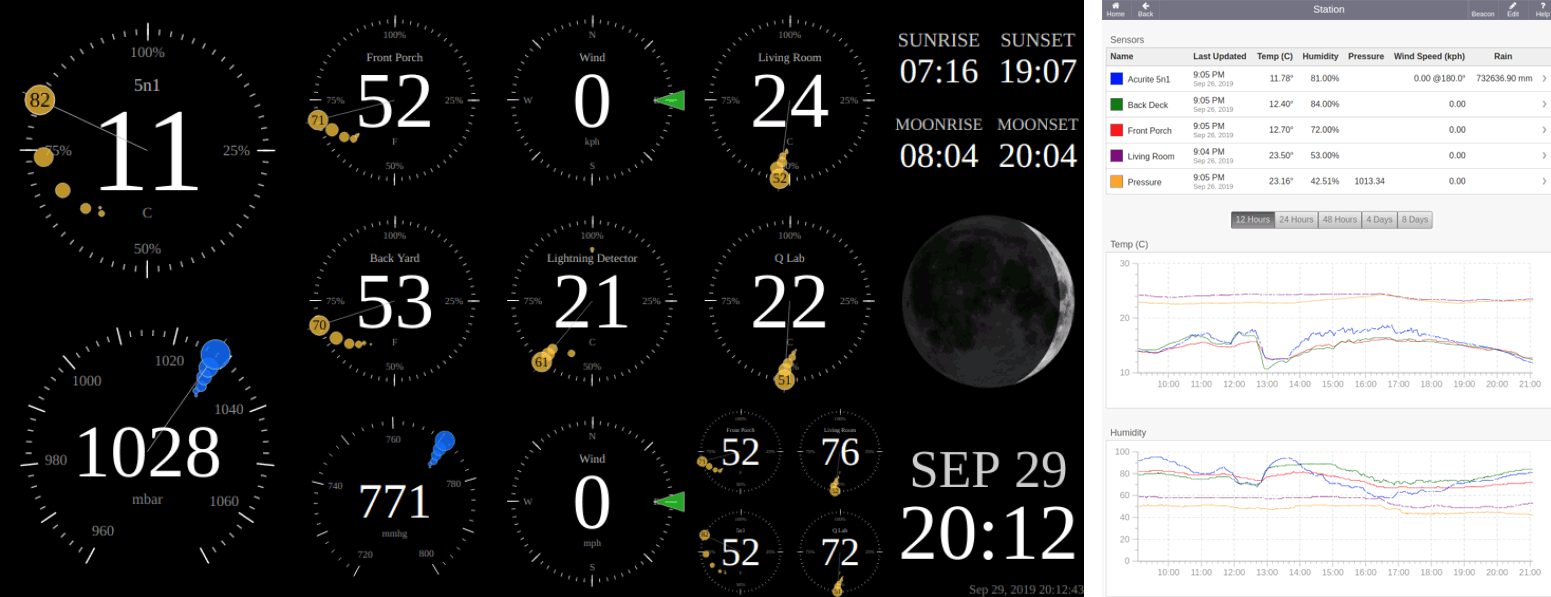
Thank you to Andrew Rivett for writing in and sharing news about his project called "QRUQSP" which is aiming to provide an easy to set up system for allowing amateur radio operators to put weather sensors on the APRS network and log the weather data. Andrew writes:
For that last 2 years I've been working on QRUQSP.org, a system to receive weather sensors via a RTL-SDR.com V3 on a Raspberry Pi and then beacon that data over Amateur Radio APRS. I've also developed a dashboard that can be used on iPad 1 and old tablets, and soon will have the ability to sync data between Pi's and to the cloud.
For more information, please check out https://qruqsp.org/ , we have roadmaps under Software and Hardware.
The QRUQSP website also explains:
Amateur Radio offers many opportunities to receive digital messages, decode them and make use of the data contained within those messages. Our primary goal is to store and organize those messages in a database in a way that improves the operator's ability to analyze, assess importance, and relay messages as appropriate for his or her amateur radio service.
The service makes use of his hardware kits that are currently available for preorder on his website, with the basic kit starting at $80. Purchasing a kit or $10 monthly subscription to the cloud service software allows you to participate in the closed beta, which is currently only available for amateur radio operators.
The QRUQSP Hardware
In terms of software Andrew has also created a web application that can be used to collect and display the weather data collected over APRS or rtl_433. The service can be hosted directly on the systems Raspberry Pi, or online on the cloud via the QRUQSP subscription service.
The Othernet project aims to bring live data such as news, weather, video, books, Wikipedia articles and audio broadcasts to the world via cheap receivers and a free satellite service. Although an internet connection provides the same data, Othernet's satellite broadcast is receivable in remote areas, will continue working in disasters, and costs nothing to continually receive roughly 100-200 MB of data a day. The trade off is that the service is downlink only, so the data that you get is only what is curated by the Othernet team. Currently the service is only available in North America and Europe, but service to other areas in the world may eventuate in the future.
We've posted about this project a few times in the past, as previously they used an L-band satellite service that was received by RTL-SDR dongles. However, these days they operate using LoRa hardware chips on the Ku-band.
Over on YouTube the TechMinds YouTube channel has just uploaded a video that demonstrates the Othernet service being received from the UK via their Dreamcatcher hardware. In particular he shows off the APRS feature which sends any APRS message containing the string "OUTNET" to the Othernet satellite stream. Later in the video he also shows the news articles, weather data, Wikipedia and audio data that was received.
KerberosSDR is our four tuner coherent RTL-SDR product made in collaboration with Othernet. With KerberosSDR applications like radio direction finding and passive radar are possible, and our free open source demo software helps to make it easier to get started exploring these applications. In this post we explore how a simple passive radar setup can be used to measure how busy a neighborhood is in terms of vehicular traffic.
Passive radar makes use of already existing strong 'illuminator' signals such as broadcast FM, DAB, digital TV and cellular. When these signals reflect off a moving metallic object like an aircraft or vehicle, it distorts the signal slightly. By comparing the distorted signal to a clean signal we can determine the distance and speed of the object causing the reflection. Wide reaching digital signals like DVB-T and DAB are often the best illuminators to use. Wideband cellular signals can also be used to detect more local targets.
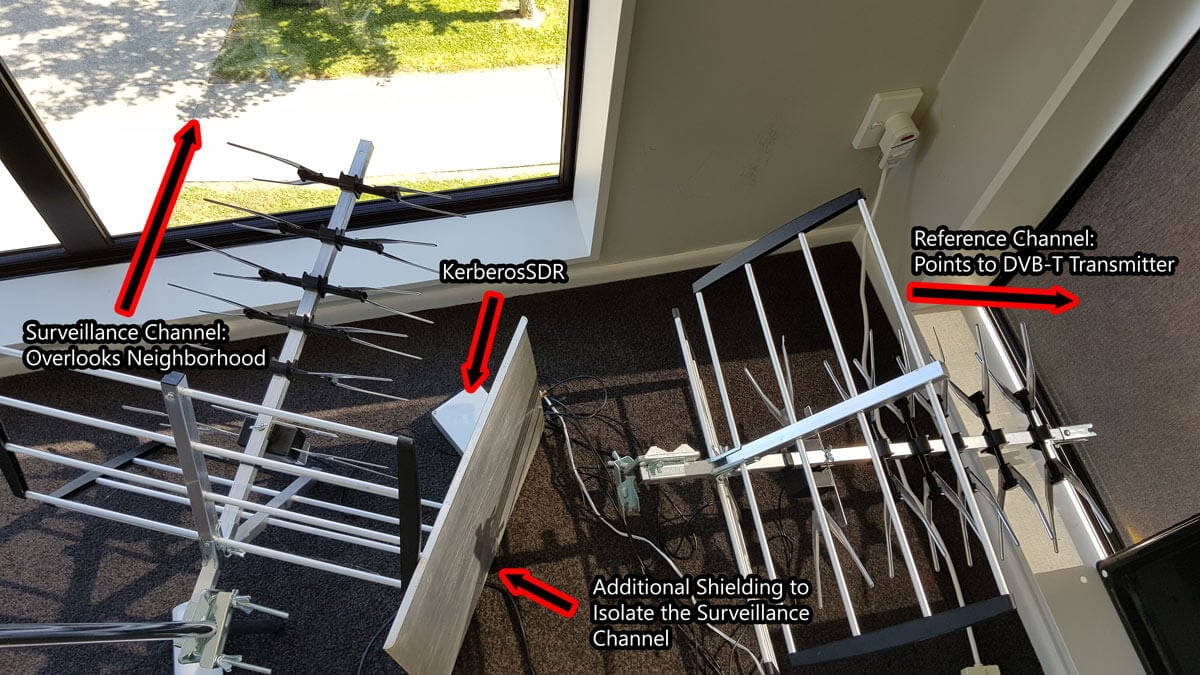
In a simple passive radar system we use two directional antennas such as Yagi's. One Yagi points towards the broadcast tower and receives the clean non-distorted reference signal. This is known as the reference channel. A second Yagi points towards the area you'd like to monitor for reflections, and this is called the surveillance channel.
In our setup we point the reference channel Yagi towards a 601 MHz DVB-T transmitter roughly 33 km away. A second Yagi is placed on a vantage point overlooking a neighborhood. The Yagi's used are cheap DVB-T TV Yagi's that can be found in any electronics or TV retail store (or on Amazon for ~$30 - $60 USD). In the software we used a bandwidth of 2.4 MHz and adjusted the gains for maximum SNR.
It is important that the surveillance channel is isolated from the reference signal as much as possible. We improve the isolation simply by placing a metal sheet next to the surveillance Yagi to block the reference DVB-T signal more. Note that putting the antennas outside will obviously result in much better results. These walls and windows contain metal which significantly reduce signal strength. We also added our RTL-SDR Blog wideband LNA to the surveillance channel powered by a cheap external bias tee to improve the noise figure of the surveillance channel.
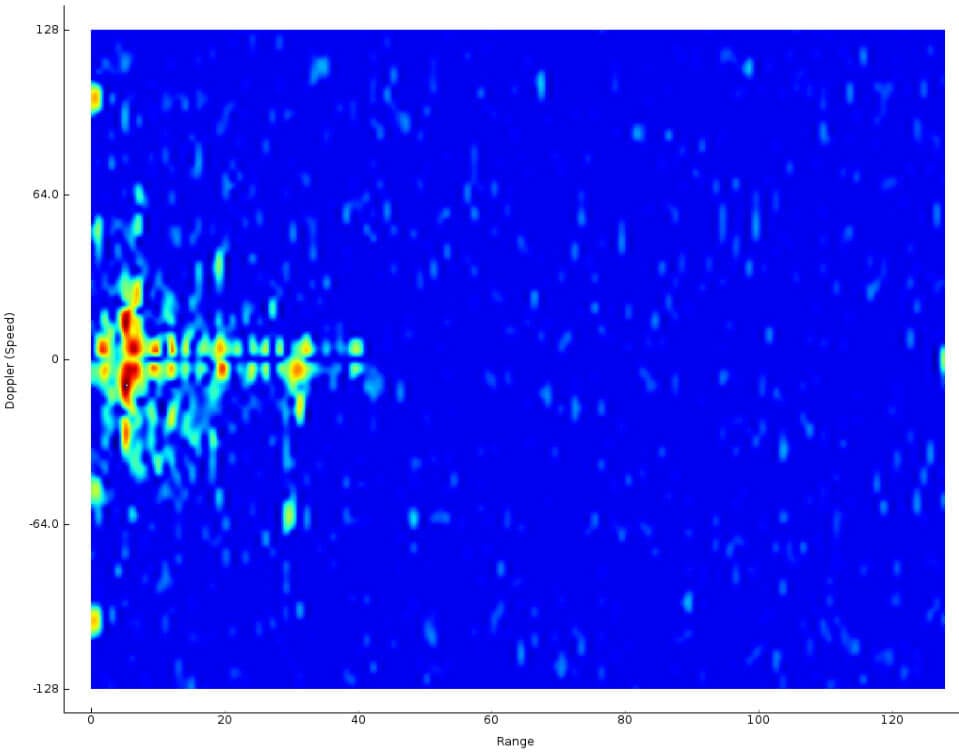
The resulting passive radar display shows us a live view of objects reflecting. Each dot on the display represents a moving vehicle that is reflecting the DVB-T surveillance signal. In the image shown below the multiple colored objects in the left center are vehicles. The X-Axis shows the distance to the object, and the Y-Axis shows the doppler speed. Both axes are relative to the observation location AND the transmit tower location.
Vehicles on the Passive Radar Display
When there are more moving cars on the road during the day and rush hours, there are more blips seen on the passive radar display. Larger vehicles also produce larger and stronger blips. By simply summing the matrix that produces this 2D display, we can get a crude measurement of how busy the neighborhood is, in terms of cars on the road since reflections are represented by higher values in the matrix. We logged this busyness value over the course of a day and plotted it on a graph.
The resulting graph is as you'd intuitively expect. At 6AM we start to see an increase in vehicles with people beginning their commute to work. This peaks at around 8:30AM - 9am with parents presumably dropping their kids off to the neighborhood school which starts classes at 9AM. From there busyness is relatively stable throughout the day. Busyness begins to drop right down again at 7PM when most people are home from work, and reaches it's minimum at around 3am.
Traffic Busyness detected with KerberosSDR Passive Radar
One limitation is that this system cannot detect vehicles that are not moving (i.e. stuck in standstill traffic). Since the doppler speed return will be zero, resulting in no ping on the radar display. The detection of ground traffic can also be distorted by aircraft flying nearby. Aircraft detections result in strong blips on the radar display which can give a false traffic result.
It would also be possible to further break down the data. We could determine the overall direction of traffic flow by looking at the positive and negative doppler shifts, and also break down busyness by distance and determine which distances correspond to particular roads. In the future we hope to be able to use the additional channels on the KerberosSDR to combine passive radar and direction finding, so that the the blips can actually be directly plotted on a map.
If you want to try something similar on the KerberosSDR software edit the RD_plot function in the _GUI/hydra_main_window.py file, and add the following simple code before CAFMatrix is normalized. You'll then get a log file traffic.txt which can be plotted in excel (remember to convert Unix time to real time and apply a moving average)
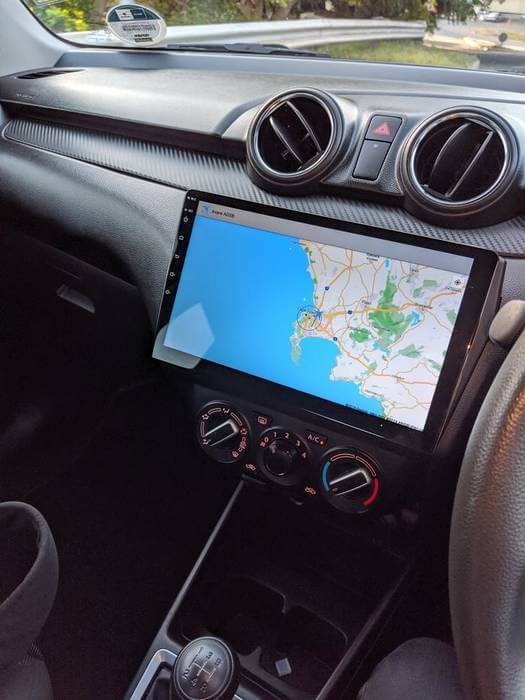
Reddit user [Bobcalamarie] recently [posted] about how he uses his car dash mounted Android tablet along with an RTL-SDR Blog V3 and a magnetic mount antenna while sitting in traffic to track aircraft overhead.
We’ve seen something similar to this once before when [Signals Everywhere] uploaded a video showing off ADS-B reception (among other things) to a dash-mounted Windows tablet and an Android head unit.
The software used by Bobcalamarie is the Android [Avare ADS-B] software which can be found in the Google Play Store. However, other applications exist for Windows, Linux, and other operating systems as well. Some software such as [Virtual Radar Server] even allows you to set-up alerts for specific types of aircraft. Which while we wouldn’t condone it, it might come in handy for someone in traffic.
What would you do if you had an SDR installed in your vehicle? We would love to hear what you have to say in the comments below.