Category: Digital Signals

Bitcoin Satellite Now Supports Lightning Payments: Receive with RTL-SDR

Bitcoin is a digital currency based on blockchain technology, and Blockstream are a large innovator in the Bitcoin world. They have recently been developing the 'lightning network' which is a layer that sits on top of the blockchain. The goal of the lightning network is to provide a second layer that helps to speed up bitcoin transactions and alleviate network congestion.

In a previous post we noted that Blockstream have data channels leased on several geostationary satellites. The goal of these satellites is to help users download the blockchain, which is the ledger of all bitcoin transactions ever made. Over time the ledger grows and becomes larger and larger, and at the time of writing is currently about 200 GB in size. Rural/field users of Bitcoin with slow, intermittent, or no internet connection can use this satellite to download or update their ledger and confirm that they have received payments.

To receive the satellite an RTL-SDR dongle together with a Linux PC, LNB and satellite dish antenna are used. More information about setting up a receiver can be found on their GitHub.

Recently Blockstream have released news that their satellites now support Lightning transactions. In addition the Asia-Pacific satellite is now online. This should help boost adoption of the lightning network among rural users.

Blockstream satellite currently covers almost the entire world

Listening in to a DECT Digital Cordless Phone with a HackRF

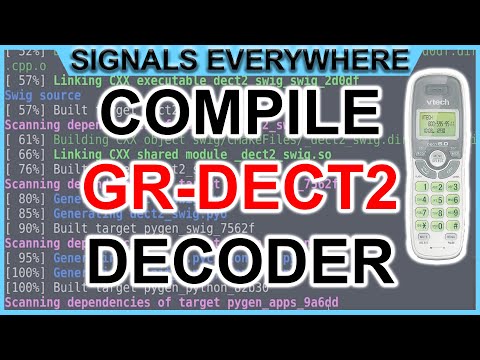
Over on YouTube SignalsEverywhere (aka Corrosive) has uploaded a new video where he shows a demonstration of him listening in to a DECT digital cordless phone with his HackRF. 

DECT is an acronym for 'Digital Enhanced Cordless Telecommunications', and is the wireless standard used by modern digital cordless phones as well as some digital baby monitors. In most countries DECT communications take place at 1880 - 1900 MHz, and in the USA at 1920 - 1930 MHz. Some modern cordless phones now use encryption on their DECT signal, but many older models do not, and most baby monitors do not either. However, DECT encryption is known to be weak, and can be broken with some effort.

In his video Corrosive uses gr-dect2, a GNU Radio based program that can decode unencrypted DECT signals. In the video he shows it decoding a DECT call from his cordless phone in real time.

DECT 6.0 Phone Decoded With HackRF SDR | Demonstration

Some tips on using DSD+ and SDR# to Listen to DMR Digital Voice

Over on YouTube user knoxieman has uploaded a video that provides a few tips on using DSD+ and an RTL-SDR for listening to DMR digital voice signals. The video is designed as a companion to Tech Minds' video which shows a full set up procedure for DSD+.

Knoxieman's video includes some tips on SDR# settings, virtual audio cable setup, and using a program called "DisplayFusion" to keep the DSD+ event windows permanently on top of the SDR# window. 

Tips on using SDR Plus and DSDPLUS to listen to DMR/DIGITAL conversations.

Combining HRPT Images From Germany to Canada

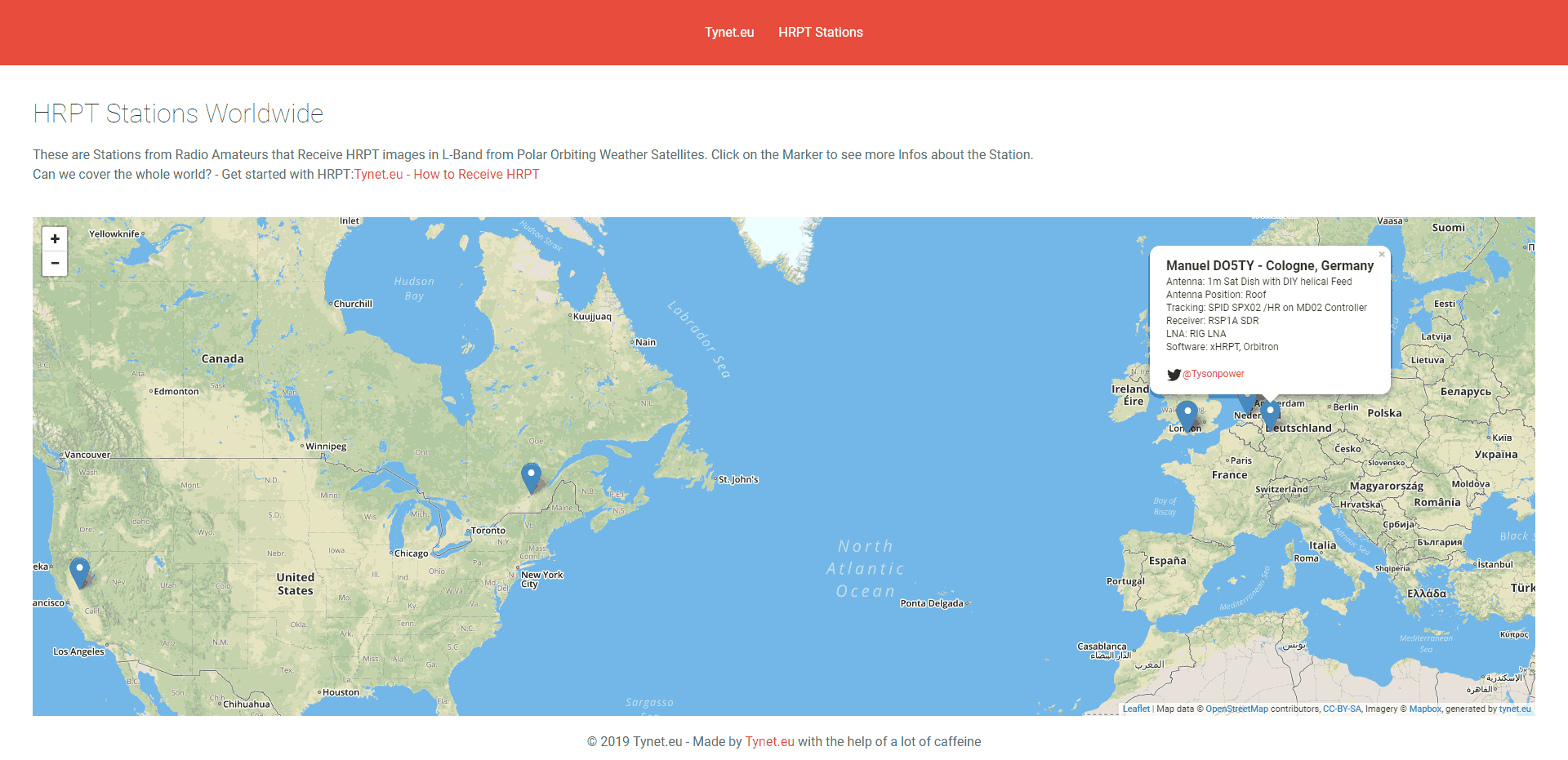
HRPT is a high resolution weather satellite image that is broadcast by the NOAA satellites. Receiving HRPT weather satellite signals is a little different to the more commonly received NOAA APT or Meteor M2 LRPT images which most readers may already be familiar with. HRPT is broadcast by the same NOAA satellites that provide the APT signal at 137 MHz, but is found in the L-band at around 1.7 GHz. The signal is much weaker, so a high gain dish antenna with motorized tracking mount, LNA and high bandwidth SDR like an Airspy is required. The payoff is that HRPT images are much higher in resolution compared to APT.

Manuel aka Tysonpower on YouTube has been successfully receiving these HRPT images for some time now and recently had the idea to try and combine two HRPT images together to create one big image covering the Atlantic ocean.

Manuel lives in Germany and on Twitter he found that he had a follower in Canada who was also receiving HRPT images. So he asked his follower to provide him with HRPT weather images that were received shortly after the pass in Germany. He then stitched the images together, and color corrected them which resulted in a nice large image covering Europe, the Atlantic, Canada and Florida.

[EN subs] HRPT over The Ocean - Ein Bild von Köln nach Kanada

AERO C-Channel Voice Audio Now Decodable with JAERO

JAERO was recently updated by programmer Jonti, and it now supports the decoding of AERO C-Channels which are voice audio channels that exist on both the L-Band and C-Band frequencies of AERO. AERO is a satellite based communications service used by modern aircraft. The information transferred are normally things like aircraft telemetry, short crew messages, weather reports and flight plans. It is similar information to what is found on VHF/HF ACARS.

Jonti notes that these C-Channel voice signals are very weak as they are spot beams, so a good antenna system is required to receive them. Over on Jonti's JAERO website there is now some information about these C-Channels (scroll all the way down to the C-Channel heading and read to the end of the page), as well as a frequency list. An excerpt of the information is pasted below:

Inmarsat C and in particular AERO C channels provide circuit switched telephony services to aircraft. The channels of interest are those that carry AMBE compressed audio at a channel rate 8400 bps and voice rate of 4800bps. There is also an older speech codec still in use, LPC at a voice rate of 9600 bps and an overall channel rate of 21000bps.

Telephone channels are two-way duplex. In the from-aircraft direction transmissions are roughly in the 1646 to 1652 Mhz range. The satellite up-converts these transmissions to C band, similar to T and R channel burst transmissions. So it is possible to receive the from-aircraft transmissions although it is significantly more difficult than those in the to-aircraft direction on the L band. So for those who want to get started receiving these transmissions the L band is by far the easiest place to start.

Another aspect of the C channels is that they most often use spot beams rather than global beams which makes it more difficult to receive transmissions for aircraft using a spot beam that is aimed at another region. However if you are inside the spot beam the transmissions are relatively easily received on L band. A 60 cm dish with an LHCP helical and L band LNA will provide excellent results but even with a patch antenna it can be done.

Decoding these channels to audio in JAERO takes a little effort to setup. Due to the uncertain legal status of the digital audio AMBE codec, the codec code needs to be compiled manually first, and then placed into the JAERO directory. Jontio has uploaded the AERO AMBE codec source code at https://github.com/jontio/libaeroambe. Since JAERO is a Windows program, compilation of libaeroambe involves using MSYS2.

Once fully set up with the audio codec, the audio will come out of default soundcard set in Windows audio properties, so ensure that any Virtual Audio Cables are not set as the default device.

On the L-band link you can get conversations from the ground to the plane. The C-band link would get you the plane to ground side of the conversation too, but that is a challenging signal that would require a large dish and Jonti doesn't know of anyone who has managed to receive that before. Typically the conversation topics are things like Medlink which is a multilingual medical support line that can provide backup to doctors or aircrew handling medical emergencies in the air. In Europe the USAF also apparently use C-Channel.

AERO C-Channel Being Received with JAERO

Creating a Wireless Pi-Star Nextion Display for Amateur Digital Radio

Thanks to Steve K2GOG of The Hudson Valley Digital Network (HVDN) for submitting his post on how to create a wireless display for Pi-Star. Pi-Star is a pre-built Raspberry Pi image for amateur radio users experimenting with digital voice communications like D-STAR and DMR. They write that it can be used for applications such as a "single mode hotspot running simplex providing you with access to the increasing number of Digital Voice networks, [or a] public duplex multimode repeater".

Pi-Star is compatible with serial based LED displays with built in GUIs like the Nextion. The displays are usually connected directly to the Raspberry Pi, but Steve wanted to use the display remotely. To do this he used a simple and inexpensive 70cm band HC-12 wireless serial port adapter. With the wireless adapters connected to the Pi he was able to see the pulses in SDR# via his RTL-SDR to confirm that the wireless serial signal was being sent. He then connected the second wireless adapter to the Nextion display via a few diodes to drop the voltage, and was able to get the display updating as if it was connected directly.

In the post Steve mentions that HVDN are also giving away an HC-12 and RTL-SDR to the first person to submit some progress with this idea.

Creating a wireless Nextion Display for Pi-Star.

SDR# Inmarsat Decoder Plugin Now Available

Microp11, the programmer of Scytale-C a standalone Inmarsat decoder has just released a new Inmarsat decoder SDR# plugin. The plugin is currently in the "pre-alpha" stages, so is still missing some functionality and may be buggy. However, it does appear to be functional at this point in time. It can be used with RTL-SDRs, and any other SDR# compatible SDR including units running on remote SpyServers. Microp11 writes:

  • I ran it with SDR# version v1.0.0.1761.
  • If it crashes you SDR# I apologize in advance.
  • The auto-tracking (default on) will alter your SDR# frequency and follow the signal’s CF. When the SNR is very low, please disable it and manually tune the SDR# to try to get the CF as close to 2000 as possible.The demodulator still has plenty ideas of its own.
  • Use USB mode with 4000 Hz bandwidth.
  • For now the interface is missing the usual scatter plots.
  • UDP Address and UDP Port are for sending the decoded frames to the Scytale-C UI.
  • Offset and CF are the difference from zero error and the CF frequency of the demodulated BPSK signal.
  • Tx and SYM are the transmitted over UDP frames and SYM is showing the number of demodulated symbols.
  • A bunch of libraries are attached as extra files. Please be gentle and accept the package as it. Will clean-up in the future.
  • Use in conjunction with the Scytale-C UI from the archive: “x64-UI1.6-Decoder1.4.zip” (link below)
  • The magic line is included in the archive: “SDRSharp.ScytaleC-1.0-alpha.zip”

The files can be downloaded from https://bitbucket.org/scytalec/scytalec/downloads.

SDRSharp Scytale-C Plugin

Transmitting and Receiving DATV with a LimeSDR and a Modified $20 DVB-S Receiver

Over on YouTube user Corrosive has uploaded a video showing how he can use the recently updated DATV Express software to transmit Digital Amateur TV (DATV) with a LimeSDR Mini, and receive it with a cheap US$20 DVB-S satellite set top box that he's modified with a custom firmware update. Corrosives work is excellent as it allows anyone to get started in DATV amateur radio cheaply. He writes:

Last week I noticed the windows DATV express software for windows had been updated to include several SDR platforms [appears to now support the LimeSDR and LimeSDR Mini, as well as the PlutoSDR] https://www.datv-express.com/CustomPage/Downloads

Using my new LimeSDR Mini I wanted to try this out. I went online and purchased a cheap DVB-S Satellite set top box on eBay branded as a KOQIT K1Mini.

In order to allow the KOQIT K1Mini DVB-S set top box to receive DATV frequencies, Corrosive has released a firmware update on GitHub that removes all satellites listed in the receiver, and replaces it with six DATV channels for amateur television use. He writes:

I decided to split the 3 23cm ATV frequencies into 6 at half the bandwidth for digital.

The receiver with my firmware configures the device to see a 9750LO LNB, by placing a simple antenna on the receiver instead of an LNB the 1.2 ghz amateur frequencies are shifted by 9750mhz and can be scanned as if they were a satellite transponder.

If you don't have a TX capable or DATV Express compatible SDR like the LimeSDR or Pluto, then we note that RPiTX (software that allows a Raspberry Pi to transmit RF without any additional hardware) also has DATV transmit capabilities that could in used in their place.

Make Your Own TV Station Using Amateur Radio With LimeSDR Mini and a Satellite Receiver 23CM 1.2GHz

Bitcoin Satellite Now Supports Lightning Payments: Receive with RTL-SDR

Bitcoin is a digital currency based on blockchain technology, and Blockstream are a large innovator in the Bitcoin world. They have recently been developing the 'lightning network' which is a layer that sits on top of the blockchain. The goal of the lightning network is to provide a second layer that helps to speed up bitcoin transactions and alleviate network congestion.

In a previous post we noted that Blockstream have data channels leased on several geostationary satellites. The goal of these satellites is to help users download the blockchain, which is the ledger of all bitcoin transactions ever made. Over time the ledger grows and becomes larger and larger, and at the time of writing is currently about 200 GB in size. Rural/field users of Bitcoin with slow, intermittent, or no internet connection can use this satellite to download or update their ledger and confirm that they have received payments.

To receive the satellite an RTL-SDR dongle together with a Linux PC, LNB and satellite dish antenna are used. More information about setting up a receiver can be found on their GitHub.

Recently Blockstream have released news that their satellites now support Lightning transactions. In addition the Asia-Pacific satellite is now online. This should help boost adoption of the lightning network among rural users.

Blockstream satellite currently covers almost the entire world

Listening in to a DECT Digital Cordless Phone with a HackRF

Over on YouTube SignalsEverywhere (aka Corrosive) has uploaded a new video where he shows a demonstration of him listening in to a DECT digital cordless phone with his HackRF. 

DECT is an acronym for 'Digital Enhanced Cordless Telecommunications', and is the wireless standard used by modern digital cordless phones as well as some digital baby monitors. In most countries DECT communications take place at 1880 - 1900 MHz, and in the USA at 1920 - 1930 MHz. Some modern cordless phones now use encryption on their DECT signal, but many older models do not, and most baby monitors do not either. However, DECT encryption is known to be weak, and can be broken with some effort.

In his video Corrosive uses gr-dect2, a GNU Radio based program that can decode unencrypted DECT signals. In the video he shows it decoding a DECT call from his cordless phone in real time.

DECT 6.0 Phone Decoded With HackRF SDR | Demonstration

Some tips on using DSD+ and SDR# to Listen to DMR Digital Voice

Over on YouTube user knoxieman has uploaded a video that provides a few tips on using DSD+ and an RTL-SDR for listening to DMR digital voice signals. The video is designed as a companion to Tech Minds' video which shows a full set up procedure for DSD+.

Knoxieman's video includes some tips on SDR# settings, virtual audio cable setup, and using a program called "DisplayFusion" to keep the DSD+ event windows permanently on top of the SDR# window. 

Tips on using SDR Plus and DSDPLUS to listen to DMR/DIGITAL conversations.

Combining HRPT Images From Germany to Canada

HRPT is a high resolution weather satellite image that is broadcast by the NOAA satellites. Receiving HRPT weather satellite signals is a little different to the more commonly received NOAA APT or Meteor M2 LRPT images which most readers may already be familiar with. HRPT is broadcast by the same NOAA satellites that provide the APT signal at 137 MHz, but is found in the L-band at around 1.7 GHz. The signal is much weaker, so a high gain dish antenna with motorized tracking mount, LNA and high bandwidth SDR like an Airspy is required. The payoff is that HRPT images are much higher in resolution compared to APT.

Manuel aka Tysonpower on YouTube has been successfully receiving these HRPT images for some time now and recently had the idea to try and combine two HRPT images together to create one big image covering the Atlantic ocean.

Manuel lives in Germany and on Twitter he found that he had a follower in Canada who was also receiving HRPT images. So he asked his follower to provide him with HRPT weather images that were received shortly after the pass in Germany. He then stitched the images together, and color corrected them which resulted in a nice large image covering Europe, the Atlantic, Canada and Florida.

[EN subs] HRPT over The Ocean - Ein Bild von Köln nach Kanada

AERO C-Channel Voice Audio Now Decodable with JAERO

JAERO was recently updated by programmer Jonti, and it now supports the decoding of AERO C-Channels which are voice audio channels that exist on both the L-Band and C-Band frequencies of AERO. AERO is a satellite based communications service used by modern aircraft. The information transferred are normally things like aircraft telemetry, short crew messages, weather reports and flight plans. It is similar information to what is found on VHF/HF ACARS.

Jonti notes that these C-Channel voice signals are very weak as they are spot beams, so a good antenna system is required to receive them. Over on Jonti's JAERO website there is now some information about these C-Channels (scroll all the way down to the C-Channel heading and read to the end of the page), as well as a frequency list. An excerpt of the information is pasted below:

Inmarsat C and in particular AERO C channels provide circuit switched telephony services to aircraft. The channels of interest are those that carry AMBE compressed audio at a channel rate 8400 bps and voice rate of 4800bps. There is also an older speech codec still in use, LPC at a voice rate of 9600 bps and an overall channel rate of 21000bps.

Telephone channels are two-way duplex. In the from-aircraft direction transmissions are roughly in the 1646 to 1652 Mhz range. The satellite up-converts these transmissions to C band, similar to T and R channel burst transmissions. So it is possible to receive the from-aircraft transmissions although it is significantly more difficult than those in the to-aircraft direction on the L band. So for those who want to get started receiving these transmissions the L band is by far the easiest place to start.

Another aspect of the C channels is that they most often use spot beams rather than global beams which makes it more difficult to receive transmissions for aircraft using a spot beam that is aimed at another region. However if you are inside the spot beam the transmissions are relatively easily received on L band. A 60 cm dish with an LHCP helical and L band LNA will provide excellent results but even with a patch antenna it can be done.

Decoding these channels to audio in JAERO takes a little effort to setup. Due to the uncertain legal status of the digital audio AMBE codec, the codec code needs to be compiled manually first, and then placed into the JAERO directory. Jontio has uploaded the AERO AMBE codec source code at https://github.com/jontio/libaeroambe. Since JAERO is a Windows program, compilation of libaeroambe involves using MSYS2.

Once fully set up with the audio codec, the audio will come out of default soundcard set in Windows audio properties, so ensure that any Virtual Audio Cables are not set as the default device.

On the L-band link you can get conversations from the ground to the plane. The C-band link would get you the plane to ground side of the conversation too, but that is a challenging signal that would require a large dish and Jonti doesn't know of anyone who has managed to receive that before. Typically the conversation topics are things like Medlink which is a multilingual medical support line that can provide backup to doctors or aircrew handling medical emergencies in the air. In Europe the USAF also apparently use C-Channel.

AERO C-Channel Being Received with JAERO

Creating a Wireless Pi-Star Nextion Display for Amateur Digital Radio

Thanks to Steve K2GOG of The Hudson Valley Digital Network (HVDN) for submitting his post on how to create a wireless display for Pi-Star. Pi-Star is a pre-built Raspberry Pi image for amateur radio users experimenting with digital voice communications like D-STAR and DMR. They write that it can be used for applications such as a "single mode hotspot running simplex providing you with access to the increasing number of Digital Voice networks, [or a] public duplex multimode repeater".

Pi-Star is compatible with serial based LED displays with built in GUIs like the Nextion. The displays are usually connected directly to the Raspberry Pi, but Steve wanted to use the display remotely. To do this he used a simple and inexpensive 70cm band HC-12 wireless serial port adapter. With the wireless adapters connected to the Pi he was able to see the pulses in SDR# via his RTL-SDR to confirm that the wireless serial signal was being sent. He then connected the second wireless adapter to the Nextion display via a few diodes to drop the voltage, and was able to get the display updating as if it was connected directly.

In the post Steve mentions that HVDN are also giving away an HC-12 and RTL-SDR to the first person to submit some progress with this idea.

Creating a wireless Nextion Display for Pi-Star.

SDR# Inmarsat Decoder Plugin Now Available

Microp11, the programmer of Scytale-C a standalone Inmarsat decoder has just released a new Inmarsat decoder SDR# plugin. The plugin is currently in the "pre-alpha" stages, so is still missing some functionality and may be buggy. However, it does appear to be functional at this point in time. It can be used with RTL-SDRs, and any other SDR# compatible SDR including units running on remote SpyServers. Microp11 writes:

  • I ran it with SDR# version v1.0.0.1761.
  • If it crashes you SDR# I apologize in advance.
  • The auto-tracking (default on) will alter your SDR# frequency and follow the signal’s CF. When the SNR is very low, please disable it and manually tune the SDR# to try to get the CF as close to 2000 as possible.The demodulator still has plenty ideas of its own.
  • Use USB mode with 4000 Hz bandwidth.
  • For now the interface is missing the usual scatter plots.
  • UDP Address and UDP Port are for sending the decoded frames to the Scytale-C UI.
  • Offset and CF are the difference from zero error and the CF frequency of the demodulated BPSK signal.
  • Tx and SYM are the transmitted over UDP frames and SYM is showing the number of demodulated symbols.
  • A bunch of libraries are attached as extra files. Please be gentle and accept the package as it. Will clean-up in the future.
  • Use in conjunction with the Scytale-C UI from the archive: “x64-UI1.6-Decoder1.4.zip” (link below)
  • The magic line is included in the archive: “SDRSharp.ScytaleC-1.0-alpha.zip”

The files can be downloaded from https://bitbucket.org/scytalec/scytalec/downloads.

SDRSharp Scytale-C Plugin

Transmitting and Receiving DATV with a LimeSDR and a Modified $20 DVB-S Receiver

Over on YouTube user Corrosive has uploaded a video showing how he can use the recently updated DATV Express software to transmit Digital Amateur TV (DATV) with a LimeSDR Mini, and receive it with a cheap US$20 DVB-S satellite set top box that he's modified with a custom firmware update. Corrosives work is excellent as it allows anyone to get started in DATV amateur radio cheaply. He writes:

Last week I noticed the windows DATV express software for windows had been updated to include several SDR platforms [appears to now support the LimeSDR and LimeSDR Mini, as well as the PlutoSDR] https://www.datv-express.com/CustomPage/Downloads

Using my new LimeSDR Mini I wanted to try this out. I went online and purchased a cheap DVB-S Satellite set top box on eBay branded as a KOQIT K1Mini.

In order to allow the KOQIT K1Mini DVB-S set top box to receive DATV frequencies, Corrosive has released a firmware update on GitHub that removes all satellites listed in the receiver, and replaces it with six DATV channels for amateur television use. He writes:

I decided to split the 3 23cm ATV frequencies into 6 at half the bandwidth for digital.

The receiver with my firmware configures the device to see a 9750LO LNB, by placing a simple antenna on the receiver instead of an LNB the 1.2 ghz amateur frequencies are shifted by 9750mhz and can be scanned as if they were a satellite transponder.

If you don't have a TX capable or DATV Express compatible SDR like the LimeSDR or Pluto, then we note that RPiTX (software that allows a Raspberry Pi to transmit RF without any additional hardware) also has DATV transmit capabilities that could in used in their place.

Make Your Own TV Station Using Amateur Radio With LimeSDR Mini and a Satellite Receiver 23CM 1.2GHz