Back in April we posted about the RFNM, an upcoming software defined radio project which will have eight 12-bit ADCs, up to 612 MHz real time bandwidth, and two DACs for transmitting with up to 153 MHz bandwidth. The standard board will support tuning from 600 - 7200 MHz, with tuning expanded down to 10 MHz available via an RFFC2071A mixer daughterboard. The board also has an onboard VSPA DSP processor, as well as built in ARM CPU cores, and a 16 GFLOPS GPU all of which can help process the massive bandwidth, as that full live bandwidth will be very difficult to transfer and use on a PC.
You will need the motherboard and at least one daughterboard.
We have been in contact with Davide Cameron, the developer behind the project and he has mentioned that a pre-production unit should be on the way to us soon for testing and review. He has noted that the software and drivers are still in development, but he has already been able to get 122 MHz out through USB to SDR++ on a machine with a fast CPU. He has also had Cyberether running well on a Mac M1, and GNU Radio on all platforms.
GNU Radio conference talks are generally about cutting edge radio research topics and applications that involve the use of GNU Radio, a popular DSP framework for SDRs. If you are interested, previous years talks can be found on the GNU Radio YouTube channel.
The talks at GRCon23 will be livestreamed on YouTube for free, and we have pasted the links to each days live stream link below. We recommend activating YouTube notifications on each video so you won't miss the start.
NOTE: We have found more stock of R828D chips, so the V4 should be in production hopefully until the end of 2025.
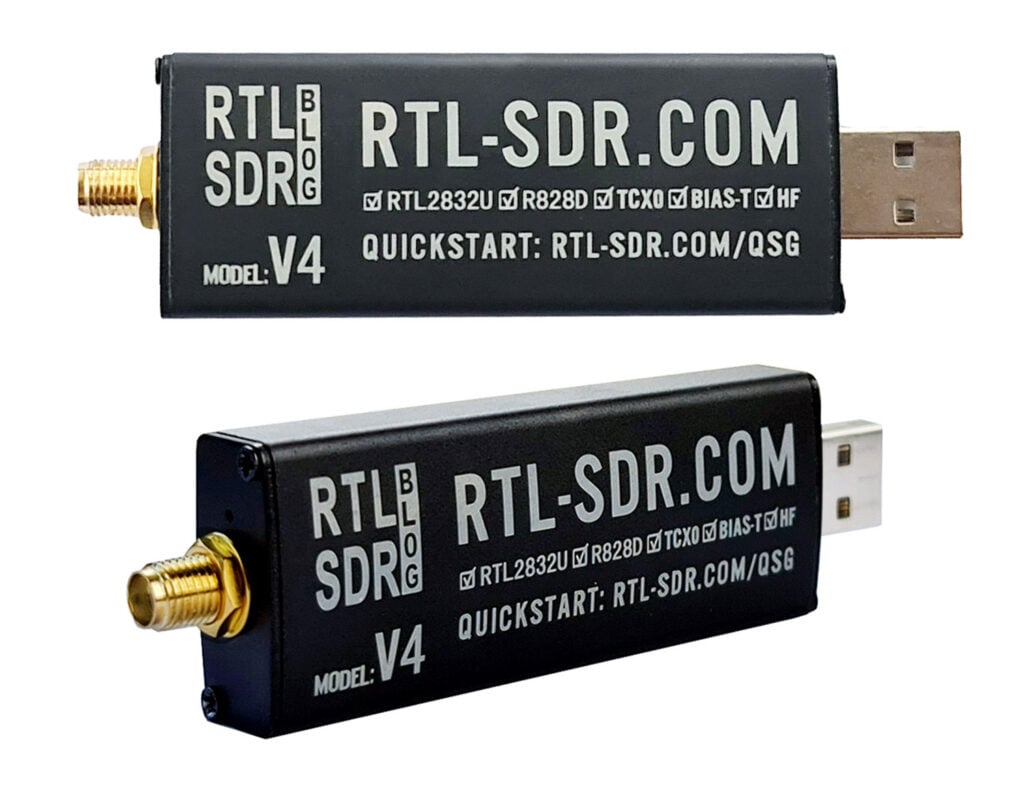
We're happy to announce the first release of our new RTL-SDR Blog V4 dongle which is based on the R828D tuner chip. The pricing is US$39.95 for the V4 dongle with antenna set, and US$29.95 for the dongle only, including free shipping to most countries.
Currently we are only shipping this model from our warehouse in China and the initial production batch is small and so we are limited in stock. However, now that we have confirmed that production of the first small batch of V4 has gone very well, we will be ramping up production, and stocking Amazon USA within 1-2 months as well.
The V4 comes with several improvements and changes that are listed below.
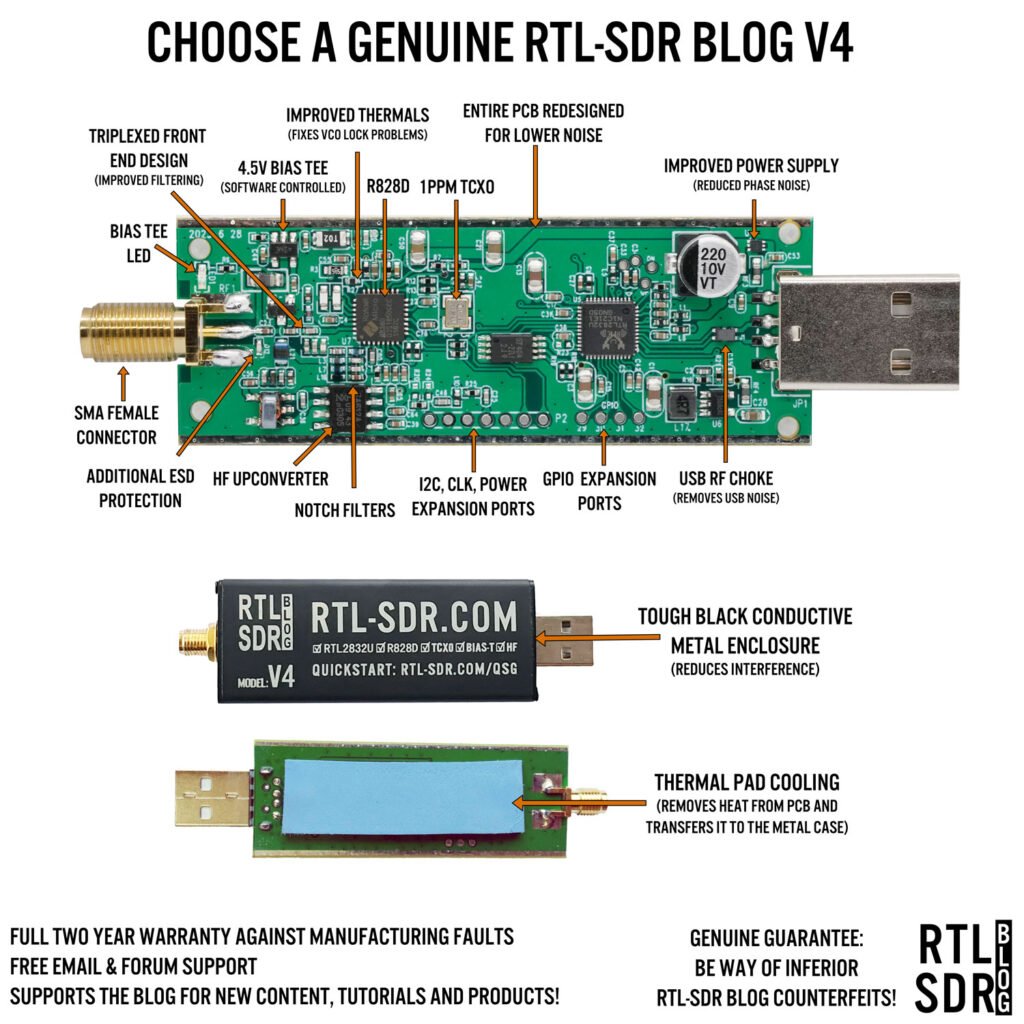
Improved HF Reception. Now uses a built in upconverter instead of using a direct sampling circuit. This means no more Nyquist folding of signals around 14.4 MHz, improved sensitivity, and adjustable gain on HF. Like the V3, the lower tuning range remains at 500 kHz and very strong reception may still require front end attenuation/filtering.
Improved filtering. The V4 makes use of the R828D tuner chip, which has three inputs. We triplex the SMA input into three bands, HF, VHF and UHF. This provides some isolation between the three bands, meaning out of band interference from strong broadcast stations is less likely to cause desensitization or imaging.
Improved Filtering x2. In addition to the triplexing, we are also making use of the open drain pin on the R828D, which allows us to add simple notch filters for common interference bands such as broadcast AM, broadcast FM and the DAB bands. These only attenuate by a few dB, but may still help.
Improved phase noise on strong signals. Due to an improved power supply design, phase noise from power supply noise has been significantly reduced.
Less heat. Due to the improved power supply design the V4 uses slightly less current and generates slightly less heat compared to the V3.
Cheaper price! The price of the R860 chip which is used in the V3 and most other RTL-SDR brands increased significantly at the beginning of 2023 which is part of the reason as to why RTL-SDR dongles have been increasing in price recently. For the V4 we are making use of an existing stockpile of R828D chips which are now priced cheaper than new productions of the R860. In a time when high inflation keeps pushing prices up this is incredibly welcome.
There are some other minor changes including a new bias tee LED and a small cutout hole in the enclosure so it's easy to tell when the bias tee is on.
Of course the same innovations that we brought in with the V3 are still implemented such as the sleek conductive black metal enclosure which works as a shield and doubles as a heatsink, a thermal pad to sink heat away from the PCB, 1PPM TCXO, SMA connector, USB noise choking and improved ESD protection.
The V4 however does come with some disadvantages compared to the V3 that need to be noted:
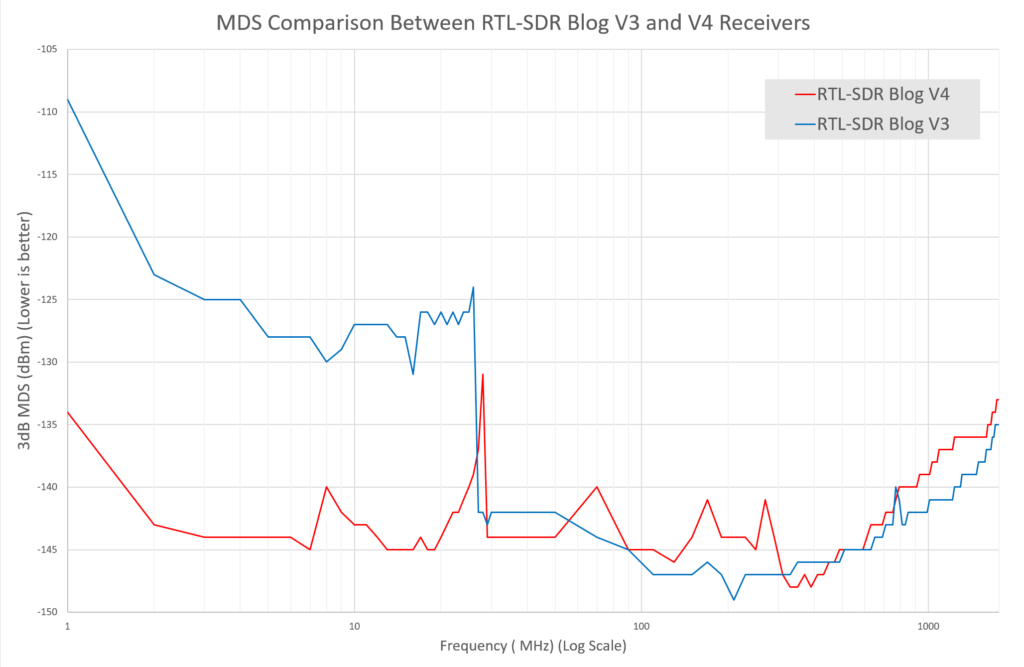
Due to the increased filtering there can be an average of 2-3 dB less sensitivity on some bands. Please see the MDS measurement graph below for the full picture.
The V4 requires the use of our RTL-SDR Blog drivers. Our RTL-SDR blog drivers are on GitHub. Please be sure to follow the installation instructions on the quickstart guide carefully. In most cases using our drivers simply means running our install-rtlsdr-blog.bat file, or replacing a dll file. (UPDATE: The default Osmocom branch now supports the RTL-SDR Blog V4, as does most other software)
The V4 is a Limited Edition Design. The R828D tuner chip is completely out of production now and the number of units we can produce is limited by the number of chips held by our contract manufacturer in China. They have indicated that there should be enough stockpile for about a years worth of production. (UPDATE: We have sourced more chips and should be able to continue production at least well into 2025)
Because of these tradeoffs we will continue selling the V3 alongside the V4.
More About the V4 Design
The R828D
The core change on the RTL-SDR Blog V4 design is the change from the R860 tuner chip to the R828D tuner chip. The R828D was previously a more expensive chip, however with the huge price increases on the R860 which came in effect at the beginning of the year we have decided to make use of existing R828D stock which is now cheaper than the R860.
The R828D is very similar to the R820/R860 and shares much of the same circuitry. However, instead of just one input, it comes with three switchable inputs. We have used these three inputs together with a triplexer to create a dongle with some extra input filtering. In the past there have been some R828D based dongles on the market, but all designs are based on TV receiver circuits. Because our design is different, you will need to use our RTL-SDR Blog driver branch which has added compatibility for our R828D design.
Also please note that because the R828D chip stock is limited, and it is no longer in production, the V4 design is also a limited design which we expect to be able to sell for about a year.
HF Design
The HF design consists of a SA612 double-balanced mixer circuit with front end filtering, which is connected to the 28.8 MHz oscillator that is also used for the tuner and RTL2832U chip. This means that HF frequencies are upconverted by 28.8 MHz. Our drivers handle this upconversion seamlessly, so you just need to tune to 0 - 28.8 MHz in order to receive HF. There is no need to set any offset.
An upconverter design also means that unlike direct sampling full gain control is available, and also there is no folding of signals across 14.4 MHz due to Nyquist.
Adding Basic Input Filtering
One of the main problems with RTL-SDR dongles is overload from strong broadcast stations such as broadcast FM, broadcast AM and DAB. By using a triplexer circuit we can make use of the three inputs on the R828D tuner chip to provide some filtering. The triplexer splits the input signal into HF (0 - 28 MHz), VHF (28 MHz - 250 MHz), and UHF+ (250 MHz - 1.766 GHz). This means that interference from something like strong broadcast FM at 88-108 MHz is more isolated when we are tuned to the HF and UHF bands.
We've also made use of the open drain pin on the R828D (which does not exist on the R860) to implement a simple switchable notch filter for the main problem broadcast bands. These notch filters cover broadcast AM, broadcast FM and DAB, and reduce them about an additional 5-10 dB. By default the notch turns ON when tuned out of these bands, and is turned OFF when tuned within them.
In terms of sensitivity, the disadvantage of adding more filtering is that it can reduce sensitivity in some bands. However, sensitivity of the RTL-SDR is usually not a problem in most situations, as we're usually limited by desensitization from strong out of band signals as mentioned above. If sensitivity is a priority an LNA such as our wideband LNA should be used anyway, for any RTL-SDR brand or model. Any front end LNA will totally dominate the sensitivity figures, making any sensitivity measurements of the RTL-SDR itself irrelevant.
Revised Power Design
The revised power design makes use of a more modern LDO with significantly better power supply noise rejection which results in much lower phase noise seen on strong narrow signals. There are also some PCB tweaks to reduce internally produced noise. The LDO improvement also has the effect of reducing power usage and lowering heat.
Other Changes
We've also added an LED to the bias tee, so it's easier to tell if it has been activated in software.
MDS Measurements
The minimum discernable signal (MDS) is a test we can do to determine what is the minimum power level that a receiver can detect.
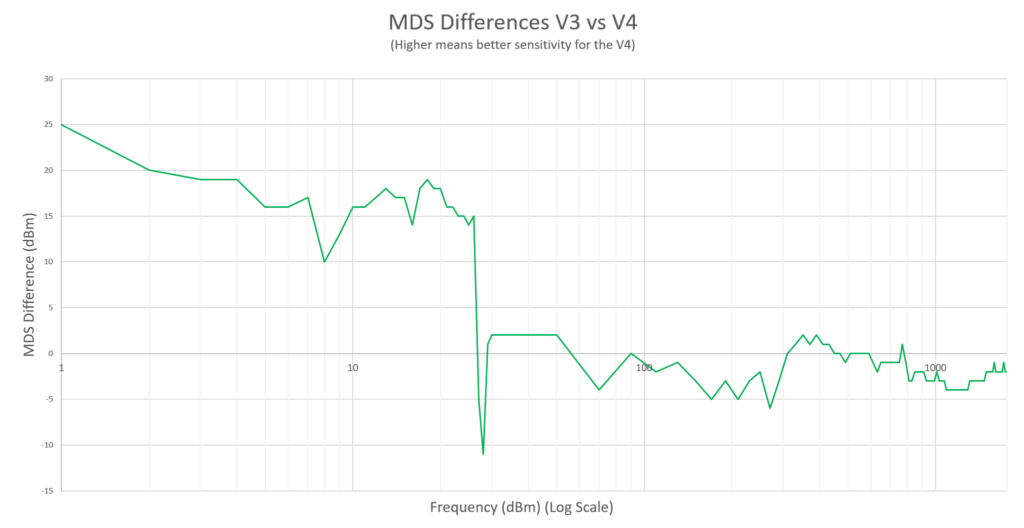
The results show that the MDS has significantly improved on the HF bands thanks to the upconverter design. However, there is some minor degradation in the VHF and UHF band.
MDS Measurements (Low values are better)MDS Comparison (Higher means better sensitivity for the V4)
Two Tone Isolation & Desensitization Test
Strong out of band signals can cause an SDR to desensitize on other bands. For example, very strong broadcast FM (which is common), can cause signals being received on other frequencies to be received with a lower signal to noise ratio.
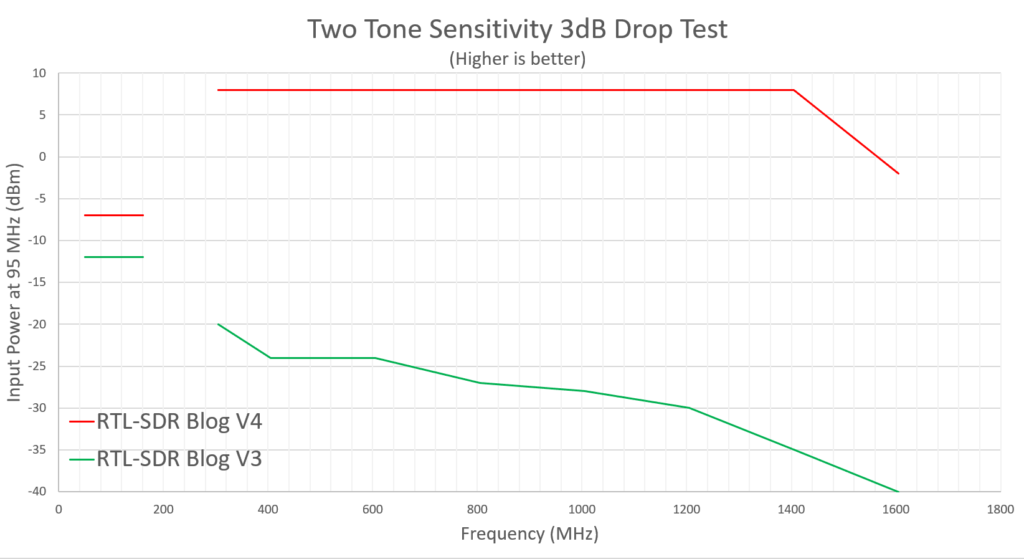
In this test we injected an "interference" tone (Tone A) at 95 MHz, and injected a second tone (Tone B) at another frequency. We then slowly increased the power on Tone A. When we noticed a 3 dB drop in the signal strength of Tone B we recorded the power level of Tone A that this occurred at.
This gives us a way to see the effect of the triplexer filters and notch filters when compared against the Blog V3 which has no filtering. A higher recorded value means that a stronger signal is required to desensitize the receiver, meaning that the strong signal handling capability is improved.
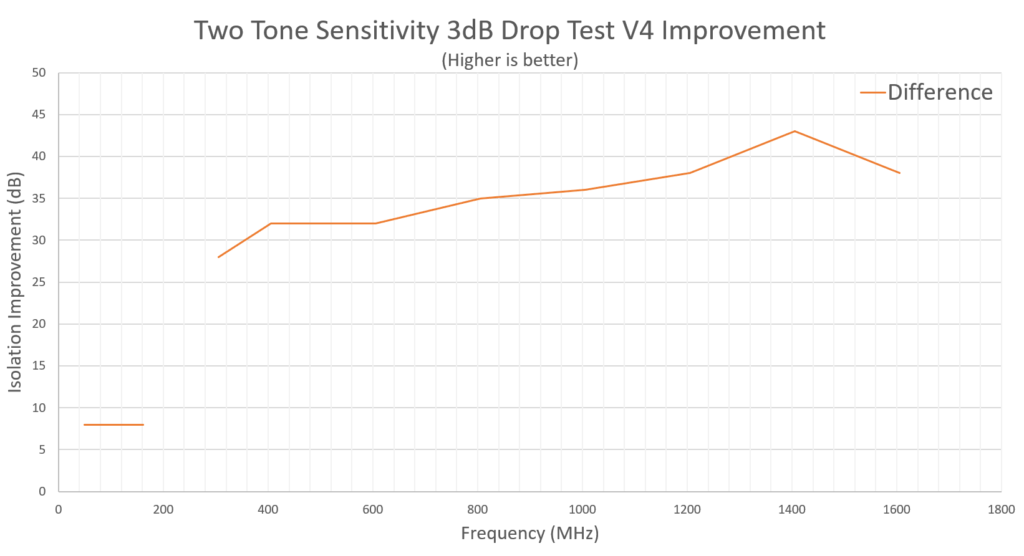
From the difference graph we can see that isolation results within the same triplexer band are improved by about 8 dB thanks to the notch, and then out of band isolation is improved by 28 - 43 dB thanks to a combination of the triplexer filters and notch.
We note that between 305 - 1405 our measurements were limited by the max power out from our signal generator, and we believe the true results are roughly 5dB better than what was recorded at these frequencies.
Two Tone Sensitivity Drop TestIsolation Improvement in the RTL-SDR Blog V4
Should I upgrade if I have an RTL-SDR Blog V3?
If you are happy with the RTL-SDR Blog V3's performance, then there is absolutely no need to upgrade as you will likely see similar performance. However, if you are purchasing a new dongle it may be wise to consider the V4 model as we believe the V4 will be a receiver that is more suitable in many situations.
Thanks
We wanted to extend some thanks to Erlend S. Ervik/LB6MI, Jack T. and everyone over the years who has given some input to RTL-SDR design.
Back in April we posted about the RFNM, an upcoming software defined radio project which will have eight 12-bit ADCs, up to 612 MHz real time bandwidth, and two DACs for transmitting with up to 153 MHz bandwidth. The standard board will support tuning from 600 - 7200 MHz, with tuning expanded down to 10 MHz via an RFFC2071A mixer.
They also updated their pricing, noting that they have upgraded a few specifications. The motherboard is set to be priced at $299. It will be available for preorder in August, with an expected October delivery date.
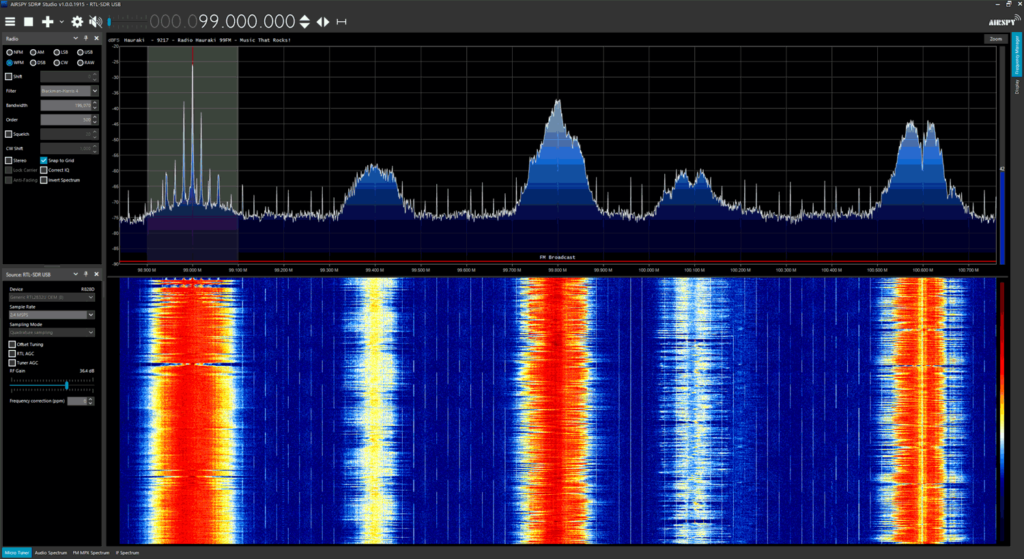
Thank you to SDR# author Youssef for updating SDR# (SDRSharp) and fixing a recent bug that was causing RTL-SDR units to crash whenever the frequency was changed. We are putting this post out to inform everyone who was having this issue to please update their SDRSharp version to 1915 which can be downloaded from airspy.com/download. Our guide at www.rtl-sdr.com/QSG can be used to walk you through the installation procedure for RTL-SDR dongles in SDR#.
The new update brings the RTL-SDR control menu down to the sidebar making it much easier to control the gain and sample rate settings. Other recent changes have also brought improvements to the RDS decoder which will be useful for DXers.
Please remember to show your appreciation to Airspy for allowing RTL-SDR users on their platform by checking out their range of higher end softwire defined radio products at airspy.com.
Meteor-M satellites are Russian owned weather imaging satellites that are in polar orbit. They transmit images to earth in the LRPT format at 137 MHz, making them almost as easy to receive as the older NOAA APT satellites. Unfortunately all prior Meteor M satellites have suffered an early ending or partial ending to their mission from technical faults or micro-meteorite collisions.
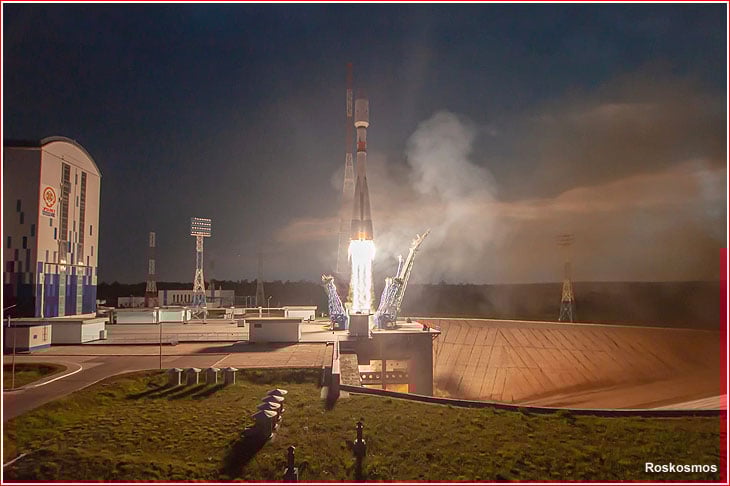
However, on June 27th 2023 the latest Meteor M2-3 satellite was successfully launched on a Soyuz-2 and has been reported to be already transmitting LRPT images of the earth.
Soyuz-2 Launch of Meteor M2-3 and 42 Cubesats
To receive images from the Meteor M2-3 satellite you will need an appropriate 137 MHz satellite antenna such as a v-dipole, Turnstile or QFH. An RTL-SDR or any similar SDR can be used as the receiver.
These days, the easiest software to use to receive Meteor M2-3 is probably SatDump, whose Windows and Android binary releases can be downloaded from the GitHub Releases page. Linux users can follow the build guide in the SatDump Readme. We note that we've found the SatDump GUI to run well on an Orange Pi 5, which makes this a good portable solution too.
To determine when the satellite is over your location you can use satellite tracking software such as Gpredict on Linux and Mac, or Orbitron on Windows. (For Orbitron, remember to run the software as Administrator, and to update the TLEs so that the Meteor M2-3 weather.txt TLE tracking data is downloaded).
Over on Twitter we've already seen various Tweets about successful reception.
1st try w/ 137 MHz LRPT from the new METEOR-M N2-3 1500utc. So nice to have a higher resolution weather sat back on VHF! Images from I/Q replay in SatDump (https://t.co/A7V0MeqeGE) pic.twitter.com/OMs1zjpKb4
Second pass of the newly launched Meteor-M 2-3
This time all worked like a charm and the picture is superb. I tried dual band to compare both LRPT in 137.900 and HRPT in 1700. Although decoded shown picture is from the HRPT stream.
@aang254, the author of SatDump has also noted that he is working on finalizing projections for Meteor M2-3 and this should be ready to use in SatDump shortly.
METEOR-M 2-3 is active, and I have added initial support including projections in SatDump already.
We also note that a Meteor Demodulator has also now just been added to SDR++.
The OQPSK mode has been added to the #Meteor demodulator to decode Meteor M N2-3. Enable it when receiving said satellite. It will be available for download in a few minutes when the nightly build is done building.
Note that some more tuning will be done in the coming days.#SDRpic.twitter.com/DB307Q5ObD
Another interesting fact is that along with Meteor M2-3 the UmKA cubesat was launched will transmit astronomical images at 2.4 GHz. To receive this, you will most likely need a 2.4 GHz WiFi dish, and also a motorized tracking system to track the satellite as it fly's overhead. Decoding of this is already supported in SatDump according to the programmer.
METEOR-M 2-3 is launching tomorrow, and with it UmKA that @HRPTEgor worked on.
It will transmit astronomical imagery on amateur bands 2.4Ghz. As such, I have added support for it in SatDump just now :-)
SDR# (SDRSharp) is our recommend software for RTL-SDRs due to it's high popularity in the community, relatively simple to learn and use interface, and host of features and third party plugins available.
Recently we're starting to see a lot of Facebook and forum posts about a new bug introduced in SDR# 1911 - 1913 so we thought we'd make a global post. This new bug has introduced a problem which causes a crash when attempting to change frequencies with RTL-SDR dongles (of any make or brand). It appears to be an issue stemming from libusb, but the exact issue is still unknown. The SDR# author is aware of the issue, but as RTL-SDR dongles are supported in SDR# for free with no guarantee, it may be several weeks until he has the time to investigate the issue fully. In the meantime we want to note some some partial fixes that we have found.
The first fix is to use our "rtl-sdr-blog" drivers instead of the default osmocom drivers. Our Quickstart guide now shows how to download these drivers and install them into SDR#, so if you want to try this solution, please see the guide. We're not exactly sure why this driver helps, but it may be due to our version being compiled against a newer version of libusb. However, this fix is only partial. While it no longer crashes on every frequency change, it will still crash approximately 5% of the time on a frequency change, which can add up when surfing through the spectrum rapidly, or when using frequency scanners.
We have also found a second fix that almost completely eliminates the crash, but it appears that it only works on some PCs. This fix is to use our rtl-sdr-blog drivers, and at the same time use Zadig to install the "libusb-win32" version of libusb, instead of the WinUSB version. However, the libusb-win32 is old, and it only appears to work on some PCs. On others it causes SDR# to crash as soon as the RTL-SDR is loaded.
Alternatively you can simply use a legacy version of SDR# by clicking the "Latest dotnet x.x build" links on the SDR# downloads page.
The final alternative would be to use another program like SDR++, which is very similar to SDR#, but without a large amount of plugins available yet. We have also added a SDR++ installation guide to our quickstart guide.
Airspy is currently holding their annual summer sale which gives 15% off their line of products until June 25. The sale brings the price of the popular Airspy receiver products down to the following in US dollars (note that actual pricing may vary across local resellers):
Airspy R2: $169.00 $143.65
Airspy Mini: $99.00 $84.15
Airspy HF+ Discovery: $169.00 $143.65
Airspy SpyVerter R2: $49.00 $41.65
YouLoop Antenna: $39.95 $33.95
The sale is active at all participating resellers, which includes our own store where we have the YouLoop on sale for US$33.95 including free shipping to most countries in the world. Please note that due to new EU VAT collection laws, EU customers must purchase the discounted YouLoop from our eBay or Aliexpress stores.